Resumos de Estudo criados com IA
-
Building a Clean Microsoft Teams Notification Card from a SharePoint List with Power Automate
Building a Clean Microsoft Teams Notification Card from a SharePoint List with Power Automate When a SharePoint list item is created or updated, a plain Teams message works, but it rarely looks professional. The message becomes a block of text,… Continue reading

-
Generic Steps to Learn NLP in Python with Libraries
50 Generic Steps to Learn NLP in Python with Libraries Introduction This article defines a generic 50-step roadmap for learning Natural Language Processing in Python using libraries. The idea is simple: instead of jumping directly into advanced models, we build… Continue reading

-
Installing NLTK and Building Your First NLP Script in Python
Installing NLTK and Building Your First NLP Script in Python When people first hear about Natural Language Processing, the subject can sound much more complicated than it really is at the beginning. In practice, your first step into NLP with… Continue reading

-
NLTK in Python: A Detailed Introduction to Natural Language Processing for Beginners
NLTK in Python: A Detailed Introduction to Natural Language Processing for Beginners Natural Language Processing, often abbreviated as NLP, is one of the most fascinating areas in modern programming because it sits at the intersection of language, data, and computation.… Continue reading

-
Integrating NLTK Stopwords into Your Structured NLP Python Project
Introduction Throughout your step-by-step NLP journey, you have worked with manual stopword lists to filter out common, non-informative words from your text. While this approach is practical, it can be limited in coverage and flexibility. In this article, we will… Continue reading

-
Installing Prerequisites and Running the Qt NLP Analysis App
Installing Prerequisites and Running the Qt NLP Analysis App Introduction Before launching your desktop NLP analysis app, you need to ensure your Python environment is set up with the required libraries. These include PyQt5 for the GUI and Matplotlib for… Continue reading

-
Building a Simple NLP Analysis App with Qt and Matplotlib in Python
Step 11 — Building a Simple NLP Analysis App with Qt and Matplotlib in Python Introduction Having learned the fundamentals of text cleaning, tokenization, and word frequency analysis, let’s take your skills to the next level by building a GUI… Continue reading

-
Making Simple Web Requests to Bing and Processing Search Results About “Python” in Python
Introduction As you progress in your NLP journey, it is common to work with real-world text fetched from the web. Searching for terms like “Python” and then processing the returned snippets is a practical step for learning how to handle… Continue reading

-
Step 0 — Preparing the Python Environment and Installing Prerequisites for a 50-Step NLP Learning Project
Introduction Before diving into your 50-step NLP with Python journey, you need a reliable workspace with all required tools installed. Setting up a proper environment ensures every script runs smoothly and lets you experiment safely without disrupting your system. In… Continue reading
-
Visualizing Word Co-occurrence (Bigrams) as Networks in Python
Step 9 — Visualizing Word Co-occurrence (Bigrams) as Networks in Python Introduction After learning how to count word co-occurrence (bigrams) in Step 8, it’s time to progress into seeing these relationships visually. Visualizing bigrams as a network (graph) helps you… Continue reading

-
Visualizing Word Frequencies with Bar Charts in Python
Step 6 — Visualizing Word Frequencies with Bar Charts in Python Introduction After learning to filter out stop words and analyze meaningful word frequencies, it’s time to add an essential skill to your NLP toolkit: visualizing word frequencies with bar… Continue reading
-
Detecting the Most Frequent Multi-Word Phrases (N-grams) in Text with Python
Step 10 — Detecting the Most Frequent Multi-Word Phrases (N-grams) in Text with Python Introduction You’ve explored word co-occurrence with bigrams and visualized word-pair networks. Now it’s time to deepen your analysis by identifying the most common multi-word phrases (also… Continue reading
-
Exploring Word Co-occurrence: Counting Word Pairs Appearing Together in Python
Step 8 — Exploring Word Co-occurrence: Counting Word Pairs Appearing Together in Python Introduction You’ve learned to compare word frequencies in different texts. Now, it’s time to look deeper into how words relate to each other within the same text.… Continue reading
-
Comparing Word Frequencies Between Two Texts in Python
Step 7 — Comparing Word Frequencies Between Two Texts in Python Introduction By now, you can read, clean, tokenize, filter, and visualize word frequencies in a single text. But in real NLP projects, comparison is as important as analysis. How… Continue reading
-
Filtering Out Stop Words in Your Python NLP Pipeline
Step 5 — Filtering Out Stop Words in Your Python NLP Pipeline Introduction Welcome to Step 5 of our practical NLP journey in Python! In previous steps, you learned how to normalize text, tokenize it, and count word frequencies. Now,… Continue reading
-
Sorting and Displaying the Most Common Words in Text (with Python)
Step 4 — Sorting and Displaying the Most Common Words in Text (with Python) Introduction In the previous step, you learned how to count word frequencies and store the results in a dictionary. Now, you’ll tackle a new and practical… Continue reading
-
Counting Word Frequencies in Text with Python
Step 3 — Counting Word Frequencies in Text with Python Introduction After learning how to normalize text and break it down into reliable tokens, the next essential milestone on your NLP journey is counting the frequency of each word. Counting… Continue reading
-
Basic Text Normalization and Reliable Token Lists in Python
Step 2 — Basic Text Normalization and Reliable Token Lists in Python Introduction After creating a safe Python environment and running our first basic script, it’s time to address the heart of many NLP tasks: breaking raw text into usable… Continue reading

-
First Contact with Text in Python (Strings) + Repository Scaffold (pyproject.toml)
Step 01 — First Contact with Text in Python (Strings) + Repository Scaffold (pyproject.toml) Introduction This 50-step project is a practical, beginner-friendly path to learning Natural Language Processing (NLP) in Python by building one small app per step. In Step… Continue reading
-
Building SharePoint-Based Agents with World Bank GDP and Football Data
Building SharePoint-Based Agents with World Bank GDP and Football Data From structured list queries to PDF knowledge bases and SPFx visualization A very strong pattern for Microsoft 365 AI solutions is to begin with structured data in SharePoint lists, then… Continue reading

-
Read-Only Fields in SharePoint Forms with Power Automate Auto-Population
Read-Only Fields in SharePoint Forms with Power Automate Auto-Population Modern SharePoint list forms are excellent for collecting business data, but they are not always the best place to let users type every value manually. In many real projects, some fields… Continue reading

-
SharePoint List Forms: How to Keep Fields Read-Only and Use Power Automate to Fill Them
SharePoint List Forms: How to Keep Fields Read-Only and Use Power Automate to Fill Them A very practical pattern in SharePoint Online is this one: This works well for columns such as: It also matches the actual behavior of modern… Continue reading

-
Building Better SharePoint List Forms with JSON Sections, Static Read-Only Fields, and Conditional Visibility
Building Better SharePoint List Forms with JSON Sections, Static Read-Only Fields, and Conditional Visibility A SharePoint list form becomes much easier to use when it is organized into clear sections instead of one long stream of fields. Native form configuration… Continue reading
-
Designing SharePoint List Forms with JSON Sections, Static Read-Only Fields, and Conditional Visibility
Designing SharePoint List Forms with JSON Sections, Static Read-Only Fields, and Conditional Visibility When a SharePoint list form starts growing, the first pain point is usually readability. A flat form with dozens of fields quickly becomes hard to scan, hard… Continue reading

-
Building a Brazil Capitals Weather App in Power Apps: Step-by-Step with Power Automate, Open-Meteo, Current Conditions, and Forecast Charts
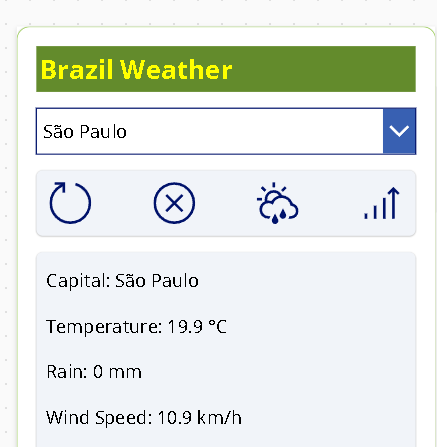
Building a Brazil Capitals Weather App in Power Apps: Step-by-Step with Power Automate, Open-Meteo, Current Conditions, and Forecast Charts This article walks through how to build a phone-layout Canvas App in Power Apps that lets a user select a Brazilian… Continue reading
-
Building App 1: A Minimal Power Apps Canvas App That Calls Power Automate and Shows São Paulo Weather
Building App 1: A Minimal Power Apps Canvas App That Calls Power Automate and Shows São Paulo Weather In this first version, the goal was deliberately small: build a simple Canvas App that calls a Power Automate flow, reads weather… Continue reading
-
How to Use an HTTP Request Result from an API Inside a Power Apps Canvas App
How to Use an HTTP Request Result from an API Inside a Power Apps Canvas App When people start working with Power Apps and APIs, one of the first assumptions is usually this: “I will call an HTTP endpoint from… Continue reading

-
Understanding MCP Servers (Model Context Protocol) — A Deep, Practical Guide (with Microsoft Learn as the backbone)
Understanding MCP Servers (Model Context Protocol) — A Deep, Practical Guide (with Microsoft Learn as the backbone) If you’re building AI agents that need to search documentation, query enterprise data, or run actions (create tickets, call APIs, read SharePoint, etc.),… Continue reading

-
SharePoint “Quick Charts” Bar Chart in a Column (PnP Sample)
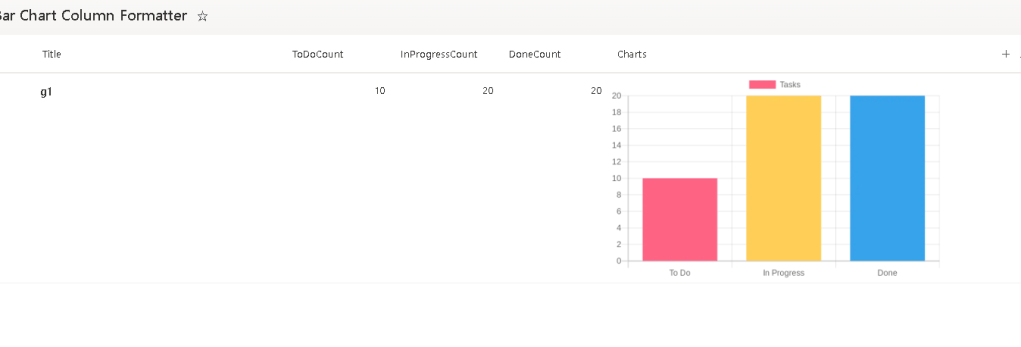
SharePoint “Quick Charts” Bar Chart in a Column (PnP Sample) Render a live bar chart per list item using Column Formatting JSON + QuickChart.io (with 3 useful variations). The PnP sample generic-quick-charts-bar-chart is a clever pattern: it uses SharePoint Column… Continue reading
-
SharePoint Approval Status Badges with Column Formatting JSON
SharePoint Approval Status Badges with Column Formatting JSON Turn the built-in moderation status into a clean icon + color “pill” (plus 3 variations you can reuse). When you enable Content Approval on a SharePoint list or library, SharePoint exposes an… Continue reading
-
SharePoint Approval Status Hover Card (PnP Pattern) — A Publish-Ready Guide + Variations
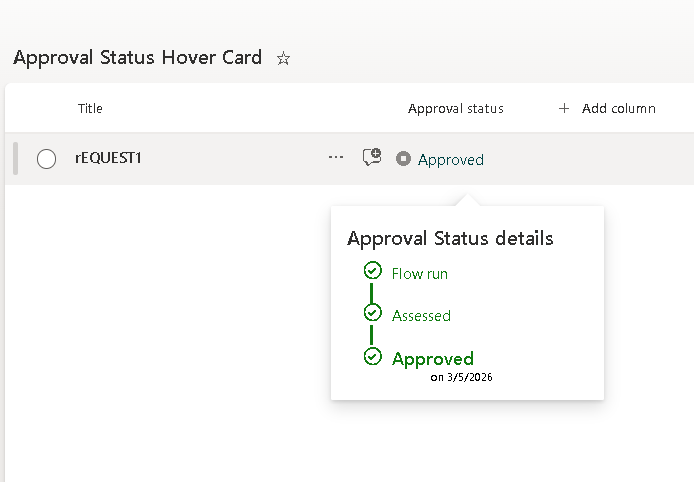
SharePoint Approval Status Hover Card (PnP Pattern) — A Publish-Ready Guide + Variations This article shows how to implement the PnP “generic-approval-status-hover-card” pattern to transform SharePoint’s built-in Approval Status into a clean icon + label with a rich hover card… Continue reading
-
Building a 0–10 “Rating Bar” in SharePoint Column Formatting (and 3 Similar Variations)
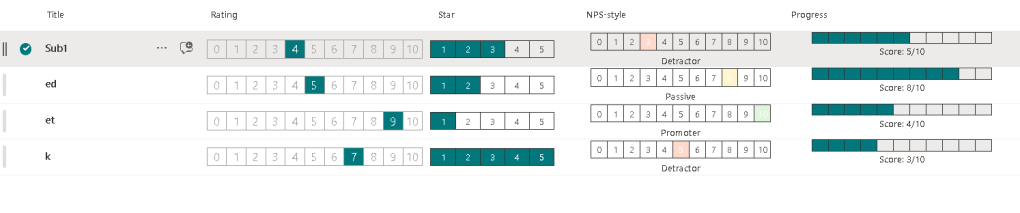
Building a 0–10 “Rating Bar” in SharePoint Column Formatting (and 3 Similar Variations) If you’ve ever wanted a compact 0–10 score UI inside a SharePoint list view (or Microsoft Lists), the PnP sample “number-zero-to-ten-rating” is a clean pattern to learn:… Continue reading
-
Building a Consistent SharePoint List “Design System” with PnP Column Formatting Samples
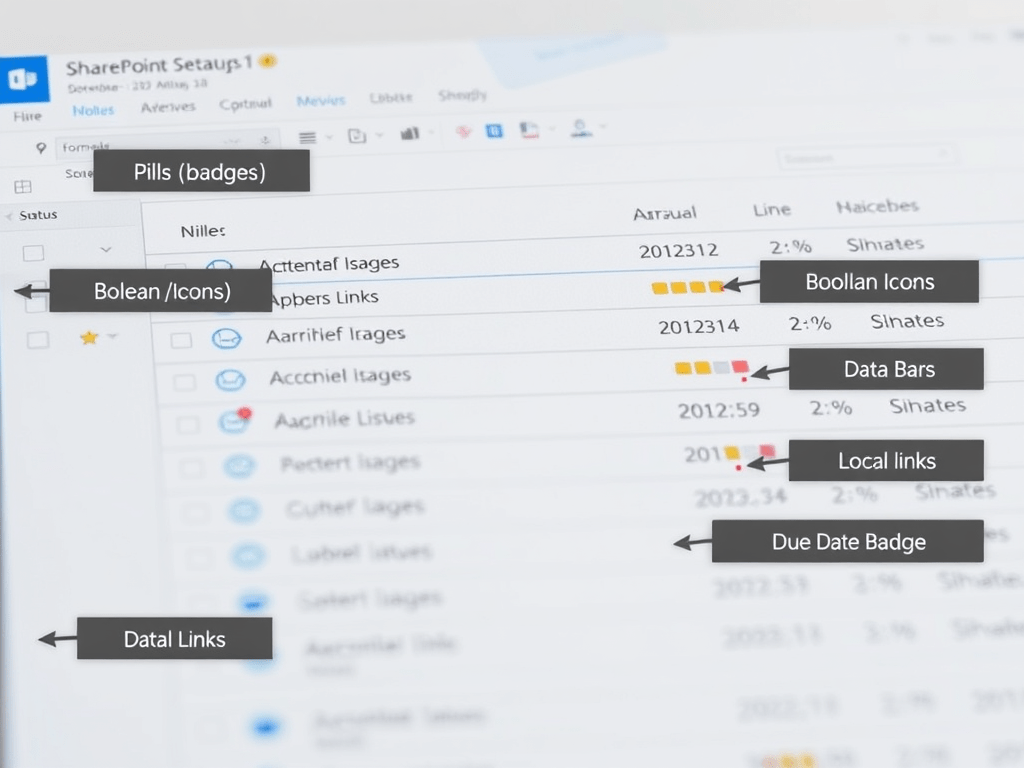
Building a Consistent SharePoint List “Design System” with PnP Column Formatting Samples The PnP List Formatting gallery is not just a collection of cool JSON snippets—it’s a pattern library you can standardize into a reusable UI design system for SharePoint/Microsoft… Continue reading
-
Custom Fields in SharePoint Framework (SPFx): Provisioning, Rendering, Editing, and Property Pane Controls (with PnP Examples)
Custom Fields in SharePoint Framework (SPFx): Provisioning, Rendering, Editing, and Property Pane Controls (with PnP Examples) When you say “custom fields in SPFx”, you usually mean all of these: Below is a single, publish-ready technical article with practical examples for… Continue reading

-
OLAP Deep Dive for Microsoft 365: Cubes (Multidimensional), Tabular Models, and Power BI Semantic Models — and How to Use Them with SharePoint, Power Automate, Power BI, and Power Apps
OLAP Deep Dive for Microsoft 365: Cubes (Multidimensional), Tabular Models, and Power BI Semantic Models — and How to Use Them with SharePoint, Power Automate, Power BI, and Power Apps OLAP (Online Analytical Processing) is the discipline of building analysis-optimized… Continue reading

-
OLAP in the Microsoft Ecosystem (and how to actually use it with SharePoint, Power Automate, Power BI, and Power Apps)
OLAP in the Microsoft Ecosystem (and how to actually use it with SharePoint, Power Automate, Power BI, and Power Apps) OLAP (Online Analytical Processing) is the “analytics side” of data: it’s designed for fast slicing/dicing, aggregations, and business-friendly analysis across… Continue reading

-
Adaptive Cards “for everything”: one mental model, multiple hosts (Teams, Power Automate, Copilot Studio, SharePoint/Viva)
Adaptive Cards “for everything”: one mental model, multiple hosts (Teams, Power Automate, Copilot Studio, SharePoint/Viva) Adaptive Cards are authored in JSON and rendered by a host (Teams, Bot Framework, Copilot Studio, etc.). The host controls feature support and final UI,… Continue reading

-
Adaptive Cards: an extensive introduction (with practical mental models)
Adaptive Cards: an extensive introduction (with practical mental models) Adaptive Cards are a platform-agnostic UI snippet format authored in JSON that a host app (for example, Microsoft Teams, Bot Framework channels, Copilot experiences, or your own app) can render into… Continue reading

-
Build a Power Automate Workflow to Send Microsoft Teams Messages
Step-by-step guide to build a Power Automate workflow that sends Microsoft Teams messages. I’ll cover the 3 most common patterns (chat, channel, and “post as Flow bot”), plus typical pitfalls and how to test. Context: In Power Automate, sending Teams… Continue reading

-
Building a Daily Football Matches Ingestion Flow (REST API → Power Automate → SharePoint)
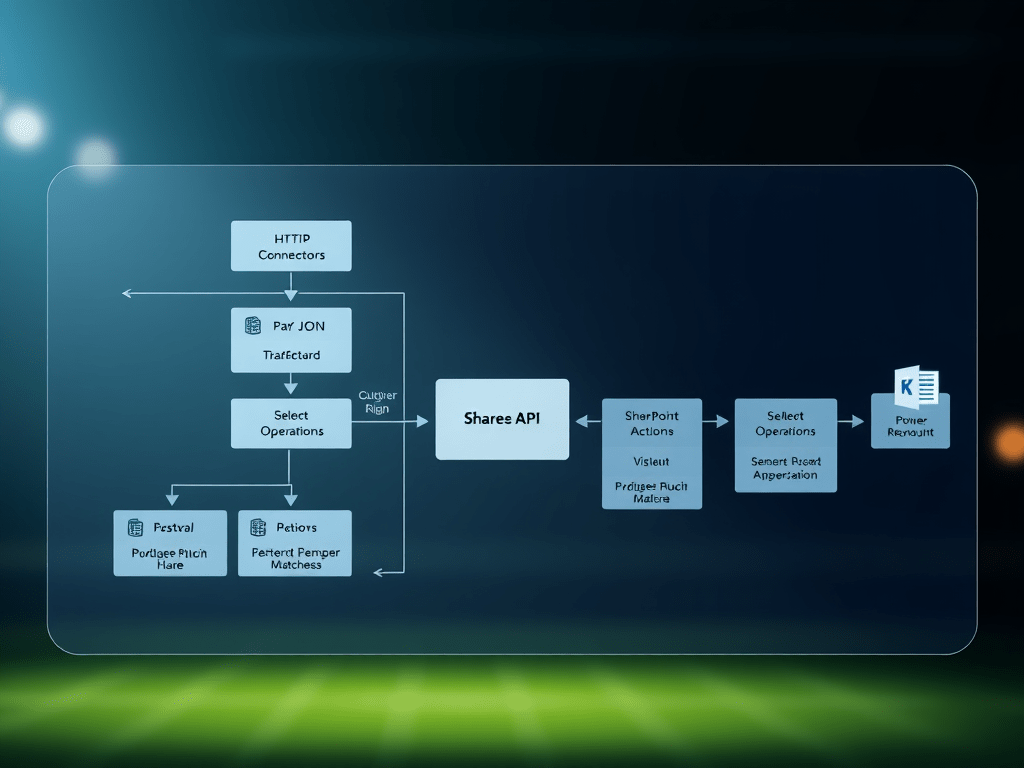
Building a Daily Football Matches Ingestion Flow (REST API → Power Automate → SharePoint) In this post, I’m documenting a real, working pattern for ingesting daily football matches from a REST endpoint (example: /v4/matches) and persisting them into a SharePoint… Continue reading
 edvaldo b. guimarães filho