Building a Modern Product List with React, TypeScript, Vite, and Fluent UI
Modern React development is not about manually manipulating HTML pages anymore. Professional frontend engineering today revolves around components, declarative rendering, reusable UI architecture, and scalable design systems. One of the most important foundational concepts in React is rendering collections of data dynamically. This is exactly what we learn in App 03 — Product List.
This application is part of the 100 React + Fluent UI Apps Project, which follows the official React learning path from React Learn and the Microsoft Fluent UI design system from Fluent UI.
Even though the application itself is visually simple, architecturally it introduces some of the most fundamental concepts in modern React engineering:
- Declarative rendering
- Rendering arrays with
map() - The importance of
key - Component composition
- TypeScript modeling
- Reusable UI components
- Separation of concerns
- Enterprise-ready Fluent UI controls
This application is also the first time the project begins treating data as structured entities instead of hardcoded JSX blocks. This is a critical transition in React development because real enterprise applications are almost always driven by collections of data coming from APIs, databases, or external services.
The Goal of This Application
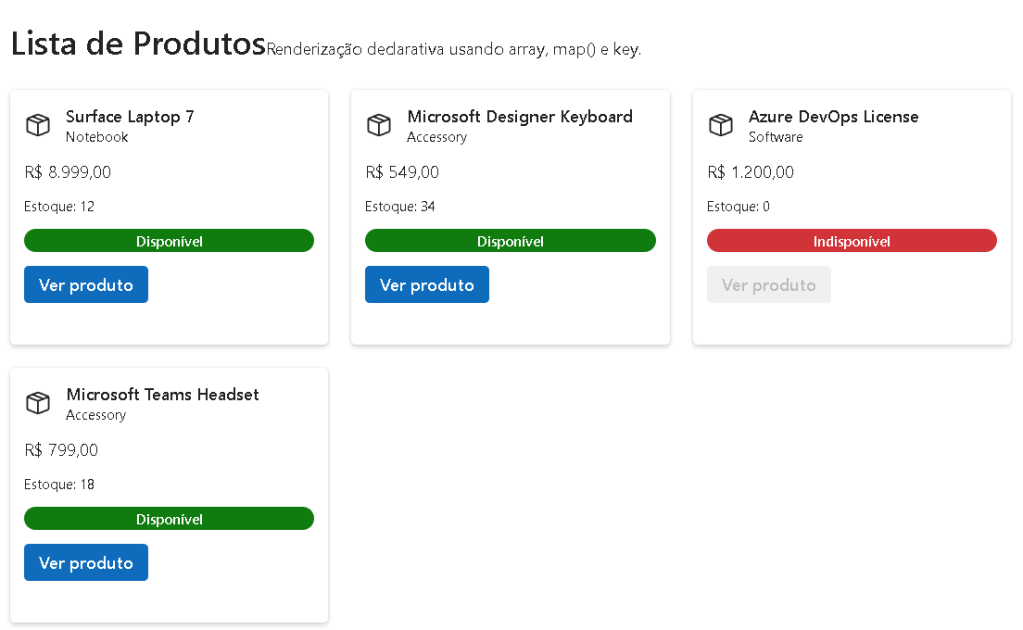
The objective of this project is to create a Microsoft-style product catalog interface using:
- React
- TypeScript
- Fluent UI
- Vite
The application displays a list of products dynamically using reusable components.
Instead of manually writing:
<div>Product 1</div><div>Product 2</div><div>Product 3</div>
React allows us to describe the UI declaratively using data structures.
This is one of the most important mental model changes introduced in the official React documentation:
The UI should be derived from data.
This means:
- data changes
- React re-renders automatically
- UI stays synchronized
This concept becomes the foundation for:
- dashboards
- tables
- grids
- forms
- APIs
- enterprise systems
Creating the Project
The project starts with Vite.
npm create vite@latest bloco01-app03-lista-produtos -- --template react-ts
This command creates:
- a React project
- TypeScript configuration
- Vite environment
- development server
- optimized build pipeline
Then dependencies are installed:
npm install
Next, Fluent UI packages are added:
npm install @fluentui/react-components @fluentui/react-icons
These libraries provide:
- enterprise UI components
- Microsoft design system
- accessibility support
- typography
- layouts
- icons
- theming
Why Vite Is Important
Vite is one of the biggest improvements in the modern frontend ecosystem.
Historically, React projects often used Create React App (CRA), but Vite introduced:
- instant startup
- ultra-fast hot reload
- native ES modules
- optimized builds
- simplified configuration
This dramatically improves developer productivity.
The official documentation explains that Vite serves modules directly during development instead of bundling the entire app first.
This makes development feel almost instantaneous.
Official documentation:
Project Structure
The project architecture follows scalable React organization principles.
src/ components/ data/ models/ styles/
Each folder has a specific responsibility.
The models Folder
src/models/Product.ts
This file defines the TypeScript structure for products.
export type Product = { id: number; name: string; category: string; price: number; stock: number; isActive: boolean;};
This introduces one of the most important enterprise concepts:
Data modeling
TypeScript allows us to define:
- object structure
- expected properties
- data contracts
- compile-time validation
Without TypeScript:
- invalid objects could appear silently
- bugs become harder to detect
- IDE assistance becomes weaker
With TypeScript:
- autocomplete improves
- errors appear immediately
- refactoring becomes safer
This becomes extremely important in enterprise React applications.
Official documentation:
Understanding the Data Layer
The file:
src/data/products.ts
contains mock product data.
export const products: Product[] = [
This line means:
- the variable is an array
- every item must follow the
Producttype
This introduces typed collections.
The array becomes the source of truth for the interface.
Instead of hardcoding UI repeatedly, React generates the interface from data.
This is the foundation of:
- API rendering
- database rendering
- dashboard systems
- admin panels
- enterprise portals
Understanding Component Architecture
The application is divided into:
ProductCardProductListApp
This separation is critical.
Modern React applications scale through composition.
Instead of giant files, React applications become trees of reusable components.
ProductCard Component
The ProductCard component is responsible for rendering a single product.
type ProductCardProps = { product: Product;};
This defines the props contract.
Props are inputs passed into components.
This means the component:
- becomes reusable
- becomes configurable
- becomes isolated
- becomes easier to maintain
The component receives:
product: Product
meaning:
- the prop must follow the Product structure
- TypeScript validates it automatically
Understanding Declarative Rendering
Inside the component:
<Body1>{formattedPrice}</Body1>
The UI is directly derived from data.
React automatically updates the screen when the underlying data changes.
This is declarative programming.
React developers describe:
- WHAT the UI should look like
instead of:
- HOW to manipulate the DOM manually
This is one of the most important mental shifts in React.
Understanding map()
The heart of this application is:
{products.map((product) => ( <ProductCard key={product.id} product={product} />))}
This is one of the most important React patterns.
The JavaScript map() function transforms arrays into new structures.
In React:
- arrays become collections of components
For each product:
- React creates a
ProductCard - passes product data as props
- renders the UI
This is how nearly all enterprise React interfaces work.
Examples:
- tables
- dashboards
- menus
- email lists
- SharePoint-like portals
- grids
- admin systems
Official documentation:
Why the key Property Matters
One of the most important React rules is:
key={product.id}
The key helps React identify elements uniquely.
Without keys:
- React cannot efficiently track items
- rendering becomes unstable
- updates may behave incorrectly
Keys are essential because React uses reconciliation.
React compares:
- previous UI tree
- new UI tree
The key tells React:
“This item is the same logical object.”
Using stable IDs is critical.
Bad example:
key={Math.random()}
or:
key={index}
These can cause rendering problems.
The best practice is:
- stable database IDs
- unique identifiers
Understanding Fluent UI
The project uses Fluent UI components instead of raw HTML.
Example:
<Card><Button><Badge><Text>
This provides:
- accessibility
- enterprise consistency
- Microsoft design standards
- keyboard support
- responsive behavior
- typography system
Instead of manually styling buttons, Fluent UI already includes:
- hover states
- focus states
- spacing
- accessibility semantics
This dramatically improves development quality.
Official documentation:
Understanding FluentProvider
Inside main.tsx:
<FluentProvider theme={webLightTheme}>
This activates the Microsoft design system globally.
The provider injects:
- theme colors
- typography
- spacing
- accessibility behavior
- Fluent styling rules
Without the provider:
- components lose visual consistency
This architecture pattern is extremely common in React:
- Theme providers
- Context providers
- State providers
Understanding CSS Grid
The product layout uses:
display: grid;grid-template-columns: repeat(auto-fit, minmax(260px, 1fr));
This creates a responsive grid automatically.
The interface adapts dynamically to screen size.
This demonstrates modern responsive design principles.
Why This App Matters
Even though visually simple, this application introduces:
- typed data modeling
- component reuse
- rendering collections
- declarative rendering
- enterprise UI systems
- scalable architecture
This foundation becomes essential for future applications involving:
- APIs
- DataGrid
- dashboards
- CRUD systems
- SharePoint-style portals
- admin systems
Without understanding rendering lists correctly, advanced React becomes difficult.
React Mental Model Introduced
This application reinforces the official React philosophy:
React is NOT:
- manual DOM programming
- jQuery-style updates
- imperative rendering
React IS:
- declarative rendering
- UI generated from data
- component composition
- predictable architecture
This mental model is the key to mastering React.
Why No useEffect Yet?
This project intentionally avoids:
useEffect- API calls
- complex state
According to the official React documentation:
“Effects synchronize your component with external systems.”
Since this app is static data rendering:
- effects are unnecessary
This is extremely important because beginners often overuse useEffect.
The project follows the React Learn recommendation:
- avoid unnecessary effects
- derive UI directly from data whenever possible
Official documentation:
Final Result
The final application is a modern Microsoft-style product catalog built using:
- React
- TypeScript
- Vite
- Fluent UI
More importantly, it establishes:
- declarative rendering patterns
- scalable component architecture
- proper React mental models
This becomes the foundation for all future enterprise React applications in the roadmap.
Technical Summary
| Technology | Purpose |
|---|---|
| React | Declarative UI rendering |
| TypeScript | Static typing and safety |
| Vite | Fast development tooling |
| Fluent UI | Microsoft enterprise design system |
| JSX | Declarative syntax |
| map() | Rendering collections dynamically |
| key | Stable identity tracking |
| Props | Component inputs |
| CSS Grid | Responsive layouts |
| FluentProvider | Global theming |
React Concepts Learned
| Concept | Description |
|---|---|
| Declarative Rendering | UI derived from data |
| Component Composition | UI built from reusable blocks |
| Props | Passing data into components |
| Rendering Lists | Using map() to generate UI |
| Keys | Stable identity for reconciliation |
| Typed Models | Structured TypeScript entities |
| Separation of Concerns | Organized architecture |
Official Documentation
React
Fluent UI
Vite
TypeScript
Current Project Progress
| Block | App | Name | Status |
|---|---|---|---|
| Block 1 | 01 | Hello React Fluent | Completed |
| Block 1 | 02 | Profile Card | Completed |
| Block 1 | 03 | Product List | Completed |
| Block 1 | 04 | Microsoft Style User Card | Next |


