Resumos de Estudo criados com IA
-
Dataverse Plug-in Execution Pipeline Laboratory: Stages, Images, Transactions, and C# Diagnostics
Dataverse Plug-in Execution Pipeline Laboratory: Stages, Images, Transactions, and C# Diagnostics Engineering server-side Dataverse behavior through the event execution pipeline, synchronous and asynchronous plug-ins, execution context, entity images, tracing, recursion control, and reproducible failure injection. Power Platform Engineering Academy —… Continue reading

-
Privileges, Ownership, Business Units, Teams, and Record-Level Authorization
Dataverse Security Laboratory: Privileges, Ownership, Business Units, Teams, and Record-Level Authorization Engineering and testing Microsoft Dataverse security through C#, security roles, business units, teams, record ownership, sharing, and the effective authorization model. Power Platform Engineering Academy — Five Years in… Continue reading
-
RowVersion, ETags, Lost Updates, and Conflict Resolution with C#
Dataverse Optimistic Concurrency Laboratory: RowVersion, ETags, Lost Updates, and Conflict Resolution with C# Engineering safe concurrent updates in Microsoft Dataverse through version-aware writes, SDK concurrency contracts, Web API conditional requests, and reproducible race-condition experiments. Power Platform Engineering Academy — Five… Continue reading
-
Dataverse Transaction & Rollback Laboratory: Atomicity, Plug-in Pipelines, and Failure Engineering with C#
Dataverse Transaction & Rollback Laboratory: Atomicity, Plug-in Pipelines, and Failure Engineering with C# Understanding where Dataverse transactions begin and end, how rollback propagates through synchronous operations, and why database atomicity is not the same as distributed consistency. Power Platform Engineering… Continue reading
-
C# ServiceClient, Organization Requests, Execution Semantics, and Production Diagnostics
Dataverse SDK Laboratory: C# ServiceClient, Organization Requests, Execution Semantics, and Production Diagnostics Engineering Microsoft Dataverse integrations through the .NET SDK, exploring service contracts, request execution, typed entities, batching, authentication, error handling, and observability. Power Platform Engineering Academy — Five Years… Continue reading
-
OAuth, OData, HTTP Contracts, and Resilient C# Integration
Dataverse Web API Laboratory: OAuth, OData, HTTP Contracts, and Resilient C# Integration Engineering direct REST integrations with Microsoft Dataverse through Microsoft Entra ID, OAuth 2.0, OData v4, conditional requests, pagination, and service protection limits. Power Platform Engineering Academy — Five… Continue reading
-
QueryExpression, FetchXML, LINQ, and Web API Performance Engineering
Dataverse Query Execution Laboratory: QueryExpression, FetchXML, LINQ, and Web API Performance Engineering Understanding how Microsoft Dataverse executes queries, enforces security, handles pagination, and exposes data through different programming interfaces. Power Platform Engineering Academy — Five Years in Five Days Technical… Continue reading
-
Dataverse Alternate Keys and Upsert: Engineering Idempotent Integrations with C#
Dataverse Alternate Keys and Upsert: Engineering Idempotent Integrations with C# Designing reliable record synchronization using alternate keys, Dataverse SDK operations, Web API addressing, and explicit concurrency controls. Power Platform Engineering Academy — Five Years in Five Days Technical domain: Microsoft… Continue reading
-
Referential Integrity, Cascading Behavior, and C# SDK
Dataverse Relationship Engineering Lab: Referential Integrity, Cascading Behavior, and C# SDK Engineering table relationships in Microsoft Dataverse through metadata, lookup columns, referential behavior, cascading operations, and programmatic validation. Power Platform Engineering Academy — Five Years in Five Days Technical domain:… Continue reading
-
Dataverse Column Behavior Laboratory: Data Types, Validation, Formula Columns, and the C# SDK
Dataverse Column Behavior Laboratory: Data Types, Validation, Formula Columns, and the C# SDK Understanding how Microsoft Dataverse interprets, validates, stores, and calculates column values across application and API boundaries. Power Platform Engineering Academy — Five Years in Five Days Technical… Continue reading
-
Engineering a Dataverse Metadata Explorer with C# and Model-Driven Apps
Engineering a Dataverse Metadata Explorer with C# and Model-Driven Apps Power Platform Engineering Academy | Article 001 of 100 Exploring Microsoft Dataverse metadata, SDK architecture, schema discovery, and operational diagnostics through an integrated engineering application. Introduction Microsoft Dataverse is much… Continue reading
-
Exploring Microsoft Dataverse Metadata with C#: Building a Metadata Explorer and Model-Driven App
Exploring Microsoft Dataverse Metadata with C#: Building a Metadata Explorer and Model-Driven App Power Platform Engineering Academy — APP-001 Introduction One of the most important differences between Microsoft Dataverse and a conventional relational database is the role metadata plays in… Continue reading
-
Creating Microsoft Dataverse Tables and Columns Programmatically with C# and the SDK
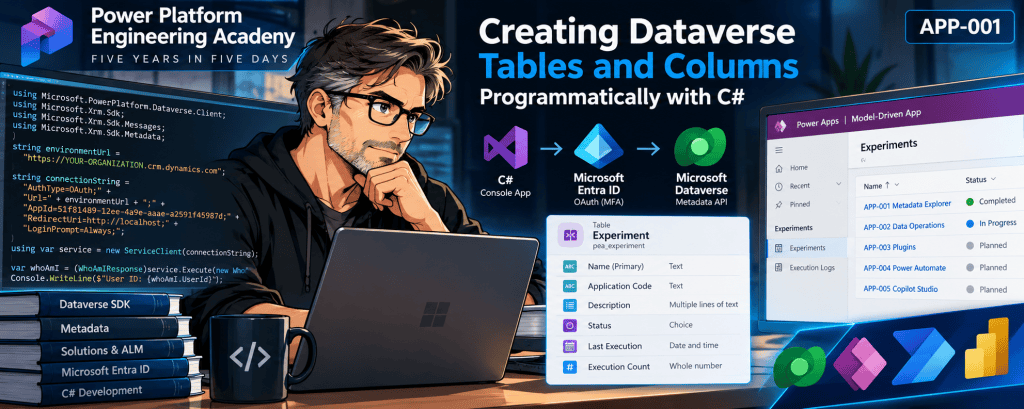
Creating Microsoft Dataverse Tables and Columns Programmatically with C# and the SDK Power Platform Engineering Academy | APP-001 — Dataverse Metadata Explorer Technical focus: C#, Dataverse SDK, metadata operations, Microsoft Entra ID authentication, solution-aware customization, and schema deployment. 1. Introduction… Continue reading
-
Understanding Dataverse Solutions, Publishers, and Application Lifecycle Management (ALM)
Model-driven Lab 01 — IT Service Desk Part 01: Understanding Dataverse Solutions, Publishers, and Application Lifecycle Management (ALM) 1. Introduction Microsoft Power Apps Model-driven applications provide a structured and metadata-driven approach to developing enterprise business applications using Microsoft Dataverse as… Continue reading
-
Prompt Engineering for Microsoft Copilot
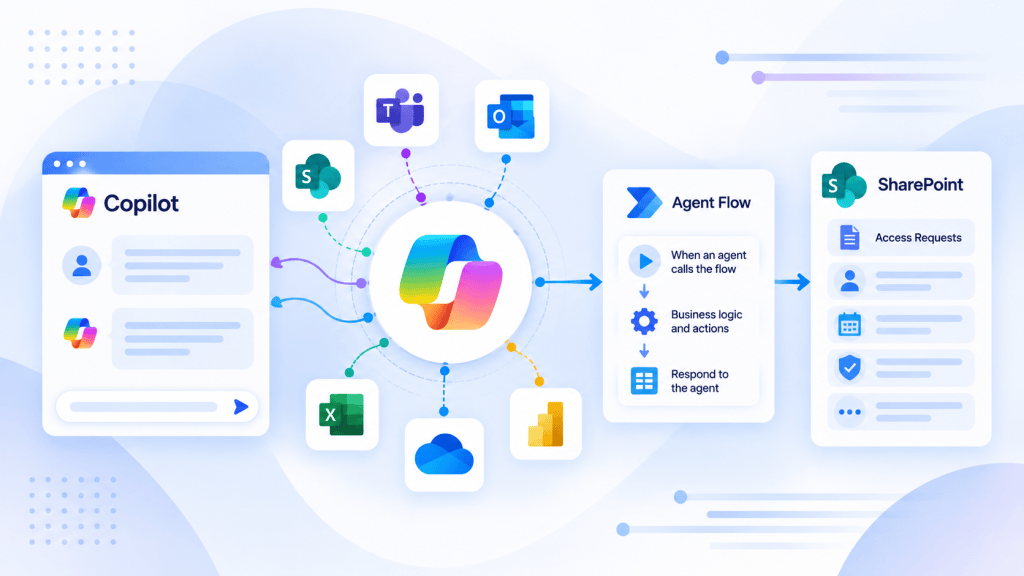
Prompt Engineering for Microsoft Copilot and Copilot Studio The Foundation of Reliable Enterprise AI Agents Understanding Instructions, Context, Grounding, Orchestration, Security, and Effective AI Interaction Design 1. Introduction Prompt Engineering has become one of the foundational disciplines in modern generative… Continue reading
-
Microsoft Dataverse: A Comprehensive Technical Guide for Power Platform, Dynamics 365, SQL Server, and SharePoint Professionals
Microsoft Dataverse: A Comprehensive Technical Guide for Power Platform, Dynamics 365, SQL Server, and SharePoint Professionals Technical Article | Microsoft Power Platform | Dataverse | Dynamics 365 | Enterprise Architecture 1. Introduction Microsoft Dataverse is a cloud-based enterprise data platform… Continue reading

-
Article 25/50 — Event Triggers and Event-Driven Agents in Microsoft Copilot Studio
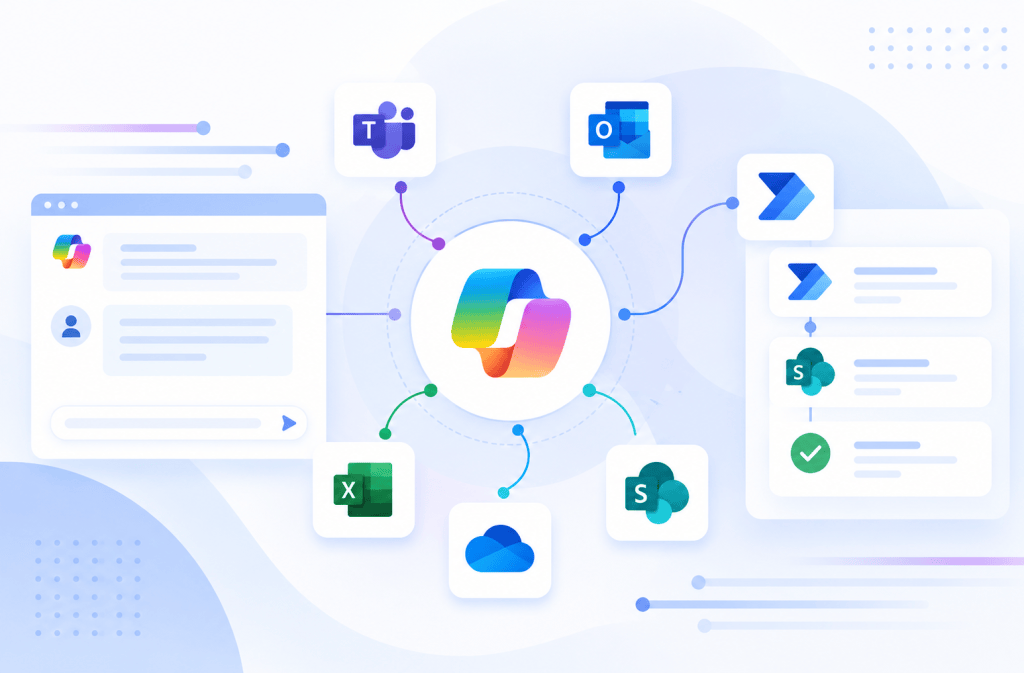
Article 25/50 — Event Triggers and Event-Driven Agents in Microsoft Copilot Studio Microsoft Copilot Studio | Event-Driven Architecture | SharePoint Online | Power Automate | Autonomous Agents | Runtime Identity | Enterprise Governance 1. Introduction Traditional conversational AI Agents are… Continue reading
-
Article 24/50 — DLP and Governance for Enterprise AI Agents in Microsoft Copilot Studio
Article 24/50 — DLP and Governance for Enterprise AI Agents in Microsoft Copilot Studio Microsoft Copilot Studio | Power Platform Governance | Data Loss Prevention | SharePoint Online | Microsoft Entra ID | Enterprise Architecture 1. Introduction Building an AI… Continue reading
-
Article 23/50 — Least Privilege and Runtime Identity in Microsoft Copilot Studio
Article 23/50 — Least Privilege and Runtime Identity in Microsoft Copilot Studio Enterprise AI Agent Security | Microsoft Entra ID | Zero Trust | SharePoint Online | Power Automate | Microsoft Graph | Identity Governance 1. Introduction The security of… Continue reading
-
Article 21/50 — Authentication vs Authorization in Enterprise AI Agents
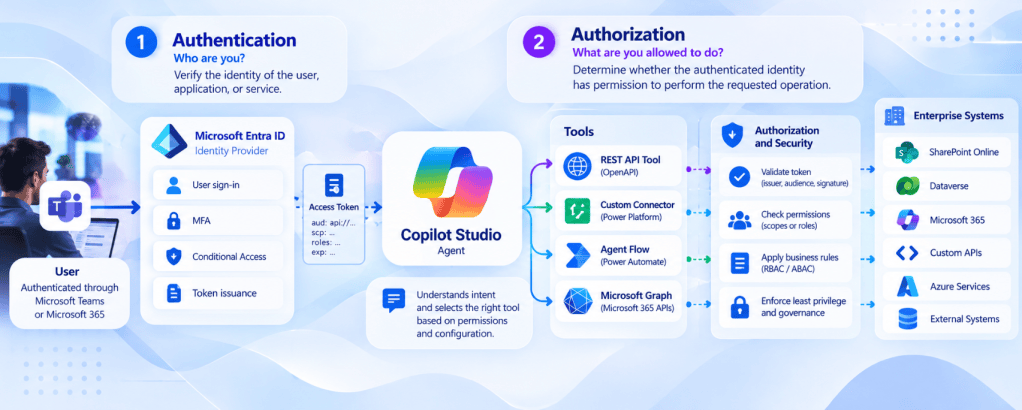
Article 21/50 — Authentication vs Authorization in Enterprise AI Agents Microsoft Copilot Studio | Microsoft Entra ID | SharePoint Online | Power Automate | Microsoft Graph | Enterprise Security Architecture 1. Introduction One of the most important challenges in enterprise… Continue reading
-
When an AI Agent executes a Tool, whose identity and permissions are actually being used?
Article 22/50 — User-Provided vs Maker-Provided Credentials in Microsoft Copilot Studio Enterprise AI Agents | Runtime Identity | Connection Security | SharePoint Online | Power Automate | Microsoft Entra ID | Governance 1. Introduction One of the most consequential architectural… Continue reading
-
Article 20/50 — OpenAPI and API-Driven Agent Architecture in Microsoft Copilot Studio
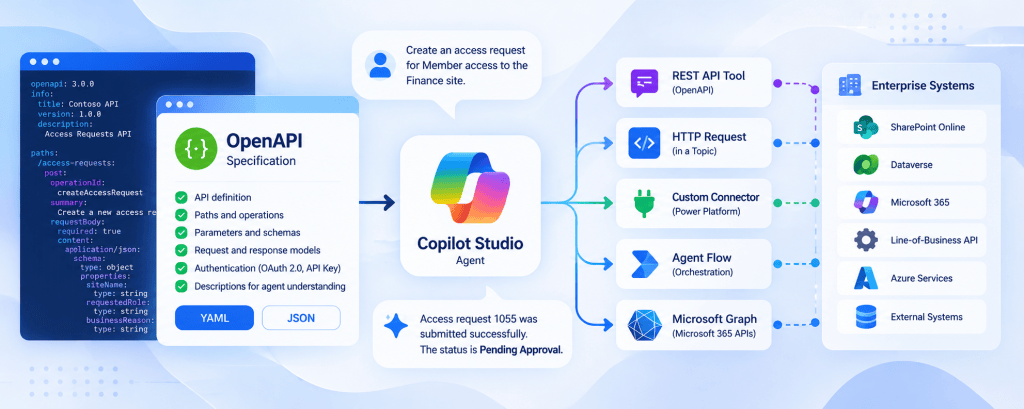
Article 20/50 — OpenAPI and API-Driven Agent Architecture in Microsoft Copilot Studio Building enterprise AI Agents requires more than connecting a language model to an external API. A reliable architecture must define how Agents discover capabilities, exchange structured data, authenticate… Continue reading
-
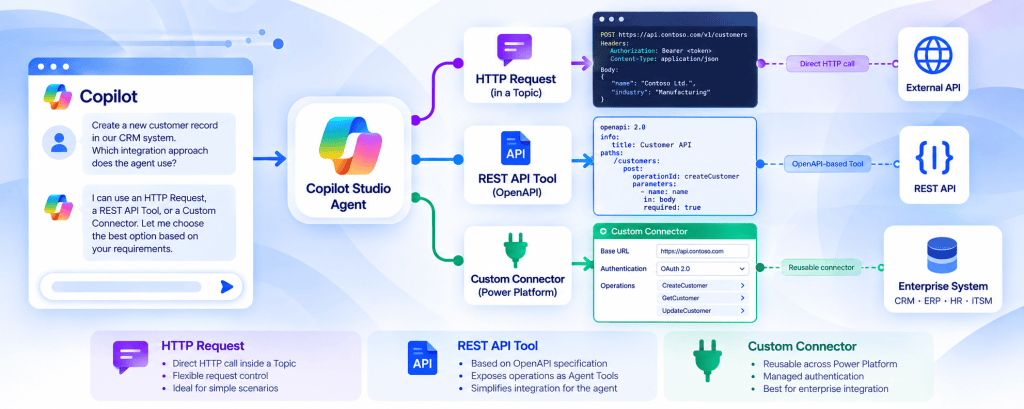
Article 19/50 — HTTP Request vs REST API Tool vs Custom Connector
Article 19/50 — HTTP Request vs REST API Tool vs Custom Connector in Microsoft Copilot Studio Enterprise AI Agents: Integration Architecture, API Contracts, Security, Governance, and Technology Selection 1. Introduction Integrating Microsoft Copilot Studio with external enterprise systems is one… Continue reading
-
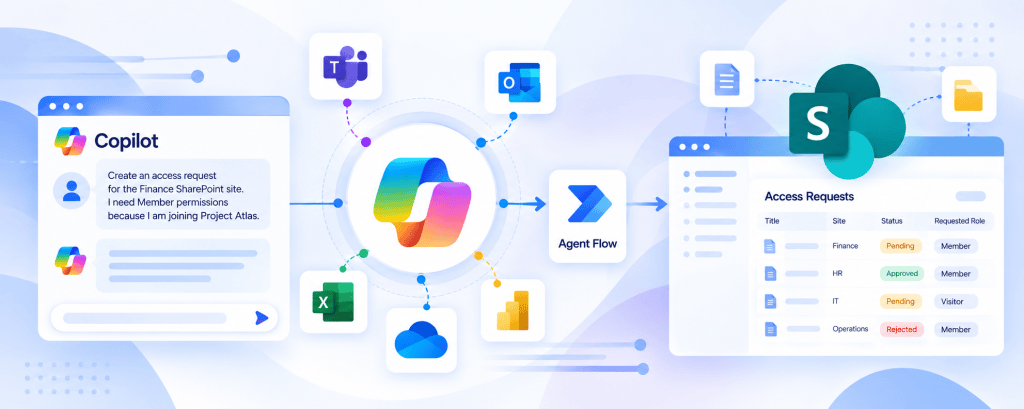
Article #18/50 — Calling REST APIs from Microsoft Copilot Studio
Article #18/50 — Calling REST APIs from Microsoft Copilot Studio A knowledge-based Agent can explain policies, summarize documents, and answer questions using approved information sources. However, many enterprise scenarios require something different: accessing live information or executing business operations through… Continue reading
-
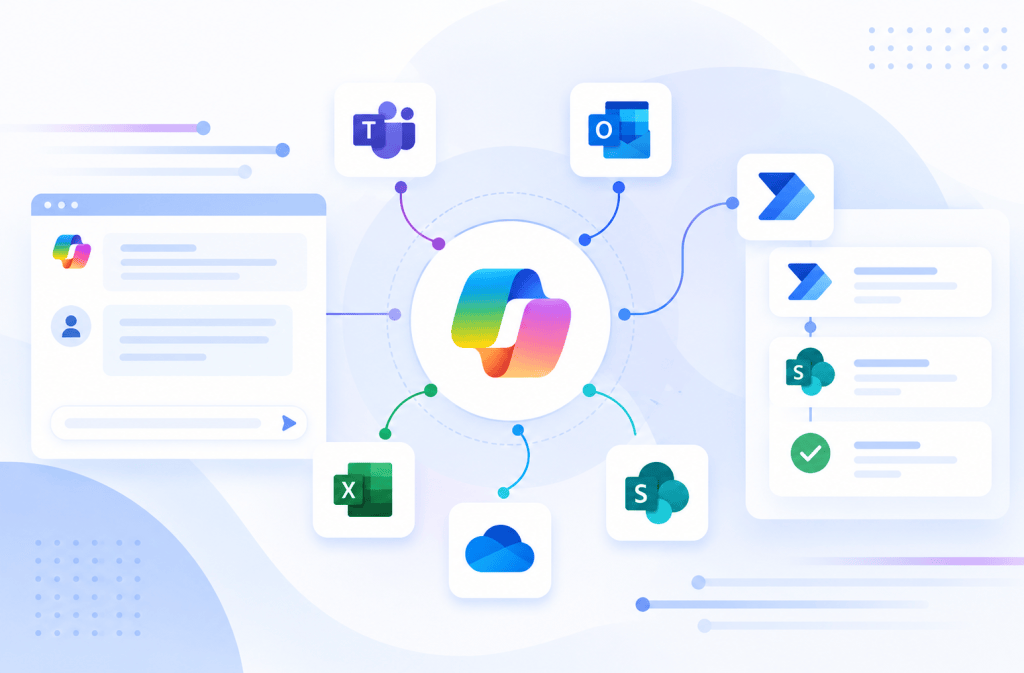
Copilot Studio and Power Automate: Designing Inputs, Outputs, and Contracts Between Agents and Flows
Copilot Studio and Power Automate: Designing Inputs, Outputs, and Contracts Between Agents and Flows Introduction Connecting Microsoft Copilot Studio to Power Automate is often described very simply: Agent calls Flow. Technically, that is correct. Architecturally, however, something much more important… Continue reading
-
Practical Build Walkthrough: Create a SharePoint Request from a Copilot Studio Agent
Practical Build Walkthrough: Create a SharePoint Request from a Copilot Studio Agent The architecture discussed so far becomes much easier to understand when implemented as a small end-to-end solution. In this walkthrough, we will build an atomic enterprise Agent capability:… Continue reading
-
Tools Architecture in Microsoft Copilot Studio: Designing Executable Capabilities for Enterprise Agents
Tools Architecture in Microsoft Copilot Studio: Designing Executable Capabilities for Enterprise Agents Introduction In the previous article, we established one of the most important distinctions in Microsoft Copilot Studio architecture: That model is intentionally simple. Now we need to open… Continue reading

-
Knowledge vs Tools vs Actions in Microsoft Copilot Studio: Choosing the Right Capability
Article 13 of 50 Knowledge vs Tools vs Actions in Microsoft Copilot Studio: Choosing the Right Capability Introduction One of the most important architectural decisions when designing an Agent in Microsoft Copilot Studio is determining what kind of capability the… Continue reading
-
Custom Prompts in Microsoft Copilot Studio: Using AI Inside Deterministic Processes
Custom Prompts in Microsoft Copilot Studio: Using AI Inside Deterministic Processes Introduction In the previous articles, we established two major architectural paths inside Microsoft Copilot Studio. The first is the generative knowledge path: The second is the deterministic process path:… Continue reading
-
Topics in Microsoft Copilot Studio: When Deterministic Conversation Beats Generative AI
Topics in Microsoft Copilot Studio: When Deterministic Conversation Beats Generative AI Introduction In the previous articles in this series, we focused heavily on the generative side of Microsoft Copilot Studio: This architecture is extremely powerful when users ask unpredictable questions… Continue reading
-
Microsoft Power Platform — Technical Architecture, Components and Enterprise Use Cases
Microsoft Power Platform — Technical Architecture, Components and Enterprise Use Cases 1. Introduction Microsoft Power Platform is Microsoft’s low-code platform for building business applications, automating processes, analyzing data, creating external business websites, and developing AI-powered agents. From an architectural perspective,… Continue reading

-
Building Enterprise AI Agents with Microsoft Copilot Studio: The Story Behind This 50-Article Technical Series
Building Enterprise AI Agents with Microsoft Copilot Studio: The Story Behind This 50-Article Technical Series Introduction This series was not created as a collection of isolated Microsoft Copilot Studio tutorials. It started with a much broader objective: Understand how enterprise… Continue reading
-
Generative Answers in Microsoft Copilot Studio: Controlling AI-Generated Responses
Generative Answers in Microsoft Copilot Studio: Controlling AI-Generated Responses Introduction In the previous articles, we built the Knowledge pipeline: We can now focus on the part that users actually see: the Generative Answer. This is where Microsoft Copilot Studio becomes… Continue reading
-
Grounding in Microsoft Copilot Studio: How Retrieved Evidence Controls Generative Answers
Grounding in Microsoft Copilot Studio: How Retrieved Evidence Controls Generative Answers Introduction In the previous articles, we separated four concepts that are often treated as if they were the same: We established that Knowledge represents the information available to an… Continue reading
-
Retrieval in Microsoft Copilot Studio: How an Agent Finds Relevant Information
Retrieval in Microsoft Copilot Studio: How an Agent Finds Relevant Information Introduction In the previous article, we established the fundamental pipeline: Now we need to isolate one of the most important—and frequently misunderstood—parts of this architecture: Retrieval. Adding a Knowledge… Continue reading
-
Knowledge Sources in Microsoft Copilot Studio: Designing Enterprise Knowledge for AI Agents
Knowledge Sources in Microsoft Copilot Studio: Designing Enterprise Knowledge for AI Agents Introduction After defining how an Agent should behave through Instructions, the next architectural question is: Where does the Agent obtain the information required to answer the user? This… Continue reading
-
Instructions in Microsoft Copilot Studio: Designing Agent Behavior, Boundaries, and Responsibilities
Instructions in Microsoft Copilot Studio: Designing Agent Behavior, Boundaries, and Responsibilities Introduction One of the first things we configure when creating an Agent in Microsoft Copilot Studio is its Instructions. At first, Instructions may appear to be nothing more than… Continue reading
-
Microsoft Copilot Studio Architecture: How an Agent Actually Works
Microsoft Copilot Studio Architecture: How an Agent Actually Works Introduction After understanding the difference between an AI Agent, a traditional chatbot, and a traditional application, the next step is to look inside a Microsoft Copilot Studio Agent. When a user… Continue reading
-
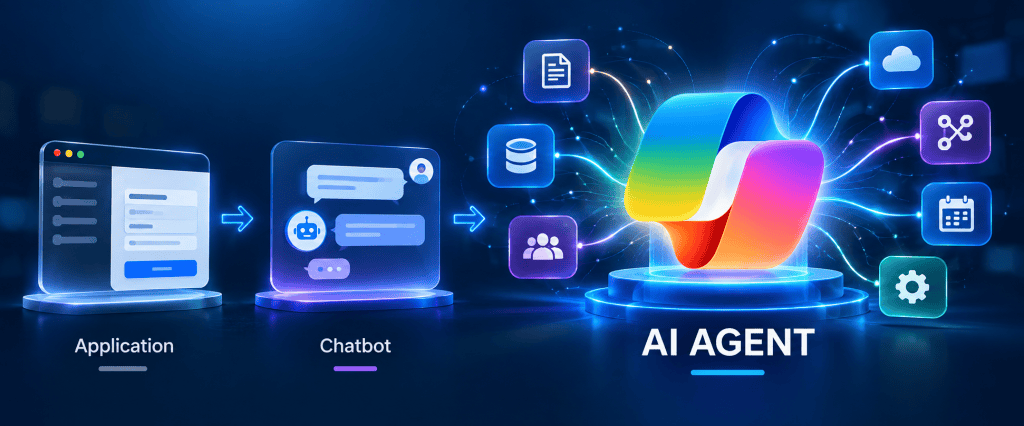
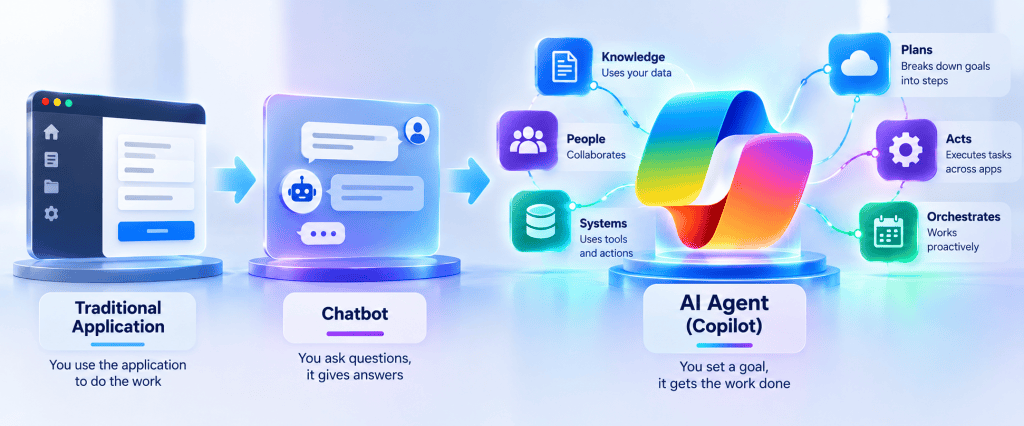
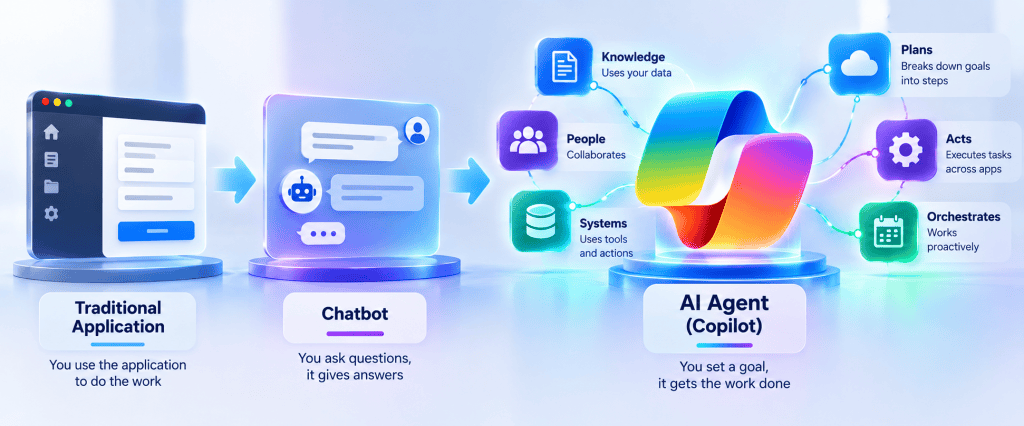
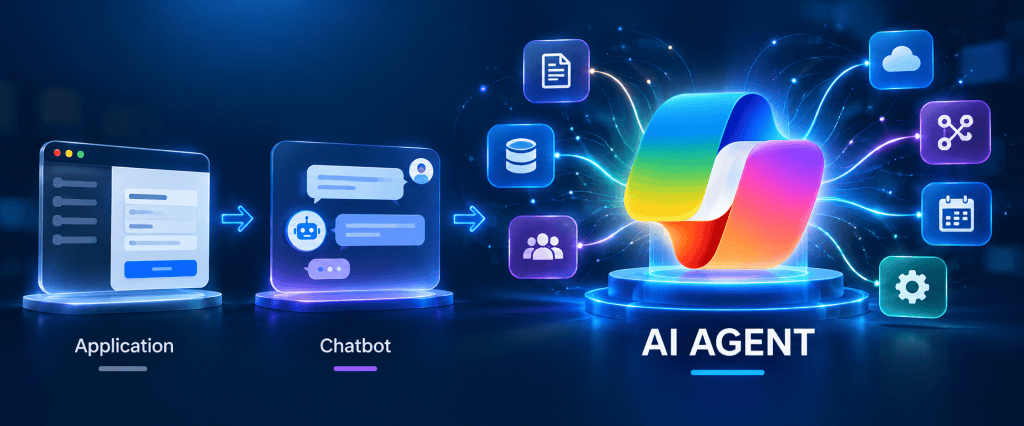
What Is an AI Agent? Agent vs Chatbot vs Traditional Application
At first glance, an AI Agent can look similar to a chatbot. Both can receive natural-language input and return conversational responses. However, from an architectural perspective, they represent very different approaches. What Is an AI Agent? Agent vs Chatbot vs… Continue reading
-
From Zero to Microsoft Certified AI Agent Builder Associate: My Practical Copilot Studio Study Roadmap
For an experienced Microsoft 365, SharePoint, Power Platform, or software developer, the first temptation is often to approach Copilot Studio as another application development environment: identify the UI components, learn the APIs, connect some services, write some logic, and build… Continue reading

