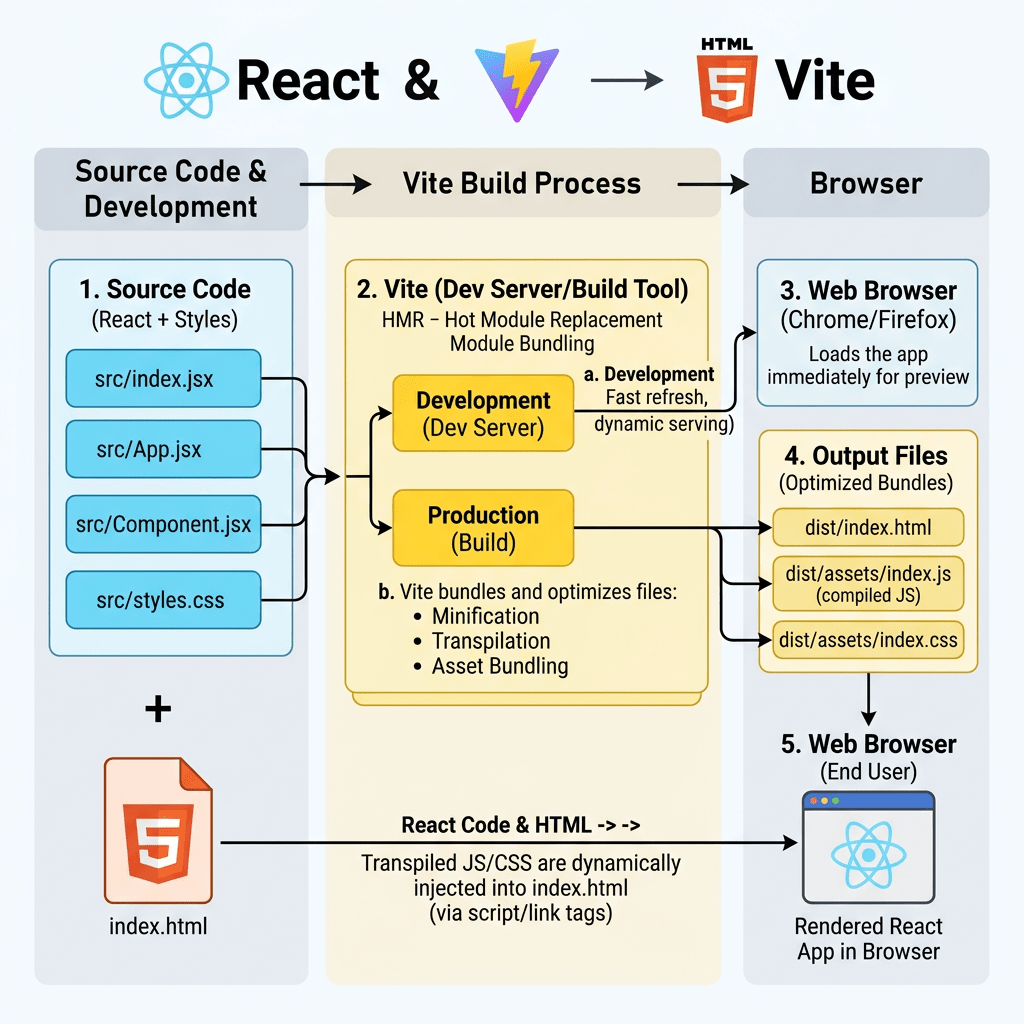
Building a Complete Enterprise React Learning Roadmap with Fluent UI, Vite, and TypeScript
Modern React development is no longer just about learning how to render buttons or update text on the screen. Professional frontend engineering today requires understanding architecture, rendering models, state management, effects, component composition, scalability, accessibility, build systems, design systems, and enterprise UI standards.
This project — the 100 React + Fluent UI Apps Roadmap — was designed to create a structured and professional React learning journey aligned with:
- React Learn Official Documentation
- Fluent UI Microsoft Design System
- Vite Guide
- TypeScript Documentation
The roadmap is heavily inspired by the official React mental model:
- UI is a function of state
- Components are pure functions
- Rendering is declarative
- State should be minimal
- Effects are only for external synchronization
- Composition is preferred over inheritance
Instead of learning React randomly through disconnected tutorials, this roadmap gradually evolves from basic JSX rendering into complete enterprise applications using Microsoft Fluent UI and professional architecture patterns.
Why This Project Exists
One of the biggest problems when learning React is that many tutorials teach:
- outdated patterns
- unnecessary
useEffect - poor folder structures
- oversized components
- imperative DOM thinking
- bad state management habits
This roadmap avoids those problems by strictly following the architecture and philosophy promoted in the official React documentation.
The goal is not merely to “make apps work.”
The goal is to understand:
- how React renders
- how JSX becomes HTML
- how components compose together
- how React updates the DOM
- how state drives UI
- how enterprise React applications are structured
- how modern tooling works
The Core Stack of the Project
The entire project is based on five main technologies.
| Technology | Purpose |
|---|---|
| React | Declarative UI library |
| TypeScript | Static typing and enterprise safety |
| Vite | Modern build tool and development server |
| Fluent UI | Microsoft enterprise design system |
| VS Code | Development environment |
Why React?
React is one of the most important frontend libraries in modern software engineering.
React introduced a fundamentally different way of building interfaces.
Traditional frontend development often relied on:
- manual DOM manipulation
- imperative updates
- jQuery-style programming
React instead introduced:
UI = function(state)
This means the interface should be derived from data rather than manually manipulated.
React applications are built from reusable components that return JSX.
Why TypeScript?
TypeScript is essential for enterprise-scale React applications.
Without TypeScript:
- runtime errors become more common
- refactoring becomes dangerous
- architecture becomes harder to maintain
With TypeScript:
- interfaces define data shapes
- props become safer
- autocomplete improves productivity
- architecture becomes more predictable
Example:
export interface User { id: number; name: string;}
This guarantees that React components receive the expected structure.
Why Vite?
Vite is the modern replacement for older React tooling approaches.
Historically many React projects used Create React App.
Modern React development now prefers Vite because it provides:
- instant startup
- fast Hot Module Replacement
- ES Modules
- optimized builds
- simplified configuration
The project creation process is:
npm create vite@latest app-name -- --template react-ts
This automatically configures:
- React
- TypeScript
- Vite
- development scripts
- build pipeline
Why Fluent UI?
Fluent UI is Microsoft’s official design system.
Instead of building all UI controls manually, Fluent UI provides:
- accessible components
- Microsoft visual standards
- enterprise layouts
- typography system
- dialogs
- grids
- navigation
- form controls
Fluent UI is especially valuable for developers targeting:
- SharePoint Framework (SPFx)
- Microsoft 365
- intranet portals
- dashboards
- enterprise systems
The Learning Philosophy
This roadmap follows a progressive architecture.
Instead of immediately jumping into APIs and advanced hooks, the learning process begins with:
- pure components
- JSX
- composition
- rendering lists
- layout systems
Only later do we introduce:
- state
- forms
- reducers
- effects
- APIs
- context
- architecture patterns
This mirrors the structure of the official React Learn documentation.
Project Structure
Every app follows a professional scalable folder structure.
src/ components/ data/ hooks/ models/ pages/ services/ styles/ utils/
Each folder has a responsibility.
| Folder | Responsibility |
|---|---|
| components | Reusable UI blocks |
| data | Mock/static data |
| hooks | Custom hooks |
| models | TypeScript interfaces |
| pages | Screen-level components |
| services | API communication |
| styles | CSS organization |
| utils | Helper functions |
Understanding React Rendering
One of the most important concepts in this roadmap is understanding how React actually works.
The browser first loads:
index.html
Inside it:
<div id="root"></div>
Then:
main.tsx
finds the root element:
ReactDOM.createRoot( document.getElementById("root")!)
Then React renders:
<App />
The component tree becomes:
JSX→ React elements→ virtual tree→ DOM updates→ browser HTML
This mental model is essential.
The Five Blocks of the Roadmap
The roadmap is divided into five progressive blocks.
BLOCK 1 — FUNDAMENTALS AND UI
Based on:
Goals:
- JSX
- components
- props
- composition
- rendering lists
- layouts
- pure rendering
Apps 01–20
| App | Name |
|---|---|
| 01 | Hello React Fluent |
| 02 | Profile Card |
| 03 | Product List |
| 04 | Microsoft Style User Card |
| 05 | Static Dashboard |
| 06 | Corporate Sidebar Menu |
| 07 | Visual Task List |
| 08 | Timeline of Events |
| 09 | Employee Table |
| 10 | Email List |
| 11 | Card Grid |
| 12 | Image Gallery |
| 13 | Movie Catalog |
| 14 | Football Teams List |
| 15 | News Page |
| 16 | Static Financial Dashboard |
| 17 | SharePoint Style Layout |
| 18 | File Explorer |
| 19 | Corporate Portal |
| 20 | Microsoft Style Landing Page |
BLOCK 2 — INTERACTIVITY AND STATE
Based on:
Goals:
useState- forms
- events
- controlled inputs
- derived state
- filters
- validation
Apps 21–40
| App | Name |
|---|---|
| 21 | Modern Counter |
| 22 | Toggle Theme |
| 23 | React Calculator |
| 24 | Login Form |
| 25 | User Registration |
| 26 | Complete ToDo List |
| 27 | Shopping List |
| 28 | Product Filter |
| 29 | Employee Search |
| 30 | Shopping Cart |
| 31 | Grade Simulator |
| 32 | Inventory Control |
| 33 | Contact Agenda |
| 34 | Currency Converter |
| 35 | BMI Calculator |
| 36 | Installment Simulator |
| 37 | Voting Panel |
| 38 | Interactive Quiz |
| 39 | Team Manager |
| 40 | Dynamic Dashboard |
BLOCK 3 — PROFESSIONAL FLUENT UI
Goals:
- enterprise layout
- DataGrid
- Tabs
- Dialogs
- Toolbar
- theming
- reusable design system
Apps 41–60
| App | Name |
|---|---|
| 41 | Microsoft Style Login |
| 42 | Corporate Form |
| 43 | Tab System |
| 44 | Dialog Manager |
| 45 | Executive Dashboard |
| 46 | DataGrid Catalog |
| 47 | Enterprise User List |
| 48 | Navigable Sidebar |
| 49 | Corporate Header |
| 50 | Professional Toolbar |
| 51 | Notification System |
| 52 | Administrative Panel |
| 53 | Ticket Manager |
| 54 | Approval System |
| 55 | Corporate Agenda |
| 56 | SharePoint Inspired Dashboard |
| 57 | Project Management |
| 58 | Support Ticket Control |
| 59 | Visual CRM |
| 60 | Enterprise Explorer |
BLOCK 4 — EFFECTS AND ARCHITECTURE
Based on:
Goals:
useEffect- APIs
- loading/error states
- memoization
- custom hooks
- context
- architecture
Apps 61–80
| App | Name |
|---|---|
| 61 | REST API Consumption |
| 62 | Dashboard with API |
| 63 | Async Search |
| 64 | GitHub User Explorer |
| 65 | Weather App |
| 66 | Pagination System |
| 67 | Infinite Scroll |
| 68 | Data Cache |
| 69 | Custom Fetch Hook |
| 70 | Global Context Control |
| 71 | Favorites System |
| 72 | DataGrid with API |
| 73 | Analytics Dashboard |
| 74 | Cryptocurrency Monitor |
| 75 | Repository Explorer |
| 76 | Log Panel |
| 77 | Reporting System |
| 78 | Performance Simulator |
| 79 | Layered Architecture |
| 80 | Mini React Enterprise Framework |
BLOCK 5 — COMPLETE ENTERPRISE APPLICATIONS
Goals:
- complete architecture
- reusable systems
- CRUD
- dashboards
- enterprise UI
- scalable applications
Apps 81–100
| App | Name |
|---|---|
| 81 | Complete CRUD System |
| 82 | Employee Management |
| 83 | Financial Dashboard |
| 84 | Inventory System |
| 85 | Kanban Board |
| 86 | Enterprise Task Manager |
| 87 | User Management System |
| 88 | Administrative Portal |
| 89 | Ticket System |
| 90 | Power BI Style Dashboard |
| 91 | Report Generator |
| 92 | Audit System |
| 93 | SharePoint Inspired Portal |
| 94 | Corporate Catalog |
| 95 | Reservation System |
| 96 | Mini Enterprise ERP |
| 97 | Complete CRM |
| 98 | Analytics System |
| 99 | Microsoft Style Admin Center |
| 100 | Final React Enterprise Platform |
PowerShell Commands Used Throughout the Project
Create app
npm create vite@latest app-name -- --template react-ts
Install dependencies
npm install
Install Fluent UI
npm install @fluentui/react-components @fluentui/react-icons
Run development server
npm run dev
Validate production build
npm run build
Preview production build
npm run preview
Technical Evolution of the Roadmap
| Stage | Concepts |
|---|---|
| Fundamentals | JSX, components, props |
| UI Composition | Lists, layouts, composition |
| Interactivity | State, events, forms |
| Fluent UI | Enterprise components |
| Effects | APIs, synchronization |
| Architecture | Hooks, services, context |
| Enterprise Apps | CRUD, dashboards, admin systems |
Why This Roadmap Is Different
This roadmap avoids treating React like a “black box.”
Instead, it explains:
- how React mounts into HTML
- how JSX becomes DOM
- how rendering works
- how components compose
- how data flows
- how enterprise architecture evolves
The goal is to create developers capable of building:
- enterprise dashboards
- SharePoint portals
- admin systems
- Microsoft-style applications
- scalable React architecture
Official Documentation
React
Fluent UI
Vite
TypeScript
Current Project Progress
| Block | App | Name | Status |
|---|---|---|---|
| Block 1 | 01 | Hello React Fluent | Completed |
| Block 1 | 02 | Profile Card | Completed |
| Block 1 | 03 | Product List | Completed |
| Block 1 | 04 | Microsoft Style User Card | Completed |
| Block 1 | 05 | Static Dashboard | Completed |
| Block 1 | 06 | Corporate Sidebar Menu | Completed |
| Block 1 | 07 | Visual Task List | Completed |
| Block 1 | 08 | Timeline of Events | Current |
| Block 1 | 09 | Employee Table | Next |
| Block 1 | 10 | Email List | Pending |
| Block 1 | 11 | Card Grid | Pending |
| Block 1 | 12 | Image Gallery | Pending |
| Block 1 | 13 | Movie Catalog | Pending |
| Block 1 | 14 | Football Teams List | Pending |
| Block 1 | 15 | News Page | Pending |
| Block 1 | 16 | Static Financial Dashboard | Pending |
| Block 1 | 17 | SharePoint Style Layout | Pending |
| Block 1 | 18 | File Explorer | Pending |
| Block 1 | 19 | Corporate Portal | Pending |
| Block 1 | 20 | Microsoft Style Landing Page | Pending |
| Block 2 | 21–40 | Interactivity and State Apps | Pending |
| Block 3 | 41–60 | Professional Fluent UI Apps | Pending |
| Block 4 | 61–80 | Effects and Architecture Apps | Pending |
| Block 5 | 81–100 | Enterprise Applications | Pending |


