Deep Technical Article — App 10: Building an Enterprise Outlook-Style Email List with React, TypeScript, Vite, JSX, ReactDOM, and Fluent UI
Modern frontend engineering is no longer about manually creating HTML pages and attaching JavaScript events afterward. Modern React applications are structured systems composed of:
- components
- rendering pipelines
- build systems
- design systems
- typed contracts
- declarative rendering models
- reusable architecture
In App 10 — Email List, we build a static Outlook-inspired corporate inbox interface using:
- React
- TypeScript
- Vite
- Fluent UI
Although visually simple, this application introduces some of the most important architectural ideas in React:
- list rendering
- component composition
- props
- JSX
- rendering pipelines
- data-driven UI
- enterprise layout systems
- reusable component architecture
- Fluent UI composition
- TypeScript modeling
This application belongs to Block 1 — Fundamentals and UI, where the roadmap focuses on:
- JSX
- components
- props
- rendering lists
- declarative UI
- composition
- layout organization
This article will deeply explain:
- how the browser loads React
- how Vite serves the application
- how TypeScript participates in rendering
- how JSX becomes JavaScript
- how ReactDOM updates the browser DOM
- how Fluent UI integrates into React
- how the component hierarchy works
- how data becomes UI
- how list rendering works internally
- how enterprise layouts are structured
This is not just about copying code.
The goal is to understand the React mental model correctly from the beginning.

1. Understanding the Complete Architecture Before Writing Code
Before writing any React code, it is critical to understand the architecture involved.
A modern React application is composed of several layers:
Browser ↓index.html ↓main.tsx ↓ReactDOM.createRoot() ↓<App /> ↓Child Components ↓JSX ↓React Virtual UI ↓Browser DOM ↓Visible HTML Interface
This is fundamentally different from traditional HTML development.
Traditional web development often looked like this:
HTML page +CSS file +JavaScript manually changing DOM
React changes the model completely.
React applications are:
- component-driven
- data-driven
- declarative
- render-based
2. Why This App Matters
At first glance, App 10 looks like:
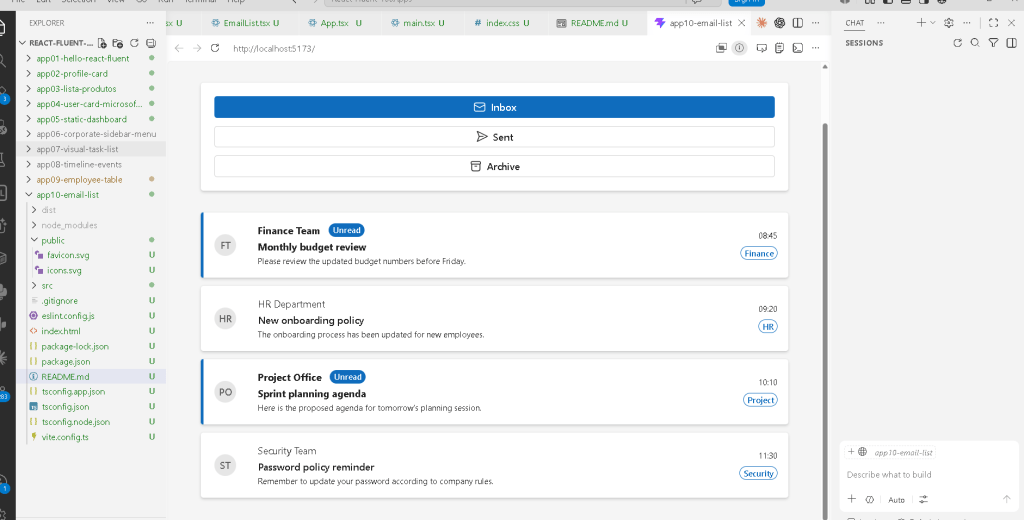
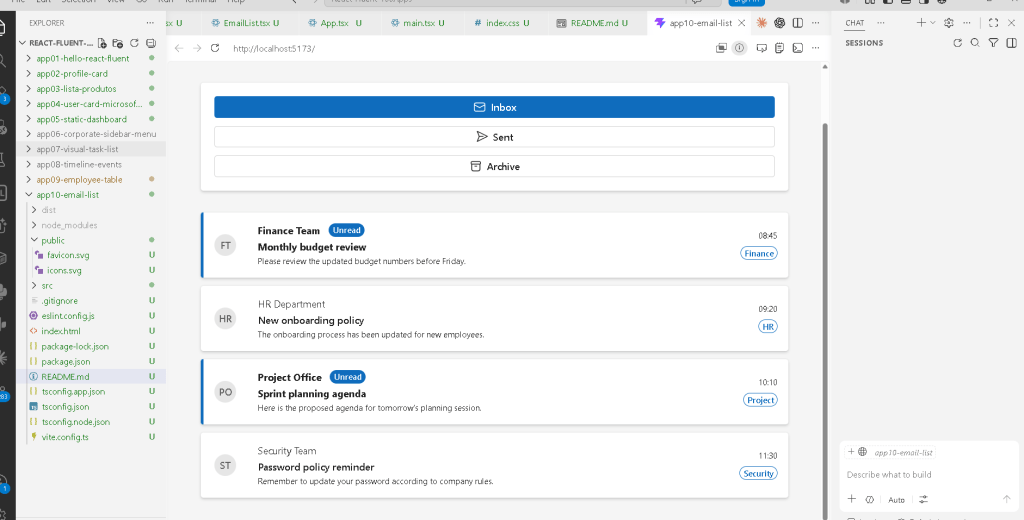
- a list of email cards
- some buttons
- avatars
- badges
However, architecturally it introduces:
- rendering collections
- dynamic UI generation
- reusable components
- typed data structures
- enterprise layout composition
- Fluent UI integration
- Outlook-style information hierarchy
These concepts later become:
- dashboards
- ticket systems
- CRM systems
- SharePoint portals
- admin centers
- reporting systems
- messaging systems
This is why foundational apps are extremely important.
3. Creating the Project
PowerShell Commands
cd C:\ReactAppsmkdir bloco01cd bloco01npm create vite@latest app10-email-list -- --template react-tscd app10-email-listnpm installnpm install @fluentui/react-components @fluentui/react-icons
4. What Happens When npm create vite Runs
This command is extremely important:
npm create vite@latest app10-email-list -- --template react-ts
Several things happen automatically.
4.1 Node.js Executes the Create Script
npm uses Node.js.
Node.js executes the Vite scaffolding package.
4.2 Vite Creates the Folder Structure
Vite generates:
- package.json
- tsconfig.json
- index.html
- src/
- main.tsx
- App.tsx
4.3 React Dependencies Are Configured
The project automatically receives:
- React
- ReactDOM
- TypeScript
- Vite React plugin
4.4 TypeScript Is Enabled
The template:
react-ts
means:
- React
- TypeScript
instead of plain JavaScript.
This is extremely important for enterprise development.
5. Why TypeScript Matters in Enterprise React
TypeScript provides:
- static typing
- safer refactoring
- autocomplete
- contract enforcement
- compile-time validation
Without TypeScript:
- invalid objects may appear silently
- bugs happen more easily
- refactoring becomes dangerous
Enterprise applications rely heavily on predictable contracts.
6. Installing Fluent UI
npm install @fluentui/react-components @fluentui/react-icons
This installs Microsoft’s enterprise React design system.
Fluent UI provides:
- accessible components
- Microsoft visual language
- typography system
- spacing system
- icons
- accessibility behavior
- keyboard support
- enterprise consistency
Without Fluent UI, all visual behavior would need manual implementation.
7. Understanding the Folder Structure
Create folders:
mkdir src\componentsmkdir src\datamkdir src\modelsmkdir src\styles
8. Why Folder Structure Matters
React apps grow extremely fast.
A poorly organized app becomes impossible to maintain later.
This project already prepares for enterprise growth.
9. Understanding Each Folder
components/
Contains reusable UI pieces.
Examples:
- cards
- lists
- headers
- menus
- forms
data/
Contains static or mock data.
Later this may evolve into:
- API services
- fetch layers
- repositories
models/
Contains TypeScript contracts.
This is critical in enterprise architecture.
styles/
Centralizes CSS organization.
Even with Fluent UI, enterprise apps still need:
- layout rules
- responsive adjustments
- application-specific styles
10. Understanding the Browser Entry Point
The real browser entry point is:
index.html
Not React.
Not App.tsx.
The browser always starts from HTML.
11. Understanding index.html
Typical structure:
<!doctype html><html lang="en"> <head> <meta charset="UTF-8" /> <meta name="viewport" content="width=device-width, initial-scale=1.0" /> <title>app10-email-list</title> </head> <body> <div id="root"></div> /src/main.tsx </body></html>
Two lines are critical:
<div id="root"></div>
and:
/src/main.tsx
12. The Meaning of div#root
This is where React lives.
Initially:
The div is empty.
Later React injects the application interface into it.
This is one of the most important ideas in React.
React does not replace the entire browser.
React mounts itself inside one HTML container.
13. The Meaning of type="module"
<script type="module">
This enables ES Modules.
Modern React projects rely heavily on:
- import/export
- modular JavaScript
- dependency graphs
Without module support:
- imports would fail
- React architecture would break
14. Understanding main.tsx
main.tsx is the React entry point.
import React from "react";import ReactDOM from "react-dom/client";import { FluentProvider, webLightTheme,} from "@fluentui/react-components";import App from "./App";import "./index.css";
This file connects:
- React
- ReactDOM
- Fluent UI
- CSS
- App component
15. React vs ReactDOM
These are NOT the same thing.
React
React handles:
- components
- JSX
- rendering logic
- hooks
- state
ReactDOM
ReactDOM handles:
- browser DOM integration
- rendering into HTML
- DOM updates
Conceptually:
React creates the UI description.ReactDOM places it into the browser.
16. Understanding ReactDOM.createRoot
ReactDOM.createRoot( document.getElementById("root")!)
This line:
- finds the HTML element
- creates the React rendering root
- connects React to the browser
17. Understanding the Non-Null Assertion
!
This tells TypeScript:
The root element definitely exists.
Without it, TypeScript warns:
This element could be null.
18. Understanding .render()
.render( <React.StrictMode> <FluentProvider theme={webLightTheme}> <App /> </FluentProvider> </React.StrictMode>);
This tells React:
Render this component tree.
The hierarchy is:
StrictMode FluentProvider App
19. Why StrictMode Exists
StrictMode helps detect:
- side effects
- deprecated APIs
- unsafe rendering
- non-pure components
React strongly encourages predictable rendering behavior.
20. Why FluentProvider Exists
Fluent UI components rely on design tokens:
- colors
- spacing
- typography
- shadows
- accessibility rules
FluentProvider distributes these globally.
Without it:
- components lose styling
- themes break
- typography becomes inconsistent
21. Understanding webLightTheme
webLightTheme
This is Microsoft’s default web theme.
It provides:
- Microsoft colors
- spacing scales
- typography system
- Fluent UI appearance rules
22. Understanding App.tsx
The root application component:
function App() {
React components are simply functions.
They:
- receive props
- return JSX
23. Understanding JSX
JSX is NOT HTML.
JSX is:
- JavaScript syntax
- declarative UI syntax
- compiled into JavaScript
This:
<Title1>Corporate Inbox</Title1>
becomes JavaScript function calls internally.
24. JSX Compilation
React does NOT directly render JSX.
Vite and TypeScript compile JSX into JavaScript.
Conceptually:
JSX →JavaScript objects →React Virtual Tree →DOM updates
25. Understanding the Main Layout
<main style={{ minHeight: "100vh", backgroundColor: "#f5f5f5", padding: "48px", }}>
This creates:
- full-screen layout
- enterprise spacing
- background styling
26. Why main Is Important
main is semantic HTML.
It tells browsers and screen readers:
This is the main page content.
Good React apps still use proper HTML semantics.
React does not replace HTML best practices.
27. Understanding the Toolbar Card
<Card>
This creates the Outlook-like toolbar container.
Cards in Fluent UI provide:
- padding
- shadows
- spacing
- Microsoft visual consistency
28. Understanding Toolbar Buttons
<Button appearance="primary">
Fluent UI buttons already include:
- hover states
- keyboard support
- accessibility
- focus behavior
- enterprise styling
Without Fluent UI, this would require large amounts of manual CSS.
29. Understanding the Icons
Mail24RegularSend24RegularArchive24Regular
These are Fluent UI SVG icons.
Advantages:
- scalable
- lightweight
- theme-aware
- accessible
30. Understanding the Email Model
EmailMessage.ts
export interface EmailMessage {
This defines a data contract.
Each email MUST contain:
- id
- sender
- subject
- preview
- unread state
This prevents inconsistent data structures.
31. Why Interfaces Matter
Interfaces create predictable architecture.
Without interfaces:
- components may receive invalid data
- debugging becomes harder
- maintenance suffers
Enterprise React relies heavily on contracts.
32. Understanding Mock Data
emails.ts
export const emails: EmailMessage[] = [
This file simulates backend data.
React’s philosophy is:
UI should derive from data.
33. Understanding Declarative Rendering
Instead of manually writing:
email row 1email row 2email row 3
React uses:
emails.map(...)
to generate UI automatically.
34. Understanding EmailList.tsx
{emails.map((email) => ( <EmailItem key={email.id} email={email} />))}
This is one of the most important React patterns.
35. Why map() Is Fundamental
map() transforms arrays.
Conceptually:
data →components
This is declarative UI.
36. Declarative vs Imperative
Imperative:
create elementappend elementset textappend again
Declarative:
For each email, render one EmailItem.
React handles the DOM internally.
37. Understanding key
key={email.id}
Keys help React identify list items efficiently.
This matters later for:
- insertions
- deletions
- sorting
- filtering
38. Understanding EmailItem.tsx
This component renders one email row.
Responsibility:
One email object →One email UI card
39. Understanding Props
interface EmailItemProps { email: EmailMessage;}
Props are component inputs.
Props make components:
- reusable
- configurable
- predictable
40. Understanding CSS Grid Layout
gridTemplateColumns: "48px 1fr auto"
This creates:
Avatar | Main content | Metadata
41. Understanding 1fr
1fr means:
Use all remaining available space.
This creates responsive layouts.
42. Understanding Conditional Rendering
{email.unread && ( <Badge>Unread</Badge>)}
Meaning:
If unread is true,render the badge.
43. Understanding Ternary Styling
fontWeight: email.unread ? 700 : 400
Meaning:
Unread → boldRead → normal
This mimics Outlook behavior.
44. Understanding Enterprise Information Hierarchy
This app introduces:
- sender prominence
- subject hierarchy
- metadata positioning
- category labels
- unread indicators
These are core enterprise UI concepts.
45. Why No State Exists Yet
This app intentionally avoids:
- useState
- useEffect
Because:
- the UI is static
- no interaction exists yet
- no external synchronization exists
This follows React Learn guidance.
46. Why No useEffect Exists
React Learn explains:
Effects synchronize with external systems.
This app has:
- no APIs
- no timers
- no browser synchronization
Therefore:
- no effect is needed
This is proper React discipline.
47. Understanding the React Mental Model
React is NOT:
- manual DOM programming
- jQuery-style manipulation
React IS:
- declarative rendering
- component composition
- data-driven UI
This distinction is critical.
48. Understanding the Browser Rendering Flow
The complete rendering pipeline:
index.html →main.tsx →ReactDOM.createRoot() →<App /> →EmailList →EmailItem →JSX →React Virtual UI →DOM nodes →Visible HTML
This is the true React architecture.
49. Running the App
Development server:
npm run dev
Vite provides:
- local server
- JSX compilation
- TypeScript compilation
- Hot Module Replacement
50. Validating Production Build
npm run build
This validates:
- TypeScript
- imports
- production bundling
Always validate builds.
51. Previewing Production Build
npm run preview
This serves the optimized production bundle locally.
52. Why This App Is Foundational
This app introduces:
- data-driven rendering
- reusable components
- Outlook-style layout
- rendering collections
- enterprise composition
- Fluent UI integration
- TypeScript contracts
These concepts become the foundation for:
- dashboards
- admin centers
- SharePoint portals
- CRM systems
- messaging systems
- ticket systems
Technical Summary
| Concept | Explanation |
|---|---|
| React | Declarative UI library |
| ReactDOM | Browser DOM renderer |
| TypeScript | Static typing system |
| Vite | Development/build tool |
| JSX | Declarative UI syntax |
| Fluent UI | Microsoft design system |
| Props | Component inputs |
map() | List rendering |
| Conditional rendering | Dynamic UI visibility |
| CSS Grid | Structured inbox layout |
| Avatar | User visualization |
| Badge | Metadata/status indicator |
| Pure components | Predictable rendering |
key | Stable list identity |
| Semantic HTML | Accessible structure |
Official Documentation
React
- React Learn
- Rendering Lists
- Conditional Rendering
- Passing Props to a Component
- Keeping Components Pure
Fluent UI
Vite
TypeScript
Current Project Progress
| Block | App | Name | Status |
|---|---|---|---|
| Block 1 | 01 | Hello React Fluent | Completed |
| Block 1 | 02 | Profile Card | Completed |
| Block 1 | 03 | Product List | Completed |
| Block 1 | 04 | Microsoft Style User Card | Completed |
| Block 1 | 05 | Static Dashboard | Completed |
| Block 1 | 06 | Corporate Sidebar Menu | Completed |
| Block 1 | 07 | Visual Task List | Completed |
| Block 1 | 08 | Timeline of Events | Completed |
| Block 1 | 09 | Employee Table | Completed |
| Block 1 | 10 | Email List | Current article completed |
| Block 1 | 11 | Grid of Cards | Next |


