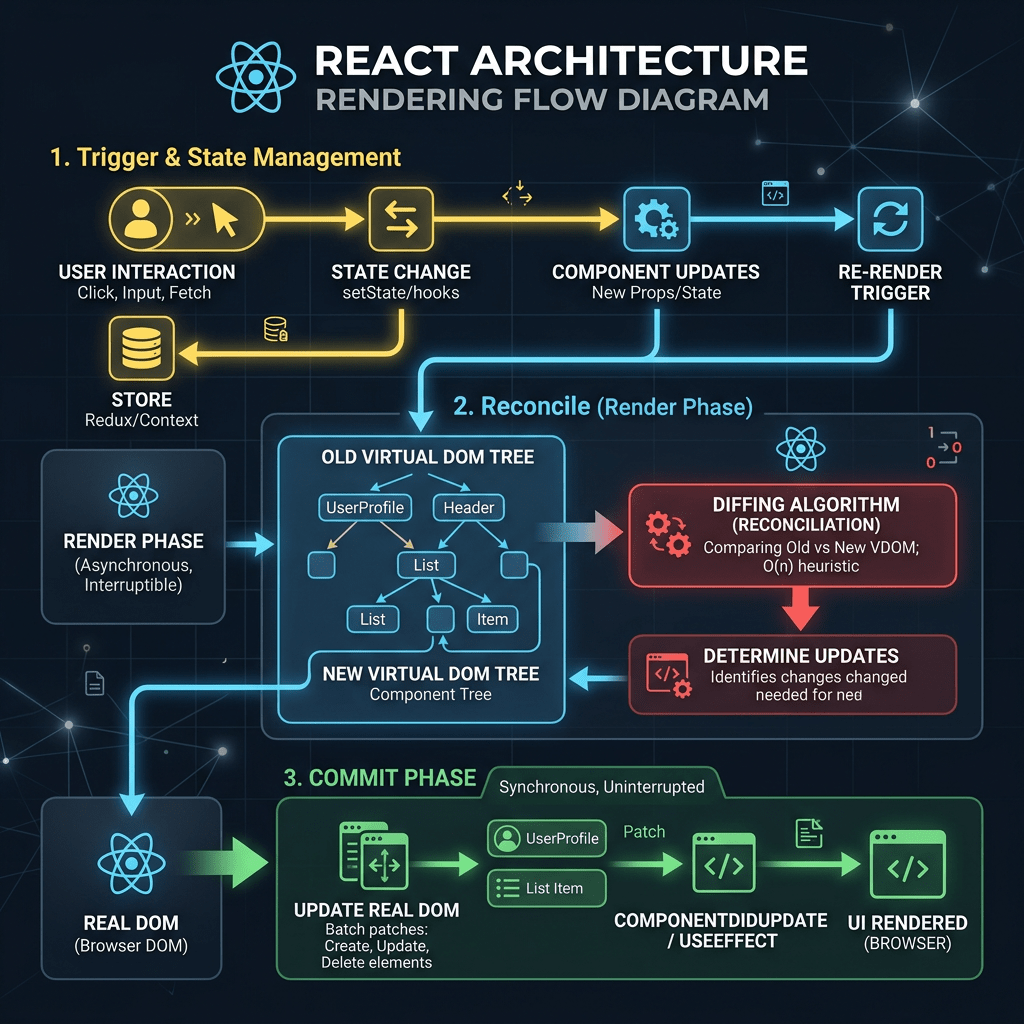
Closing Block 1 — Understanding the Complete React Rendering Flow
Block 1 of the 100 React + Fluent UI Apps project established the architectural foundation of modern React development. The goal was never only to build visual interfaces, but to understand the real rendering flow of a professional React application using:
- React
- TypeScript
- Vite
- Fluent UI
- JSX
- Component composition
- Declarative UI architecture
The first twenty applications focused on React’s official “Describing the UI” mental model from React Learn and introduced the core principle of modern React:
The interface is a function of data and state.
By the end of Block 1, the most important thing is understanding how the application is organized internally and how data flows through the project structure.
This article explains the complete architectural flow used throughout the first block:
models ↓data ↓components ↓App.tsx ↓main.tsx ↓index.html ↓browser DOM
This flow is the foundation of nearly every professional React application.
The project structure and learning roadmap were defined in the React + Fluent UI project architecture documentation.
1. Understanding the Big Picture
A beginner often sees React as:
Some JSX files magically showing HTML on screen
But React applications actually follow a very structured rendering pipeline.
In Block 1, every application gradually introduced this architecture:
TypeScript models describe data structureData files provide application dataComponents render reusable UI piecesApp.tsx composes the screenmain.tsx mounts React into HTMLindex.html provides the root DOM containerBrowser renders the final interface
Understanding this pipeline is critical before learning:
- state
- hooks
- effects
- APIs
- routing
- reducers
- enterprise architecture
Without this foundation, advanced React becomes confusing.
2. Step One — The models/ Layer
The first architectural layer is:
src/models/
This folder defines the shape of the application data.
Example:
export interface TaskItem { id: number; title: string; status: string;}
This does not render anything.
It only describes what the data should look like.
This is extremely important because React applications are driven by data.
The model layer gives:
- type safety
- predictable structure
- IntelliSense
- validation
- maintainability
- scalability
In enterprise applications, models become the contract between:
- APIs
- services
- components
- business logic
3. Why Models Matter
Without models:
Any object shape could appear anywhere.
That quickly creates chaos in large applications.
With TypeScript models:
Every object follows a predictable structure.
For example:
export interface Employee { id: number; name: string; department: string;}
Now every component knows exactly what an Employee object contains.
This is one of the biggest differences between professional React development and small experimental code.
4. Step Two — The data/ Layer
After models, we introduced:
src/data/
This layer stores static or mock data.
Example:
import type { TaskItem } from "../models/TaskItem";export const tasks: TaskItem[] = [ { id: 1, title: "Create dashboard", status: "Completed", },];
Notice the relationship:
TaskItem model defines the structuretasks array follows that structure
This is extremely important architecturally.
The UI should not invent random data structures while rendering.
Instead:
Models define the shape.Data follows the model.Components consume the data.
This creates consistency across the application.
5. Why Data Is Separated from Components
A very common beginner mistake is placing all data directly inside components.
Example of bad architecture:
function App() { const tasks = [...]}
This becomes difficult to scale.
Separating data into data/ gives:
- cleaner components
- reusable data sources
- easier testing
- better organization
- easier future API integration
Later in the project, many apps from Blocks 4 and 5 will replace static data with:
- REST APIs
- fetch requests
- services
- async data loading
But the rendering flow remains the same.
6. Step Three — The components/ Layer
The next layer is:
src/components/
This is where React becomes truly powerful.
Components are reusable UI building blocks.
Example:
export function TaskCard({ task }: TaskCardProps) { return ( <Card> <Text>{task.title}</Text> </Card> );}
A component:
- receives data
- returns JSX
- describes UI
React components are functions.
This is one of the most important concepts from React Learn — Your First Component.
7. The Relationship Between Models, Data, and Components
By Block 1, the architecture became:
models/ defines structuredata/ creates structured datacomponents/ render the data visually
Example flow:
TaskItem.ts defines TaskItemtasks.ts creates TaskItem[]TaskCard.tsx renders one TaskItemTaskList.tsx renders many TaskCard components
This is already enterprise architecture thinking.
8. Understanding Component Composition
React applications are built by composition.
Example:
App └── TaskList └── TaskCard
Each component has one responsibility.
This is one of the biggest lessons of Block 1.
Instead of creating:
- giant files
- mixed logic
- duplicated markup
React encourages:
- small components
- reusable components
- isolated responsibilities
9. Why Components Must Be Pure
Throughout Block 1, most apps were intentionally static.
Why?
Because React Learn emphasizes pure components first.
A pure component:
- receives props
- returns JSX
- does not mutate external data
- does not create side effects
Example:
function UserCard({ user }) { return <Text>{user.name}</Text>;}
Same input:
user.name = "John"
Same output:
John
This predictability is critical in React.
10. Step Four — The Role of App.tsx
After creating reusable components, everything becomes connected inside:
src/App.tsx
App.tsx is the root application component.
Example:
function App() { return ( <main> <TaskList /> </main> );}
App.tsx does not usually contain all UI details.
Instead, it composes the screen using child components.
This is one of the most important architectural ideas introduced in Block 1:
App.tsx is the composition layer.
It organizes:
- layout
- sections
- containers
- child components
11. App.tsx as the UI Orchestrator
Think about App.tsx as the conductor of an orchestra.
It does not play every instrument itself.
Instead, it coordinates the structure.
Example:
App Sidebar Header Dashboard Footer
This is how enterprise React apps scale.
12. Step Five — The Role of main.tsx
After App.tsx, React still needs to connect to the browser.
That happens in:
src/main.tsx
Example:
ReactDOM.createRoot( document.getElementById("root")!).render( <React.StrictMode> <FluentProvider theme={webLightTheme}> <App /> </FluentProvider> </React.StrictMode>);
This file is the bridge between:
- React
- HTML
- browser DOM
13. What main.tsx Actually Does
main.tsx performs several critical tasks:
1. Imports React
import React from "react";
2. Imports ReactDOM
import ReactDOM from "react-dom/client";
3. Imports the App
import App from "./App";
4. Finds the HTML root
document.getElementById("root")
5. Creates the React rendering root
ReactDOM.createRoot(...)
6. Renders the component tree
<App />
14. Why FluentProvider Wraps the App
In all Fluent UI apps, we used:
<FluentProvider theme={webLightTheme}>
This provider injects:
- Microsoft typography
- colors
- spacing
- accessibility rules
- design tokens
Without it, Fluent UI components would not behave correctly.
This introduced the idea of global providers.
Later in the project, additional providers may appear:
- routing providers
- context providers
- authentication providers
- theme providers
15. Step Six — The Role of index.html
Many beginners think React replaces HTML completely.
It does not.
Every React app still starts with:
index.html
Inside it:
<div id="root"></div>
This empty div becomes the container for the entire React application.
Flow:
Browser loads index.html ↓main.tsx executes ↓React finds #root ↓<App /> ↓Components render ↓Browser DOM updates
16. How JSX Becomes Real HTML
One of the most important concepts from Block 1 is understanding that JSX is not HTML.
Example:
<Card> <Text>Hello</Text></Card>
JSX is compiled into JavaScript.
React then creates a virtual UI description.
ReactDOM converts that into real browser DOM nodes.
Final browser result:
<div class="card"> <span>Hello</span></div>
So the rendering pipeline is:
JSX ↓JavaScript ↓React virtual tree ↓ReactDOM ↓Browser DOM ↓Visible HTML
17. Understanding the Complete Enterprise Flow
By the end of Block 1, the full architecture became:
models/ defines data contractsdata/ stores structured informationcomponents/ render reusable UIApp.tsx composes the pagemain.tsx mounts Reactindex.html hosts the root containerVite serves the appBrowser displays the final interface
This is the real React rendering flow.
18. Why This Architecture Matters
This architecture allows React apps to scale.
Future apps will add:
- state
- hooks
- effects
- APIs
- reducers
- routing
- authentication
- dashboards
- DataGrid
- enterprise workflows
But the core structure remains almost identical.
Even very large enterprise applications still follow this same composition model.
19. The Mental Model Learned in Block 1
The most important lesson of Block 1 is this:
React is not:
- manually creating DOM elements
- imperative UI programming
- jQuery-style manipulation
React is:
- declarative UI architecture
- component composition
- data-driven rendering
- predictable rendering flow
This mental shift is critical.
20. Preparing for Block 2
Block 1 intentionally avoided:
- complex state
- effects
- APIs
- reducers
Because first we needed to master:
- rendering
- composition
- JSX
- data flow
- structure
Now Block 2 will introduce:
useState- events
- forms
- controlled inputs
- derived state
- interactivity
The architectural foundation built in Block 1 is what makes those advanced topics understandable.
PowerShell Commands Used Throughout Block 1
Create projects
mkdir C:\ReactAppscd C:\ReactAppsmkdir bloco01cd bloco01npm create vite@latest app01-hello-react-fluent -- --template react-ts
Install dependencies
npm installnpm install @fluentui/react-components @fluentui/react-icons
Create architecture folders
mkdir src\componentsmkdir src\datamkdir src\modelsmkdir src\styles
Run development server
npm run dev
Validate production build
npm run build
Preview production build
npm run preview
Technical Summary
| Layer | Responsibility |
|---|---|
models/ | Defines TypeScript data structures |
data/ | Stores structured application data |
components/ | Renders reusable UI pieces |
App.tsx | Composes the application layout |
main.tsx | Mounts React into the browser |
index.html | Provides the HTML root container |
| JSX | Describes UI declaratively |
| ReactDOM | Converts React tree into browser DOM |
| Vite | Development server and build system |
| Fluent UI | Microsoft enterprise design system |
| TypeScript | Static typing and architecture safety |
Official Documentation
React
- React Learn
- Describing the UI
- Your First Component
- Passing Props to a Component
- Rendering Lists
- Keeping Components Pure
Fluent UI
Vite
TypeScript
Current Project Progress
| Block | Apps | Focus | Status |
|---|---|---|---|
| Block 1 | 01–20 | UI Fundamentals and Declarative Rendering | Completed |
| Block 2 | 21–40 | Interactivity and State | Next |
| Block 3 | 41–60 | Professional Fluent UI Architecture | Upcoming |
| Block 4 | 61–80 | Effects and Enterprise Architecture | Upcoming |
| Block 5 | 81–100 | Complete Enterprise Applications | Upcoming |
Block 1 Applications
| App | Name | Status |
|---|---|---|
| 01 | Hello React Fluent | Completed |
| 02 | Profile Card | Completed |
| 03 | Product List | Completed |
| 04 | Microsoft Style User Card | Completed |
| 05 | Static Dashboard | Completed |
| 06 | Corporate Sidebar Menu | Completed |
| 07 | Visual Task List | Completed |
| 08 | Timeline of Events | Completed |
| 09 | Employee Table | Completed |
| 10 | Email List | Completed |
| 11 | Grid of Cards | Completed |
| 12 | Image Gallery | Completed |
| 13 | Movie Catalog | Completed |
| 14 | Football Teams List | Completed |
| 15 | News Page | Completed |
| 16 | Financial Dashboard | Completed |
| 17 | SharePoint Style Layout | Completed |
| 18 | File Explorer | Completed |
| 19 | Corporate Portal | Completed |
| 20 | Microsoft Style Landing Page | Completed |
Block 1 established the core React rendering and composition mental model that the remaining 80 applications will build upon.


