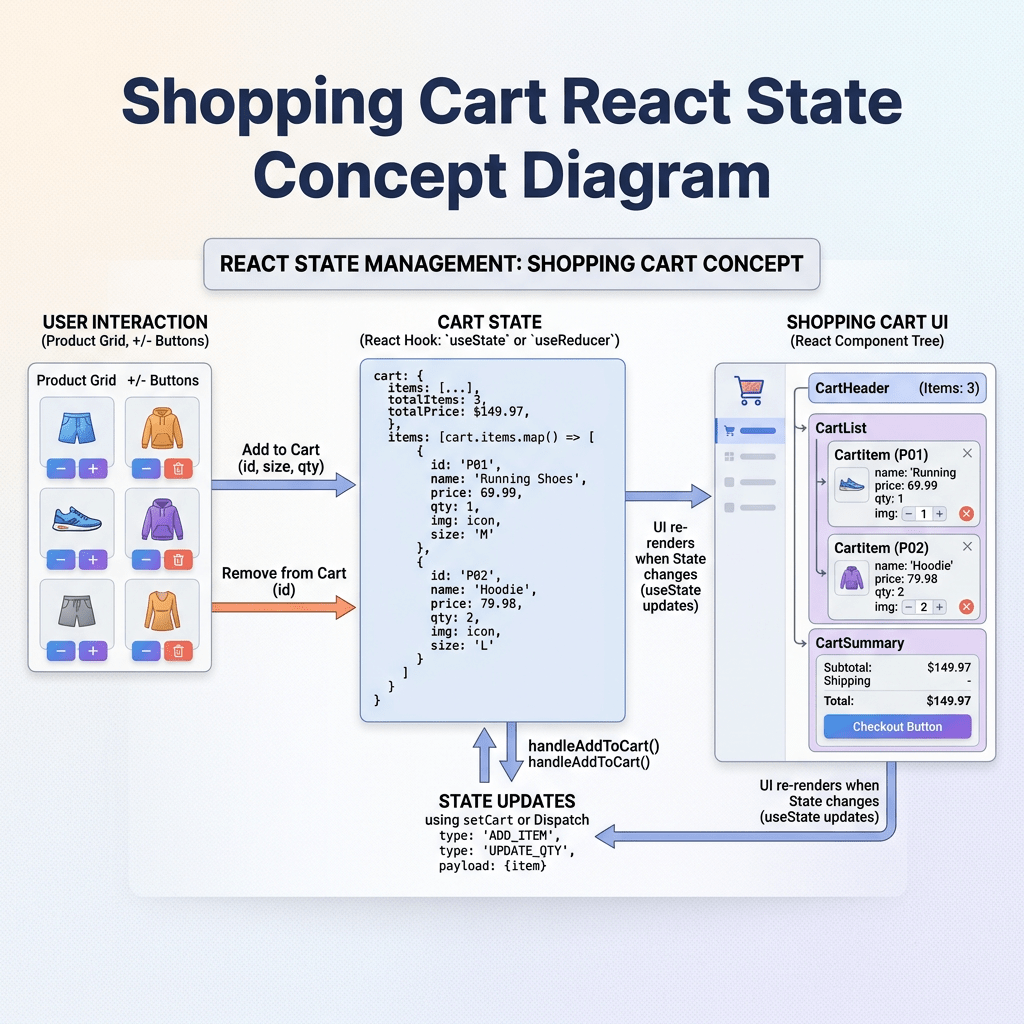
Technical Blog Article — App 30: Building a Shopping Cart with React, TypeScript, Vite, and Fluent UI
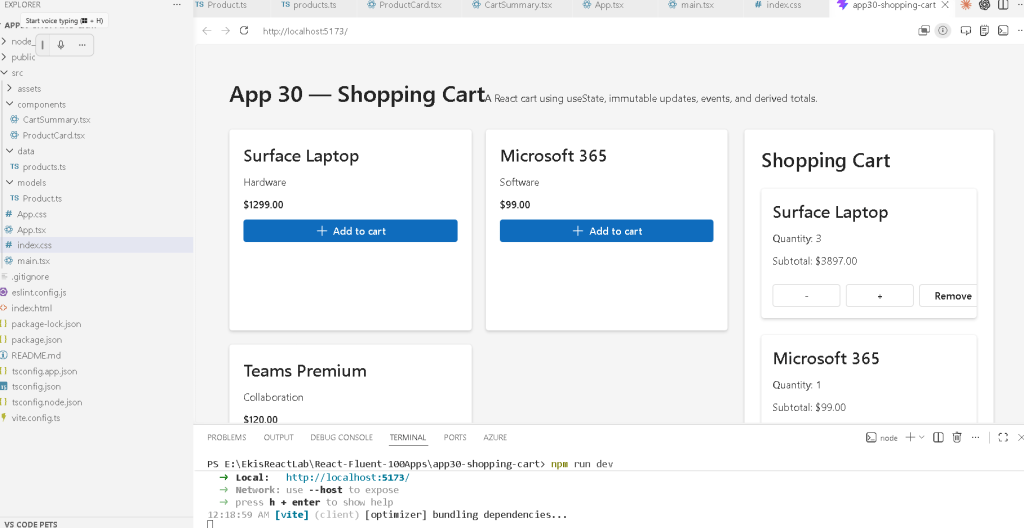
The Shopping Cart is one of the most important exercises in frontend engineering because it introduces a central React concept:
The interface is a function of state.
In App 30 — Shopping Cart, we move deeper into Block 2 of the React learning roadmap, focused on:
useState- immutable updates
- derived state
- event handling
- array manipulation
- component composition
- state-driven rendering
The roadmap defines App 30 as “Carrinho de Compras / Shopping Cart”, specifically focused on derived state and React’s “Choosing the State Structure” mental model.
This application is extremely important because it simulates the type of logic found in:
- e-commerce systems
- ERP platforms
- Microsoft-style enterprise portals
- SharePoint business apps
- inventory systems
- admin dashboards
Even though the UI appears simple, architecturally this app introduces:
- complex state updates
- immutable patterns
- functional state updates
- array transformations
- dynamic rendering
- calculated totals
- separation of concerns
Most importantly, this app teaches:
What should be stored in state?What should be derived from state?
This distinction is one of the most important concepts in modern React.
1. Creating the Project
The project starts with Vite + React + TypeScript.
PowerShell Commands
cd C:\ReactAppsmkdir bloco02cd bloco02npm create vite@latest app30-shopping-cart -- --template react-tscd app30-shopping-cartnpm installnpm install @fluentui/react-components @fluentui/react-icons
This creates:
- React
- TypeScript
- Vite
- Fluent UI
- development environment
- build configuration
2. Creating the Folder Structure
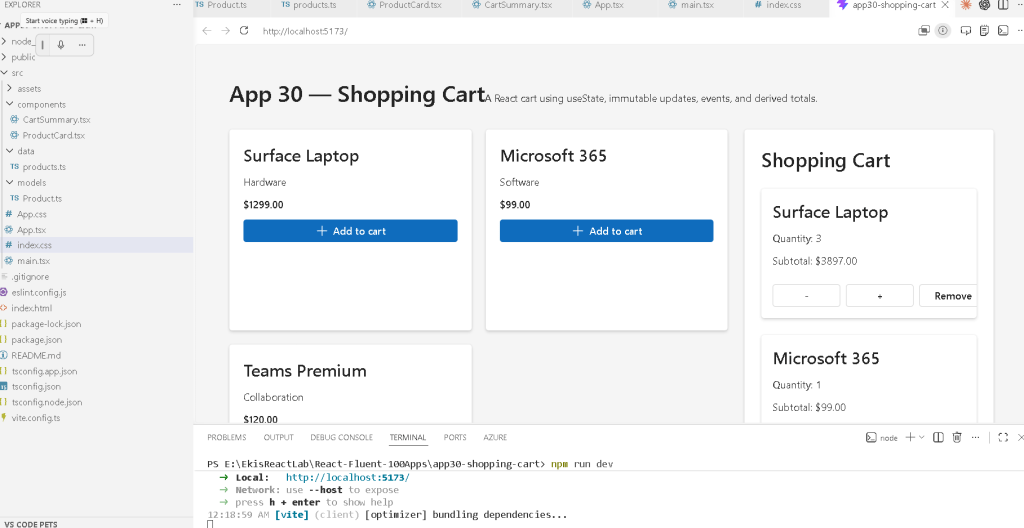
Professional React applications require organization from the beginning.
PowerShell
mkdir src\componentsmkdir src\datamkdir src\models
The architecture becomes:
src/ components/ data/ models/
3. Why This Structure Matters
Each folder has a responsibility.
| Folder | Responsibility |
|---|---|
components/ | Reusable UI blocks |
data/ | Static/mock data |
models/ | TypeScript types/interfaces |
This separation prevents chaos as applications grow.
4. The Product Model
src/models/Product.ts
export interface Product { id: number; name: string; category: string; price: number;}export interface CartItem extends Product { quantity: number;}
This file introduces an extremely important TypeScript concept:
Interface extension
5. Understanding extends
export interface CartItem extends Product
This means:
CartItem contains ALL Product propertiesPLUS quantity
Conceptually:
Product id name category priceCartItem id name category price quantity
This is very important because it avoids duplication.
Without extends, you would repeat all fields manually.
6. Why Models Matter in React
The model defines the shape of the data.
React applications become dramatically easier to understand when data structures are explicit.
Benefits:
- autocomplete
- validation
- safer refactoring
- fewer runtime bugs
- better scalability
- predictable architecture
7. The Product Data Source
src/data/products.ts
import type { Product } from "../models/Product";export const products: Product[] = [ { id: 1, name: "Surface Laptop", category: "Hardware", price: 1299 }, { id: 2, name: "Microsoft 365", category: "Software", price: 99 }, { id: 3, name: "Teams Premium", category: "Collaboration", price: 120 },];
This introduces another critical React idea:
The UI should derive from data.
Instead of manually creating cards one by one, React uses data structures and renders dynamically.
8. Why the Array Matters
This array becomes the source of truth.
React later transforms this:
[ Product 1, Product 2, Product 3]
into:
[ ProductCard, ProductCard, ProductCard]
using:
products.map(...)
This is declarative rendering.
9. The ProductCard Component
src/components/ProductCard.tsx
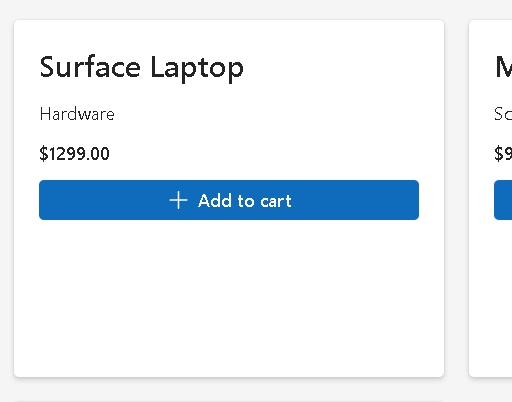
This component is responsible for rendering one product.
interface ProductCardProps { product: Product; onAddToCart: (product: Product) => void;}
This introduces props with functions.
10. Functions as Props
One of React’s most important concepts is:
Parent components can send behavior to child components.
The prop:
onAddToCart
is not data.
It is behavior.
This means:
- the child component can trigger actions
- the parent keeps control of state
- state remains centralized
This is foundational React architecture.
11. The Add Button
<Button appearance="primary" icon={<Add24Regular />} onClick={() => onAddToCart(product)}> Add to cart</Button>
This line introduces:
- events
- callbacks
- function execution
- React event system
12. Understanding onClick
onClick={() => onAddToCart(product)}
This is extremely important.
We are NOT doing:
onClick={onAddToCart(product)}
because that would execute immediately during render.
Instead:
() => onAddToCart(product)
creates a function that React executes later when the user clicks.
13. React Event Flow
The flow becomes:
User clicks button ↓Button triggers onClick ↓onAddToCart(product) ↓Parent updates state ↓React re-renders UI
This is the core React rendering cycle.
14. The Root State
Inside App.tsx:
const [cartItems, setCartItems] = useState<CartItem[]>([]);
This is the central state of the application.
15. Understanding useState
React state is component memory.
The syntax:
const [cartItems, setCartItems]
creates:
- current value
- update function
Conceptually:
cartItems current cart memorysetCartItems function that changes cart memory
16. Why the State Starts Empty
useState<CartItem[]>([])
The initial cart is empty.
This means:
No products added yet.
The UI later changes dynamically based on this array.
17. The Add-To-Cart Algorithm
The most important logic in the app is:
function addToCart(product: Product)
This function must:
- check if product already exists
- increase quantity if found
- create new item if not found
18. Functional State Updates
setCartItems((currentItems) => {
This is a functional state update.
This is the safest pattern when the next state depends on the previous state.
React Learn strongly recommends this pattern.
19. Why Functional Updates Matter
Bad pattern:
setCartItems([...cartItems, item])
Safer pattern:
setCartItems((currentItems) => ...)
Why?
Because React state updates may be asynchronous.
Functional updates always use the latest state snapshot.
20. Finding Existing Products
const existingItem = currentItems.find( (item) => item.id === product.id);
This checks whether the cart already contains the product.
Possible result:
- item found
- undefined
21. Updating Existing Quantity
return currentItems.map((item) => item.id === product.id ? { ...item, quantity: item.quantity + 1 } : item);
This is one of the most important React patterns.
22. Why map() Is Used
map() transforms arrays immutably.
We are NOT changing the original array.
We are creating a NEW array.
This is critical because React expects immutable updates.
23. Understanding Immutable Updates
React state should NEVER be mutated directly.
Bad:
item.quantity++;
Correct:
{ ...item, quantity: item.quantity + 1 }
This creates a NEW object.
24. The Spread Operator
{ ...item, quantity: item.quantity + 1 }
This copies:
- id
- name
- category
- price
and replaces:
- quantity
Conceptually:
Old object copiedquantity updated
25. Adding a New Product
If the product does not exist:
return [...currentItems, { ...product, quantity: 1 }];
This:
- copies old items
- appends a new object
Again:
- immutable update
- no mutation
26. Increasing Quantity
function increaseQuantity(id: number)
This uses:
map()
to create a new array with one updated item.
27. Decreasing Quantity
function decreaseQuantity(id: number)
This demonstrates array chaining:
.map(...).filter(...)
28. Why .filter() Is Used
If quantity reaches zero:
remove the item entirely
This is achieved with:
.filter((item) => item.quantity > 0)
This is elegant React state management.
29. Removing Items Completely
function removeItem(id: number)
This uses:
filter()
to remove items immutably.
30. The CartSummary Component
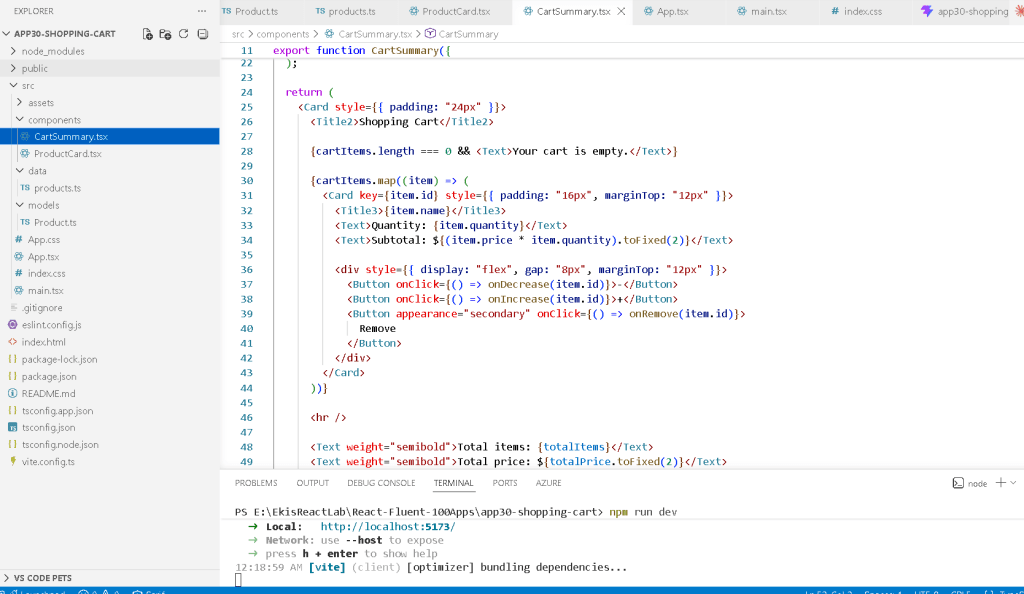
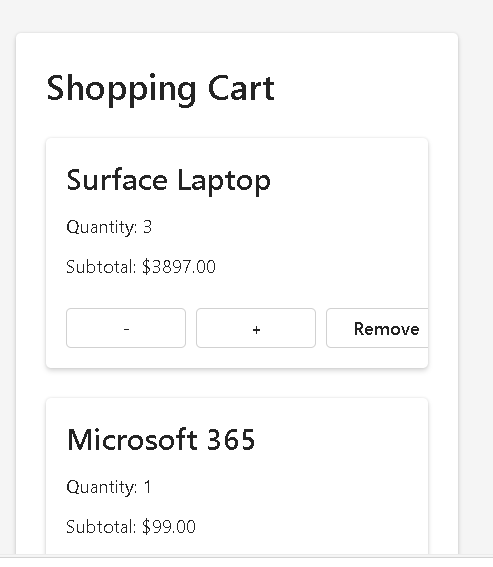
This component introduces derived state.
31. Derived State
This is one of the most important concepts in React.
Notice:
const totalItems = ...const totalPrice = ...
We are NOT storing totals in state.
This is intentional.
32. Why Totals Should NOT Be Stored
Bad architecture:
const [totalPrice, setTotalPrice]
Why bad?
Because:
- duplicated state
- synchronization problems
- bugs
- unnecessary complexity
Instead:
Totals are CALCULATED from cartItems.
This is React’s recommended mental model.
33. Calculating Totals with reduce()
cartItems.reduce(...)
reduce() converts an array into a single value.
34. Total Items Calculation
const totalItems = cartItems.reduce( (sum, item) => sum + item.quantity, 0);
Flow:
0 + quantity1 + quantity2 + quantity3
35. Total Price Calculation
const totalPrice = cartItems.reduce( (sum, item) => sum + item.price * item.quantity, 0);
Flow:
subtotal1 + subtotal2 + subtotal3
36. Why This Is Powerful
The totals automatically stay correct because they derive from state.
This means:
- fewer bugs
- simpler logic
- predictable UI
37. Component Composition
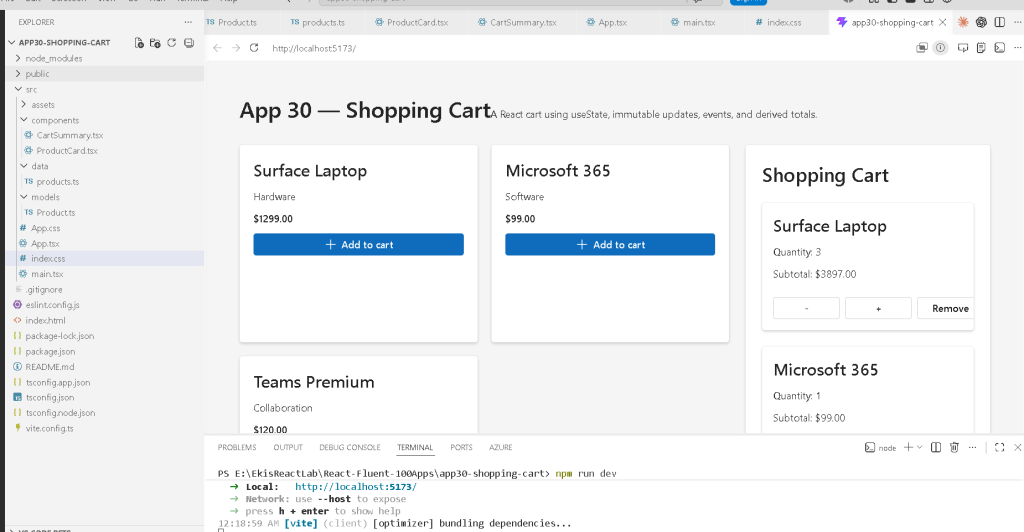
The hierarchy becomes:
App ProductCard ProductCard ProductCard CartSummary
This is classic React composition.
38. The Main Layout
display: "grid",gridTemplateColumns: "2fr 1fr",
This creates:
- products area
- cart sidebar
Very common in e-commerce systems.
39. Fluent UI Components Used
This app uses:
CardButtonTextTitle1Title2Title3
These provide:
- Microsoft styling
- accessibility
- typography consistency
- enterprise design language
40. Why Fluent UI Matters Here
Without Fluent UI:
- buttons
- spacing
- typography
- accessibility
- focus management
would require manual implementation.
Fluent UI dramatically accelerates enterprise UI development.
41. Why This App Is Important
This app introduces:
- real state management
- immutable updates
- event handling
- derived state
- reusable components
- parent-child communication
- React rendering flow
This is the foundation for:
- inventory systems
- admin dashboards
- ERP platforms
- SharePoint business apps
- enterprise commerce systems
42. React Mental Model Reinforced
This app reinforces the correct React mental model:
State changes ↓React re-renders ↓UI automatically updates
Not:
- manual DOM manipulation
- imperative UI updates
- jQuery-style logic
43. No useEffect Yet — And That Is Correct
Notice:
- no
useEffect - no synchronization
- no API calls
That is GOOD.
According to React Learn — You Might Not Need an Effect
you should avoid effects when pure rendering logic is enough.
This app is fully driven by:
- state
- props
- rendering
No effects are necessary.
Technical Summary
| Concept | Explanation |
|---|---|
useState | Component memory |
| Functional updates | Safest state update pattern |
map() | Immutable array transformation |
filter() | Removing items immutably |
reduce() | Derived totals |
| Derived state | Calculated, not stored |
| Props | Parent-child communication |
| Event handling | User interaction |
| Fluent UI | Enterprise Microsoft design system |
| TypeScript interfaces | Strong typing |
Official Documentation
React
- React Learn
- State: A Component’s Memory
- Updating Arrays in State
- Choosing the State Structure
- You Might Not Need an Effect
Fluent UI
Vite
TypeScript
Current Project Progress
| Block | App | Name | Status |
|---|---|---|---|
| Block 1 | 01 | Hello React Fluent | Completed |
| Block 1 | 02 | Profile Card | Completed |
| Block 1 | 03 | Product List | Completed |
| Block 1 | 04 | Microsoft Style User Card | Completed |
| Block 1 | 05 | Static Dashboard | Completed |
| Block 1 | 06 | Corporate Sidebar Menu | Completed |
| Block 1 | 07 | Visual Task List | Completed |
| Block 1 | 08 | Timeline Events | Completed |
| Block 1 | 09 | Employee Table | Completed |
| Block 1 | 10 | Email List | Completed |
| Block 1 | 11 | Grid of Cards | Completed |
| Block 1 | 12 | Image Gallery | Completed |
| Block 1 | 13 | Movie Catalog | Completed |
| Block 1 | 14 | Football Teams | Completed |
| Block 1 | 15 | News Page | Completed |
| Block 1 | 16 | Financial Dashboard | Completed |
| Block 1 | 17 | SharePoint Layout | Completed |
| Block 1 | 18 | File Explorer | Completed |
| Block 1 | 19 | Corporate Portal | Completed |
| Block 1 | 20 | Microsoft Landing Page | Completed |
| Block 2 | 21 | Modern Counter | Completed |
| Block 2 | 22 | Toggle Theme | Completed |
| Block 2 | 23 | React Calculator | Completed |
| Block 2 | 24 | Login Form | Completed |
| Block 2 | 25 | User Registration | Completed |
| Block 2 | 26 | Complete ToDo List | Completed |
| Block 2 | 27 | Shopping List | Completed |
| Block 2 | 28 | Product Filter | Completed |
| Block 2 | 29 | Employee Search | Completed |
| Block 2 | 30 | Shopping Cart | Current Article Completed |


