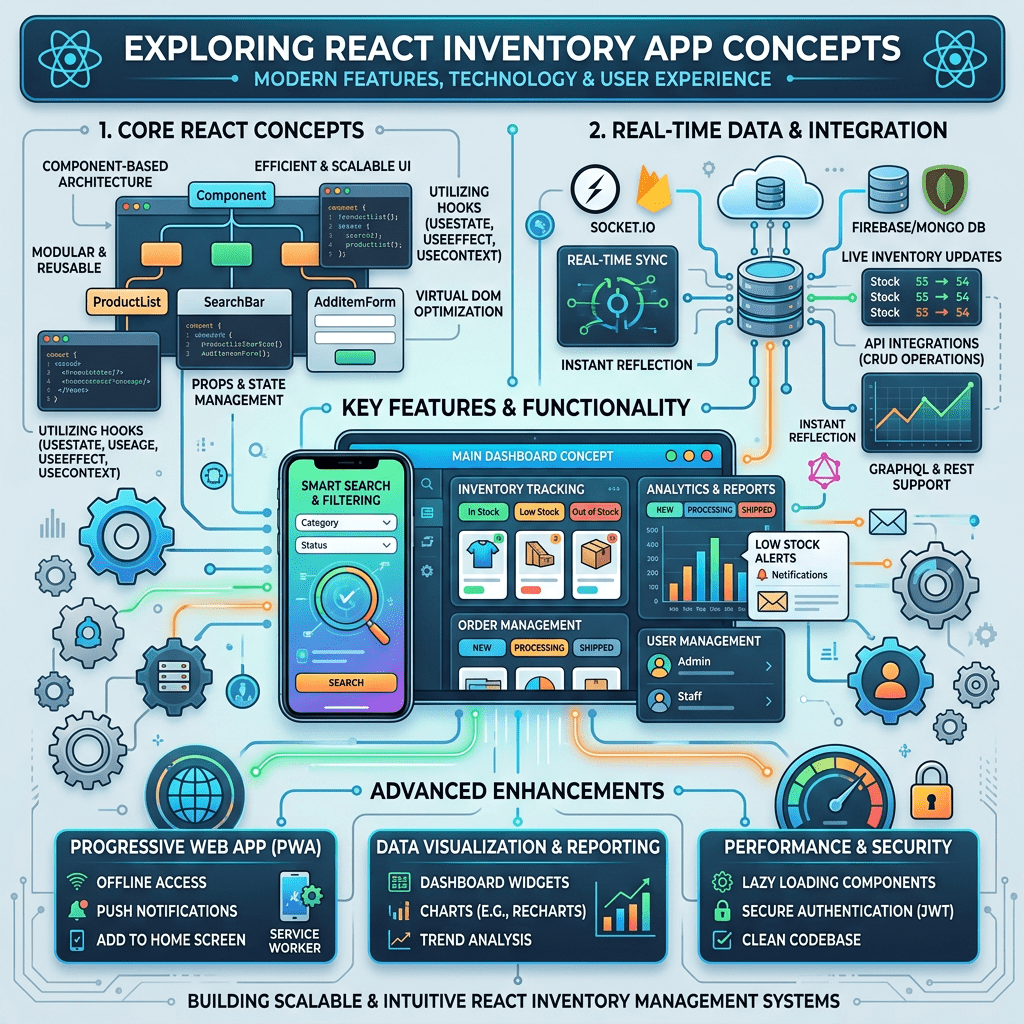
Technical Blog Article — App 32: Inventory Control with React, TypeScript, Vite, and Fluent UI
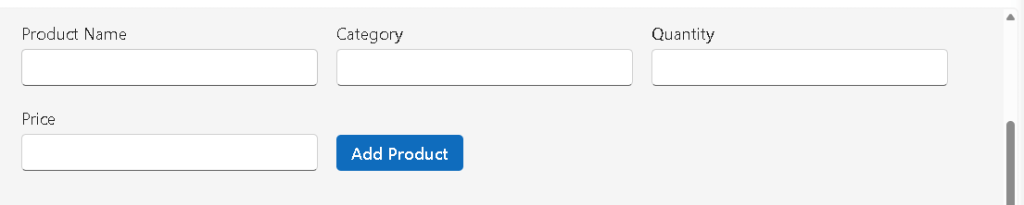
Modern enterprise applications frequently revolve around one central concept: managing data visually and interactively. One of the most common examples is inventory management. Warehouses, stores, IT departments, ERP systems, procurement portals, and internal corporate tools all rely heavily on inventory tracking interfaces.
That is why App 32 — Inventory Control is an extremely important milestone in the React learning roadmap. Unlike earlier static UI exercises, this application introduces true dynamic interaction between the user and the interface.
According to the roadmap, App 32 belongs to Block 2 — Interactivity and State, the stage where React starts becoming a real application platform instead of just a UI rendering library.
This app introduces several core React concepts simultaneously:
- component state
- controlled forms
- dynamic rendering
- immutable array updates
- derived state
- conditional rendering
- enterprise tables
- React mental model
- Fluent UI business interfaces
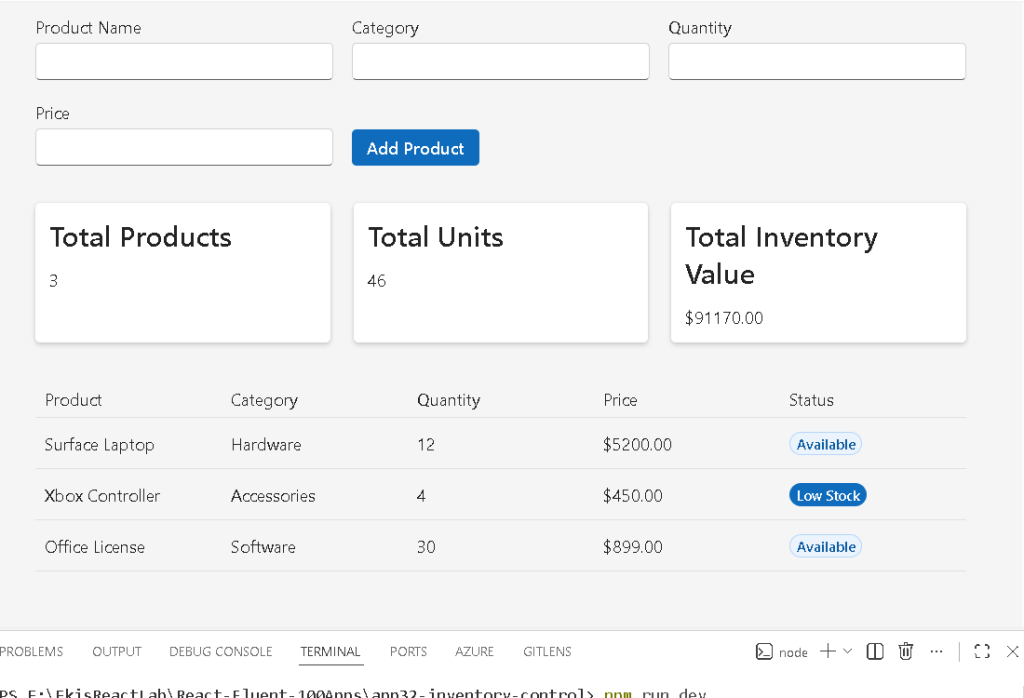
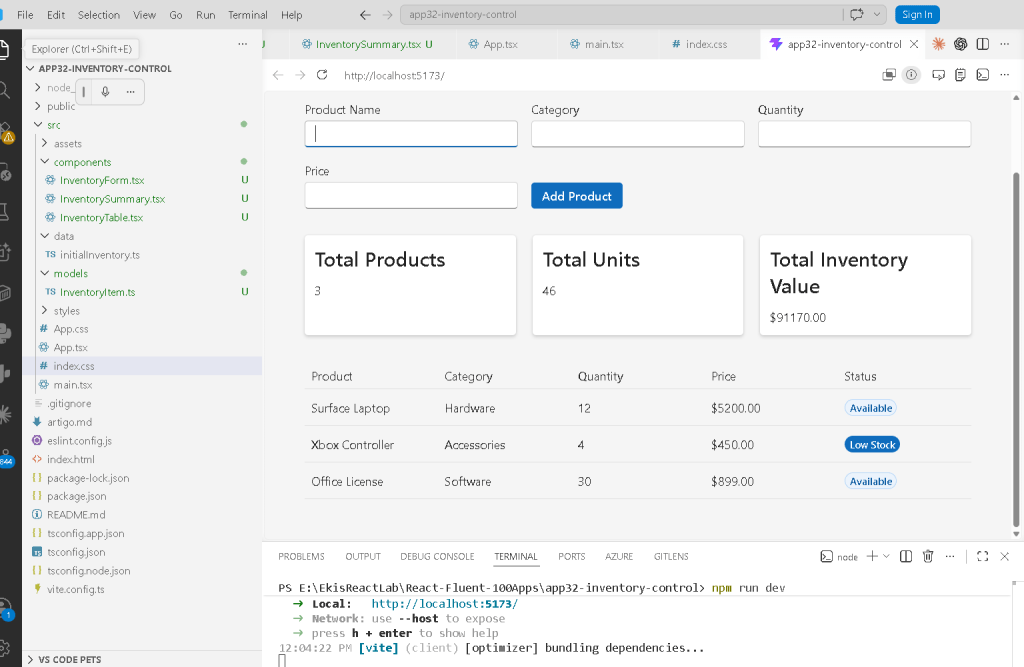
The application simulates a small inventory management system where users can:
- visualize products
- add new inventory items
- calculate totals automatically
- detect low-stock products
- interact with controlled enterprise forms
Even though the app is still relatively small, architecturally it already resembles real-world business systems.
1. Creating the Project
The first step is creating the React + TypeScript + Vite application.
PowerShell Commands
cd C:\ReactAppsmkdir bloco02cd bloco02npm create vite@latest app32-inventory-control -- --template react-tscd app32-inventory-controlnpm installnpm install @fluentui/react-components @fluentui/react-iconsmkdir src\componentsmkdir src\modelsmkdir src\datamkdir src\stylesNew-Item artigo.md -ItemType FileNew-Item src\models\InventoryItem.ts -ItemType FileNew-Item src\data\initialInventory.ts -ItemType FileNew-Item src\components\InventoryForm.tsx -ItemType FileNew-Item src\components\InventoryTable.tsx -ItemType FileNew-Item src\components\InventorySummary.tsx -ItemType File
This structure already reflects professional React architecture principles:
- separation of concerns
- reusable components
- isolated models
- dedicated data sources
- modular composition
2. Why This App Is Architecturally Important
This application is the first large step toward true business-oriented React development.
Earlier apps focused mostly on:
- JSX
- layouts
- static rendering
- props
- visual composition
Now the application starts introducing:
- mutable business data
- user interaction
- dynamic state
- calculations
- form handling
- real UI updates
This transition is critical because it introduces the real React mental model:
UI = function(state)
The interface is no longer static.
Now:
- state changes
- React detects changes
- React re-renders the UI
- the browser updates automatically
This is the core idea behind modern React.
3. Understanding the Folder Structure
The final structure becomes:
src/ components/ InventoryForm.tsx InventorySummary.tsx InventoryTable.tsx data/ initialInventory.ts models/ InventoryItem.ts styles/ App.tsx main.tsx index.css
Each folder has a very specific responsibility.
| Folder | Responsibility |
|---|---|
components/ | Reusable UI pieces |
models/ | TypeScript contracts |
data/ | Static/mock business data |
styles/ | CSS organization |
App.tsx | Main composition layer |
main.tsx | React application entry point |
This separation becomes increasingly important as applications grow.
4. The Inventory Model
The file:
src/models/InventoryItem.ts
contains:
export interface InventoryItem { id: number; productName: string; category: string; quantity: number; price: number;}
This is one of the most important files in the application.
Many beginners underestimate models because they do not generate visible UI directly. However, enterprise systems are built around data structures.
The interface defines the exact shape of an inventory item.
Every inventory object must contain:
| Property | Type |
|---|---|
id | number |
productName | string |
category | string |
quantity | number |
price | number |
5. Why TypeScript Interfaces Matter
This structure gives several enterprise advantages:
- type safety
- autocomplete
- predictable architecture
- safer refactoring
- fewer runtime bugs
- better scalability
For example, this would generate an error:
quantity: "ten"
because quantity must be a number.
This is one reason why TypeScript is heavily used in enterprise React applications.
6. The Initial Inventory Data
The file:
src/data/initialInventory.ts
contains mock inventory data.
export const initialInventory: InventoryItem[] = [ { id: 1, productName: "Surface Laptop", category: "Hardware", quantity: 12, price: 5200, },];
This file simulates data that later could come from:
- REST APIs
- databases
- ERP systems
- SharePoint lists
- Microsoft Graph
- backend services
For now, the app uses local in-memory data to focus on React fundamentals.
7. The React State System
Inside App.tsx, we create the main inventory state:
const [items, setItems] = useState<InventoryItem[]>(initialInventory);
This line is extremely important.
It introduces:
- React state
- component memory
- reactive rendering
8. Understanding useState
React components are functions.
Normally, functions lose their variables after execution.
React state solves this problem.
useState(...)
creates persistent component memory.
React stores the state internally between renders.
The syntax:
const [items, setItems]
creates two things:
| Variable | Purpose |
|---|---|
items | Current state value |
setItems | Function to update state |
This pattern appears constantly in React development.
9. Why State Triggers Re-rendering
When:
setItems(...)
is called, React:
- updates the state
- schedules a re-render
- executes the component again
- compares the new UI
- updates the DOM
This automatic rendering cycle is the foundation of React.
10. Controlled Inputs
The form uses controlled components:
<Input value={productName} onChange={(_, data) => setProductName(data.value) }/>
This means React fully controls the input value.
The input no longer owns its own state internally.
Instead:
- React stores the value
- React provides the value
- React updates the value
This is called:
Controlled Components
11. Why Controlled Inputs Matter
Controlled inputs provide:
- validation control
- predictable behavior
- synchronization
- derived calculations
- centralized data flow
This becomes essential for:
- forms
- filters
- dashboards
- enterprise systems
Without controlled inputs, managing complex forms becomes extremely difficult.
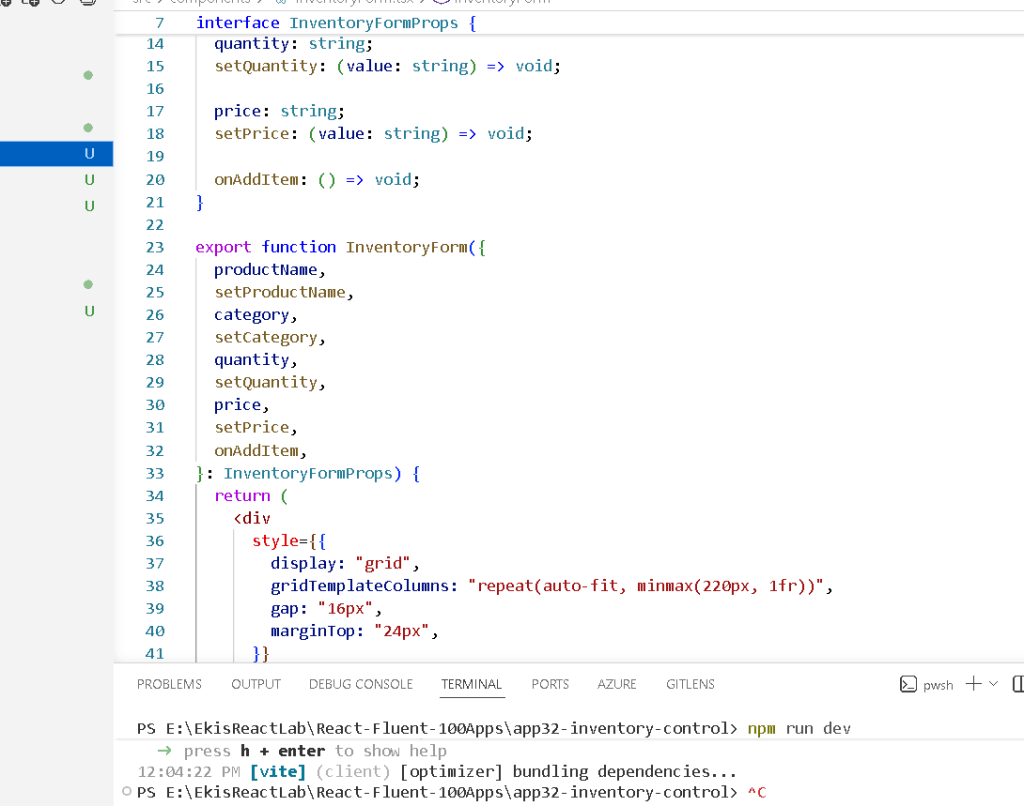
12. Understanding the Form Component
The file:
src/components/InventoryForm.tsx
receives many props:
productNamesetProductNamecategorysetCategoryquantitysetQuantity
This teaches an important React concept:
State lives in the parent component.
The form does not own the state.
App.tsx owns the state.
The form only receives:
- values
- update functions
This pattern is fundamental in React architecture.
13. Component Responsibility
Each component has one clear responsibility.
| Component | Responsibility |
|---|---|
InventoryForm | Input handling |
InventorySummary | Calculations |
InventoryTable | Data visualization |
App.tsx | State orchestration |
This separation keeps the application maintainable.
14. Immutable Updates
When adding a new item:
setItems([...items, newItem]);
This line is one of the most important concepts in React.
We NEVER do:
items.push(newItem);
because React state must be immutable.
Instead:
- we create a NEW array
- React detects the new reference
- React re-renders correctly
15. Why Immutability Matters
React detects changes mainly through references.
If you mutate the same array:
- React may not detect changes properly
- rendering bugs may appear
- state becomes unpredictable
Immutable patterns solve this.
16. Understanding the Spread Operator
[...items, newItem]
The spread operator:
- copies the existing array
- appends the new item
- creates a completely new array
Conceptually:
old array +new item =new array
17. Derived State
Inside InventorySummary.tsx:
const totalUnits = items.reduce( (sum, item) => sum + item.quantity, 0);
This is derived state.
The totals are NOT stored separately.
Instead, they are calculated from existing data.
This follows official React recommendations:
Avoid redundant state.
18. Why Derived State Is Better
Storing totals separately creates duplication.
Example of bad architecture:
itemstotalUnitstotalPrice
Now multiple pieces of state must stay synchronized.
This easily creates bugs.
Derived state avoids this.
19. Understanding reduce()
The reduce() method processes arrays into a single value.
Example:
items.reduce( (sum, item) => sum + item.quantity, 0);
This means:
- start with 0
- add each quantity
- return the final total
Conceptually:
0 + 12 + 4 + 30 = 46
20. Conditional Rendering
Inside the table:
{item.quantity <= 5 ? ( <Badge appearance="filled"> Low Stock </Badge>) : ( <Badge appearance="tint"> Available </Badge>)}
React renders different UI depending on data conditions.
This is one of the most powerful concepts in React.
The UI automatically reflects business logic.
21. Enterprise Tables with Fluent UI
The table uses Fluent UI components:
<Table><TableHeader><TableBody><TableRow><TableCell>
Instead of manually styling raw HTML tables, Fluent UI provides:
- accessibility
- Microsoft styling
- spacing consistency
- enterprise behavior
- responsive patterns
This is why Fluent UI is extremely valuable in enterprise React development.
22. Why the App Uses Multiple Components
The application intentionally avoids putting everything into one file.
Bad architecture:
App.tsx contains everything
Good architecture:
App InventoryForm InventorySummary InventoryTable
This improves:
- readability
- reuse
- maintenance
- scalability
23. Understanding React Composition
React applications scale through composition.
Components are combined like building blocks.
The hierarchy becomes:
App InventoryForm InventorySummary InventoryTable
Each component solves one problem.
24. Why There Is No useEffect Yet
This app intentionally avoids useEffect.
Why?
Because React Learn teaches:
Effects synchronize with external systems.
This app has:
- no API
- no localStorage
- no timers
- no subscriptions
Everything is internal component state.
Therefore:
useStateis enoughuseEffectwould be unnecessary
This is extremely important because many beginners overuse effects.
25. The React Mental Model
This app reinforces the correct React mental model.
React is NOT:
- manual DOM manipulation
- imperative UI updates
- jQuery-style programming
React IS:
- state-driven rendering
- declarative UI
- component composition
- reactive updates
The user changes data.
React updates the UI automatically.
26. The Relationship Between Components
The flow becomes:
User types in form ↓React state updates ↓App re-renders ↓Summary recalculates ↓Table updates ↓UI changes automatically
This is modern React architecture in practice.
27. Why This App Is Important for Enterprise Development
Inventory systems appear everywhere:
- ERP platforms
- procurement systems
- warehouse systems
- SharePoint portals
- Power Platform integrations
- Microsoft enterprise dashboards
Understanding this app prepares you for:
- CRUD systems
- dashboards
- business forms
- API-driven applications
- enterprise architecture
28. Production Validation
Run the development server:
npm run dev
Validate production build:
npm run build
Preview production build:
npm run preview
The build step is extremely important because it validates:
- TypeScript correctness
- dependency resolution
- production compilation
Technical Summary
| Concept | Explanation |
|---|---|
useState | Component memory |
| Controlled Inputs | React controls form state |
| Immutable Updates | Correct React state updates |
| Spread Operator | Creates new arrays |
map() | Dynamic rendering |
reduce() | Inventory calculations |
| Derived State | Calculated values from existing state |
| Conditional Rendering | UI changes based on business rules |
| Fluent UI Table | Enterprise data visualization |
| Composition | Small reusable components |
Official Documentation
React
- React Learn
- State: A Component’s Memory
- Updating Arrays in State
- Choosing the State Structure
- Reacting to Input with State
Fluent UI
Vite
TypeScript
Current Project Progress
| Block | App | Name | Status |
|---|---|---|---|
| Block 1 | 01 | Hello React Fluent | Completed |
| Block 1 | 02 | Profile Card | Completed |
| Block 1 | 03 | Product List | Completed |
| Block 1 | 04 | Microsoft Style User Card | Completed |
| Block 1 | 05 | Static Dashboard | Completed |
| Block 1 | 06 | Corporate Sidebar Menu | Completed |
| Block 1 | 07 | Visual Task List | Completed |
| Block 2 | 21 | Modern Counter | Completed |
| Block 2 | 22 | Toggle Theme | Completed |
| Block 2 | 23 | React Calculator | Completed |
| Block 2 | 24 | Login Form | Completed |
| Block 2 | 25 | User Registration | Completed |
| Block 2 | 26 | ToDo List | Completed |
| Block 2 | 27 | Shopping List | Completed |
| Block 2 | 28 | Product Filter | Completed |
| Block 2 | 29 | Employee Search | Completed |
| Block 2 | 30 | Shopping Cart | Completed |
| Block 2 | 31 | Grade Simulator | Completed |
| Block 2 | 32 | Inventory Control | Current |
| Block 2 | 33 | Contact Agenda | Next |


