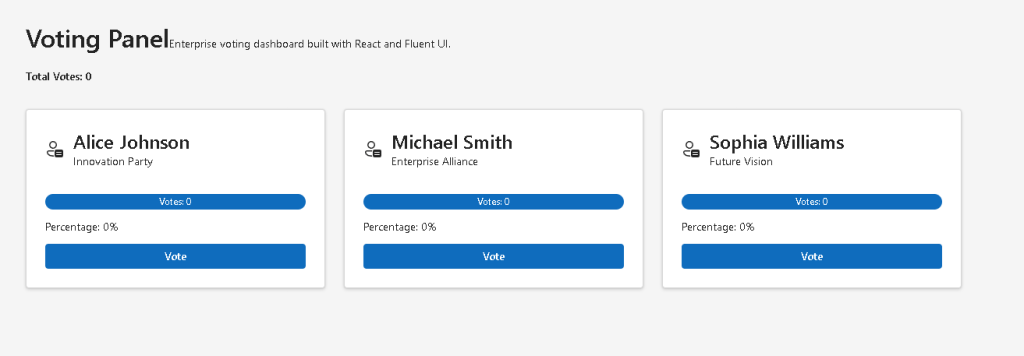
App 37: Voting Panel with React, TypeScript, Vite, and Fluent UI
App 37 is the Voting Panel, part of Block 2 — Interactivity and State, where the roadmap defines App 37 as “Painel de Votação / Voting Panel.”
The corrected version avoids invalid Fluent UI icons such as PersonNote24Regular and PersonVote24Regular. We will use:
Person24RegularTrophy24Regular
Fluent UI React icons are provided by @fluentui/react-icons, and Microsoft’s Fluent icon guidance recommends using icons as semantic visual helpers inside UI components. (Fluent 2 Design System)
PowerShell Commands
mkdir bloco02cd bloco02npm create vite@latest app37-voting-panel -- --template react-tscd app37-voting-panelnpm installnpm install @fluentui/react-components @fluentui/react-iconsmkdir src\componentsmkdir src\datamkdir src\modelsmkdir src\stylesNew-Item src\models\Candidate.ts -ItemType FileNew-Item src\data\candidates.ts -ItemType FileNew-Item src\components\CandidateCard.tsx -ItemType FileNew-Item src\components\VotingBoard.tsx -ItemType FileNew-Item artigo.md -ItemType File
Project Structure
src/ components/ CandidateCard.tsx VotingBoard.tsx data/ candidates.ts models/ Candidate.ts styles/ App.tsx main.tsx index.css
src/models/Candidate.ts
export interface Candidate { id: number; name: string; party: string; votes: number;}
src/data/candidates.ts
import type { Candidate } from "../models/Candidate";export const initialCandidates: Candidate[] = [ { id: 1, name: "Alice Johnson", party: "Innovation Party", votes: 0, }, { id: 2, name: "Michael Smith", party: "Enterprise Alliance", votes: 0, }, { id: 3, name: "Sophia Williams", party: "Future Vision", votes: 0, },];
src/components/CandidateCard.tsx
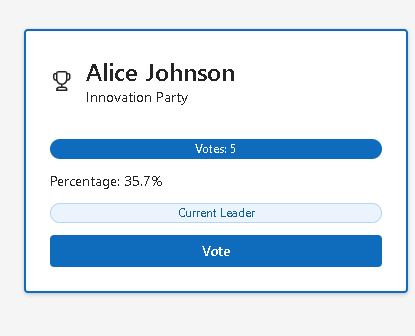
import { Badge, Button, Card, CardHeader, Text, Title3,} from "@fluentui/react-components";import { Person24Regular, Trophy24Regular,} from "@fluentui/react-icons";import type { Candidate } from "../models/Candidate";interface CandidateCardProps { candidate: Candidate; totalVotes: number; isLeader: boolean; onVote: (id: number) => void;}export function CandidateCard({ candidate, totalVotes, isLeader, onVote,}: CandidateCardProps) { const percentage = totalVotes === 0 ? "0.0" : ((candidate.votes / totalVotes) * 100).toFixed(1); return ( <Card style={{ padding: "24px", border: isLeader ? "2px solid #0f6cbd" : "1px solid #d6d6d6", }} > <CardHeader image={ isLeader ? ( <Trophy24Regular /> ) : ( <Person24Regular /> ) } header={<Title3>{candidate.name}</Title3>} description={<Text>{candidate.party}</Text>} /> <div style={{ marginTop: "20px", display: "flex", flexDirection: "column", gap: "12px", }} > <Badge appearance="filled"> Votes: {candidate.votes} </Badge> <Text>Percentage: {percentage}%</Text> {isLeader && totalVotes > 0 && ( <Badge appearance="tint"> Current Leader </Badge> )} <Button appearance="primary" onClick={() => onVote(candidate.id)} > Vote </Button> </div> </Card> );}
src/components/VotingBoard.tsx
import { useState } from "react";import { Text, Title1,} from "@fluentui/react-components";import { initialCandidates } from "../data/candidates";import { CandidateCard } from "./CandidateCard";import type { Candidate } from "../models/Candidate";export function VotingBoard() { const [candidates, setCandidates] = useState<Candidate[]>(initialCandidates); function handleVote(id: number) { setCandidates((previousCandidates) => previousCandidates.map((candidate) => { if (candidate.id === id) { return { ...candidate, votes: candidate.votes + 1, }; } return candidate; }) ); } const totalVotes = candidates.reduce( (sum, candidate) => sum + candidate.votes, 0 ); const highestVoteCount = Math.max( ...candidates.map((candidate) => candidate.votes) ); return ( <section> <Title1>Voting Panel</Title1> <Text> Enterprise voting dashboard built with React, TypeScript, Vite, and Fluent UI. </Text> <div style={{ marginTop: "20px", marginBottom: "32px", }} > <Text weight="semibold"> Total Votes: {totalVotes} </Text> </div> <div style={{ display: "grid", gridTemplateColumns: "repeat(auto-fit, minmax(280px, 1fr))", gap: "24px", }} > {candidates.map((candidate) => ( <CandidateCard key={candidate.id} candidate={candidate} totalVotes={totalVotes} isLeader={ candidate.votes === highestVoteCount && totalVotes > 0 } onVote={handleVote} /> ))} </div> </section> );}
src/App.tsx
import { VotingBoard } from "./components/VotingBoard";function App() { return ( <main style={{ minHeight: "100vh", padding: "48px", backgroundColor: "#f5f5f5", boxSizing: "border-box", }} > <div style={{ maxWidth: "1200px", margin: "0 auto", }} > <VotingBoard /> </div> </main> );}export default App;
src/main.tsx
import React from "react";import ReactDOM from "react-dom/client";import { FluentProvider, webLightTheme,} from "@fluentui/react-components";import App from "./App";import "./index.css";ReactDOM.createRoot( document.getElementById("root")!).render( <React.StrictMode> <FluentProvider theme={webLightTheme}> <App /> </FluentProvider> </React.StrictMode>);
src/index.css
body { margin: 0; font-family: "Segoe UI", Arial, sans-serif;}* { box-sizing: border-box;}
Technical Explanation
The most important line in this application is:
const [candidates, setCandidates] = useState<Candidate[]>(initialCandidates);
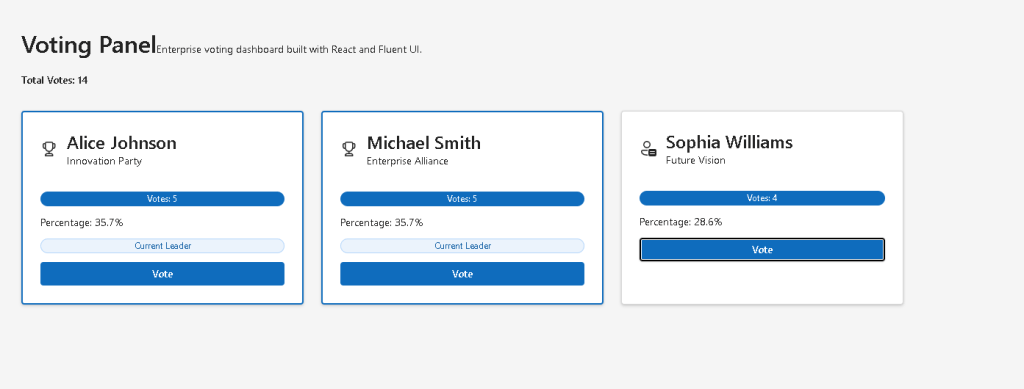
This creates the app memory. Every time the user clicks Vote, React updates the candidate list and renders the UI again.
The voting update is immutable:
return { ...candidate, votes: candidate.votes + 1,};
This means we do not modify the old object directly. We create a new object with the updated vote count.
The total votes are derived:
const totalVotes = candidates.reduce( (sum, candidate) => sum + candidate.votes, 0);
This is correct React design because totalVotes can be calculated from existing state. It does not need its own useState.
Run and Validate
npm run dev
npm run build
npm run preview
Technical Summary
| Concept | Explanation |
|---|---|
useState | Stores the candidate list |
setCandidates | Updates the voting state |
map() | Creates a new candidate array |
| Spread operator | Copies the existing candidate |
reduce() | Calculates total votes |
| Derived state | Total and percentage are calculated |
| Conditional rendering | Shows leader badge only when needed |
| Fluent UI | Provides Card, Button, Badge, Text |
| Corrected icon | Uses Person24Regular, not invalid icons |
Official Documentation
| Topic | Link |
|---|---|
| React Learn | https://react.dev/learn |
| State | https://react.dev/learn/state-a-components-memory |
| Events | https://react.dev/learn/responding-to-events |
| Updating Arrays | https://react.dev/learn/updating-arrays-in-state |
| Fluent UI React | https://react.fluentui.dev |
| Fluent Icons | https://fluent2.microsoft.design/components/web/react/core/icon/usage |
| Vite | https://vite.dev/guide/ |
| TypeScript | https://www.typescriptlang.org/docs/ |
Current Progress
| Block | App | Name | Status |
|---|---|---|---|
| Block 2 | 37 | Voting Panel | Corrected |
| Block 2 | 38 | Interactive Quiz | Next |


