Technical Blog Article — App 58: Ticket Control with React, TypeScript, Vite, and Fluent UI
Introduction
In modern enterprise systems, ticket management interfaces are everywhere. Organizations use ticket systems to control incidents, service requests, approvals, infrastructure problems, SharePoint access issues, ERP support workflows, CRM operations, and internal IT support.
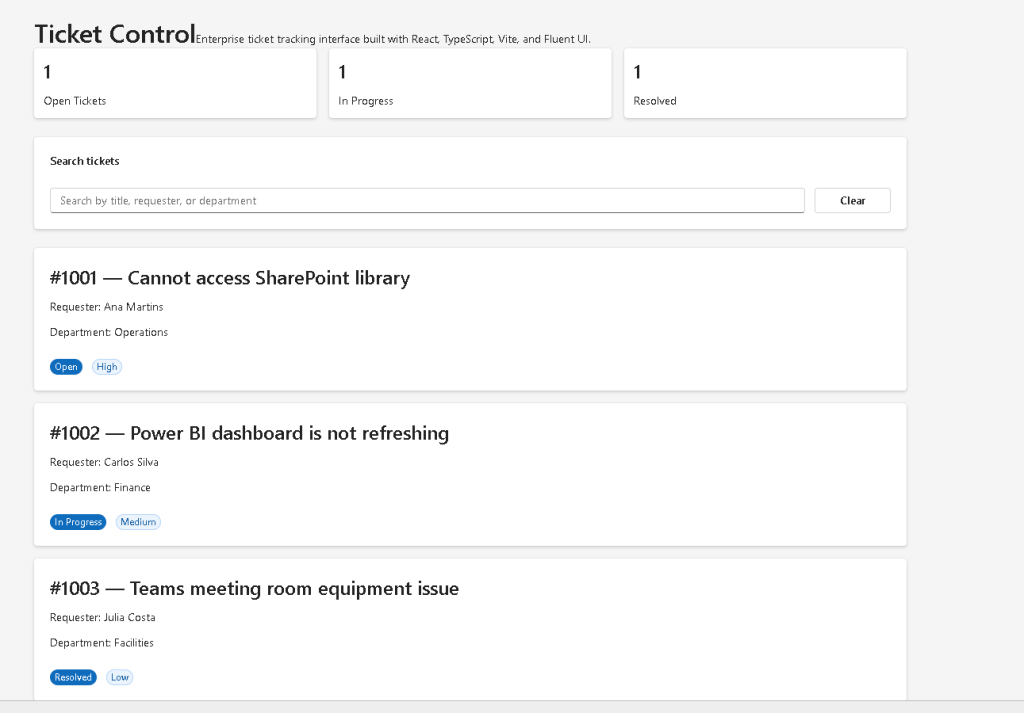
In App 58 — Ticket Control, we build a Microsoft-style enterprise ticket dashboard using:
- React
- TypeScript
- Vite
- Fluent UI
This application belongs to Block 3 — Professional Fluent UI, where the project transitions from basic React rendering into enterprise UI architecture using Microsoft design patterns. The roadmap defines Block 3 as the stage focused on:
- FluentProvider
- themes
- dialogs
- DataGrid
- toolbar
- tabs
- enterprise layouts
- reusable enterprise components
This app introduces an important React architectural concept:
UI should be derived from filtered state and data.
Instead of manually manipulating the DOM, React receives:
- application data
- component state
- filtering rules
and automatically re-renders the correct interface.
This application also reinforces:
- component composition
- derived filtering
- reusable components
- enterprise layout organization
- Fluent UI card systems
- Microsoft visual standards
Official references:
1. What This Application Teaches
This application teaches several important enterprise React concepts.
| Concept | Explanation |
|---|---|
| State-driven filtering | Search dynamically filters tickets |
| Derived UI | Filtered results are calculated from state |
| Component composition | UI split into reusable sections |
| Enterprise layout | Microsoft-style dashboard structure |
| Fluent UI cards | Professional container components |
| Controlled input | Search field controlled by React state |
| TypeScript models | Strongly typed ticket structure |
| List rendering | Dynamic rendering using map() |
| Immutable architecture | Original ticket data never changes |
| React rendering flow | State updates trigger UI updates |
The mental model is:
User types→ React state updates→ filtering logic runs→ React re-renders→ filtered tickets appear
This is declarative UI architecture.
2. Create the Project
Use PowerShell:
cd C:\ReactAppsNew-Item bloco03 -ItemType Directorycd bloco03npm create vite@latest app58-ticket-control -- --template react-tscd app58-ticket-controlnpm installnpm install @fluentui/react-components @fluentui/react-icons
3. Create the Folder Structure
New-Item src\components -ItemType DirectoryNew-Item src\models -ItemType DirectoryNew-Item src\data -ItemType DirectoryNew-Item src\styles -ItemType Directory
Create files:
New-Item src\models\Ticket.ts -ItemType FileNew-Item src\data\tickets.ts -ItemType FileNew-Item src\components\TicketSummary.tsx -ItemType FileNew-Item src\components\TicketFilters.tsx -ItemType FileNew-Item src\components\TicketList.tsx -ItemType FileNew-Item artigo.md -ItemType File
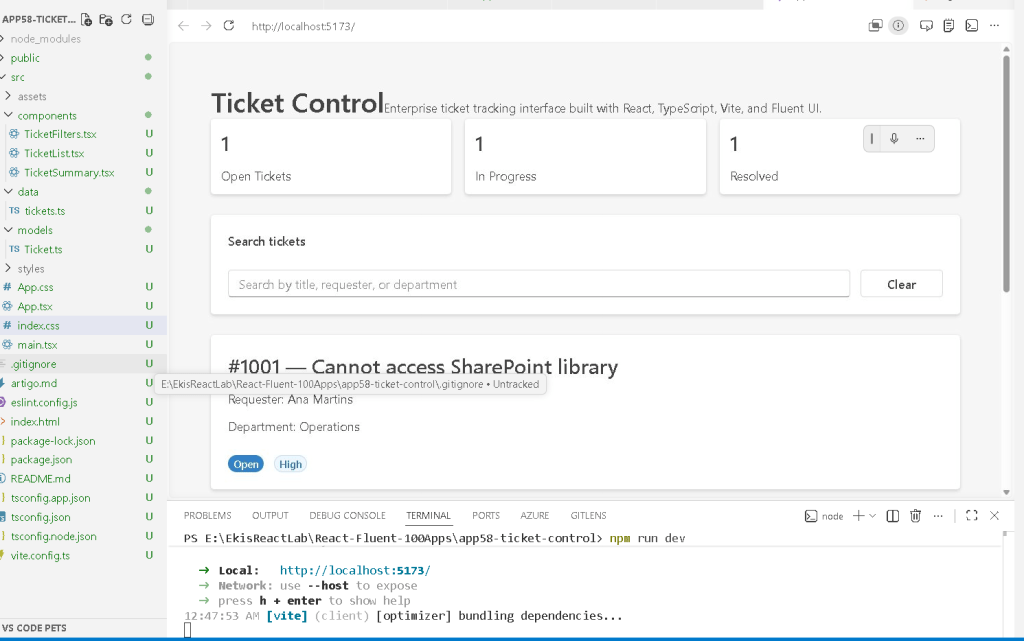
4. Final Folder Structure
app58-ticket-control/ src/ components/ TicketSummary.tsx TicketFilters.tsx TicketList.tsx models/ Ticket.ts data/ tickets.ts styles/ App.tsx main.tsx index.css artigo.md
This structure matters because enterprise React applications should separate responsibilities.
| Folder | Responsibility |
|---|---|
components/ | Reusable UI pieces |
models/ | TypeScript interfaces and types |
data/ | Static or mock data |
styles/ | CSS organization |
App.tsx | Main layout composition |
main.tsx | React entry point |
5. Creating the Ticket Model
src\models\Ticket.ts
export type TicketStatus = | "Open" | "In Progress" | "Resolved";export type TicketPriority = | "High" | "Medium" | "Low";export interface Ticket { id: number; title: string; requester: string; department: string; status: TicketStatus; priority: TicketPriority;}
This file defines the structure of every ticket.
This is important because enterprise applications require predictable data structures.
The interface guarantees:
- every ticket has an id
- every ticket has a title
- every ticket has a valid status
- every ticket has a valid priority
Without typing:
- state becomes unpredictable
- bugs become harder to detect
- refactoring becomes dangerous
This is one of the biggest advantages of TypeScript in enterprise React systems.
6. Creating the Ticket Data Source
src\data\tickets.ts
import type { Ticket } from "../models/Ticket";export const tickets: Ticket[] = [ { id: 1001, title: "Cannot access SharePoint library", requester: "Ana Martins", department: "Operations", status: "Open", priority: "High", },];
This file introduces an important React concept:
UI should come from data.
Instead of hardcoding multiple cards manually inside JSX, React uses arrays and rendering loops.
This creates scalable interfaces.
7. Understanding Component Composition
The application is divided into three major UI sections:
| Component | Responsibility |
|---|---|
TicketSummary | Dashboard metrics |
TicketFilters | Search/filter controls |
TicketList | Ticket rendering |
This is one of the most important React patterns:
Large UI→ broken into smaller components→ each component has one responsibility
This makes applications:
- easier to scale
- easier to maintain
- easier to debug
- easier to reuse
8. The Ticket Summary Component
TicketSummary.tsx
This component calculates dashboard metrics.
Example:
const open = tickets.filter( (ticket) => ticket.status === "Open" ).length;
This is derived data.
The application does NOT store:
openCountresolvedCountinProgressCount
inside React state.
Instead, React calculates them from the existing data source.
This follows official React guidance:
Avoid redundant state.
Official documentation:
9. Why Derived Data Matters
Bad architecture:
const [openCount, setOpenCount]
Good architecture:
const open = tickets.filter(...).length;
Why?
Because:
- there is less duplicated data
- there are fewer synchronization bugs
- rendering stays predictable
- architecture becomes simpler
React applications should derive values whenever possible.
10. Understanding Fluent UI Cards
The summary dashboard uses:
<Card>
Fluent UI Cards provide:
- enterprise spacing
- Microsoft styling
- accessibility
- layout consistency
- responsive behavior
Cards are extremely common in:
- dashboards
- SharePoint portals
- analytics systems
- admin panels
- CRM systems
11. Understanding the Search Filter
TicketFilters.tsx
This component introduces controlled inputs.
The input uses:
value={searchText}
combined with:
onChange={(_, data) => onSearchChange(data.value)}
This means:
React controls the input value.
The browser input is no longer the source of truth.
React state becomes the source of truth.
This is one of the core concepts of React forms.
Official documentation:
12. Understanding Controlled Inputs
The rendering cycle becomes:
User types→ onChange fires→ React state updates→ App re-renders→ filtered list updates
This is declarative rendering.
We are not manually hiding or showing cards.
We only update state.
React handles the UI synchronization automatically.
13. Understanding useState
Inside App.tsx:
const [searchText, setSearchText] = useState("");
This creates component memory.
| Part | Meaning |
|---|---|
searchText | Current search value |
setSearchText | Function used to update the value |
useState | React Hook for component state |
State exists because local variables disappear between renders.
React components re-run frequently.
State persists across renders.
Official documentation:
14. Understanding Derived Filtering
The filtering logic:
const filteredTickets = tickets.filter((ticket) => {
creates a derived array.
Important:
The original tickets array never changes.
React creates a new filtered result.
This is immutable architecture.
15. Why Immutable Patterns Matter
React strongly prefers immutable logic because:
- rendering becomes predictable
- debugging becomes easier
- accidental mutations are avoided
- memoization becomes safer
Bad approach:
tickets.splice(...)
Good approach:
tickets.filter(...)
React applications should avoid mutating original collections.
16. Understanding map() Rendering
Inside TicketList.tsx:
tickets.map((ticket) => (
This converts data into UI.
Conceptually:
Ticket object→ React component→ Fluent UI Card→ rendered interface
This is declarative rendering.
Instead of manually creating DOM nodes, we describe what should appear.
Official documentation:
17. Why key={ticket.id} Matters
Inside the list:
key={ticket.id}
Keys help React identify list elements.
This becomes critical when:
- items are added
- items are removed
- items are reordered
Without keys:
- React shows warnings
- rendering becomes less efficient
Keys should be:
- stable
- unique
- predictable
18. Understanding Fluent UI Badges
The app uses:
<Badge>
Badges provide:
- visual status indicators
- enterprise semantic feedback
- compact information display
Examples:
- Open
- Resolved
- High Priority
This is very common in:
- ticket systems
- dashboards
- workflow systems
- approval portals
19. Layout Composition
The application layout uses:
display: "grid"
and:
display: "flex"
Grid is used for:
- dashboard cards
- responsive layouts
Flexbox is used for:
- alignment
- spacing
- horizontal grouping
Modern enterprise UI heavily depends on:
- Flexbox
- CSS Grid
20. Understanding main.tsx
The file:
src/main.tsx
connects:
- React
- ReactDOM
- FluentProvider
- App.tsx
- the HTML page
Critical section:
<FluentProvider theme={webLightTheme}>
This activates:
- Microsoft design tokens
- Fluent typography
- accessibility behavior
- component styling
- theme consistency
Without FluentProvider:
- Fluent UI components lose their theme system
21. Why There Is No useEffect
This app intentionally avoids useEffect.
There is:
- no API request
- no timer
- no external synchronization
The UI is entirely derived from:
- local data
- React state
- filtering logic
According to React Learn:
“You Might Not Need an Effect.”
Official documentation:
This is extremely important.
Many beginners misuse useEffect for internal calculations.
But filtering derived arrays does NOT require effects.
22. The React Mental Model in This App
This application reinforces the most important React principle:
UI = function(state + data)
The interface automatically changes according to:
- user input
- filtering rules
- derived rendering
React is declarative.
You describe:
- what the UI should look like
React handles:
- rendering
- updates
- synchronization
23. Running the Application
Development server:
npm run dev
Production validation:
npm run build
Production preview:
npm run preview
24. Technical Summary
| Concept | Explanation |
|---|---|
useState | Stores search input |
| Controlled Input | React controls filter field |
| Derived Filtering | Filtered tickets calculated from state |
| Fluent UI Card | Enterprise ticket container |
| Fluent UI Badge | Visual status indicator |
| TypeScript Interface | Predictable ticket structure |
map() | Converts data into UI |
filter() | Creates derived collections |
| Immutable Architecture | Original array never changes |
| FluentProvider | Activates Microsoft theme system |
25. Concept Table
| Concept | File | Why It Matters |
|---|---|---|
| Ticket model | Ticket.ts | Defines predictable ticket structure |
| Ticket data | tickets.ts | Source of UI rendering |
| Summary dashboard | TicketSummary.tsx | Derived metrics |
| Search filtering | TicketFilters.tsx | Controlled input architecture |
| Ticket rendering | TicketList.tsx | Declarative list rendering |
| React state | App.tsx | Stores search text |
| Fluent UI | All components | Microsoft enterprise UI |
| Derived state | App.tsx | Filtering computed from state |
26. Official Documentation
React
- React Learn
- State: A Component’s Memory
- Rendering Lists
- Reacting to Input with State
- Choosing the State Structure
- You Might Not Need an Effect
Fluent UI
Tooling
27. Final Architectural Insight
This application introduces one of the most important enterprise React patterns:
Data→ filtering rules→ derived UI→ enterprise rendering
The user never manipulates the interface directly.
Instead:
- the user changes state
- React recalculates the UI
- React renders the result
This same architecture appears later in:
- CRM systems
- admin portals
- SharePoint dashboards
- ticket systems
- ERP applications
- approval workflows
- analytics dashboards
Mastering this pattern is essential before:
- API integration
- reducers
- Context API
- routing
- enterprise dashboards
- DataGrid systems
Because in React:
State changes.React re-renders.UI updates automatically.
Current Project Progress
| Block | App | Name | Status |
|---|---|---|---|
| Block 3 | 41 | Microsoft Style Login | Completed |
| Block 3 | 42 | Corporate Form | Completed |
| Block 3 | 43 | Tabs Navigation | Completed |
| Block 3 | 44 | Dialog Manager | Completed |
| Block 3 | 45 | Executive Dashboard | Completed |
| Block 3 | 46 | DataGrid Catalog | Completed |
| Block 3 | 47 | Enterprise User List | Completed |
| Block 3 | 48 | Navigable Sidebar | Completed |
| Block 3 | 49 | Corporate Header | Completed |
| Block 3 | 50 | Professional Toolbar | Completed |
| Block 3 | 51 | Notification System | Completed |
| Block 3 | 52 | Administrative Panel | Completed |
| Block 3 | 53 | Ticket Manager | Completed |
| Block 3 | 54 | Approval System | Completed |
| Block 3 | 55 | Corporate Calendar | Completed |
| Block 3 | 56 | SharePoint Inspired Dashboard | Completed |
| Block 3 | 57 | Project Management | Completed |
| Block 3 | 58 | Ticket Control | Current |
| Block 3 | 59 | Visual CRM | Next |
| Block 3 | 60 | Corporate Explorer | Upcoming |


