Technical Blog Article — App 63: Async Search with React, TypeScript, Vite, and Fluent UI
Introduction
Modern enterprise applications depend heavily on asynchronous data retrieval. Almost every professional React system eventually needs to:
- search remote data
- retrieve users
- query APIs
- display dynamic results
- synchronize UI with external systems
- handle loading and error states
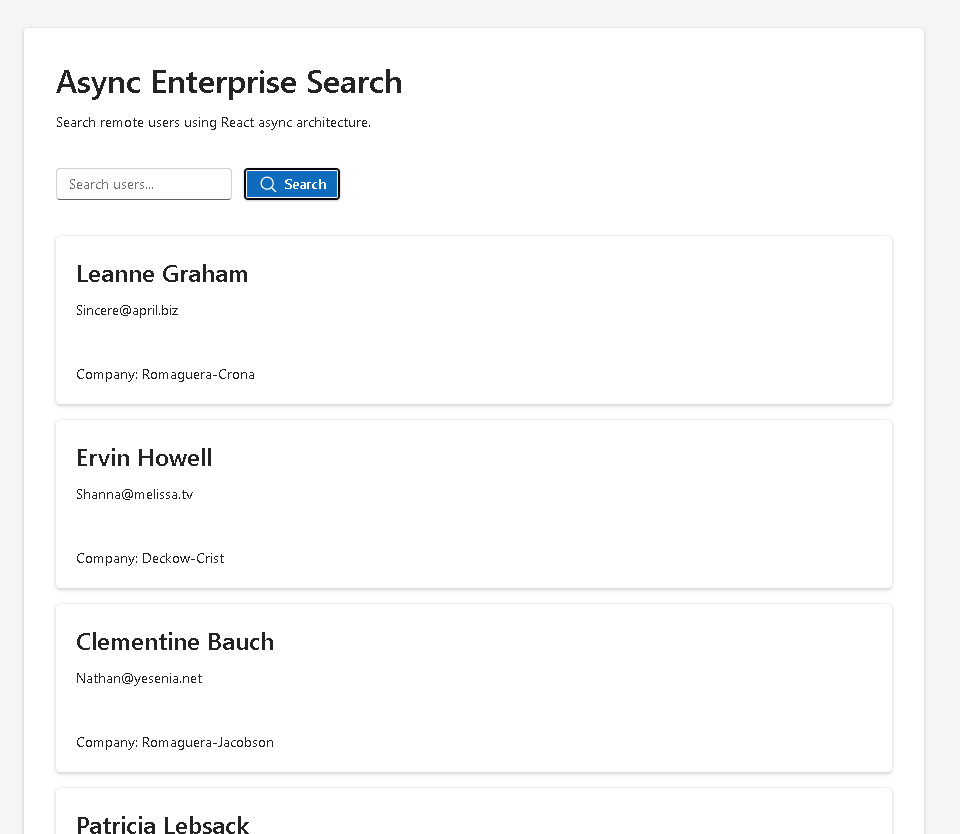
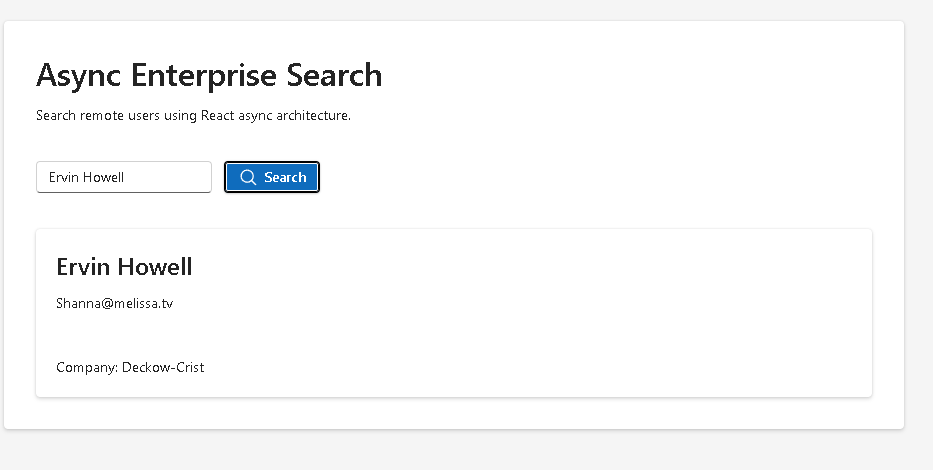
This is exactly the purpose of App 63 — Async Search.
This application belongs to Block 4 — Effects and Architecture, where the ReactLab roadmap transitions from local UI rendering into external synchronization, async architecture, effects, services, APIs, and scalable enterprise patterns.
The app simulates a Microsoft-style enterprise search experience using:
- React
- TypeScript
- Vite
- Fluent UI
- async/await
- Fetch API
- controlled components
- loading states
- error handling
- conditional rendering
This app introduces one of the most important React mental models:
External systemsmust synchronize with React state.
Unlike static rendering, asynchronous systems involve:
- waiting
- latency
- failures
- synchronization
- external dependencies
Because of this, React applications must manage async workflows carefully.
The key rendering model becomes:
User interaction→ state update→ async operation→ external response→ React re-render→ UI updates automatically
This is the foundation of:
- dashboards
- SharePoint portals
- Microsoft 365 integrations
- search engines
- GitHub explorers
- CRM systems
- admin panels
- enterprise React applications
1. Project Goal
The purpose of App 63 is to create an enterprise search interface capable of:
- receiving user search input
- sending async requests
- retrieving remote users
- rendering search results
- displaying loading feedback
- handling failures gracefully
- organizing code professionally
The app intentionally separates:
- models
- services
- components
- rendering logic
This separation is critical in scalable React applications.
2. React Learn Concepts Introduced
This app directly connects to several important React Learn sections:
| React Concept | Purpose |
|---|---|
| Synchronizing with Effects | Async synchronization |
| Reacting to Input with State | Controlled search input |
| Conditional Rendering | Loading and error UI |
| State as Component Memory | Search state |
| Lifecycle of Reactive Effects | Async request lifecycle |
| Keeping Components Pure | Rendering separation |
Official React documentation:
3. Create the Project
Create the Block Folder
cd C:\ReactAppsNew-Item bloco04 -ItemType Directorycd bloco04
Create the Vite React Project
npm create vite@latest app63-async-search -- --template react-ts
This creates:
- React
- TypeScript
- Vite configuration
- development server
- ESLint integration
- project structure
Enter the Project
cd app63-async-search
Install Dependencies
npm install
Install Fluent UI
npm install @fluentui/react-components @fluentui/react-icons
Fluent UI provides:
- Microsoft design system
- accessibility
- enterprise components
- typography
- responsive layout behavior
- theme system
Official documentation:
4. Create the Folder Structure
New-Item src\components -ItemType DirectoryNew-Item src\services -ItemType DirectoryNew-Item src\models -ItemType DirectoryNew-Item src\hooks -ItemType DirectoryNew-Item src\styles -ItemType Directory
5. Create the Files
New-Item src\models\UserResult.ts -ItemType FileNew-Item src\services\searchService.ts -ItemType FileNew-Item src\components\SearchBar.tsx -ItemType FileNew-Item src\components\SearchResults.tsx -ItemType FileNew-Item src\components\LoadingState.tsx -ItemType FileNew-Item src\components\ErrorMessage.tsx -ItemType FileNew-Item artigo.md -ItemType File
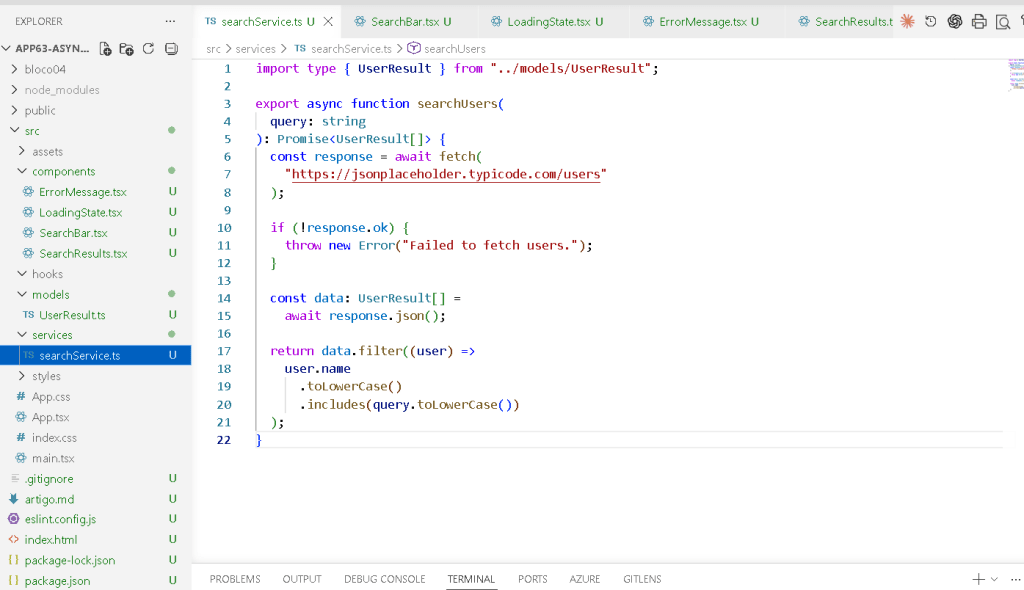
6. Final Project Structure
app63-async-search/ src/ components/ ErrorMessage.tsx LoadingState.tsx SearchBar.tsx SearchResults.tsx services/ searchService.ts models/ UserResult.ts hooks/ styles/ App.tsx main.tsx index.css
This structure is extremely important because professional React applications should separate:
- rendering
- data retrieval
- models
- UI concerns
- orchestration
7. Create the API Model
src\models\UserResult.ts
export interface UserResult { id: number; name: string; email: string; company: { name: string; };}
This defines the expected API structure.
The app uses the public API:
https://jsonplaceholder.typicode.com/users
TypeScript ensures:
- predictable rendering
- safer refactoring
- autocomplete
- type validation
Without TypeScript models:
- API rendering becomes fragile
- runtime bugs become more likely
- maintenance becomes harder
8. Create the Service Layer
src\services\searchService.ts
import type { UserResult } from "../models/UserResult";export async function searchUsers( query: string): Promise<UserResult[]> { const response = await fetch( "https://jsonplaceholder.typicode.com/users" ); if (!response.ok) { throw new Error("Failed to fetch users."); } const data: UserResult[] = await response.json(); return data.filter((user) => user.name .toLowerCase() .includes(query.toLowerCase()) );}
9. Why the Service Layer Matters
One of the biggest architectural mistakes in beginner React apps is placing:
- fetch
- filtering
- error handling
- rendering
- state updates
all inside one giant component.
Instead, this project separates responsibilities:
| Layer | Responsibility |
|---|---|
| Components | UI rendering |
| Services | External systems |
| Models | Data contracts |
| App.tsx | State orchestration |
This architecture scales far better in enterprise environments.
10. Understanding async/await
The function:
export async function searchUsers(...)
is asynchronous.
This means it returns a Promise.
Inside:
await fetch(...)
JavaScript pauses until the HTTP request completes.
Without async handling:
- the app would continue immediately
- data would not be ready
- rendering would fail
11. Understanding the Fetch API
The Fetch API performs HTTP requests.
fetch("https://jsonplaceholder.typicode.com/users")
This retrieves remote data.
The response contains:
- status
- headers
- metadata
- response body
The JSON body is extracted with:
await response.json()
Official documentation:
12. Create the Search Bar
src\components\SearchBar.tsx
import { Button, Input,} from "@fluentui/react-components";import { Search24Regular,} from "@fluentui/react-icons";interface SearchBarProps { query: string; onQueryChange: (value: string) => void; onSearch: () => void;}export function SearchBar({ query, onQueryChange, onSearch,}: SearchBarProps) { return ( <div style={{ display: "flex", gap: "12px", }} > <Input value={query} placeholder="Search users..." onChange={(_, data) => onQueryChange(data.value) } /> <Button appearance="primary" icon={<Search24Regular />} onClick={onSearch} > Search </Button> </div> );}
13. Controlled Inputs
The search input is controlled.
value={query}
and:
onChange={...}
This means:
- React owns the value
- state becomes the source of truth
- rendering becomes predictable
This is one of the core React mental models.
Official documentation:
14. Create the Loading Component
src\components\LoadingState.tsx
import { Spinner, Text,} from "@fluentui/react-components";export function LoadingState() { return ( <div style={{ display: "flex", gap: "12px", alignItems: "center", marginTop: "24px", }} > <Spinner /> <Text> Loading search results... </Text> </div> );}
15. Why Loading States Matter
Without loading feedback:
- the interface feels frozen
- users think the app broke
- UX becomes confusing
Enterprise applications must always communicate async status.
16. Create the Error Component
src\components\ErrorMessage.tsx
import { MessageBar, MessageBarBody,} from "@fluentui/react-components";interface ErrorMessageProps { message: string;}export function ErrorMessage({ message,}: ErrorMessageProps) { return ( <MessageBar intent="error"> <MessageBarBody> {message} </MessageBarBody> </MessageBar> );}
17. Create Search Results
src\components\SearchResults.tsx
import { Card, Text, Title3,} from "@fluentui/react-components";import type { UserResult } from "../models/UserResult";interface SearchResultsProps { results: UserResult[];}export function SearchResults({ results,}: SearchResultsProps) { return ( <div style={{ display: "grid", gap: "16px", marginTop: "24px", }} > {results.map((user) => ( <Card key={user.id} style={{ padding: "20px", }} > <Title3>{user.name}</Title3> <Text>{user.email}</Text> <br /> <Text> Company: {user.company.name} </Text> </Card> ))} </div> );}
18. Rendering Lists with map()
This app uses:
results.map(...)
React transforms data into UI.
This is declarative rendering.
Instead of manually creating DOM nodes, we describe:
- what the UI should look like
- based on the data
Official documentation:
19. Create App.tsx
src\App.tsx
import { useState } from "react";import { Card, FluentProvider, Title1, Text, webLightTheme,} from "@fluentui/react-components";import { SearchBar } from "./components/SearchBar";import { SearchResults } from "./components/SearchResults";import { LoadingState } from "./components/LoadingState";import { ErrorMessage } from "./components/ErrorMessage";import { searchUsers } from "./services/searchService";import type { UserResult } from "./models/UserResult";function App() { const [query, setQuery] = useState(""); const [results, setResults] = useState<UserResult[]>([]); const [loading, setLoading] = useState(false); const [error, setError] = useState(""); async function handleSearch() { try { setLoading(true); setError(""); const users = await searchUsers(query); setResults(users); } catch (err) { setError( "Search failed. Please try again." ); } finally { setLoading(false); } } return ( <FluentProvider theme={webLightTheme}> <main style={{ minHeight: "100vh", backgroundColor: "#f5f5f5", padding: "48px", boxSizing: "border-box", }} > <section style={{ maxWidth: "900px", margin: "0 auto", }} > <Card style={{ padding: "32px", }} > <Title1> Async Enterprise Search </Title1> <Text> Search remote users using React async architecture. </Text> <div style={{ marginTop: "24px", }} > <SearchBar query={query} onQueryChange={setQuery} onSearch={handleSearch} /> </div> {loading && <LoadingState />} {error && ( <div style={{ marginTop: "24px", }} > <ErrorMessage message={error} /> </div> )} {!loading && !error && results.length > 0 && ( <SearchResults results={results} /> )} </Card> </section> </main> </FluentProvider> );}export default App;
20. Understanding the Rendering Flow
The complete rendering flow becomes:
User types query→ query state updatesUser clicks Search→ handleSearch runsloading becomes true→ spinner appearssearchUsers()→ async API requestAPI returns data→ results state updatesReact re-renders→ SearchResults appearloading becomes false→ spinner disappears
This is the heart of async React rendering.
21. Why try/catch/finally Matters
try {}catch {}finally {}
This guarantees:
- loading starts correctly
- errors are handled
- loading always stops
Without finally, loading might remain active forever after failures.
22. Conditional Rendering
This app uses:
{loading && <LoadingState />}
and:
{error && <ErrorMessage />}
This is conditional rendering.
The UI changes automatically according to state.
Official documentation:
23. Create main.tsx
src\main.tsx
import React from "react";import ReactDOM from "react-dom/client";import App from "./App";import "./index.css";ReactDOM.createRoot( document.getElementById("root")!).render( <React.StrictMode> <App /> </React.StrictMode>);
24. Create index.css
src\index.css
body { margin: 0; font-family: "Segoe UI", Arial, sans-serif;}* { box-sizing: border-box;}
25. Run the Application
Development:
npm run dev
Production validation:
npm run build
Production preview:
npm run preview
26. Technical Summary
| Concept | Explanation |
|---|---|
| Controlled Input | React owns search value |
| Async/Await | Handles asynchronous requests |
| Fetch API | Retrieves remote data |
| Service Layer | Separates API logic |
| Loading State | Shows async progress |
| Error State | Handles failures |
| Conditional Rendering | UI derives from state |
| Fluent UI | Enterprise Microsoft UI |
| TypeScript Models | Safe API contracts |
| Declarative Rendering | React renders from state |
27. Concept Table
| Concept | File | Why It Matters |
|---|---|---|
| API model | UserResult.ts | Strong typing |
| Async service | searchService.ts | External synchronization |
| Search input | SearchBar.tsx | Controlled component |
| Loading feedback | LoadingState.tsx | Better UX |
| Error handling | ErrorMessage.tsx | Graceful failures |
| Data rendering | SearchResults.tsx | Declarative UI |
| State orchestration | App.tsx | Coordinates async flow |
28. Official Documentation
| Topic | Documentation |
|---|---|
| React Learn | React Learn |
| Synchronizing with Effects | Synchronizing with Effects |
| Lifecycle of Reactive Effects | Lifecycle of Reactive Effects |
| Conditional Rendering | Conditional Rendering |
| Rendering Lists | Rendering Lists |
| Fluent UI | Fluent UI React Components |
| Fetch API | MDN Fetch API |
| Vite | Vite Guide |
| TypeScript | TypeScript Docs |
29. Final Architectural Insight
The most important lesson from App 63 is:
Remote data does not change the React mental model.
Even with APIs and async systems:
State changes→ React re-renders→ UI updates automatically
The app still follows the same declarative architecture introduced in the earlier apps.
The difference is that now React must synchronize with:
- networks
- APIs
- latency
- asynchronous systems
This is the foundation for:
- enterprise dashboards
- SharePoint integrations
- GitHub explorers
- CRM search systems
- admin portals
- Microsoft 365 applications
Current Project Progress
| Block | App | Name | Status |
|---|---|---|---|
| Block 1 | 01–20 | Fundamentals and UI | Completed |
| Block 2 | 21–40 | Interactivity and State | Completed |
| Block 3 | 41–60 | Professional Fluent UI | Completed |
| Block 4 | 61 | REST API Consumption | Completed |
| Block 4 | 62 | API Dashboard | Completed |
| Block 4 | 63 | Async Search | Current |
| Block 4 | 64 | GitHub User Explorer | Next |


