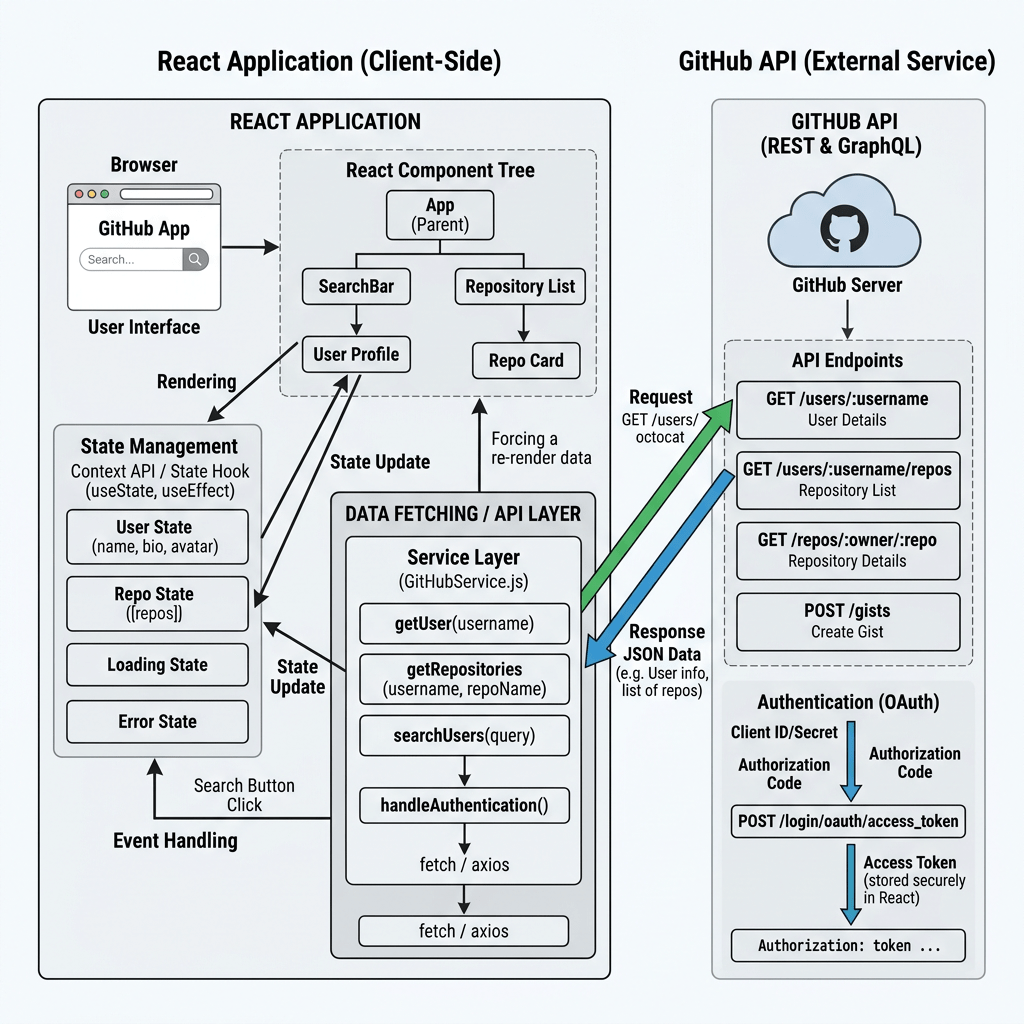
Technical Blog Article — App 64: GitHub User Explorer with React, TypeScript, Vite, and Fluent UI
Introduction
Modern React applications rarely operate using only static local data. Real enterprise systems constantly synchronize with external services such as APIs, databases, authentication providers, analytics systems, CRMs, ERPs, and cloud platforms. Because of this, understanding asynchronous rendering and external synchronization is one of the most important transitions in React learning.
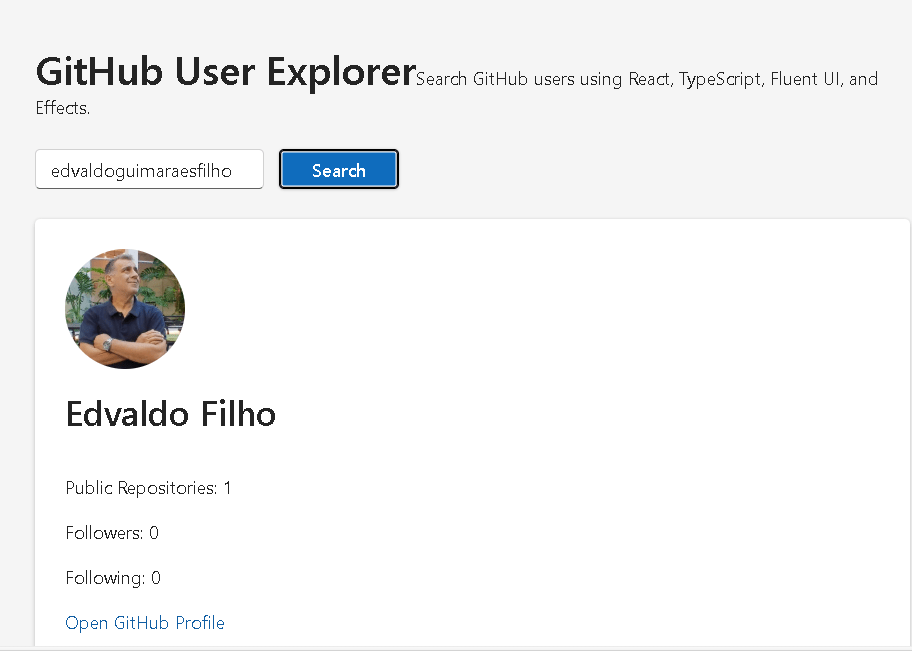
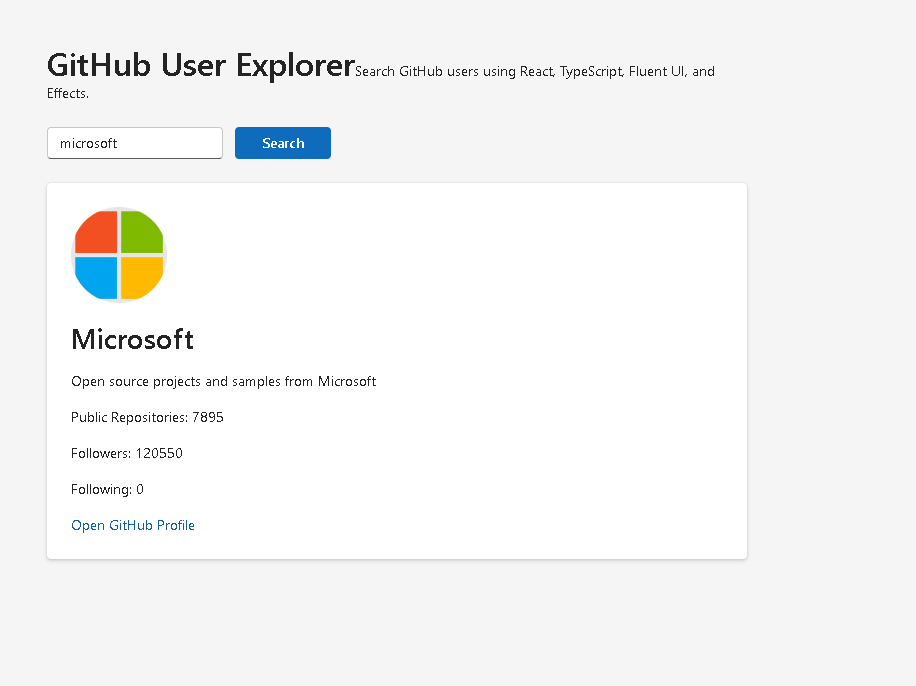
User types username
→ React updates input state
User clicks Search
→ searchUsername updates
Dependency array changes
→ useEffect executes
GitHub API request runs
→ loading state becomes true
Data arrives
→ user state updates
React re-renders
→ GitHubProfileCard appears
useEffect- external synchronization
- async rendering
- REST APIs
- loading states
- error handling
- service architecture
- professional state organization
According to the ReactLab roadmap, App 64 is focused on GitHub API integration and React Effects architecture.
This app introduces one of the most important React mental models:
UI reacts to state.State reacts to async data.Effects synchronize React with external systems.
This is fundamentally different from beginner JavaScript applications that manually manipulate HTML.
Instead of:
find HTML elementchange DOM manuallyinject content manually
React applications follow:
event→ state update→ effect runs→ async request→ state changes→ React re-renders UI
This app follows the official React architecture guidance from:
What This App Builds
The application allows users to:
- type a GitHub username
- execute an API request
- load GitHub profile data
- display the profile visually
- handle loading state
- handle API failures
- render enterprise-style UI with Fluent UI
The final UI displays:
- GitHub avatar
- profile name
- biography
- repository count
- followers
- following
- direct GitHub profile link
The application demonstrates the complete lifecycle of asynchronous React rendering.
Main Concepts Introduced
| Concept | Purpose |
|---|---|
useEffect | Synchronize with external systems |
fetch() | Execute HTTP requests |
| async/await | Handle asynchronous operations |
| loading state | Represent pending requests |
| error state | Represent failures |
| conditional rendering | Render different UI states |
| TypeScript interfaces | Type API responses |
| service layer | Separate API logic |
| controlled input | React-controlled form input |
| Fluent UI Cards | Enterprise presentation layer |
Create the Project
Create the application
mkdir bloco04cd bloco04npm create vite@latest app64-github-user-explorer -- --template react-tscd app64-github-user-explorer
Install dependencies:
npm install
Install Fluent UI:
npm install @fluentui/react-components @fluentui/react-icons
Create the Folder Structure
New-Item src\components -ItemType DirectoryNew-Item src\models -ItemType DirectoryNew-Item src\services -ItemType DirectoryNew-Item src\styles -ItemType Directory
Create files:
New-Item src\models\GitHubUser.ts -ItemType FileNew-Item src\services\githubService.ts -ItemType FileNew-Item src\components\SearchBar.tsx -ItemType FileNew-Item src\components\GitHubProfileCard.tsx -ItemType FileNew-Item artigo.md -ItemType File
Final Project Structure
app64-github-user-explorer/ src/ components/ GitHubProfileCard.tsx SearchBar.tsx models/ GitHubUser.ts services/ githubService.ts styles/ App.tsx main.tsx index.css
This architecture is important because React applications should separate responsibilities clearly.
| Layer | Responsibility |
|---|---|
| Components | UI rendering |
| Models | TypeScript contracts |
| Services | API communication |
| App | State orchestration |
| main.tsx | React root mounting |
Create the GitHub Model
src\models\GitHubUser.ts
export interface GitHubUser { login: string; avatar_url: string; name: string; bio: string; public_repos: number; followers: number; following: number; html_url: string;}
This interface defines the exact structure expected from GitHub’s API.
This is extremely important because APIs are external systems. Strong typing makes React applications safer and more maintainable.
Without TypeScript interfaces:
- data becomes unpredictable
- refactoring becomes dangerous
- rendering bugs become easier to introduce
Understanding API Contracts
The interface acts as a contract between:
- your frontend
- the GitHub API
Conceptually:
GitHub API→ returns JSONTypeScript Interface→ defines expected structureReact Components→ safely render data
This is the foundation of enterprise frontend engineering.
Create the GitHub Service
src\services\githubService.ts
import type { GitHubUser } from "../models/GitHubUser";export async function fetchGitHubUser( username: string): Promise<GitHubUser> { const response = await fetch( `https://api.github.com/users/${username}` ); if (!response.ok) { throw new Error("GitHub user not found."); } return response.json();}
Why a Service Layer Matters
One of the biggest architectural improvements in modern React apps is separating API logic from UI rendering.
Bad approach:
Component contains: - UI - API requests - parsing - business logic
Better approach:
Service layer handles APIsComponents focus on rendering
Benefits:
- reusable services
- easier testing
- cleaner components
- scalable architecture
Understanding fetch()
await fetch(...)
This performs an HTTP request to GitHub’s servers.
Flow:
React app→ sends HTTP request→ GitHub API responds→ JSON data arrives→ React updates state→ UI re-renders
This is the first real external synchronization pattern introduced in the ReactLab roadmap.
Understanding async/await
Without asynchronous behavior:
The browser would freeze waiting for data.
Instead:
Request runs asynchronously.React keeps rendering.When data arrives: state updates UI updates
This is critical in modern frontend engineering.
Create the Search Bar Component
src\components\SearchBar.tsx
import { Button, Input,} from "@fluentui/react-components";interface SearchBarProps { username: string; onUsernameChange: (value: string) => void; onSearch: () => void;}export function SearchBar({ username, onUsernameChange, onSearch,}: SearchBarProps) { return ( <div style={{ display: "flex", gap: "12px", }} > <Input placeholder="Enter GitHub username" value={username} onChange={(_, data) => onUsernameChange(data.value) } /> <Button appearance="primary" onClick={onSearch} > Search </Button> </div> );}
Controlled Inputs in React
The input uses:
value={username}
combined with:
onChange={...}
This creates a controlled input.
The React mental model is:
React state controls the UI.
Not:
Browser DOM controls the UI.
This is one of the most important React architecture principles.
Create the GitHub Profile Card
src\components\GitHubProfileCard.tsx
import { Avatar, Card, Link, Text, Title2,} from "@fluentui/react-components";import type { GitHubUser } from "../models/GitHubUser";interface GitHubProfileCardProps { user: GitHubUser;}export function GitHubProfileCard({ user,}: GitHubProfileCardProps) { return ( <Card style={{ padding: "24px", marginTop: "24px", display: "flex", flexDirection: "column", gap: "16px", }} > <Avatar image={{ src: user.avatar_url, }} size={96} /> <Title2> {user.name || user.login} </Title2> <Text>{user.bio}</Text> <Text> Public Repositories: {user.public_repos} </Text> <Text> Followers: {user.followers} </Text> <Text> Following: {user.following} </Text> <Link href={user.html_url} target="_blank" > Open GitHub Profile </Link> </Card> );}
Why This Component Is Important
This component is intentionally pure.
It:
- receives props
- returns JSX
- does not own state
- does not fetch APIs
This separation is critical in React architecture.
Create App.tsx
src\App.tsx
import { useEffect, useState } from "react";import { Spinner, Text, Title1,} from "@fluentui/react-components";import { SearchBar } from "./components/SearchBar";import { GitHubProfileCard } from "./components/GitHubProfileCard";import type { GitHubUser } from "./models/GitHubUser";import { fetchGitHubUser } from "./services/githubService";function App() { const [username, setUsername] = useState("microsoft"); const [searchUsername, setSearchUsername] = useState("microsoft"); const [user, setUser] = useState<GitHubUser | null>(null); const [loading, setLoading] = useState(false); const [error, setError] = useState(""); useEffect(() => { async function loadUser() { try { setLoading(true); setError(""); const data = await fetchGitHubUser(searchUsername); setUser(data); } catch (err) { setError( "Unable to load GitHub profile." ); setUser(null); } finally { setLoading(false); } } loadUser(); }, [searchUsername]); return ( <main style={{ minHeight: "100vh", backgroundColor: "#f5f5f5", padding: "48px", boxSizing: "border-box", }} > <section style={{ maxWidth: "700px", margin: "0 auto", }} > <Title1> GitHub User Explorer </Title1> <Text> Search GitHub users using React, TypeScript, Fluent UI, and Effects. </Text> <div style={{ marginTop: "24px", }} > <SearchBar username={username} onUsernameChange={setUsername} onSearch={() => setSearchUsername(username) } /> </div> {loading && ( <div style={{ marginTop: "24px", }} > <Spinner label="Loading profile..." /> </div> )} {error && ( <Text style={{ color: "red", marginTop: "24px", display: "block", }} > {error} </Text> )} {user && !loading && ( <GitHubProfileCard user={user} /> )} </section> </main> );}export default App;
Understanding useEffect
This is the core architectural concept:
useEffect(() => { ...}, [searchUsername]);
The effect synchronizes React with GitHub’s API.
Official React definition:
Effects synchronize your components with external systems.
Understanding the Dependency Array
[searchUsername]
This means:
Run the effect whenever searchUsername changes.
This is one of the most important parts of Effect architecture.
Why We Use Two Username States
usernamesearchUsername
This is intentional.
| State | Purpose |
|---|---|
username | Current typing |
searchUsername | Confirmed search |
Without this separation:
- every keystroke would trigger an API request
This is an enterprise optimization pattern.
Loading State
const [loading, setLoading] = useState(false);
Asynchronous rendering always requires:
- pending state
- success state
- failure state
Professional UIs never assume requests are instant.
Error State
const [error, setError] = useState("");
Real systems fail.
Possible failures:
- invalid usernames
- rate limits
- internet failures
- server downtime
Professional React applications must represent failures gracefully.
Conditional Rendering
{loading && <Spinner />}
{error && <Text>{error}</Text>}
{user && !loading && ( <GitHubProfileCard user={user} />)}
This is declarative UI architecture.
The UI changes according to state.
Why This App Is Architecturally Important
This app introduces:
React State→ Effects→ API Integration→ Async Rendering→ Enterprise UI
This architecture becomes the foundation for:
- dashboards
- analytics systems
- SharePoint integrations
- admin portals
- CRM systems
- ERP interfaces
- Microsoft-style enterprise applications
Create main.tsx
src\main.tsx
import React from "react";import ReactDOM from "react-dom/client";import { FluentProvider, webLightTheme,} from "@fluentui/react-components";import App from "./App";import "./index.css";ReactDOM.createRoot( document.getElementById("root")!).render( <React.StrictMode> <FluentProvider theme={webLightTheme}> <App /> </FluentProvider> </React.StrictMode>);
Create index.css
src\index.css
body { margin: 0; font-family: "Segoe UI", Arial, sans-serif;}* { box-sizing: border-box;}
Run the Application
Development:
npm run dev
Production validation:
npm run build
Production preview:
npm run preview
Complete Rendering Flow
User types username→ React updates input stateUser clicks Search→ searchUsername updatesDependency array changes→ useEffect executesGitHub API request runs→ loading state becomes trueData arrives→ user state updatesReact re-renders→ GitHubProfileCard appears
Technical Summary
| Concept | Explanation |
|---|---|
useEffect | Synchronizes React with GitHub API |
fetch() | Executes HTTP requests |
| async/await | Handles asynchronous behavior |
| Loading state | Represents pending requests |
| Error state | Represents failures |
| Controlled input | React controls input |
| Conditional rendering | UI derived from state |
| Fluent UI Card | Enterprise presentation |
| Service layer | Isolates API logic |
| TypeScript interface | Strong typing |
Concept Table
| Concept | File | Why It Matters |
|---|---|---|
| API contract | GitHubUser.ts | Strong typing |
| Service architecture | githubService.ts | Clean separation |
| Controlled input | SearchBar.tsx | State-driven forms |
| Presentational component | GitHubProfileCard.tsx | Pure rendering |
| Effect synchronization | App.tsx | External systems |
| Loading UX | App.tsx | Async feedback |
| Error handling | App.tsx | Production resilience |
| Fluent UI | Multiple files | Enterprise Microsoft UI |
Official Documentation
| Topic | Documentation |
|---|---|
| React Learn | React Learn |
| Synchronizing with Effects | Synchronizing with Effects |
| Lifecycle of Reactive Effects | Lifecycle of Reactive Effects |
| You Might Not Need an Effect | You Might Not Need an Effect |
| GitHub REST API | GitHub REST API |
| Fluent UI React Components | Fluent UI React Components |
| Vite Guide | Vite Guide |
| TypeScript Docs | TypeScript Docs |
Current Project Progress
| Block | App | Name | Status |
|---|---|---|---|
| Block 1 | 01 | Hello React Fluent | Completed |
| Block 1 | 02 | Profile Card | Completed |
| Block 1 | 03 | Product List | Completed |
| Block 1 | 04 | Microsoft Style User Card | Completed |
| Block 1 | 05 | Static Dashboard | Completed |
| Block 1 | 06 | Corporate Sidebar Menu | Completed |
| Block 1 | 07 | Visual Task List | Completed |
| Block 1 | 08 | Timeline Events | Completed |
| Block 1 | 09 | Employee Table | Completed |
| Block 1 | 10 | Email List | Completed |
| Block 1 | 11 | Grid of Cards | Completed |
| Block 1 | 12 | Image Gallery | Completed |
| Block 1 | 13 | Movie Catalog | Completed |
| Block 1 | 14 | Football Teams | Completed |
| Block 1 | 15 | News Page | Completed |
| Block 1 | 16 | Financial Dashboard | Completed |
| Block 1 | 17 | SharePoint Style Layout | Completed |
| Block 1 | 18 | File Explorer | Completed |
| Block 1 | 19 | Corporate Portal | Completed |
| Block 1 | 20 | Microsoft Style Landing Page | Completed |
| Block 2 | 21 | Modern Counter | Completed |
| Block 2 | 22 | Toggle Theme | Completed |
| Block 2 | 23 | React Calculator | Completed |
| Block 2 | 24 | Login Form | Completed |
| Block 2 | 25 | User Registration | Completed |
| Block 2 | 26 | Complete ToDo List | Completed |
| Block 2 | 27 | Shopping List | Completed |
| Block 2 | 28 | Product Filter | Completed |
| Block 2 | 29 | Employee Search | Completed |
| Block 2 | 30 | Shopping Cart | Completed |
| Block 2 | 31 | Grade Simulator | Completed |
| Block 2 | 32 | Inventory Control | Completed |
| Block 2 | 33 | Contact Agenda | Completed |
| Block 2 | 34 | Currency Converter | Completed |
| Block 2 | 35 | BMI Calculator | Completed |
| Block 2 | 36 | Installment Simulator | Completed |
| Block 2 | 37 | Voting Panel | Completed |
| Block 2 | 38 | Interactive Quiz | Completed |
| Block 2 | 39 | Team Manager | Completed |
| Block 2 | 40 | Dynamic Dashboard | Completed |
| Block 3 | 41 | Microsoft Style Login | Completed |
| Block 3 | 42 | Corporate Form | Completed |
| Block 3 | 43 | Tabs Navigation | Completed |
| Block 3 | 44 | Dialog Manager | Completed |
| Block 3 | 45 | Executive Dashboard | Completed |
| Block 3 | 46 | DataGrid Catalog | Completed |
| Block 3 | 47 | Enterprise User List | Completed |
| Block 3 | 48 | Sidebar Navigation | Completed |
| Block 3 | 49 | Corporate Header | Completed |
| Block 3 | 50 | Professional Toolbar | Completed |
| Block 3 | 51 | Notification Center | Completed |
| Block 3 | 52 | Administrative Panel | Completed |
| Block 3 | 53 | Ticket Manager | Completed |
| Block 3 | 54 | Approval System | Completed |
| Block 3 | 55 | Corporate Calendar | Completed |
| Block 3 | 56 | SharePoint Inspired Dashboard | Completed |
| Block 3 | 57 | Project Dashboard | Completed |
| Block 3 | 58 | Ticket Control | Completed |
| Block 3 | 59 | CRM Visual | Completed |
| Block 3 | 60 | Corporate Explorer | Completed |
| Block 4 | 61 | REST API Consumption | Completed |
| Block 4 | 62 | API Dashboard | Completed |
| Block 4 | 63 | Async Search | Completed |
| Block 4 | 64 | GitHub User Explorer | Current |
| Block 4 | 65 | Weather App | Next |


