Technical Blog Article — App 65: Weather App with React, TypeScript, Fluent UI, and External APIs
Introduction
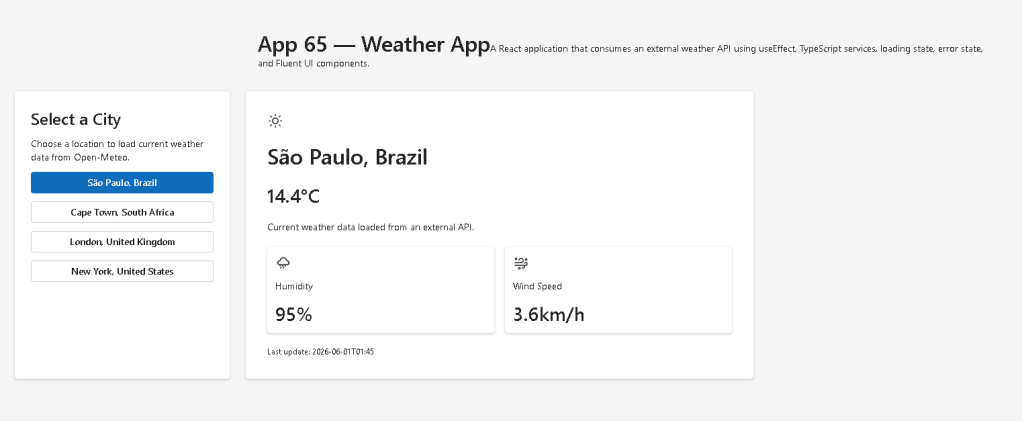
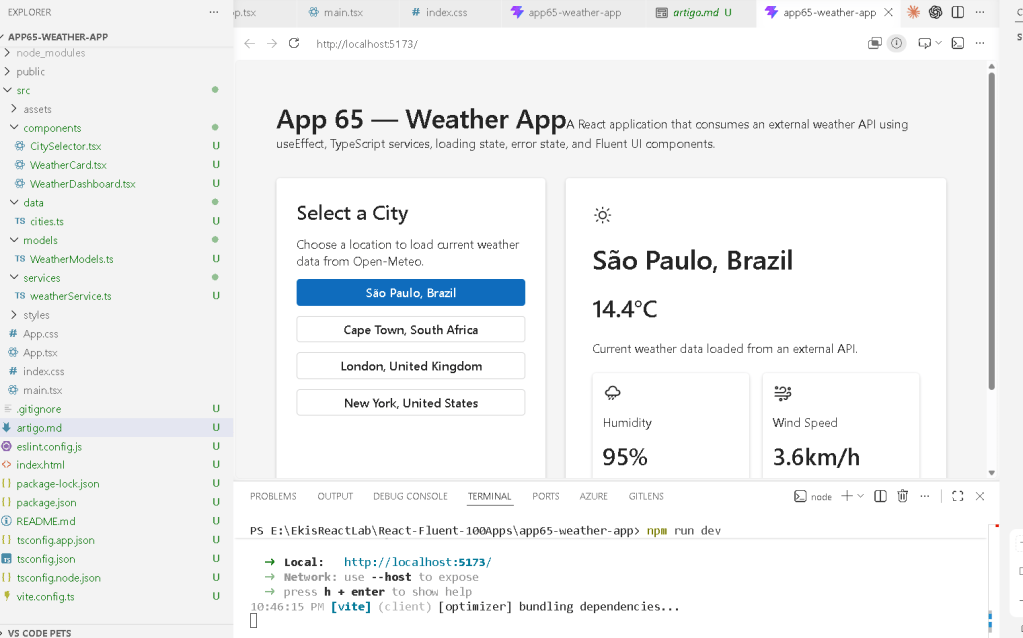
In App 65 — Weather App, we continue our journey through Block 4 — Effects and Architecture, where the focus is learning how React applications interact with external systems. According to the React roadmap for this project, App 65 introduces weather services, external APIs, asynchronous data loading, and proper use of useEffect.
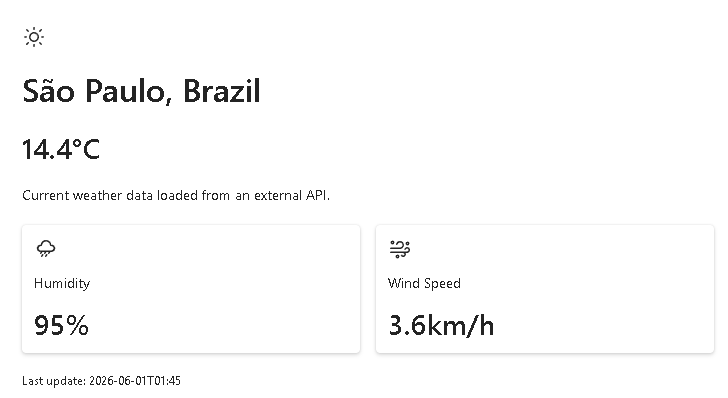
Unlike previous applications that worked only with local data, this project retrieves real-world information from a live weather service. This is an important milestone because most enterprise applications depend on external systems:
- REST APIs
- Databases
- Authentication providers
- Microsoft Graph
- SharePoint APIs
- CRM systems
- ERP platforms
- Weather services
- Analytics platforms
The Weather App teaches how React synchronizes UI with external data sources while maintaining predictable rendering behavior.
The application uses:
- React
- TypeScript
- Vite
- Fluent UI
- Open-Meteo API
- useEffect
- useState
- Service Layer Architecture
The most important React concept introduced is:
External System→ Fetch Data→ Update State→ React Re-render→ UI Updates Automatically
This is the essence of modern React applications.
Why Weather Apps Are Excellent Learning Projects
Weather applications combine several enterprise development concepts:
- External APIs
- Loading states
- Error handling
- Asynchronous operations
- Data transformation
- Service architecture
- State management
- UI composition
Unlike static applications, weather data changes constantly.
Every request can return:
- different temperatures
- different humidity values
- different wind speeds
This means React must respond dynamically to changing information.
Creating the Project
mkdir bloco04cd bloco04npm create vite@latest app65-weather-app -- --template react-tscd app65-weather-appnpm installnpm install @fluentui/react-componentsnpm install @fluentui/react-icons
Create folders:
mkdir src\componentsmkdir src\modelsmkdir src\servicesmkdir src\datamkdir src\styles
Create files:
New-Item src\models\WeatherModels.ts -ItemType FileNew-Item src\services\weatherService.ts -ItemType FileNew-Item src\data\cities.ts -ItemType FileNew-Item src\components\WeatherCard.tsx -ItemType FileNew-Item src\components\CitySelector.tsx -ItemType FileNew-Item src\components\WeatherDashboard.tsx -ItemType FileNew-Item artigo.md -ItemType File
Why We Use Open-Meteo
For this project we use the official Open-Meteo weather service.
Benefits:
- Free
- No API Key required
- Global coverage
- JSON responses
- Fast
- Easy to learn
- Excellent for educational projects
Instead of worrying about authentication, we can focus on React architecture.
Understanding the Architecture
The project uses a layered structure:
UI Layer ComponentsBusiness Layer Weather DashboardService Layer Weather ServiceExternal Layer Open-Meteo API
This separation becomes critical in enterprise applications.
The Model Layer
File:
src/models/WeatherModels.ts
Contains:
export interface WeatherViewModel { cityName: string; country: string; temperature: number; humidity: number; windSpeed: number;}
Why use interfaces?
TypeScript provides:
- Type safety
- IntelliSense
- Better refactoring
- Compile-time validation
- Architectural clarity
Without interfaces, large applications become difficult to maintain.
The Service Layer
File:
src/services/weatherService.ts
The service layer is one of the most important architectural concepts introduced in Block 4.
Instead of calling APIs directly inside components:
fetch(...)
we isolate that logic:
getCurrentWeather()
Benefits:
- Reusable code
- Easier testing
- Better organization
- Separation of concerns
This mirrors enterprise architectures used in:
- SharePoint
- Microsoft Graph projects
- SPFx solutions
- React Enterprise Portals
Understanding Fetch
The service uses:
const response = await fetch(url);
fetch() is a browser API used to make HTTP requests.
The process is:
React→ fetch()→ HTTP Request→ Weather API→ JSON Response→ React State→ UI Update
This is asynchronous.
React does not block the UI while waiting.
Why Async/Await Matters
The service uses:
async function
and
await
This makes asynchronous code easier to read.
Without async/await:
.then().then().then().catch()
With async/await:
const result = await fetch(...)
Much cleaner.
Understanding useState
Inside the dashboard:
const [weather, setWeather] = useState<WeatherViewModel | null>(null);
This creates component memory.
React remembers:
- temperature
- humidity
- wind speed
- selected city
between renders.
State is the memory system of React.
Official React concept:
State = Component Memory
Loading State
The application also stores:
const [loading, setLoading] = useState(false);
This allows the UI to display:
Loading...
while data is being downloaded.
Without a loading state:
- users would see empty screens
- users would not know what is happening
Professional applications always provide feedback.
Error State
The app also stores:
const [error, setError] = useState<string | null>(null);
This handles situations such as:
- Internet failure
- API outage
- Invalid responses
- Server problems
Enterprise applications must always anticipate failure.
The Most Important Concept: useEffect
The heart of App 65 is:
useEffect(() => { loadWeather();}, [selectedCity]);
This is exactly the type of situation React Learn describes as a valid Effect.
Why?
Because we are synchronizing with an external system.
React Learn says:
Effects synchronize components with external systems.
A weather API is an external system.
Therefore:
Weather API→ useEffect is appropriate
What Triggers the Effect?
The dependency array:
[selectedCity]
means:
When selectedCity changes,run the effect again.
Flow:
User selects city→ selectedCity changes→ useEffect runs→ API request executes→ state updates→ UI re-renders
This is a perfect example of React’s reactive model.
Cleanup Function
The app uses:
return () => { ignore = true;};
Why?
Imagine:
City A request startsUser immediately selects City BCity B request starts
If City A finishes later, it could overwrite City B data.
The cleanup prevents stale updates.
This is a real-world React pattern.
Understanding the Component Hierarchy
The application follows:
App WeatherDashboard CitySelector WeatherCard
Each component has a single responsibility.
App
Responsible for:
- Layout
- Page title
- Composition
WeatherDashboard
Responsible for:
- API communication
- State
- Business logic
CitySelector
Responsible for:
- City selection
WeatherCard
Responsible for:
- Displaying weather information
This follows React’s composition philosophy.
Fluent UI Components
The app uses:
CardButtonTextTitle1Title2Spinner
Why Fluent UI?
Benefits:
- Accessibility
- Microsoft styling
- Keyboard support
- Consistent typography
- Enterprise appearance
This matches the project goal of learning React using Microsoft-style interfaces.
Why We Use a Service Layer
Bad approach:
WeatherCard fetch(...)
Good approach:
WeatherCard ↓WeatherDashboard ↓WeatherService ↓API
Advantages:
- Reusability
- Maintainability
- Scalability
This pattern will appear repeatedly in later apps.
Enterprise Architecture Concepts Introduced
App 65 introduces:
| Concept | Purpose |
|---|---|
| Service Layer | API isolation |
| Models | Type definitions |
| Components | UI separation |
| Loading State | UX feedback |
| Error State | Fault tolerance |
| useEffect | External synchronization |
| Fetch API | HTTP communication |
| TypeScript | Type safety |
These are the foundations of professional React applications.
Why This App Is Important
Many developers learn React only with local state.
Real projects require:
- APIs
- Authentication
- External services
- Data synchronization
App 65 is the bridge between:
Local React Applications
and
Real Enterprise Applications
Technical Summary
| Technology | Purpose |
|---|---|
| React | UI rendering |
| TypeScript | Static typing |
| Vite | Development server |
| Fluent UI | Enterprise design system |
| Open-Meteo | Weather data source |
| useState | Component memory |
| useEffect | API synchronization |
| Fetch API | HTTP communication |
| Service Layer | Business abstraction |
| Spinner | Loading feedback |
Official Documentation
React
Fluent UI
Open-Meteo
TypeScript
Vite
Current Project Progress
| Block | App | Name | Status |
|---|---|---|---|
| Block 1 | 01–20 | Fundamentals and UI | Completed |
| Block 2 | 21–40 | Interactivity and State | Completed |
| Block 3 | 41–60 | Professional Fluent UI | Completed |
| Block 4 | 61 | REST API Consumer | Completed |
| Block 4 | 62 | API Dashboard | Completed |
| Block 4 | 63 | Async Search | Completed |
| Block 4 | 64 | GitHub User Explorer | Completed |
| Block 4 | 65 | Weather App | Current |
| Block 4 | 66 | Pagination System | Next |
ReactLab Progress
- Completed Apps: 65 / 100
- Remaining Apps: 35
- Current Focus: Effects, APIs, Service Layer Architecture, and External Data Synchronization


