As React applications evolve and begin consuming real APIs, displaying all records at once becomes inefficient and difficult to manage. Enterprise applications such as CRM systems, SharePoint portals, ticket management systems, employee directories, administrative dashboards, and reporting platforms commonly use pagination to divide large datasets into smaller and more manageable groups.
App 66 — Pagination System with React, TypeScript, Fluent UI, and Vite
Introduction
As React applications evolve and begin consuming real APIs, displaying all records at once becomes inefficient and difficult to manage. Enterprise applications such as CRM systems, SharePoint portals, ticket management systems, employee directories, administrative dashboards, and reporting platforms commonly use pagination to divide large datasets into smaller and more manageable groups.
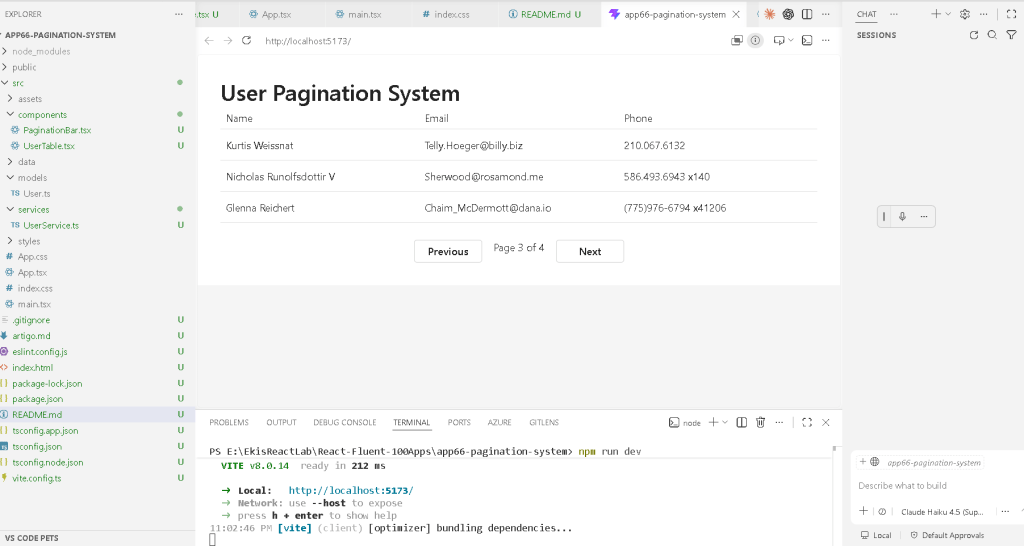
In App 66 — Pagination System, we continue our journey through Block 4 — Effects and Architecture, focusing on one of the most important enterprise UI patterns: data paging.
This application demonstrates how React state controls navigation through datasets, how APIs are consumed correctly using useEffect, and how Fluent UI can be used to create a professional Microsoft-style interface.
According to the ReactLab roadmap, App 66 introduces:
- API consumption
- Pagination logic
- Derived state
- Loading states
- Enterprise data navigation
- Component composition
- Service layer architecture
The React mental model remains unchanged:
State changes→ React re-renders→ UI updates automatically
The difference is that now state controls not only data but also which portion of that data is visible.
Learning Objectives
By completing this application, you will learn:
- How to fetch remote data
- How to store records using React state
- How to create page navigation controls
- How to calculate derived values
- How to display loading indicators
- How to organize API access into services
- How to separate responsibilities between components
Creating the Project
Create the Application
mkdir bloco04cd bloco04npm create vite@latest app66-pagination-system -- --template react-tscd app66-pagination-systemnpm installnpm install @fluentui/react-components
Create the Folder Structure
mkdir src\componentsmkdir src\modelsmkdir src\servicesmkdir src\datamkdir src\styles
Create the Files
New-Item src\models\User.ts -ItemType FileNew-Item src\services\UserService.ts -ItemType FileNew-Item src\components\UserTable.tsx -ItemType FileNew-Item src\components\PaginationBar.tsx -ItemType FileNew-Item src\main.tsx -ItemType FileNew-Item src\index.css -ItemType FileNew-Item artigo.md -ItemType File
Final Folder Structure
src/│├── components/│ ├── PaginationBar.tsx│ └── UserTable.tsx│├── models/│ └── User.ts│├── services/│ └── UserService.ts│├── styles/│├── App.tsx├── main.tsx└── index.css
This structure separates:
- Data contracts
- API communication
- Presentation components
- Application orchestration
This separation becomes essential in enterprise React applications.
Understanding the User Model
User.ts
export interface User { id: number; name: string; email: string; phone: string;}
This interface defines the structure of every user returned by the API.
TypeScript provides:
- IntelliSense
- Type safety
- Compile-time validation
- Safer refactoring
Instead of guessing the shape of the data, React knows exactly what fields exist.
Understanding the Service Layer
UserService.ts
import type { User } from "../models/User";export async function getUsers(): Promise<User[]> { const response = await fetch( "https://jsonplaceholder.typicode.com/users" ); return await response.json();}
The service layer isolates API logic.
Benefits:
- Cleaner UI components
- Easier maintenance
- Easier testing
- Reusable data access
Enterprise applications often contain dozens of services, making this pattern extremely important.
Understanding React Effects
The API is loaded using:
useEffect(() => { async function loadData() { const result = await getUsers(); setUsers(result); setLoading(false); } loadData();}, []);
According to React Learn:
Effects synchronize components with external systems.
An API is an external system.
Therefore:
API call→ useEffect
is the correct React pattern.
Understanding Pagination State
The current page is stored using:
const [page, setPage] = useState(1);
React remembers the page number between renders.
When the user clicks:
Next
React updates state:
setPage(page + 1);
React then re-renders automatically.
No manual DOM updates are required.
Calculating the Current Records
The page size is:
const PAGE_SIZE = 3;
The first record index is:
const start = (page - 1) * PAGE_SIZE;
Example:
| Page | Start Index |
|---|---|
| 1 | 0 |
| 2 | 3 |
| 3 | 6 |
| 4 | 9 |
The visible records are:
const currentUsers = users.slice(start, start + PAGE_SIZE);
This creates a smaller subset from the complete collection.
Derived State
Notice:
const totalPages = Math.ceil(users.length / PAGE_SIZE);
This value is derived from existing state.
React Learn recommends:
Avoid redundant state.
Instead of storing total pages separately, we calculate it from existing data.
Benefits:
- Less code
- Fewer bugs
- Easier maintenance
- Better synchronization
Loading State
The loading flag improves user experience.
const [loading, setLoading] = useState(true);
While data is loading:
<Spinner label="Loading users..." />
The user immediately understands that work is being performed.
This is a common enterprise pattern.
UserTable Component
The table component receives:
users: User[]
and renders:
NameEmailPhone
using Fluent UI Table components.
The component is completely reusable because it only receives data through props.
This follows React’s concept of pure components.
PaginationBar Component
The PaginationBar component receives:
currentPagetotalPagesonPreviousonNext
It does not know where the data comes from.
Its only responsibility is:
Display navigation controls
This is a perfect example of separation of concerns.
Enterprise Benefits of Pagination
Without pagination:
1,000 records→ huge table→ poor performance→ difficult navigation
With pagination:
1,000 records→ smaller pages→ faster rendering→ easier navigation
This is why nearly every enterprise system implements paging.
Understanding main.tsx
The application entry point:
import React from "react";import ReactDOM from "react-dom/client";import { FluentProvider, webLightTheme,} from "@fluentui/react-components";import App from "./App";import "./index.css";ReactDOM.createRoot( document.getElementById("root")!).render( <React.StrictMode> <FluentProvider theme={webLightTheme}> <App /> </FluentProvider> </React.StrictMode>);
Responsibilities:
- Connect React to HTML
- Enable Fluent UI
- Apply Microsoft theme
- Start the application
Understanding index.css
body { margin: 0; font-family: "Segoe UI", Arial, sans-serif; background-color: #f5f5f5;}* { box-sizing: border-box;}button { font-family: inherit;}table { width: 100%;}.app-container { min-height: 100vh; padding: 32px; background-color: #f5f5f5;}.app-content { max-width: 1100px; margin: 0 auto;}.app-header { margin-bottom: 24px;}.pagination-wrapper { display: flex; justify-content: center; margin-top: 24px;}
This CSS:
- Removes browser defaults
- Applies Microsoft typography
- Creates consistent spacing
- Centers content
- Supports responsive layouts
Technical Summary
| Concept | Explanation |
|---|---|
| useState | Stores page and user data |
| useEffect | Loads external API data |
| Fetch API | Retrieves remote data |
| Pagination | Divides datasets into pages |
| Derived State | Calculates total pages |
| Fluent UI Table | Displays enterprise data |
| Fluent UI Button | Navigation controls |
| Spinner | Loading indicator |
| Service Layer | API abstraction |
| TypeScript Interface | Strongly typed data |
Official Documentation
React
- React Learn
- State: A Component’s Memory
- Synchronizing with Effects
- You Might Not Need an Effect
Fluent UI
- Fluent UI React Components
- Fluent UI Table
- Fluent UI Button
Vite
- Vite Guide
TypeScript
- TypeScript Documentation
Final Architectural Insight
Pagination demonstrates one of the most important React principles:
Data remains the sameState decides what portion is visibleReact renders the result
The dataset is never modified.
Instead:
Current Page→ determines visible records→ React re-renders→ UI updates
This same architectural pattern appears in:
- DataGrid systems
- SharePoint lists
- CRM dashboards
- Reporting portals
- Administrative systems
- Enterprise search results
Mastering pagination prepares you for larger applications where thousands of records must be displayed efficiently.
Current Progress
| Block | App | Name | Status |
|---|---|---|---|
| Block 4 | 61 | REST API Consumption | Completed |
| Block 4 | 62 | Dashboard with API | Completed |
| Block 4 | 63 | Async Search | Completed |
| Block 4 | 64 | GitHub User Explorer | Completed |
| Block 4 | 65 | Weather App | Completed |
| Block 4 | 66 | Pagination System | Completed |
| Block 4 | 67 | Infinite Scroll | Next |
Apps completed: 01–66
Current app: 66 — Pagination System
Next app: 67 — Infinite Scroll


