Modern applications frequently display large datasets. Enterprise portals, CRM systems, SharePoint intranets, Microsoft 365 dashboards, social feeds, audit logs, ticket systems, and analytics platforms often need to present hundreds or even thousands of records.
Technical Blog Article — App 67: Infinite Scroll with React, TypeScript, Vite, and Fluent UI
Introduction
Modern applications frequently display large datasets. Enterprise portals, CRM systems, SharePoint intranets, Microsoft 365 dashboards, social feeds, audit logs, ticket systems, and analytics platforms often need to present hundreds or even thousands of records.
Loading everything at once creates several problems:
- Large initial payloads
- Slower rendering
- Increased memory consumption
- Poor user experience
- Unnecessary network requests
One popular solution is Infinite Scroll.
Instead of loading all records at once, the application loads a small batch, waits for the user to scroll, and then loads more data automatically.
This application belongs to Block 4 — Effects and Architecture, where the focus moves beyond simple state management into synchronization with external systems, custom hooks, architecture patterns, and professional React design. The roadmap defines App 67 as Infinite Scroll, immediately after Pagination and before Data Cache.
The goal is not simply to make content appear while scrolling. The goal is to understand the React mental model behind the feature.
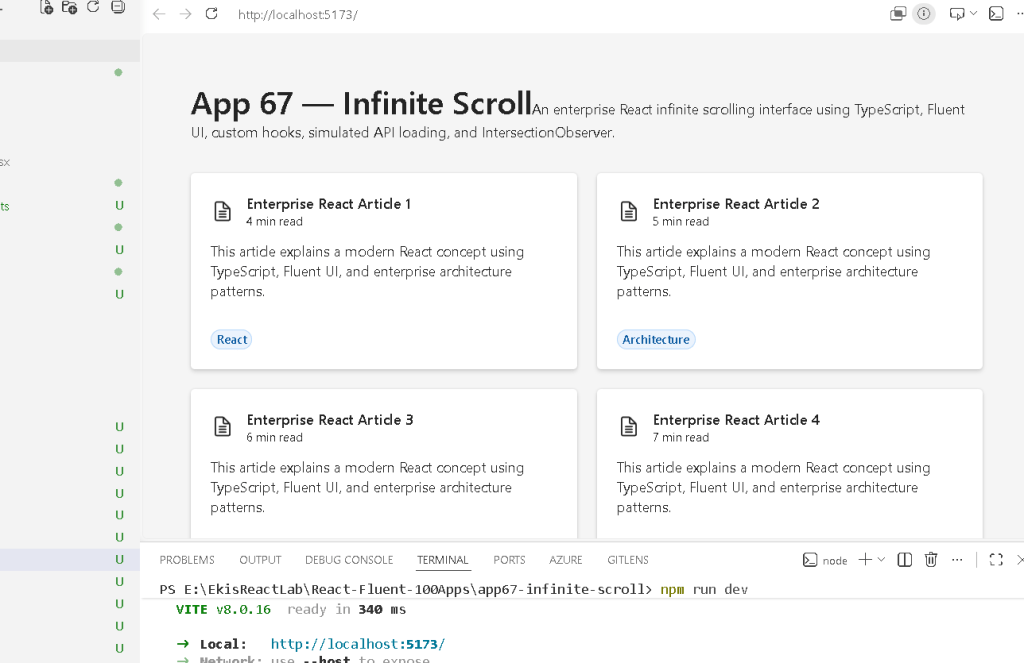
Why Infinite Scroll Matters
Many modern applications use infinite scrolling:
- LinkedIn feeds
- Microsoft Viva dashboards
- News portals
- GitHub activity pages
- CRM record viewers
- Ticket management systems
- Enterprise audit logs
Without infinite scroll:
Request 500 recordsRender 500 cardsRender 500 DOM elementsIncrease memory usageSlow initial load
With infinite scroll:
Load first 10Render first 10User scrollsLoad next 10Render next 10Repeat
The application becomes more responsive and scalable.
The React Mental Model
One of the biggest mistakes beginners make is thinking:
User scrolls→ append HTML manually
That is not React.
React works differently:
User scrollsBrowser detects visibilityState changesReact re-rendersNew items appear
React never manually appends HTML.
React renders UI from state.
The Architecture
The application is divided into several layers:
App.tsx│├── InfiniteArticleList.tsx│├── ArticleCard.tsx│├── useInfiniteArticles.ts│├── articleService.ts│└── ArticleItem.ts
Each file has one responsibility.
This separation follows the architecture principles introduced throughout Block 4.
Project Structure
src/ components/ ArticleCard.tsx InfiniteArticleList.tsx hooks/ useInfiniteArticles.ts services/ articleService.ts models/ ArticleItem.ts styles/ App.tsx main.tsx index.css
This organization is intentionally similar to what professional React teams use.
The Model Layer
The first step is defining the data shape.
export interface ArticleItem { id: number; title: string; summary: string; category: string; readTime: string;}
This interface describes every article displayed on screen.
Benefits:
- Strong typing
- Autocomplete
- Safer refactoring
- Better architecture
- Easier maintenance
TypeScript guarantees predictable data structures.
The Service Layer
The file:
articleService.ts
simulates a backend API.
The UI does not know where data comes from.
Today:
Local mock data
Tomorrow:
REST APIGraph APISharePoint APICRM API
Nothing changes in the UI.
This is one of the reasons service layers exist.
The component should not care where the data originates.
Why We Need a Custom Hook
The file:
useInfiniteArticles.ts
contains the loading logic.
Without a custom hook:
App.tsx layout loading logic observer logic pagination logic state logic
Everything becomes mixed together.
With a custom hook:
App.tsx layoutInfiniteArticleList.tsx renderinguseInfiniteArticles.ts business logic
This separation improves maintainability.
Official React guidance encourages reusing logic through custom hooks.
Understanding useState
Several state values exist:
articlespagehasMoreisLoading
Each serves a different purpose.
articles
Stores loaded articles.
Current visible data
page
Tracks the current page.
Page 1Page 2Page 3...
hasMore
Indicates whether more data exists.
true→ continue loadingfalse→ stop loading
isLoading
Prevents duplicate requests.
Without it:
Observer triggersObserver triggers againObserver triggers againMultiple requestsDuplicate data
With loading protection:
Only one request at a time
Why We Use useRef
The hook contains:
const observerTargetRef = useRef<HTMLDivElement | null>(null);
This stores a reference to a DOM element.
The browser needs a real DOM element to observe.
React state is not enough.
The observer requires:
HTML element reference
That is exactly what useRef provides.
The Intersection Observer
This is the most important concept in the app.
The browser provides:
IntersectionObserver
This API watches whether an element becomes visible.
Instead of constantly checking scroll position:
window.scrollYwindow.innerHeightdocument height
the browser does the work.
The observer says:
Tell me when this element enters the viewport.
That element becomes the loading trigger.
Why useEffect Is Correct Here
Many previous apps intentionally avoided useEffect.
This app is different.
React documentation states:
Effects synchronize components with external systems.
The observer is:
Browser API
which is external to React.
Therefore:
useEffect(...)
is correct.
The effect:
- Creates the observer
- Connects it to the DOM element
- Listens for visibility changes
- Disconnects when necessary
This is exactly the type of synchronization React expects Effects to handle.
Cleanup Function
The hook contains:
return () => { observer.disconnect();};
This is critical.
Without cleanup:
Old observers remain activeMemory leaks occurMultiple observers accumulateDuplicate requests happen
Cleanup removes the observer when React no longer needs it.
This is one of the most important concepts in Effect lifecycle management.
Loading More Data
When the observer detects visibility:
Target enters viewport
the callback executes:
loadArticles()
The service returns:
Next page
The hook updates state:
setArticles(...)
React immediately re-renders.
The UI grows automatically.
No manual DOM manipulation occurs.
Rendering the Cards
Each article becomes:
<ArticleCard />
through:
articles.map(...)
This is classic React list rendering.
Data:
Article 1Article 2Article 3
becomes:
Card 1Card 2Card 3
React converts data into UI.
Why Fluent UI Is Used
Fluent UI provides:
- Accessibility
- Microsoft design standards
- Keyboard navigation
- Consistent spacing
- Enterprise appearance
Components used:
- Card
- Badge
- Spinner
- Text
- Typography
These components already implement many behaviors that would otherwise require manual development.
Loading State
When loading:
<Spinner />
appears.
This improves user experience.
Users immediately understand:
More content is being loaded.
instead of thinking the page is frozen.
End of Data State
When all records are loaded:
All articles were loaded.
appears.
This communicates completion clearly.
Good enterprise applications always provide feedback.
Why This Architecture Scales
Today:
80 mock articles
Tomorrow:
SharePoint documentsCRM recordsGitHub repositoriesAudit logsWeather recordsProductsUsersTickets
The architecture remains identical.
Only the service changes.
This is exactly what enterprise React architecture aims to achieve.
Technical Summary
| Concept | Purpose |
|---|---|
| TypeScript Interface | Defines article structure |
| Service Layer | Separates data access |
| Custom Hook | Reuses loading logic |
| useState | Stores application state |
| useRef | Stores DOM references |
| useEffect | Synchronizes with observer |
| IntersectionObserver | Detects visibility |
| Fluent UI Card | Displays article data |
| Spinner | Loading feedback |
| Infinite Scroll | Progressive data loading |
Concept Table
| File | Responsibility |
|---|---|
| ArticleItem.ts | Data model |
| articleService.ts | Data provider |
| useInfiniteArticles.ts | Loading logic |
| ArticleCard.tsx | Individual article UI |
| InfiniteArticleList.tsx | List rendering |
| App.tsx | Application shell |
| main.tsx | React entry point |
| index.css | Global styling |
Official Documentation
React
- https://react.dev/learn
- https://react.dev/learn/synchronizing-with-effects
- https://react.dev/reference/react/useEffect
- https://react.dev/reference/react/useRef
- https://react.dev/learn/reusing-logic-with-custom-hooks
Fluent UI
Vite
TypeScript
Browser APIs
Final Architectural Insight
The most important lesson from App 67 is:
Infinite Scrollis not about scrolling.It is about:Browser Observation→ Effect Synchronization→ State Updates→ React Rendering
Once you understand that flow, you understand one of the most important architectural patterns used in modern React applications.
Current Progress
| Block | App | Name | Status |
|---|---|---|---|
| Block 1 | 01-20 | Fundamentals and UI | Completed |
| Block 2 | 21-40 | Interactivity and State | Completed |
| Block 3 | 41-60 | Fluent UI Professional | Completed |
| Block 4 | 61 | REST API Consumption | Completed |
| Block 4 | 62 | Dashboard with API | Completed |
| Block 4 | 63 | Async Search | Completed |
| Block 4 | 64 | GitHub Explorer | Completed |
| Block 4 | 65 | Weather App | Completed |
| Block 4 | 66 | Pagination System | Completed |
| Block 4 | 67 | Infinite Scroll | Current |
| Block 4 | 68 | Data Cache | Next |
Current App: 67 — Infinite Scroll
Next App: 68 — Data Cache
Roadmap Position: Block 4 — Effects and Architecture (Apps 61–80)


