App 68 — Data Cache Dashboard introduces the concept of a cache layer between the user interface and the data source.
App 68 — Data Cache Dashboard with React, TypeScript, Fluent UI, and Enterprise Caching Patterns
Introduction
As React applications grow, performance becomes increasingly important. Loading data from an API every time a component renders can create unnecessary network traffic, slower user experiences, higher infrastructure costs, and inefficient application behavior.
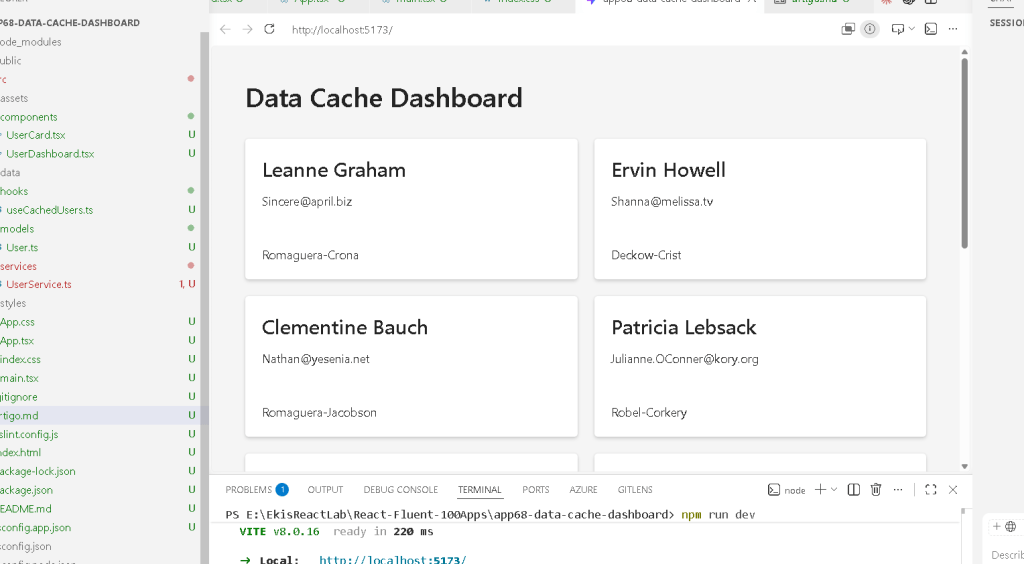
In enterprise environments such as SharePoint portals, Microsoft 365 dashboards, CRM systems, ERP platforms, analytics solutions, and administrative applications, caching is one of the most common architectural patterns used to improve performance.
App 68 — Data Cache Dashboard introduces the concept of a cache layer between the user interface and the data source.
This application belongs to Block 4 — Effects and Architecture, where the focus shifts from basic React rendering into professional architecture, API integration, service layers, custom hooks, performance optimization, and scalable application design. The roadmap defines App 68 as “Data Cache” and introduces memoization and caching concepts.
The purpose of this application is not simply to fetch data from an API. Instead, it demonstrates how React applications can avoid unnecessary requests by storing previously loaded information and reusing it whenever possible.
The architecture implemented in this application follows a common enterprise pattern:
API
→ Service Layer
→ Cache Layer
→ Custom Hook
→ React Components
This separation of responsibilities makes the application easier to maintain, test, scale, and optimize.
Why Caching Matters
Imagine an application that displays user information.
Without caching:
- User opens the page
- API request executes
- Data loads
If the user navigates away and returns:
- Another API request executes
- Same data is downloaded again
If ten users perform the same action repeatedly, the API receives many identical requests.
This produces:
- slower performance
- unnecessary bandwidth consumption
- increased server load
- worse user experience
With caching:
- First request loads data from the API
- Data is stored locally
- Future requests reuse cached data
The result:
- faster rendering
- fewer network requests
- better scalability
- improved responsiveness
React Architecture Introduced
This application introduces an architecture commonly found in professional React projects:
src/ ├─ components/ ├─ hooks/ ├─ services/ ├─ models/ ├─ App.tsx └─ main.tsx
Each folder has a specific responsibility.
Components
Responsible only for rendering.
Components should not know where data comes from.
Examples:
- UserCard
- UserDashboard
Their responsibility is displaying information.
Hooks
Responsible for reusable React logic.
Example:
useCachedUsers()
The hook knows how data is loaded.
The component only consumes the result.
Services
Responsible for communication with external systems.
Examples:
- REST APIs
- Graph APIs
- SharePoint APIs
- Databases
The service layer hides implementation details from React components.
Models
Responsible for TypeScript contracts.
Models define:
- object structures
- interfaces
- types
This improves maintainability and predictability.
Understanding the Cache Layer
Inside the service layer, we create:
let cache: User[] | null = null;
This variable exists outside React.
This is important.
The cache does not belong to a component.
The cache belongs to the service.
The flow becomes:
First request↓Cache empty↓Fetch API↓Store data↓Return data
Future requests:
Cache contains data↓Skip API↓Return cached data
This dramatically improves performance.
Why the Cache Is Outside React State
Many beginners try to store everything inside React state.
However, cache is not UI state.
Cache is application infrastructure.
The UI should render data.
The service should manage data retrieval.
Separating these concerns creates cleaner architecture.
React Learn emphasizes that components should focus on rendering and state relevant to the interface. Business logic should often be extracted into reusable layers.
Understanding the Service Layer
The UserService performs three responsibilities:
- Check cache
- Load API data if necessary
- Return standardized objects
This is important because components should never need to know:
- API URL
- JSON structure
- response mapping
- cache implementation
The component simply receives:
User[]
This makes the UI independent from the backend implementation.
Custom Hooks and Reusable Logic
One of the most important lessons of App 68 is the use of a custom hook:
useCachedUsers()
Instead of repeating:
useEffect(...)fetch(...)loading state...
inside every component, we centralize the logic.
Benefits:
- code reuse
- easier maintenance
- cleaner components
- better testing
- professional architecture
This follows the React Learn principle of reusing logic with custom hooks.
Loading State
The hook also introduces:
const [loading, setLoading] = useState(true);
Loading indicators are essential in professional applications.
Without them:
- users see blank screens
- interfaces appear broken
- user confidence decreases
With loading states:
Loading...↓Data arrives↓Dashboard appears
The user always understands what is happening.
Why Fluent UI Is Used
The visual layer uses Fluent UI.
Fluent UI provides:
- Microsoft design language
- accessibility support
- keyboard navigation
- responsive behavior
- enterprise consistency
Instead of manually creating cards and layouts, we use professional components:
- Card
- Title
- Text
- Spinner
This dramatically reduces UI complexity.
React Rendering Flow
The complete rendering cycle becomes:
App ↓UserDashboard ↓useCachedUsers ↓UserService ↓Cache CheckCache exists? ├─ Yes → Return cached data └─ No ↓ API Call ↓ Store Cache ↓ Return DataReact State Updates ↓React Re-renders ↓Cards Display Users
Understanding this flow is critical because enterprise React applications frequently follow the same pattern.
Enterprise Applications That Use This Pattern
The architecture demonstrated here appears in:
- SharePoint dashboards
- Microsoft 365 portals
- CRM systems
- ERP systems
- Reporting platforms
- Analytics dashboards
- Employee directories
- Ticket management systems
- Project management portals
Learning this pattern now prepares you for much larger applications later in the ReactLab roadmap.
Why This App Matters
Visually, App 68 appears simple.
Architecturally, however, it introduces several advanced concepts:
- service layer architecture
- caching
- custom hooks
- separation of concerns
- reusable logic
- performance optimization
- enterprise scalability
These concepts become increasingly important as applications grow.
Many beginner React projects place all logic inside components.
Professional React projects separate:
UI
Data Access
Business Logic
Caching
State Management
into dedicated layers.
App 68 is the first step toward that professional architecture.
Technical Summary
| Concept | Purpose |
|---|---|
| Cache Layer | Prevent unnecessary API calls |
| Service Layer | Abstract backend communication |
| Custom Hook | Reuse data-loading logic |
| useEffect | Load data on component initialization |
| Loading State | Improve user experience |
| Fluent UI | Enterprise Microsoft UI |
| TypeScript Models | Strong typing |
| Separation of Concerns | Cleaner architecture |
| React Rendering | UI derived from state |
| Enterprise Pattern | Scalable solution |
Official Documentation
React
- React Learn
- Synchronizing with Effects
- Reusing Logic with Custom Hooks
- You Might Not Need an Effect
Fluent UI
- Fluent UI React Components
Vite
- Vite Guide
TypeScript
- TypeScript Documentation
Final Architectural Insight
The most important lesson from App 68 is that React components should not be responsible for everything.
A professional React application separates responsibilities:
UI↓Hooks↓Services↓Cache↓API
When responsibilities are separated correctly:
- components stay simple
- code becomes reusable
- performance improves
- applications scale more easily
This architecture will be expanded in App 69, where we build a reusable Custom Fetch Hook that generalizes data loading patterns across multiple APIs.
Current Progress
| Block | Status |
|---|---|
| Block 1 | Apps 01–20 ✅ |
| Block 2 | Apps 21–40 ✅ |
| Block 3 | Apps 41–60 ✅ |
| Block 4 | Apps 61–68 ✅ |
| Current | App 68 — Data Cache Dashboard |
| Next | App 69 — Custom Fetch Hook |
Project: ReactLab — 100 React Apps with Fluent UI, React Learn, TypeScript, and Vite.
Current Position: 68 / 100 Apps Completed ✅


