As React applications grow, developers quickly discover a recurring problem: the same API consumption logic is repeated across multiple components.
Technical Blog Article — App 69: Building a Reusable Custom Fetch Hook with React, TypeScript, Fluent UI, and Vite
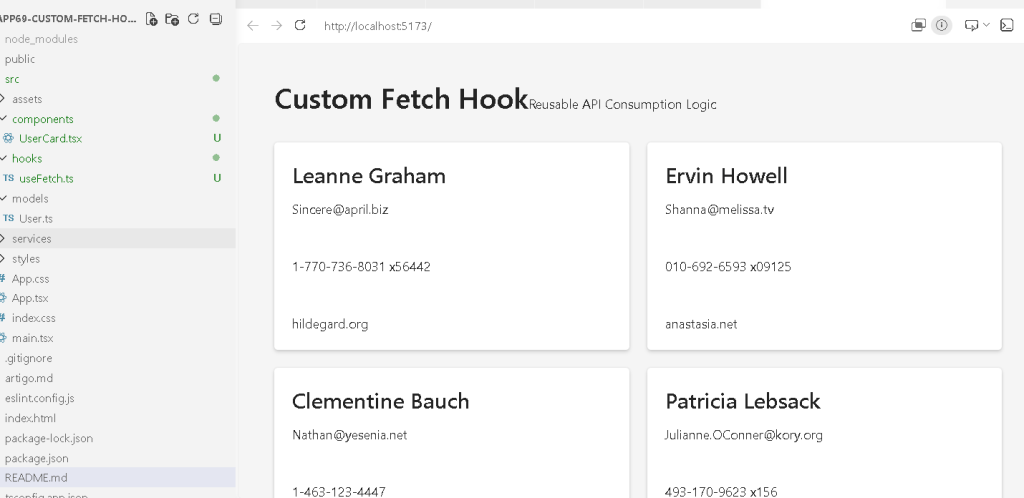
Introduction
As React applications grow, developers quickly discover a recurring problem: the same API consumption logic is repeated across multiple components.
Every component that loads data typically needs:
- a loading state
- an error state
- a fetch request
- a useEffect hook
- data storage
- response handling
Initially this duplication may seem harmless, but in enterprise applications it creates technical debt, increases maintenance costs, and makes applications harder to evolve.
In App 69 — Custom Fetch Hook, we solve this problem using one of React’s most powerful architectural features:
Custom Hooks.
This application belongs to Block 4 — Effects and Architecture, where the focus moves beyond basic components and enters professional React architecture patterns. The objective is to understand how React allows developers to extract reusable stateful logic into custom hooks while keeping UI components clean and focused on presentation.
The central concept introduced in this application is:
UI Components↓Custom Hook↓API
Instead of every component implementing its own data-loading behavior, a reusable hook becomes responsible for communication with external systems.
This follows the official React Learn guidance regarding Custom Hooks and logic reuse.
Why Custom Hooks Exist
Consider a project with:
- User List
- Product Catalog
- Dashboard
- Customer Directory
- Reports Page
Without a reusable hook, each page might contain:
useEffect(...)fetch(...)loading stateerror state
repeated over and over again.
The result is:
Duplicate codeDuplicate bugsDuplicate maintenance
React solves this through Custom Hooks.
A custom hook allows us to encapsulate stateful behavior inside a reusable function.
Instead of writing:
API logicAPI logicAPI logicAPI logic
we write:
useFetch()
once and reuse it everywhere.
Understanding React Effects
The application uses:
useEffect()
inside the custom hook.
This is the correct place for Effects.
According to React Learn:
Effects synchronize React components with external systems.
An API is an external system.
Therefore:
Fetching data=Effect
This makes useEffect appropriate here.
Unlike previous applications where effects were unnecessary, this app demonstrates a legitimate use case.
Project Creation
Create the project:
mkdir bloco04cd bloco04npm create vite@latest app69-custom-fetch-hook -- --template react-tscd app69-custom-fetch-hooknpm installnpm install @fluentui/react-components
Create folders:
mkdir src\componentsmkdir src\hooksmkdir src\modelsmkdir src\servicesmkdir src\styles
Create files:
New-Item src\hooks\useFetch.ts -ItemType FileNew-Item src\models\User.ts -ItemType FileNew-Item src\components\UserCard.tsx -ItemType FileNew-Item artigo.md -ItemType File
Project Architecture
The final architecture is:
src/│├── components/│ └── UserCard.tsx│├── hooks/│ └── useFetch.ts│├── models/│ └── User.ts│├── services/│├── styles/│├── App.tsx├── main.tsx└── index.css
Notice how the architecture separates concerns.
The component displays information.
The hook loads information.
The model defines information.
Each file has a single responsibility.
Creating the User Model
The model defines the structure of the API response.
export interface User { id: number; name: string; email: string; phone: string; website: string;}
This interface provides:
- strong typing
- autocomplete
- compile-time validation
- safer refactoring
Instead of guessing API structure, TypeScript knows exactly what data exists.
Creating the Custom Hook
The heart of the application is:
export function useFetch<T>(url: string)
Notice the generic:
<T>
This is extremely important.
The hook is not limited to users.
It can fetch:
- users
- products
- orders
- reports
- tickets
- customers
The hook becomes reusable across the entire application.
Understanding Generic Types
Without generics:
useFetchUsers()
would only work for users.
With generics:
useFetch<User[]>()useFetch<Product[]>()useFetch<Order[]>()
the same hook works everywhere.
This is one of the most powerful TypeScript features for React architecture.
Understanding State Management
Inside the hook we create three states:
dataloadingerror
These represent the complete API lifecycle.
Loading
Before the request completes:
loading = true
The UI can show:
<Spinner />
Success
When the request succeeds:
data contains responseloading = false
The UI displays results.
Error
When something fails:
error contains messageloading = false
The UI displays feedback.
This pattern appears in nearly every professional React application.
Why Components Become Cleaner
Without a hook:
UserPage loading state error state useEffectProductPage loading state error state useEffectDashboard loading state error state useEffect
Huge duplication.
With a hook:
const { data, loading, error,} = useFetch(...)
The component becomes focused on presentation.
This separation of concerns improves:
- readability
- maintainability
- scalability
- testing
Fluent UI Integration
The UI uses Fluent UI components:
- Card
- Text
- Title
- Spinner
These components automatically provide:
- Microsoft styling
- accessibility
- keyboard support
- enterprise design consistency
This allows us to focus on React architecture rather than manually building visual controls.
Understanding the UserCard Component
The UserCard component is intentionally simple.
Its responsibility is:
Receive user dataDisplay user data
Nothing more.
Notice it does not:
- fetch data
- call APIs
- manage loading
- manage errors
This follows React’s composition philosophy.
Components should have clear responsibilities.
Separation of Concerns
The architecture now looks like:
UserCard ↓PresentationuseFetch ↓Business LogicAPI ↓External System
Each layer performs a different job.
This pattern scales naturally into enterprise applications.
React Mental Model
This application reinforces a fundamental React concept:
Effects synchronizeComponents renderHooks reuse logic
Many developers initially place all logic inside components.
As applications grow, that approach becomes difficult to maintain.
Custom Hooks solve this by extracting reusable behavior.
Why This App Matters
App 69 represents a major architectural milestone.
Earlier apps taught:
- components
- props
- state
- events
- forms
- effects
This app teaches:
Architecture
The ability to organize logic cleanly becomes increasingly important as applications become larger.
The same pattern introduced here will be reused in:
- App 70 Context API
- App 71 Favorites System
- App 72 DataGrid API
- App 73 Analytics Dashboard
- App 74 Cryptocurrency Monitor
- App 75 Repository Explorer
and many future enterprise applications.
Technical Summary
| Concept | Purpose |
|---|---|
| Custom Hook | Reuse stateful logic |
| useFetch | Generic API abstraction |
| useEffect | Synchronize with API |
| useState | Store data lifecycle |
| TypeScript Generics | Reusable typing |
| Fluent UI | Enterprise UI |
| Spinner | Loading feedback |
| Error State | Failure handling |
| Separation of Concerns | Clean architecture |
| Reusable Logic | Professional React pattern |
Official Documentation
React
- React Learn
- Reusing Logic with Custom Hooks
- Synchronizing with Effects
- You Might Not Need an Effect
Fluent UI
- Fluent UI React Components
TypeScript
- TypeScript Generics
- Interfaces
- Type Safety
Vite
- Vite Guide
Final Architectural Insight
The most important lesson from App 69 is that React applications should not duplicate stateful logic.
Instead of:
Component A → fetchComponent B → fetchComponent C → fetch
we create:
useFetch()
once.
Then reuse it everywhere.
This transforms React from a collection of components into a scalable architecture.
The mental model becomes:
External System ↓Custom Hook ↓React State ↓UI Components ↓Rendered Interface
That transition—from writing components to designing reusable architecture—is what separates intermediate React development from professional React engineering.
Current Progress
| Block | App | Name | Status |
|---|---|---|---|
| Block 4 | 61 | REST API Consumer | Completed |
| Block 4 | 62 | API Dashboard | Completed |
| Block 4 | 63 | Async Search | Completed |
| Block 4 | 64 | GitHub Explorer | Completed |
| Block 4 | 65 | Weather App | Completed |
| Block 4 | 66 | Pagination System | Completed |
| Block 4 | 67 | Infinite Scroll | Completed |
| Block 4 | 68 | Data Cache | Completed |
| Block 4 | 69 | Custom Fetch Hook | Current |
| Block 4 | 70 | Global State with Context | Next |
Roadmap based on the ReactLab 100 Apps structure.


