This application introduces one of the most important architectural patterns in modern React development and prepares the foundation for larger enterprise systems
App 70 — Global State Management with Context API
Building Enterprise Global State with React Context, TypeScript, Fluent UI, and Vite
Introduction
As React applications grow, one of the first architectural challenges developers encounter is sharing data between components that are not directly related.
In small applications, passing data through props is simple and effective. However, enterprise applications often require information that must be accessible throughout the entire application:
- Authenticated user information
- User permissions
- Theme settings
- Language preferences
- Notifications
- Shopping cart data
- Global filters
- Corporate configuration
Without a centralized approach, developers quickly face a problem known as Prop Drilling.
Prop drilling occurs when data must be passed through multiple intermediate components that do not actually use that data themselves.
React provides an official solution for this challenge:
Context API
Context allows data to be shared across a component tree without manually passing props through every level.
This application introduces one of the most important architectural patterns in modern React development and prepares the foundation for larger enterprise systems such as:
- Microsoft 365 Portals
- SharePoint Applications
- Administrative Dashboards
- CRM Systems
- ERP Platforms
- Corporate Intranets
This app is based on the official React documentation:
- React Context
- State Management
- Component Composition
- Shared State Architecture
Learning Objectives
By completing this application, you will understand:
- Why Context API exists
- What problem Context solves
- How Providers work
- How Consumers access shared data
- How React re-renders Context consumers
- How TypeScript improves Context safety
- How enterprise applications organize shared state
Creating the Project
Create the application:
mkdir bloco04cd bloco04npm create vite@latest app70-global-context -- --template react-tscd app70-global-contextnpm installnpm install @fluentui/react-components
Create the project structure:
New-Item src\components -ItemType DirectoryNew-Item src\contexts -ItemType DirectoryNew-Item src\models -ItemType DirectoryNew-Item src\styles -ItemType Directory
Create the files:
New-Item src\models\User.ts -ItemType FileNew-Item src\contexts\UserContext.tsx -ItemType FileNew-Item src\components\UserDashboard.tsx -ItemType FileNew-Item src\components\UserProfile.tsx -ItemType FileNew-Item artigo.md -ItemType File
The Enterprise Problem
Imagine the following hierarchy:
App └── Dashboard └── Header └── UserMenu └── UserProfile
If UserProfile needs user information, we might end up passing props through every component:
App ↓Dashboard ↓Header ↓UserMenu ↓UserProfile
This creates unnecessary complexity.
Many intermediate components simply forward data they never use.
This is exactly the problem Context API was designed to solve.
Understanding Context
Context acts like a global communication channel inside React.
Instead of manually passing data:
Parent → Child → Child → Child
React provides:
Provider ↓Any Consumer
Any component inside the Provider can access the shared information.
Creating the User Model
The application begins with a simple enterprise user model.
export interface User { id: number; name: string; role: string; department: string;}
This model represents:
- Employee identity
- Organizational role
- Department information
Using TypeScript ensures that every user object follows the same structure throughout the application.
Creating the Context
The UserContext becomes the central source of truth.
Responsibilities:
- Store the current user
- Allow user updates
- Provide access to all child components
The Provider wraps the entire application.
Conceptually:
UserProvider ↓App ↓All Components
Every component inside the Provider can access the same user state.
Understanding useContext
The custom hook:
const { user } = useUser();
allows any component to access shared state.
Without Context:
<UserProfile user={user} />
With Context:
const { user } = useUser();
No props required.
This dramatically simplifies component communication.
Building the Dashboard Component
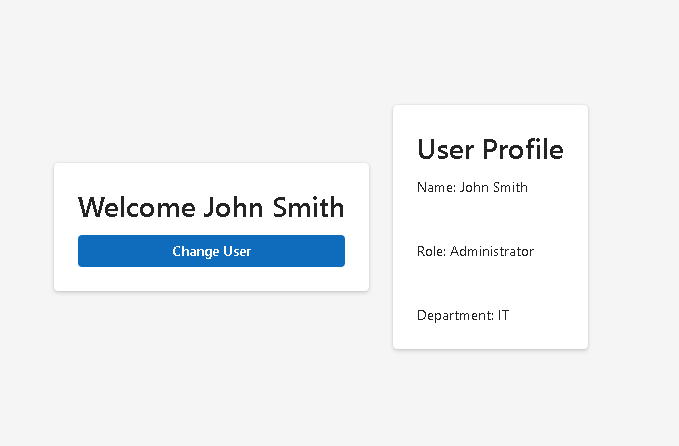
The dashboard displays:
- Welcome message
- User information
- Action button
The component reads the shared user directly from Context.
When the button is clicked:
Button Click ↓updateUser() ↓setUser() ↓Provider Updates ↓React Re-renders Consumers
Every component consuming the context automatically receives the new data.
Building the User Profile Component
The UserProfile component also reads the same Context.
Important observation:
UserDashboardandUserProfile
are completely independent.
Neither passes data to the other.
Both simply consume the same Context.
This is one of the most powerful concepts in React architecture.
Understanding React Re-rendering
When state changes inside the Provider:
setUser(newUser);
React performs:
Provider State Changes ↓Consumers Re-render ↓UI Updates Automatically
There is no manual DOM manipulation.
This follows the React philosophy:
UI = Function(State)
The interface always reflects the current state.
Why Context Is Better Than Global Variables
Some beginners attempt to use global JavaScript variables.
Example:
let currentUser = {...}
This creates serious problems:
- No React re-rendering
- No lifecycle integration
- No predictability
- No component synchronization
Context solves all of these problems because it is integrated directly into React’s rendering engine.
Why TypeScript Matters
The Context is strongly typed:
interface UserContextType { user: User; updateUser: (user: User) => void;}
Benefits:
- Autocomplete
- Refactoring safety
- Error prevention
- Better maintainability
- Enterprise scalability
This becomes increasingly important as applications grow.
Why We Do Not Use useEffect
This application intentionally avoids:
useEffect()
There is no:
- API request
- Local Storage synchronization
- Browser subscription
- Timer
- External system
Everything happens inside React state.
According to React Learn:
You Might Not Need an Effect
State and Context are sufficient.
Enterprise Use Cases
The same pattern is used in:
Authentication
Current UserPermissionsRolesClaims
Themes
Dark ThemeLight ThemeCorporate Theme
Localization
EnglishPortugueseSpanishFrench
Notifications
Global Toast MessagesAlertsWarnings
Corporate Settings
Organization PreferencesUser PreferencesPortal Configuration
React Mental Model
This application reinforces a critical React concept:
Shared State ↓Context ↓Consumers ↓UI
Components do not request DOM updates.
Components do not manually synchronize data.
React automatically handles rendering whenever state changes.
Technical Summary
| Concept | Description |
|---|---|
| Context API | Global state sharing |
| Provider | Makes state available |
| Consumer | Reads shared state |
| useContext | Accesses Context data |
| TypeScript | Strong typing |
| useState | Stores Context data |
| Shared State | Multiple components use same data |
| Fluent UI | Enterprise UI system |
| React Rendering | Automatic UI updates |
| Prop Drilling Elimination | Cleaner architecture |
Concepts Learned
| Area | Knowledge Acquired |
|---|---|
| React Architecture | Shared state design |
| Context API | Global communication |
| TypeScript | Typed Context |
| State Management | Centralized state |
| Component Design | Independent consumers |
| Enterprise Patterns | Provider architecture |
| Fluent UI | Corporate visual design |
| Rendering Model | Automatic updates |
Official Documentation
React Documentation:
- https://react.dev/learn
- https://react.dev/learn/passing-data-deeply-with-context
- https://react.dev/learn/scaling-up-with-reducer-and-context
- https://react.dev/learn/state-a-components-memory
Fluent UI:
TypeScript:
Vite:
Final Thoughts
App 70 marks an important transition in the ReactLab journey.
For the first time, state is no longer local to a single component.
Instead, the application introduces a shared state architecture that can support larger enterprise systems.
Understanding Context is essential before moving into:
- Reducers
- Complex State Management
- Authentication Systems
- Theme Providers
- Global Configuration
- Enterprise Dashboards
The key takeaway is simple:
Provider owns stateConsumers read stateReact handles rendering
This is the foundation of scalable React architecture.
Technical Progress
| Block | App | Name | Status |
|---|---|---|---|
| Block 1 | 01–20 | Fundamentals and UI | Completed |
| Block 2 | 21–40 | Interactivity and State | Completed |
| Block 3 | 41–60 | Professional Fluent UI | Completed |
| Block 4 | 61 | REST API Consumer | Completed |
| Block 4 | 62 | API Dashboard | Completed |
| Block 4 | 63 | Async Search | Completed |
| Block 4 | 64 | GitHub Explorer | Completed |
| Block 4 | 65 | Weather App | Completed |
| Block 4 | 66 | Pagination System | Completed |
| Block 4 | 67 | Infinite Scroll | Completed |
| Block 4 | 68 | Data Cache | Completed |
| Block 4 | 69 | Custom Fetch Hook | Completed |
| Block 4 | 70 | Global State with Context API | Completed |
| Block 4 | 71 | Favorites System | Next |
Current Position: App 70 Completed
Next App: App 71 — Favorites System
Progress: 70 / 100 Apps Completed


