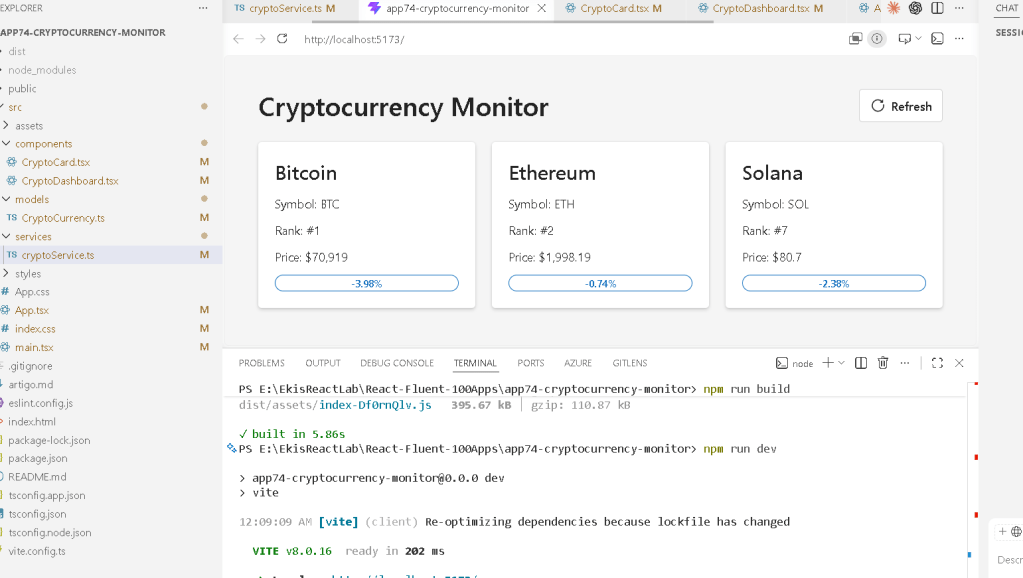
Para o App 74 — Cryptocurrency Monitor, segue o artigo técnico completo em formato WordPress.
App 74 — Cryptocurrency Monitor with React, TypeScript, Fluent UI, and CoinGecko API
Introduction
Modern web applications increasingly rely on real-time data. Financial systems, stock dashboards, cryptocurrency platforms, and analytics portals all require the ability to retrieve external information and present it in a clear, responsive, and user-friendly interface.
In ReactLab, App 74 — Cryptocurrency Monitor represents an important milestone in the learning journey because it combines several concepts introduced throughout Block 4:
- React Hooks
- useEffect
- API Consumption
- Async/Await
- TypeScript Models
- Service Layer Architecture
- Fluent UI Components
- Loading States
- Error Handling
- Enterprise Dashboard Design
This application demonstrates how React synchronizes with an external system using Effects. Unlike previous applications where data existed locally, cryptocurrency information comes from a remote REST API and must be fetched dynamically.
The application retrieves market information for:
- Bitcoin
- Ethereum
- Solana
using the CoinGecko public API.
The final result is a professional Microsoft-style dashboard capable of displaying live cryptocurrency market data with Fluent UI components.
Why Cryptocurrency Data Is Interesting
Cryptocurrency data is an excellent educational example because:
- Prices change constantly
- Data comes from an external service
- Requests must be asynchronous
- Failures can occur
- Loading states are necessary
- User interfaces must update dynamically
Unlike static applications, this project demonstrates how React applications communicate with systems outside the browser.
This is exactly the scenario where React Effects become necessary.
Understanding the React Architecture
The application follows a layered architecture:
App └── CryptoDashboard ├── useEffect ├── Service Layer ├── Loading State ├── Error State └── CryptoCard
Each layer has a specific responsibility.
The App component acts as the root container.
The Dashboard component handles business logic.
The Service Layer communicates with the API.
The Card component focuses only on presentation.
This separation improves maintainability and scalability.
Creating the Data Model
Enterprise applications should never work with anonymous objects.
Instead, TypeScript interfaces define the expected structure.
export interface CryptoCurrency { id: string; name: string; symbol: string; current_price: number; market_cap_rank: number; price_change_percentage_24h: number;}
This interface acts as a contract.
Benefits include:
- Type safety
- Autocomplete
- Easier refactoring
- Better documentation
- Fewer runtime errors
Whenever the API returns data, TypeScript can validate the expected shape.
Service Layer Pattern
The application uses a dedicated service file:
export async function getCryptocurrencies()
Instead of calling fetch directly inside every component.
This architecture provides:
- Reusability
- Better testing
- Separation of concerns
- Easier maintenance
The service is responsible for:
- Sending the HTTP request
- Validating the response
- Returning the JSON payload
- Throwing errors when necessary
The component does not need to know implementation details.
It simply asks for data.
Understanding useEffect
One of the most important concepts introduced by this application is:
useEffect(() => { loadData();}, []);
Many React developers misuse Effects.
According to the official React documentation:
Effects are used to synchronize React components with external systems.
The CoinGecko API is an external system.
The flow becomes:
Component renders→ useEffect executes→ API request sent→ Data received→ State updated→ React re-renders
Without useEffect, the request would never execute automatically when the component loads.
Managing Loading State
Users should never stare at a blank screen.
The application introduces:
const [loading, setLoading] = useState(true);
During the API request:
Loading = true
The UI displays:
<Spinner label="Loading..." />
This creates a professional user experience.
Once the request completes:
Loading = false
The dashboard appears.
Error Handling
Network failures happen.
APIs become unavailable.
Internet connections fail.
Because of this, professional applications require error handling.
The application introduces:
const [error, setError] = useState("");
If the API request fails:
setError( "Unable to load cryptocurrency data.");
The interface then displays an appropriate message.
This prevents silent failures and improves reliability.
Building Reusable Components
The CryptoCard component follows one of React’s most important principles:
One componentOne responsibility
The component receives a cryptocurrency object through props:
interface CryptoCardProps { crypto: CryptoCurrency;}
Its only responsibility is rendering.
It does not:
- Fetch data
- Manage loading state
- Manage errors
This separation makes the component reusable.
Any future dashboard can reuse the same card.
Fluent UI Integration
The project uses Fluent UI to create a professional Microsoft-style interface.
Components include:
- Card
- Text
- Title3
- Badge
- Spinner
- Button
Benefits include:
- Accessibility
- Consistent spacing
- Responsive design
- Keyboard support
- Microsoft design language
Instead of manually building every control, developers can focus on business logic.
Visualizing Market Performance
One useful feature is the 24-hour variation badge.
const positive = crypto.price_change_percentage_24h >= 0;
If positive:
Filled Badge
If negative:
Outline Badge
This provides immediate visual feedback.
Users can quickly identify whether an asset is gaining or losing value.
This demonstrates how React derives UI from data.
Refreshing Data
The application includes a Refresh button.
<Button onClick={loadData}>
The same logic used during initial loading is reused later.
This follows the DRY principle:
Don't Repeat Yourself
The loadData function becomes a reusable operation that can be executed:
- Automatically via useEffect
- Manually via user interaction
React Mental Model
This application reinforces one of React’s most important ideas:
UI = Function(State)
The cryptocurrency cards are generated from state.
The loading screen is generated from state.
The error screen is generated from state.
Nothing is manually inserted into the DOM.
React observes state changes and updates the interface automatically.
Enterprise Architecture Lessons
Although visually simple, App 74 introduces architecture patterns used in large applications:
- Service Layer
- Typed Models
- Component Separation
- API Integration
- State Management
- Error Handling
- Loading States
- Reusable UI Components
These same concepts appear in:
- SharePoint portals
- CRM systems
- ERP dashboards
- Financial applications
- Microsoft 365 solutions
- Analytics platforms
Mastering them now prepares developers for significantly larger projects.
Technical Summary
| Concept | Purpose |
|---|---|
| React | UI rendering |
| TypeScript | Strong typing |
| Fluent UI | Microsoft design system |
| useEffect | External synchronization |
| useState | Component memory |
| Async/Await | API communication |
| Service Layer | Separation of concerns |
| Spinner | Loading feedback |
| Error State | Failure handling |
| Card Component | Data presentation |
| CoinGecko API | Cryptocurrency data |
What We Learned
By completing App 74, we learned how to:
- Fetch data from a REST API
- Synchronize React with external systems
- Create a service layer
- Model API responses using TypeScript
- Display loading indicators
- Handle failures gracefully
- Build reusable presentation components
- Use Fluent UI in enterprise dashboards
- Follow React’s official guidance regarding Effects
Most importantly, we learned that Effects should be used only when React needs to synchronize with something outside itself.
The CoinGecko API is exactly that kind of external system.
This makes App 74 one of the most important learning exercises in Block 4.
The next application, App 75 — Repository Explorer, will continue expanding API integration concepts while introducing more advanced data navigation patterns.
Official Documentation
- React Learn
- Synchronizing with Effects
- Lifecycle of Reactive Effects
- Fluent UI React Components
- CoinGecko API Documentation
- Vite Guide
- TypeScript Documentation
Current Progress
| Block | App | Name | Status |
|---|---|---|---|
| Block 4 | 61 | REST API Consumption | Completed |
| Block 4 | 62 | API Dashboard | Completed |
| Block 4 | 63 | Async Search | Completed |
| Block 4 | 64 | GitHub Explorer | Completed |
| Block 4 | 65 | Weather App | Completed |
| Block 4 | 66 | Pagination System | Completed |
| Block 4 | 67 | Infinite Scroll | Completed |
| Block 4 | 68 | Data Cache | Completed |
| Block 4 | 69 | Custom Fetch Hook | Completed |
| Block 4 | 70 | Context API Control | Completed |
| Block 4 | 71 | Favorites System | Completed |
| Block 4 | 72 | API DataGrid | Completed |
| Block 4 | 73 | Analytics Dashboard | Completed |
| Block 4 | 74 | Cryptocurrency Monitor | Current ✅ |
| Block 4 | 75 | Repository Explorer | Next 🚀 |
Current Position: App 74 / 100
Next App: App 75 — Repository Explorer.


