Technical Blog Article — App 76: Log Viewer Dashboard with React, TypeScript, Fluent UI, and Enterprise Architecture
Introduction
Modern enterprise systems generate thousands or even millions of log entries every day. Every user login, API request, database operation, file upload, workflow execution, approval action, or system error can generate logs.
Organizations depend on log systems to:
- Monitor application health
- Troubleshoot production issues
- Track user activities
- Analyze performance
- Detect security incidents
- Support auditing requirements
- Maintain compliance
Examples include:
- Microsoft 365 audit logs
- SharePoint activity logs
- Azure Monitor
- Azure Application Insights
- Microsoft Sentinel
- Enterprise ERP systems
- CRM platforms
- Internal business applications
For this reason, one of the most common enterprise dashboards is a Log Viewer Dashboard.
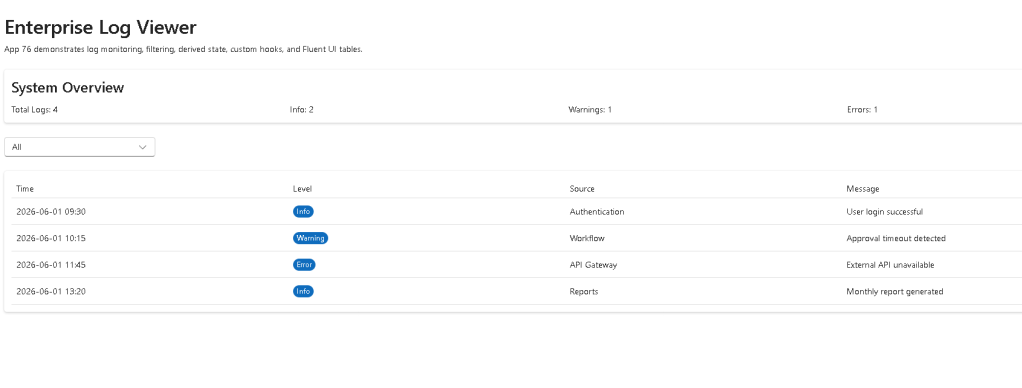
App 76 introduces the concept of building a professional log monitoring interface using:
- React
- TypeScript
- Vite
- Fluent UI
- Service Layer Architecture
- Type-safe Models
- useEffect
- Derived Data
This application belongs to Block 4 — Effects and Architecture, where the focus is learning how React synchronizes with external systems and how enterprise applications organize code into layers.
Why Log Dashboards Matter
In small applications, developers often debug using:
console.log(...)
However, enterprise systems require centralized monitoring.
Imagine:
10 users100 users1,000 users10,000 users100,000 users
At scale, manually reading console output becomes impossible.
Organizations instead use dashboards that aggregate information such as:
| Metric | Example |
|---|---|
| Total Logs | 12,450 |
| Errors | 125 |
| Warnings | 842 |
| Information Events | 11,483 |
| Critical Alerts | 7 |
| Active Users | 1,284 |
The purpose of App 76 is to simulate such a dashboard.
Learning Objectives
This app introduces:
| Concept | Description |
|---|---|
| useEffect | Load data from services |
| Service Layer | Separate UI from data access |
| Models | Strong TypeScript contracts |
| Derived Data | Summary calculations |
| Component Composition | Dashboard structure |
| Fluent UI | Enterprise visual components |
| Type Imports | Modern TypeScript architecture |
| TS1484 | Type-only imports |
Creating the Project
Create the Application
mkdir bloco04cd bloco04npm create vite@latest app76-log-viewer-dashboard -- --template react-tscd app76-log-viewer-dashboardnpm installnpm install @fluentui/react-components
Create the Folder Structure
mkdir src\componentsmkdir src\modelsmkdir src\servicesmkdir src\datamkdir src\styles
Create files:
New-Item src\models\LogEntry.ts -ItemType FileNew-Item src\services\logService.ts -ItemType FileNew-Item src\components\LogSummary.tsx -ItemType FileNew-Item src\components\LogGrid.tsx -ItemType FileNew-Item artigo.md -ItemType File
Final Project Structure
app76-log-viewer-dashboard/src/│├── components/│ ├── LogSummary.tsx│ └── LogGrid.tsx│├── models/│ └── LogEntry.ts│├── services/│ └── logService.ts│├── data/│├── styles/│├── App.tsx├── main.tsx└── index.css
This structure follows the architecture established throughout ReactLab.
Understanding the LogEntry Model
LogEntry.ts
export interface LogEntry { id: number; timestamp: string; level: string; source: string; message: string;}
This interface represents a single log record.
Each log entry contains:
| Property | Purpose |
|---|---|
| id | Unique identifier |
| timestamp | Event date/time |
| level | Severity |
| source | System module |
| message | Description |
This model acts as a contract.
Every component that consumes logs knows exactly what properties exist.
This is one of the major advantages of TypeScript.
Why Models Matter
Without a model:
const logs = [];
React components become fragile.
Developers must guess:
What properties exist?What types are expected?What fields are mandatory?
With TypeScript:
LogEntry
becomes the source of truth.
Understanding the Service Layer
logService.ts
The service layer simulates an API.
import type { LogEntry } from "../models/LogEntry";export async function getLogs(): Promise<LogEntry[]> { return [ { id: 1, timestamp: "2026-06-02 09:30", level: "Information", source: "Authentication", message: "User logged in successfully", }, { id: 2, timestamp: "2026-06-02 09:35", level: "Warning", source: "Storage", message: "Disk utilization above 80%", }, { id: 3, timestamp: "2026-06-02 09:40", level: "Error", source: "API Gateway", message: "Service unavailable", }, ];}
Notice:
import type { LogEntry }
This becomes extremely important later.
Why Use a Service Layer
Many beginners place everything inside App.tsx.
Enterprise applications do not.
Instead:
UI Layer ↓Service Layer ↓API Layer ↓Database
This separation improves:
- Maintainability
- Testing
- Scalability
- Reusability
Understanding useEffect
The application loads logs using:
useEffect(() => { loadLogs();}, []);
This is the correct use of useEffect.
Why?
Because React must synchronize with an external source:
Service Layer
According to React Learn:
Effects synchronize components with external systems.
This is exactly our scenario.
React Rendering Flow
The rendering cycle looks like:
App renderslogs = []useEffect executesloadLogs()Service returns datasetLogs(...)State changesReact re-rendersDashboard updates
This is a perfect example of proper Effect usage.
Understanding the TS1484 Error
During development you encountered:
TS1484:'LogEntry' is a type and must be imported using a type-only import
This error appeared because Vite + modern TypeScript enable:
"verbatimModuleSyntax": true
When this option is enabled:
import { LogEntry }
is treated as a runtime import.
However:
LogEntry
is not a runtime object.
It only exists during compilation.
Incorrect Import
import { LogEntry } from "../models/LogEntry";
TypeScript interprets this as:
Import a runtime value
But interfaces do not exist at runtime.
Result:
TS1484
Correct Import
import type { LogEntry } from "../models/LogEntry";
The keyword:
type
tells TypeScript:
This import only exists for typing.Remove it from the generated JavaScript.
Problem solved.
Why Modern TypeScript Requires This
Benefits include:
- Smaller bundles
- Faster compilation
- Cleaner output
- Better tree-shaking
- Explicit architecture
This is now considered best practice.
Understanding LogSummary
The dashboard summary component calculates:
Total LogsErrorsWarningsInformation
These values are derived.
We do not store them separately.
Example:
const totalLogs = logs.length;const errors = logs.filter(x => x.level === "Error").length;
This follows React guidance:
Avoid redundant state.
Derived values should be calculated.
Not stored.
Understanding LogGrid
The grid displays:
TimestampLevelSourceMessage
The component receives:
logs
through props.
This demonstrates React composition:
App│├── LogSummary│└── LogGrid
Both components consume the same data.
Component Responsibility
A React component should have one responsibility.
LogSummary
Responsible for:
AggregationMetricsStatistics
LogGrid
Responsible for:
DisplayTabular visualization
App
Responsible for:
State ownershipLoading dataComposition
This separation improves maintainability.
Why Fluent UI Is Used
Fluent UI provides:
- Accessibility
- Consistent spacing
- Enterprise styling
- Keyboard support
- Microsoft design language
Instead of manually building:
cardstablespanels
we use:
CardTextTitleTable
This accelerates development.
Enterprise Architecture Introduced
App 76 introduces a common architecture:
Models│Services│State│Components│UI
Future apps will extend this architecture to:
REST APIsAuthenticationContext APICachingPaginationReportingAnalytics
Why This App Belongs to Block 4
Block 4 focuses on:
EffectsArchitectureServicesExternal Data
App 76 is one of the first examples where:
UI is no longer static.
Data comes from outside the component.
That makes useEffect necessary.
Technical Summary
| Concept | Explanation |
|---|---|
| useEffect | Synchronizes with services |
| Service Layer | Isolates data access |
| LogEntry | TypeScript model |
| Derived Data | Summary calculations |
| Component Composition | Dashboard architecture |
| Fluent UI | Enterprise visual layer |
| TS1484 | Type-only import requirement |
| import type | Modern TypeScript best practice |
| State Ownership | App controls data |
| Props | Components receive data |
Concept Table
| Concept | File | Why It Matters |
|---|---|---|
| LogEntry Model | LogEntry.ts | Defines contracts |
| Service Layer | logService.ts | Simulates APIs |
| Effect Loading | App.tsx | Loads external data |
| Dashboard Metrics | LogSummary.tsx | Derived state |
| Grid Display | LogGrid.tsx | Data visualization |
| Type Imports | All files | Fixes TS1484 |
| Fluent UI | Components | Enterprise UI |
| React State | App.tsx | Controls rendering |
Official Documentation
React
- React Learn
- Synchronizing with Effects
- You Might Not Need an Effect
- Passing Data Deeply with Context
TypeScript
Fluent UI
Vite
Current Project Progress
| Block | App | Name | Status |
|---|---|---|---|
| Block 4 | 61 | REST API Consumer | Completed |
| Block 4 | 62 | API Dashboard | Completed |
| Block 4 | 63 | Async Search | Completed |
| Block 4 | 64 | GitHub Explorer | Completed |
| Block 4 | 65 | Weather App | Completed |
| Block 4 | 66 | Pagination System | Completed |
| Block 4 | 67 | Infinite Scroll | Completed |
| Block 4 | 68 | Data Cache | Completed |
| Block 4 | 69 | Custom Fetch Hook | Completed |
| Block 4 | 70 | Context API | Completed |
| Block 4 | 71 | Favorites System | Completed |
| Block 4 | 72 | API DataGrid | Completed |
| Block 4 | 73 | Analytics Dashboard | Completed |
| Block 4 | 74 | Crypto Monitor | Completed |
| Block 4 | 75 | Repository Explorer | Completed |
| Block 4 | 76 | Log Viewer Dashboard | Current |
| Block 4 | 77 | Reporting System | Next |
Final Architectural Insight
The most valuable lesson from App 76 is not the dashboard itself.
It is understanding how React applications evolve from:
Static Components
to:
Services→ Effects→ State→ Derived Data→ Enterprise Dashboards
And equally important, this app introduces one of the most common TypeScript enterprise issues:
TS1484
By fixing it with:
import type { LogEntry }
you adopted the modern TypeScript pattern used in professional React applications built with Vite, strict TypeScript settings, and enterprise-scale architectures.


