Technical Blog Article — App 78: Performance Simulator with React, TypeScript, Fluent UI, useMemo, and Enterprise Optimization
Introduction
As React applications grow, performance becomes increasingly important. Small applications with dozens of records may render instantly, but enterprise applications often work with thousands of records, complex filters, dashboards, reports, analytics systems, and expensive calculations.
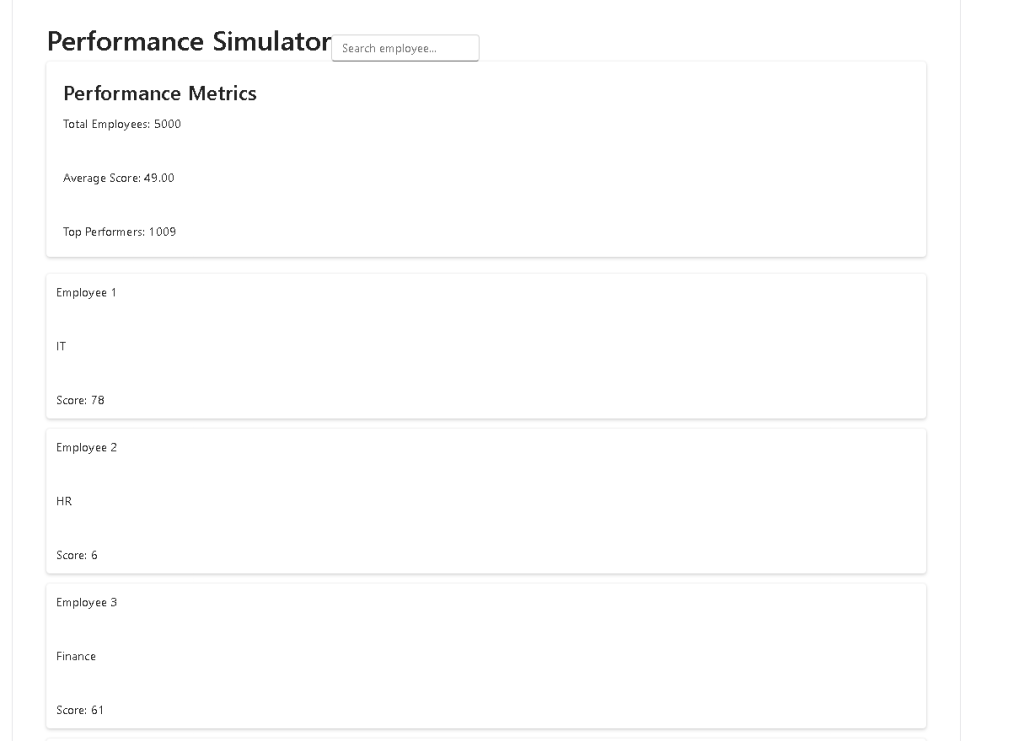
In App 78 — Performance Simulator, we focus on understanding how React rendering behaves when handling large datasets and computationally expensive operations. This application belongs to Block 4 — Effects and Architecture, where the objective is to build professional React applications using advanced hooks, service layers, reusable components, and performance optimization patterns.
The goal of this application is not only to build a dashboard but also to understand:
- Why React components re-render
- What causes unnecessary calculations
- When to use useMemo
- Why derived state is important
- How large datasets affect performance
- How enterprise dashboards are structured
This application follows the official React philosophy:
UI = f(State)
The interface is always derived from state, and optimization should preserve this mental model rather than bypass it.
Creating the Project
Create the application using Vite and TypeScript:
mkdir bloco04cd bloco04npm create vite@latest app78-performance-simulator -- --template react-tscd app78-performance-simulatornpm installnpm install @fluentui/react-componentsnpm install @fluentui/react-icons
Create the folder structure:
mkdir src\componentsmkdir src\datamkdir src\modelsmkdir src\servicesmkdir src\styles
Create files:
New-Item src\models\EmployeePerformance.ts -ItemType FileNew-Item src\data\employeeData.ts -ItemType FileNew-Item src\services\performanceService.ts -ItemType FileNew-Item src\components\SearchBar.tsx -ItemType FileNew-Item src\components\PerformanceSummary.tsx -ItemType FileNew-Item src\components\EmployeeGrid.tsx -ItemType FileNew-Item src\App.tsx -ItemType FileNew-Item src\main.tsx -ItemType FileNew-Item artigo.md -ItemType File
Project Structure
src/│├── components/│ ├── SearchBar.tsx│ ├── PerformanceSummary.tsx│ └── EmployeeGrid.tsx│├── data/│ └── employeeData.ts│├── models/│ └── EmployeePerformance.ts│├── services/│ └── performanceService.ts│├── styles/│├── App.tsx├── main.tsx└── index.css
This structure follows enterprise React architecture principles:
- Models define data contracts
- Services contain business logic
- Components handle presentation
- App composes the UI
- main.tsx connects React to the browser
Understanding main.tsx
One detail that is often overlooked is that React does not start in App.tsx.
The true entry point is:
src/main.tsx
import React from "react";import ReactDOM from "react-dom/client";import { FluentProvider, webLightTheme,} from "@fluentui/react-components";import App from "./App";import "./index.css";ReactDOM.createRoot( document.getElementById("root")!).render( <React.StrictMode> <FluentProvider theme={webLightTheme}> <App /> </FluentProvider> </React.StrictMode>);
The rendering flow is:
index.html ↓main.tsx ↓FluentProvider ↓App.tsx ↓Components
The FluentProvider is placed here because it should wrap the entire application.
This guarantees:
- Microsoft typography
- Fluent UI themes
- accessibility
- design tokens
- enterprise styling consistency
Understanding the Dataset
To simulate a realistic enterprise scenario, we generate 5000 employees.
export const employees =Array.from({ length: 5000 }, (_, index) => ({ id: index + 1, name: `Employee ${index + 1}`, department: [ "IT", "HR", "Finance", "Operations", ][index % 4], score: Math.floor(Math.random() * 100),}));
The objective is not the data itself.
The objective is to simulate:
Large dataset→ Filtering→ Calculations→ Rendering→ Optimization
This resembles real dashboards used in corporate environments.
Why Performance Matters
Imagine a dashboard with:
- 50,000 users
- 200,000 transactions
- 10,000 reports
- KPI calculations
If React recalculates everything on every render, the UI becomes slower.
A common beginner mistake:
const averageScore =calculateAverageScore(filteredEmployees);
This executes every render.
Even if nothing changed.
With a small dataset, you do not notice.
With enterprise datasets, the impact becomes visible.
Introducing useMemo
React provides:
useMemo()
Its purpose:
Remember the previous calculation resultuntil dependencies change.
Example:
const averageScore =useMemo( () => calculateAverageScore( filteredEmployees ), [filteredEmployees]);
React stores the previous value.
Only when:
filteredEmployees changes
does React recalculate.
This is caching for calculations.
Derived State
Notice:
const averageScore =useMemo(...)
We do NOT store:
const [averageScore,setAverageScore]
Why?
Because averageScore is derived.
It comes from:
employees+filter
React recommends:
Avoid redundant state.
Derived values should be calculated, not stored.
This reduces bugs and keeps state simpler.
Search Filtering
The search system demonstrates another enterprise pattern.
const filteredEmployees =useMemo(() => { return employees.filter( employee => employee.name .toLowerCase() .includes( search.toLowerCase() ) );}, [search]);
Without useMemo:
- filtering runs every render
With useMemo:
- filtering runs only when search changes
This becomes important for large collections.
Service Layer
The calculations are moved to:
services/performanceService.ts
Instead of:
App.tsx
This separation improves:
- maintainability
- testing
- readability
- scalability
Enterprise React applications should separate:
UIfromBusiness Logic
Whenever possible.
Component Composition
The final hierarchy is:
App│├── SearchBar│├── PerformanceSummary│└── EmployeeGrid
Each component has a single responsibility.
This follows React’s composition philosophy.
Small reusable components are easier to:
- test
- maintain
- reuse
- optimize
Why We Do Not Use useEffect
One important lesson:
This app does NOT need useEffect.
There is:
- no API call
- no timer
- no browser subscription
- no external system
Everything is derived from existing state.
According to React Learn:
“You Might Not Need an Effect.”
Many developers overuse useEffect.
The correct approach is:
Derived value?Use calculation.External system?Use Effect.
Enterprise Dashboard Pattern
The architecture of this app resembles:
- HR dashboards
- CRM reports
- ERP analytics
- Power BI-style interfaces
- SharePoint reporting portals
The pattern is:
Data↓Filter↓Metrics↓Grid↓Visualization
Understanding this architecture prepares you for larger applications later in the roadmap.
Technical Summary
| Concept | Purpose |
|---|---|
| useState | Stores search term |
| useMemo | Caches expensive calculations |
| Derived State | Metrics calculated from data |
| Fluent UI | Enterprise visual design |
| Service Layer | Business logic separation |
| Component Composition | Reusable architecture |
| Large Dataset | Performance simulation |
| Filtering | Dynamic search |
| TypeScript | Strong typing |
| Dashboard Pattern | Enterprise UI architecture |
Official Documentation
React
- https://react.dev/learn
- https://react.dev/reference/react/useMemo
- https://react.dev/learn/you-might-not-need-an-effect
- https://react.dev/learn/keeping-components-pure
Fluent UI
Vite
TypeScript
Final Architectural Insight
The most important lesson from App 78 is that performance optimization should not change the React mental model.
React remains:
State↓Render↓UI
Tools like useMemo simply help React avoid unnecessary work.
The goal is not to stop rendering.
The goal is to make rendering efficient while preserving React’s declarative architecture.


