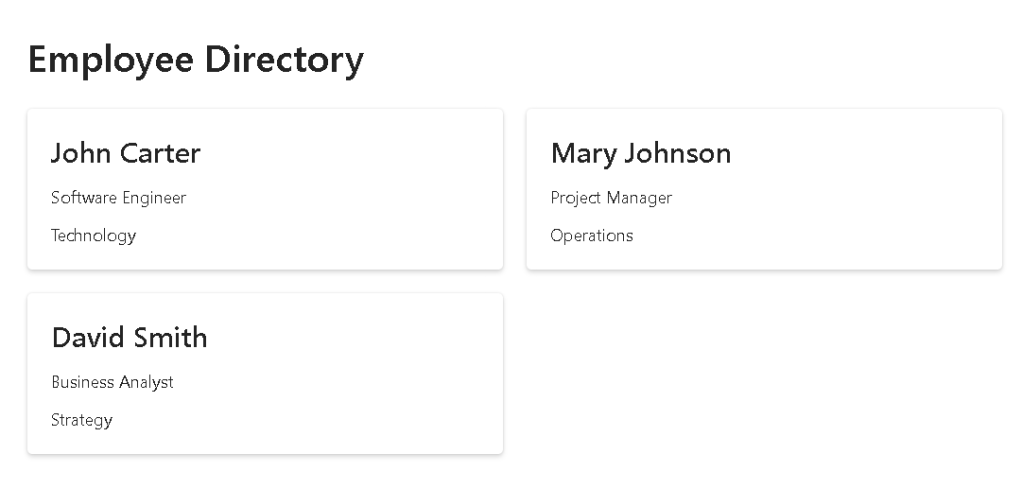
App 79 — Layered Architecture with React, TypeScript, Fluent UI, and Enterprise Design Patterns
Introduction
As React applications grow, one of the biggest challenges developers face is maintaining code organization. Small applications often start with everything inside a single file: API calls, state management, business rules, UI rendering, validation, and styling. While this may work initially, it quickly becomes difficult to maintain, test, and extend.
This is why App 79 — Layered Architecture is one of the most important applications in the ReactLab roadmap.
This application belongs to Block 4 — Effects and Architecture and introduces a professional architecture pattern used in enterprise React solutions. The goal is not to build a complex UI but to learn how to organize a React application using clear architectural layers.
The architecture introduced in this app follows a simple but powerful flow:
Model Layer
→ Service Layer
→ Custom Hook Layer
→ Page Layer
→ Component Layer
Each layer has a single responsibility.
This separation makes applications easier to:
- maintain
- scale
- test
- refactor
- reuse
The concepts learned here prepare the foundation for the final enterprise applications of Block 5.
Why Layered Architecture Matters
Many developers begin React by placing everything inside App.tsx:
function App() { // state // effects // api calls // business rules // rendering return (...)}
While this works for small demos, it creates several problems:
- Components become enormous
- Business logic is duplicated
- API code spreads throughout the UI
- Testing becomes difficult
- Refactoring becomes risky
Professional applications separate concerns.
Instead of one giant component, responsibilities are divided.
For example:
ModelsServicesHooksPagesComponents
Each layer has one purpose.
This approach follows one of the most important software engineering principles:
Single Responsibility Principle (SRP)
Understanding the Model Layer
The model layer defines the shape of the data.
Example:
export interface Employee { id: number; name: string; role: string; department: string;}
The model acts as a contract.
Benefits:
- Type safety
- Predictable structures
- IntelliSense support
- Safer refactoring
Without models:
const employee = { something: "unknown"}
With models:
const employee: Employee
TypeScript immediately validates the structure.
In enterprise applications, model layers often contain:
- DTOs
- API contracts
- domain models
- validation schemas
Understanding the Service Layer
The service layer is responsible for data access.
Instead of components calling APIs directly:
fetch(...)
components call services:
getEmployees()
Example:
export async function getEmployees() { return Promise.resolve([...]);}
Today the service returns mock data.
Tomorrow the implementation can change to:
fetch(...)
or
Graph API
or
SharePoint REST
without changing the UI.
This is one of the biggest benefits of architecture.
The UI doesn’t care where data comes from.
The service abstracts the source.
Understanding the Custom Hook Layer
Custom Hooks are one of the most powerful React features.
Instead of placing data-loading logic inside a component:
useEffect(...)useState(...)
we move it into a reusable hook.
Example:
export function useEmployees() { ...}
Responsibilities:
- Loading data
- Managing loading state
- Managing error state
- Encapsulating effects
- Reusing business logic
This means multiple pages can reuse the same hook.
Benefits:
- Less duplication
- Cleaner components
- Easier testing
- Better separation
Understanding the Component Layer
Components should focus on rendering.
Example:
<EmployeeCard />
The component receives data through props:
<EmployeeCard employee={employee} />
and displays it.
The component should not:
- fetch data
- know APIs
- manage global logic
Its responsibility is:
Receive dataRender UI
This makes components predictable and reusable.
Understanding the Page Layer
Pages coordinate the application.
Example:
EmployeeDirectoryPage
Responsibilities:
- Use hooks
- Organize layout
- Compose components
The page acts as a bridge between logic and presentation.
Flow:
Page ↓Hook ↓Service ↓ModelPage ↓Components
This separation creates clean architecture.
React Mental Model
This application reinforces an important React concept:
UI is a function of state.
The hook retrieves data.
The page receives data.
Components render data.
React updates the interface automatically.
Flow:
Service returns data↓Hook updates state↓React re-renders↓Page receives data↓Components render data
The UI is derived from state.
Why useEffect Belongs in Hooks
Many developers place useEffect inside UI components.
Example:
function EmployeeCard() { useEffect(...)}
This mixes responsibilities.
Instead:
useEmployees()
contains the effect.
Benefits:
- Components remain pure
- Effects stay isolated
- Logic becomes reusable
This aligns perfectly with the React Learn guidance regarding Effects.
Effects should synchronize with external systems.
The custom hook is the ideal place for that synchronization.
Enterprise Evolution
Today’s architecture:
Component↓Hook↓Service↓Mock Data
Future architecture:
Component↓Hook↓Service↓REST API↓Database
The UI remains unchanged.
Only the service changes.
This is exactly how large enterprise systems evolve.
Benefits of Layered Architecture
Scalability
Applications can grow without becoming chaotic.
Reusability
Hooks and services can be reused across pages.
Maintainability
Changes are isolated.
Testability
Services and hooks can be tested independently.
Separation of Concerns
Each layer has one purpose.
Technical Summary
| Layer | Responsibility |
|---|---|
| Models | Data contracts |
| Services | Data access |
| Hooks | State and effects |
| Pages | Orchestration |
| Components | Rendering |
| Fluent UI | Enterprise UI |
| TypeScript | Type safety |
| React | Declarative rendering |
What We Learned
This application introduces one of the most important concepts in enterprise React development:
Architecture matters.
Small projects can survive without structure.
Large projects cannot.
By separating Models, Services, Hooks, Pages, and Components, we create applications that are easier to understand, maintain, scale, and evolve.
This architecture prepares the foundation for App 80 — Mini Framework React Enterprise, where these concepts will evolve into a complete enterprise React structure.
Technical Concepts Table
| Concept | Description |
|---|---|
| Model Layer | Defines data contracts |
| Service Layer | Encapsulates data access |
| Custom Hooks | Reusable state and effect logic |
| Page Layer | Coordinates application flow |
| Component Layer | Pure UI rendering |
| Fluent UI | Microsoft enterprise design system |
| TypeScript | Strong typing |
| useEffect | External synchronization |
| useState | Component memory |
| Separation of Concerns | Each layer has one responsibility |
Official Documentation
- React Learn
- Thinking in React
- Synchronizing with Effects
- Reusing Logic with Custom Hooks
- Fluent UI React Components
- Vite Guide
- TypeScript Documentation
Current Progress
| Block | App | Name | Status |
|---|---|---|---|
| Block 1 | 01–20 | Fundamentals and UI | Completed |
| Block 2 | 21–40 | Interactivity and State | Completed |
| Block 3 | 41–60 | Professional Fluent UI | Completed |
| Block 4 | 61–78 | Effects and Architecture | Completed |
| Block 4 | 79 | Layered Architecture | Current |
| Block 4 | 80 | Mini Framework React Enterprise | Next |
Current Position: Block 4 → App 79 → Layered Architecture
Next App: App 80 → Mini Framework React Enterprise


