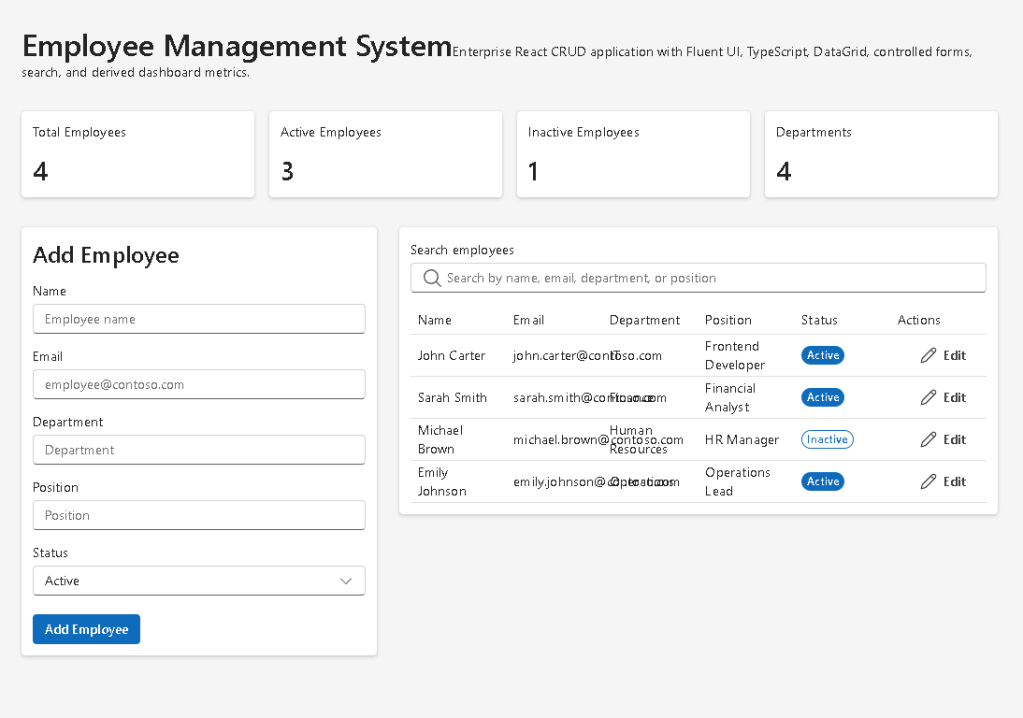
App 82 — Employee Management System with React, TypeScript, Fluent UI, and Vite
Introduction
As React applications become larger and more business-oriented, developers eventually need to move beyond simple examples such as counters, calculators, forms, and dashboards. Real enterprise systems manage business entities, support user workflows, and provide interfaces for creating, editing, searching, and deleting information.
In App 82 — Employee Management System, we build one of the most common business applications found in corporate environments: an employee management platform.
This application introduces a complete CRUD workflow using React, TypeScript, Fluent UI, and modern React architecture.
The project allows users to:
- View employees
- Search employees
- Add employees
- Edit employees
- Delete employees
- View summary metrics
- Manage employee status
This app follows the React philosophy described in React Learn:
UI = f(State)
The interface is entirely derived from application state.
Official React guidance:
Learning Objectives
This application teaches:
- Enterprise component architecture
- TypeScript modeling
- CRUD operations
- Controlled forms
- Derived state
- Search and filtering
- Fluent UI DataGrid
- Enterprise dashboard patterns
- React state management
Enterprise Scenario
Imagine a company that maintains employee information.
Each employee contains:
- Name
- Department
- Position
- Status
The company needs an internal portal where managers can:
- Search employees
- Add new employees
- Update information
- Remove inactive employees
- View summary statistics
This is exactly what App 82 provides.
Architecture Overview
The application follows a layered structure:
App│├── DashboardSummary│├── EmployeeForm│├── EmployeeSearch│└── EmployeeGrid
Each component has a single responsibility.
This follows one of the most important React principles:
Components should do one thing well.
The Employee Model
The Employee interface defines the structure of the business entity.
export interface Employee { id: number; name: string; email: string; department: string; position: string; status: "Active" | "Inactive";}
Benefits:
- Type safety
- Autocomplete
- Easier maintenance
- Safer refactoring
TypeScript guarantees that every employee follows the same structure.
Why TypeScript Matters
Without TypeScript:
{ name: 123}
could accidentally enter the application.
With TypeScript:
name: string
invalid data is detected during development.
Enterprise React applications should always use TypeScript.
Initial Data Source
The application starts with a mock employee dataset.
const initialEmployees = [...]
This simulates information normally coming from:
- REST APIs
- Databases
- SharePoint Lists
- Microsoft Graph
- ERP systems
- CRM systems
For learning purposes, local data keeps the focus on React concepts.
React State Management
The most important state is:
const [employees, setEmployees]
This state stores the entire employee collection.
Every operation modifies this state.
React automatically updates the UI.
The flow is:
User Action ↓State Update ↓React Re-render ↓Updated Interface
Controlled Forms
The EmployeeForm component uses controlled inputs.
Example:
<Input value={employee.name}/>
The value comes directly from React state.
This means:
React owns the form data.
The browser is not the source of truth.
React state is.
This is one of the most important React concepts.
Add Employee Workflow
When the user fills the form and clicks Add:
User Input ↓State Object ↓New Employee Created ↓Employees Array Updated ↓React Re-render
Implementation:
setEmployees([ ...employees, newEmployee,]);
The spread operator creates a new array.
React prefers immutable updates.
Edit Employee Workflow
Editing works differently.
The selected employee is loaded into the form.
The application stores:
editingEmployeeId
When Save is clicked:
employees.map(...)
replaces only the matching employee.
Benefits:
- Immutable updates
- Predictable rendering
- Better debugging
Delete Employee Workflow
Delete uses:
employees.filter(...)
The selected employee is removed.
Example:
setEmployees( employees.filter( employee => employee.id !== employeeId ));
This creates a new collection without the deleted item.
Search Functionality
The EmployeeSearch component provides real-time filtering.
The user types:
John
React executes:
employees.filter(...)
The filtered collection is rendered immediately.
No page refresh.
No server round trip.
Pure React rendering.
Derived State
The dashboard cards demonstrate one of React’s most important concepts:
Derived State.
We calculate:
Total EmployeesActive EmployeesInactive EmployeesDepartments
from existing data.
Notice:
const activeEmployees = employees.filter(...)
We do not store this value separately.
Instead, we derive it.
React Learn strongly recommends this pattern because it avoids duplicated state.
Dashboard Metrics
The DashboardSummary component provides KPIs.
Examples:
Total Employees42Active Employees38Inactive Employees4Departments7
These values update automatically whenever the employee collection changes.
This is a perfect example of:
UI derived from state
Fluent UI Integration
The application uses Fluent UI extensively.
Components include:
- Card
- Input
- Dropdown
- Button
- Badge
- DataGrid
- Typography
Benefits:
- Microsoft design language
- Accessibility
- Consistency
- Enterprise appearance
- Responsive layouts
Fluent UI is the same design system used across Microsoft products.
DataGrid
The DataGrid is the heart of the employee listing.
Columns:
- Name
- Department
- Position
- Status
- Actions
Benefits:
- Structured display
- Enterprise UX
- Better scalability
- Professional appearance
DataGrids are fundamental in corporate applications.
Badge Components
Employee status uses Fluent UI Badges.
Example:
[ Active ]
or
[ Inactive ]
Visual indicators improve usability and readability.
Why useMemo is Used
Filtering is implemented using:
useMemo(...)
Purpose:
Avoid recalculating filtered employees unnecessarily.
Benefits:
- Better performance
- Cleaner architecture
- Reduced rendering work
This becomes important when datasets grow.
React Mental Model
This app reinforces a critical React principle:
State changes→ React re-renders→ UI updates
We never manually update the DOM.
We update state.
React handles everything else.
Enterprise Relevance
This architecture is similar to systems found in:
- SharePoint portals
- Human Resources systems
- Employee directories
- Corporate intranets
- ERP platforms
- CRM platforms
- Microsoft 365 business applications
Understanding this pattern prepares developers for real-world projects.
Technical Summary
| Concept | Purpose |
|---|---|
| TypeScript Interface | Employee model |
| useState | Employee storage |
| Controlled Form | Employee editing |
| CRUD | Create, Read, Update, Delete |
| useMemo | Optimized filtering |
| DataGrid | Enterprise table |
| Fluent UI | Microsoft design system |
| Derived State | Dashboard metrics |
| Search | Dynamic filtering |
| Component Composition | Modular architecture |
Official Documentation
React Learn
Thinking in React
Managing State
Choosing the State Structure
Fluent UI
Fluent UI DataGrid
TypeScript
Vite
Final Thoughts
App 82 is the first application in the final stage of the ReactLab roadmap that truly resembles a real enterprise system.
It combines:
- Forms
- DataGrids
- CRUD
- Search
- Dashboard metrics
- Fluent UI
- TypeScript
- State management
The application demonstrates how React scales from simple components into professional business solutions.
Most importantly, it reinforces the fundamental React principle:
State is the source of truth.
The UI is simply a visual representation of that state.
Current Progress
| App | Name | Status |
|---|---|---|
| 80 | Mini Framework React Enterprise | Completed |
| 81 | Complete CRUD System | Completed |
| 82 | Employee Management System | Current |
| 83 | Financial Dashboard | Next |
| 84 | Inventory Management System | Upcoming |
| 85 | Kanban Board | Upcoming |
| 86 | Enterprise Task Manager | Upcoming |
| 87 | User Management System | Upcoming |
| 88 | Administrative Portal | Upcoming |
| 89 | Ticket System | Upcoming |
| 90 | Power BI Style Dashboard | Upcoming |
| 91 | Report Generator | Upcoming |
| 92 | Audit System | Upcoming |
| 93 | SharePoint Inspired Portal | Upcoming |
| 94 | Corporate Catalog | Upcoming |
| 95 | Reservation System | Upcoming |
| 96 | Mini ERP Enterprise | Upcoming |
| 97 | Complete CRM | Upcoming |
| 98 | Analytics Platform | Upcoming |
| 99 | Microsoft Admin Center Style | Upcoming |
| 100 | Final Enterprise React Platform | Final Goal |
Current App: 82/100 — Employee Management System
Next App: 83/100 — Financial Dashboard 🚀For App 82, you should create the article file first:
New-Item artigo.md -ItemType File
Below is the complete technical blog article for App 82 — Employee Management System.
App 82 — Employee Management System with React, TypeScript, Fluent UI, and Vite
Introduction
As React applications become larger and more business-oriented, developers eventually need to move beyond simple examples such as counters, calculators, forms, and dashboards. Real enterprise systems manage business entities, support user workflows, and provide interfaces for creating, editing, searching, and deleting information.
In App 82 — Employee Management System, we build one of the most common business applications found in corporate environments: an employee management platform.
This application introduces a complete CRUD workflow using React, TypeScript, Fluent UI, and modern React architecture.
The project allows users to:
- View employees
- Search employees
- Add employees
- Edit employees
- Delete employees
- View summary metrics
- Manage employee status
This app follows the React philosophy described in React Learn:
UI = f(State)
The interface is entirely derived from application state.
Official React guidance:
Learning Objectives
This application teaches:
- Enterprise component architecture
- TypeScript modeling
- CRUD operations
- Controlled forms
- Derived state
- Search and filtering
- Fluent UI DataGrid
- Enterprise dashboard patterns
- React state management
Enterprise Scenario
Imagine a company that maintains employee information.
Each employee contains:
- Name
- Department
- Position
- Status
The company needs an internal portal where managers can:
- Search employees
- Add new employees
- Update information
- Remove inactive employees
- View summary statistics
This is exactly what App 82 provides.
Architecture Overview
The application follows a layered structure:
App│├── DashboardSummary│├── EmployeeForm│├── EmployeeSearch│└── EmployeeGrid
Each component has a single responsibility.
This follows one of the most important React principles:
Components should do one thing well.
The Employee Model
The Employee interface defines the structure of the business entity.
export interface Employee { id: number; name: string; email: string; department: string; position: string; status: "Active" | "Inactive";}
Benefits:
- Type safety
- Autocomplete
- Easier maintenance
- Safer refactoring
TypeScript guarantees that every employee follows the same structure.
Why TypeScript Matters
Without TypeScript:
{ name: 123}
could accidentally enter the application.
With TypeScript:
name: string
invalid data is detected during development.
Enterprise React applications should always use TypeScript.
Initial Data Source
The application starts with a mock employee dataset.
const initialEmployees = [...]
This simulates information normally coming from:
- REST APIs
- Databases
- SharePoint Lists
- Microsoft Graph
- ERP systems
- CRM systems
For learning purposes, local data keeps the focus on React concepts.
React State Management
The most important state is:
const [employees, setEmployees]
This state stores the entire employee collection.
Every operation modifies this state.
React automatically updates the UI.
The flow is:
User Action ↓State Update ↓React Re-render ↓Updated Interface
Controlled Forms
The EmployeeForm component uses controlled inputs.
Example:
<Input value={employee.name}/>
The value comes directly from React state.
This means:
React owns the form data.
The browser is not the source of truth.
React state is.
This is one of the most important React concepts.
Add Employee Workflow
When the user fills the form and clicks Add:
User Input ↓State Object ↓New Employee Created ↓Employees Array Updated ↓React Re-render
Implementation:
setEmployees([ ...employees, newEmployee,]);
The spread operator creates a new array.
React prefers immutable updates.
Edit Employee Workflow
Editing works differently.
The selected employee is loaded into the form.
The application stores:
editingEmployeeId
When Save is clicked:
employees.map(...)
replaces only the matching employee.
Benefits:
- Immutable updates
- Predictable rendering
- Better debugging
Delete Employee Workflow
Delete uses:
employees.filter(...)
The selected employee is removed.
Example:
setEmployees( employees.filter( employee => employee.id !== employeeId ));
This creates a new collection without the deleted item.
Search Functionality
The EmployeeSearch component provides real-time filtering.
The user types:
John
React executes:
employees.filter(...)
The filtered collection is rendered immediately.
No page refresh.
No server round trip.
Pure React rendering.
Derived State
The dashboard cards demonstrate one of React’s most important concepts:
Derived State.
We calculate:
Total EmployeesActive EmployeesInactive EmployeesDepartments
from existing data.
Notice:
const activeEmployees = employees.filter(...)
We do not store this value separately.
Instead, we derive it.
React Learn strongly recommends this pattern because it avoids duplicated state.
Dashboard Metrics
The DashboardSummary component provides KPIs.
Examples:
Total Employees42Active Employees38Inactive Employees4Departments7
These values update automatically whenever the employee collection changes.
This is a perfect example of:
UI derived from state
Fluent UI Integration
The application uses Fluent UI extensively.
Components include:
- Card
- Input
- Dropdown
- Button
- Badge
- DataGrid
- Typography
Benefits:
- Microsoft design language
- Accessibility
- Consistency
- Enterprise appearance
- Responsive layouts
Fluent UI is the same design system used across Microsoft products.
DataGrid
The DataGrid is the heart of the employee listing.
Columns:
- Name
- Department
- Position
- Status
- Actions
Benefits:
- Structured display
- Enterprise UX
- Better scalability
- Professional appearance
DataGrids are fundamental in corporate applications.
Badge Components
Employee status uses Fluent UI Badges.
Example:
[ Active ]
or
[ Inactive ]
Visual indicators improve usability and readability.
Why useMemo is Used
Filtering is implemented using:
useMemo(...)
Purpose:
Avoid recalculating filtered employees unnecessarily.
Benefits:
- Better performance
- Cleaner architecture
- Reduced rendering work
This becomes important when datasets grow.
React Mental Model
This app reinforces a critical React principle:
State changes→ React re-renders→ UI updates
We never manually update the DOM.
We update state.
React handles everything else.
Enterprise Relevance
This architecture is similar to systems found in:
- SharePoint portals
- Human Resources systems
- Employee directories
- Corporate intranets
- ERP platforms
- CRM platforms
- Microsoft 365 business applications
Understanding this pattern prepares developers for real-world projects.
Technical Summary
| Concept | Purpose |
|---|---|
| TypeScript Interface | Employee model |
| useState | Employee storage |
| Controlled Form | Employee editing |
| CRUD | Create, Read, Update, Delete |
| useMemo | Optimized filtering |
| DataGrid | Enterprise table |
| Fluent UI | Microsoft design system |
| Derived State | Dashboard metrics |
| Search | Dynamic filtering |
| Component Composition | Modular architecture |
Official Documentation
React Learn
Thinking in React
Managing State
Choosing the State Structure
Fluent UI
Fluent UI DataGrid
TypeScript
Vite
Final Thoughts
App 82 is the first application in the final stage of the ReactLab roadmap that truly resembles a real enterprise system.
It combines:
- Forms
- DataGrids
- CRUD
- Search
- Dashboard metrics
- Fluent UI
- TypeScript
- State management
The application demonstrates how React scales from simple components into professional business solutions.
Most importantly, it reinforces the fundamental React principle:
State is the source of truth.
The UI is simply a visual representation of that state.
Current Progress
| App | Name | Status |
|---|---|---|
| 80 | Mini Framework React Enterprise | Completed |
| 81 | Complete CRUD System | Completed |
| 82 | Employee Management System | Current |
| 83 | Financial Dashboard | Next |
| 84 | Inventory Management System | Upcoming |
| 85 | Kanban Board | Upcoming |
| 86 | Enterprise Task Manager | Upcoming |
| 87 | User Management System | Upcoming |
| 88 | Administrative Portal | Upcoming |
| 89 | Ticket System | Upcoming |
| 90 | Power BI Style Dashboard | Upcoming |
| 91 | Report Generator | Upcoming |
| 92 | Audit System | Upcoming |
| 93 | SharePoint Inspired Portal | Upcoming |
| 94 | Corporate Catalog | Upcoming |
| 95 | Reservation System | Upcoming |
| 96 | Mini ERP Enterprise | Upcoming |
| 97 | Complete CRM | Upcoming |
| 98 | Analytics Platform | Upcoming |
| 99 | Microsoft Admin Center Style | Upcoming |
| 100 | Final Enterprise React Platform | Final Goal |
Current App: 82/100 — Employee Management System
Next App: 83/100 — Financial Dashboard 🚀


