Building an Enterprise Inventory Management System with React, TypeScript, Fluent UI, and Vite
Introduction
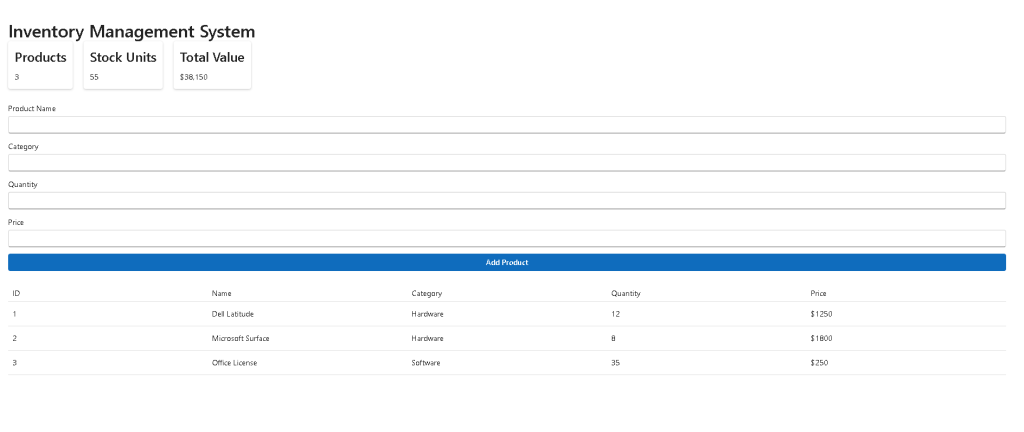
Inventory management is one of the most common requirements in enterprise software. Whether managing hardware assets, software licenses, warehouse products, office equipment, or retail inventories, organizations need a reliable system to track quantities, monitor stock levels, and calculate inventory value.
In App 84 — Inventory Management System, we enter the advanced stage of the ReactLab journey where multiple concepts learned throughout the previous applications are combined into a realistic enterprise application.
This project belongs to Block 5 — Complete Applications, where the focus is no longer isolated React concepts but complete business solutions built using modern React architecture, TypeScript, Fluent UI, and enterprise design principles.
The application demonstrates:
- Inventory tracking
- Product registration
- Enterprise forms
- Data visualization
- Derived state calculations
- Component composition
- TypeScript models
- Fluent UI integration
- Business-oriented React architecture
Rather than building a simple demo, the goal is to understand how React can be used to model real business workflows.
Why Inventory Systems Matter
Inventory systems are fundamental across many industries:
- Retail stores
- Warehouses
- Manufacturing
- IT asset management
- Software license control
- Corporate procurement
- Supply chain management
At their core, inventory systems answer three critical questions:
- What products exist?
- How many units are available?
- What is the total inventory value?
The App 84 architecture is designed around these principles.
React Mental Model Applied
One of the most important lessons from React Learn is:
UI should be derived from state.
In this application:
Inventory State ↓React Rendering ↓Dashboard UI
The product collection becomes the single source of truth.
Everything else is derived:
- Total products
- Total stock units
- Total inventory value
- Inventory table
No duplicated state is required.
Enterprise Architecture
The project follows a layered structure:
src/│├── components/├── models/├── services/├── data/├── styles/│├── App.tsx└── main.tsx
Each folder has a clear responsibility.
Models
Models define business entities.
Example:
export interface Product { id: number; name: string; category: string; quantity: number; price: number;}
This creates a strongly typed contract between all layers of the application.
Benefits include:
- Autocomplete
- Type safety
- Better refactoring
- Easier maintenance
Data Layer
The inventory data file simulates a backend.
inventoryData.ts
In future enterprise applications, this layer can be replaced with:
- REST APIs
- GraphQL APIs
- SharePoint Lists
- SQL databases
- Azure services
Because React components consume data through services, the UI remains independent from the data source.
Service Layer
The service layer introduces abstraction.
Instead of directly importing data everywhere:
getInventory()
acts as the access point.
This approach scales well when transitioning to:
Mock Data ↓REST API ↓Azure Function ↓Enterprise Backend
without requiring major UI changes.
Component Architecture
The application is divided into three major UI areas.
InventorySummary
Responsible for business metrics.
Displays:
- Total products
- Total stock units
- Total inventory value
This follows the dashboard pattern used across enterprise applications.
The component receives data through props and remains completely reusable.
InventoryForm
Responsible for product registration.
The form demonstrates:
- Controlled inputs
- React state
- Event handling
- Fluent UI Fields
- Fluent UI Inputs
Every input is controlled by React state.
The flow is:
User Types ↓onChange Event ↓React State Updates ↓React Re-renders
This is the core React form pattern.
InventoryGrid
Responsible for displaying inventory data.
The grid demonstrates:
- Dynamic rendering
- Array mapping
- Table generation
- Business data visualization
React transforms:
Product[]
into:
Table Rows
through declarative rendering.
Understanding Derived State
One of the most important concepts in App 84 is derived state.
Instead of storing totals separately:
const totalProducts = products.length;
const totalItems = products.reduce( (sum, product) => sum + product.quantity, 0 );
const totalValue = products.reduce( (sum, product) => sum + product.quantity * product.price, 0 );
These values are calculated directly from the inventory collection.
This follows React’s recommendation:
Avoid redundant state.
Benefits include:
- Fewer bugs
- Simpler architecture
- Automatic synchronization
- Better maintainability
Why Fluent UI
Fluent UI is Microsoft’s official design system.
The application uses Fluent UI for:
- Cards
- Buttons
- Inputs
- Fields
- Typography
- Tables
Advantages include:
- Accessibility
- Keyboard navigation
- Enterprise styling
- Responsive behavior
- Consistent spacing
- Microsoft design language
Instead of manually implementing visual controls, Fluent UI provides production-ready components.
State Management Flow
The inventory lifecycle works as follows:
User fills form ↓Clicks Add Product ↓addProduct() ↓React state updated ↓products array changes ↓React re-renders ↓Grid updates ↓Summary recalculates
No manual DOM manipulation occurs.
React handles all rendering automatically.
Why This App Is Important
App 84 represents a major milestone in the ReactLab roadmap.
Earlier applications focused on:
- Components
- Props
- Lists
- Forms
- State
Now those concepts are combined into a realistic business solution.
The architecture introduced here can later evolve into:
- Warehouse management systems
- Asset management systems
- Procurement systems
- SharePoint inventory portals
- ERP modules
- Enterprise dashboards
The patterns learned are directly transferable to real-world projects.
React Learn Concepts Applied
This application reinforces several concepts from the official React documentation:
State as Memory
The inventory collection exists in component state.
Updating Arrays in State
New products are added using immutable updates.
setProducts([ ...products, product]);
Choosing the State Structure
Only essential state is stored.
Totals are derived.
Thinking in React
The application is decomposed into:
InventorySummary
InventoryForm
InventoryGrid
Each component has a single responsibility.
Future Enhancements
The current implementation can easily evolve to include:
- Edit product
- Delete product
- Product search
- Category filters
- Sorting
- Pagination
- Fluent UI DataGrid
- Local Storage persistence
- REST API integration
- Azure backend
- SharePoint Lists integration
This demonstrates the scalability of the architecture.
Technical Summary
| Concept | Implementation |
|---|---|
| React State | Product collection |
| TypeScript | Product model |
| Fluent UI | Enterprise UI |
| Derived State | Inventory metrics |
| Forms | Product creation |
| Services | Data abstraction |
| Tables | Inventory visualization |
| Composition | Summary + Form + Grid |
| Immutable Updates | Safe state changes |
| Enterprise Architecture | Layered organization |
Official Documentation
React
Fluent UI
Vite
TypeScript
Conclusion
App 84 transforms fundamental React concepts into a practical enterprise inventory solution.
The application demonstrates how React, TypeScript, and Fluent UI can work together to create maintainable business software while following the official React mental model.
Most importantly, it reinforces a principle that becomes increasingly important as applications grow:
Data lives in state.
UI derives from state.
React renders the result.
Once this principle is fully internalized, building larger enterprise applications becomes significantly easier.


