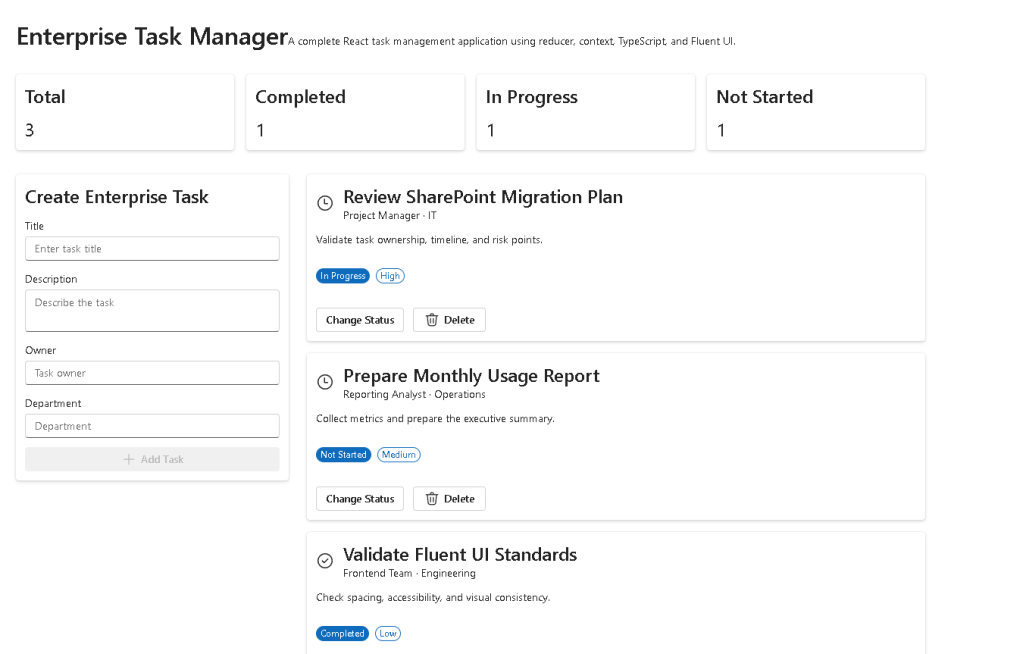
App 86 — Enterprise Task Manager with React, TypeScript, Context API, Reducer, Vite, and Fluent UI
Introduction
As React applications grow, managing state becomes increasingly challenging. Small applications can often rely on useState, but enterprise applications typically require a more scalable architecture that allows multiple components to share data while keeping state transitions predictable and maintainable.
This is exactly the purpose of App 86 — Enterprise Task Manager.
This application represents an important milestone in the ReactLab journey because it combines several advanced React concepts into a single enterprise-style application:
- React Context API
- useReducer
- Fluent UI
- TypeScript
- Component Composition
- Derived State
- Enterprise Architecture
- Centralized State Management
The application simulates a corporate task management system where users can:
- Create tasks
- View tasks
- Change task status
- Delete tasks
- Monitor task statistics
- Share task state across multiple components
Unlike previous applications that relied mostly on local component state, App 86 introduces a more scalable pattern based on React’s official recommendation:
Scaling Up with Reducer and Context
This pattern is heavily used in enterprise systems because it creates a predictable state flow while reducing prop drilling.
Why Context API?
As applications grow, data often needs to be accessed by many components.
Without Context:
App └── Dashboard └── TaskList └── TaskCard
The task data would need to be passed through every level using props.
This problem is called:
Prop Drilling
Prop drilling makes applications harder to maintain because components receive data they do not actually use.
React Context solves this problem.
Instead of passing data through multiple levels:
Provider ↓Any Component
Any component inside the provider tree can access the shared state.
This makes architecture cleaner and easier to scale.
Why useReducer?
When state becomes more complex, multiple useState hooks can become difficult to manage.
Imagine:
const [tasks, setTasks] = useState([]);const [completedTasks, setCompletedTasks] = useState([]);const [pendingTasks, setPendingTasks] = useState([]);const [statistics, setStatistics] = useState({});
This quickly becomes difficult to maintain.
Instead, React recommends:
useReducer()
Reducers centralize state updates.
Every state change becomes an action:
ADD_TASKCHANGE_STATUSDELETE_TASK
This creates a predictable architecture:
User Action→ Dispatch Action→ Reducer→ New State→ React Re-render
Enterprise Architecture
This application follows a layered architecture.
src/ components/ TaskForm TaskCard TaskList TaskSummary TaskDashboard context/ TaskContext reducers/ taskReducer models/ TaskItem data/ initialTasks
Each layer has a single responsibility.
The Task Model
The model defines the shape of the data.
export interface TaskItem { id: number; title: string; description: string; owner: string; department: string; status: TaskStatus; priority: TaskPriority;}
Benefits:
- Type safety
- Autocomplete
- Predictable state
- Easier refactoring
TypeScript ensures every task follows the same structure.
The Reducer Pattern
The reducer acts as a central state controller.
switch (action.type)
Each action represents a business operation.
Example:
ADD_TASK
Adds a new task.
CHANGE_STATUS
Updates workflow progress.
DELETE_TASK
Removes a task.
This approach mirrors enterprise backend architectures where actions are processed through centralized business logic.
Shared State with Context
The Context Provider wraps the application:
<TaskProvider> <TaskDashboard /></TaskProvider>
All child components can access:
tasksdispatch
through:
useTasks()
This removes unnecessary prop chains and keeps components focused on their responsibilities.
Fluent UI Integration
The interface is built using Fluent UI.
Main components:
- Card
- Button
- Badge
- Field
- Input
- Textarea
- Text
- Title
Benefits:
- Microsoft Design Language
- Accessibility
- Keyboard Navigation
- Consistent Spacing
- Responsive Layout
- Enterprise Appearance
Fluent UI allows developers to focus on business functionality rather than rebuilding visual components from scratch.
Task Dashboard
The dashboard acts as the main application shell.
It combines:
HeaderSummary CardsTask FormTask List
This creates a typical enterprise experience similar to:
- Microsoft 365
- SharePoint Portals
- Internal Dashboards
- Project Management Systems
Derived State
One important React concept used in this application is:
Derived State
The summary cards do not store their own values.
Instead:
const completed = tasks.filter(...)
React calculates the value from the task list.
This avoids duplicated state and keeps the application consistent.
React Learn strongly recommends deriving data whenever possible instead of storing redundant state.
No useEffect Needed
A common mistake among React developers is overusing useEffect.
This application intentionally avoids effects.
Why?
Because there is:
- no API synchronization
- no timers
- no subscriptions
- no browser integrations
All behavior is internal UI state.
According to React Learn:
You Might Not Need an Effect
This application is a perfect example of that principle.
Enterprise Workflow Simulation
The task lifecycle follows:
Not Started ↓In Progress ↓Completed
Users can move tasks through the workflow.
This mirrors real-world enterprise task management systems.
Examples:
- Project tracking
- Migration activities
- Audit actions
- Support tickets
- Development tasks
Responsive Design
The layout uses CSS Grid:
grid-template-columns:repeat(auto-fit, minmax(...))
Benefits:
- Desktop support
- Tablet support
- Mobile support
- Automatic resizing
No additional libraries are required.
React Mental Model
The most important lesson of App 86 is understanding the React mental model.
React is not:
Change HTML directly
React is:
Change State→ React updates UI
The application follows:
Task Action→ Dispatch→ Reducer→ State Update→ Re-render→ Updated UI
This pattern scales extremely well.
Technical Summary
| Concept | Purpose |
|---|---|
| useReducer | Centralized state management |
| Context API | Shared state |
| TypeScript | Strong typing |
| Fluent UI | Enterprise UI |
| Derived State | Calculated statistics |
| Reducer Actions | Predictable state transitions |
| CSS Grid | Responsive layout |
| Component Composition | Modular architecture |
| Controlled Inputs | React-managed forms |
| React Rendering | UI derived from state |
What We Learned
App 86 introduces one of the most important architectural patterns in modern React.
By combining:
- Context API
- Reducer
- Fluent UI
- TypeScript
we create an application that is significantly closer to real-world enterprise systems than simple tutorial projects.
This architecture prepares developers for:
- SharePoint Framework (SPFx)
- Microsoft 365 Applications
- Enterprise Portals
- CRM Systems
- ERP Systems
- Administrative Dashboards
- Large React Applications
Most importantly, it reinforces the core React principle:
State drives the UI.Reducers control state changes.Context shares state.React renders the result.
That is the foundation of scalable React development.
Technical References
- React Learn
- Scaling Up with Reducer and Context
- Extracting State Logic into a Reducer
- Passing Data Deeply with Context
- Fluent UI React Components
- Vite Guide
- TypeScript Documentation
Current Progress
| Block | Apps | Status |
|---|---|---|
| Block 1 — Fundamentals and UI | 01–20 | Completed |
| Block 2 — Interactivity and State | 21–40 | Completed |
| Block 3 — Fluent UI Professional | 41–60 | Completed |
| Block 4 — Effects and Architecture | 61–80 | Completed |
| Block 5 — Complete Applications | 81–85 | Completed |
| Block 5 — Complete Applications | 86 | Completed |
| Block 5 — Complete Applications | 87–100 | Next |
Current App: App 86 — Enterprise Task Manager
Next App: App 87 — User Management System


