Building an Enterprise User Management System with React, TypeScript, Fluent UI, and Context API
Introduction
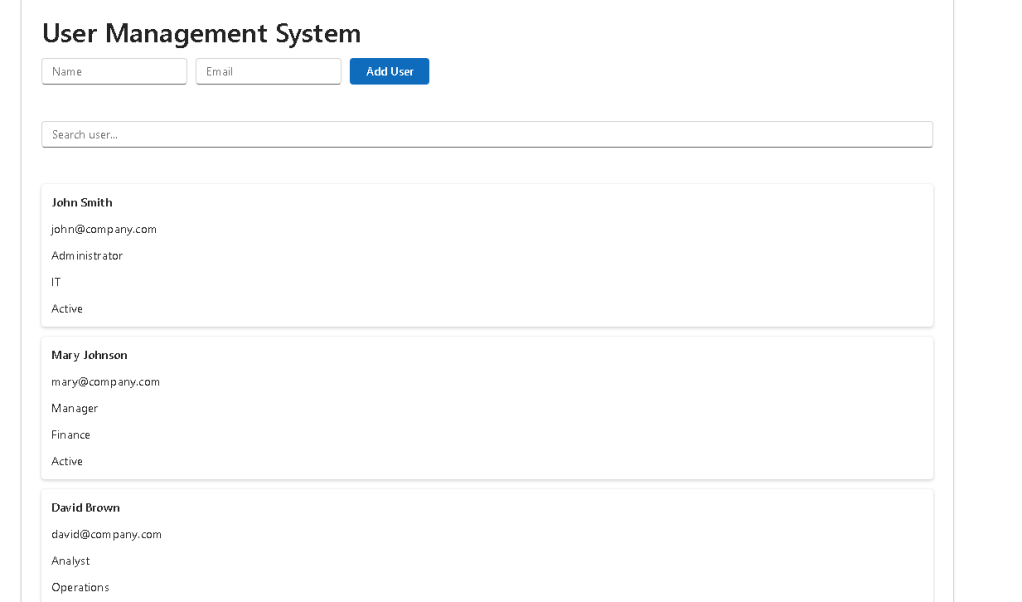
In App 87, we enter a very important category of enterprise applications: User Management Systems.
Almost every corporate platform contains some form of user administration module. Whether we look at Microsoft 365 administration portals, SharePoint environments, CRM platforms, ERP systems, HR solutions, ticketing systems, or custom enterprise applications, user management is one of the most common business requirements.
This application consolidates concepts learned throughout the ReactLab journey and combines them into a realistic enterprise architecture.
The project uses:
- React
- TypeScript
- Vite
- Fluent UI
- Context API
- Component Composition
- Service Layer
- Enterprise Folder Organization
The objective is not simply to display a list of users. The real goal is understanding how React applications organize data, distribute state, separate responsibilities, and scale into maintainable enterprise solutions.
The application demonstrates:
- User listing
- User searching
- Shared state management
- Context API
- Service abstraction
- Reusable components
- Microsoft-style interface design
The architecture follows modern React recommendations from the official documentation and reinforces the concept that UI should always be derived from state.
Why User Management Matters
User management is one of the foundational modules of enterprise software.
Typical responsibilities include:
- Creating users
- Editing users
- Deactivating users
- Managing permissions
- Assigning roles
- Searching users
- Auditing changes
- Organizing departments
Examples include:
- Microsoft 365 Admin Center
- SharePoint User Administration
- CRM Platforms
- ERP Systems
- Ticket Management Solutions
- HR Platforms
Because of this, learning how to build a user management interface provides valuable experience that transfers directly into professional development environments.
Project Architecture
The application follows a layered architecture.
src/│├── components/│├── contexts/│├── services/│├── models/│├── data/│└── App.tsx
Each layer has a specific responsibility.
Components
Responsible for UI rendering.
Examples:
- UserGrid
- UserForm
- UserSearch
- UserDashboard
Contexts
Responsible for shared state.
Example:
- UserContext
Services
Responsible for business data access.
Example:
- UserService
Models
Responsible for TypeScript definitions.
Example:
- User interface
Data
Contains mock data.
Example:
- users.ts
This separation prevents large files and makes the application easier to maintain.
The User Model
One of the first architectural decisions is defining the user structure.
export interface User { id: number; name: string; email: string; role: string; department: string; active: boolean;}
This interface acts as a contract.
Every user object must contain:
- Identifier
- Name
- Role
- Department
- Active Status
Benefits include:
- Type safety
- IntelliSense
- Easier refactoring
- Better maintainability
TypeScript immediately warns developers when data does not match the expected structure.
The Service Layer
The application introduces a service layer.
UserService.getAll()
Currently the data comes from a mock array.
However, the UI does not know where the data comes from.
Today:
UserService→ Mock Data
Future:
UserService→ REST API
The UI remains unchanged.
This is an important enterprise design principle:
Components should not care where data comes from.
Context API
One of the most important concepts introduced in App 87 is Context API.
Instead of passing data through many levels of props:
App→ Dashboard→ Grid→ Card
we can share data globally.
React provides:
createContext()
and
useContext()
to solve this problem.
The UserContext stores:
userssetUsers
and makes them available to the entire application tree.
This eliminates prop drilling and simplifies state distribution.
Understanding Shared State
Without Context:
Parent passes props to child to grandchild
With Context:
Any componentcan accessthe shared statedirectly
This pattern is used extensively in:
- Authentication systems
- User management
- Theme management
- Notifications
- Shopping carts
- Enterprise dashboards
Search as Derived State
The search functionality introduces a very important React concept:
Derived State.
Notice that the application does not store a separate list of filtered users.
Instead:
const filteredUsers = users.filter(...)
The filtered list is calculated during rendering.
This follows React’s official recommendation:
Avoid redundant state whenever possible.
Benefits:
- Less synchronization logic
- Fewer bugs
- Simpler code
- Easier maintenance
The UI is derived from existing state rather than duplicated.
Fluent UI Integration
The application uses Fluent UI as its visual foundation.
Benefits include:
- Accessibility
- Keyboard navigation
- Enterprise styling
- Consistent spacing
- Microsoft design language
- Responsive layouts
Components used include:
- Card
- Input
- Button
- Text
- Typography components
This creates a professional Microsoft-style experience immediately.
Component Composition
React applications scale through composition.
Instead of one large file:
App.tsx
containing everything, responsibilities are divided.
App └── UserDashboard ├── UserForm ├── UserSearch └── UserGrid
Each component solves one problem.
Benefits:
- Reusability
- Testability
- Readability
- Scalability
This is one of the most important architectural concepts in React.
Why No useEffect?
A common question is:
Why doesn’t App 87 use useEffect?
The answer is simple:
There is no external system to synchronize.
Current data comes from:
Mock Data
not:
APIDatabaseWebSocketBrowser API
Therefore:
useStateis sufficient
According to React Learn:
Effects should synchronize with external systems.
Since this application uses local data only, useEffect would be unnecessary.
React Mental Model
App 87 reinforces the central React principle:
UI = Function(State)
The user list displayed on screen is generated from:
users+search term
When state changes:
State changes→ React re-renders→ UI updates automatically
No manual DOM manipulation is necessary.
This declarative model is one of React’s greatest strengths.
Enterprise Evolution Path
This application can evolve into:
Phase 1
Current version
- Search
- Context
- User listing
Phase 2
Add CRUD
- Create
- Update
- Delete
Phase 3
REST API
- GET
- POST
- PUT
- DELETE
Phase 4
Authentication
- Login
- JWT
- OAuth
Phase 5
Role Management
- Administrator
- Manager
- Analyst
Phase 6
Audit System
- Activity history
- User tracking
- Compliance logs
This demonstrates how a simple React application can grow into a real enterprise platform.
Technical Summary
| Concept | Purpose |
|---|---|
| React | UI Library |
| TypeScript | Strong typing |
| Fluent UI | Microsoft Design System |
| Context API | Shared State |
| Service Layer | Data abstraction |
| Models | Business contracts |
| Search | Derived state |
| Component Composition | Reusability |
| Vite | Development platform |
| Enterprise Architecture | Scalability |
Official Documentation
React
Context API
Managing State
Sharing State Between Components
Fluent UI
TypeScript
Vite
Final Thoughts
App 87 represents an important milestone in the ReactLab journey.
This is no longer a simple learning exercise.
It introduces architectural patterns used daily in enterprise applications:
- Shared State
- Context API
- Service Layer
- TypeScript Models
- Fluent UI
- Search Systems
- User Administration
These same concepts appear in Microsoft 365 portals, SharePoint administration systems, CRM platforms, ERP solutions, and countless corporate applications.
By mastering App 87, you are learning patterns that directly translate into real-world enterprise React development.
Current Progress
| App | Name | Status |
|---|---|---|
| 81 | CRUD System | Completed |
| 82 | Employee Management | Completed |
| 83 | Financial Dashboard | Completed |
| 84 | Inventory System | Completed |
| 85 | Kanban Board | Completed |
| 86 | Enterprise Task Manager | Completed |
| 87 | User Management System | Completed Article |
| 88 | Administrative Portal | Next |
| 89 | Ticket System | Upcoming |
| 90 | Power BI Dashboard Style | Upcoming |
Current Position: Block 5 → App 87 / 100 🚀
Roadmap reference: App 87 is defined as User Management System (Sistema de Usuários) in the ReactLab roadmap.


