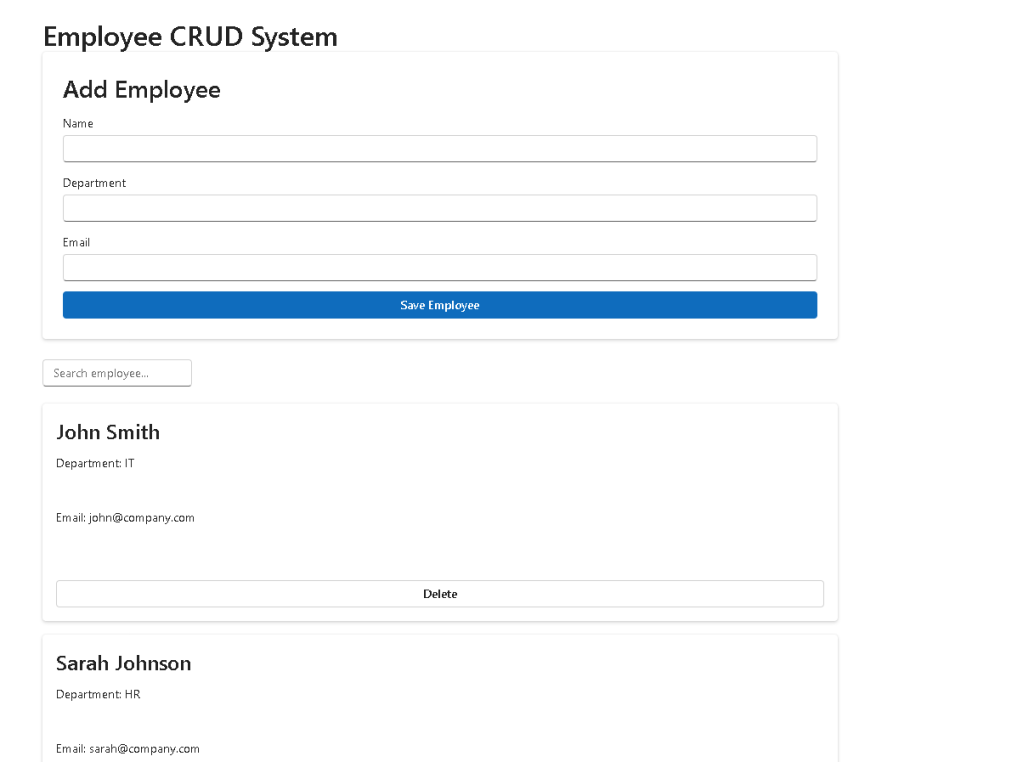
Building a Complete CRUD System with React, TypeScript, Fluent UI, and Vite
Introduction
As developers progress from learning individual React concepts toward building real-world applications, one milestone stands above many others: creating a complete CRUD system.
CRUD stands for:
- Create
- Read
- Update
- Delete
These four operations form the foundation of most business applications. Whether you are building:
- Employee Management Systems
- CRM Platforms
- ERP Solutions
- SharePoint Administrative Tools
- Inventory Systems
- Ticketing Applications
- User Management Portals
the underlying architecture almost always revolves around CRUD operations.
In App 81 — Complete CRUD System, we officially enter Block 5 — Complete Applications, where the goal is no longer learning isolated React features but combining everything learned into enterprise-style applications. This app consolidates concepts from the previous 80 projects and introduces a scalable architecture that resembles real-world corporate systems.
Why CRUD Applications Matter
CRUD applications are the backbone of business software.
Most enterprise systems exist primarily to manage data:
EmployeesCustomersProductsOrdersTicketsProjectsInvoicesAssetsDocuments
The user needs to:
Create recordsRead recordsUpdate recordsDelete records
React is particularly well suited for this because its declarative rendering model automatically keeps the user interface synchronized with application state.
Instead of manually manipulating the DOM, React allows developers to focus on data and state.
React Mental Model
The most important concept reinforced by this application is:
UI = Function(State)
When the employee collection changes:
Add Employee→ State changes→ React re-renders→ UI updates
When an employee is removed:
Delete Employee→ State changes→ React re-renders→ UI updates
The developer never manually updates the screen.
React handles the rendering automatically.
This follows the official React guidance:
- Components should be pure.
- UI should derive from state.
- State should be minimal.
- Derived values should not be stored.
Project Creation
The project begins with Vite.
mkdir bloco05cd bloco05npm create vite@latest app81-complete-crud-system -- --template react-tscd app81-complete-crud-systemnpm installnpm install @fluentui/react-components @fluentui/react-icons
Vite provides:
- Fast startup
- Hot Module Replacement
- Optimized builds
- Native ES Modules
- Excellent TypeScript integration
For modern React development, Vite has become one of the preferred solutions.
Project Structure
Enterprise React applications benefit from clear separation of responsibilities.
src/│├── components/│ ├── EmployeeForm.tsx│ └── EmployeeList.tsx│├── models/│ └── Employee.ts│├── data/│ └── initialEmployees.ts│├── services/│├── styles/│├── App.tsx├── main.tsx└── index.css
Each folder has a specific purpose.
| Folder | Purpose |
|---|---|
| components | Reusable UI components |
| models | TypeScript interfaces |
| data | Mock or static data |
| services | Future API layer |
| styles | Application styling |
This architecture scales naturally as applications grow.
Modeling Business Data
The Employee model defines the shape of the data.
export interface Employee { id: number; name: string; department: string; email: string;}
This interface provides:
- Type safety
- IntelliSense
- Refactoring support
- Compile-time validation
Without TypeScript, accidental mistakes become easier:
name: 123email: true
With TypeScript, these errors are detected immediately.
Initial Data
The application starts with mock employees.
export const initialEmployees: Employee[] = [...]
This simulates a future API response.
Later, the exact same UI can consume data from:
- REST APIs
- GraphQL
- Microsoft Graph
- SharePoint
- SQL databases
The UI remains almost unchanged.
Only the data source changes.
This is a major architectural advantage.
Controlled Forms
The EmployeeForm component introduces controlled inputs.
Example:
<Input value={name} onChange={(_, data) => setName(data.value) }/>
React becomes the source of truth.
The flow is:
User types→ onChange fires→ State updates→ React re-renders→ Input displays new value
This predictable cycle is one of React’s greatest strengths.
Why Controlled Components Matter
Controlled forms provide:
- Validation
- Predictability
- State synchronization
- Easier debugging
Without controlled inputs, form behavior becomes harder to manage.
Enterprise applications almost always rely on controlled forms.
Creating Employees
The Create operation happens here:
onSave({ id: Date.now(), name, department, email,});
When submitted:
Form→ Creates Employee Object→ Calls Parent Callback→ Updates State→ React Re-renders
The EmployeeForm does not directly manipulate the employee collection.
Instead, it communicates with the parent component.
This is a key React pattern.
State Ownership
The employee collection lives inside App.tsx.
const [employees, setEmployees] = useState<Employee[]>(initialEmployees);
This means:
App owns the state.Children receive data through props.
React calls this:
Lifting State Up
A common beginner mistake is duplicating state in multiple places.
Centralized ownership avoids synchronization problems.
Immutable Updates
Adding an employee uses:
setEmployees(previous => [ ...previous, employee,]);
Notice:
Old array remains untouched.New array is created.
React expects immutable updates.
This makes rendering predictable and enables React optimizations.
Deleting Employees
Delete is implemented using filter.
setEmployees(previous => previous.filter( x => x.id !== id ));
The process becomes:
Find matching employeeRemove from collectionCreate new arrayUpdate stateReact re-renders
Again, no DOM manipulation occurs.
Only state changes.
Searching Employees
Search functionality demonstrates derived state.
The application stores:
search
and
employees
Only.
The filtered collection is calculated.
const filteredEmployees = useMemo(...)
This is important.
React recommends avoiding duplicated state.
Bad approach:
employeesfilteredEmployees
stored separately.
Good approach:
Store original dataCalculate filtered data
This avoids synchronization bugs.
Why useMemo Was Introduced
The filter operation could run every render.
employees.filter(...)
For small datasets, that is fine.
However, enterprise applications may contain:
1,000 employees10,000 employees100,000 employees
useMemo prevents unnecessary recalculations.
useMemo(() => ..., [employees, search]);
The calculation runs only when dependencies change.
Fluent UI Integration
Fluent UI provides the Microsoft design system.
Components used:
- Card
- Input
- Button
- Field
- Typography
Benefits include:
- Accessibility
- Keyboard navigation
- Consistent spacing
- Microsoft styling
- Responsive behavior
Instead of building controls manually, Fluent UI provides enterprise-ready building blocks.
Component Composition
The application follows this hierarchy:
App│├── EmployeeForm│└── EmployeeList
Responsibilities remain clear:
| Component | Responsibility |
|---|---|
| App | State management |
| EmployeeForm | Employee creation |
| EmployeeList | Employee display |
| Employee Model | Data contract |
This separation improves maintainability.
Why No useEffect?
An interesting observation:
This CRUD application does not require useEffect.
Why?
Because:
- No API calls
- No timers
- No browser subscriptions
- No external synchronization
Everything is internal state.
React Learn explicitly teaches:
You Might Not Need an Effect
Many beginners overuse useEffect.
This application demonstrates that state alone is often sufficient.
Enterprise Evolution Path
This app is intentionally simple.
However, it provides the exact foundation for future enterprise systems.
Possible next evolutions:
Employee CRUD→ REST API→ DataGrid→ Pagination→ Sorting→ Authentication→ Authorization→ Context API→ Service Layer→ Enterprise Dashboard
The architecture remains valid.
Only additional layers are introduced.
Technical Summary
| Concept | Description |
|---|---|
| CRUD | Create, Read, Update, Delete |
| useState | Employee storage |
| useMemo | Search optimization |
| Controlled Forms | Predictable form handling |
| Immutable Updates | Safe state changes |
| Derived State | Filtered employees |
| Component Composition | Form + List |
| TypeScript Interfaces | Strong typing |
| Fluent UI | Microsoft design system |
| React Rendering | UI derived from state |
Official Documentation
React
- React Learn
- Thinking in React
- Updating Arrays in State
- Choosing the State Structure
- You Might Not Need an Effect
Fluent UI
TypeScript
Current Progress
| Block | App | Name | Status |
|---|---|---|---|
| Block 4 | 77 | Reporting System | Completed |
| Block 4 | 78 | Performance Simulator | Completed |
| Block 4 | 79 | Layered Architecture | Completed |
| Block 4 | 80 | Mini Framework React Enterprise | Completed |
| Block 5 | 81 | Complete CRUD System | Current |
| Block 5 | 82 | Employee Management System | Next |
| Block 5 | 83 | Financial Dashboard | Upcoming |
| Block 5 | 84 | Inventory System | Upcoming |
| Block 5 | 85 | Kanban Board | Upcoming |
| Block 5 | 86 | Enterprise Task Manager | Upcoming |
| Block 5 | 87 | User Management System | Upcoming |
| Block 5 | 88 | Administrative Portal | Upcoming |
| Block 5 | 89 | Ticket System | Upcoming |
| Block 5 | 90 | Power BI Style Dashboard | Upcoming |
| Block 5 | 91 | Report Generator | Upcoming |
| Block 5 | 92 | Audit System | Upcoming |
| Block 5 | 93 | SharePoint Inspired Portal | Upcoming |
| Block 5 | 94 | Corporate Catalog | Upcoming |
| Block 5 | 95 | Reservation System | Upcoming |
| Block 5 | 96 | Mini ERP Enterprise | Upcoming |
| Block 5 | 97 | Complete CRM | Upcoming |
| Block 5 | 98 | Analytics System | Upcoming |
| Block 5 | 99 | Microsoft Admin Center Style | Upcoming |
| Block 5 | 100 | React Enterprise Platform Final | Final Goal |
The Complete CRUD System is the first true enterprise-style application of Block 5 and serves as the architectural foundation for the remaining enterprise applications in the ReactLab roadmap.


