Building an Enterprise Kanban Board with React, TypeScript, Fluent UI, and Vite
Introduction
As React applications evolve from simple forms and dashboards into enterprise-grade systems, one UI pattern becomes almost unavoidable: the Kanban Board.
Kanban boards are widely used in Agile, Scrum, DevOps, Project Management, Product Development, IT Operations, and Enterprise Workflow Management systems.
Popular platforms such as Microsoft Planner, Jira, Azure DevOps, Trello, and many internal corporate applications rely on the Kanban model to visualize work progress.
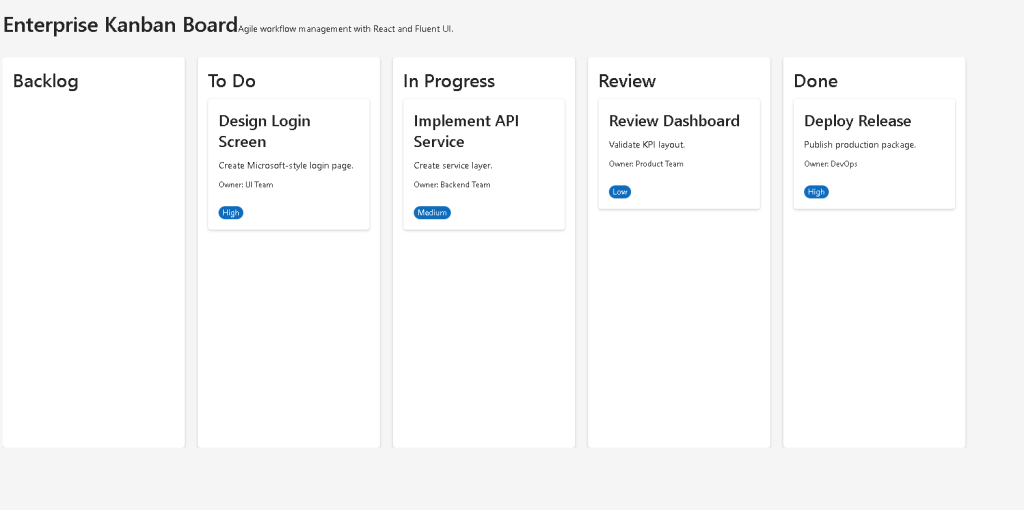
In App 85 — Kanban Board, we build a complete enterprise-style board using:
- React
- TypeScript
- Fluent UI
- Vite
The objective is not only to display tasks but also to understand how React can transform structured data into a complex visual workflow while maintaining clean architecture and component separation.
This application belongs to Block 5 — Complete Applications of the ReactLab roadmap and consolidates concepts learned throughout the previous eighty-four applications.
What is Kanban?
Kanban is a workflow visualization methodology.
Instead of looking at tasks as a simple list, work is organized into stages.
A common workflow is:
Backlog → To Do → In Progress → Review → Done
Each task moves through the workflow until completion.
This approach provides several benefits:
- Visual progress tracking
- Bottleneck identification
- Team collaboration
- Work prioritization
- Status transparency
- Agile project management
The visual nature of Kanban makes it one of the most effective productivity systems used in modern software development.
React Mental Model
One of the most important lessons of this application is understanding that the Kanban board is entirely derived from data.
We do not manually create columns.
We do not manually place tasks into containers.
Instead:
Task Data↓Filtering Logic↓React Rendering↓Kanban Columns↓Task Cards
The UI is a direct reflection of the application state.
This follows the official React philosophy:
UI is a function of state.
Project Architecture
The project follows a layered architecture:
App│└── KanbanBoard │ ├── KanbanColumn │ │ │ └── TaskCard │ ├── KanbanColumn │ └── TaskCard │ └── KanbanColumn └── TaskCard
Each component has a single responsibility.
This is one of the most important React design principles.
Why TypeScript Matters
The application uses a strongly typed model:
export interface KanbanTask { id: number; title: string; description: string; owner: string; priority: "Low" | "Medium" | "High"; status: TaskStatus;}
This provides:
- Type safety
- Better IntelliSense
- Easier refactoring
- Clear contracts between components
- Reduced runtime bugs
Without TypeScript, large enterprise applications quickly become difficult to maintain.
The Importance of Data Modeling
The entire Kanban board is driven by a collection of tasks.
Each task contains:
- Identifier
- Title
- Description
- Owner
- Priority
- Status
The status field is particularly important because it determines where the task appears.
For example:
status: "In Progress"
automatically places the task in the In Progress column.
No additional UI code is required.
React simply renders the correct output from the data.
Rendering Columns
The board creates columns using filtering logic:
tasks.filter( task => task.status === "Done")
This produces a new collection containing only completed tasks.
The same pattern is repeated for every workflow stage.
This demonstrates one of React’s strongest features:
Declarative Rendering.
Instead of saying:
Move this card to that column.
we say:
Show all tasks whose status is Done.
React handles the rest.
Why Array.filter() Is So Important
The filter function is the heart of the Kanban architecture.
Without filter:
All tasks would appear everywhere.
With filter:
Backlog tasks appear only in BacklogTo Do tasks appear only in To DoDone tasks appear only in Done
This creates a clean separation of workflow stages.
Component Composition
The board demonstrates deep component composition.
The hierarchy is:
App └── KanbanBoard └── KanbanColumn └── TaskCard
This allows:
- Reusability
- Scalability
- Maintainability
- Testability
Instead of creating one huge file, the application is divided into logical pieces.
This is exactly how enterprise React applications are structured.
Fluent UI Integration
The visual layer is built with Fluent UI.
Fluent UI provides:
- Microsoft design language
- Accessibility support
- Consistent spacing
- Enterprise styling
- Responsive behavior
The primary components used are:
- Card
- Badge
- Title
- Text
Without Fluent UI, much more CSS would be required.
Understanding TaskCard
TaskCard is responsible for displaying a single task.
Its responsibilities include:
- Display title
- Display description
- Display owner
- Display priority
Nothing else.
This is important because React components should be focused.
A component should have one responsibility whenever possible.
Understanding KanbanColumn
KanbanColumn receives:
titletasks
and renders:
Column HeaderTask CardTask CardTask Card
The component does not know where tasks come from.
It only knows how to display them.
This separation makes the application easier to maintain.
Why the Board Uses Horizontal Layout
Kanban systems are naturally horizontal.
The board uses:
display: flex;
because workflow progresses from left to right.
This produces:
Backlog | To Do | In Progress | Review | Done
which is the industry standard layout.
Enterprise Applications That Use This Pattern
The architecture used in this application appears in:
- Microsoft Planner
- Azure DevOps Boards
- Jira
- Trello
- Monday.com
- Asana
- ServiceNow
- CRM systems
- ERP systems
Understanding this architecture is valuable because the same concepts appear repeatedly in enterprise development.
Why There Is No useEffect
A common beginner mistake is adding useEffect everywhere.
This application intentionally avoids useEffect.
Why?
Because:
- No API requests
- No timers
- No subscriptions
- No external synchronization
The board is entirely generated from local data.
According to React Learn:
Effects should synchronize with external systems.
Since there is no external system here, useEffect is unnecessary.
This is an important React lesson.
Why There Is No State Yet
The board is currently static.
Tasks do not move between columns.
This is intentional.
The purpose is to master rendering architecture before introducing interactions.
Future versions may add:
- Drag and Drop
- State Management
- Reducers
- Context API
- Persistence
- API Integration
The current application focuses on visual workflow architecture.
Preparing for Future Enterprise Apps
This app prepares the foundation for:
- App 86 Enterprise Task Manager
- App 87 User Management
- App 88 Administrative Portal
- App 89 Ticket System
- App 90 Power BI Dashboard
All of those systems rely on similar architectural principles:
Data↓Filtering↓Components↓Rendering↓Enterprise UI
Mastering Kanban architecture now makes those applications much easier to understand.
Technical Summary
| Concept | Description |
|---|---|
| React Components | UI building blocks |
| TypeScript | Strong typing |
| Fluent UI | Microsoft design system |
| Kanban Workflow | Visual task management |
| Array.filter() | Column separation |
| Array.map() | Task rendering |
| Component Composition | Board → Column → Card |
| Declarative UI | UI derived from data |
| Enterprise Layout | Professional architecture |
| Reusable Components | Scalable design |
Official Documentation
React
- https://react.dev/learn
- https://react.dev/learn/thinking-in-react
- https://react.dev/learn/rendering-lists
- https://react.dev/learn/updating-arrays-in-state
Fluent UI
- https://developer.microsoft.com/en-us/fluentui#/controls/web
- https://developer.microsoft.com/en-us/fluentui#/controls/web/card
- https://developer.microsoft.com/en-us/fluentui#/controls/web/badge
Vite
TypeScript
Final Thought
The most important lesson from App 85 is that React applications should be driven by data.
The board does not manually manage the UI.
Instead:
Task Data→ React Rendering→ Kanban Workflow
As applications grow larger, this mental model becomes increasingly important.
Enterprise React development is not about manipulating HTML.
It is about describing UI as a function of data and allowing React to handle the rendering process.
That is exactly what the Kanban Board demonstrates.
Current Progress
| App | Name | Status |
|---|---|---|
| 81 | CRUD System | ✅ |
| 82 | Employee Management | ✅ |
| 83 | Financial Dashboard | ✅ |
| 84 | Inventory System | ✅ |
| 85 | Kanban Board | ✅ Current |
| 86 | Enterprise Task Manager | ⏭ Next |
| 87 | User Management System | Pending |
| 88 | Administrative Portal | Pending |
| 89 | Ticket System | Pending |
| 90 | Power BI Style Dashboard | Pending |
| 91 | Report Generator | Pending |
| 92 | Audit System | Pending |
| 93 | SharePoint Inspired Portal | Pending |
| 94 | Corporate Catalog | Pending |
| 95 | Reservation System | Pending |
| 96 | Mini ERP Enterprise | Pending |
| 97 | Complete CRM | Pending |
| 98 | Analytics System | Pending |
| 99 | Microsoft Admin Center | Pending |
| 100 | Final Enterprise Platform | Pending |
Estamos em: Block 5 → App 85 → Kanban Board ✅
Próxima aplicação: App 86 → Enterprise Task Manager.


