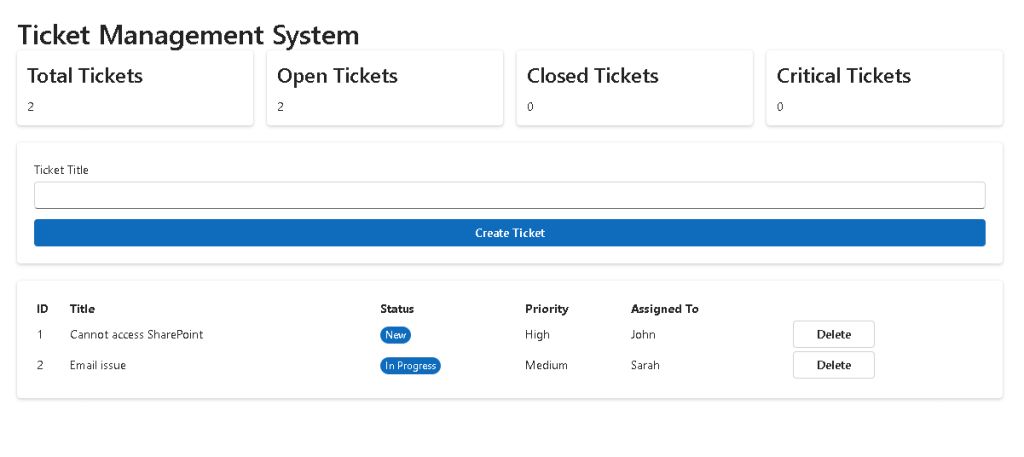
Technical Blog Article — App 89: Ticket Management System with React, TypeScript, Vite, Fluent UI, and useReducer
Introduction
In App 89 — Ticket Management System, we build a complete enterprise-style Help Desk application using React, TypeScript, Vite, Fluent UI, and the useReducer pattern.
This app belongs to Block 5 — Complete Applications, where the goal is to consolidate everything learned in the previous apps into more realistic enterprise systems. In the official roadmap, App 89 is defined as Sistema de Tickets / Help Desk / complex state, connected to React’s reducer pattern.
A ticket system is a perfect example of a real-world React application because it includes:
- structured business data
- forms
- dashboard metrics
- list rendering
- delete actions
- status management
- derived state
- reducer-based updates
- enterprise UI composition
The main React concept of this app is:
Complex UI state→ centralized reducer→ predictable actions→ React re-render→ updated enterprise interface
1. Create the Project
mkdir bloco05cd bloco05npm create vite@latest app89-ticket-management-system -- --template react-tscd app89-ticket-management-systemnpm installnpm install @fluentui/react-componentsnpm install @fluentui/react-icons
2. Create the Folder Structure
mkdir src\componentsmkdir src\pagesmkdir src\modelsmkdir src\datamkdir src\reducersmkdir src\styles
3. Create the Files
New-Item src\models\Ticket.ts -ItemType FileNew-Item src\data\mockTickets.ts -ItemType FileNew-Item src\reducers\ticketReducer.ts -ItemType FileNew-Item src\components\TicketDashboard.tsx -ItemType FileNew-Item src\components\TicketForm.tsx -ItemType FileNew-Item src\components\TicketGrid.tsx -ItemType FileNew-Item src\pages\HomePage.tsx -ItemType FileNew-Item artigo.md -ItemType File
4. Final Structure
app89-ticket-management-system/ src/ components/ TicketDashboard.tsx TicketForm.tsx TicketGrid.tsx data/ mockTickets.ts models/ Ticket.ts pages/ HomePage.tsx reducers/ ticketReducer.ts styles/ App.tsx main.tsx artigo.md package.json vite.config.ts
This structure follows the project standard used across the ReactLab apps: components, pages, hooks, services, models, data, styles, and utilities.
5. Business Scenario
The app represents an internal IT support system.
A user or technician can:
- view all tickets
- create a new ticket
- delete a ticket
- see dashboard metrics
- track ticket priority
- track ticket status
- see who is assigned to each ticket
A real ticket lifecycle usually looks like this:
New→ Assigned→ In Progress→ Resolved→ Closed
This makes the app a good candidate for useReducer, because the state is no longer just one small variable.
6. Ticket Model
src/models/Ticket.ts
export type TicketStatus = | "New" | "Assigned" | "In Progress" | "Resolved" | "Closed";export type TicketPriority = | "Low" | "Medium" | "High" | "Critical";export interface Ticket { id: number; title: string; description: string; category: string; priority: TicketPriority; status: TicketStatus; assignedTo: string; createdAt: string;}
Explanation
The model defines the shape of a ticket.
This is important because TypeScript protects the application from invalid objects.
For example, this is valid:
priority: "High"
But this would be invalid:
priority: "Very Important"
because "Very Important" is not part of the TicketPriority union type.
This gives us:
- safer code
- better autocomplete
- clearer business rules
- easier refactoring
- fewer runtime bugs
7. Mock Data
src/data/mockTickets.ts
import type { Ticket } from "../models/Ticket";export const mockTickets: Ticket[] = [ { id: 1, title: "Cannot access SharePoint", description: "User cannot open the corporate portal.", category: "SharePoint", priority: "High", status: "New", assignedTo: "John Carter", createdAt: "2026-06-03", }, { id: 2, title: "Email synchronization failed", description: "Mailbox is not syncing correctly in Outlook.", category: "Exchange", priority: "Medium", status: "In Progress", assignedTo: "Sarah Miller", createdAt: "2026-06-02", }, { id: 3, title: "Power BI report not loading", description: "Finance dashboard is returning a loading error.", category: "Power BI", priority: "Critical", status: "Assigned", assignedTo: "Michael Brown", createdAt: "2026-06-01", },];
Explanation
The mock data simulates data that would usually come from an API.
For now, the app is local and static, but later this could evolve into:
React UI→ service layer→ REST API→ database→ ticket records
8. Reducer
src/reducers/ticketReducer.ts
import type { Ticket } from "../models/Ticket";export interface TicketState { tickets: Ticket[];}export type TicketAction = | { type: "ADD"; payload: Ticket } | { type: "DELETE"; payload: number } | { type: "UPDATE_STATUS"; payload: { id: number; status: Ticket["status"]; }; };export function ticketReducer( state: TicketState, action: TicketAction): TicketState { switch (action.type) { case "ADD": return { ...state, tickets: [...state.tickets, action.payload], }; case "DELETE": return { ...state, tickets: state.tickets.filter( ticket => ticket.id !== action.payload ), }; case "UPDATE_STATUS": return { ...state, tickets: state.tickets.map(ticket => ticket.id === action.payload.id ? { ...ticket, status: action.payload.status, } : ticket ), }; default: return state; }}
Explanation
The reducer centralizes all ticket updates.
Instead of spreading state logic across many components, we define all allowed actions in one place.
The reducer receives:
current state+action=new state
This is the key idea:
State transitions become explicit.
Actions supported:
| Action | Purpose |
|---|---|
ADD | Adds a new ticket |
DELETE | Removes a ticket |
UPDATE_STATUS | Changes the status of a ticket |
This follows the React Learn direction for extracting complex state logic into a reducer. App 89 is also mapped in the project table to that concept.
9. Ticket Dashboard
src/components/TicketDashboard.tsx
import { Card, Text, Title3,} from "@fluentui/react-components";import type { Ticket } from "../models/Ticket";interface Props { tickets: Ticket[];}export function TicketDashboard({ tickets,}: Props) { const total = tickets.length; const open = tickets.filter( ticket => ticket.status !== "Closed" ).length; const closed = tickets.filter( ticket => ticket.status === "Closed" ).length; const critical = tickets.filter( ticket => ticket.priority === "Critical" ).length; return ( <div style={{ display: "grid", gridTemplateColumns: "repeat(auto-fit, minmax(220px, 1fr))", gap: "16px", marginBottom: "24px", }} > <Card> <Title3>Total Tickets</Title3> <Text size={600}>{total}</Text> </Card> <Card> <Title3>Open Tickets</Title3> <Text size={600}>{open}</Text> </Card> <Card> <Title3>Closed Tickets</Title3> <Text size={600}>{closed}</Text> </Card> <Card> <Title3>Critical Tickets</Title3> <Text size={600}>{critical}</Text> </Card> </div> );}
Explanation
This component demonstrates derived state.
We do not store:
const [totalTickets, setTotalTickets] = useState(...)
Instead, we calculate values from tickets.
That is better because:
- no duplicate state
- no synchronization bugs
- simpler rendering
- cleaner logic
React mental model:
tickets data→ calculations→ dashboard UI
10. Ticket Form
src/components/TicketForm.tsx
import { useState } from "react";import { Button, Card, Field, Input, Textarea,} from "@fluentui/react-components";import type { Ticket } from "../models/Ticket";interface Props { onAddTicket: (ticket: Ticket) => void;}export function TicketForm({ onAddTicket,}: Props) { const [title, setTitle] = useState(""); const [description, setDescription] = useState(""); const isFormValid = title.trim().length > 0 && description.trim().length > 0; function handleSubmit() { if (!isFormValid) { return; } const ticket: Ticket = { id: Date.now(), title, description, category: "General", priority: "Medium", status: "New", assignedTo: "Unassigned", createdAt: new Date() .toISOString() .split("T")[0], }; onAddTicket(ticket); setTitle(""); setDescription(""); } return ( <Card style={{ padding: "20px", marginBottom: "24px", display: "flex", flexDirection: "column", gap: "16px", }} > <Field label="Ticket Title" required> <Input value={title} onChange={(_, data) => setTitle(data.value) } placeholder="Example: Cannot access SharePoint" /> </Field> <Field label="Description" required> <Textarea value={description} onChange={(_, data) => setDescription(data.value) } placeholder="Describe the issue..." /> </Field> <Button appearance="primary" onClick={handleSubmit} disabled={!isFormValid} > Create Ticket </Button> </Card> );}
Explanation
This form uses controlled components.
The input value comes from React state:
value={title}
When the user types:
onChange={(_, data) => setTitle(data.value)}
React updates state, then re-renders the UI.
The validation is derived:
const isFormValid = title.trim().length > 0 && description.trim().length > 0;
Again, we avoid unnecessary state.
Bad approach:
const [isFormValid, setIsFormValid] = useState(false);
Good approach:
const isFormValid = title && description;
11. Ticket Grid
src/components/TicketGrid.tsx
import { Badge, Button, Card,} from "@fluentui/react-components";import type { Ticket, TicketStatus,} from "../models/Ticket";interface Props { tickets: Ticket[]; onDelete: (id: number) => void; onUpdateStatus: ( id: number, status: TicketStatus ) => void;}export function TicketGrid({ tickets, onDelete, onUpdateStatus,}: Props) { return ( <Card style={{ padding: "20px", overflowX: "auto", }} > <table style={{ width: "100%", borderCollapse: "collapse", }} > <thead> <tr> <th align="left">ID</th> <th align="left">Title</th> <th align="left">Category</th> <th align="left">Priority</th> <th align="left">Status</th> <th align="left">Assigned To</th> <th align="left">Created</th> <th align="left">Actions</th> </tr> </thead> <tbody> {tickets.map(ticket => ( <tr key={ticket.id}> <td>{ticket.id}</td> <td>{ticket.title}</td> <td>{ticket.category}</td> <td> <Badge> {ticket.priority} </Badge> </td> <td> <Badge> {ticket.status} </Badge> </td> <td>{ticket.assignedTo}</td> <td>{ticket.createdAt}</td> <td> <div style={{ display: "flex", gap: "8px", }} > <Button size="small" onClick={() => onUpdateStatus( ticket.id, "In Progress" ) } > Start </Button> <Button size="small" onClick={() => onUpdateStatus( ticket.id, "Closed" ) } > Close </Button> <Button size="small" appearance="secondary" onClick={() => onDelete(ticket.id) } > Delete </Button> </div> </td> </tr> ))} </tbody> </table> </Card> );}
Explanation
The grid displays all tickets.
Each row receives a stable key:
key={ticket.id}
This is important because React uses keys to track list items correctly.
The action buttons do not modify state directly.
They call functions received from the parent:
onDelete(ticket.id)onUpdateStatus(ticket.id, "Closed")
This keeps the component reusable and clean.
12. Home Page
src/pages/HomePage.tsx
import { useReducer, useState } from "react";import { Field, Input,} from "@fluentui/react-components";import { mockTickets } from "../data/mockTickets";import { ticketReducer,} from "../reducers/ticketReducer";import { TicketDashboard } from "../components/TicketDashboard";import { TicketForm } from "../components/TicketForm";import { TicketGrid } from "../components/TicketGrid";export function HomePage() { const [state, dispatch] = useReducer(ticketReducer, { tickets: mockTickets, }); const [searchText, setSearchText] = useState(""); const filteredTickets = state.tickets.filter(ticket => ticket.title .toLowerCase() .includes(searchText.toLowerCase()) || ticket.category .toLowerCase() .includes(searchText.toLowerCase()) || ticket.assignedTo .toLowerCase() .includes(searchText.toLowerCase()) ); return ( <> <TicketDashboard tickets={state.tickets} /> <TicketForm onAddTicket={ticket => dispatch({ type: "ADD", payload: ticket, }) } /> <Field label="Search tickets"> <Input value={searchText} onChange={(_, data) => setSearchText(data.value) } placeholder="Search by title, category, or technician" /> </Field> <div style={{ marginTop: "24px" }}> <TicketGrid tickets={filteredTickets} onDelete={id => dispatch({ type: "DELETE", payload: id, }) } onUpdateStatus={(id, status) => dispatch({ type: "UPDATE_STATUS", payload: { id, status, }, }) } /> </div> </> );}
Explanation
This page owns the reducer.
The reducer state is initialized with:
tickets: mockTickets
The page also owns searchText.
The filtered tickets are derived:
const filteredTickets = state.tickets.filter(...)
Again, we do not create another state variable for filtered data.
This is correct React thinking:
Store source data.Store user input.Derive the visible result.
13. App Component
src/App.tsx
import { FluentProvider, Title1, Text, webLightTheme,} from "@fluentui/react-components";import { HomePage } from "./pages/HomePage";function App() { return ( <FluentProvider theme={webLightTheme}> <main style={{ minHeight: "100vh", backgroundColor: "#f5f5f5", padding: "32px", boxSizing: "border-box", }} > <section style={{ maxWidth: "1200px", margin: "0 auto", }} > <Title1> Ticket Management System </Title1> <Text> Enterprise help desk application built with React, TypeScript, Vite, Fluent UI, and reducer-based state management. </Text> <div style={{ marginTop: "32px" }}> <HomePage /> </div> </section> </main> </FluentProvider> );}export default App;
Explanation
App.tsx provides the global layout and Fluent UI theme.
The important part is:
<FluentProvider theme={webLightTheme}>
This activates the Microsoft Fluent UI design system globally.
14. Main Entry Point
src/main.tsx
import React from "react";import ReactDOM from "react-dom/client";import App from "./App";import "./index.css";ReactDOM.createRoot( document.getElementById("root")!).render( <React.StrictMode> <App /> </React.StrictMode>);
Explanation
The rendering flow is:
index.html→ loads main.tsx→ main.tsx renders App→ App renders HomePage→ HomePage renders dashboard, form, and grid
15. Global CSS
src/index.css
body { margin: 0; font-family: "Segoe UI", Arial, sans-serif;}* { box-sizing: border-box;}table th,table td { padding: 12px; border-bottom: 1px solid #ddd;}table th { background-color: #f3f2f1;}
16. Run the App
npm run dev
Validate production build:
npm run build
Preview production build:
npm run preview
17. Complete Rendering Flow
main.tsx renders AppApp provides FluentProvider and layoutHomePage owns reducer stateTicketDashboard receives tickets and calculates metricsTicketForm creates a new ticketTicketGrid displays tickets and sends actions upwardReducer receives actions and returns new stateReact re-renders the UI
18. Why useReducer Is Better Than useState Here
For small state, useState is enough.
For example:
const [searchText, setSearchText] = useState("");
But ticket management has multiple operations:
ADDDELETEUPDATE_STATUS
When the number of operations grows, reducer is cleaner.
The reducer makes the app easier to maintain because:
- actions are explicit
- business rules are centralized
- updates are predictable
- components stay simpler
- TypeScript protects action payloads
19. Why No useEffect Is Needed
This app does not use useEffect.
There is no external system yet:
- no API
- no timer
- no localStorage
- no WebSocket
- no browser subscription
All logic is internal UI state.
So the correct React solution is:
useReducer for ticket stateuseState for search/form inputderived state for filters and metrics
Using useEffect here would be unnecessary.
20. Technical Summary
| Concept | Explanation |
|---|---|
Ticket model | Defines the business entity |
TicketStatus | Limits valid status values |
TicketPriority | Limits valid priority values |
mockTickets | Simulates backend data |
useReducer | Manages complex ticket state |
| Reducer actions | Defines allowed state transitions |
TicketDashboard | Displays derived metrics |
TicketForm | Creates new tickets |
TicketGrid | Displays and manages ticket rows |
| Search input | Filters visible tickets |
| Derived state | Calculates metrics and filtered data |
| Fluent UI | Provides Microsoft-style interface |
| TypeScript | Protects data structure and actions |
21. Concept Table
| Concept | File | Why It Matters |
|---|---|---|
| Data model | Ticket.ts | Defines the ticket shape |
| Mock data | mockTickets.ts | Provides initial records |
| Reducer | ticketReducer.ts | Centralizes state updates |
| Dashboard | TicketDashboard.tsx | Shows KPIs from data |
| Form | TicketForm.tsx | Creates new tickets |
| Grid | TicketGrid.tsx | Displays records and actions |
| Page orchestration | HomePage.tsx | Connects state and UI |
| Fluent theme | App.tsx | Applies Microsoft UI system |
| React root | main.tsx | Mounts app into browser |
| Global CSS | index.css | Resets layout and table styling |
22. Official Documentation
| Topic | Documentation |
|---|---|
| React Learn | https://react.dev/learn |
| Extracting State Logic into a Reducer | https://react.dev/learn/extracting-state-logic-into-a-reducer |
| Scaling Up with Reducer and Context | https://react.dev/learn/scaling-up-with-reducer-and-context |
| Managing State | https://react.dev/learn/managing-state |
| Reacting to Input with State | https://react.dev/learn/reacting-to-input-with-state |
| Rendering Lists | https://react.dev/learn/rendering-lists |
| Fluent UI React Components | https://developer.microsoft.com/en-us/fluentui#/controls/web |
| Fluent UI Badge | https://developer.microsoft.com/en-us/fluentui#/controls/web/badge |
| Fluent UI Card | https://developer.microsoft.com/en-us/fluentui#/controls/web/card |
| Fluent UI Input | https://developer.microsoft.com/en-us/fluentui#/controls/web/input |
| Vite Guide | https://vite.dev/guide/ |
| TypeScript Docs | https://www.typescriptlang.org/docs/ |
23. Final Architectural Insight
App 89 is a major step in the ReactLab journey.
It moves beyond simple screens and enters real enterprise application structure.
The most important lesson is:
When UI behavior becomes complex,move state transitions into a reducer.
The reducer gives us a controlled architecture:
User clicks→ component dispatches action→ reducer calculates new state→ React re-renders→ UI updates
This pattern appears in many real systems:
- ticket platforms
- admin centers
- approval workflows
- task managers
- inventory systems
- CRM modules
- ERP screens
- SharePoint-style portals
App 89 prepares the foundation for even larger applications, especially App 90 and beyond.
Current Project Progress
| Block | App | Name | Status |
|---|---|---|---|
| Block 1 | 01–20 | Fundamentals and UI | Completed |
| Block 2 | 21–40 | Interactivity and State | Completed |
| Block 3 | 41–60 | Professional Fluent UI | Completed |
| Block 4 | 61–80 | Effects and Architecture | Completed |
| Block 5 | 81 | Complete CRUD System | Completed |
| Block 5 | 82 | Employee Management | Completed |
| Block 5 | 83 | Financial Dashboard | Completed |
| Block 5 | 84 | Inventory System | Completed |
| Block 5 | 85 | Kanban Board | Completed |
| Block 5 | 86 | Enterprise Task Manager | Completed |
| Block 5 | 87 | User Management System | Completed |
| Block 5 | 88 | Administrative Portal | Completed |
| Block 5 | 89 | Ticket Management System | Current |
| Block 5 | 90 | Power BI Style Dashboard | Next |
We are here: App 89 / 100 — Ticket Management System.


