Building an Enterprise Audit System with React, TypeScript, Vite, and Fluent UI DataGrid
Introduction
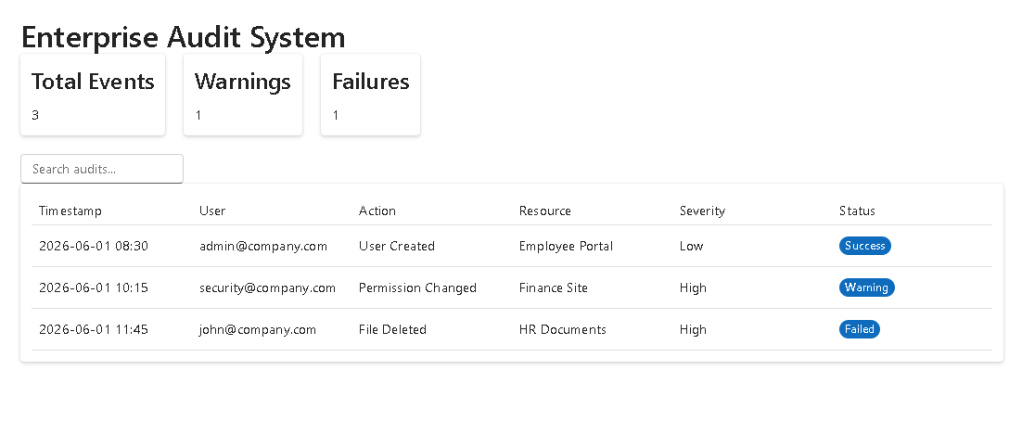
In App 92 — Audit System, we build an enterprise-style audit dashboard using React, TypeScript, Vite, and Fluent UI.
Audit systems are essential in professional applications because they help organizations understand what happened, when it happened, who performed an action, and whether the action succeeded or failed.
This application simulates a corporate audit monitoring system similar to dashboards used in Microsoft 365 administration, SharePoint governance, security portals, compliance platforms, and enterprise monitoring tools.
The main goal of this app is to combine several important React concepts:
- Component composition
- TypeScript models
- Service-based architecture
- Search state
- Derived data
- useMemo optimization
- Fluent UI DataGrid
- Enterprise dashboard layout
A very important part of this version is the correct implementation of Fluent UI DataGrid. During the build process, TypeScript reported an error because DataGridRow was being used with multiple direct children. Fluent UI DataGrid expects a render function pattern instead.
This article includes the corrected implementation.
PowerShell Project Setup
Create the project:
mkdir bloco05cd bloco05npm create vite@latest app92-audit-system -- --template react-tscd app92-audit-systemnpm installnpm install @fluentui/react-components @fluentui/react-icons
Create folders:
mkdir src\componentsmkdir src\modelsmkdir src\servicesmkdir src\datamkdir src\styles
Create files:
New-Item src\models\AuditRecord.ts -ItemType FileNew-Item src\data\auditData.ts -ItemType FileNew-Item src\services\auditService.ts -ItemType FileNew-Item src\components\AuditSummary.tsx -ItemType FileNew-Item src\components\AuditFilters.tsx -ItemType FileNew-Item src\components\AuditGrid.tsx -ItemType FileNew-Item src\App.tsx -ItemType FileNew-Item src\main.tsx -ItemType FileNew-Item src\index.css -ItemType FileNew-Item artigo.md -ItemType File
Final Project Structure
app92-audit-system/ src/ components/ AuditSummary.tsx AuditFilters.tsx AuditGrid.tsx models/ AuditRecord.ts data/ auditData.ts services/ auditService.ts styles/ App.tsx main.tsx index.css artigo.md package.json vite.config.ts tsconfig.json
The Audit Model
src/models/AuditRecord.ts
export interface AuditRecord { id: number; timestamp: string; user: string; action: string; resource: string; severity: "Low" | "Medium" | "High"; status: "Success" | "Warning" | "Failed";}
This model defines the structure of every audit event.
Each record contains:
| Property | Purpose |
|---|---|
| id | Unique identifier |
| timestamp | When the event happened |
| user | Who performed the action |
| action | What happened |
| resource | Where the action happened |
| severity | Business impact |
| status | Final result |
TypeScript helps prevent invalid audit data from entering the UI.
Mock Audit Data
src/data/auditData.ts
import type { AuditRecord } from "../models/AuditRecord";export const auditData: AuditRecord[] = [ { id: 1, timestamp: "2026-06-01 08:30", user: "admin@company.com", action: "User Created", resource: "Employee Portal", severity: "Low", status: "Success", }, { id: 2, timestamp: "2026-06-01 10:15", user: "security@company.com", action: "Permission Changed", resource: "Finance Site", severity: "High", status: "Warning", }, { id: 3, timestamp: "2026-06-01 11:45", user: "john@company.com", action: "File Deleted", resource: "HR Documents", severity: "High", status: "Failed", }, { id: 4, timestamp: "2026-06-02 09:20", user: "manager@company.com", action: "Report Viewed", resource: "Executive Dashboard", severity: "Medium", status: "Success", },];
This file simulates data that could later come from an API, database, Microsoft Graph, SharePoint, or Microsoft Purview audit export.
Service Layer
src/services/auditService.ts
import { auditData } from "../data/auditData";export function getAuditRecords() { return auditData;}
The service layer separates data access from UI rendering.
Today it returns local mock data.
Later it can be replaced by:
REST APIMicrosoft GraphSharePoint APIAzure FunctionCSV importDatabase query
The components will not need to know where the data comes from.
Audit Summary Component
src/components/AuditSummary.tsx
import { Card, Text, Title3,} from "@fluentui/react-components";interface AuditSummaryProps { total: number; warnings: number; failures: number;}export function AuditSummary({ total, warnings, failures,}: AuditSummaryProps) { return ( <div style={{ display: "flex", gap: "20px", marginBottom: "20px", flexWrap: "wrap", }} > <Card> <Title3>Total Events</Title3> <Text>{total}</Text> </Card> <Card> <Title3>Warnings</Title3> <Text>{warnings}</Text> </Card> <Card> <Title3>Failures</Title3> <Text>{failures}</Text> </Card> </div> );}
This component receives calculated values through props.
It does not calculate data by itself.
This keeps the component pure and reusable.
Audit Filters Component
src/components/AuditFilters.tsx
import { Input,} from "@fluentui/react-components";interface AuditFiltersProps { search: string; onSearchChange: (value: string) => void;}export function AuditFilters({ search, onSearchChange,}: AuditFiltersProps) { return ( <Input placeholder="Search audits by user or action..." value={search} onChange={(_, data) => onSearchChange(data.value) } style={{ maxWidth: "420px", marginBottom: "20px", }} /> );}
This component is controlled by React state.
The value comes from the parent.
When the user types, the component calls:
onSearchChange(data.value)
This updates the state in App.tsx.
Correct Fluent UI DataGrid Implementation
src/components/AuditGrid.tsx
import { Badge, Card, DataGrid, DataGridBody, DataGridCell, DataGridHeader, DataGridHeaderCell, DataGridRow, createTableColumn,} from "@fluentui/react-components";import type { TableColumnDefinition,} from "@fluentui/react-components";import type { AuditRecord } from "../models/AuditRecord";const columns: TableColumnDefinition<AuditRecord>[] = [ createTableColumn<AuditRecord>({ columnId: "timestamp", renderHeaderCell: () => "Timestamp", renderCell: (item) => item.timestamp, }), createTableColumn<AuditRecord>({ columnId: "user", renderHeaderCell: () => "User", renderCell: (item) => item.user, }), createTableColumn<AuditRecord>({ columnId: "action", renderHeaderCell: () => "Action", renderCell: (item) => item.action, }), createTableColumn<AuditRecord>({ columnId: "resource", renderHeaderCell: () => "Resource", renderCell: (item) => item.resource, }), createTableColumn<AuditRecord>({ columnId: "severity", renderHeaderCell: () => "Severity", renderCell: (item) => item.severity, }), createTableColumn<AuditRecord>({ columnId: "status", renderHeaderCell: () => "Status", renderCell: (item) => ( <Badge appearance="filled"> {item.status} </Badge> ), }),];interface AuditGridProps { items: AuditRecord[];}export function AuditGrid({ items,}: AuditGridProps) { return ( <Card> <DataGrid items={items} columns={columns} > <DataGridHeader> <DataGridRow> {({ renderHeaderCell }) => ( <DataGridHeaderCell> {renderHeaderCell()} </DataGridHeaderCell> )} </DataGridRow> </DataGridHeader> <DataGridBody<AuditRecord>> {({ item, rowId }) => ( <DataGridRow<AuditRecord> key={rowId}> {({ renderCell }) => ( <DataGridCell> {renderCell(item)} </DataGridCell> )} </DataGridRow> )} </DataGridBody> </DataGrid> </Card> );}
Why the Previous DataGrid Code Failed
The incorrect version used this pattern:
<DataGridRow> <DataGridCell>{item.timestamp}</DataGridCell> <DataGridCell>{item.user}</DataGridCell> <DataGridCell>{item.action}</DataGridCell></DataGridRow>
This caused the TypeScript error:
This JSX tag's 'children' prop expects a single childof type 'CellRenderFunction', but multiple children were provided.
The reason is that Fluent UI DataGrid does not expect manually listed cells in that structure.
Instead, it expects a render function:
<DataGridRow> {({ renderCell }) => ( <DataGridCell> {renderCell(item)} </DataGridCell> )}</DataGridRow>
The same rule applies to the header:
<DataGridRow> {({ renderHeaderCell }) => ( <DataGridHeaderCell> {renderHeaderCell()} </DataGridHeaderCell> )}</DataGridRow>
This is the correct Fluent UI DataGrid pattern.
Root Application
src/App.tsx
import { useMemo, useState } from "react";import { FluentProvider, Title1, Text, webLightTheme,} from "@fluentui/react-components";import { AuditFilters } from "./components/AuditFilters";import { AuditGrid } from "./components/AuditGrid";import { AuditSummary } from "./components/AuditSummary";import { getAuditRecords } from "./services/auditService";function App() { const [search, setSearch] = useState(""); const audits = getAuditRecords(); const filteredAudits = useMemo(() => { return audits.filter( (audit) => audit.user .toLowerCase() .includes(search.toLowerCase()) || audit.action .toLowerCase() .includes(search.toLowerCase()) || audit.resource .toLowerCase() .includes(search.toLowerCase()) ); }, [audits, search]); const warnings = filteredAudits.filter( (audit) => audit.status === "Warning" ).length; const failures = filteredAudits.filter( (audit) => audit.status === "Failed" ).length; return ( <FluentProvider theme={webLightTheme}> <main style={{ minHeight: "100vh", padding: "32px", backgroundColor: "#f5f5f5", boxSizing: "border-box", }} > <section style={{ maxWidth: "1200px", margin: "0 auto", }} > <Title1> Enterprise Audit System </Title1> <Text> Monitor corporate audit events, warnings, failures, and administrative activity. </Text> <div style={{ marginTop: "32px" }}> <AuditSummary total={filteredAudits.length} warnings={warnings} failures={failures} /> <AuditFilters search={search} onSearchChange={setSearch} /> <AuditGrid items={filteredAudits} /> </div> </section> </main> </FluentProvider> );}export default App;
React Entry Point
src/main.tsx
import React from "react";import ReactDOM from "react-dom/client";import App from "./App";import "./index.css";ReactDOM.createRoot( document.getElementById("root")!).render( <React.StrictMode> <App /> </React.StrictMode>);
This file connects React to the HTML root element.
The rendering flow is:
index.html div#rootmain.tsx ReactDOM.createRootApp.tsx AuditSummary AuditFilters AuditGrid
Global CSS
src/index.css
body { margin: 0; font-family: "Segoe UI", Arial, sans-serif;}* { box-sizing: border-box;}
This removes the default browser margin and applies a Microsoft-style font.
Running the App
Development server:
npm run dev
Production build:
npm run build
Preview:
npm run preview
The corrected AuditGrid.tsx should now compile successfully because the DataGrid rows follow the expected Fluent UI render-function pattern.
React Concepts Used
| Concept | Where It Appears | Why It Matters |
|---|---|---|
| Component composition | App renders Summary, Filters, Grid | Keeps UI modular |
| useState | Search input state | Stores user input |
| useMemo | Filtered audits | Avoids unnecessary recalculation |
| Derived data | warnings and failures | Avoids duplicated state |
| TypeScript interface | AuditRecord.ts | Strong data shape |
| Service layer | auditService.ts | Separates data access |
| Fluent UI DataGrid | AuditGrid.tsx | Enterprise table rendering |
| Controlled input | AuditFilters.tsx | React controls field value |
| Render functions | AuditGrid.tsx | Correct Fluent UI DataGrid pattern |
Technical Summary
| Area | Implementation |
|---|---|
| Framework | React |
| Language | TypeScript |
| Build Tool | Vite |
| Design System | Fluent UI |
| Main Component | App.tsx |
| Data Model | AuditRecord |
| Data Source | auditData.ts |
| Service | auditService.ts |
| Search | useState |
| Filtering | useMemo |
| Table | Fluent UI DataGrid |
| Status UI | Fluent UI Badge |
Official Documentation
| Topic | Link |
|---|---|
| React Learn | https://react.dev/learn |
| Thinking in React | https://react.dev/learn/thinking-in-react |
| Managing State | https://react.dev/learn/managing-state |
| useMemo | https://react.dev/reference/react/useMemo |
| Fluent UI React Components | https://react.fluentui.dev |
| Fluent UI DataGrid | https://react.fluentui.dev/?path=/docs/components-datagrid–docs |
| Vite Guide | https://vite.dev/guide/ |
| TypeScript Documentation | https://www.typescriptlang.org/docs/ |
Final Insight
The most important lesson in this application is that enterprise React development is not only about displaying data.
It is about organizing the system correctly.
This app separates:
Data model→ Mock data→ Service layer→ State→ Derived values→ UI components→ DataGrid rendering
The corrected DataGrid implementation also teaches an important lesson:
Fluent UI components often have their own expected composition model.
In this case, DataGridRow expects a render function, not multiple direct cell children.
Understanding this pattern prevents TypeScript errors and produces a cleaner, more scalable enterprise grid.
App 92 prepares the project for the next application: App 93 — SharePoint Inspired Portal.
Current Progress
| Block | App | Name | Status |
|---|---|---|---|
| Block 5 | 91 | Report Generator | Completed |
| Block 5 | 92 | Audit System | Completed |
| Block 5 | 93 | SharePoint Inspired Portal | Next |
Current Position: App 92 / 100 ✅


