Building an Enterprise Corporate Catalog with React, TypeScript, Fluent UI, and Vite
Introduction
As React applications evolve from simple demonstrations into enterprise-grade systems, one recurring requirement appears across almost every organization: a centralized catalog.
A corporate catalog can represent many different business concepts:
- Products
- Services
- Software licenses
- Hardware assets
- Corporate subscriptions
- Consulting offerings
- Internal service requests
- Procurement inventories
In large organizations, employees need a single place to discover, search, and review available resources. This is why enterprise platforms such as Microsoft 365, SharePoint portals, ERP systems, procurement platforms, and service management applications frequently include catalog-style interfaces.
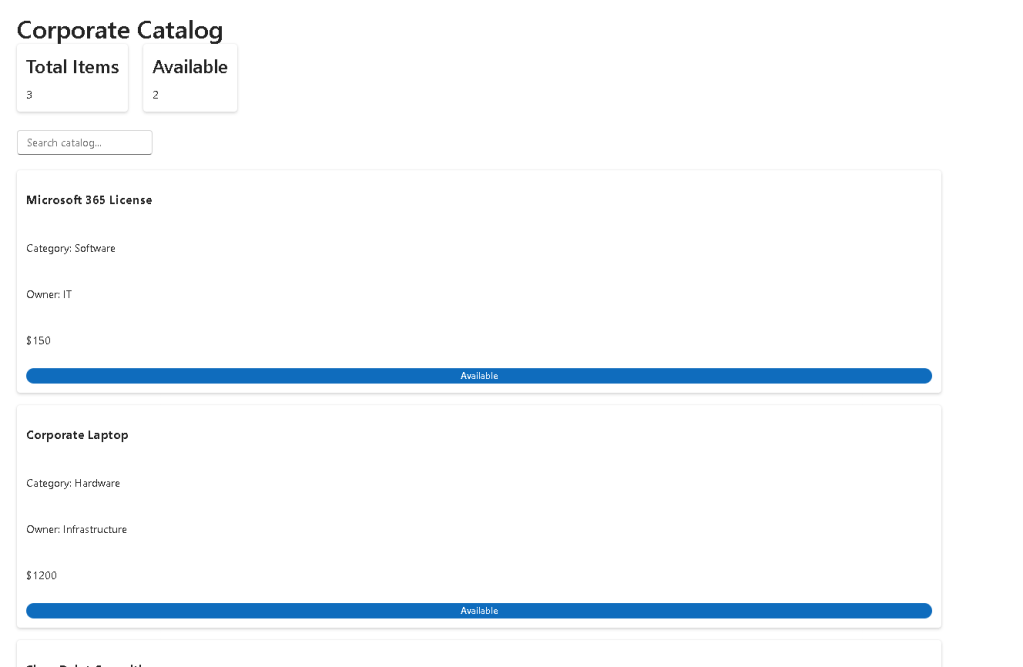
App 94 — Corporate Catalog represents an important milestone in the ReactLab journey because it combines many concepts introduced throughout the previous applications into a realistic business scenario.
This application demonstrates how modern React architecture can be used to create a scalable, maintainable, and professional catalog management experience using:
- React
- TypeScript
- Fluent UI
- Vite
- Component composition
- Service layers
- Derived state
- Search functionality
- Dashboard summaries
- Enterprise UI patterns
The application follows the React philosophy that the user interface should be derived from state and data rather than manually manipulating the DOM.
Business Scenario
Imagine a company that offers dozens or hundreds of internal services.
Examples include:
| Service | Department |
|---|---|
| Microsoft 365 License | IT |
| Laptop Request | Infrastructure |
| SharePoint Consulting | Consulting |
| Power BI Dashboard Development | Business Intelligence |
| Security Assessment | Cybersecurity |
| Cloud Migration | Cloud Services |
Instead of managing these offerings through spreadsheets, the organization wants a searchable corporate catalog.
Users should be able to:
- Browse catalog items
- Search by name
- View categories
- Review ownership information
- Verify availability
- See summary statistics
This is the problem solved by App 94.
Architecture Overview
The application follows a layered architecture:
App│├── Dashboard├── Filters├── Catalog Grid│Service Layer│Mock Data│TypeScript Models
Each layer has a specific responsibility.
This separation makes the application easier to maintain and expand.
Future enhancements might include:
- REST APIs
- Authentication
- Pagination
- DataGrid integration
- Reservation workflows
- CRUD operations
- SharePoint integration
The architecture is already prepared for that evolution.
Why TypeScript Matters
The catalog uses a strongly typed model.
export interface CatalogItem { id: number; name: string; category: string; owner: string; price: number; status: "Available" | "Retired";}
This interface defines the shape of every catalog item.
Benefits include:
- Compile-time validation
- Better IntelliSense
- Safer refactoring
- Self-documenting code
- Reduced runtime errors
Without TypeScript, it would be easy to accidentally introduce invalid properties or inconsistent structures.
In enterprise systems, strong typing becomes increasingly important as applications grow.
Data-Driven UI
One of the most important React principles demonstrated in this application is:
UI = Function(Data)
The catalog interface is generated from data rather than hardcoded markup.
Instead of creating individual cards manually, the application loops through catalog items and renders them dynamically.
This approach provides:
- Scalability
- Maintainability
- Reusability
- Consistency
If tomorrow the catalog grows from 3 items to 3,000 items, the rendering approach remains exactly the same.
Only the data changes.
Service Layer Pattern
The application introduces a simple service layer:
export function getCatalogItems() { return catalogData;}
At first glance this may appear unnecessary because the data is local.
However, architecturally it is extremely valuable.
Why?
Because future changes become easier.
Today:
Service→ Local Mock Data
Tomorrow:
Service→ REST API
Or:
Service→ Microsoft Graph
Or:
Service→ SharePoint List
The UI components remain unchanged because they communicate only with the service layer.
This is a common enterprise architecture pattern.
Search Functionality
The search experience is implemented through React state.
const [search, setSearch] = useState("");
This state stores the current search text.
Whenever the user types into the Fluent UI Input component:
<Input value={search} onChange={(_, data) => setSearch(data.value) }/>
React automatically updates the state.
The interface then re-renders using the new value.
No DOM manipulation is required.
Derived State
One of the most important React concepts demonstrated in App 94 is derived state.
Instead of storing filtered results separately, the application calculates them:
const filteredCatalog = useMemo(() => { return catalog.filter((item) => item.name .toLowerCase() .includes(search.toLowerCase()) );}, [catalog, search]);
This follows React’s recommendation:
Do not store redundant state.
The filtered list can always be derived from:
- Original catalog
- Search text
Therefore it does not need its own state.
Benefits:
- Less complexity
- Fewer bugs
- Easier maintenance
- Better React architecture
Why useMemo Is Important
The application uses:
useMemo()
This hook allows React to cache calculated values.
In a small catalog the difference is minimal.
However, imagine:
5,000 catalog items10,000 catalog items50,000 catalog items
Filtering could become expensive.
useMemo ensures React only recalculates when necessary.
This introduces an important performance optimization pattern used in enterprise applications.
Dashboard Cards
The dashboard component displays summary information:
- Total catalog items
- Available items
These metrics are examples of derived business information.
The dashboard transforms raw data into useful insights.
This pattern appears everywhere in enterprise software:
- Executive dashboards
- Power BI reports
- SharePoint portals
- Management systems
Users often care more about summarized information than raw records.
The dashboard provides immediate visibility into catalog status.
Fluent UI Integration
The application uses Fluent UI as the visual framework.
Why Fluent UI?
Because it provides:
- Accessibility
- Microsoft styling
- Consistent design language
- Keyboard navigation
- Enterprise appearance
- Professional component library
Instead of manually building every control, Fluent UI provides production-ready components.
Examples used in this application include:
- Card
- Input
- Badge
- Text
- Title
These components automatically follow Microsoft design guidelines.
Component Composition
The application is intentionally divided into multiple components:
CatalogDashboardCatalogFiltersCatalogGrid
Each component has one responsibility.
This follows React’s philosophy of composition.
Rather than creating a giant App.tsx file, the interface is broken into reusable building blocks.
Benefits include:
- Easier maintenance
- Better readability
- Improved testing
- Reusability
- Scalability
This becomes increasingly important in larger applications.
Enterprise Design Considerations
Several enterprise design principles are demonstrated:
Clear Separation of Concerns
UI components do not fetch data directly.
They receive data through props.
Predictable Data Flow
Data flows downward:
App→ Components
This makes debugging easier.
Reusable Components
The dashboard, filters, and grid could be reused elsewhere.
Future Expandability
The architecture can evolve toward:
- CRUD systems
- Reservation systems
- ERP modules
- SharePoint integrations
- Microsoft Graph APIs
without major restructuring.
React Mental Model Reinforced
App 94 reinforces one of the most important React concepts:
State changes→ React re-renders→ UI updates
There is no direct DOM manipulation.
Instead:
User types→ State updates→ Filter recalculates→ Grid re-renders
This declarative approach is what makes React applications predictable and maintainable.
Technical Summary
| Concept | Purpose |
|---|---|
| React | Component-based UI |
| TypeScript | Strong typing |
| Fluent UI | Microsoft design system |
| Vite | Development tooling |
| Service Layer | Data abstraction |
| useState | Search state |
| useMemo | Performance optimization |
| Derived State | Filtered catalog |
| Component Composition | Reusable architecture |
| Dashboard Cards | Business metrics |
| Search Filtering | User interaction |
| Catalog Grid | Data presentation |
What We Learned
By completing App 94, we learned how to:
- Build a realistic enterprise catalog
- Separate data, services, and UI
- Implement search functionality
- Use derived state correctly
- Apply useMemo for optimization
- Structure React applications professionally
- Use Fluent UI enterprise components
- Follow React architectural best practices
Most importantly, we reinforced the React principle that interfaces should be derived from data and state rather than manipulated manually.
This same pattern will be reused in reservation systems, CRM applications, ERP modules, administrative portals, analytics dashboards, and the final enterprise applications that conclude the ReactLab journey.
The Corporate Catalog serves as an excellent example of how modern React architecture scales from simple examples into real business solutions.
Technical References
- React Learn
- useState Reference
- useMemo Reference
- Fluent UI React Components
- Vite Guide
- TypeScript Documentation
Current Progress
| Block | App | Name | Status |
|---|---|---|---|
| Block 5 | 91 | Report Generator | Completed |
| Block 5 | 92 | Audit System | Completed |
| Block 5 | 93 | SharePoint Inspired Portal | Completed |
| Block 5 | 94 | Corporate Catalog | Completed |
| Block 5 | 95 | Reservation System | Next |
Current App: 94 — Corporate Catalog
Next App: 95 — Reservation System
Progress: 94 / 100 Apps Completed 🚀


