Building an Enterprise Reservation Management System with React, TypeScript, Fluent UI, and Vite
Introduction
Modern organizations depend heavily on reservation and scheduling systems. Whether managing meeting rooms, company vehicles, training facilities, hotel resources, equipment, or shared workspaces, reservation platforms are a fundamental part of daily business operations.
In App 95 — Reservation Management System, we build a complete enterprise-style reservation application using React, TypeScript, Vite, and Fluent UI. This application belongs to the final stage of the ReactLab roadmap, where all concepts learned throughout the project are combined into realistic business applications.
Unlike early applications that focused on isolated concepts such as rendering, state management, or component composition, this project integrates multiple React concepts into a single cohesive solution.
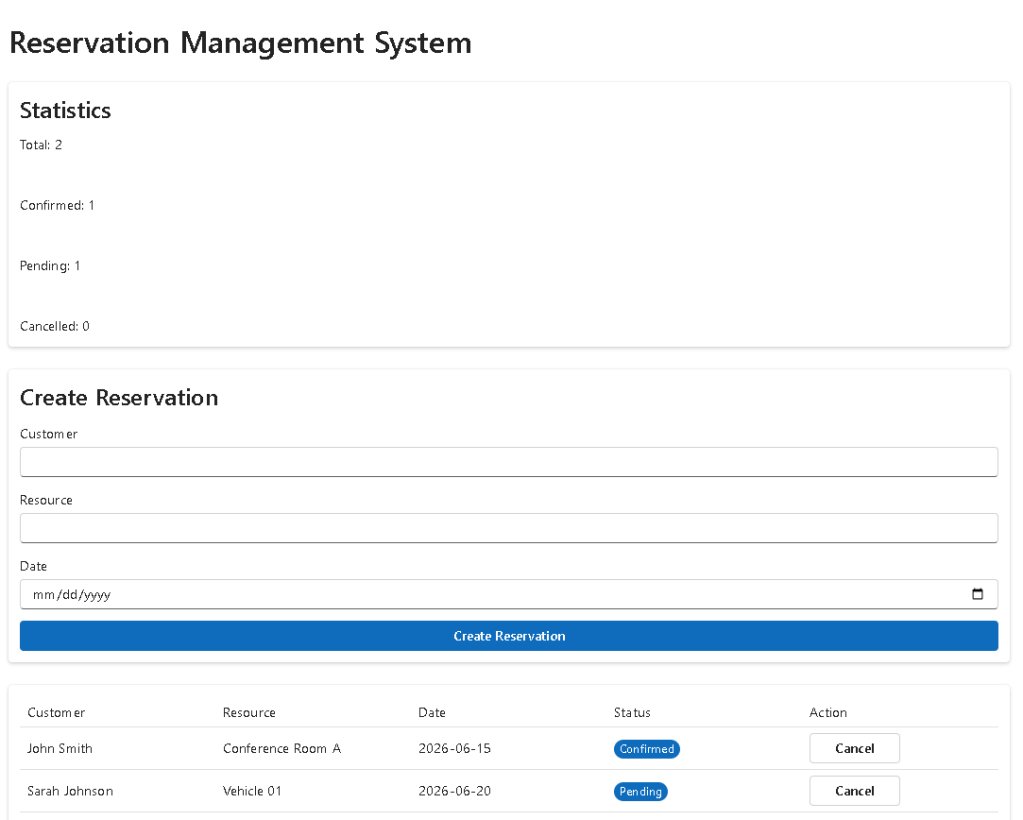
The application allows users to:
- Create reservations
- View reservations
- Monitor reservation status
- Cancel reservations
- Display reservation metrics
- Manage business resources
- Track operational data
- Use Microsoft-style enterprise interfaces
The application follows the React philosophy:
UI is a function of state.
Every visual element displayed on the screen is derived from React state. No manual DOM manipulation is required.
Project Goals
The primary objective of this application is to demonstrate how React can be used to build real business solutions.
This project introduces:
- Enterprise forms
- Data management
- Business entities
- Reservation workflows
- Dashboard statistics
- Derived state calculations
- Fluent UI components
- TypeScript models
- Component composition
- Enterprise architecture
The final result resembles applications commonly found in:
- Corporate intranets
- Facility management systems
- Booking platforms
- ERP solutions
- SharePoint business portals
- Microsoft 365 administrative environments
Creating the Project
The application starts with Vite.
mkdir bloco05cd bloco05npm create vite@latest app95-reservation-management-system -- --template react-tscd app95-reservation-management-systemnpm installnpm install @fluentui/react-componentsnpm install @fluentui/react-icons
Vite provides:
- Fast development startup
- Hot Module Replacement
- Modern ES Module support
- Optimized production builds
TypeScript provides:
- Strong typing
- Better refactoring
- Architectural consistency
- Reduced runtime errors
Creating the Project Structure
Enterprise React applications should always separate responsibilities.
New-Item src\components -ItemType DirectoryNew-Item src\models -ItemType DirectoryNew-Item src\data -ItemType DirectoryNew-Item src\services -ItemType DirectoryNew-Item src\styles -ItemType DirectoryNew-Item src\models\Reservation.ts -ItemType FileNew-Item src\data\reservationData.ts -ItemType FileNew-Item src\components\ReservationForm.tsx -ItemType FileNew-Item src\components\ReservationGrid.tsx -ItemType FileNew-Item src\components\ReservationStatistics.tsx -ItemType FileNew-Item src\App.tsx -ItemType FileNew-Item src\main.tsx -ItemType FileNew-Item src\index.css -ItemType FileNew-Item artigo.md -ItemType File
Final structure:
src/ components/ ReservationForm.tsx ReservationGrid.tsx ReservationStatistics.tsx models/ Reservation.ts data/ reservationData.ts services/ styles/ App.tsx main.tsx index.css
This architecture keeps business entities, UI components, and application logic separated.
Understanding the Reservation Model
The application uses a strongly typed business entity.
export interface Reservation { id: number; customerName: string; resourceName: string; reservationDate: string; status: ReservationStatus;}
This model defines:
| Property | Purpose |
|---|---|
| id | Unique reservation identifier |
| customerName | Customer making the reservation |
| resourceName | Reserved resource |
| reservationDate | Reservation date |
| status | Business workflow status |
Using TypeScript interfaces ensures consistency across the entire application.
Why State Matters
The reservation list is stored in React state.
const [reservations, setReservations] = useState<Reservation[]>(reservationData);
State acts as React’s memory.
Without state:
- Reservations would disappear
- UI could not update dynamically
- User interactions would not persist
React re-renders automatically whenever state changes.
Creating Reservations
The reservation form uses controlled inputs.
<Input value={customerName} onChange={(_, data) => setCustomerName(data.value) }/>
This creates a controlled component.
The data flow becomes:
User types→ Input event→ State updates→ React re-renders→ UI updates
This is the standard React pattern.
Adding New Reservations
When the user clicks:
Create Reservation
The application creates a new object:
const reservation: Reservation = { id: Date.now(), customerName, resourceName, reservationDate, status: "Pending",};
The reservation is added using immutable updates:
setReservations([ ...reservations, reservation,]);
React strongly recommends immutable state updates because they make rendering predictable.
Reservation Status Workflow
The system currently supports:
ConfirmedPendingCancelled
These statuses simulate real enterprise workflows.
Examples:
Pending→ waiting for approvalConfirmed→ approved reservationCancelled→ reservation removed
This workflow can later evolve into:
DraftPendingApprovedRejectedCompletedCancelled
Derived State and Statistics
One of the most important React concepts used here is derived state.
The statistics are not stored.
Instead, they are calculated:
const confirmed = reservations.filter( r => r.status === "Confirmed" ).length;
Similarly:
const pending = reservations.filter( r => r.status === "Pending" ).length;
and:
const cancelled = reservations.filter( r => r.status === "Cancelled" ).length;
This follows official React guidance:
Avoid redundant state.
The statistics are derived from existing data rather than stored separately.
Enterprise Dashboard Design
The Reservation Statistics component provides a dashboard experience.
Instead of showing only raw data, the application presents operational metrics.
Examples:
- Total reservations
- Confirmed reservations
- Pending reservations
- Cancelled reservations
This mirrors real-world dashboard design principles.
Executives and managers often need summary information before detailed records.
Using Fluent UI
Fluent UI provides Microsoft’s enterprise design system.
Main components used:
- Card
- Input
- Field
- Button
- Table
- Badge
- Typography
Benefits include:
- Accessibility
- Keyboard navigation
- Consistent spacing
- Microsoft visual standards
- Responsive behavior
Instead of manually building UI elements, developers compose enterprise-ready components.
Understanding the Reservation Grid
The Reservation Grid acts as the operational view of the system.
Each row represents:
Reservation
Columns display:
CustomerResourceDateStatusAction
This layout mirrors business applications found throughout the Microsoft ecosystem.
Cancellation Workflow
Cancellation demonstrates state-driven business logic.
When a user clicks:
Cancel
The application updates the reservation:
status: "Cancelled"
React automatically updates:
- Grid
- Statistics
- Status badges
- UI rendering
No manual DOM manipulation occurs.
Why No useEffect?
This application intentionally avoids useEffect.
There is:
- No API
- No external synchronization
- No timer
- No browser subscription
Everything is internal UI state.
According to React Learn:
You Might Not Need an Effect.
The correct solution is simple state management.
Understanding main.tsx
The entry point is:
import React from "react";import ReactDOM from "react-dom/client";import App from "./App";import "./index.css";ReactDOM.createRoot( document.getElementById("root")!).render( <React.StrictMode> <App /> </React.StrictMode>);
Responsibilities:
index.html→ loads main.tsxmain.tsx→ renders AppApp→ renders all business components
This is the standard React rendering pipeline.
Technical Summary
| Technology | Purpose |
|---|---|
| React | Declarative UI |
| TypeScript | Strong typing |
| Vite | Development tooling |
| Fluent UI | Microsoft design system |
| useState | Component memory |
| Controlled Inputs | Form handling |
| Derived State | Dashboard metrics |
| Table Components | Data visualization |
| Badge Components | Status indicators |
| Component Composition | Architecture |
Concepts Learned
| Concept | Application |
|---|---|
| State Management | Reservation lifecycle |
| Forms | Reservation creation |
| Derived State | Statistics dashboard |
| Fluent UI | Enterprise components |
| TypeScript Models | Business entities |
| Immutable Updates | Reservation changes |
| Conditional Rendering | Status display |
| Dashboard Design | KPI presentation |
| Component Composition | Modular architecture |
| Enterprise UI | Microsoft-style application |
Official Documentation
React
- https://react.dev/learn
- https://react.dev/learn/managing-state
- https://react.dev/learn/choosing-the-state-structure
- https://react.dev/learn/sharing-state-between-components
Fluent UI
Vite
TypeScript
Conclusion
App 95 demonstrates how React evolves from simple UI rendering into complete business applications.
The application combines:
- Forms
- Data management
- Business workflows
- Dashboard metrics
- Enterprise design
- Fluent UI components
- TypeScript models
Most importantly, it reinforces the React mental model:
State→ Rendering→ User Interaction→ State Update→ Re-render
This pattern appears in virtually every modern React enterprise application.
By mastering this workflow, developers are prepared to build reservation systems, ERP modules, SharePoint business solutions, CRM interfaces, administrative portals, and enterprise dashboards using React and Fluent UI.
Current Progress
| Block | App | Name | Status |
|---|---|---|---|
| Block 5 | 91 | Report Generator | Completed |
| Block 5 | 92 | Audit System | Completed |
| Block 5 | 93 | SharePoint Inspired Portal | Completed |
| Block 5 | 94 | Corporate Catalog | Completed |
| Block 5 | 95 | Reservation Management System | Completed |
| Block 5 | 96 | Mini ERP Enterprise | Next |


