Building a Mini ERP Enterprise Application with React, TypeScript, Fluent UI, and Vite
Introduction
Enterprise Resource Planning (ERP) systems are among the most important software platforms used by organizations. They centralize business operations, improve visibility across departments, and provide a single source of truth for operational data.
Modern ERP solutions typically manage:
- Employees
- Products
- Inventory
- Orders
- Suppliers
- Financial information
- Reporting
- Operational workflows
In App 96 of the ReactLab roadmap, we build a Mini ERP Enterprise Dashboard using React, TypeScript, Vite, and Fluent UI.
This project serves as a capstone-style application that combines many concepts learned throughout the previous applications:
- Component architecture
- TypeScript models
- Enterprise layouts
- Dashboard design
- Data visualization
- Business data organization
- Fluent UI components
- React rendering patterns
Although simplified, the architecture mirrors patterns commonly found in real enterprise systems.
Why Build an ERP Application?
ERP systems are excellent learning projects because they naturally require:
- Multiple business entities
- Data relationships
- Dashboards
- Grids
- Forms
- Reports
- Reusable components
Unlike small demo applications, ERP-style projects force developers to think about:
- Separation of concerns
- Scalability
- Reusability
- Maintainability
- Data modeling
These are exactly the skills required in professional React development.
Architecture Overview
The application is intentionally organized using a layered structure.
src/│├── components/│ ├── EmployeeGrid.tsx│ ├── ProductGrid.tsx│ └── KpiCards.tsx│├── models/│ ├── Employee.ts│ └── Product.ts│├── data/│ ├── employees.ts│ └── products.ts│├── services/│├── styles/│├── App.tsx├── main.tsx└── index.css
Each folder has a clear responsibility.
Models
Define the business entities.
Data
Provides sample ERP records.
Components
Render specific areas of the user interface.
App
Composes the entire ERP dashboard.
This structure is much closer to enterprise applications than placing everything inside a single file.
Business Models
ERP systems revolve around business entities.
The first model is Employee:
export interface Employee { id: number; name: string; department: string; position: string;}
The second model is Product:
export interface Product { id: number; name: string; category: string; stock: number;}
These interfaces provide:
- Strong typing
- Better IntelliSense
- Safer refactoring
- Predictable architecture
TypeScript helps ensure that business objects remain consistent throughout the application.
Data as the Source of Truth
The application includes static data files:
employees.tsproducts.ts
These files simulate information that would normally come from:
- SQL Server
- Oracle
- SAP
- REST APIs
- Microsoft Dataverse
- SharePoint Lists
The important concept is:
UI is derived from data.
React components should not invent data.
Instead, they render information that already exists.
This principle becomes even more important when connecting to real APIs later.
Dashboard KPIs
One of the first things users expect in an ERP system is a dashboard.
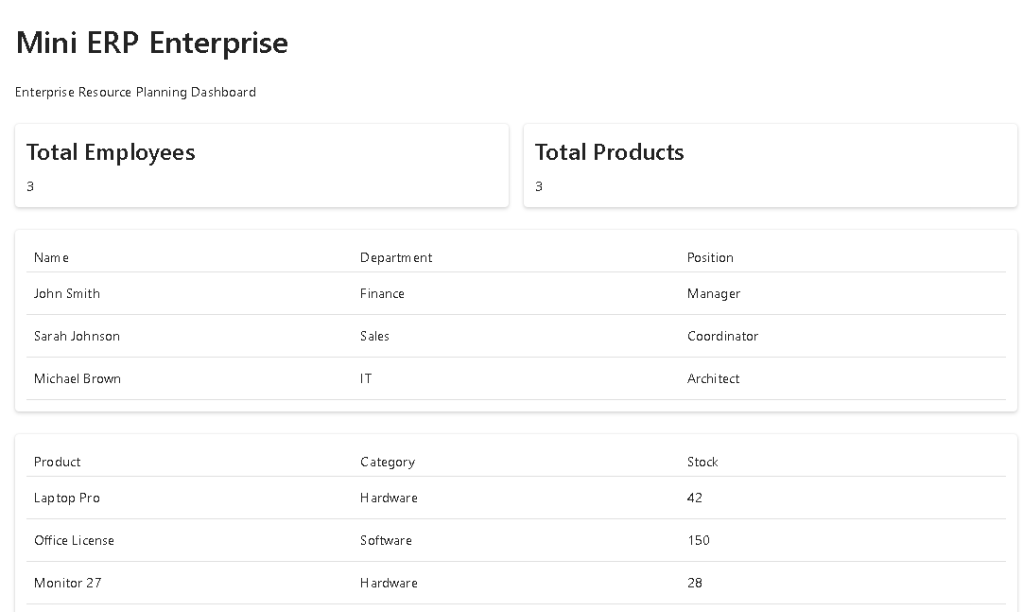
The KPI section provides immediate visibility into:
- Number of employees
- Number of products
The KPI Cards component receives values through props:
<KpiCards employees={employees.length} products={products.length}/>
This demonstrates a fundamental React principle:
Components receive data through props and render UI based on that data.
The KPI component itself remains reusable because it does not know where the numbers originate.
Component Composition
React applications scale through composition.
The ERP dashboard is composed of:
App│├── KpiCards├── EmployeeGrid└── ProductGrid
Each component has a single responsibility.
KpiCards
Displays summary metrics.
EmployeeGrid
Displays employee information.
ProductGrid
Displays product information.
This separation makes the application easier to:
- Maintain
- Test
- Extend
- Refactor
Enterprise Tables
Business applications frequently revolve around tabular data.
For this reason, App 96 introduces enterprise-style tables.
The Employee Grid displays:
- Name
- Department
- Position
The Product Grid displays:
- Product
- Category
- Stock
Fluent UI tables provide:
- Consistent Microsoft styling
- Accessibility
- Enterprise visual standards
- Responsive layouts
In larger applications these grids would evolve into:
- Sorting
- Filtering
- Paging
- Search
- Row selection
- Export functionality
Why Fluent UI?
Fluent UI is Microsoft’s official design system.
Using Fluent UI gives applications:
- Consistent appearance
- Accessibility support
- Enterprise design patterns
- Modern components
- Microsoft ecosystem alignment
This makes it particularly valuable for developers working with:
- SharePoint
- Microsoft 365
- Teams
- Power Platform
- Enterprise portals
The dashboard immediately feels more professional because Fluent UI handles typography, spacing, cards, and table styling.
React Mental Model
One of the most important lessons from this project is understanding React’s rendering model.
The dashboard is not manually updating HTML.
Instead:
Data→ Props→ Components→ JSX→ React Render→ Browser UI
React treats the user interface as a function of data.
When data changes:
New Data→ React Re-render→ Updated UI
This declarative model is significantly easier to maintain than imperative DOM manipulation.
Why There Is No useEffect
A common beginner mistake is adding useEffect everywhere.
This application intentionally does not use useEffect.
Why?
Because:
- No API calls exist
- No timers exist
- No browser subscriptions exist
- No external synchronization exists
The UI is entirely derived from static business data.
According to React Learn:
Effects should synchronize with external systems.
Since there are no external systems involved, effects are unnecessary.
This follows modern React best practices.
Enterprise Evolution Path
This Mini ERP serves as a foundation for future enterprise features.
Possible future enhancements include:
Employee Management
- Add employees
- Edit employees
- Remove employees
Inventory Management
- Stock updates
- Product movements
- Reorder alerts
Authentication
- Login screens
- User roles
- Permissions
Reporting
- KPI dashboards
- Charts
- Analytics
API Integration
- REST APIs
- GraphQL
- Microsoft Graph
State Management
- Context API
- Reducers
- Global application state
This demonstrates how a simple dashboard can evolve into a full enterprise platform.
Technical Summary
| Concept | Purpose |
|---|---|
| React Components | UI composition |
| TypeScript Interfaces | Business models |
| Props | Data communication |
| Fluent UI Cards | KPI presentation |
| Fluent UI Tables | Business data visualization |
| Component Composition | Enterprise architecture |
| Declarative Rendering | UI derived from data |
| Vite | Fast development environment |
| Dashboard Design | ERP overview |
| Strong Typing | Maintainability |
What We Learned
By building App 96 we learned how to:
- Structure an enterprise React application
- Create business models with TypeScript
- Build reusable components
- Create dashboard KPI sections
- Render enterprise tables
- Organize application layers
- Apply Fluent UI professionally
- Think in terms of business entities
Most importantly, we reinforced the React principle:
Build small components, compose them together, and let data drive the UI.
Official Documentation
React
- https://react.dev/learn
- https://react.dev/learn/thinking-in-react
- https://react.dev/learn/rendering-lists
Fluent UI
Vite
TypeScript
Microsoft Learn
Technical Concepts Table
| Area | Concepts |
|---|---|
| React | Composition, Rendering, Props |
| TypeScript | Interfaces, Strong Typing |
| Fluent UI | Cards, Tables, Layouts |
| Architecture | Models, Components, Data Layer |
| ERP | Employees, Products, KPIs |
| Dashboard | Metrics and Visibility |
| Enterprise Design | Microsoft-style UI |
| React Learn | Thinking in React |
Current Progress
| App | Name | Status |
|---|---|---|
| 91 | Report Generator | Completed |
| 92 | Audit System | Completed |
| 93 | SharePoint Inspired Portal | Completed |
| 94 | Corporate Catalog | Completed |
| 95 | Reservation System | Completed |
| 96 | Mini ERP Enterprise | Current |
| 97 | Complete CRM | Next |
| 98 | Analytics System | Upcoming |
| 99 | Microsoft Style Admin Center | Upcoming |
| 100 | Final React Enterprise Platform | Upcoming |
Current Position: Block 5 → App 96/100 ✅
Remaining Apps: 97, 98, 99, 100 🚀


