Building an Enterprise CRM System with React, TypeScript, Fluent UI, and Vite
Introduction
As applications grow beyond simple CRUD operations, they begin to resemble real business systems. One of the most common enterprise solutions is a Customer Relationship Management platform, commonly known as a CRM.
A CRM centralizes customer information, sales opportunities, business contacts, account managers, revenue tracking, and customer lifecycle management. Organizations use CRM platforms to improve customer engagement, monitor sales pipelines, manage opportunities, and generate business intelligence.
In ReactLab, App 97 — Complete CRM System represents one of the final applications in the roadmap and serves as a consolidation exercise for nearly everything learned throughout the project.
This application combines:
- React component composition
- TypeScript modeling
- Fluent UI enterprise components
- Service layer architecture
- Form development
- Dashboard summaries
- Data grids
- Derived calculations
- Enterprise layout patterns
The application follows the React philosophy described in the official React documentation:
- UI is derived from state
- Components are reusable building blocks
- Data flows downward through props
- State should remain minimal
- Derived values should be calculated rather than stored
This app demonstrates how these concepts work together inside a realistic business application.
Why CRM Systems Matter
Customer Relationship Management systems are among the most valuable enterprise applications because they centralize business information.
Typical CRM capabilities include:
- Customer management
- Lead tracking
- Opportunity management
- Sales forecasting
- Revenue reporting
- Contact history
- Activity tracking
- Workflow automation
Examples include:
- Microsoft Dynamics 365
- Salesforce
- HubSpot
- Zoho CRM
The objective of App 97 is not to reproduce these platforms entirely, but to build a simplified architecture that demonstrates the foundations behind enterprise CRM development.
Creating the Project
The application starts with Vite and TypeScript.
mkdir bloco05cd bloco05npm create vite@latest app97-complete-crm-system -- --template react-tscd app97-complete-crm-systemnpm installnpm install @fluentui/react-componentsnpm install @fluentui/react-icons
Vite provides:
- Fast startup
- Instant Hot Module Replacement
- Optimized production builds
- Modern ES Module support
TypeScript provides:
- Static typing
- Better refactoring
- Safer code
- Improved maintainability
Creating the Folder Structure
Professional applications require organization.
New-Item src\components -ItemType DirectoryNew-Item src\models -ItemType DirectoryNew-Item src\services -ItemType DirectoryNew-Item src\data -ItemType DirectoryNew-Item src\styles -ItemType DirectoryNew-Item src\hooks -ItemType DirectoryNew-Item src\pages -ItemType DirectoryNew-Item src\models\Customer.ts -ItemType FileNew-Item src\services\customerService.ts -ItemType FileNew-Item src\components\CustomerGrid.tsx -ItemType FileNew-Item src\components\CustomerForm.tsx -ItemType FileNew-Item src\components\CustomerSummary.tsx -ItemType FileNew-Item artigo.md -ItemType File
Final structure:
src/├── components/├── models/├── services/├── hooks/├── pages/├── styles/├── data/├── App.tsx├── main.tsx└── index.css
This structure prepares the application for future expansion.
Designing the Customer Model
The Customer model defines the shape of business data.
export interface Customer { id: number; company: string; contact: string; email: string; status: "Lead" | "Prospect" | "Customer"; annualRevenue: number;}
This model represents a customer record inside the CRM.
Benefits of modeling data with TypeScript:
- Strong typing
- Better IntelliSense
- Safer refactoring
- Architectural clarity
Every CRM begins with a reliable business model.
Building a Service Layer
Instead of placing data directly inside components, the application uses a service layer.
export const customers: Customer[] = [...]
The service layer acts as a future integration point.
Later, this same file could be replaced by:
REST APIGraphQL APIAzure FunctionsMicrosoft DataverseDynamics 365SQL Server
Because components consume data through a service abstraction, changing the backend becomes easier.
Dashboard Summary Cards
Enterprise applications typically begin with KPIs.
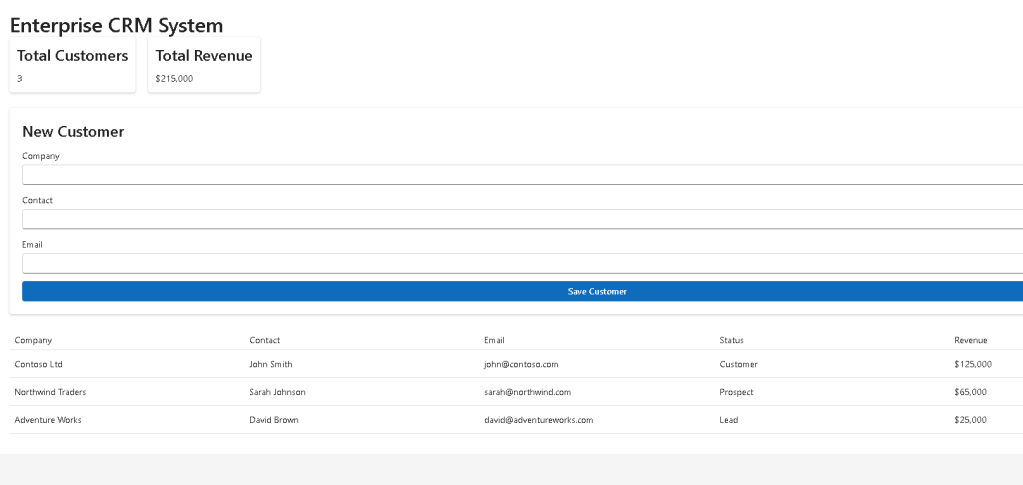
The CRM dashboard displays:
- Total Customers
- Total Revenue
These metrics are generated through the CustomerSummary component.
The component receives data through props:
<CustomerSummary totalCustomers={customers.length} totalRevenue={totalRevenue}/>
This reinforces React’s one-way data flow.
Data originates in App.tsx and flows downward into child components.
Derived Data in React
Notice this calculation:
const totalRevenue = customers.reduce( (sum, customer) => sum + customer.annualRevenue, 0);
This is derived data.
React Learn strongly recommends calculating values whenever possible instead of storing duplicate state.
Bad:
const [totalRevenue, setTotalRevenue] = useState(...)
Good:
const totalRevenue = customers.reduce(...)
Advantages:
- Less state
- Fewer bugs
- Easier maintenance
- Predictable rendering
Enterprise Tables with Fluent UI
CustomerGrid renders customer information.
Enterprise applications frequently display:
- Customers
- Orders
- Employees
- Products
- Tickets
inside tables or grids.
The CRM uses Fluent UI table components:
<Table><TableHeader><TableBody><TableRow><TableCell>
Benefits:
- Accessibility
- Consistent styling
- Enterprise appearance
- Keyboard support
- Responsive behavior
These are the same design principles found throughout Microsoft products.
Understanding Component Composition
The CRM architecture follows a simple hierarchy:
App│├── CustomerSummary├── CustomerForm└── CustomerGrid
Each component owns a specific responsibility.
CustomerSummary:
Displays KPIs
CustomerForm:
Captures user input
CustomerGrid:
Displays customer records
This separation makes applications easier to maintain.
Forms in Enterprise Applications
CustomerForm introduces another essential business requirement.
Enterprise systems constantly collect data:
- Customer registration
- Product creation
- Ticket submission
- Employee onboarding
Forms are the bridge between users and business processes.
The CRM form uses:
<Field><Input /><Button />
provided by Fluent UI.
Advantages:
- Accessibility
- Consistent spacing
- Enterprise styling
- Microsoft design standards
Why Fluent UI Matters
Fluent UI provides more than visual controls.
It delivers:
- Accessibility
- Design consistency
- Responsive behavior
- Enterprise patterns
- Microsoft visual language
The CRM instantly looks professional because it uses Fluent UI as its foundation.
This is one of the major benefits of adopting a mature design system.
React Mental Model
This CRM reinforces the most important React principle:
UI = Function(State)
The dashboard is not manually updated.
Instead:
Data changes→ React re-renders→ UI updates automatically
React handles synchronization between data and the DOM.
Developers focus on describing the interface rather than manipulating it.
Scaling Toward Real CRM Platforms
Although simplified, this architecture can evolve into:
AuthenticationRoutingCustomer DetailsLead ManagementSales PipelineOpportunity TrackingNotesAttachmentsReportsDashboardsAnalyticsRole-Based Security
The structure already supports this growth.
This is exactly why architecture matters from the beginning.
Technical Summary
| Concept | Purpose |
|---|---|
| React Components | UI composition |
| TypeScript Models | Business entities |
| Fluent UI | Enterprise design system |
| Service Layer | Data abstraction |
| Forms | Data collection |
| Tables | Data presentation |
| Derived Values | KPI calculations |
| Props | Data flow |
| Composition | Reusable architecture |
| Vite | Development environment |
Concepts Learned
| Area | Knowledge Acquired |
|---|---|
| React | Component composition |
| TypeScript | Entity modeling |
| Fluent UI | Enterprise UI development |
| Services | Data abstraction |
| Forms | User input handling |
| Dashboards | KPI presentation |
| Tables | Structured data rendering |
| Architecture | Separation of concerns |
| State Management | Derived values |
| Enterprise Design | Business application patterns |
Official Documentation
React
- https://react.dev/learn
- https://react.dev/learn/thinking-in-react
- https://react.dev/learn/managing-state
Fluent UI
Vite
TypeScript
Final Thoughts
App 97 represents a major milestone in the ReactLab journey.
Unlike early applications that focused on isolated concepts, this CRM combines multiple architectural layers into a realistic enterprise solution.
The application demonstrates how React, TypeScript, Fluent UI, services, forms, and dashboards work together to create business software.
More importantly, it reinforces the mindset required for professional React development:
Business Data→ Models→ Services→ Components→ React Rendering→ Enterprise User Interface
That mindset is what transforms a collection of components into a real enterprise application.
Current Progress
| Block | App | Name | Status |
|---|---|---|---|
| Block 5 | 93 | Portal SharePoint Inspired | Completed |
| Block 5 | 94 | Corporate Catalog | Completed |
| Block 5 | 95 | Reservation System | Completed |
| Block 5 | 96 | Mini ERP Enterprise | Completed |
| Block 5 | 97 | Complete CRM System | Completed |
| Block 5 | 98 | Analytics System | Next |
| Block 5 | 99 | Microsoft Admin Center | Upcoming |
| Block 5 | 100 | React Enterprise Platform | Final |
Progress: 97 / 100 Apps Completed (97%) 🚀


