Building Modern SharePoint Solutions with SPFx, PnPjs and PnP ListView
From Raw Data to Professional UI
When building enterprise-grade SharePoint solutions with SPFx, one of the most common mistakes developers make is jumping directly into UI controls without understanding the data layer first.
This usually creates:
- tightly coupled code
- duplicated logic
- difficult maintenance
- poor scalability
A much better approach is to separate:
Data Layer
and
Presentation Layer
This article introduces that architecture using:
- SPFx
- PnPjs
- PnP React Controls
- ListView
This is one of the most reusable patterns you can learn.
The architecture
The flow:
SharePoint List ↓PnPjs ↓Service / Component Logic ↓React State ↓PnP ListView ↓User Interface
This separation is important.
PnPjs retrieves.
ListView displays.
React controls the state.
This is clean architecture.
Why PnPjs first?
Before touching UI, we must understand how data is retrieved.
PnPjs is the official community-driven abstraction layer for SharePoint REST.
Official docs:
PnPjs Getting Started:
PnPjs SharePoint docs:
PnP React Controls docs:
ListView docs:
These are essential references.
Part 1 — Setting up PnPjs
Install:
npm install @pnp/sp
Why centralize configuration?
A common beginner mistake:
const sp = spfi().using(SPFx(context));
inside every component.
Bad idea.
This creates multiple instances.
Better:
single reusable instance.
pnpjsConfig.ts
Create:
src/webparts/spPnPbasico/components/pnpjsConfig.ts
Code:
import { spfi, SPFI } from "@pnp/sp";import { SPFx } from "@pnp/sp/behaviors/spfx";import "@pnp/sp/webs";import "@pnp/sp/lists";import "@pnp/sp/items";let _sp: SPFI | undefined;export const getSP = (context?: any): SPFI => { if (!_sp && context) { _sp = spfi().using(SPFx(context)); } if (!_sp) { throw new Error("PnPjs has not been initialized."); } return _sp;};
Understanding the imports
These imports are critical:
import "@pnp/sp/webs";import "@pnp/sp/lists";import "@pnp/sp/items";
Without them:
sp.websp.web.listssp.web.lists.items
may not exist.
PnPjs uses modular imports.
This is important for bundle optimization.
Passing context from WebPart
Your WebPart passes the SPFx context:
const element: React.ReactElement<ISpPnPbasicoProps> = React.createElement( SpPnPbasico, { context: this.context } );
This is how authentication flows into PnPjs.
Without it, requests fail.
Part 2 — Retrieving SharePoint data
Now let’s create the first data retrieval layer.
This stage is intentionally simple.
No UI.
Only retrieval.
First component
import * as React from 'react';import { useEffect } from "react";import { ISpPnPbasicoProps } from './ISpPnPbasicoProps';import { getSP } from "./pnpjsConfig";const SpPnPbasico: React.FC<ISpPnPbasicoProps> = (props) => { useEffect(() => { loadItems(); }, []); const loadItems = async (): Promise<void> => { try { const sp = getSP(props.context); const items = await sp.web.lists .getByTitle("Bike Sales") .items .select("Id", "Title")(); console.log("Bike Sales items:", items); } catch (error) { console.error("Error loading items:", error); } }; return ( <div> <h1>Welcome to SPFx with PnPjs!</h1> <p>Check the browser console to see the list items.</p> </div> );};export default SpPnPbasico;
Breaking down the retrieval
useEffect
useEffect(() => { loadItems();}, []);
Runs once.
Equivalent to componentDidMount.
getSP
const sp = getSP(props.context);
Gets the singleton instance.
getByTitle
.getByTitle("Bike Sales")
Targets the list.
items
.items
Targets the collection.
select
.select("Id", "Title")
Very important.
Always reduce payload.
Good performance practice.
Why this matters
At this point you already know:
- connect to SharePoint
- authenticate
- query lists
- optimize fields
This is the foundation.
Now comes UI.
Part 3 — Evolving to PnP ListView
Now we stop using:
console.log(items)
and render data.
This is the natural evolution.
Install:
npm install @pnp/spfx-controls-react
Why ListView?
PnP ListView is a powerful wrapper over Fluent UI.
Benefits:
- sorting
- filtering
- selection
- responsive layout
- custom rendering
- consistent UI
Instead of manually building HTML tables.
Much faster.
Much cleaner.
The evolution
Old:
PnPjs → Console
New:
PnPjs → React State → ListView
Huge evolution.
Full ListView component
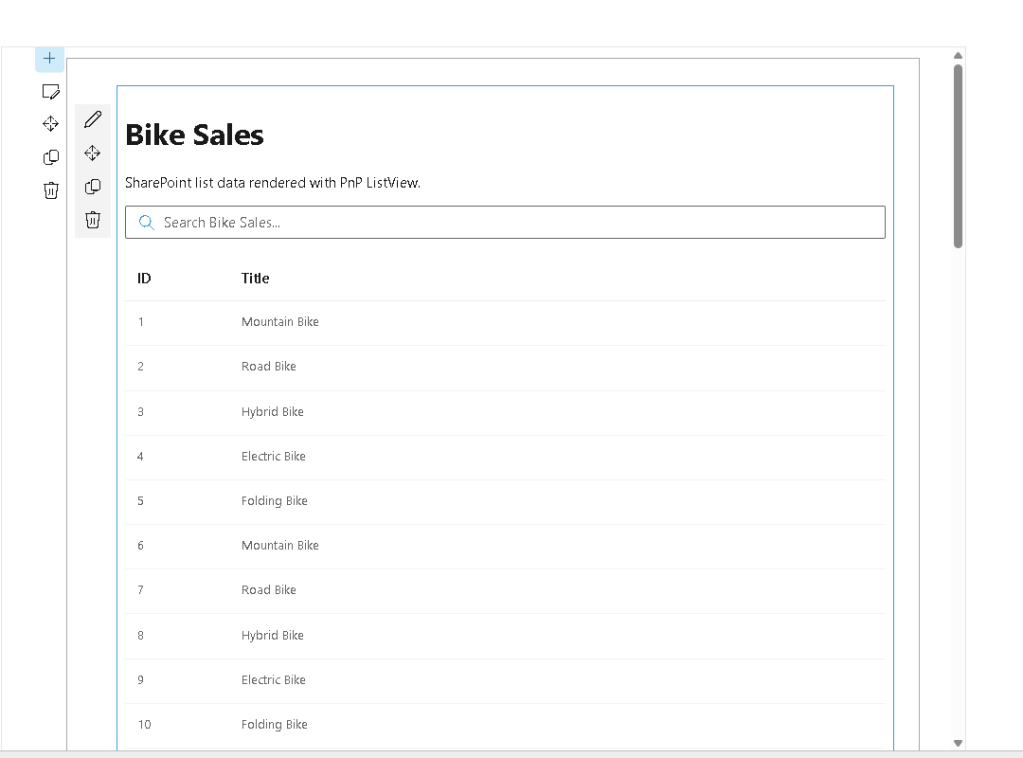
import * as React from 'react';import { useEffect, useState } from "react";import { ISpPnPbasicoProps } from './ISpPnPbasicoProps';import { getSP } from "./pnpjsConfig";import { ListView, IViewField, SelectionMode} from "@pnp/spfx-controls-react/lib/ListView";interface IBikeSaleItem { Id: number; Title: string;}const SpPnPbasico: React.FC<ISpPnPbasicoProps> = (props) => { const [items, setItems] = useState<IBikeSaleItem[]>([]); useEffect(() => { loadItems(); }, []); const loadItems = async (): Promise<void> => { try { const sp = getSP(props.context); const listItems: IBikeSaleItem[] = await sp.web.lists .getByTitle("Bike Sales") .items .select("Id", "Title")(); setItems(listItems); } catch (error) { console.error("Error loading Bike Sales items:", error); } }; const viewFields: IViewField[] = [ { name: "Id", displayName: "ID", sorting: true, minWidth: 50, maxWidth: 80 }, { name: "Title", displayName: "Title", sorting: true, minWidth: 150 } ]; return ( <div> <h1>Bike Sales</h1> <p>SharePoint list data rendered with PnP ListView.</p> <ListView items={items} viewFields={viewFields} compact={false} selectionMode={SelectionMode.none} showFilter={true} filterPlaceHolder="Search Bike Sales..." /> </div> );};export default SpPnPbasico;
What changed?
Before:
console.log(items);
Now:
setItems(listItems);
React stores state.
Then:
<ListView items={items} />
renders UI.
This is the bridge.
Why this pattern scales
This same architecture works for:
- Document Libraries
- Search Results
- Approval Lists
- Training Catalogs
- Dashboard Widgets
- Audit Reports
- Purview exports
- Power BI feeders
You can reuse this pattern everywhere.
Next evolution
Now that we have:
PnPjs
+
ListView
the next logical controls are:
- ListItemPicker
- PeoplePicker
- TaxonomyPicker
- FilePicker
- FolderPicker
- RichText
- DynamicForm
This is where SPFx becomes powerful.
But it all starts here.
PnPjs first.
UI second.
That order matters.
Final architecture
Best practice:
WebPart ↓Context ↓PnPjs Config ↓Service Layer ↓Component ↓State ↓PnP ListView
This is the foundation for modern SharePoint development.
Master this.
Everything else builds on top of it.

 edvaldo b. guimarães filho