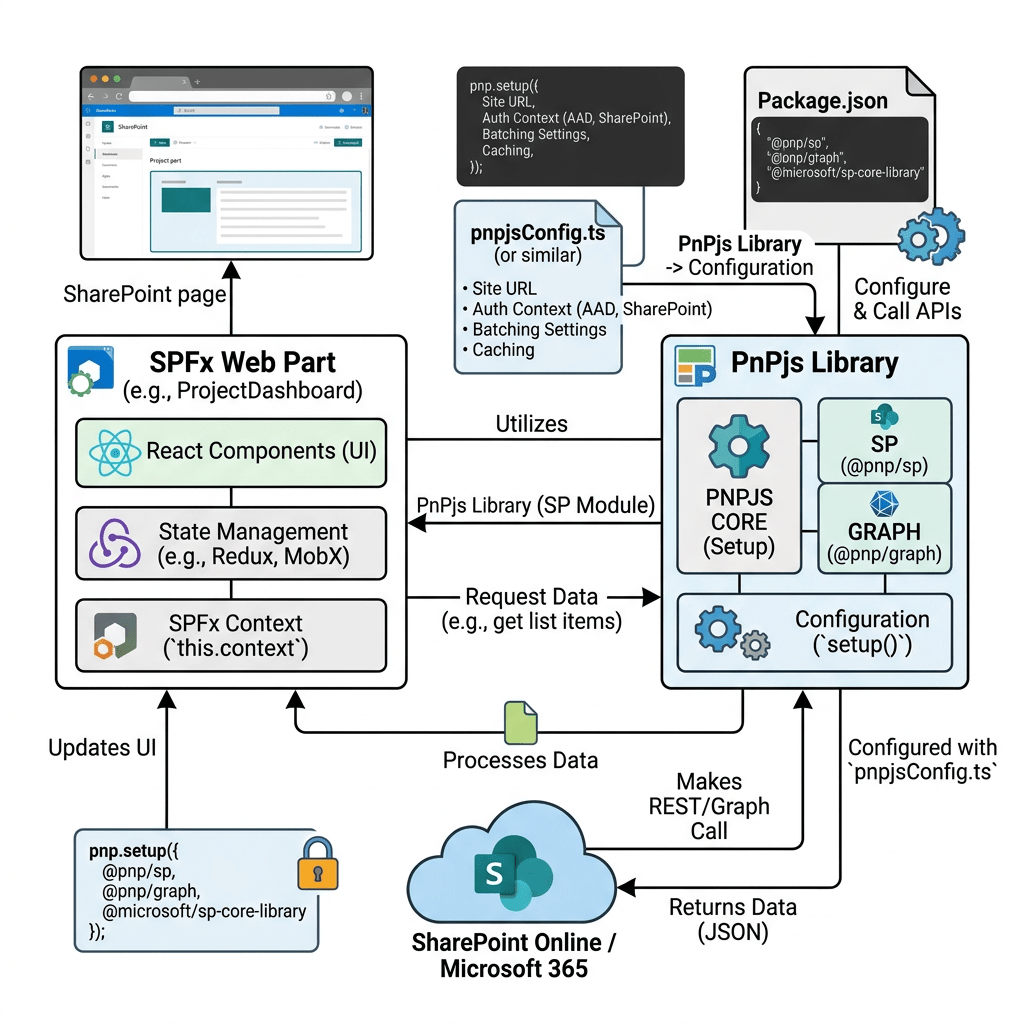
When building SharePoint Framework solutions, it is very common to start with one web part, one React component, and one simple PnPjs configuration file. At the beginning, this feels natural. The web part needs SharePoint data, so we create a pnpjsConfig.ts file, initialize spfi() with the SPFx context, and use it inside the component.
Centralizing PnPjs Configuration in a Large SPFx Solution
When building SharePoint Framework solutions, it is very common to start with one web part, one React component, and one simple PnPjs configuration file. At the beginning, this feels natural. The web part needs SharePoint data, so we create a pnpjsConfig.ts file, initialize spfi() with the SPFx context, and use it inside the component.
However, this pattern becomes dangerous when the solution grows.
Imagine an SPFx solution that will contain 100 web parts. If every web part has its own pnpjsConfig.ts, the project quickly becomes harder to maintain. You may end up with 100 different configuration files, 100 different initialization patterns, and many duplicated imports. Even worse, if you need to change how PnPjs is initialized, you would need to update the same logic in many places.
A better approach is to create only one shared PnPjs configuration file for the entire SPFx solution.
This file becomes the central place responsible for creating and returning the SharePoint PnPjs instance. Every web part can reuse it.
Why PnPjs Needs Configuration in SPFx
PnPjs needs the SPFx context because SharePoint Framework provides important runtime information such as the current site URL, authentication context, HTTP client behavior, and page context.
Without the SPFx context, PnPjs would not know how to correctly make authenticated requests to SharePoint from inside the web part.
The basic idea is:
const sp = spfi().using(SPFx(context));
This creates a SharePoint Fluent Interface instance connected to the current SPFx context.
The Problem with Multiple Config Files
In a small demo, this is acceptable:
src/webparts/customList/pnpjsConfig.tssrc/webparts/documents/pnpjsConfig.tssrc/webparts/news/pnpjsConfig.ts
But in a solution with 100 web parts, this becomes a maintenance problem:
src/webparts/wp01/pnpjsConfig.tssrc/webparts/wp02/pnpjsConfig.tssrc/webparts/wp03/pnpjsConfig.ts...src/webparts/wp100/pnpjsConfig.ts
This creates several problems:
- Code duplication.
- Inconsistent imports.
- Different developers may change the config in different ways.
- Harder refactoring.
- More risk of bugs.
- More files to review.
- More places to update when adding Graph, caching, logging, batching, or custom services.
For a large SPFx solution, configuration should be centralized.
Recommended Folder Structure
Instead of creating one config file per web part, create one shared configuration file under a common folder:
src/ common/ pnpjsConfig.ts webparts/ wp01AccessibleAccordion/ wp02Accordion/ wp03AdaptiveCardHost/ wp04AnimatedDialog/ ... wp100Something/
The important idea is simple:
One SPFx solutionOne shared PnPjs configMany web parts consuming it
Installing PnPjs
Inside the SPFx solution, install PnPjs:
npm install @pnp/sp --save
If later you want Microsoft Graph support too:
npm install @pnp/graph --save
For this article, we will focus on SharePoint using @pnp/sp.
Shared pnpjsConfig.ts
Create this file:
src/common/pnpjsConfig.ts
Full code:
import { WebPartContext } from '@microsoft/sp-webpart-base';import { spfi, SPFI } from '@pnp/sp';import { SPFx } from '@pnp/sp/behaviors/spfx';import '@pnp/sp/webs';import '@pnp/sp/lists';import '@pnp/sp/items';let _sp: SPFI | undefined = undefined;export const getSP = (context?: WebPartContext): SPFI => { if (!_sp && context) { _sp = spfi().using(SPFx(context)); } if (!_sp) { throw new Error('PnPjs has not been initialized. Pass the SPFx context at least once.'); } return _sp;};
Understanding the Code
The file imports WebPartContext from SPFx because the configuration needs the current web part context.
import { WebPartContext } from '@microsoft/sp-webpart-base';
Then it imports the PnPjs SharePoint factory and interface:
import { spfi, SPFI } from '@pnp/sp';
spfi() creates the SharePoint Fluent Interface.
SPFI is the TypeScript type for the SharePoint PnPjs instance.
Then we import the SPFx behavior:
import { SPFx } from '@pnp/sp/behaviors/spfx';
This behavior connects PnPjs to the SPFx runtime context.
The selective imports define which SharePoint APIs are available:
import '@pnp/sp/webs';import '@pnp/sp/lists';import '@pnp/sp/items';
This is important. PnPjs uses selective imports. If you want to work with lists and items, you must import those modules.
The variable below stores the shared instance:
let _sp: SPFI | undefined = undefined;
This means the solution will reuse the same initialized PnPjs instance instead of recreating it everywhere.
The getSP function initializes PnPjs only once:
export const getSP = (context?: WebPartContext): SPFI => { if (!_sp && context) { _sp = spfi().using(SPFx(context)); } if (!_sp) { throw new Error('PnPjs has not been initialized. Pass the SPFx context at least once.'); } return _sp;};
The first web part that calls getSP(this.context) initializes the shared instance.
After that, other files can call getSP() without passing the context again.
Using the Shared Config in a Web Part
Inside a web part file, import the shared config:
import { getSP } from '../../common/pnpjsConfig';
Then initialize it in onInit():
protected async onInit(): Promise<void> { await super.onInit(); getSP(this.context);}
Example:
import * as React from 'react';import * as ReactDom from 'react-dom';import { Version } from '@microsoft/sp-core-library';import { BaseClientSideWebPart } from '@microsoft/sp-webpart-base';import PnPListViewDemo from './components/PnPListViewDemo';import { IPnPListViewDemoProps } from './components/IPnPListViewDemoProps';import { getSP } from '../../common/pnpjsConfig';export interface IPnPListViewDemoWebPartProps { description: string;}export default class PnPListViewDemoWebPart extends BaseClientSideWebPart<IPnPListViewDemoWebPartProps> { protected async onInit(): Promise<void> { await super.onInit(); getSP(this.context); } public render(): void { const element: React.ReactElement<IPnPListViewDemoProps> = React.createElement( PnPListViewDemo, { description: this.properties.description } ); ReactDom.render(element, this.domElement); } protected get dataVersion(): Version { return Version.parse('1.0'); }}
Notice that the web part initializes PnPjs once using the SPFx context.
The React component does not need to receive the full SPFx context only to use SharePoint data. It can simply use getSP().
Using PnPjs Inside a React Component
Example component:
import * as React from 'react';import { getSP } from '../../../common/pnpjsConfig';export interface IPnPListViewDemoProps { description: string;}export interface IListItem { Id: number; Title: string;}const PnPListViewDemo: React.FC<IPnPListViewDemoProps> = () => { const [items, setItems] = React.useState<IListItem[]>([]); const [loading, setLoading] = React.useState<boolean>(true); React.useEffect(() => { const loadItems = async (): Promise<void> => { try { const sp = getSP(); const listItems: IListItem[] = await sp.web.lists .getByTitle('Documents') .items .select('Id', 'Title') .top(10)(); setItems(listItems); } catch (error) { console.error('Error loading SharePoint items:', error); } finally { setLoading(false); } }; loadItems(); }, []); if (loading) { return <div>Loading SharePoint items...</div>; } return ( <div> <h2>PnPjs Shared Configuration Demo</h2> {items.map((item) => ( <div key={item.Id}> {item.Title} </div> ))} </div> );};export default PnPListViewDemo;
This component does not configure PnPjs. It only consumes the already configured instance.
That is the key architectural improvement.
Why This Matters in a 100 Web Part Solution
In a solution with 100 web parts, you do not want this:
100 web parts100 pnpjsConfig.ts files100 different initialization patterns
You want this:
100 web parts1 shared pnpjsConfig.ts1 consistent initialization pattern
This gives you a cleaner architecture.
If tomorrow you decide to add more PnPjs imports, you update one file.
For example, if you need folders:
import '@pnp/sp/folders';
If you need files:
import '@pnp/sp/files';
If you need fields:
import '@pnp/sp/fields';
If you need site users:
import '@pnp/sp/site-users/web';
You add these imports once in the shared file, not in every web part.
A Better Long-Term Architecture
For a large SPFx solution, I recommend this structure:
src/ common/ pnpjsConfig.ts services/ ListsService.ts DocumentsService.ts UsersService.ts models/ IListItem.ts IDocumentItem.ts IUserInfo.ts webparts/ wp01AccessibleAccordion/ wp02Accordion/ wp03AdaptiveCardHost/ ...
In this architecture:
common/pnpjsConfig.tsinitializes PnPjs.services/contains reusable business logic.models/contains TypeScript interfaces.webparts/contains only the web part UI and web part-specific logic.
This is much better than placing all SharePoint calls directly inside every React component.
Example Service Using the Shared Config
Create:
src/services/ListsService.ts
Code:
import { getSP } from '../common/pnpjsConfig';export interface IGenericListItem { Id: number; Title: string;}export class ListsService { public static async getItems(listTitle: string): Promise<IGenericListItem[]> { const sp = getSP(); const items: IGenericListItem[] = await sp.web.lists .getByTitle(listTitle) .items .select('Id', 'Title') .top(20)(); return items; }}
Now any web part can call:
const items = await ListsService.getItems('Documents');
The web part does not need to know how PnPjs is configured.
Final Recommendation
For a learning project with many PnP SPFx React Controls, and especially for a solution that may eventually contain 100 web parts, do not create one PnPjs config file per web part.
Create one shared configuration file:
src/common/pnpjsConfig.ts
Initialize it once from the web part using:
getSP(this.context);
Then reuse it from components and services using:
const sp = getSP();
This keeps the solution clean, scalable, and easier to maintain.
The main lesson is:
Do not duplicate configuration. Centralize it.
In a large SPFx solution, one good shared PnPjs configuration file is better than 100 small duplicated configuration files.

 edvaldo b. guimarães filho