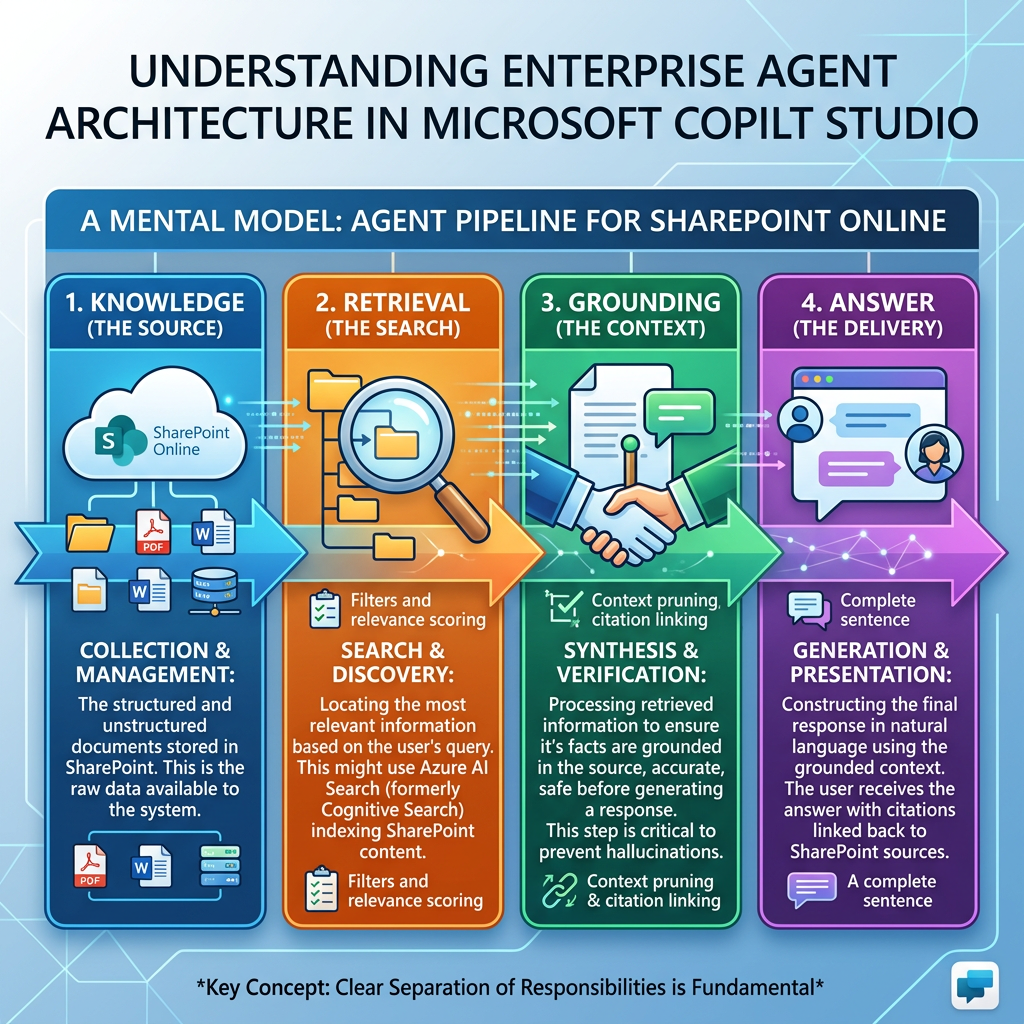
Knowledge → Retrieval → Grounding → Answer
A Technical Deep Dive into How Enterprise Agents Turn Corporate Content into Generative Responses
1. Introduction
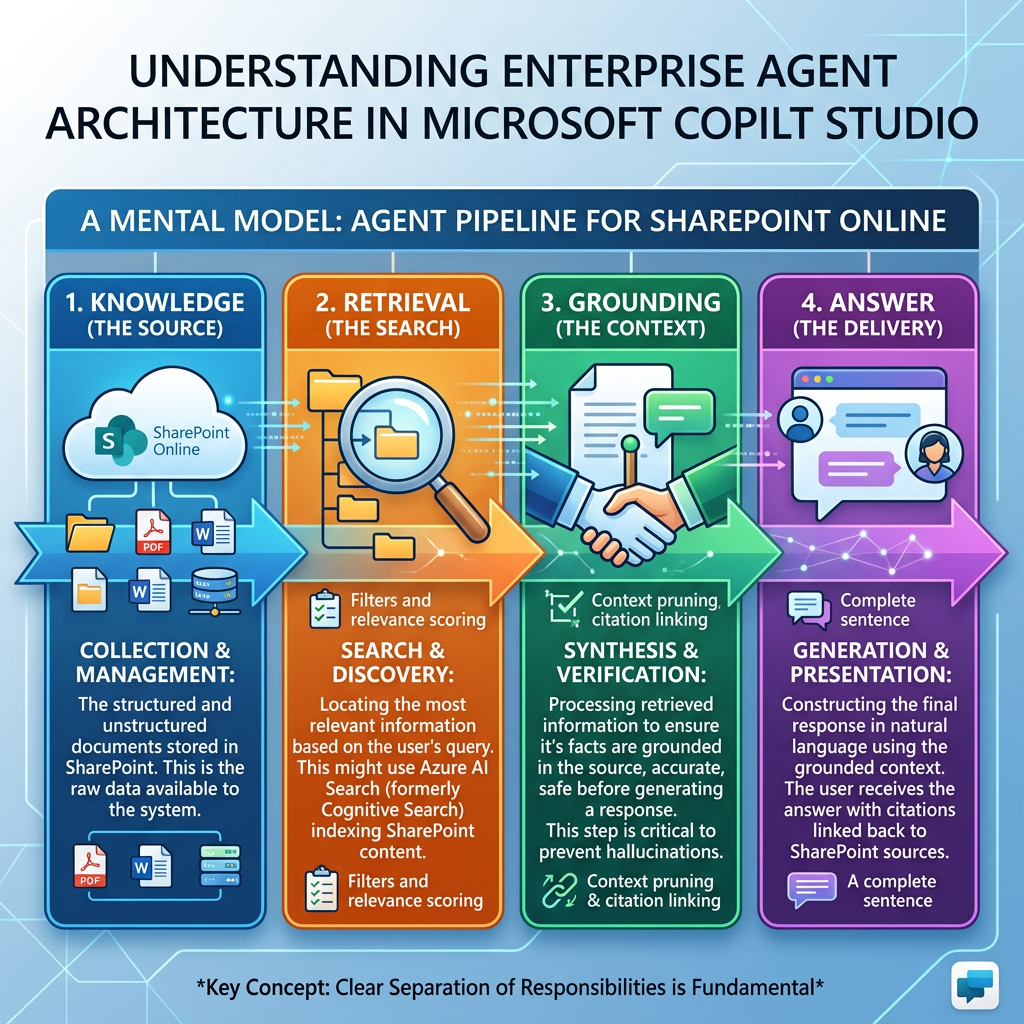
One of the most important concepts to understand when designing enterprise agents is the pipeline:
Knowledge → Retrieval → Grounding → Answer
At first sight, this appears simple:
The agent has documents, searches them, reads something relevant, and answers the user.
Architecturally, however, these are four different responsibilities.
Understanding their separation is fundamental when working with Microsoft Copilot Studio, especially when SharePoint Online is used as an enterprise Knowledge Source.
A useful mental model is:
| Stage | Fundamental question |
|---|---|
| Knowledge | What information exists and is available to the agent? |
| Retrieval | Which pieces of that information are relevant to this question? |
| Grounding | Which retrieved evidence should be supplied as context for reasoning? |
| Answer | How should the model synthesize that evidence into a useful response? |
The important point is:
The Large Language Model does not normally receive your entire SharePoint site every time a user asks a question.
Instead, a retrieval mechanism identifies a relatively small amount of relevant information and supplies that information to the generative model as context.
This general architectural pattern is usually described as Retrieval-Augmented Generation (RAG).
Microsoft describes RAG in Copilot Studio as a way of combining the reasoning capabilities of language models with trusted organizational knowledge so that responses can be based on enterprise content instead of relying exclusively on the model’s pretrained knowledge.
2. The complete mental model
Consider the following SharePoint scenario.
A document library contains:
- Vacation Policy.docx
- Remote Work Policy.pdf
- Expense Policy.pdf
- Information Security Policy.docx
- Employee Travel Policy.pdf
A user asks:
“How many vacation days can I carry over to next year?”
Conceptually, the pipeline looks like this:
User question │ ▼"What is the maximum number of vacation daysI can carry over to next year?" │ ▼┌───────────────────────┐│ KNOWLEDGE ││ SharePoint policies │└───────────────────────┘ │ ▼┌───────────────────────┐│ RETRIEVAL ││ Find relevant content │└───────────────────────┘ │ ▼Relevant evidence:"Employees may carry over a maximumof five unused vacation days..." │ ▼┌───────────────────────┐│ GROUNDING ││ Give evidence/context ││ to the model │└───────────────────────┘ │ ▼┌───────────────────────┐│ ANSWER ││ Generate response │└───────────────────────┘ │ ▼"You may carry over up to five unusedvacation days into the following year."
This distinction is extremely important for troubleshooting.
If the agent provides a poor answer, there are several possible causes.
The model itself may not be the problem.
The failure could have happened much earlier.
| Failure | Example |
|---|---|
| Knowledge problem | The correct policy isn’t present |
| Permission problem | The user cannot access the document |
| Retrieval problem | The correct document exists but isn’t retrieved |
| Relevance problem | A less relevant document ranks higher |
| Grounding problem | Insufficient or ambiguous evidence reaches the model |
| Instruction problem | Instructions encourage unsupported interpretation |
| Generation problem | Correct evidence is retrieved but summarized incorrectly |
Therefore:
Answer quality is the product of the entire pipeline, not only the LLM.
3. Stage 1 — Knowledge
3.1 What is Knowledge?
In an Agent, Knowledge represents information the Agent can consult to answer questions.
Microsoft describes Knowledge Sources as sources that ground an Agent’s responses in enterprise data. Copilot Studio can use sources including SharePoint, Dataverse, documents, websites, enterprise systems through Copilot connectors, and other supported sources.
Knowledge is therefore not an action.
This distinction should remain permanent in our architecture:
| Knowledge | Action |
|---|---|
| Provides information | Performs operations |
| Generally read-oriented | Can change system state |
| “What is our policy?” | “Create my vacation request” |
| Retrieve document information | Create SharePoint item |
| Explain procedure | Start Power Automate flow |
| Find instructions | Call API |
A good rule is:
Knowledge helps the Agent know. Tools/Actions help the Agent do.
4. Knowledge is not the LLM’s memory
This distinction is central to understanding enterprise AI.
An LLM already possesses knowledge acquired during training.
However, that knowledge might be:
- old;
- incomplete;
- generic;
- unrelated to your company;
- unaware of internal documents;
- unaware of current policies;
- inappropriate as an authoritative enterprise source.
Suppose Contoso changed its travel policy yesterday.
The model cannot magically know:
Contoso Travel Policy v7Updated: September 11, 2026
But an Agent grounded in the corresponding SharePoint content can potentially retrieve that information.
Therefore we can distinguish:
| Source of information | Nature |
|---|---|
| Model training | General pretrained knowledge |
| Conversation history | Current conversational context |
| Instructions | Behavioral guidance |
| Knowledge Source | Enterprise factual context |
| Tool/API | Dynamic operational or real-time information |
This distinction becomes especially important when building corporate Agents.
5. Enterprise Knowledge Sources in Copilot Studio
Copilot Studio currently supports multiple types of Knowledge Sources. The exact supported capabilities can vary between the standard harness, the newer experiences, agent types, and preview features, so the current Microsoft documentation should always be consulted before making architecture decisions.
Examples include:
| Knowledge Source | Typical use |
|---|---|
| SharePoint | Corporate policies, manuals, procedures |
| Uploaded files | Small controlled document collections |
| Dataverse | Structured enterprise information |
| Public websites | Public documentation |
| Microsoft Copilot connectors | External enterprise systems |
| Azure AI Search | Custom enterprise search architectures |
| Custom knowledge | Proprietary search/API scenarios |
Microsoft also supports custom retrieval scenarios through mechanisms such as OnKnowledgeRequested, allowing an organization to integrate its own search system or API into the knowledge process.
6. SharePoint as Knowledge
For our project, SharePoint is particularly important.
Imagine:
SharePoint Sitehttps://contoso.sharepoint.com/sites/HR
with:
HR│├── Policies│ ├── Vacation Policy.docx│ ├── Remote Work Policy.pdf│ └── Expense Policy.pdf│└── Training ├── New Employee Guide.pdf └── Benefits Handbook.docx
Copilot Studio can use SharePoint as a Knowledge Source.
Microsoft documents that when the full SharePoint integration is used, the Agent surfaces only content that the signed-in user has permission to access. At minimum, the user must have appropriate read access to the SharePoint content.
This produces an important security architecture:
Agent knows SharePoint exists │ ▼User asks question │ ▼Identity / permissions evaluated │ ▼Search executes within accessible content │ ▼Only authorized results can contributeto the response
Therefore:
Adding a SharePoint site as Knowledge does not mean every Agent user automatically receives access to everything in that site.
This is a fundamental enterprise security principle.
7. Knowledge Source ≠ Content automatically inserted into every prompt
Suppose the HR library contains 20,000 documents.
When someone asks:
“Can employees carry vacation days forward?”
It would be inefficient and technically unrealistic to send all 20,000 documents to the LLM.
Instead:
20,000 documents │ │ Retrieval ▼Small set of relevant evidence │ │ Grounding ▼LLM │ ▼Answer
This brings us to the second stage.
8. Stage 2 — Retrieval
8.1 What is Retrieval?
Retrieval is the process of finding information relevant to the user’s question within the available Knowledge.
Conceptually:
Knowledge Corpus +User Query │ ▼Search / Retrieval │ ▼Relevant Results
If the Knowledge Source contains 50,000 possible pieces of information, retrieval tries to identify the relatively small subset that is useful for the current question.
9. Retrieval is a relevance problem
Suppose we have these texts:
Document A
Annual Leave PolicyEmployees receive 25 vacation days annually.A maximum of five unused vacation daysmay be carried forward into the following year.
Document B
Remote Work PolicyEmployees can work remotely up to threedays per week with manager approval.
Document C
Travel PolicyBusiness travel must be approved by theemployee's direct manager.
The user asks:
“How many vacation days can I transfer to next year?”
An ideal retrieval system should rank Document A much higher than B or C.
Conceptually:
| Candidate | Relevance |
|---|---|
| Annual Leave Policy | 0.96 |
| Employee Benefits | 0.62 |
| Remote Work Policy | 0.12 |
| Travel Policy | 0.05 |
The exact internal scores and algorithms used by Microsoft services are implementation details and shouldn’t be assumed unless Microsoft documents them.
The theoretical concept, however, is straightforward:
Retrieval tries to maximize relevance between the user’s intent and available information.
10. Keyword search versus semantic retrieval
Traditional search often emphasizes exact words.
Suppose the document says:
“Employees may carry forward five unused annual leave days.”
The user asks:
“How much vacation can I transfer to next year?”
A purely literal search might struggle because:
Query Documentvacation annual leavetransfer carry forwardnext year following year
The concepts match even though the exact words differ.
Semantic search attempts to capture conceptual similarity.
vacation ───────────── annual leavetransfer ───────────── carry forwardnext year ──────────── following year
Microsoft’s semantic indexing technologies can use query intent and additional semantic signals to improve retrieval and relevance. Microsoft documents semantic indexing as a mechanism that helps provide grounding data for Copilot experiences using Microsoft Graph and enterprise information.
This distinction becomes extremely important in enterprise search.
11. Query transformation and query rewriting
The user’s raw sentence isn’t necessarily the ideal search query.
For example:
“Hey, I’m going on holiday in December and I still have eight days left, can I just move all of them to next year?”
A retrieval-oriented representation might focus on concepts such as:
vacationunused dayscarry overmaximumfollowing year
The theoretical process can be represented as:
Natural-language question │ ▼Intent understanding │ ▼Search-oriented formulation │ ▼Knowledge retrieval
Microsoft’s custom Knowledge Source documentation explicitly discusses query rewriting in the OnKnowledgeRequested architecture, which is useful when integrating custom retrieval systems.
This illustrates an important principle:
The conversation query and the retrieval query don’t necessarily have to be identical.
12. Retrieval candidates and ranking
A search system might conceptually follow this pattern:
Query │ ▼Candidate retrieval │ ▼Candidate 1Candidate 2Candidate 3Candidate 4Candidate 5 │ ▼Relevance ranking │ ▼Best results
Possible ranking signals may conceptually include:
- lexical similarity;
- semantic similarity;
- metadata;
- scope;
- user permissions;
- source configuration;
- document context;
- search-system-specific ranking signals.
We should not claim that Copilot Studio uses every one of these signals in every scenario unless Microsoft explicitly documents it.
But as an architectural model, ranking is a major part of RAG.
13. Retrieval quality determines Answer quality
Consider two retrieval outcomes.
Good Retrieval
Question:
“What is the maximum vacation carry-over?”
Retrieved:
A maximum of five unused vacation days maybe carried forward into the following year.
Likely Answer:
Employees can carry over a maximum of five unused vacation days.
Bad Retrieval
Retrieved:
Employees receive 25 vacation days annually.
Possible Answer:
Employees receive 25 vacation days per year.
The generated language might be perfectly fluent.
But it did not answer the question.
This means:
Fluent generation cannot repair missing evidence reliably.
The quality chain is therefore:
Poor Knowledge ↓Poor Retrieval ↓Poor Grounding ↓Poor Answer
14. Precision and Recall
Two classical information retrieval concepts are extremely useful when analyzing Agents.
Precision
Precision asks:
Of all the information retrieved, how much was actually relevant?
Simplified:
Precision =Relevant retrieved items────────────────────────All retrieved items
If the system retrieves ten pieces of content and only two are useful, precision is low.
Recall
Recall asks:
Of all relevant information available, how much did the retrieval process actually find?
Simplified:
Recall =Relevant retrieved items────────────────────────All relevant items available
If five relevant pieces of information exist but only one was found, recall is poor.
15. Precision versus Recall in an Agent
Imagine a Knowledge Base containing:
100 HR documents
Only four discuss vacation carry-over.
Retrieval returns:
Result 1 — Vacation Carryover Policy ✓Result 2 — Vacation Eligibility ✓Result 3 — Travel Expense ✗Result 4 — Sick Leave ✗Result 5 — Remote Work ✗
The retrieval contains noise.
That noise becomes important because the next stage—Grounding—depends upon what retrieval provides.
16. Chunking — an important RAG concept
In theoretical RAG architectures, large documents are commonly divided into smaller pieces often called chunks.
Instead of treating:
Employee Handbook.pdf300 pages
as one giant object, the retrieval system can work with smaller logical sections:
Chunk 1 — IntroductionChunk 2 — Employment eligibilityChunk 3 — Vacation allocationChunk 4 — Vacation carry-overChunk 5 — Sick leaveChunk 6 — Remote work...
Then:
Question:"How many vacation days can I carry over?" ↓Retrieve:Chunk 4 — Vacation carry-over
This allows retrieval to locate the relevant portion instead of sending a huge document to the LLM.
Important distinction
Chunking is a standard RAG concept.
However, Microsoft doesn’t expose every internal segmentation, embedding, indexing, ranking, or retrieval implementation detail of each Copilot Studio Knowledge Source.
Therefore, when discussing Copilot Studio specifically, we should distinguish:
RAG theory:
documents are commonly segmented and indexed for efficient retrieval.
Microsoft-documented behavior:
Copilot Studio retrieves information from configured Knowledge Sources and uses that information to ground generative answers.
That distinction prevents us from inventing undocumented architecture.
17. Retrieval and SharePoint permissions
Retrieval is not merely:
Question → Search
For corporate content it is closer to:
Question +User identity +Knowledge Source +Permissions │ ▼Authorized retrieval
Microsoft explicitly states that the SharePoint Knowledge integration surfaces content according to what the user is permitted to access.
Suppose:
Employee A├── HR General Policies ✓└── Executive Compensation ✗Executive B├── HR General Policies ✓└── Executive Compensation ✓
The same question could therefore operate over different effective knowledge spaces.
Same AgentSame Knowledge SourceSame questionDifferent identity │ ▼Different authorized retrieval set
This is security trimming.
And it is one reason permissions must be considered part of the knowledge architecture itself.
18. Stage 3 — Grounding
Grounding is one of the most frequently used—and frequently misunderstood—terms in enterprise generative AI.
18.1 What does Grounding mean?
At a conceptual level, grounding means providing relevant external evidence to the generative model so that its response is anchored in that evidence.
Without grounding:
Question │ ▼LLM's pretrained knowledge │ ▼Answer
With grounding:
Question │ ├─────────────┐ │ │ ▼ ▼Retrieval Knowledge │ ▼Relevant evidence │ ▼LLM + evidence │ ▼Grounded Answer
Microsoft describes Knowledge Sources as grounding Agent responses in enterprise data.
19. Retrieval and Grounding are not the same thing
This deserves special emphasis.
Retrieval
Finds information.
Grounding
Uses retrieved information as evidence/context for generation.
Therefore:
Retrieval:"What information is relevant?"Grounding:"Use this relevant information as factual context."Generation:"Produce an answer from this context."
A simple analogy:
Imagine a lawyer.
Knowledge
The entire law library.
Retrieval
The research assistant finds five relevant cases.
Grounding
Those cases are placed on the lawyer’s desk as the evidence to use.
Answer
The lawyer produces the legal analysis.
The lawyer doesn’t reread the entire law library for every question.
20. Grounding context
Conceptually, the LLM might receive something similar to:
SYSTEM / AGENT INSTRUCTIONSAnswer employee policy questions usingapproved corporate knowledge.USER QUESTIONHow many unused vacation days can I carryover into next year?RETRIEVED CONTEXTSource: Vacation PolicySection: Carryover"Employees may carry forward a maximumof five unused vacation days into thefollowing calendar year."TASKGenerate an answer using the available evidence.
The exact production prompt used internally by Copilot Studio isn’t exposed like this.
This is simply a conceptual model.
But it demonstrates what grounding accomplishes:
It reduces the gap between what the model happens to know and what the organization says is true.
21. Grounding does not guarantee truth
An important misconception is:
“If the Agent is grounded, hallucination becomes impossible.”
That is false.
Grounding significantly improves the opportunity for accurate, evidence-based answers, but several failures remain possible.
| Situation | Possible result |
|---|---|
| Source is incorrect | Grounded answer may also be incorrect |
| Source is outdated | Agent may repeat outdated policy |
| Sources conflict | Answer may be ambiguous |
| Retrieval misses evidence | Agent lacks correct context |
| Evidence is incomplete | Answer may overgeneralize |
| Instructions are weak | Model may infer too much |
| Question is ambiguous | Wrong interpretation possible |
Thus:
Grounded ≠ guaranteed correct
A better statement is:
Grounded =response generated with external evidenceavailable as context.
22. The hierarchy of trust
Enterprise knowledge architecture should think about source authority.
Suppose SharePoint contains:
VacationPolicy-2023.docxVacationPolicy-Draft.docxVacationPolicy-Final.docxVacationPolicy-2026-Approved.docx
The LLM cannot necessarily infer your governance rules merely from filenames.
This is fundamentally an information governance problem.
A mature architecture should consider:
- authoritative sources;
- lifecycle;
- ownership;
- approval;
- obsolete content;
- version control;
- metadata;
- permissions;
- retention;
- duplicate documents.
In other words:
RAG quality begins before AI—it begins with information architecture.
This is particularly relevant to SharePoint architects.
23. Excellent SharePoint structure improves Agent design
Consider two libraries.
Library A
Document1.docxfinal2.pdfpolicy-new.pdfpolicy-final-final.docxCopy of leave.pdfoldpolicy.docx
Library B
| Document | Policy Type | Status | Effective Date | Owner |
|---|---|---|---|---|
| Vacation Policy | HR | Approved | 2026-01-01 | HR |
| Remote Work Policy | HR | Approved | 2026-03-01 | HR |
| Expense Policy | Finance | Approved | 2026-05-01 | Finance |
Library B has dramatically better information governance.
AI does not remove the need for good SharePoint architecture.
It increases its value.
24. Grounding versus Instructions
Another common confusion:
Instructions are not Knowledge.
Suppose we configure:
Instructions:Employees may carry forward five vacation days.
That is technically behavior/context written into the Agent instructions.
But this is different from maintaining:
Vacation Policy.docx
as enterprise Knowledge.
Compare:
| Instructions | Knowledge |
|---|---|
| Tell Agent how to behave | Provide content to retrieve |
| Usually relatively static | Potentially large corpus |
| Behavioral constraints | Enterprise facts |
| Tone, scope, rules | Policies, manuals, procedures |
| Not primarily a document repository | Designed for searchable information |
Microsoft’s guidance also notes that Agent instructions should align with the actual tools and Knowledge Sources configured for the Agent.
25. Grounding versus prompt engineering
Prompt engineering tells the model how to reason/respond.
Grounding provides the model with what evidence to reason from.
For example:
Instruction
Answer clearly.Do not invent company policies.If information isn't available,say that you don't have enough information.
Grounding evidence
Employees may carry over a maximumof five vacation days.
Answer
You can carry over a maximum of fiveunused vacation days into the following year.
These components work together.
26. Stage 4 — Answer
Once the model has:
User query+Agent instructions+Conversation context+Retrieved/grounding evidence
the generative model synthesizes the final response.
This is the generation part of Retrieval-Augmented Generation.
Retrieval +Augmentation +Generation
Hence:
R + A + G
27. Answer generation is synthesis, not simple copy/paste
Suppose the retrieved evidence contains:
Policy A:Employees receive 25 vacation days annually.Policy B:Employees may carry over five unused days.Policy C:Carry-over days must be used before March 31.
The user asks:
“Can I carry unused days over and when must I use them?”
The final answer may synthesize multiple pieces:
Yes. You can carry over up to five unused vacation days, and those carried-over days must be used by March 31.
That answer doesn’t necessarily exist verbatim anywhere.
The model has synthesized it.
This distinction is important:
Search engine:Returns documents/results.Generative Agent:Retrieves information +interprets it +combines it +explains it conversationally.
28. Generative Answers in Copilot Studio
Microsoft calls this capability Generative Answers.
Generative Answers allow the Agent to retrieve relevant information from configured sources and generate responses without the maker having to create a manual conversational Topic for every possible question.
For example, instead of manually creating:
Topic: VacationTopic: Sick LeaveTopic: Remote WorkTopic: ExpensesTopic: TravelTopic: Benefits...
you might connect an approved HR Knowledge Source and allow Generative Answers to respond from those documents.
This is one of the major architectural differences between traditional conversational bots and modern RAG-based Agents.
29. Traditional chatbot versus RAG Agent
Traditional bot
User │ ▼Intent classification │ ▼Topic │ ▼Decision tree │ ▼Prewritten answer
Example:
Trigger:"vacation policy"→ Topic VacationPolicy→ Message:"Employees receive 25 days..."
RAG-based Agent
User │ ▼Intent understanding │ ▼Knowledge retrieval │ ▼Grounding context │ ▼LLM reasoning │ ▼Generated answer
This allows much more variation in questions.
30. Generative orchestration adds another layer
Modern Copilot Studio Agents can also use generative orchestration.
The orchestrator can decide whether a request requires:
- Knowledge;
- a Tool;
- a Topic;
- another Agent;
- multiple steps.
Microsoft describes the standard harness as an LLM-driven planning layer capable of interpreting user intent and composing Knowledge, Tools, Topics, Agents and other capabilities into plans.
Therefore, a more complete architecture can look like:
                    User
                      │
                      ▼
             Generative Orchestrator
                      │
            ┌─────────┼─────────┐
            │         │         │
            ▼         ▼         ▼
        Knowledge    Tool      Topic
            │
            ▼
        Retrieval
            │
            ▼
        Grounding
            │
            └─────────┐
                      ▼
                  Synthesis
                      │
                      ▼
                    Answer
31. Example: Knowledge only
User:
“What is our expense reimbursement policy?”
Architecture:
Question ↓Knowledge ↓Retrieval ↓Grounding ↓Answer
No Action is necessary.
32. Example: Knowledge + Action
User:
“What expenses can I claim, and submit a reimbursement request for $95.”
Now there are two intents.
Knowledge requirement
What expenses can I claim?
Action requirement
Submit reimbursement request.
Architecture:
                    User
                      │
                      ▼
                 Orchestrator
                 /           \
                /             \
       Knowledge               Tool
          │                     │
      Retrieval            Power Automate
          │                     │
      Grounding             Create item
          │                     │
          └─────────┬───────────┘
                    ▼
                Final Answer
This demonstrates why we maintain the distinction:
Knowledge answers. Action executes.
33. Security inside the four-stage model
Security should be evaluated at every layer.
| Layer | Security question |
|---|---|
| Knowledge | What data has been connected? |
| Retrieval | What is the current user allowed to retrieve? |
| Grounding | What information reaches the model context? |
| Answer | Could the response expose restricted information? |
| Action | What operation can be performed and under whose identity? |
For SharePoint specifically, Microsoft documents permission-aware behavior for supported SharePoint knowledge scenarios and support for sensitivity-related controls, with certain limitations such as encrypted or password-protected content.
34. Two users, one Agent, different answers
Consider:
Agent:Corporate Knowledge Assistant
Knowledge:
SharePoint /sites/Corporate
Documents:
General PoliciesExecutive PoliciesHR Confidential
User A only has access to General Policies.
User B has access to General Policies and Executive Policies.
Conceptually:
User A query ↓Security trimmed retrieval ↓General Policies only
while:
User B query ↓Security trimmed retrieval ↓General + Executive Policies
The Knowledge Source configuration may be the same.
The effective searchable knowledge can differ according to identity and permissions.
35. Citations and provenance
A high-quality enterprise Agent should help users understand where information came from.
Conceptually:
Answer │ ├── Claim A → Source 1 ├── Claim B → Source 2 └── Claim C → Source 3
Citations improve:
- transparency;
- validation;
- user trust;
- auditability;
- troubleshooting.
Copilot Studio Generative Answers can provide source attribution/citations depending on the Knowledge Source and configuration, and Microsoft’s testing guidance recommends checking whether citations and source attribution are correct.
36. The retrieval bottleneck
One of the deepest lessons in RAG architecture is:
A model cannot correctly reason over evidence it never received.
Suppose the perfect answer exists in SharePoint.
But retrieval does not find it.
Then the generation stage does not possess the required evidence.
Correct document exists ✓Correct document retrieved ✗Grounding evidence ✗Reliable answer unlikely
Therefore, when an Agent answers incorrectly, asking only:
“Why did the AI hallucinate?”
is often the wrong first question.
A better debugging sequence is:
1. Does the correct information exist?2. Is the source configured?3. Is the source ready?4. Can this user access it?5. Did retrieval find it?6. Was the correct evidence used?7. Did generation interpret it correctly?
37. A practical troubleshooting matrix
| Symptom | Likely stage |
|---|---|
| Correct document doesn’t exist | Knowledge |
| User can’t access source | Knowledge/Security |
| Agent finds unrelated documents | Retrieval |
| Agent ignores obvious relevant content | Retrieval |
| Agent receives conflicting policies | Grounding/Knowledge governance |
| Agent cites correct content but summarizes badly | Generation |
| Agent answers outside corporate content | Instructions/Grounding |
| Agent says “I don’t know” despite document existing | Permissions/Retrieval |
| Old policy appears instead of current one | Knowledge governance/Retrieval |
This matrix will become extremely useful during our labs.
38. Testing the pipeline systematically
Microsoft recommends testing Knowledge Sources in the Agent testing experience. Knowledge sources must be available/ready before they can participate correctly in testing.
Rather than asking random questions, we should build a controlled test set.
Suppose VacationPolicy.docx contains ten known facts.
Create questions such as:
| ID | Question | Expected evidence |
|---|---|---|
| T01 | How many vacation days do employees receive? | 25 days |
| T02 | How many days may be carried over? | 5 days |
| T03 | When must carry-over days be used? | March 31 |
| T04 | Who approves exceptions? | HR Director |
| T05 | Can contractors carry vacation days? | No |
Then deliberately test negative cases:
| ID | Question | Expected behavior |
|---|---|---|
| N01 | What is our maternity policy? | Not enough information |
| N02 | What is the CEO’s salary? | Not available/unauthorized |
| N03 | Can I carry 15 days? | Correct contradiction |
| N04 | Invent a better vacation rule | Must not present invention as policy |
This allows us to evaluate the complete pipeline rather than merely admiring fluent answers.
39. Knowledge quality metrics
A mature Agent evaluation can consider several dimensions.
| Dimension | Question |
|---|---|
| Retrieval relevance | Did the Agent find relevant content? |
| Groundedness | Is the response supported by retrieved evidence? |
| Correctness | Does the answer match authoritative information? |
| Completeness | Did it include all necessary facts? |
| Citation quality | Are sources appropriate? |
| Refusal quality | Does it correctly admit missing information? |
| Permission correctness | Is restricted information protected? |
| Consistency | Do paraphrased questions yield equivalent answers? |
Microsoft’s implementation guidance specifically recommends validating that Knowledge Sources are accurate, structured, current and suitable for grounding before deploying RAG-based Agents.
40. Garbage In → Grounded Garbage Out
A powerful misconception about RAG is that the model will “fix” poor corporate content.
It usually cannot safely do so.
Consider:
Document A:Carry-over limit: 5 daysDocument B:Carry-over limit: 10 daysDocument C:Carry-over abolished in 2024Document D:Draft — carry-over 15 days
If all four are available as authoritative Knowledge, retrieval might surface conflicting evidence.
The Agent has no magical knowledge of which corporate rule management intended.
Thus:
Bad information architecture ↓Conflicting retrieval ↓Ambiguous grounding ↓Unreliable answer
RAG does not replace content governance.
41. RAG makes SharePoint governance more important
For a SharePoint architect, this is a major insight.
Historically, weak document governance mainly harmed human search.
With enterprise Agents, weak governance also harms machine retrieval.
Therefore concepts such as:
- Content Types;
- metadata;
- document lifecycle;
- versioning;
- approval;
- permissions;
- sensitivity;
- authoritative libraries;
- archive strategies;
- document ownership;
become part of AI architecture.
The chain becomes:
Information Architecture ↓Knowledge Quality ↓Retrieval Quality ↓Grounding Quality ↓Answer Quality
This is one of the most important architectural equations in our project.
42. Agent Instructions influence the pipeline
Agent Instructions can define behavior such as:
Use available corporate knowledge when answeringpolicy questions.Do not invent policies.If the available knowledge doesn't contain enoughinformation, clearly state that the answer isn'tavailable.Prefer approved corporate information.Keep answers concise.Include relevant citations where available.
But Instructions cannot manufacture missing Knowledge.
Microsoft explicitly notes that instructions referencing Knowledge or Tools need the corresponding resources to actually exist in the Agent configuration.
Therefore:
Excellent Instructions+No Knowledge=No corporate facts
Likewise:
Excellent Knowledge+Poor Instructions=Potentially undesirable behavior
Both matter.
43. Knowledge descriptions matter
Copilot Studio allows Knowledge Sources to have names and descriptions.
Microsoft recommends providing accurate and detailed descriptions, especially when generative AI/orchestration is used, because those descriptions help the orchestrator understand the role of the source.
Instead of:
Name:DocumentsDescription:Company documents
prefer something like:
Name:Human Resources PoliciesDescription:Approved corporate HR policies covering annual leave,vacation carry-over, sick leave, remote work,employee benefits, and employment procedures.Use this knowledge for employee HR policy questions.
This improves the semantic meaning of the Agent architecture.
44. Custom Knowledge and controlled retrieval
At a more advanced stage, we may need retrieval mechanisms outside native SharePoint search.
Examples:
- Azure AI Search;
- custom enterprise search;
- proprietary APIs;
- specialized knowledge bases.
Copilot Studio supports custom Knowledge integration through mechanisms including OnKnowledgeRequested. Microsoft documents that custom results can be transformed into structures containing elements such as content, title and content location for Generative Answers.
This gives us a future advanced architecture:
User ↓Copilot Studio ↓OnKnowledgeRequested ↓Custom Search API ↓Azure AI Search ↓Ranked results ↓System.SearchResults ↓Grounding ↓Answer
We should not start there.
Native SharePoint Knowledge should be learned first.
But understanding that this extension point exists helps build the complete architecture map.
45. Native SharePoint versus copied/ingested content
An important current Copilot Studio distinction is that SharePoint content can participate through different knowledge configurations.
Microsoft documents a difference between scenarios where SharePoint files are copied/ingested into Dataverse-backed knowledge versus the full SharePoint integration that queries SharePoint infrastructure directly.
Conceptually:
Ingested file model
SharePoint file ↓Copied/Ingested ↓Dataverse-backed storage/index ↓Retrieval
Full SharePoint Knowledge integration
SharePoint ↓SharePoint search infrastructure ↓Permission-aware retrieval ↓Grounding
These approaches are not architecturally identical.
This will matter later when we study:
- synchronization;
- permissions;
- freshness;
- storage;
- authentication;
- governance.
46. Freshness matters
Imagine this timeline:
January 2026Vacation Policy v15 carry-over daysSeptember 2026Vacation Policy v23 carry-over days
A good enterprise Agent needs access to the authoritative current content.
Therefore knowledge architecture must consider:
Correctness+Authority+Freshness+Permissions+Retrievability
A document can be perfectly written but still be dangerous as Agent Knowledge if it is obsolete.
47. Why metadata still matters
The rise of semantic search doesn’t mean metadata is obsolete.
Metadata can still be useful for:
- scoping;
- filtering;
- authority signals;
- lifecycle management;
- governance;
- content discovery;
- archive strategies.
Microsoft also documents scenarios in Microsoft Copilot where SharePoint library metadata can contribute additional signals when grounding searches scoped to libraries and folders.
Therefore, AI doesn’t eliminate information architecture.
It complements it.
48. The Context Window concept
LLMs operate on finite context.
Conceptually:
Context Window│├── System instructions├── Agent instructions├── Conversation history├── Tool results├── Retrieved knowledge└── User question
That context cannot contain unlimited corporate information.
This is another reason retrieval exists.
Rather than:
Send everything
the goal is:
Send the most relevant evidence.
This creates the RAG optimization problem:
How do we maximize useful information inside limited model context?
49. Retrieval can be more important than model size
Consider two Agents.
Agent A
Excellent LLMPoor KnowledgePoor retrieval
Agent B
Strong LLMExcellent KnowledgeExcellent retrieval
For enterprise questions, Agent B may be substantially more reliable.
This is why Agent engineering isn’t simply:
“Choose the smartest model.”
It is:
Model+Knowledge+Retrieval+Grounding+Instructions+Security+Evaluation+Governance
50. A deeper theoretical formulation
We can model the process mathematically.
Let:
q = user's questionK = total knowledge corpusR(q,K) = retrieval functionC = retrieved contextM = generative modelI = Agent instructionsA = generated answer
Then:
C = R(q, K)
and:
A = M(q, C, I)
In simplified form:
Answer =Model( Question, Retrieved Knowledge, Instructions)
The critical insight is:
M does not normally receive K.M receives R(q,K).
The entire Knowledge corpus K may be enormous.
The retrieved context C is much smaller.
51. An even more realistic model
Enterprise retrieval also depends on identity and authorization.
Let:
u = current userP(u,K) = subset of knowledge user may access
Then:
Kᵤ = P(u,K)
Retrieval becomes:
C = R(q,Kᵤ)
and generation becomes:
A = M(q,C,I)
Therefore:
User identity ↓Authorized Knowledge ↓Retrieval ↓Grounding ↓Answer
That is a much better enterprise mental model.
52. Add orchestration
With a modern Copilot Studio Agent, another function appears:
O(q)
where O is the orchestrator deciding which capability to use.
It might choose:
O(q) → Knowledge
or:
O(q) → Tool
or:
O(q) → Knowledge + Tool
or even a multistep plan.
Microsoft documents this LLM-driven planning behavior in generative orchestration.
Therefore a more complete conceptual equation becomes:
Plan = O(UserRequest)if Plan requires Knowledge: Evidence = Retrieval(Query, AuthorizedKnowledge)if Plan requires Tool: ToolResult = ExecuteTool(...)Answer =LLM( Instructions, UserRequest, Evidence, ToolResult, ConversationContext)
Now we are getting very close to the conceptual architecture of a modern enterprise Agent.
53. Knowledge → Retrieval → Grounding → Answer summarized technically
| Layer | Input | Process | Output |
|---|---|---|---|
| Knowledge | Enterprise content | Organize/connect/index | Searchable corpus |
| Retrieval | User intent + corpus | Search/rank/filter | Relevant evidence |
| Grounding | Retrieved evidence | Add context to reasoning | Evidence-constrained context |
| Answer | Question + instructions + context | LLM synthesis | Natural-language response |
54. Responsibilities by Microsoft component
A simplified Copilot Studio view:
| Concept | Microsoft component |
|---|---|
| Knowledge definition | Knowledge |
| Knowledge Source | SharePoint, Dataverse, files, etc. |
| Retrieval | Underlying search/retrieval mechanisms |
| Generative response | Generative Answers |
| Behavior | Instructions |
| Planning | Generative orchestration |
| Operations | Tools / Actions |
| Testing | Agent test/Preview experience |
55. Our SharePoint Policy Assistant mapped to this architecture
The Agent we are building can eventually be understood like this:
SharePoint Policy Assistant│├── Instructions│ ││ └── Define behavior│├── Knowledge│ ││ └── SharePoint HR Policies│├── Retrieval│ ││ └── Find relevant policy information│├── Grounding│ ││ └── Give retrieved policy evidence to model│└── Answer │ └── Explain policy to employee
No Action is required yet.
This is a deliberately atomic Knowledge Agent.
That makes it perfect for learning RAG.
56. What we should verify in every Knowledge Agent
Before considering an Agent successful, test:
| Area | Verification |
|---|---|
| Knowledge | Correct sources connected |
| Status | Source is available/ready |
| Security | User authorization works |
| Retrieval | Relevant content is found |
| Grounding | Answer reflects retrieved evidence |
| Accuracy | Claims match source |
| Citations | Sources are correct |
| Unknown questions | Agent admits missing information |
| Conflicting content | Agent doesn’t invent certainty |
| Instructions | Scope is respected |
| Paraphrasing | Equivalent questions produce equivalent answers |
57. Anti-patterns
Anti-pattern 1 — “Just connect the entire intranet”
All SharePoint ↓Agent
This can create unnecessary scope, ambiguity, governance problems and difficult evaluation.
Prefer initially:
Specific problem ↓Specific Knowledge ↓Specific Agent
Anti-pattern 2 — Put corporate facts in Instructions
Don’t turn Instructions into a 50-page policy repository.
Use Knowledge for enterprise content.
Use Instructions for behavior.
Anti-pattern 3 — Assume the Agent understands document authority
If old and current policies coexist without governance, the model cannot reliably determine corporate authority.
Anti-pattern 4 — Blame every problem on hallucination
First inspect:
Knowledge↓Permissions↓Retrieval↓Grounding↓Generation
Anti-pattern 5 — Test only easy questions
Test:
- exact wording;
- paraphrases;
- ambiguous questions;
- missing answers;
- conflicting information;
- unauthorized information;
- adversarial questions.
58. The most important conceptual distinction
If there is one diagram to remember, it is this:
                       CORPORATE DATA
                            │
                            ▼
                       KNOWLEDGE
                  "What information exists?"
                            │
                            ▼
                       RETRIEVAL
                 "What is relevant now?"
                            │
                            ▼
                       GROUNDING
               "What evidence should the
                  model reason from?"
                            │
                            ▼
                         ANSWER
                 "How should that evidence
                   be communicated?"
And one level higher:
           GENERATIVE ORCHESTRATION
                    │
                    ▼
              Decide what is needed
               /               \
              /                 \
        KNOWLEDGE               TOOL
            │                     │
        Retrieval               Action
            │                     │
        Grounding                Result
              \                 /
               \               /
                ▼             ▼
                  LLM synthesis
                       │
                       ▼
                     Answer
59. The architectural principle
For enterprise Agents, we can summarize the entire idea in one equation:
High-quality Answer ≈High-quality Knowledge ×High-quality Retrieval ×Good Grounding ×Good Instructions ×Appropriate Model ×Correct Permissions ×Good Governance
Notice the multiplication metaphor.
If one factor is close to zero, the quality of the entire solution can collapse.
60. Final perspective
The critical shift when moving from traditional application development to enterprise generative AI is realizing that we aren’t merely programming an answer.
We are designing an information pipeline.
Traditional programming often looks like:
Input ↓Deterministic logic ↓Output
A Knowledge-based Agent looks more like:
User intent ↓Orchestration ↓Enterprise Knowledge ↓Permission-aware Retrieval ↓Relevant Evidence ↓Grounding ↓LLM Reasoning ↓Generated Answer ↓Citation / validation
For a SharePoint architect, this leads to an especially important conclusion:
SharePoint information architecture becomes part of AI architecture.
Libraries, permissions, content quality, metadata, document ownership, lifecycle and governance no longer affect only search and human document management.
They can directly influence:
what the Agent can find ↓what the Agent can ground on ↓what the Agent ultimately tells the user
That is why understanding Knowledge → Retrieval → Grounding → Answer is one of the foundational concepts we should master before adding Actions, Power Automate, Microsoft Graph or more advanced Agent architectures.
Microsoft Learn — Recommended official references
1. Knowledge Sources overview — Copilot Studio
Microsoft’s main documentation describing Knowledge Sources and their relationship with grounding and Generative Answers.
Knowledge sources summary — Microsoft Copilot Studio
2. Retrieval-Augmented Generation in Copilot Studio
This is one of the most directly relevant Microsoft documents for the concepts discussed in this article.
Enhance AI responses by using Retrieval Augmented Generation
3. SharePoint as a Knowledge Source
Essential for our practical labs.
Add SharePoint as a knowledge source
4. Add Knowledge to an Agent
Explains Agent-level and topic-level Knowledge configuration.
Add knowledge to an existing agent
5. Generative Answers
Official Microsoft training for generating responses from Knowledge Sources.
Generate AI-powered agent responses using Generative Answers
6. Generative Answers node
Technical documentation for using Generative Answers in Topics.
7. Generative orchestration
Important for understanding how modern Agents choose between Knowledge, Topics, Tools and other capabilities.
Apply generative orchestration capabilities
8. Agent Instructions
Official documentation on Agent-level Instructions.
9. Custom Knowledge Sources
Advanced material showing how custom retrieval systems can participate in the knowledge pipeline through OnKnowledgeRequested.
Connect to custom knowledge sources
10. Semantic indexing
Useful theoretical complement for understanding semantic enterprise retrieval in the Microsoft ecosystem.
Semantic indexing for Microsoft Copilot
11. Testing Knowledge Sources
Important for moving from architecture to controlled evaluation.
Test your agent’s knowledge sources
12. Copilot Studio AI capabilities
Broader Microsoft guidance explaining Generative Answers, orchestration and related AI capabilities.
Explore AI capabilities in Copilot Studio
Final cheat sheet
| Concept | Remember this |
|---|---|
| Knowledge | The information the Agent is allowed to consult |
| Retrieval | Finding the information relevant to the current question |
| Grounding | Providing that evidence to the LLM as factual context |
| Answer | Synthesizing the evidence into natural language |
| Instructions | Tell the Agent how to behave |
| Orchestration | Determines which capability should be used |
| Tool / Action | Executes an operation |
| RAG | Retrieval + external context + Generation |
| Security trimming | Limits retrievable information according to authorization |
| Citation | Connects generated claims back to sources |
| Governance | Determines whether the Knowledge itself can be trusted |
The core sequence:
Knowledge → Retrieval → Grounding → Answer
or, in one sentence:
Knowledge defines what can be known; Retrieval selects what matters; Grounding gives that evidence to the model; and Answer turns the grounded evidence into a useful response.


