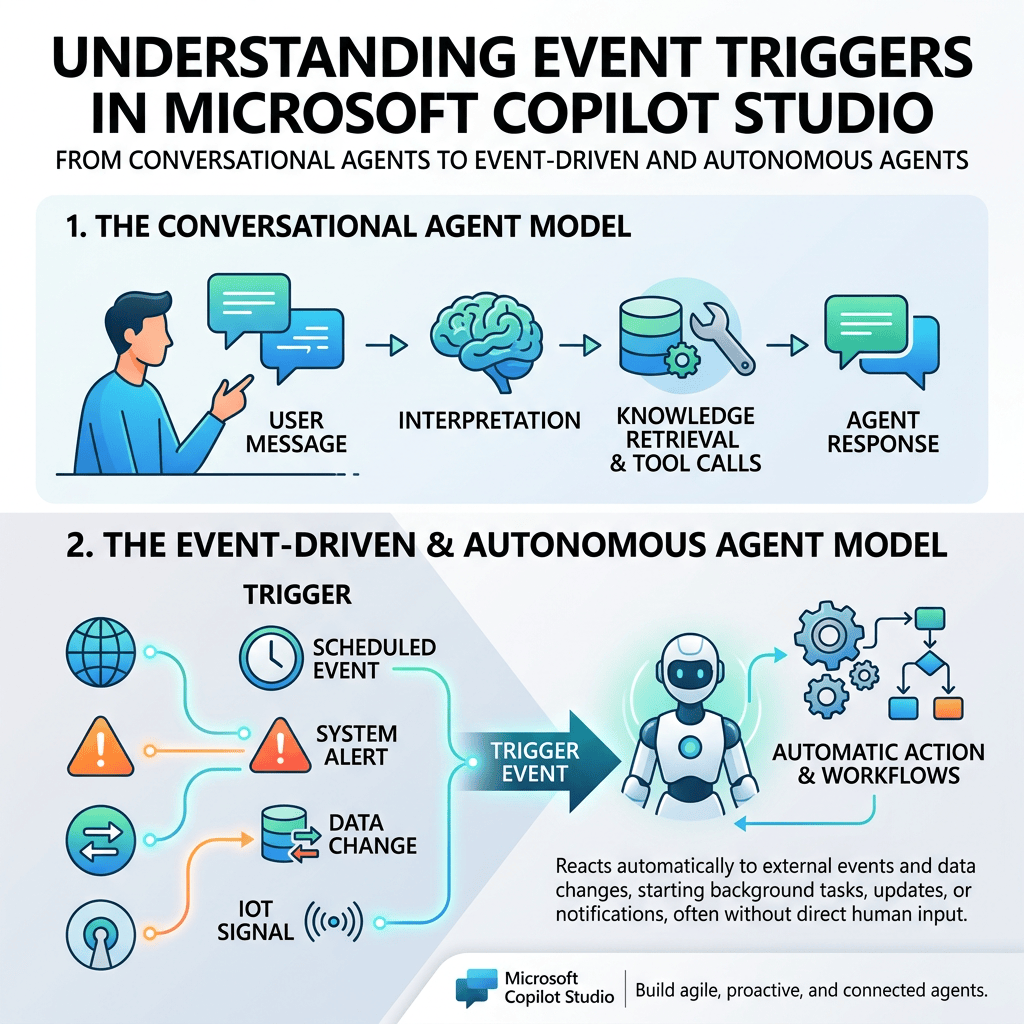
Microsoft Copilot Studio agents are often introduced as conversational systems: a user sends a message, the agent interprets the request, retrieves knowledge, calls tools when necessary, and generates a response.
Understanding Event Triggers in Microsoft Copilot Studio
From Conversational Agents to Event-Driven and Autonomous Agents
Microsoft Copilot Studio agents are often introduced as conversational systems: a user sends a message, the agent interprets the request, retrieves knowledge, calls tools when necessary, and generates a response.
However, this is only one way an agent can start working.
Modern Copilot Studio agents can also react to events occurring outside the conversation.
Examples include:
- A SharePoint list item is created.
- A SharePoint list item is modified.
- A document is uploaded to a SharePoint library.
- A Microsoft Forms response is submitted.
- A Planner task is completed.
- A Microsoft Teams channel receives a message.
- An email arrives.
- A Dataverse row changes.
- A scheduled time is reached.
These scenarios introduce an important Copilot Studio concept:
Event Triggers
Event Triggers allow an agent to react to something happening in an external system without requiring the user to first send a conversational message.
This changes the architecture of an Agent significantly.
Instead of thinking only about:
User → Agent → Response
we can also think about:
External System → Event → Trigger → Agent → Reaction
An Agent can support both models at the same time.
1. The Traditional Conversational Model
The simplest mental model for an Agent is:
User
↓
Message
↓
Agent
↓
Reasoning
↓
Answer
For example:
User:
“What is our vacation policy?”
The user initiates the interaction.
Nothing happens until the user provides input.
This is fundamentally a reactive conversational architecture.
The Agent reacts to a message.
2. Event-Driven Agents
Event Triggers introduce another source of input.
Consider a SharePoint list called:
Service Requests
with columns such as:
- Title
- RequestedBy
- Category
- Status
- AssignedTo
- Comments
An external process modifies an item:
ID: 154
Title: VPN access request
Status: Approved
The user does not need to tell the Agent:
“Request 154 was approved.”
SharePoint can generate an event when the item changes.
Conceptually:
SharePoint
↓
Item modified
↓
SharePoint Connector
↓
Trigger Payload
↓
Copilot Studio Agent
↓
Instructions / Orchestration / Topics / Tools
↓
Reaction
This is fundamentally different from a normal conversational request.
The external event initiated the execution.
3. What Is an Event Trigger?
An Event Trigger allows an Agent to react when something happens in an external system.
A useful simplified model is:
Event
↓
Trigger
↓
Payload
↓
Agent
↓
Orchestration
↓
Reaction
The Trigger itself does not represent the entire business process.
It represents the entry point into the Agent.
The Trigger answers:
What happened that caused the Agent to start processing?
4. Event Trigger vs User Message
A user message and an Event Trigger are both ways information can enter an Agent, but they originate from different places.
Conversational input
User
↓
Message
↓
Agent
Example:
“Has my request been approved?”
Event input
SharePoint
↓
Item modified
↓
Trigger
↓
Payload
↓
Agent
Example:
Request ID: 154
Status: Approved
The important architectural idea is:
The Agent does not necessarily need a user message to begin processing.
5. The Agent Is Not Continuously Polling SharePoint
This distinction is extremely important.
When we configure:
When an item is created or modified
we should NOT imagine the following behavior:
Agent: “Did SharePoint change?”
Agent: “Did SharePoint change?”
Agent: “Did SharePoint change?”
Agent: “Did SharePoint change?”
The Agent is not continuously asking SharePoint whether something changed.
Instead, the better mental model is:
SharePoint
↓
Something happens
↓
Connector / Trigger infrastructure
↓
Event detected
↓
Trigger Payload
↓
Agent
Therefore:
The Agent receives an event rather than continuously searching for the event.
This is the foundation of an event-driven architecture.
6. SharePoint Event Triggers
In Copilot Studio, SharePoint can expose different types of Event Triggers.
Examples include:
- When an item is created
- When an item is created or modified
- When an item or a file is modified
- When a file is created (properties only)
Each Trigger represents a different kind of external event.
7. When an Item Is Created
The Trigger:
When an item is created
fires when a new list item is created.
Conceptually:
SharePoint List
↓
CREATE
↓
New Item
↓
Trigger
↓
Agent
Example:
Employee creates a support request
↓
SharePoint item created
↓
Trigger
↓
Agent evaluates the event
This is useful when the Agent should react specifically to newly created records.
8. When an Item Is Created or Modified
This Trigger has a broader scope.
It can react to:
CREATE
or:
UPDATE
For example:
Request #154
Status = Pending
Later:
Request #154
Status = Approved
That modification can activate the Trigger.
Conceptually:
SharePoint List
↓
UPDATE
↓
Item #154
↓
Trigger
↓
Agent
This is especially useful for business processes where state transitions matter.
9. The Trigger Payload
The event itself is not enough.
The Agent needs information about what happened.
That information is delivered through the:
Trigger Payload
Conceptually, imagine something like:
ID: 154
Title: VPN access request
Status: Approved
ModifiedBy: John Smith
This is only a conceptual example.
The actual payload depends on the Connector, Trigger, and configuration.
The important architecture is:
Event
↓
Payload containing event data
↓
Agent
The payload gives the Agent context about the external event.
10. What the Payload Represents
A useful mental model is:
Event = Something happened
Payload = Information describing what happened
For example:
Event:
SharePoint item modified
Payload:
Item ID: 154
Title: VPN access request
Old Status: Pending
New Status: Approved
The Agent can then reason over the information that entered through that event.
11. Instructions Still Matter
A Trigger tells the Agent:
Something happened.
But it does not necessarily tell the Agent:
What should I do about it?
That is where Instructions remain important.
Consider the event:
SharePoint item changed
That event by itself does not define the expected business behavior.
Instructions may provide additional guidance such as:
“When a service request changes to Approved, notify the requester and summarize the approval.”
We can therefore think about:
Event
+
Payload
+
Instructions
Agent behavior
The Trigger provides context.
Instructions define expected behavior.
12. Trigger Is Not Knowledge
It is essential not to confuse Event Triggers with Knowledge Sources.
Knowledge answers questions such as:
“What is the corporate travel policy?”
The architecture is:
Question
↓
Retrieval
↓
Knowledge Source
↓
Grounding
↓
Answer
An Event Trigger serves a different purpose:
Something happened
↓
Trigger
↓
Agent
Therefore:
| Component | Purpose |
|---|---|
| Knowledge | Provides information |
| Trigger | Starts processing because something happened |
| Instructions | Defines behavior |
| Topic | Provides Agent logic or capability |
| Tool / Action | Performs an operation |
| Agent | Orchestrates the overall behavior |
This distinction becomes increasingly important as Agent solutions grow.
13. Trigger Is Not an Action
A Trigger and an Action solve opposite sides of a process.
A Trigger answers:
What caused processing to start?
An Action answers:
What can the Agent do next?
For example:
Trigger: SharePoint item modified
↓
Agent
↓
Action: Send notification
Another example:
Trigger: New request created
↓
Agent
↓
Action: Classify request
↓
Action: Update SharePoint
A useful distinction is:
Trigger = Input / Event
Action = Output / Operation
14. Knowledge, Trigger, and Action
These three concepts are easy to mix together, so it is useful to keep them separate.
Knowledge
Question:
What does the Agent know?
Examples:
- Corporate Policies
- Technical Documentation
- Training Material
- SharePoint Documents
Trigger
Question:
What happened?
Example:
A SharePoint item was modified.
Action
Question:
What can the Agent do?
Examples:
- Update a SharePoint item
- Send a notification
- Call a Flow
- Create a record
15. A More Complete Agent Architecture
Once Event Triggers are introduced, the architecture becomes more interesting.
The Agent can receive input from a user:
User
↓
Message
↓
Agent
But the Agent can also receive input from an external system:
SharePoint
↓
Event
↓
Trigger
↓
Payload
↓
Agent
The Agent can therefore have multiple entry paths.
16. Conversational vs Event-Driven Architecture
We can now distinguish two broad Agent interaction models.
Conversational
Human
↓
Question
↓
Agent
↓
Answer
The human starts the process.
Event-driven
System
↓
Event
↓
Trigger
↓
Agent
↓
Decision / Action
The external system starts the process.
An Agent can support both models simultaneously.
17. What Happens During an Active Conversation?
This is one of the most important questions.
Imagine this conversation:
User:
“Tell me about request 154.”
Agent:
“Request 154 is currently pending.”
While that conversation continues, somebody modifies the SharePoint item:
Status: Pending → Approved
A configured SharePoint Event Trigger can detect that external event.
However, the correct mental model is NOT:
“The Agent noticed SharePoint while chatting.”
A better model is:
User Message
↓
Conversation
↓
Agent
At the same time:
SharePoint Event
↓
Trigger Payload
↓
Agent
These are separate input paths.
18. Does the Agent Automatically Interrupt the Conversation?
Not necessarily.
This distinction is very important.
There is a difference between:
The Agent received an external event.
and:
The Agent inserted a message into the exact active conversation.
These are not automatically the same thing.
The Event Trigger can initiate Agent processing.
However, how the resulting behavior reaches a user depends on the architecture.
That can involve:
- Channel
- Conversation context
- Topic
- Action
- Notification
- Tool
- Authentication
- Delivery mechanism
Therefore:
An Event Trigger does not automatically mean “interrupt the current chat.”
19. Event Triggers and Autonomous Agents
Event Triggers are one of the mechanisms that allow us to move from purely conversational Agents toward more autonomous Agents.
Compare:
Reactive Agent
User asks
↓
Agent reacts
Event-Driven Agent
Business system changes
↓
Agent reacts
And eventually:
Business Event
↓
Agent
↓
Reasoning
↓
Select appropriate Tool
↓
Execute Action
↓
Process result
The human no longer needs to explicitly initiate every Agent execution.
20. Generative Orchestration
Event Triggers are associated with Agents using Generative Orchestration.
The Trigger provides:
- The event
- The payload
- Context
The Agent can then use its available capabilities to determine what should happen next.
Conceptually:
Trigger
↓
Payload
↓
Generative Orchestration
↓
Reasoning
↓
Topic / Tool / Action
This is an important difference from a rigid workflow.
The Agent may use context and Instructions to decide which available capability is appropriate.
21. Trigger + Topic + Action
A Trigger is not necessarily the complete process.
The Agent may need a Topic or Action to react to the event.
For example:
SharePoint Item Modified
↓
Event Trigger
↓
Agent receives Payload
↓
Instructions
↓
Generative Orchestration
↓
Select Topic or Action
↓
Execute response
This means that Event Triggers should be understood as entry mechanisms into the Agent’s orchestration.
22. Event Trigger vs Topic Trigger
These names can be confusing.
They solve different problems.
Topic Trigger
A Topic Trigger determines when a Topic should execute based on incoming activities or conversational conditions.
Example:
User says:
“I need help with vacation.”
↓
Topic Trigger
↓
Vacation Topic
Event Trigger
An Event Trigger reacts to something happening in an external system.
Example:
SharePoint vacation request created
↓
Event Trigger
↓
Agent
The distinction is:
Topic Trigger = internal/conversational trigger
Event Trigger = external system event
23. Authentication Is a Critical Security Detail
Security becomes extremely important with Event Triggers.
The connector used by an Event Trigger has its own authentication context.
That authentication context may not be the same identity as the user currently talking to the Agent.
This means we must always ask:
- Who authenticated the Connector?
- What permissions does that connection have?
- Which SharePoint sites can it access?
- Which data can enter the Agent?
- Which Actions can run afterward?
This becomes critical when using:
- HR sites
- Finance sites
- Confidential libraries
- Administrative sites
- Restricted SharePoint lists
24. User Permissions and Connector Permissions Are Different
This distinction is fundamental.
Suppose:
User A can access:
Site A
The Event Trigger connection can access:
Site A
Site B
Site C
We must not automatically assume that because User A cannot access Site B, the entire Agent architecture is safe.
The Connector may have a broader security context.
Therefore, security analysis must consider:
- User permissions
- Connector permissions
- Agent permissions
- Action permissions
- Destination of generated output
25. Trigger Payloads Can Contain Sensitive Data
The Trigger Payload itself may contain information from SharePoint.
For example:
Employee Name
Salary Request
Department
Manager
Comments
Status
Conceptually:
SharePoint
↓
Sensitive Information
↓
Trigger Payload
↓
Agent
↓
Action
↓
External destination
Therefore, Trigger Payload design is also a data protection concern.
The question is not only:
“Can the Trigger fire?”
We must also ask:
“What information is being delivered to the Agent?”
26. Security Questions We Should Always Ask
Whenever we introduce an Event Trigger, we should ask:
Who detects the event?
Whose credentials authenticate the Connector?
What information enters the Trigger Payload?
What can the Agent do with this information?
Which Actions can the Agent execute?
Who can receive the resulting information?
Can information cross security boundaries?
Can the Agent expose information to a user who normally cannot access it?
These questions should become part of our architecture checklist.
27. Publishing Changes the Behavior
Event Triggers introduce an important distinction between testing and production behavior.
During development, we want to inspect and test event payloads.
After publication, the Agent can react automatically when the configured event occurs.
Conceptually:
Before Publish:
Event
↓
Test Trigger
↓
Developer observes behavior
After Publish:
External Event
↓
Trigger
↓
Agent automatically reacts
This is a major architectural transition.
Publishing an Event Trigger means enabling autonomous behavior.
28. Testing Event Triggers
A useful testing process is:
- Configure the Trigger.
- Generate the external event.
- Capture or inspect the Trigger Payload.
- Execute the Agent against that payload.
- Observe the Agent’s reasoning and behavior.
- Verify selected Topic or Tool.
- Verify resulting Action.
- Validate permissions.
- Validate unexpected scenarios.
- Publish only after controlled testing.
Autonomous behavior deserves careful testing because there may be no user watching every execution.
29. Monitoring
Once Event Triggers are used in production, monitoring becomes very important.
For each autonomous execution, ideally we want to understand:
- What event occurred?
- When did it occur?
- Which payload entered the Agent?
- Which Agent execution was started?
- Which Topic or Tool was selected?
- Which Action was executed?
- Did the operation succeed?
- Did it fail?
- Was sensitive information involved?
Autonomous Agents require observability.
Without monitoring, troubleshooting becomes difficult.
30. Event Frequency Matters
Event Triggers also introduce operational and cost considerations.
Imagine a SharePoint list with:
10 modifications per day
That is very different from a list with:
100,000 modifications per day
Conceptually:
Event Frequency
↓
Trigger Frequency
↓
Agent Executions
↓
Processing / Consumption
Therefore, we should always understand the expected volume of events.
A Trigger connected to a very active system may generate substantial Agent activity.
31. A Potential Event Loop
One particularly dangerous scenario is:
Trigger:
When an item is created or modified
Then the Agent executes an Action:
Update the same SharePoint item
Potential result:
SharePoint item modified
↓
Trigger
↓
Agent
↓
Update SharePoint item
↓
Item modified again
↓
Trigger
↓
Agent
↓
Update item again
↓
…
This is a classic event loop.
It is not unique to Copilot Studio.
The same type of problem can happen in traditional event-driven systems and Power Automate.
Possible architectural protections include:
- Processing flags
- Status fields
- Trigger filtering
- Comparison of previous/current state
- Idempotency
- Agent processing markers
- Conditions preventing repeated processing
Loop prevention should be considered whenever an Agent modifies the same system that generated its Trigger.
32. Example: SharePoint Request Agent
Consider a SharePoint list:
InternalRequests
Columns:
Title
RequestedBy
Department
Status
Priority
Description
AgentAnalysis
An Event Trigger detects:
When an item is created
Architecture:
Employee
↓
Creates request
↓
SharePoint
↓
Event Trigger
↓
Trigger Payload
↓
Agent
↓
Instructions
↓
Analyze request
↓
Action
↓
Update SharePoint
The Agent could potentially:
- Interpret the description
- Categorize the request
- Generate an initial summary
- Determine priority
- Recommend next steps
- Call an appropriate Action
No conversation was necessary to start the process.
33. Example: Approval Monitoring
Consider:
Request Status = Pending
Later:
Request Status = Approved
Architecture:
Status changed
↓
SharePoint Trigger
↓
Agent
↓
Evaluate event
↓
Action
↓
Notify requester
This demonstrates an Agent participating in an event-driven business process.
34. But Do We Actually Need an Agent?
This is one of the most important architectural questions.
Suppose the requirement is simply:
“When Status becomes Approved, send an email.”
Do we need an Agent?
Probably not.
Power Automate is likely simpler:
SharePoint
↓
When item modified
↓
Condition
↓
Send email
There is very little value in introducing generative reasoning.
Now consider another requirement:
“When a new request arrives, interpret the free-text description, classify it, compare it against corporate guidance, determine the appropriate process, generate a contextual explanation, and choose the appropriate Tool.”
Now an Agent becomes much more interesting.
Therefore:
Event-driven does not automatically mean Agent-driven.
35. Deterministic Automation vs Agentic Automation
This distinction is central to good solution architecture.
Deterministic automation
IF Status = Approved
THEN Send Email
Suitable for:
- Power Automate
- Agent Flow
- Traditional workflow
- Business rules
Agentic automation
Analyze what happened
↓
Understand context
↓
Interpret unstructured information
↓
Consult Knowledge if necessary
↓
Determine appropriate capability
↓
Choose an Action
↓
Generate contextual output
Suitable when reasoning actually provides business value.
A mature architect should always ask:
Do I need reasoning here, or do I simply need automation?
36. Knowledge, Retrieval, Grounding, Trigger, and Action
Previously, our mental model for Knowledge was:
Knowledge
↓
Retrieval
↓
Grounding
↓
Answer
Now we introduce another chain:
External Event
↓
Trigger
↓
Payload
↓
Agent
↓
Orchestration
↓
Topic / Action
↓
Reaction
These chains solve different problems.
The first is primarily about information.
The second is primarily about events and behavior.
37. Combining Knowledge and Event Triggers
These concepts can also work together.
Imagine:
SharePoint item created
↓
Trigger
↓
Agent receives request
↓
Knowledge Retrieval
↓
Corporate policy found
↓
Grounding
↓
Agent reasons over request + policy
↓
Action
↓
Update SharePoint
Now we have a combination of:
- Event Trigger
- Knowledge
- Retrieval
- Grounding
- Instructions
- Generative Orchestration
- Tool
- Action
This is much closer to a real enterprise Agent architecture.
38. The Full Mental Model
A useful mental model is:
Inputs:
User Message
or
External Event
↓
Agent
↓
Instructions
↓
Generative Orchestration
↓
Possible capabilities:
Knowledge
Topics
Tools
Actions
Knowledge path:
Knowledge Source
↓
Retrieval
↓
Grounding
↓
Context
Action path:
Tool
↓
External System
↓
Operation
Event path:
External System
↓
Event
↓
Trigger
↓
Payload
↓
Agent
This model helps us understand that each component has a different responsibility.
39. Event Trigger vs Recurrence
An Event Trigger does not necessarily require a business application to change data.
Another important Trigger type is:
Recurrence
For example:
Every 60 minutes
↓
Trigger
↓
Agent
This creates a time-based autonomous execution.
The difference is:
Event Trigger:
Something happened in another system.
Recurrence Trigger:
A configured amount of time passed.
Both can initiate Agent behavior without a user message.
40. Event-Driven vs Time-Driven Agents
We can therefore distinguish:
Conversation-driven
User says something.
Event-driven
An external system changes.
Time-driven
A scheduled interval occurs.
These are three different ways an Agent can start execution.
Conceptually:
User Message ──────┐
External Event ────┼──→ Agent
Schedule ──────────┘
This is an important expansion of the Agent mental model.
41. Why This Matters for Enterprise Agents
Once Agents can react to business events, they stop being only chat interfaces.
They can become participants in business processes.
For example:
SharePoint request created
↓
Agent classifies it
Document uploaded
↓
Agent evaluates metadata
Planner task completed
↓
Agent evaluates next step
Email received
↓
Agent categorizes it
Dataverse row changed
↓
Agent determines appropriate response
This introduces the possibility of proactive and autonomous business behavior.
42. Autonomy Increases Responsibility
Autonomy is powerful, but it also increases risk.
A conversational mistake may affect one answer.
An autonomous mistake could potentially:
- Modify data
- Send notifications
- Start processes
- Call APIs
- Create records
- Trigger approvals
- Expose information
- Consume resources repeatedly
Therefore, autonomous Agents require stronger design discipline.
43. A Useful Autonomy Checklist
Before publishing an Event Trigger, ask:
- What exactly starts the Trigger?
- How frequently can it occur?
- What data enters the payload?
- Which identity authenticates the Connector?
- Which permissions does that identity have?
- Which Instructions control behavior?
- Which Topics are available?
- Which Tools are available?
- Which Actions could modify external systems?
- Could an Action trigger the same Event again?
- Could this create a loop?
- Can sensitive information leave its security boundary?
- How will execution be monitored?
- What happens if the Agent makes the wrong decision?
- Could deterministic automation solve the problem more safely?
This checklist will become increasingly important as our Agents become more autonomous.
44. Key Concepts to Remember
Event:
Something happened.
Trigger:
The mechanism that starts Agent processing because of the event.
Trigger Payload:
Information describing what happened.
Instructions:
Guidance defining how the Agent should behave.
Knowledge:
Information the Agent can retrieve and use.
Retrieval:
The process of finding relevant information.
Grounding:
Using retrieved information to constrain and support the response or reasoning.
Generative Orchestration:
The mechanism that helps the Agent decide how available capabilities should be used.
Topic:
Defined Agent logic or conversational capability.
Tool / Action:
Something the Agent can execute.
Connector:
Integration mechanism used to communicate with external systems.
45. Final Architecture Summary
The traditional Agent model is:
User
↓
Agent
↓
Answer
The event-driven Agent model is:
External System
↓
Event
↓
Trigger
↓
Payload
↓
Agent
↓
Orchestration
↓
Topic / Tool / Action
↓
Reaction
A more complete enterprise model is:
External Event
↓
Trigger
↓
Payload
↓
Agent
↓
Instructions
↓
Knowledge Retrieval if required
↓
Grounding
↓
Reasoning / Orchestration
↓
Select Tool
↓
Execute Action
↓
Monitor Result
46. The Most Important Lesson
The central idea to remember is:
The Agent is not necessarily watching the SharePoint list while the user is talking to it.
Instead:
SharePoint produces an event, the Trigger receives that event, a Trigger Payload provides context, and this can start an Agent execution.
That execution may occur independently of a conversation.
This means an Agent can have several forms of input:
- User conversation
- SharePoint events
- Microsoft 365 events
- Dataverse events
- Emails
- Teams messages
- Forms submissions
- Scheduled executions
- Other connected systems
This is one of the foundations of autonomous Agents in Microsoft Copilot Studio.
Conclusion
Event Triggers represent an important transition in understanding Microsoft Copilot Studio.
At first, an Agent may appear to be:
“Something I talk to.”
Event Triggers introduce another possibility:
“Something that can react when the enterprise changes.”
That change can originate from SharePoint, Microsoft Teams, Outlook, Planner, Dataverse, Forms, OneDrive, schedules, and other connected systems.
However, autonomy also introduces additional architectural responsibilities.
As soon as an Agent can react without an explicit user request, we must think carefully about:
- Trigger frequency
- Payload contents
- Instructions
- Available Topics
- Available Tools
- Actions
- Authentication
- Authorization
- Data protection
- Loop prevention
- Monitoring
- Consumption
- Governance
The goal should not simply be to make an Agent autonomous.
The goal should be to make it:
Intentionally autonomous, secure, observable, and constrained within clearly defined business boundaries.
Official Microsoft References
Microsoft Learn — Event trigger overview
Microsoft Learn — Add an event trigger
Microsoft Learn — Topic triggers
Microsoft Learn — Agent flows overview
Microsoft Copilot Studio Agent Academy — Event Triggers
Quick Reference
Knowledge answers:
What does the Agent know?
Retrieval answers:
Which information is relevant right now?
Grounding answers:
Which retrieved information should constrain and support the Agent’s reasoning or answer?
Trigger answers:
What happened that caused the Agent to run?
Trigger Payload answers:
What information describes that event?
Instructions answer:
How should the Agent behave?
Orchestration answers:
Given the current context, which capability should the Agent use?
Action answers:
What can the Agent do?
Connector answers:
How does the Agent or Trigger communicate with the external system?
The short version is:
Knowledge = Information
Trigger = Event
Payload = Context
Instructions = Behavior
Orchestration = Decision
Action = Operation


