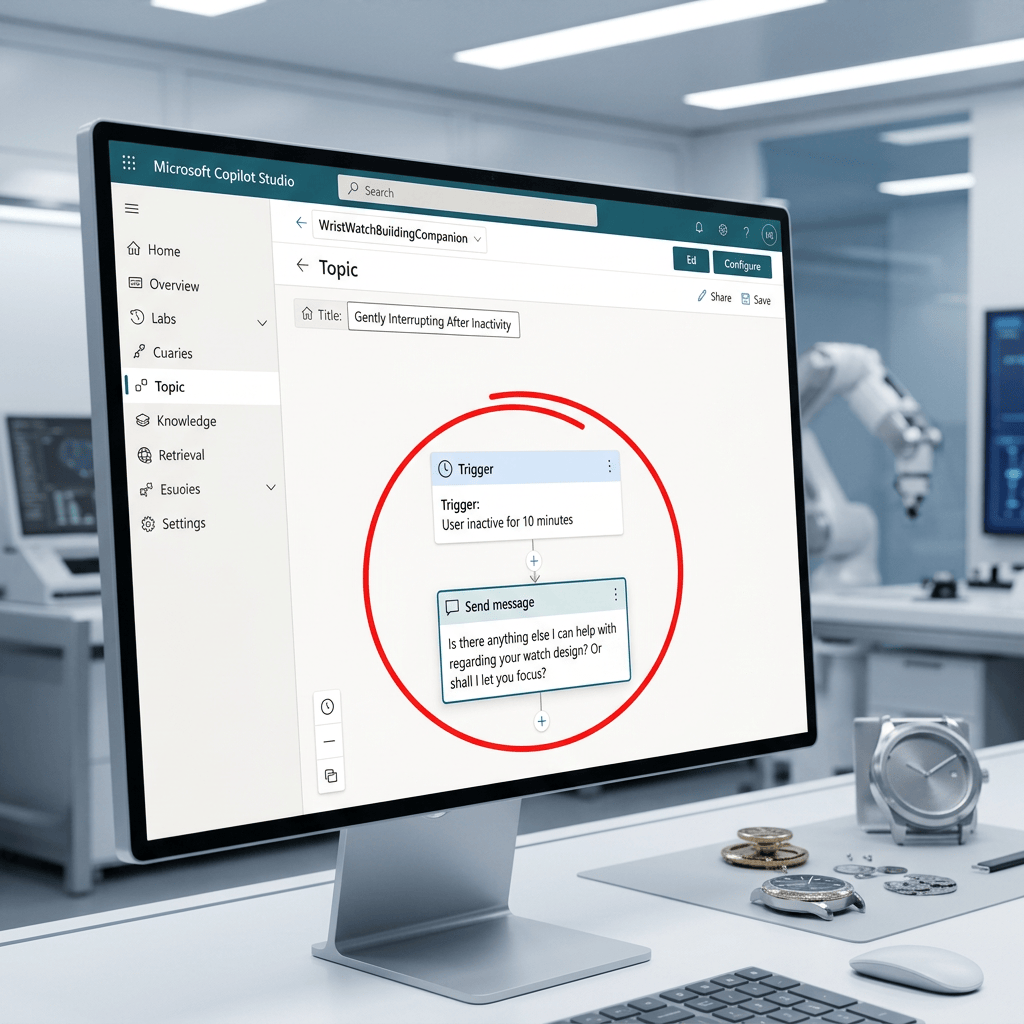
Using an Inactivity Trigger in Microsoft Copilot Studio to Re-Engage the User
Introduction
Not every useful conversational behavior in Microsoft Copilot Studio needs to involve Knowledge, Retrieval, Grounding, or an external Tool.
Sometimes the objective is purely conversational.
A good example is introducing a small interruption after the user has been inactive for a certain amount of time.
In our WristWatchBuildingCompanion laboratory, we created a Topic called:
Cansaço
The purpose of this Topic is to detect when the user has been inactive for approximately 60 seconds and then send a conversational message designed to re-engage the user.
This creates a useful pattern:
Conversation ↓User becomes inactive ↓Inactivity threshold is reached ↓Topic is triggered ↓Agent sends a re-engagement message
This pattern is simple, but it is useful because it helps us understand how Copilot Studio can react not only to what the user says, but also to conversational state and timing.
1. What Is an Inactivity Trigger?
An inactivity trigger is a trigger that activates when the user has not sent a message for a configured period of time.
Instead of waiting for a specific phrase such as:
"help me"
or:
"compare two watches"
the trigger waits for a period of inactivity.
Conceptually:
User sends message ↓Timer starts ↓User sends another message? | +-- Yes → timer resets | +-- No ↓ inactivity threshold reached ↓ Topic starts
This is fundamentally different from a traditional intent-based Topic trigger.
2. Intent Trigger vs Inactivity Trigger
A normal Topic might begin because the user says something recognizable.
For example:
User:"Compare Seiko and Citizen" ↓Trigger recognizes the intent ↓Watch Comparison Topic
An inactivity-based Topic works differently:
User says something ↓No additional message for 60 seconds ↓Inactivity Topic
The trigger is therefore based on conversation timing, not semantic meaning.
3. Why Use an Inactivity Trigger?
An inactivity trigger can be useful when we want the Agent to behave more naturally or proactively.
For example, the Agent may:
- check whether the user still needs help;
- ask a reflective question;
- offer a different direction;
- summarize what has been discussed;
- provide a small conversational break;
- encourage the user to continue;
- ask for feedback;
- collect information about the user’s motivation.
In our watch-related laboratory, the objective is not to force the user to continue.
The objective is to gently break the conversational rhythm and create a more human interaction.
4. Our Scenario
The Topic is named:
Cansaço
The idea is:
User talks with WristWatchBuildingCompanion ↓User becomes inactive ↓60 seconds pass ↓Cansaço Topic is triggered ↓Agent sends a short conversational message
An example message is:
Before we continue, I'm curious — what brought you to this topic today?
Another possibility is:
You've been exploring watches for a bit — what part of this conversation has been most interesting so far?
Or:
Quick break from the technical details: what made you interested in this watch or topic?
The important idea is that the message should feel like a conversational intervention, not an error message or system notification.
5. Minimal Topic Design
The first version should remain very small.
Conceptually:
Topic: CansaçoTrigger:The user is inactive for a whileDuration:60 secondsNode:Message
That is enough to test the behavior.
We do not need:
- Variables
- Conditions
- Tools
- Actions
- SharePoint
- Power Automate
- Knowledge
for the first experiment.
This is important because it isolates the concept.
6. Topic Responsibility
This Topic has a very specific responsibility:
React to inactivity and send a conversational message.
That makes it a good example of an atomic Topic.
Its responsibility is not:
- retrieve watch knowledge;
- compare watches;
- create SharePoint items;
- call an API;
- execute an Action.
It simply changes the conversation flow.
7. Topic vs Knowledge
This experiment helps reinforce the separation between Topic and Knowledge.
Knowledge
Knowledge answers questions using available information.
Example:
What is the difference between quartz and automatic movements?
Potential flow:
User Question ↓Retrieval ↓Knowledge ↓Grounding ↓Answer
Topic
A Topic controls a structured conversational sequence.
Example:
User becomes inactive ↓Inactivity Trigger ↓Message Node
No Knowledge lookup is inherently required.
8. Topic vs Tool
This also demonstrates that not every Topic needs a Tool.
A Tool is useful when the Agent needs to perform an operation.
For example:
Create SharePoint itemSend emailCall REST APIStart workflowUpdate Dataverse row
Our inactivity Topic performs no external operation.
Therefore:
Topic = YesTool = NoAction = No
At this stage, that separation is useful.
9. A Simple Architectural View
The architecture is extremely lightweight.
User | vConversation | vInactivity detected | vTopic Trigger | vMessage Node | vUser
There is no external system involved.
This makes it easy to understand and test.
10. The Role of the Trigger
The Trigger answers one question:
When should this Topic start?
For our scenario:
When the user has been inactive for approximately 60 seconds.
This is different from:
When the user says "compare watches".
or:
When the user says "identify this watch".
The trigger is therefore not based on user intent.
It is based on timing.
11. Why 60 Seconds Is Useful for Testing
A short interval such as 60 seconds is convenient during a laboratory.
If the interval were:
10 minutes
testing would become slow.
A 60-second interval makes the behavior easier to observe.
However, this does not mean 60 seconds would necessarily be appropriate in production.
In a real environment, the timing should depend on the interaction style.
Examples:
| Scenario | Possible inactivity interval |
|---|---|
| Lab testing | 60 seconds |
| Support conversation | 2–5 minutes |
| Long-form research Agent | longer interval |
| Guided process | depends on step complexity |
The correct value depends on the user experience.
12. Conversation Fatigue
The Topic name Cansaço introduces an interesting design concept.
A user may be technically engaged in the conversation while still becoming mentally fatigued.
For example:
User asks technical questionAgent sends detailed answerUser reads for a whileNo immediate response
Silence does not necessarily mean abandonment.
The user might be:
- reading;
- thinking;
- checking a watch;
- comparing information;
- looking at another page;
- researching something externally.
Therefore, an inactivity message should be subtle.
A poor message would be:
Are you still there?
Repeated too aggressively, this can become annoying.
A better message may add conversational value:
While you think about that, what part of watchmaking interests you most:history, movements, design, or specific models?
This creates a softer transition.
13. Re-Engagement vs Interruption
There is an important UX difference between re-engagement and interruption.
Interruption
Hello?Are you there?Please respond.
This can feel intrusive.
Re-engagement
If you'd like, we can explore this from another angle — history,movement technology, or specific models.
This provides value even if the user is still reading.
A good inactivity Topic should generally behave more like re-engagement than interruption.
14. Context-Aware Messages
The simplest Topic can use a fixed message.
For example:
What brought you to this topic today?
Later, the Topic could become context-aware.
For example:
We've been discussing Seiko quartz history.What part interests you most — the technology, the history,or the watches themselves?
This introduces a more advanced design problem.
The Topic would need access to useful conversational context.
Conceptually:
Conversation context ↓Inactivity Topic ↓Context-aware message
This could eventually involve Variables, generative behavior, or other Agent capabilities.
But it is not required for the first implementation.
15. Turning the Message into a Question
A Message Node simply displays text.
A Question Node does something more.
It asks the user for input and stores the response.
For example:
Question:"What brought you to this topic today?"
Then:
User response ↓Variable
For example:
ReasonForVisit
Now the Topic becomes:
Inactivity Trigger ↓Question ↓User response ↓Variable
This becomes useful if the response will be used later.
16. Connecting the Question to an Action
The same pattern can eventually be extended.
Inactivity Trigger ↓Question ↓ReasonForVisit variable ↓Tool / Action ↓SharePoint
For example, a SharePoint list could contain:
| Column | Value |
|---|---|
| InitialPrompt | User’s first prompt |
| ReasonForVisit | Answer to inactivity question |
| Date | Conversation date |
| Agent | WristWatchBuildingCompanion |
Now the inactivity Topic becomes part of a larger telemetry or feedback scenario.
This is where Topic and Tool begin to work together.
17. Conversation Feedback Scenario
A possible future version could ask:
We've been talking for a while. Was this conversation useful so far?
The answer could then be stored.
Conceptually:
Conversation ↓Inactivity ↓Question ↓Feedback ↓SharePoint
This could help analyze:
- why users use the Agent;
- which topics are most interesting;
- whether conversations are useful;
- what users expected;
- where the Agent needs improvement.
This turns a conversational feature into a lightweight research mechanism.
18. Ethical and UX Considerations
Proactive messages should be used carefully.
A system that constantly interrupts the user can quickly become frustrating.
The following questions should be considered:
Is the message useful?Is the timing appropriate?Can the same message repeat too often?Does the user understand why the Agent is speaking?Is the Agent asking for unnecessary information?Will the collected response be stored?If stored, is the user aware?Is the collected information personal?
These questions become especially important in enterprise scenarios.
19. Avoiding Excessive Repetition
Imagine this behavior:
60 seconds inactivity ↓"What brought you here?"60 seconds inactivity ↓"What brought you here?"60 seconds inactivity ↓"What brought you here?"
This would quickly become annoying.
A more advanced Topic may therefore need state.
For example:
AlreadyAskedInactivityQuestion = true
Then:
Inactivity Trigger ↓Condition | +-- Already asked → do nothing | +-- Not asked → ask question
This introduces the concept of a Condition.
20. Evolving the Topic
The Topic can therefore evolve incrementally.
Version 1
Trigger ↓Message
Version 2
Trigger ↓Question ↓Variable
Version 3
Trigger ↓Condition ↓Question ↓Variable
Version 4
Trigger ↓Condition ↓Question ↓Variables ↓Tool ↓SharePoint
This is an excellent example of progressive Agent development.
21. Why This Is a Good Copilot Studio Laboratory
This small experiment exposes several important Copilot Studio concepts.
We can observe:
TopicTriggerMessageQuestionVariableConditionToolAction
without needing to build a large Agent.
The scenario starts simple and can gradually incorporate more advanced capabilities.
This is exactly the type of atomic laboratory that helps build real understanding.
22. Architectural Separation
A mature version of this scenario might look like this:
                WristWatchBuildingCompanion
                          |
          +---------------+---------------+
          |                               |
      Knowledge                         Topics
          |                               |
     Watch facts                    Cansaço Topic
          |                               |
     Retrieval                      Inactivity Trigger
          |                               |
     Grounding                          Question
          |                               |
       Answer                           Variable
                                          |
                                          v
                                      Tool/Action
                                          |
                                          v
                                      SharePoint
Notice that the two sides serve different purposes.
Knowledge answers the watch-related question.
The Topic controls the conversational behavior.
The Tool performs an external operation.
23. A More Advanced Possibility: Dynamic Re-Engagement
Later, instead of sending a fixed sentence, the Agent could generate a contextual interruption.
For example:
User has been discussing mechanical movements.After inactivity:"You were exploring mechanical movements.Would you like to continue with automatic winding,escapements, or movement accuracy?"
Another conversation might produce:
"You were comparing Seiko and Citizen.Would you like to continue with movements,technology, or historical significance?"
This creates a more intelligent re-engagement pattern.
Conceptually:
Conversation Context +Inactivity Event ↓Generate contextual re-engagement ↓User continues
This begins to combine deterministic Topic logic with generative behavior.
24. Could Inactivity Become Part of Agent Personality?
We can take the idea even further.
Different Agents could react differently to silence.
An educational Agent might say:
Take your time. If you'd like, I can explain the same conceptfrom a simpler or more technical perspective.
A support Agent might say:
If you're checking the steps now, I can wait.When you're ready, tell me what happened.
A research Agent might say:
While you're reviewing that, I can also compare the historicalsources behind this answer.
Therefore inactivity behavior can become part of the Agent’s conversational design.
It is not simply a timer.
It can reinforce personality and purpose.
25. The Broader Pattern
The deeper pattern is:
Conversation Event ↓Trigger ↓Structured Topic ↓Conversational Response
The event could eventually be:
User says somethingUser becomes inactiveUser answers a questionA variable reaches a stateA process returns a result
This is where Copilot Studio moves beyond simple question-and-answer interaction.
It becomes an orchestration environment for conversational behavior.
26. Key Concepts Learned
This small experiment helps reinforce several concepts.
| Concept | Role |
|---|---|
| Agent | Overall conversational system |
| Topic | Structured conversational flow |
| Trigger | Determines when the Topic begins |
| Inactivity Trigger | Starts after user inactivity |
| Message | Sends information to the user |
| Question | Requests information from the user |
| Variable | Stores information |
| Condition | Controls logic |
| Tool | Provides external capability |
| Action | Executes an operation |
| Knowledge | Provides information |
| Retrieval | Finds relevant information |
| Grounding | Uses retrieved information as evidence |
The Cansaço Topic initially uses only a small subset:
Trigger+Message
That is intentional.
27. Final Architecture of the First Version
The first version should remain simple.
Topic: CansaçoTrigger:User inactive for approximately 60 seconds ↓Message:"Quick break from the technical details:what made you interested in this topic today?"
Nothing more is required to understand the inactivity concept.
Conclusion
An inactivity-based Topic is a small but useful example of how Microsoft Copilot Studio can control conversation beyond direct user prompts.
The important idea is that an Agent does not need to operate only as:
Question ↓Answer
It can also react to conversational events.
Conversation ↓Event ↓Trigger ↓Topic ↓Behavior
In our WristWatchBuildingCompanion laboratory, the Cansaço Topic demonstrates this using a simple inactivity threshold.
The first implementation is intentionally minimal:
Inactivity Trigger ↓Message
From there, the same pattern can evolve naturally into:
Inactivity Trigger ↓Question ↓Variable ↓Condition ↓Tool / Action ↓SharePoint
This makes the experiment useful not only as a conversational feature, but also as a foundation for understanding how Copilot Studio combines triggers, structured dialogue, state, and external actions.
The most important lesson is simple:
Topics define conversational behavior, and triggers determine when that behavior should begin.
An inactivity trigger adds time and conversational state to that model, allowing the Agent to react even when the user says nothing.


