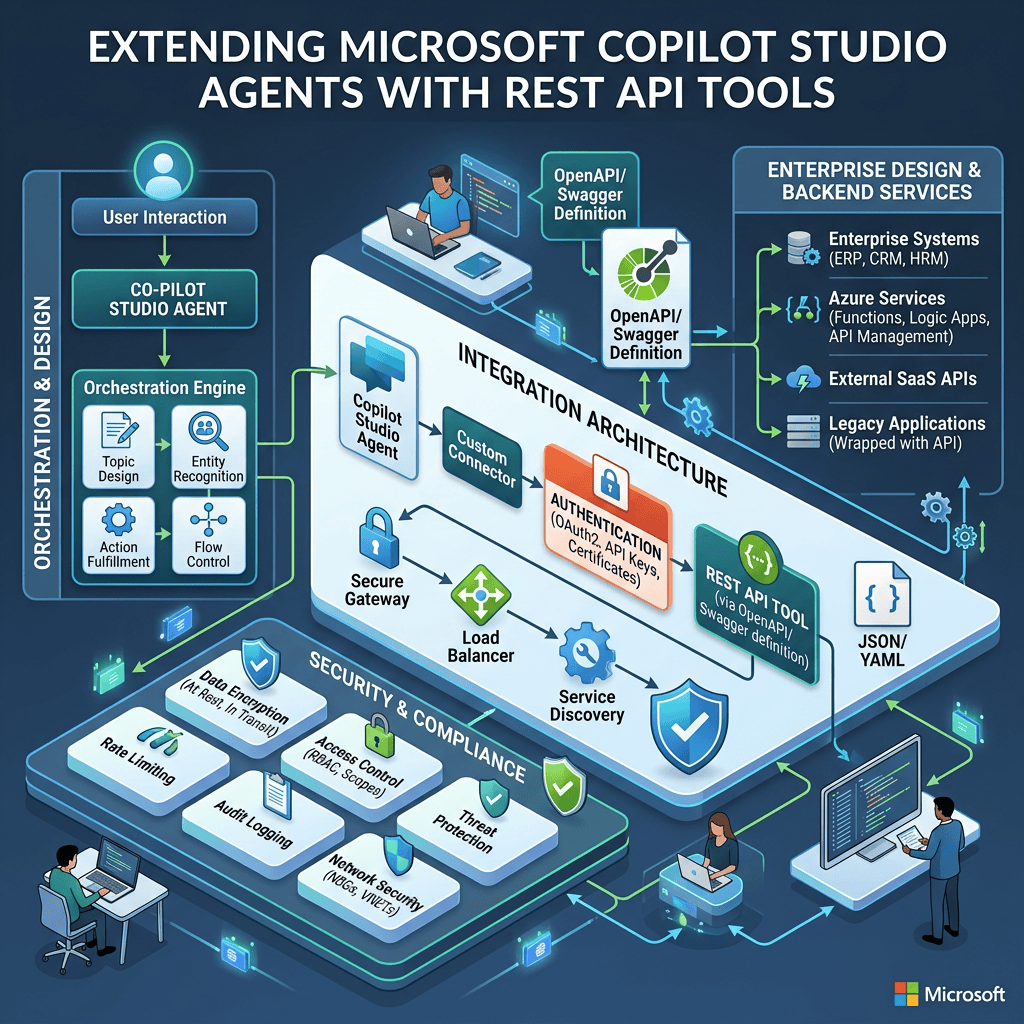
Extending Microsoft Copilot Studio Agents with REST API Tools
Architecture, OpenAPI, Authentication, Orchestration, Security, and Enterprise Design
Introduction
One of the most important transitions when learning Microsoft Copilot Studio is moving from an Agent that can answer questions to an Agent that can interact with external systems.
A Knowledge-based Agent might answer:
“What is our vacation policy?”
A REST API-enabled Agent can potentially answer questions such as:
“What are the current Premier League standings?”
“Find ticket 12345.”
“What is the current status of order 9821?”
“Show me today’s matches.”
“Create a support ticket.”
“Update this record.”
These scenarios require something fundamentally different from static Knowledge.
The Agent must communicate with another system.
Microsoft Copilot Studio supports this through Tools, and one important Tool type is the:
REST API Tool
Microsoft currently documents this capability as a Preview feature.
A simplified architecture is:
User
↓
Agent
↓
Generative Orchestration
↓
REST API Tool
↓
External REST API
↓
JSON Response
↓
Agent
↓
Natural-language Response
This apparently simple architecture introduces several important concepts:
- Tools
- REST APIs
- OpenAPI
- HTTP methods
- Endpoints
- Parameters
- Authentication
- API keys
- OAuth 2.0
- Connections
- Inputs
- Outputs
- Generative Orchestration
- Security
- Least privilege
- Error handling
- API lifecycle
- ALM
- Solutions
Understanding these concepts is essential before building production-grade Agents that interact with external systems.
1. Knowledge and Tools Solve Different Problems
Before discussing REST APIs, we must reinforce one of the most important distinctions in Copilot Studio:
Knowledge is not a Tool.
Knowledge primarily answers:
“What information can the Agent use to answer a question?”
A Tool answers:
“What external capability can the Agent invoke?”
Consider a corporate policy Agent.
A SharePoint document containing vacation policies might be configured as Knowledge.
Architecture:
User
↓
“What is our vacation policy?”
↓
Agent
↓
Knowledge Retrieval
↓
SharePoint
↓
Grounding
↓
Answer
Now consider another question:
“How many vacation days do I currently have available?”
The answer might exist in an HR system exposed through an API.
Architecture:
User
↓
“How many vacation days do I have?”
↓
Agent
↓
REST API Tool
↓
HR API
↓
Current employee data
↓
Agent
↓
Answer
These are fundamentally different mechanisms.
A useful mental model is:
Knowledge = information for reasoning
Tool = capability the Agent can invoke
2. What Is a Tool?
A Tool is an external capability available to the Agent.
Tools allow an Agent to move beyond purely conversational or Knowledge-based behavior.
Depending on the Copilot Studio experience and scenario, Tools can include mechanisms such as:
- Connectors
- Workflows
- REST APIs
- MCP servers
- other supported capabilities
A Tool may retrieve information:
Agent
↓
Tool
↓
GET external data
Or perform an operation:
Agent
↓
Tool
↓
POST / PUT / DELETE
↓
External system changed
This distinction is important because a Tool can potentially have side effects.
Reading a football league table is very different from deleting a customer record.
3. What Is a REST API?
REST stands for:
Representational State Transfer
A REST API exposes resources through HTTP endpoints.
For example, imagine a football service exposing:
GET /competitions
GET /competitions/{id}
GET /competitions/{id}/standings
GET /teams/{id}
GET /teams/{id}/matches
The client sends an HTTP request.
The server returns an HTTP response.
Conceptually:
Client
↓
HTTP Request
↓
REST API
↓
Business System / Database
↓
HTTP Response
↓
Client
Copilot Studio can become the client in this architecture.
4. The Agent Does Not Need to Understand the API Implementation
This is architecturally important.
Suppose an external football API is implemented using:
- Java
- .NET
- Node.js
- Python
- PHP
The Agent generally does not care.
The integration contract is the API.
The Agent needs to understand:
- Endpoint
- HTTP method
- Parameters
- Authentication
- Request schema
- Response schema
- Description of the operation
This is one of the major advantages of API-based architectures.
The Agent interacts with the contract, not the internal implementation.
5. The Role of OpenAPI
Copilot Studio needs a machine-readable description of the REST API.
This is where:
OpenAPI
becomes essential.
OpenAPI describes the API contract.
It can describe:
- Base URL
- Paths
- HTTP methods
- Parameters
- Request bodies
- Response structures
- Authentication mechanisms
- Data types
- Operation descriptions
Instead of manually teaching Copilot Studio:
“There is a GET endpoint at this URL and it accepts these parameters…”
we provide an OpenAPI specification.
Conceptually:
REST API
↓
OpenAPI Specification
↓
Copilot Studio
↓
Tools generated from API operations
6. OpenAPI as a Contract
Imagine this operation:
GET /teams/{id}
The OpenAPI specification could describe:
Operation:
Get Team
Parameter:
id
Type:
integer
Required:
true
Description:
The unique identifier of the football team.
Response:
Team object
The specification provides Copilot Studio with enough structural information to understand the operation.
This means OpenAPI acts as a contract between:
API Provider
and
Copilot Studio
7. OpenAPI Version Requirement
This is an especially important detail from the current Microsoft documentation.
Microsoft states that REST API Tools are created from:
OpenAPI v2
The uploaded specification must be a JSON file.
If an OpenAPI v3 specification is submitted, Copilot Studio automatically translates it to v2 during the creation process.
Therefore, the safest mental model is:
REST API
↓
OpenAPI specification
↓
OpenAPI v2 representation
↓
Copilot Studio Tool generation
This requirement exists because of how Power Platform processes API specifications.
8. The Three Things Copilot Studio Needs
Microsoft identifies three fundamental pieces of information required to connect an Agent to a REST API.
1. OpenAPI specification
Defines what the API can do.
2. Authentication configuration
Defines how access to the API is authorized.
3. Descriptions
Help the language model determine when the API should be invoked.
The third element is particularly important in Agent architecture.
Traditional application code explicitly determines which function to call.
For example:
if (requestType === “standings”) {
getStandings();
}
Generative Orchestration can work differently.
The LLM evaluates the user’s intent and the descriptions of available Tools.
Therefore:
Descriptions are part of the orchestration architecture.
9. Traditional Application vs Agent
Consider a traditional application.
The developer writes:
Button Click
↓
getStandings()
The application knows exactly which function should execute.
An Agent might receive:
“Who is leading the Premier League?”
There is no button.
The Agent must interpret the request.
Conceptually:
User Prompt
↓
Intent Interpretation
↓
Available Tools
↓
Tool descriptions
↓
Select appropriate Tool
↓
Execute Tool
↓
Interpret response
↓
Answer
This is a major architectural difference between traditional applications and Agents.
10. Generative Orchestration
Copilot Studio’s Generative Orchestration can interpret user intent and determine which available capability is appropriate.
Conceptually:
User
↓
Natural Language
↓
Agent
↓
Generative Orchestration
↓
Available capabilities
├── Knowledge
├── Topic
├── Tool A
├── Tool B
├── REST API Tool
└── Workflow
↓
Selected capability
The quality of Tool descriptions therefore directly affects orchestration.
11. Why Tool Descriptions Matter
Imagine two Tools.
Tool A:
“Gets data.”
Tool B:
“Retrieves current Premier League standings including team position, points, wins, draws, losses, goals scored, goals conceded, and goal difference.”
A user asks:
“Show me the Premier League table.”
Tool B provides much stronger semantic information to the orchestrator.
Microsoft explicitly recommends detailed descriptions and suggests including synonyms that can help the Agent understand when the Tool is appropriate.
Therefore:
Tool descriptions are not merely documentation for developers.
They are metadata used by the Agent’s orchestration.
12. REST API Tool Creation Process
The current Microsoft process can be summarized as:
Agent
↓
Tools
↓
Add tool
↓
New tool
↓
REST API
↓
Upload OpenAPI specification
↓
Configure API description
↓
Select Solution
↓
Configure Authentication
↓
Select API operations
↓
Configure Tool descriptions
↓
Review parameters
↓
Publish
↓
Create Connection
↓
Add Tool to Agent
This pipeline transforms an external API definition into capabilities the Agent can invoke.
13. Starting in Copilot Studio
Inside the Agent, navigate to:
Overview
Then locate:
Tools
Select:
Add tool
Alternatively:
Tools → Add a tool
Then select:
New tool → REST API
At this point, Copilot Studio expects the API specification.
14. Uploading the OpenAPI Specification
The next step is:
Upload a REST API
You provide the OpenAPI specification file.
The specification becomes the structural source for determining:
- Operations
- Inputs
- Outputs
- Parameter types
- Endpoint definitions
This is why creating a good OpenAPI specification is important.
Poorly documented APIs tend to produce poorly described Tools.
15. API-Level Description
After uploading the specification, Copilot Studio presents information about the API.
One particularly important field is:
Description
Microsoft emphasizes that this description should be detailed because orchestration uses it to determine when the API should be used.
For example, this description is weak:
“Football API.”
A stronger description would be:
“Retrieves current and historical football information including competitions, teams, fixtures, match results, standings, scorers, seasons, and scheduled matches.”
Now the Agent has much more semantic information.
16. Descriptions as Semantic Routing Metadata
This introduces an interesting architectural concept.
In traditional programming:
Routing is usually deterministic.
For example:
URL
↓
Controller
↓
Method
In Agent architecture:
Natural-language intent
↓
Semantic understanding
↓
Tool descriptions
↓
Tool selection
Therefore Tool descriptions can be thought of as:
Semantic routing metadata
They help connect natural-language intent with executable capabilities.
17. Solution Integration
During REST API Tool creation, Copilot Studio allows you to associate the API with a:
Solution
This is important for enterprise Power Platform architecture.
Solutions support application lifecycle management.
Conceptually:
DEV
↓
Solution
↓
Export
↓
TEST
↓
Solution
↓
PROD
A REST API integration should therefore not be treated as an isolated configuration created manually in every environment.
For enterprise development, think about:
- DEV
- TEST
- UAT
- PROD
- Solutions
- Connection References
- Environment Variables
- Deployment
- Governance
18. What Happens If No Solution Is Selected?
According to the current Microsoft documentation, selecting a Solution is optional during this process.
If no Solution is selected, Copilot Studio can create one automatically using the action name and default publisher.
However, for enterprise development, deliberately using a custom Solution usually provides better lifecycle management.
That allows the integration to become part of the broader Power Platform ALM strategy.
19. Authentication
After defining the API, Copilot Studio needs to know:
Who is allowed to call it?
The current REST API Tool interface documents three authentication options:
- None
- API key
- OAuth 2.0
These represent very different security models.
20. Authentication: None
With:
None
the API does not require authentication.
Architecture:
Agent
↓
REST API Tool
↓
Public API
This can be appropriate for genuinely public services.
However, absence of authentication should always trigger a security question:
Is this endpoint intentionally public?
For enterprise APIs, unauthenticated access is generally unusual.
21. Authentication: API Key
Many external APIs use an API key.
Conceptually:
Agent
↓
HTTP Request
↓
API Key
↓
REST API
For example:
GET /matches
Header:
X-Auth-Token: abc123
The key identifies or authorizes the caller.
The Copilot Studio configuration requires information such as:
- Parameter label
- Parameter name
- Parameter location
The location can be:
Header
or
Query
22. API Key in Header
An example might conceptually look like:
GET /matches
X-Auth-Token: YOUR_API_KEY
Using headers is common because credentials are kept separate from the resource URL.
Another API might use:
Authorization: Bearer YOUR_API_KEY
The exact format depends on the external API.
Copilot Studio does not invent this configuration.
It must correspond to the API’s actual authentication contract.
23. API Key in Query String
Some APIs accept something similar to:
GET /matches?apikey=ABC123
This works technically when supported by the API.
However, API keys in query strings deserve extra caution because URLs can appear in:
- Logs
- Monitoring systems
- Browser history
- Proxy logs
- Diagnostics
Where an API supports both mechanisms, headers are generally preferable for secrets.
24. Runtime Authentication Behavior
The current Microsoft documentation describes an important behavior for REST API Tools using API keys:
When the Agent needs the API Tool, the user can be prompted to authenticate by providing the API key.
This has architectural implications.
We need to distinguish:
Maker credentials
from:
End-user credentials
and from:
Service credentials
These are not necessarily interchangeable.
25. Authentication: OAuth 2.0
OAuth 2.0 provides a much richer authorization architecture.
Conceptually:
User
↓
Agent
↓
Authorization Server
↓
Authentication + Consent
↓
Authorization Code
↓
Token Endpoint
↓
Access Token
↓
REST API
The API can then perform operations under an authorization context associated with the authenticated user.
26. OAuth 2.0 Components
The current Copilot Studio REST API configuration exposes concepts such as:
Client ID
Identifies the application.
Client Secret
Authenticates the application where required.
Authorization URL
Where the user is sent for authentication and consent.
Token URL
Where authorization information is exchanged for tokens.
Refresh URL
Used for token renewal.
Scope
Defines requested permissions.
These are fundamental OAuth concepts and should be understood before configuring production integrations.
27. OAuth and Least Privilege
Suppose our Agent only needs to:
Read customer orders.
The OAuth scope should ideally represent read access.
It should not automatically receive permissions such as:
Delete customers
Update invoices
Administer users
Modify security
The architectural principle is:
Grant the smallest permission set necessary to perform the required business capability.
This is the principle of:
Least Privilege
28. User Context Matters
Authentication is not merely about successfully obtaining a token.
We must ask:
Whose identity is represented by this token?
Possible models include:
User
↓
Agent
↓
API
or:
User
↓
Agent
↓
Shared Service Identity
↓
API
These models have very different security implications.
An API may contain records the current user should never access.
Therefore:
Authentication answers “Who are you?”
while:
Authorization answers “What are you allowed to do?”
Both must be designed.
29. Selecting API Operations
A REST API can expose many endpoints.
For example:
GET /customers
GET /customers/{id}
POST /customers
PUT /customers/{id}
DELETE /customers/{id}
Copilot Studio does not require that every operation become available to the Agent.
This is extremely important.
You can selectively expose operations.
30. Least Capability
Suppose the Agent only needs to retrieve customers.
Expose:
GET /customers
GET /customers/{id}
Do not expose:
DELETE /customers/{id}
unless the business requirement actually requires it.
This extends Least Privilege into another architectural principle:
Least Capability
Do not give the Agent Tools it does not need.
31. Why Tool Selection Is a Security Boundary
Imagine the API exposes:
GetCustomer
UpdateCustomer
DeleteCustomer
ResetCustomerPassword
ExportCustomerDatabase
If all operations are exposed to the Agent, orchestration potentially has access to all those capabilities.
A better architecture might expose only:
GetCustomer
Therefore, security is not only:
“Can the API authenticate?”
Security also includes:
Which API operations are available to the Agent?
32. HTTP Methods and Risk
A useful simplified classification is:
| Method | Typical Purpose | Typical Risk |
|---|---|---|
| GET | Read information | Lower |
| POST | Create or execute | Medium/High |
| PUT | Replace/update | High |
| PATCH | Partial update | High |
| DELETE | Delete resource | Very High |
This is not an absolute security classification.
A GET endpoint can still expose extremely sensitive information.
However, the table helps us think about side effects.
33. Tool-Level Configuration
After selecting an API operation, Copilot Studio allows configuration of:
Tool name
and:
Tool description
Again, these descriptions matter to orchestration.
For example:
Weak:
“Get standings.”
Better:
“Retrieve the current standings table for a football competition, including club position, points, wins, draws, losses, goals, and goal difference.”
Now the orchestrator has stronger semantic signals.
34. Inputs
A Tool can require inputs.
Suppose we have:
GET /teams/{id}
The Tool needs:
teamId
Conceptually:
User:
“Tell me about Arsenal.”
↓
Agent identifies Arsenal
↓
Tool requires teamId
↓
Resolve or obtain teamId
↓
REST API Tool
↓
GET /teams/57
↓
API Response
This introduces another important problem:
Natural-language entities are not always API identifiers.
The user knows:
Arsenal
The API may require:
57
That mapping becomes part of the Agent/API architecture.
35. Inputs Must Be Well Described
Suppose an input is named:
id
That is ambiguous.
What does it represent?
- User ID?
- Team ID?
- Competition ID?
- Match ID?
A better description is:
“The unique numeric identifier of the football team.”
Descriptions reduce ambiguity for orchestration.
36. Outputs
The REST API returns structured data.
For example:
{
“id”: 57,
“name”: “Arsenal FC”,
“shortName”: “Arsenal”,
“tla”: “ARS”
}
The Agent receives this structured output.
The final user experience does not need to expose raw JSON.
Instead:
API JSON
↓
Agent
↓
Natural-language generation
↓
“Arsenal FC is identified by team ID 57 and uses the abbreviation ARS.”
This is an important benefit of combining APIs with generative interfaces.
37. Structured Systems Meet Natural Language
REST APIs generally expect structured input.
Users generally speak natural language.
The Agent acts as an intermediary.
Conceptually:
Natural Language
↓
Intent + Entities
↓
Structured Parameters
↓
REST API
↓
Structured JSON
↓
Agent
↓
Natural Language
This transformation is one of the most powerful Agent patterns.
38. Example: Football Agent
Consider our practical football scenario.
The user asks:
“When does Arsenal play next?”
Potential architecture:
User
↓
Agent
↓
Understand intent:
Next match
↓
Identify entity:
Arsenal
↓
Resolve Arsenal team identifier
↓
Select REST API Tool:
Get Team Matches
↓
Call football API
↓
Receive JSON
↓
Identify next scheduled match
↓
Generate response
The user does not need to understand:
- URLs
- IDs
- JSON
- HTTP
- authentication
- API schemas
The Agent hides that complexity.
39. REST API Tool vs Knowledge
Consider:
“What is Arsenal’s history?”
This may be suitable for Knowledge.
Now:
“When does Arsenal play next?”
This requires current structured information.
A REST API is much more appropriate.
Therefore:
Knowledge:
Historical/documentary information
REST API:
Current structured operational information
The distinction is not absolute, but it is a useful architectural starting point.
40. REST API Tool vs Connector
Suppose a prebuilt Power Platform Connector already exists.
Then creating a raw REST API integration might not be necessary.
Conceptually:
External System
↓
Existing Connector
↓
Copilot Studio
may be preferable to:
External System
↓
Custom REST definition
↓
Copilot Studio
Prebuilt connectors can reduce integration effort and provide established authentication and operation definitions.
41. REST API Tool vs Custom Connector
A Custom Connector acts as a reusable Power Platform abstraction around an external API.
It can potentially be reused by:
- Power Apps
- Power Automate
- Copilot Studio
- Logic Apps scenarios
A direct REST API Tool can be attractive when the primary requirement is:
Expose this API directly to the Agent.
A Custom Connector may make more sense when the API is intended to become a broader Power Platform integration asset.
42. REST API Tool vs Workflow
Suppose the requirement is:
Create SharePoint item
↓
Start approval
↓
Wait for approval
↓
Update SharePoint
↓
Send email
That is not simply one API call.
It is a deterministic multi-step business process.
A Workflow or Power Automate-based approach may be more appropriate.
Conceptually:
Agent
↓
Workflow Tool
↓
Step 1
↓
Step 2
↓
Step 3
↓
Step 4
↓
Result
A REST API Tool is particularly natural when the capability already exists as an API endpoint.
43. REST API vs MCP
Model Context Protocol introduces another integration architecture.
Very simplistically:
REST API integration:
Agent
↓
Known API contract
↓
REST endpoint
MCP:
Agent
↓
MCP Client
↓
MCP Server
↓
Exposed Tools / Resources
MCP can provide a standardized mechanism for exposing capabilities to AI systems.
REST APIs remain extremely important because the enterprise world already contains enormous numbers of REST services.
These approaches should therefore not automatically be treated as competitors.
The right choice depends on the architecture.
44. Choosing the Right Integration
A useful decision model is:
Existing supported Connector?
↓
Yes → Evaluate Connector first.
No
↓
Simple external REST API?
↓
Evaluate REST API Tool.
Need reusable Power Platform abstraction?
↓
Evaluate Custom Connector.
Multi-step deterministic process?
↓
Evaluate Workflow / Power Automate.
Service already exposes MCP?
↓
Evaluate MCP.
Complex custom requirements?
↓
Evaluate custom API / Azure Function / other pro-code architecture.
The principle is:
Use the simplest integration mechanism that satisfies the requirement securely.
45. REST API Tools Are Actions, Not Knowledge
This deserves repetition.
Suppose our API returns standings.
The Agent is not necessarily indexing those standings as Knowledge.
Instead:
User Request
↓
Tool invocation
↓
API Request
↓
API Response
↓
Current execution context
↓
Generated Answer
This is operational retrieval.
It is different from traditional Knowledge Retrieval and Grounding over indexed documents.
46. Combining Knowledge and REST APIs
Real Agents can combine both.
Imagine a football Agent.
Knowledge contains:
- Competition rules
- Historical articles
- Club information
- Tournament documentation
REST API provides:
- Current standings
- Fixtures
- Results
- Match data
- Teams
Architecture:
User
↓
Agent
↓
Generative Orchestration
↓
Knowledge OR REST API Tool
↓
Relevant Context
↓
Answer
A more complex request could require both.
For example:
“Explain how Champions League qualification works and show which Premier League teams currently occupy qualifying positions.”
The first part may require Knowledge.
The second requires current standings.
Conceptually:
Question
↓
Agent
├── Knowledge → Qualification rules
└── REST API → Current standings
↓
Combine context
↓
Answer
This demonstrates why orchestration becomes so important.
47. Read Tools vs Write Tools
A useful architectural classification is:
Read Tools
Retrieve information.
Examples:
GetTeam
GetStandings
GetTicket
GetOrderStatus
Write Tools
Change external systems.
Examples:
CreateTicket
UpdateOrder
DeleteRecord
ApproveRequest
The security posture should become progressively stricter as Tools gain side effects.
48. Read-Only First
When learning or designing a new Agent integration, a useful strategy is:
Start read-only.
For our football Agent:
Phase 1:
GET competitions
Phase 2:
GET teams
Phase 3:
GET standings
Phase 4:
GET matches
There is no reason to introduce mutation operations when the business scenario only requires retrieval.
This reduces risk while we learn:
- OpenAPI
- Authentication
- Tool selection
- Parameters
- Outputs
- Orchestration
49. Error Handling
External APIs fail.
Possible failures include:
400 Bad Request
401 Unauthorized
403 Forbidden
404 Not Found
429 Too Many Requests
500 Internal Server Error
503 Service Unavailable
Timeout
Malformed JSON
Unexpected schema
The Agent architecture must account for these scenarios.
For example:
User
↓
Agent
↓
Tool
↓
API
↓
429 Too Many Requests
↓
Agent
↓
Appropriate user-facing explanation
The Agent should not invent data simply because the API call failed.
50. API Failure Must Not Become Hallucination
This is a critical pattern.
Wrong:
API fails
↓
Agent invents likely result
Correct:
API fails
↓
Agent recognizes unavailable result
↓
Agent explains that current information could not be retrieved
This is particularly important for:
- Finance
- HR
- Orders
- Inventory
- Sports scores
- Reservations
- Compliance
- Administrative systems
Current operational information should come from the authoritative system.
51. Rate Limits
External APIs frequently impose rate limits.
For example:
10 requests/minute
100 requests/hour
1,000 requests/day
The Agent may create API traffic based on natural-language conversations.
Therefore:
Users
↓
Agent Requests
↓
Tool Calls
↓
API Consumption
A heavily used Agent can create significant API traffic.
Rate limits must therefore be part of architecture and capacity planning.
52. Authentication Is Not Authorization
This distinction must always remain clear.
Authentication:
Who is calling?
Authorization:
What is that identity allowed to do?
A successfully authenticated Agent does not automatically have permission to access every resource.
The external API remains responsible for enforcing its authorization model.
53. Never Trust the Agent as the Security Boundary
Suppose Instructions say:
“Never retrieve salary information.”
That is useful behavioral guidance.
But the external API should still enforce permissions.
Security should not depend solely on natural-language Instructions.
Correct architecture:
User
↓
Agent
↓
Tool
↓
API Authorization
↓
Allowed / Denied
The authoritative system must enforce the real security boundary.
54. Instructions vs API Security
Instructions:
“Do not delete customer records.”
API permissions:
DELETE endpoint not available.
The second protection is stronger.
Better yet:
Do not expose the Delete Tool at all.
Therefore security layers might include:
Agent Instructions
↓
Tool Selection
↓
Authentication
↓
Authorization
↓
API permissions
↓
Business rules
This is:
Defense in Depth
55. Tool Descriptions Are Functional Metadata, Not Security
Another important distinction:
Description:
“Only use this Tool for approved requests.”
This can guide orchestration.
But it is not a security control.
Security must still exist at:
- Connection
- Identity
- Token
- Scope
- API authorization
- backend rules
Never confuse semantic guidance with authorization enforcement.
56. Connections
After publishing the REST API Tool definition, Copilot Studio requires a:
Connection
The Tool definition describes:
How the API works.
The Connection represents:
How this instance/user authenticates to that API.
Conceptually:
Tool Definition
Connection
↓
Executable Tool
This distinction is similar to other Power Platform integration patterns.
57. Definition vs Runtime Connection
Think about:
OpenAPI
↓
Defines contract
Tool
↓
Defines Agent capability
Connection
↓
Provides runtime access
Agent
↓
Invokes capability
This separation becomes especially important when moving between environments.
58. ALM Implications
Consider:
DEV
TEST
PROD
The API structure may remain the same.
But endpoints or credentials may differ.
For example:
DEV API:
api-dev.contoso.com
TEST API:
api-test.contoso.com
PROD API:
api.contoso.com
Credentials should not simply be hardcoded into Agent Instructions.
This is where proper environment, connection, Solution, and deployment architecture becomes essential.
59. Secrets Must Not Be Instructions
Never use Instructions as a secret store.
Wrong:
Instructions:
“Use API key ABC123XYZ.”
Instructions are behavioral configuration, not secret management.
Credentials should use supported authentication and connection mechanisms.
The principle is:
Prompt configuration is not credential storage.
60. Observability
A production REST-enabled Agent should be observable.
Ideally we want to understand:
- Which Tool was selected?
- Which operation executed?
- What inputs were supplied?
- Did authentication succeed?
- What HTTP status was returned?
- How long did the API take?
- Did orchestration select the correct Tool?
- Was the result correctly interpreted?
- Did the API hit a rate limit?
- Did an operation fail?
Without observability, Agent troubleshooting becomes guesswork.
61. Testing Strategy
REST API Agent testing should occur in layers.
Layer 1 — API
Test the API independently.
Does the endpoint work?
Layer 2 — OpenAPI
Does the specification correctly describe the endpoint?
Layer 3 — Authentication
Can Copilot Studio authenticate?
Layer 4 — Tool
Does direct Tool execution produce the expected result?
Layer 5 — Orchestration
Does the Agent choose the correct Tool?
Layer 6 — Conversation
Does the Agent transform the structured result into a correct answer?
This layered strategy prevents us from debugging everything simultaneously.
62. Example Troubleshooting Sequence
Suppose the user asks:
“Show Arsenal’s next match.”
The Agent fails.
Do not immediately change:
- Instructions
- OpenAPI
- Authentication
- Tool description
- Agent description
- API
- Topic
Instead investigate:
- Does the API endpoint work independently?
- Does authentication work?
- Does the Tool execute manually?
- Are inputs correct?
- Is the output correct?
- Does orchestration select the Tool?
- Does the Agent interpret the output correctly?
One variable at a time.
63. Our Football Agent Architecture
For our practical project, we can think about:
User
↓
Football Agent
↓
Instructions
↓
Generative Orchestration
↓
REST API Tools
↓
football-data.org
↓
JSON
↓
Agent
↓
User-friendly response
Potential Tools might conceptually include:
Get Competitions
Get Competition
Get Standings
Get Teams
Get Team
Get Matches
Get Team Matches
Get Scorers
Each Tool should represent a clear atomic capability.
64. Atomic Tools
Just as we have been using the concept of atomic Agents, we should think about:
Atomic Tools
A Tool should ideally have a clear responsibility.
For example:
GetCompetitionStandings
is easier to reason about than:
DoEverythingFootball
Atomic capabilities improve:
- Tool selection
- Description quality
- Testing
- Security
- Monitoring
- Troubleshooting
65. Good Tool Description Example
Consider:
Name
GetCompetitionStandings
Description
“Retrieves the current standings table for a specified football competition. Use this Tool when the user asks for league position, table, ranking, points, wins, draws, losses, goals, or current competition standings.”
Notice the synonyms:
- standings
- table
- ranking
- position
- points
These provide semantic signals to the Agent.
66. Bad Tool Description Example
Name
GetData
Description
“Gets football information.”
Now imagine ten Tools with descriptions like this.
Generative Orchestration has very little semantic information to distinguish them.
Therefore:
Good Agent architecture includes good Tool metadata.
67. Tool Selection and Prompt Engineering Meet
Traditional API documentation is usually written for developers.
Agent API documentation has two audiences:
Developer
and:
LLM Orchestrator
This creates a new discipline.
The description must be technically correct while also semantically useful.
For example:
Traditional:
“Returns standings.”
Agent-oriented:
“Retrieves current competition standings. Use when users ask about league tables, rankings, club positions, points, wins, draws, losses, goal difference, or who is leading a competition.”
The second description improves semantic discoverability.
68. Parameter Descriptions Matter Too
Suppose the API operation requires:
competitionCode
Weak description:
“Code.”
Better:
“The official competition code used by the football API, such as PL for Premier League or CL for UEFA Champions League.”
This helps orchestration map user intent into structured API inputs.
69. The Agent as an Adapter
A useful architectural interpretation is that the Agent acts as an adapter between:
Human language
and:
Machine interfaces
Human:
“Who is top of the Premier League?”
Machine:
GET /competitions/PL/standings
This transformation is central to Agent architecture.
70. Agent Does Not Replace the API
The Agent is not the system of record.
football-data.org remains responsible for football data.
SharePoint remains responsible for SharePoint content.
Dataverse remains responsible for Dataverse records.
SAP remains responsible for SAP business data.
The Agent provides:
- interpretation
- orchestration
- conversational interaction
- result synthesis
This leads to a critical architectural principle:
Keep authoritative data in authoritative systems.
71. API as an Anti-Corruption Boundary
From a broader software architecture perspective, an API can provide a controlled boundary between the Agent and the business system.
Instead of giving the Agent direct database access:
Agent
↓
Database
we can expose:
Agent
↓
Controlled API
↓
Business Logic
↓
Database
The API can enforce:
- validation
- permissions
- business rules
- logging
- throttling
- filtering
This is generally much safer.
72. Enterprise Security Architecture
A mature architecture might look like:
User
↓
Microsoft 365 / Agent Authentication
↓
Copilot Studio Agent
↓
Generative Orchestration
↓
Approved Tool
↓
Authenticated Connection
↓
API Gateway / API
↓
Authorization
↓
Business Logic
↓
Data Source
Each layer has a responsibility.
The Agent should not become the sole security boundary.
73. When NOT to Use a REST API Tool
A REST API Tool is not automatically the best solution.
Do not use it simply because the technology exists.
If the requirement is:
“Create a SharePoint list item.”
A native SharePoint Connector may be simpler.
If the requirement is:
“Run a five-step approval workflow.”
Power Automate or Workflow may be better.
If the requirement is:
“Answer questions from corporate documents.”
Knowledge is more appropriate.
If the requirement is:
“Call an external football API and retrieve current standings.”
REST API Tool becomes very attractive.
Architecture should follow the requirement.
74. Decision Table
| Requirement | Candidate |
|---|---|
| Answer from documents | Knowledge |
| Search SharePoint content | Knowledge / supported SharePoint capabilities |
| Execute simple SharePoint operation | Connector |
| Multi-step deterministic business process | Workflow / Power Automate |
| Call external REST endpoint | REST API Tool |
| Reusable Power Platform API abstraction | Custom Connector |
| Service already exposes standardized AI Tools | MCP |
| Complex custom business logic | Custom API / Azure Function |
| UI-heavy SharePoint solution | SPFx |
| Structured business application | Power Apps / Dataverse depending on requirements |
There is no universal winner.
The correct architecture depends on the problem.
75. REST API Tool Architecture Summary
The complete mental model is:
User Prompt
↓
Agent Instructions
↓
Generative Orchestration
↓
Intent Recognition
↓
Tool Discovery
↓
Tool Description Matching
↓
REST API Tool
↓
Input Parameters
↓
Authentication
↓
HTTP Request
↓
External API
↓
HTTP Response
↓
Structured Output
↓
Agent
↓
Response Generation
↓
User
This is fundamentally different from:
Knowledge
↓
Retrieval
↓
Grounding
↓
Answer
Both mechanisms can coexist in the same Agent.
76. Security Checklist
Before publishing a REST-enabled Agent, ask:
- Is the API trusted?
- Is HTTPS required?
- Which authentication mechanism is used?
- Whose identity executes the call?
- What permissions does that identity have?
- Are API keys properly protected?
- Are OAuth scopes minimal?
- Which API operations are exposed?
- Does the Agent really need write operations?
- Can dangerous operations be removed entirely?
- Does the backend enforce authorization?
- Are inputs validated?
- Are outputs potentially sensitive?
- Are API errors handled safely?
- Are rate limits understood?
- Are executions logged?
- Can Tool activity be monitored?
- Are DEV/TEST/PROD separated?
- Are connections managed correctly?
- Is the feature supported for the intended production scenario?
That final question is particularly important while the REST API Tool feature remains Preview.
77. Most Important Architectural Lessons
Several principles should remain with us.
Knowledge and Tools are different
Knowledge provides context.
Tools provide capabilities.
OpenAPI is the contract
It explains the API structure to Copilot Studio.
Descriptions participate in orchestration
They help the Agent understand when a Tool should be used.
Authentication is not authorization
Successful authentication does not imply unrestricted access.
Instructions are not security controls
Real permissions must be enforced by the external system.
Expose only necessary operations
An Agent should not receive capabilities it does not need.
Prefer read-only when possible
Especially during initial development and testing.
APIs can fail
The Agent must not replace failed current data with invented information.
Use Solutions for lifecycle management
Think beyond DEV.
Never store secrets in Instructions
Use supported authentication and connection mechanisms.
Start simple
One API.
One operation.
One Tool.
One question.
One expected result.
Then expand.
78. Final Mental Model
The simplest REST API Agent model is:
User
↓
Agent
↓
Tool
↓
REST API
↓
Result
But the enterprise model is:
User
↓
Agent Instructions
↓
Generative Orchestration
↓
Tool Selection
↓
REST API Tool Definition
↓
Input Mapping
↓
Authentication / Connection
↓
HTTP Request
↓
External API
↓
Authorization + Business Logic
↓
System of Record
↓
HTTP Response
↓
Structured Tool Output
↓
Agent Reasoning
↓
Generated Response
↓
User
That is the architecture we should have in mind when working with REST APIs in Microsoft Copilot Studio.
Conclusion
REST API Tools represent an important step in the evolution from a conversational Agent to an integrated enterprise Agent.
A Knowledge-only Agent can understand and explain information.
A Tool-enabled Agent can interact with external systems.
REST API Tools provide a bridge between natural-language interaction and structured enterprise services.
The Agent can translate:
Human Intent
into:
Structured API Operations
and translate:
Structured API Responses
back into:
Human-readable answers
However, this capability also introduces responsibility.
Once an Agent can call an external API, architecture must consider:
- OpenAPI contracts
- Tool descriptions
- Generative Orchestration
- Input mapping
- Output mapping
- Authentication
- Authorization
- API keys
- OAuth 2.0
- Least Privilege
- Least Capability
- Error handling
- Rate limits
- Logging
- Monitoring
- Solutions
- ALM
- Security
- Governance
The most important lesson is therefore not:
“Copilot Studio can call REST APIs.”
It is:
“Copilot Studio can expose carefully selected REST API operations as semantic Tools that Generative Orchestration can select from natural-language intent.”
That is a much more powerful architectural concept.
And it also explains why we should not immediately expose an entire API to an Agent.
A better approach is:
API
↓
Select required operations
↓
Create atomic Tools
↓
Write precise descriptions
↓
Configure secure authentication
↓
Test individual Tool execution
↓
Test Generative Orchestration
↓
Validate permissions
↓
Observe failures
↓
Only then expand capabilities
For our practical football project, this gives us an ideal laboratory:
User
↓
Football Agent
↓
Generative Orchestration
↓
REST API Tool
↓
football-data.org
↓
JSON
↓
Agent
↓
Natural-language / Adaptive Card response
This lets us study REST APIs, OpenAPI, API-key authentication, Tool descriptions, parameters, JSON responses, Generative Orchestration, security, error handling and Agent design in a controlled environment before applying the same architecture to more sensitive enterprise APIs.
Official Microsoft References
Microsoft Learn — Extend your agent with tools from a REST API (Preview)
Microsoft Learn — Tools overview for agents
Microsoft Learn — Apply generative orchestration capabilities
Microsoft Learn — Available tools for agents
Microsoft Learn — Configure user authentication for tools
Microsoft Learn — Extend the capabilities of your agent
Microsoft Learn — Use Power Platform connectors as tools in Copilot Studio agents
Microsoft Learn Training — Take action in external systems using connector and REST API tools
Quick Reference
| Concept | Purpose |
|---|---|
| Knowledge | Provides information |
| Retrieval | Finds relevant Knowledge |
| Grounding | Uses retrieved evidence |
| Instructions | Defines Agent behavior |
| Tool | Gives the Agent an external capability |
| REST API Tool | Exposes REST operations to the Agent |
| OpenAPI | Describes the API contract |
| Description | Helps orchestration select the Tool |
| Input | Data sent to the Tool/API |
| Output | Data returned by the Tool/API |
| Connection | Provides runtime connectivity/authentication |
| API Key | Simple API authentication mechanism |
| OAuth 2.0 | Delegated/token-based authorization architecture |
| Generative Orchestration | Determines how available capabilities should be used |
| Solution | Packages components for management and ALM |
| Connector | Power Platform abstraction around external services |
| Workflow | Multi-step deterministic process |
| MCP | Standardized protocol for exposing capabilities to AI clients |
The shortest mental model is:
Knowledge = What can the Agent know?
Instructions = How should the Agent behave?
Orchestration = What should the Agent use?
Tool = What can the Agent do?
OpenAPI = What operations does the API expose?
Authentication = Who is calling?
Authorization = What may that identity do?
REST API = Which external system capability is being invoked?
Response = What did the external system return?


