Using Workflows as Tools in Microsoft Copilot Studio Agents
From Conversational Reasoning to Deterministic Business Automation
Introduction
Microsoft Copilot Studio agents become significantly more useful when they can do more than answer questions.
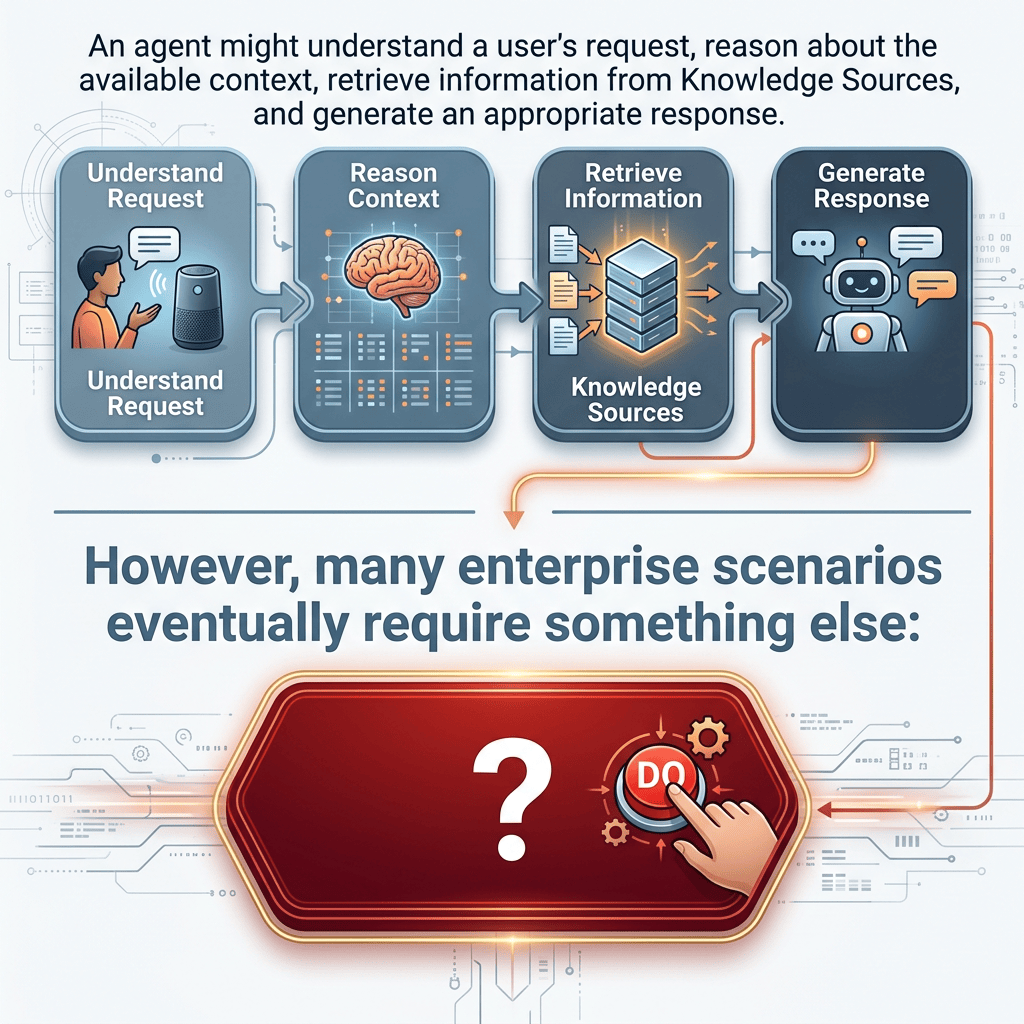
An agent might understand a user’s request, reason about the available context, retrieve information from Knowledge Sources, and generate an appropriate response. However, many enterprise scenarios eventually require something else:
an operation must actually be performed.
Examples include:
- Creating a SharePoint list item
- Updating an existing request
- Retrieving structured business data
- Sending a notification
- Starting an approval process
- Calling another enterprise system
- Executing deterministic business logic
- Returning calculated or retrieved information to the agent
This is where Tools and Workflows become important.
A useful high-level architecture is:
User
↓
Agent
↓
Reasoning / Orchestration
↓
Tool
↓
Workflow
↓
Business Systems
↓
Workflow Result
↓
Agent
↓
Response to User
The workflow therefore becomes a bridge between the conversational and reasoning capabilities of the Agent and deterministic enterprise automation.
1. Knowledge and Action Are Different
Before discussing workflows, it is important to preserve one of the most important architectural distinctions in Copilot Studio:
Knowledge provides information.
Tools provide capabilities.
Consider a SharePoint scenario.
A user asks:
“What is our hardware replacement policy?”
The Agent might retrieve a document from SharePoint and answer the question.
Conceptually:
User Question
↓
Agent
↓
Knowledge
↓
Retrieval
↓
Grounding
↓
Answer
Now consider another request:
“Create a hardware replacement request for my laptop.”
The Agent must perform an operation.
Conceptually:
User Request
↓
Agent
↓
Tool
↓
Workflow
↓
SharePoint
↓
Create Item
The first scenario primarily requires Knowledge.
The second requires an Action capability, exposed to the Agent as a Tool.
2. What Is a Workflow?
In the current Copilot Studio experience described by Microsoft, Workflows are automated flows created through the Copilot Studio workflow experience.
They automate repetitive tasks and integrate applications and services.
A Workflow is fundamentally deterministic.
This is an important distinction from the generative Agent.
Consider:
Agent:
“Given what the user said, what capability should I use?”
Workflow:
“Execute these defined steps using these inputs.”
The Agent provides flexible reasoning and orchestration.
The Workflow provides predictable process execution.
This creates a powerful architectural combination:
Agent = reasoning and orchestration
Workflow = deterministic execution
3. Why Deterministic Execution Matters
Suppose a user says:
“I need access to the Finance SharePoint site.”
The Agent might interpret:
Intent = Access Request
Resource = Finance SharePoint Site
RequestedFor = Current User
The Agent could then invoke a Workflow.
The Workflow might execute:
Receive parameters
↓
Validate required values
↓
Create SharePoint item
↓
Generate request identifier
↓
Return identifier to Agent
For example:
RequestId = 842
The Agent can then generate a natural-language response:
“Your access request was created successfully. The request ID is 842.”
The Agent did not need to know how to create a SharePoint list item.
The Workflow encapsulated that operation.
4. Workflow as an Agent Tool
Microsoft allows a Workflow to be added to an Agent as a Tool.
This changes the role of the Workflow.
Instead of existing only as an independent automation, it becomes a capability available to the Agent.
Conceptually:
Agent
Available Tools:
- Search employee directory
- Create service request
- Get request status
- Update request
- Send notification
Each capability could potentially be implemented by a Workflow.
The Agent’s orchestrator can determine when an appropriate Tool should be invoked.
5. The Required Workflow Contract
A Workflow cannot simply be an arbitrary automation if it is expected to behave as an Agent Tool.
Microsoft defines an important contract.
The Workflow must contain:
When an agent calls the flow
and:
Respond to the agent
This gives us a very useful architectural model:
Agent
↓
When an agent calls the flow
↓
Workflow Logic
↓
Respond to the agent
↓
Agent
The first component represents the entry point.
The second represents the return path.
Together they establish a request/response contract between Agent and Workflow.
6. Inputs: Agent → Workflow
The Agent may need to provide information to the Workflow.
Imagine a SharePoint request Agent.
The user says:
“Create a request for VPN access because I need to work remotely.”
The Agent might identify values such as:
RequestType = VPN Access
Description = Need remote access
These values can become Workflow inputs.
Conceptually:
User
↓
Agent understands request
↓
Tool selected
↓
Inputs
RequestType
Description
↓
Workflow
The Workflow now has structured values that can be used by deterministic automation.
7. Processing Inside the Workflow
Once the Workflow receives its inputs, normal workflow logic can execute.
For example:
When an agent calls the flow
↓
Receive:
RequestType
Description
↓
Create item in SharePoint
↓
Retrieve created item ID
↓
Prepare response
↓
Respond to the agent
The Workflow can contain actions, connectors, conditions, transformations, loops, and other supported automation components.
The important point is that the Agent does not need to implement this business logic itself.
8. Outputs: Workflow → Agent
The opposite direction is equally important.
A Workflow can return information to the Agent.
Suppose SharePoint creates:
ID = 842
The Workflow could return:
RequestId = 842
Status = Submitted
Conceptually:
Workflow
↓
Respond to the agent
↓
RequestId = 842
Status = Submitted
↓
Agent
The Agent can then transform those structured values into a conversational response.
For example:
“Your VPN access request was submitted successfully. Your request number is 842.”
This gives us a complete round trip:
User
↓
Agent
↓
Input Parameters
↓
Workflow
↓
Business Operation
↓
Output Parameters
↓
Agent
↓
Natural Language Response
9. Why “Respond to the Agent” Is Important
Without a response mechanism, the Agent would have no structured way to receive the result of the operation.
Imagine:
Agent
↓
Create Request Workflow
↓
SharePoint creates item
But then nothing returns.
The Agent would not necessarily know:
- Whether the operation succeeded
- Which ID was generated
- Which status resulted
- What information should be presented to the user
The Respond to the agent action closes this communication loop.
10. Real-Time Response Requirement
Microsoft specifies that a Workflow used as an Agent Tool must respond in real time.
The relevant setting is:
Asynchronous response = Off
under the Networking settings of the response action.
This is logical when we consider the interaction model.
The Agent is effectively waiting for:
Agent
↓
Tool Call
↓
Workflow
↓
Result
↓
Continue Agent Execution
If the Workflow behaved purely as a detached asynchronous process, the Agent would not have the immediate result required to continue the current interaction in the same way.
11. The 100-Second Limit
Microsoft currently documents a 100-second action limit for a Workflow being called as an Agent Tool.
This has architectural consequences.
A Workflow called synchronously by an Agent should generally not contain a long-running business process before returning its required response.
For example, this architecture could be problematic:
Agent
↓
Workflow
↓
Wait for human approval
↓
Wait hours
↓
Respond to Agent
That does not fit the synchronous interaction model.
Instead, we should think carefully about separating:
Immediate Agent response
from:
Long-running background process
For the standard Agent Flow experience, Microsoft also documents a useful pattern where longer-running actions can be placed after the response to the Agent, allowing the Flow to return the immediate result while subsequent work continues independently.
12. Published Workflows
Another important requirement is:
The Workflow must be published.
Creating and saving the Workflow is not sufficient for it to become available as an Agent Tool.
The lifecycle therefore becomes:
Design
↓
Configure Inputs
↓
Implement Logic
↓
Configure Outputs
↓
Test
↓
Publish
↓
Add as Tool
↓
Configure Tool
↓
Test Agent
Publication establishes the version that can participate in the Agent runtime.
13. Adding the Workflow to the Agent
According to the Microsoft documentation for the Workflow experience, the general path is:
Agents
↓
Select Agent
↓
Tools
↓
Add a tool
↓
Workflows
↓
Select Workflow
The list should contain eligible published Workflows.
Eligibility therefore depends on the Workflow having the expected Agent communication structure.
In simplified terms:
When an agent calls the flow
↓
Workflow logic
↓
Respond to the agent
↓
Published
Once added, the Workflow becomes one of the capabilities available to the Agent.
14. Agent-Level Tool
The documentation specifically describes adding the Workflow as an:
agent-level tool
This distinction is important.
At the Agent level, the orchestrator can invoke the Workflow directly at runtime.
Conceptually:
User Request
↓
Agent Orchestrator
↓
Available capabilities evaluated
↓
Workflow selected
↓
Workflow executed
This allows the Agent to reason about which Tool is appropriate for the current request.
15. The Importance of the Tool Description
One detail in the Microsoft documentation deserves special attention:
the Workflow’s description should clearly explain its purpose and functionality.
Why?
Because the description is not merely documentation for developers.
It helps the Agent understand when the Tool is appropriate.
Imagine two descriptions.
Poor description:
“SharePoint Flow”
Better description:
“Creates a new internal IT support request in the Corporate Service Requests SharePoint list when a user asks to submit a new support request.”
The second description communicates much more semantic information.
The Agent can better understand:
When should I use this Tool?
This makes Tool descriptions part of Agent design.
16. Tool Selection Is an Orchestration Problem
Once several Tools exist, the Agent needs to distinguish between them.
For example:
Tool A:
Create IT Request
Tool B:
Get IT Request Status
Tool C:
Cancel IT Request
User says:
“What’s happening with request 842?”
The Agent should understand that this is not a request to create something.
It should select:
Get IT Request Status
The descriptions, Agent Instructions, Tool inputs, and surrounding context help the orchestration process determine the appropriate capability.
17. Instructions and Tool Descriptions Have Different Roles
It is useful to distinguish them.
Agent Instructions
Describe overall Agent behavior.
For example:
“You help employees manage internal IT requests. Use the appropriate Tool when users ask to create or retrieve requests.”
Tool Description
Describes one specific capability.
For example:
“Retrieves an existing IT request from SharePoint using its request ID.”
Conceptually:
Instructions:
How should the Agent behave overall?
Tool Description:
What does this particular Tool do, and when is it useful?
18. Workflow Inputs Should Be Designed Carefully
Suppose our Workflow creates a SharePoint request.
We could define:
Title
Description
Category
Priority
RequestedBy
But should the Agent provide every value?
Not necessarily.
Some values might be derived deterministically.
For example:
RequestedDate = utcNow()
Status = “New”
These do not necessarily need to be generated by the Agent.
A useful design principle is:
Let the Agent provide semantic information that requires understanding.
Let deterministic systems provide deterministic values whenever possible.
For example:
Agent determines:
Category = “VPN Access”
Workflow determines:
CreatedDate = current timestamp
Status = “New”
SharePoint determines:
ID = generated item ID
This reduces unnecessary generative variability.
19. Do Not Let the LLM Invent System Data
This principle becomes especially important for identifiers.
Suppose we need:
RequestId
The Agent should not invent:
RequestId = 12345
Instead:
SharePoint creates the item
↓
SharePoint returns ID
↓
Workflow captures ID
↓
Workflow returns ID to Agent
↓
Agent displays ID
The authoritative system should generate authoritative data.
The Agent should consume that result.
20. Example: Creating a SharePoint Item
A simple enterprise architecture could therefore be:
User:
“Create a request to install Visual Studio.”
↓
Agent
Extracts:
Title = Install Visual Studio
Description = User needs Visual Studio installed
↓
Tool:
Create IT Request
↓
Workflow
↓
SharePoint Connector
↓
Create item
↓
SharePoint returns:
ID = 921
↓
Respond to the agent:
RequestId = 921
↓
Agent:
“Your request was created successfully. Request ID: 921.”
This is a very clean separation of responsibilities.
21. Who Executes the SharePoint Operation?
This is one of the most important security questions.
When a Workflow uses a SharePoint Connector, some authenticated connection must execute the SharePoint operation.
Therefore, we must never think simply:
“The Agent created the SharePoint item.”
Architecturally, something closer to this occurs:
Agent
↓
Workflow
↓
Connector
↓
Authenticated Connection
↓
SharePoint
The permissions of that connection determine what operations are possible.
22. User Identity vs Connection Identity
This distinction must be evaluated carefully.
The user talking to the Agent may have one security context.
The connection used by the Workflow may have another.
Conceptually:
User permissions:
Site A
Workflow connection permissions:
Site A
Site B
Site C
These security boundaries are not automatically equivalent.
Therefore, every Tool should be analyzed in terms of:
- Who invokes the Agent?
- Which identity executes the Workflow?
- Which connection is used?
- What permissions does that connection have?
- What data can the Workflow retrieve?
- What data can the Workflow modify?
- What information is returned to the Agent?
- What information can ultimately be shown to the user?
This becomes fundamental in enterprise Agent architecture.
23. Principle of Least Privilege
Workflow connections should follow the principle of least privilege.
If a Workflow only needs access to:
IT Requests
then giving its execution identity broad access to unrelated HR, Finance, or executive content creates unnecessary risk.
The Tool boundary should correspond as closely as possible to the business capability.
This is particularly important because Agents can dynamically decide when Tools are useful.
A Tool should therefore be safe even when considered independently.
24. Agent Reasoning vs Workflow Logic
A useful architectural principle is:
Use the Agent for interpretation.
Use the Workflow for deterministic business logic.
For example:
User:
“I can’t connect from home and I think my VPN access expired.”
Agent reasoning:
Intent = VPN support
Potential Action = Create IT request
Workflow logic:
Create SharePoint item
Set Status = New
Set Category = VPN
Generate timestamp
Return ID
This separation provides both flexibility and predictability.
25. Workflow vs Knowledge
A Workflow should not be confused with Knowledge.
Suppose the Agent needs to answer:
“What information must I provide when requesting VPN access?”
That might come from:
Knowledge Source
↓
Corporate IT Policy
↓
Retrieval
↓
Grounding
↓
Answer
But:
“Create my VPN request.”
requires:
Tool
↓
Workflow
↓
SharePoint
Therefore:
Knowledge answers.
Workflow executes.
26. Combining Knowledge and Workflow
Real enterprise Agents often need both.
Consider:
User:
“Can contractors request VPN access?”
↓
Agent
↓
Retrieve VPN policy
↓
Knowledge says contractors require manager approval
↓
Agent explains requirement
↓
User:
“Yes, create the request.”
↓
Agent
↓
Workflow Tool
↓
Create SharePoint request
↓
Return ID
This architecture combines:
Knowledge
+
Retrieval
+
Grounding
+
Reasoning
+
Tool
+
Workflow
+
SharePoint
This is much closer to a production enterprise Agent.
27. Workflow vs Event Trigger
Another distinction is important.
A Workflow can be initiated in different ways.
For our Agent Tool scenario:
Agent
↓
When an agent calls the flow
But workflows can also be triggered by:
Events
or:
Schedules
Therefore:
Agent Tool invocation:
Agent decides to invoke Workflow.
Event-driven Workflow:
External event starts Workflow.
Scheduled Workflow:
Time starts Workflow.
These architectures solve different problems.
28. Agent-Initiated Architecture
Agent Tool:
User
↓
Agent
↓
Reasoning
↓
Tool selected
↓
Workflow
The Agent participates in deciding that the operation should occur.
29. Event-Initiated Architecture
Event automation:
SharePoint
↓
Item Created
↓
Trigger
↓
Workflow
The SharePoint event initiates the process.
No conversational reasoning is required merely to detect the event.
30. Scheduled Architecture
Scheduled automation:
Clock / Schedule
↓
Recurrence
↓
Workflow
Again, no user conversation is required.
Understanding these differences prevents us from using Agents unnecessarily.
31. When NOT to Use an Agent
Suppose the requirement is:
“When a SharePoint item is created, send an email.”
The architecture can simply be:
SharePoint
↓
Trigger
↓
Workflow
↓
Email
Adding:
SharePoint
↓
Agent
↓
Reasoning
↓
Workflow
↓
Email
would probably add complexity without meaningful value.
The Agent becomes useful when interpretation or reasoning contributes to the process.
For example:
“Analyze the free-text support request, determine which department should handle it, explain the classification, and invoke the appropriate workflow.”
Now generative reasoning has a clear purpose.
32. Workflows Are Deterministic
Microsoft explicitly describes Workflows as deterministic.
That concept is extremely useful architecturally.
Given defined inputs and logic, the Workflow follows its configured rule-based execution path.
This contrasts with generative reasoning, where language interpretation and generated responses may vary.
Therefore:
Agent:
Flexible
Contextual
Generative
Reasoning-oriented
Workflow:
Structured
Rule-based
Repeatable
Execution-oriented
Combining them allows us to place each type of logic where it belongs.
33. A Useful Enterprise Boundary
A useful design principle is:
Agent decides:
What does the user mean?
Which capability is appropriate?
Workflow decides:
How exactly is the operation performed?
SharePoint decides:
How is the enterprise record stored?
This creates clean architectural boundaries.
34. Tool Inputs Are a Contract
Once a Workflow becomes a Tool, its inputs effectively become an API-like contract.
Imagine:
CreateRequest
Inputs:
Title: string
Description: string
Category: string
Outputs:
RequestId: integer
Status: string
Conceptually, this is similar to a function:
CreateRequest(
title,
description,
category
)
returns:
requestId
status
This way of thinking is particularly useful for developers.
The Workflow is not literally a traditional REST endpoint, but from the Agent architecture perspective it exposes a callable capability with defined inputs and outputs.
35. Tool Outputs Are Also a Contract
Outputs should therefore be designed intentionally.
Avoid returning enormous amounts of unnecessary data.
If the Agent only needs:
RequestId
Status
do not automatically return an entire SharePoint record containing dozens of fields.
This provides several benefits:
- Lower complexity
- Easier orchestration
- Reduced data exposure
- Easier troubleshooting
- Smaller payloads
- Better performance
The Tool boundary should be explicit and minimal.
36. The 100-Second Limit Encourages Good Architecture
The synchronous execution limit should not simply be viewed as an inconvenience.
It encourages separation between:
interactive operations
and:
long-running processes
Interactive:
Agent
↓
Create request
↓
Return ID
Long-running:
Request
↓
Approval
↓
Manager decision
↓
Provisioning
↓
Notification
The Agent does not necessarily need to remain synchronously attached to that entire lifecycle.
37. Human Approval Requires Different Thinking
Suppose a process requires manager approval.
Trying to make the Agent wait synchronously for the manager is inappropriate.
Instead:
Agent
↓
Workflow
↓
Create Request
↓
Start Approval Process
↓
Return immediate status
Agent:
“Your request was submitted for approval.”
The approval can continue independently.
Later, another process or query can retrieve the result.
This is an example of separating conversational responsiveness from business-process duration.
38. Error Handling
Workflow design should also consider failure.
Suppose SharePoint is unavailable.
Instead of returning nothing, the Workflow should ideally provide meaningful output.
Conceptually:
Success = false
ErrorCode = SHAREPOINT_CREATE_FAILED
Message = Unable to create request
The Agent can then respond appropriately.
The Agent should not claim:
“Your request was successfully created”
unless the Tool actually returned successful execution information.
39. Never Let Conversational Confidence Replace Transaction Confirmation
This principle is extremely important.
A language model can generate a confident sentence.
That does not prove a transaction occurred.
Therefore:
Agent requests operation
↓
Workflow executes operation
↓
External system confirms operation
↓
Workflow returns confirmation
↓
Agent communicates confirmation
The system-of-record result must determine transactional truth.
Not the language model.
40. Testing the Tool
Testing should verify more than whether the Agent produces a nice response.
We should inspect:
Input sent by Agent
↓
Workflow execution
↓
Connector operation
↓
External system result
↓
Output returned
↓
Final Agent response
In the newer Copilot Studio experience, Microsoft also provides an activity trace that can help inspect which Tool was invoked, which arguments were passed, and what the Tool returned.
This is extremely valuable for debugging orchestration.
41. What If the Agent Does Not Call the Workflow?
Microsoft recommends examining areas such as:
- Tool name
- Tool description
- Agent Instructions
This makes sense because orchestration needs enough semantic information to understand the capability.
For example:
Bad:
Tool name:
Flow1
Description:
Creates data.
Better:
Tool name:
Create SharePoint IT Request
Description:
Creates a new IT service request in the Corporate Service Requests SharePoint list when the user asks to submit a new IT support request.
The second definition gives the orchestrator much stronger information.
42. Tool Design Is Part of Prompt Engineering
This leads to an interesting architectural conclusion.
Prompt engineering in an Agent is not limited to the main Instructions.
The semantic surface includes:
Agent Instructions
Tool Names
Tool Descriptions
Input Names
Input Descriptions
Conversation Context
All of these can influence how the Agent understands available capabilities.
Tool design is therefore partly an integration problem and partly an orchestration-design problem.
43. One Huge Workflow vs Atomic Tools
It may be tempting to create:
CorporateMegaWorkflow
with inputs controlling dozens of operations.
For example:
Operation = CreateRequest
Operation = UpdateRequest
Operation = DeleteRequest
Operation = FindRequest
Operation = ApproveRequest
Operation = SendEmail
This may work technically, but it makes the semantic Tool boundary less clear.
A more agent-friendly architecture can often use atomic capabilities:
Create Request
Get Request Status
Update Request
Cancel Request
Submit Request for Approval
Each Tool has a clear purpose.
This aligns with the same atomic-agent philosophy we have been applying throughout our Copilot Studio studies.
44. Atomic Tools Improve Governance
Smaller Tools also make security easier to reason about.
Consider:
Tool A:
Read Request
Tool B:
Create Request
Tool C:
Delete Request
These represent very different risk levels.
If everything is hidden behind one enormous Workflow, auditing and controlling capabilities becomes more difficult.
Atomic Tools allow us to reason about permissions and consequences separately.
45. Workflow Reuse
A published Workflow can become a reusable capability.
Conceptually:
Workflow:
CreateServiceRequest
Potential consumers:
Agent A
Agent B
Agent C
This creates an interesting architectural opportunity.
Instead of embedding business logic repeatedly inside multiple Agents, a common deterministic operation can potentially be centralized.
The Agent remains responsible for its conversational purpose and orchestration.
The Workflow remains responsible for the business operation.
46. Workflow as an Internal Business API
For developers familiar with service-oriented architecture, a useful mental model is to treat the Workflow approximately as an internal business operation.
Traditional architecture:
Application
↓
API
↓
Business Logic
↓
Database
Agent architecture:
Agent
↓
Tool
↓
Workflow
↓
Connector
↓
Business System
The technologies differ, but the architectural principle is similar:
Expose a controlled business capability through a defined contract.
47. When a Traditional API Might Be Better
Workflows should not automatically replace APIs.
A custom API may be preferable when we need:
- Very high throughput
- Complex transactional behavior
- Specialized authentication
- Strict latency requirements
- Large data processing
- Sophisticated domain logic
- Existing enterprise services
- Strong API lifecycle management
A Workflow is particularly attractive when:
- Microsoft 365 connectors already solve the integration
- The process is relatively straightforward
- Low-code maintainability is valuable
- SharePoint, Teams, Outlook, Dataverse, or similar services dominate the integration
- Business automation logic already fits the Power Platform model
Again:
Agents are not universal solutions.
Workflows are not universal integration layers.
Architecture should follow the problem.
48. Current Copilot Studio Terminology Matters
There is an important product-evolution detail in the current Microsoft documentation.
Microsoft currently documents both:
Agent flows
and:
Workflows
The traditional Agent flows documentation applies to Agents using the standard harness.
The newer Workflows experience described in the documentation used for this article applies to Agents or Workflows powered by the GitHub Copilot harness.
The underlying architectural concepts remain similar:
Trigger
↓
Actions
↓
Automation
and, when used as an Agent Tool:
Agent
↓
Flow/Workflow
↓
Response
However, the authoring experience, product terminology, capabilities, and billing model can differ.
Therefore, when following Microsoft documentation, always verify which harness and experience the article refers to.
49. Workflows and Copilot Credits
The Microsoft documentation for the GitHub Copilot harness explicitly notes that usage-based billing applies to building, testing, evaluating, and using Agents, and that these operations can consume Copilot Credits.
This is another reason architecture matters.
Calling a Workflow is not merely an abstract logical operation.
Production architectures should eventually consider:
- Execution volume
- Number of actions
- Agent invocations
- Workflow invocations
- Testing activity
- Capacity
- Copilot Credits
- Licensing
Cost should therefore eventually become part of Agent architecture, just as security and performance are.
50. Complete SharePoint Example
Consider a corporate Agent called:
IT Service Assistant
The user says:
“My Visual Studio installation stopped working. Create a support request.”
The architecture could be:
User
↓
Agent
↓
Instructions
↓
Generative Orchestration
↓
Agent identifies intent:
Create IT Request
↓
Tool:
Create IT Request Workflow
↓
Inputs:
Title = Visual Studio installation problem
Description = Visual Studio installation stopped working
Category = Software
↓
When an agent calls the flow
↓
Workflow
↓
SharePoint Connector
↓
Create Item
↓
SharePoint:
ID = 1054
↓
Respond to the agent
Outputs:
RequestId = 1054
Status = New
↓
Agent
↓
“Your support request was created successfully. Request ID: 1054.”
This example demonstrates the entire interaction between reasoning and deterministic automation.
51. Extending the Example with Knowledge
Now imagine the Agent also has an IT Support Knowledge Source in SharePoint.
Before creating the request, the Agent could retrieve troubleshooting documentation.
Architecture:
User Problem
↓
Agent
↓
Knowledge Retrieval
↓
Grounding
↓
Agent proposes troubleshooting
↓
Problem remains unresolved
↓
Agent selects Tool
↓
Workflow
↓
Create SharePoint request
↓
Return Request ID
Now the Agent provides both:
Knowledge
and:
Action
This is one of the most useful enterprise Agent patterns.
52. Security Model for the Complete Architecture
We should now ask:
Who is the user?
↓
How is the Agent authenticated?
↓
Which Knowledge can the user retrieve?
↓
Which Tools are available?
↓
Which connection executes the Workflow?
↓
What can that connection access?
↓
What data enters SharePoint?
↓
What data returns from SharePoint?
↓
What data is returned to the Agent?
↓
What data is displayed to the user?
This chain should be analyzed for every enterprise Tool.
53. The Full Mental Model
Our Copilot Studio mental model has now expanded considerably.
Conversation path:
User
↓
Agent
↓
Instructions
↓
Orchestration
Knowledge path:
Knowledge Source
↓
Retrieval
↓
Grounding
↓
Agent Context
Action path:
Agent
↓
Tool
↓
Workflow
↓
Connector
↓
External System
Return path:
External System
↓
Workflow
↓
Respond to the agent
↓
Agent
↓
User
This gives us a complete enterprise interaction loop.
54. Tool vs Knowledge vs Trigger
A concise distinction is:
Knowledge
Question:
What information can the Agent use?
Tool
Question:
What capability can the Agent invoke?
Workflow
Question:
How is a deterministic multi-step operation executed?
Trigger
Question:
What caused an automation to begin?
Connector
Question:
How does the automation communicate with another system?
Instructions
Question:
How should the Agent behave?
Orchestration
Question:
Given the current context, which capability should be used?
55. Architectural Checklist
Before exposing a Workflow as an Agent Tool, ask:
- What business capability does this Workflow represent?
- Is an Agent actually necessary?
- What should cause the Agent to select this Tool?
- Is the Tool description clear?
- What inputs are required?
- Which inputs should come from the Agent?
- Which values should be generated deterministically?
- What outputs must return to the Agent?
- Is the Workflow published?
- Does it contain
When an agent calls the flow? - Does it contain
Respond to the agent? - Is asynchronous response disabled?
- Can the interactive portion complete within the documented action limit?
- Which Connector executes each external operation?
- Which identity authenticates that Connector?
- What permissions does that identity have?
- Does the design follow least privilege?
- Could sensitive information be returned to an unauthorized user?
- How are errors returned?
- How will execution be monitored?
- Could a smaller atomic Tool provide a safer architecture?
- Could Power Automate or another deterministic automation solve the entire requirement without an Agent?
56. The Most Important Architectural Lesson
The central idea is not simply:
“An Agent can call a Workflow.”
The deeper architectural pattern is:
Use generative reasoning to determine what should be done when interpretation is required.
Then:
Use deterministic automation to control how the business operation is actually executed.
Conceptually:
Understand
↓
Decide
↓
Execute
↓
Confirm
Where:
Agent:
Understand + Decide
Workflow:
Execute
External System:
Confirm authoritative result
Agent:
Communicate result
This separation is extremely valuable in enterprise architecture.
Conclusion
Workflows transform Microsoft Copilot Studio Agents from systems that primarily understand and communicate into systems that can participate in real business processes.
The Agent can understand natural language, reason over context, retrieve Knowledge, and determine which capability is appropriate.
The Workflow provides deterministic execution.
The Connector provides access to external systems.
The external system remains the authoritative source for transactional results.
Finally, Respond to the agent returns structured information to the Agent, allowing it to continue the conversation using the actual result of the operation.
The resulting architecture is:
User
↓
Agent
↓
Instructions + Context + Knowledge
↓
Orchestration
↓
Tool Selection
↓
Workflow
↓
Connector
↓
Enterprise System
↓
Result
↓
Respond to the agent
↓
Agent
↓
User
For SharePoint-centric enterprise solutions, this pattern is particularly powerful because it lets us combine the strengths of technologies we already understand:
SharePoint = content and business data
Agent = natural-language understanding and reasoning
Knowledge = trusted information
Workflow = deterministic process
Connector = integration
Tool = capability exposed to the Agent
The goal should not be to move every business process into an Agent.
Instead, the Agent should be introduced precisely where language understanding, context, reasoning, Knowledge, or dynamic orchestration adds value.
The deterministic portions of the process should remain deterministic.
That separation is one of the foundations for building reliable enterprise Agents with Microsoft Copilot Studio.


