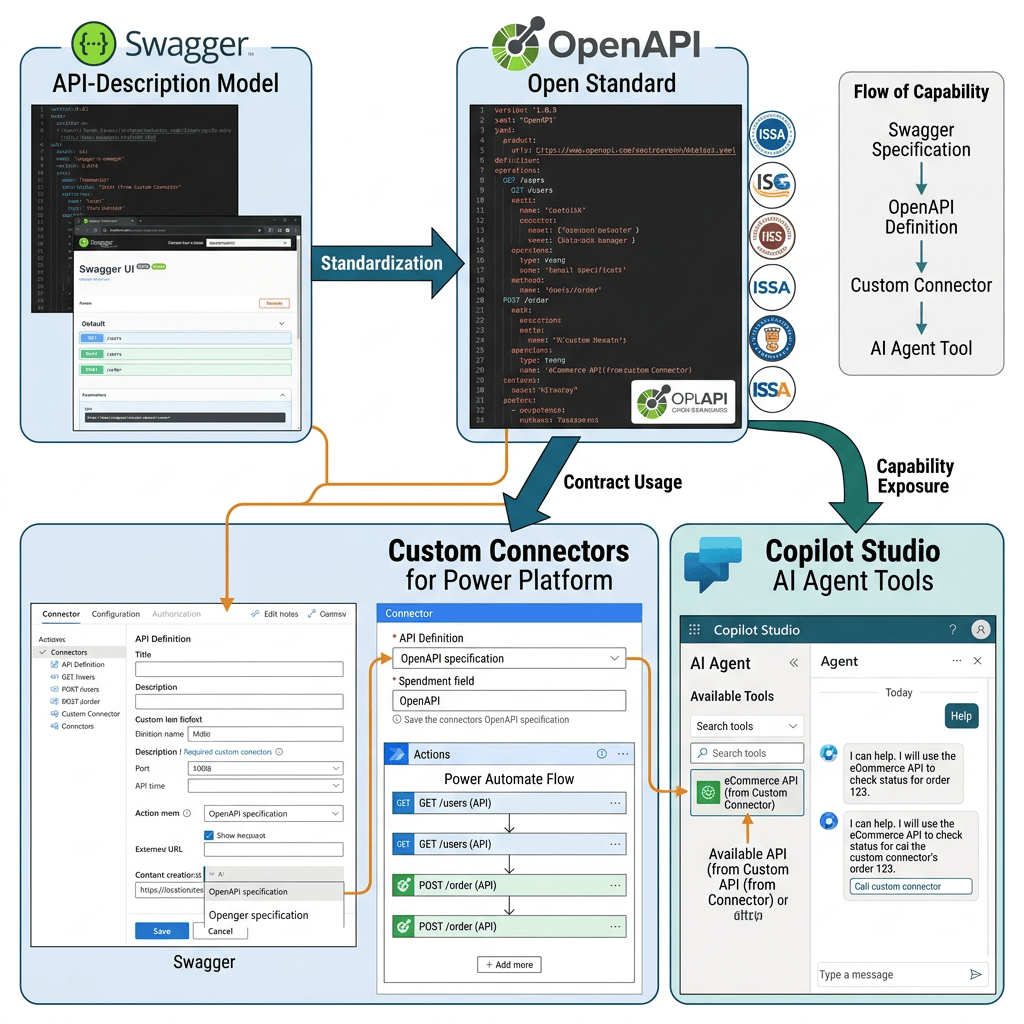
Swagger started the API-description model; OpenAPI became the open standard; Custom Connectors use that contract to expose REST API operations to Power Platform, and Copilot Studio can ultimately make those capabilities available to an Agent as Tools.
Swagger and OpenAPI: Origins, Evolution, and Their Role in Modern API Integration
Introduction
When working with REST APIs, Power Platform Custom Connectors, Power Automate, and Microsoft Copilot Studio, two terms appear frequently: Swagger and OpenAPI.
They are closely related, but they are not exactly the same thing.
The simplest way to understand the relationship is:
Swagger was the original specification. OpenAPI is the standardized evolution of that specification. Swagger remains the name of a popular ecosystem of tools built around OpenAPI.
This distinction becomes particularly important when working with Microsoft Power Platform because Custom Connectors rely on an API description to understand which operations an external API exposes, which parameters those operations require, how authentication works, and what data can be returned.
Microsoft describes a Custom Connector as a wrapper around an API and states that, behind the scenes, Power Apps, Power Automate, Logic Apps, and Copilot Studio use OpenAPI to define connectors. (Microsoft Learn)
1. The Problem Before Swagger
REST APIs are fundamentally based on HTTP.
For example, our football API might expose an operation such as:
GET https://api.football-data.org/v4/competitions/PL/standings
A human developer can read API documentation and determine that:
Host:api.football-data.orgBase Path:/v4Resource:/competitions/{code}/standingsHTTP Method:GETParameter:codeAuthentication:API KeyResponse:JSON
However, traditional documentation is primarily designed for humans.
Software needs something more structured.
Ideally, we want a machine-readable description similar to:
API│├── Information├── Server├── Authentication├── Paths│ └── Operations├── Parameters├── Request├── Responses└── Schemas
This is the problem that Swagger was created to address.
2. The Origin of Swagger
Swagger began in 2010 as an open-source specification for designing and describing RESTful APIs. An ecosystem of tools subsequently appeared around the specification, including Swagger UI, Swagger Editor, and Swagger Codegen. (Swagger)
The fundamental idea was simple but extremely powerful:
REST API │ ▼Machine-readable API description │ ▼Swagger Specification │ ├── Documentation ├── Testing ├── Client generation └── Development tools
Instead of documenting an API only with prose, developers could describe its interface using a structured document.
For example:
paths: /competitions/{code}/standings: get: parameters: - name: code in: path required: true type: string
A program can parse this structure and determine that:
- an endpoint exists;
- it supports
GET; - it expects a parameter named
code; - the parameter appears in the URL path;
- the parameter is required;
- its type is
string.
Swagger therefore transformed API documentation into something that both humans and software could understand.
3. Swagger Was More Than Documentation
This is an important conceptual distinction.
Traditional documentation might say:
To retrieve competition standings, call:GET /competitions/{code}/standingsThe code parameter identifies the competition.
A developer can understand this.
But a Swagger/OpenAPI document represents the same information structurally:
paths: /competitions/{code}/standings: get: operationId: GetCompetitionStandings parameters: - name: code in: path required: true type: string
Now software can understand it as well.
The architectural change is therefore:
Traditional API DocumentationAPI ↓Documentation ↓Human Developer
versus:
OpenAPI DescriptionAPI ↓Structured Contract ↓Human + Software
This concept of a machine-readable API contract is one of the most important ideas behind OpenAPI.
4. Swagger Specification vs. Swagger Tools
The word Swagger eventually became overloaded because it referred both to the specification and to tools surrounding that specification.
For example:
Swagger│├── Swagger Specification├── Swagger UI├── Swagger Editor└── Swagger Codegen
These are not the same thing.
Swagger Specification was the API description format.
Swagger UI renders API definitions as interactive documentation.
Swagger Editor provides an environment for authoring and validating API descriptions.
Swagger Codegen uses API descriptions to generate client/server-related code.
This distinction became even more important after the specification itself was renamed OpenAPI.
5. The Major Transition: Swagger Becomes OpenAPI
The critical historical transition occurred in 2015.
The Swagger Specification was donated to the Linux Foundation, and the OpenAPI Initiative (OAI) was established to continue developing an open, vendor-neutral specification for RESTful API metadata. Microsoft was among the founding members of the OpenAPI Initiative. (OpenAPI Initiative)
The historical relationship can therefore be visualized as:
Swagger Specification │ ▼Swagger 2.0 │ │ 2015 ▼OpenAPI Initiative │ ▼OpenAPI Specification │ ├── OpenAPI 2.0 ├── OpenAPI 3.x └── continuing evolution
This is why modern documentation frequently uses expressions such as:
OpenAPI (formerly Swagger)
Microsoft uses this terminology extensively in its Custom Connector documentation. (Microsoft Learn)
6. Did Swagger Disappear?
No.
The specification became the OpenAPI Specification, but Swagger continued as a family of tools for working with OpenAPI.
Therefore, today we should distinguish between:
OpenAPI =Specification / StandardSwagger =Tooling ecosystem around OpenAPI
This is slightly simplified, but it is a very useful modern mental model.
For example, Swagger UI still exists and can render an OpenAPI description.
Likewise, Swagger Editor can be used to edit API descriptions.
This explains why developers still constantly encounter the word “Swagger” even though the specification itself is now called OpenAPI.
7. What Exactly Is OpenAPI?
OpenAPI is a specification for describing HTTP APIs in a standardized, machine-readable form.
An OpenAPI description can communicate information such as:
API│├── Metadata│ ├── Title│ ├── Description│ └── Version│├── Host / Servers│├── Paths│├── Operations│ ├── GET│ ├── POST│ ├── PUT│ └── DELETE│├── Parameters│├── Request Bodies│├── Responses│├── Data Schemas│└── Security
The crucial concept is:
OpenAPI describes the interface contract of an API.
It does not implement the API.
8. API Implementation vs. OpenAPI Description
Suppose football-data.org implements:
GET /v4/competitions/PL/standings
That endpoint exists on the actual web server.
Our OpenAPI file might contain:
paths: /competitions/{code}/standings: get:
That definition does not create the endpoint.
It only describes it.
Conceptually:
API Implementation │ │ described by ▼OpenAPI Description
For a developer familiar with C# or TypeScript, it is useful to think of OpenAPI as a form of external interface contract.
The analogy is not exact, but conceptually:
Implementation ↕Contract
is similar to:
REST API ↕OpenAPI Description
9. OpenAPI Is Not YAML
Another common misunderstanding is saying:
“OpenAPI is a YAML file.”
Not exactly.
OpenAPI is a specification.
YAML and JSON are formats that can be used to represent an OpenAPI description.
Conceptually:
OpenAPI Specification │ ▼API Description │ ┌──┴──┐ ▼ ▼ YAML JSON
For example:
info: title: Football Data API version: '1.0'
is YAML representing part of an OpenAPI description.
The same information can also be represented in JSON.
10. Understanding Our Football Data API Definition
Now we can apply the theory directly to our Football Data API Custom Connector.
Our definition starts with:
swagger: '2.0'
This declares that the document follows the Swagger/OpenAPI 2.0 format.
Then we have:
host: api.football-data.orgbasePath: /v4schemes: - https
Together, these elements describe where the API is located:
https +api.football-data.org +/v4
Result:
https://api.football-data.org/v4
Then we describe a resource:
paths: /competitions/{code}/standings:
And an HTTP operation:
get:
The logical name of the operation is:
operationId: GetCompetitionStandings
The operation expects an input:
parameters: - name: code in: path required: true type: string
Therefore:
code = PL
produces:
/competitions/PL/standings
The API contract can also describe possible responses:
responses: '200': description: Competition standings returned successfully '400': description: Invalid request '403': description: Authentication or subscription restriction '404': description: Competition not found '429': description: API request limit exceeded
The OpenAPI document is therefore describing the conversation that a client can have with the REST API.
11. OpenAPI and Microsoft Power Platform
This becomes especially important in Power Platform.
Microsoft describes a Custom Connector as a wrapper around a REST API. Custom Connectors allow services such as Power Apps, Power Automate, Logic Apps, and Copilot Studio to communicate with APIs that aren’t available through prebuilt connectors. (Microsoft Learn)
The architecture becomes:
External REST API │ ▼OpenAPI Description │ ▼Custom Connector │ ├── Power Apps ├── Power Automate ├── Logic Apps └── Copilot Studio
Microsoft also explicitly states that behind the scenes these products use OpenAPI to define connectors. (Microsoft Learn)
This explains why learning OpenAPI is relevant even though our ultimate objective is building Agents.
12. Why Power Apps Shows a “Swagger Editor”
This is exactly what we encountered in our Football Data API experiment.
The Power Apps Custom Connector interface contains a:
Swagger editor
and our document contains:
swagger: '2.0'
At the same time, Microsoft documentation talks about:
OpenAPI Definition
These are not three unrelated technologies.
They are different parts of the same historical evolution.
Microsoft currently documents this Custom Connector scenario as requiring an OpenAPI 2.0 definition, formerly known as Swagger. The documentation also states that OpenAPI 3.0 definitions aren’t supported by this Custom Connector import flow. (Microsoft Learn)
Therefore:
Swagger Editor │ ▼swagger: '2.0' │ ▼OpenAPI 2.0 Definition │ ▼Custom Connector
is perfectly consistent with the platform’s history.
13. OpenAPI and Custom Connector Operations
An important connection exists between an OpenAPI operation and what Power Platform exposes as an action.
Suppose our definition contains:
operationId: GetCompetitionStandings
Power Platform can interpret this operation and expose it through the connector.
Microsoft documentation explains that connector actions map to operations defined in Swagger/OpenAPI. (Microsoft Learn)
Therefore:
OpenAPIoperationId:GetCompetitionStandings ↓Custom ConnectorAction:GetCompetitionStandings
This is one of the bridges between a traditional REST API and low-code platforms.
14. From REST API to Copilot Studio Agent
Now the relationship becomes particularly interesting for our learning path.
Historically:
REST API ↓Swagger ↓OpenAPI ↓Machine-readable API contract
Power Platform adds:
REST API ↓OpenAPI ↓Custom Connector ↓Power Platform
Copilot Studio extends the architecture further:
User │ ▼Agent │ ▼Tool │ ▼Custom Connector │ ▼OpenAPI Operation │ ▼REST API
For our Football Agent:
User │ │ "Show me the Premier League standings" ▼Agent │ │ Understands the request ▼Tool │ ▼Custom Connector │ │ GetCompetitionStandings │ │ code = PL ▼HTTP GET │ ▼football-data.org │ ▼JSON │ ▼Connector │ ▼Agent │ ▼User
This is why OpenAPI is much more than an old API documentation technology for our purposes.
It becomes part of the contract through which an Agent can access external capabilities.
15. Knowledge vs. OpenAPI/Tools
We should also maintain one of the most important distinctions in our Copilot Studio learning path.
A Knowledge Source provides information that can be retrieved and used to ground answers.
A Tool provides an operational capability.
Therefore:
SharePoint Documents ↓Knowledge ↓Retrieval ↓Grounding ↓Answer
is conceptually different from:
REST API ↓OpenAPI ↓Custom Connector ↓Tool ↓Agent
In our architecture, football-data.org is not simply a document repository used for Grounding. We are exposing API operations that the Agent can invoke.
16. The Bigger Architectural Picture
Our current experiment can now be represented as:
                    USER
                      │
                      ▼
              COPILOT STUDIO
                      │
                      ▼
                    AGENT
                      │
               Orchestration
                      │
                      ▼
                     TOOL
                      │
                      ▼
              CUSTOM CONNECTOR
                      │
             OpenAPI Contract
                      │
                      ▼
                HTTP / REST
                      │
                      ▼
             football-data.org
                      │
                      ▼
                JSON Response
                      │
                      ▼
              CUSTOM CONNECTOR
                      │
                      ▼
                    AGENT
                      │
                      ▼
                    USER
OpenAPI occupies a very specific position:
It formally describes how the external HTTP API can be consumed.
The Custom Connector then provides the Power Platform abstraction around that API.
The Agent can subsequently use the capability exposed through that integration.
Summary Table
| Concept | Meaning | Role in Our Project |
|---|---|---|
| REST API | HTTP-based service exposing resources and operations | football-data.org |
| Swagger | Original open-source API description specification and the name still used by its tooling ecosystem | Historical foundation |
| Swagger 2.0 | Major Swagger specification version that became the basis of OpenAPI | Format used by our connector |
| OpenAPI | Open, standardized specification for describing HTTP APIs | Defines our API contract |
| OAS | OpenAPI Specification | Formal name/abbreviation |
| OpenAPI Description | Machine-readable description of a particular API | Describes Football Data API operations |
| YAML | Structured serialization format | Used to write our definition |
| JSON | Alternative structured serialization format | Can also represent OpenAPI |
| Swagger Editor | Tool/interface for editing API descriptions | Appears in the Custom Connector UI |
| Swagger UI | Tool for rendering interactive API documentation | Common API testing/documentation experience |
paths | Defines available API paths | /competitions/{code}/standings |
operationId | Unique logical identifier for an API operation | GetCompetitionStandings |
parameters | Describes operation inputs | code = PL |
responses | Describes possible HTTP responses | 200, 400, 403, 404, 429 |
| Security Definition | Describes how API authentication works | Football API key |
| Custom Connector | Power Platform wrapper around an API | Exposes football-data.org |
| Tool | Capability an Agent can invoke | Uses the connector operation |
| Knowledge | Information available for retrieval/grounding | Different responsibility from the connector |
| Agent | Interprets user intent and orchestrates available capabilities | Football Agent |
Official Documentation and Reference Links
| Resource | Purpose |
|---|---|
| Microsoft Learn — Custom Connectors overview | Microsoft architecture and lifecycle of Custom Connectors |
| Microsoft Learn — Create a Custom Connector from an OpenAPI definition | Explains importing OpenAPI 2.0 definitions into Custom Connectors |
| Microsoft Learn — Create a Custom Connector from scratch | Explains the General, Security, Definition, Code, and Test stages |
| Microsoft Learn — Create a Custom Connector for a Web API | Shows how OpenAPI describes a Web API for Power Platform integration |
| Microsoft Learn — Connector documentation | Main Microsoft connector documentation |
| OpenAPI Initiative — Official site | Organization responsible for the OpenAPI Specification |
| OpenAPI Specification — Official specification | Current formal OpenAPI specification |
| OpenAPI Initiative — 2015 announcement | Historical announcement establishing the OpenAPI Initiative |
| Swagger — History of Swagger | Historical explanation of Swagger and its transition to OpenAPI |
The key sentence to remember is:
Swagger started the API-description model; OpenAPI became the open standard; Custom Connectors use that contract to expose REST API operations to Power Platform, and Copilot Studio can ultimately make those capabilities available to an Agent as Tools.


