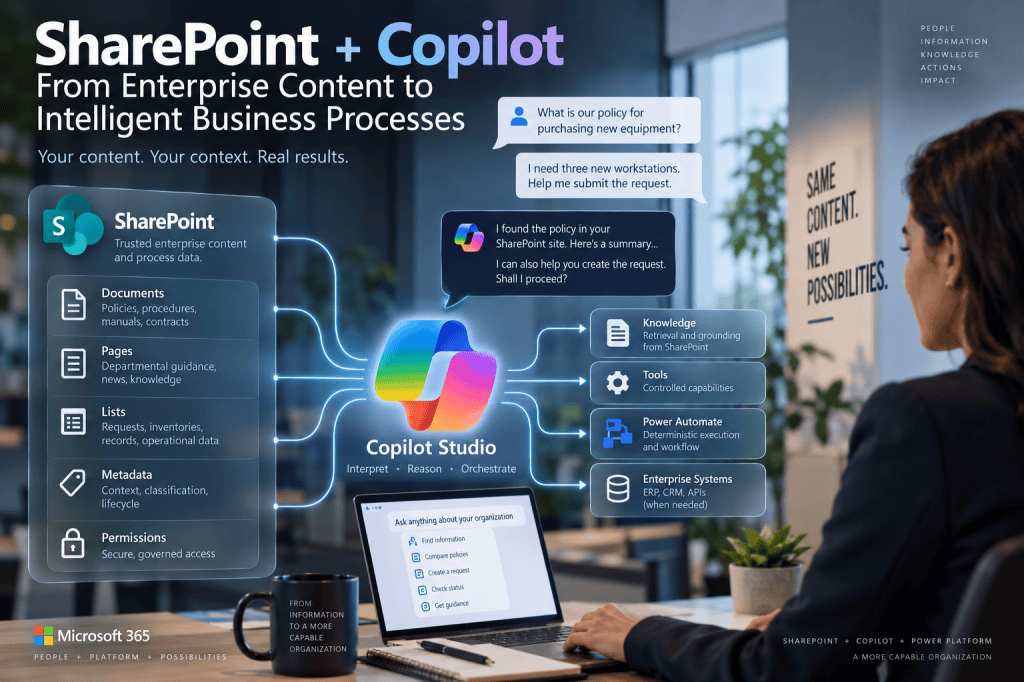
SharePoint + Copilot
From Enterprise Content Management to Intelligent Business Processes
For more than two decades, SharePoint has occupied a distinctive position in the Microsoft enterprise architecture. It is not simply a document repository, and it is not a traditional transactional system either. SharePoint sits between collaboration, content management, information architecture, knowledge management and business process support.
This position becomes particularly important in the age of Microsoft Copilot.
Many organizations already have an enormous amount of their operational knowledge stored in SharePoint: policies, procedures, contracts, project documentation, technical manuals, training materials, templates, meeting records and departmental documentation. At the same time, SharePoint Lists frequently contain structured operational information such as requests, issues, inventories, project registers, risks, approvals and departmental records.
Historically, accessing this information required users to understand the information architecture. They needed to know which site to open, which library contained a document, which metadata to use, which view to select or which search terms would locate the required information.
Generative AI changes this interaction model.
A user can increasingly begin not with a site, library or search box, but with a business question:
“What is our policy for purchasing computer equipment?”
The same user might immediately continue:
“I need three engineering workstations. Help me submit the request.”
From the employee’s perspective, these statements belong to the same conversation.
From an architectural perspective, however, they cross several fundamentally different layers.
The first request concerns Knowledge. The second eventually becomes an Action.
The first requires Retrieval and Grounding against trusted enterprise information. The second may require structured data, validation, workflow, authentication, authorization and a transaction against SharePoint or another enterprise system.
This is where the combination of SharePoint, Copilot Studio and Power Platform becomes particularly interesting.
SharePoint can provide the information architecture, content, structured data and permission model. Copilot Studio can provide the conversational and reasoning layer. Power Automate can provide deterministic workflow and execution. Other enterprise systems can remain authoritative for transactions that properly belong outside SharePoint.
The resulting architecture is not simply:
SharePoint + AI
It is closer to:
Enterprise Information → Retrieval → Grounding → Reasoning → Action → Business Process
Understanding this architecture requires us to reconsider what SharePoint represents in an AI-enabled enterprise.
1. SharePoint Was Already an Enterprise Knowledge Platform
Long before Large Language Models became part of enterprise software, SharePoint was already addressing a knowledge-management problem.
Organizations needed a controlled environment where information could be created, classified, secured, published, searched, updated and eventually retired.
SharePoint addressed this problem through sites, libraries, lists, pages, columns, metadata, Content Types, permissions, version history, search and governance.
These mechanisms can appear less important when an employee can simply ask an Agent a question in natural language. In reality, the opposite is true.
Generative AI makes information architecture more important because an Agent needs reliable information behind the conversational interface.
Consider a procurement Agent.
If SharePoint contains a clearly identified and maintained document called Corporate Procurement Policy, the Agent has a potentially authoritative source against which a response can be grounded.
If instead the site contains:
ProcurementPolicy.docx
ProcurementPolicy-Final.docx
ProcurementPolicy-Final-v2.docx
ProcurementPolicy-OLD.docx
ProcurementPolicy-2024-JohnComments.docx
the Agent has inherited an information-management problem.
The LLM did not create that problem.
It merely exposed it through a new interface.
This leads to an important principle:
AI does not eliminate information architecture. AI consumes information architecture.
The quality of an enterprise Agent is therefore connected not only to the model, Instructions and orchestration, but also to the quality of the underlying enterprise content.
2. From Document Management to Knowledge Architecture
Traditional SharePoint architecture frequently begins with questions such as where documents should be stored, how sites should be organized and which metadata should be applied.
Agent architecture adds another question:
Which information should become available as trusted Knowledge for reasoning?
That is a different architectural problem.
A document being stored in SharePoint does not automatically mean that it should participate in every Agent’s Knowledge scope.
A Human Resources Agent might require HR policies but should not necessarily search engineering documentation.
A Procurement Agent might require purchasing policies, supplier procedures and expense rules, but should not automatically search every document in the corporate intranet.
Knowledge architecture therefore introduces semantic scope on top of information architecture.
Traditional information architecture answers:
Where does this information belong?
Knowledge architecture additionally asks:
For which reasoning scenarios should this information be available?
This distinction becomes important as organizations begin creating multiple specialized Agents.
Instead of building one enormous Agent connected to the entire tenant, an organization can define smaller Knowledge domains aligned with business responsibilities.
This is particularly compatible with the concept of atomic Agents: an Agent should have a clear purpose, a controlled Knowledge domain and a limited set of operational capabilities.
SharePoint becomes one of the mechanisms through which those Knowledge boundaries can be expressed.
3. Site Architecture Becomes Part of AI Architecture
SharePoint architects have traditionally thought carefully about site boundaries.
A site can represent a department, project, business function, communication area or security boundary.
With Copilot Studio, those decisions can also affect the Knowledge architecture.
Microsoft currently allows a SharePoint site URL to be configured as a Knowledge Source in Copilot Studio. When the Agent searches that source, it searches the registered location and its supported subpaths rather than automatically traversing unrelated parent, sibling or other sites.
This gives existing site architecture a new significance.
Imagine a tenant with:
/sites/hr
/sites/procurement
/sites/engineering
/sites/legal
Those URLs were originally designed as information and organizational boundaries.
They can now also become meaningful Knowledge boundaries.
A Procurement Agent can be grounded in Procurement content without automatically treating Engineering or Legal content as part of the same Knowledge domain.
This does not mean that every historical SharePoint site architecture is automatically suitable for AI.
It means that the way content has been organized begins to influence the quality and controllability of Agent grounding.
A poorly structured SharePoint environment therefore creates not only navigation and governance problems.
It can become an AI architecture problem.
4. Libraries Are No Longer Only Places Where Documents Live
A document library traditionally provides storage, metadata, versioning, permissions and document-management capabilities.
In an Agent architecture, the content of that library can also become part of a reasoning pipeline.
Conceptually, the architecture changes from:
User → SharePoint → Library → Document
to:
User → Agent → Retrieval → SharePoint → Relevant Content → Grounding → Generated Answer
This is a significant change.
The employee no longer necessarily needs to find and open the policy document before receiving value from it.
The Agent can retrieve relevant information and synthesize a targeted answer.
Microsoft describes this SharePoint integration in Copilot Studio as a Knowledge Source capable of grounding generative answers against registered SharePoint content. For supported SharePoint Knowledge scenarios, the Agent can retrieve content the signed-in user is permitted to access.
The document remains important.
But the primary unit of interaction is increasingly no longer the document itself.
It is the business question.
This changes the role of SharePoint without making SharePoint less important.
The library becomes part of the Agent’s enterprise Knowledge layer.
5. Retrieval Changes How We Think About Search
Traditional SharePoint Search and Agent Retrieval are related but should not be treated as identical user experiences.
Traditional search typically asks the user to formulate a query and then evaluate a set of results.
The user performs much of the cognitive work:
Query → Results → Open Documents → Read → Compare → Interpret
With an Agent, the interaction can become:
Question → Retrieval → Relevant Context → Grounding → Synthesized Answer
The retrieval stage is therefore not simply about locating a document.
Its purpose is to provide relevant context for the reasoning process.
Microsoft currently documents enhanced grounding for SharePoint Knowledge Sources using tenant graph grounding with semantic search, designed to improve retrieval precision and the amount of useful context available to the Agent.
This represents an important architectural evolution.
Search was primarily designed to help the human find information.
Retrieval in an Agent architecture helps the model obtain context so that it can construct a response.
The underlying information still matters enormously.
But the consumer of the retrieved information is now partly the reasoning system itself.
6. Grounding Is What Connects Enterprise Truth to Generative Reasoning
An LLM can generate plausible language without consulting SharePoint.
That is precisely why grounding matters.
Suppose a user asks:
“How many quotations are required for purchases above $20,000?”
A general-purpose model might know common procurement practices.
But common procurement practices are irrelevant if the organization has a specific approved rule.
The correct architecture is not:
Question → LLM → plausible answer
It is:
Question
↓
Retrieval
↓
Corporate Procurement Policy
↓
Relevant Evidence
↓
Grounding
↓
Generated Answer
The Agent still uses generative reasoning.
But its reasoning is anchored in enterprise information.
This distinction separates a generic AI assistant from an enterprise Knowledge Agent.
The model contributes language and interpretation.
SharePoint contributes organizational context and authoritative content.
Neither layer should be confused with the other.
7. Permissions Survive the Transition to AI
One of the most important architectural characteristics of SharePoint integration is that connecting content to an Agent does not inherently mean that every Agent user gains access to that content.
For the supported SharePoint Knowledge Source integration in Copilot Studio, Microsoft states that the Agent surfaces content according to the signed-in user’s permissions. At minimum, the user must have appropriate Read access to the SharePoint site or list for the content to be available through that Knowledge Source. Microsoft also documents permission trimming in relation to sensitivity labels, subject to limitations for encrypted content.
This is critical.
Suppose a Procurement site contains:
General Procurement Policies
and:
Confidential Supplier Negotiations
Maria has access only to the general policy information.
John, a procurement manager, has access to both.
The fact that the Agent has been configured against SharePoint does not mean Maria should suddenly receive John’s restricted information.
The Knowledge architecture remains connected to the enterprise authorization model.
The conceptual pipeline therefore becomes:
Authenticated User
↓
Agent
↓
Knowledge Request
↓
SharePoint Authorization
↓
Permitted Content
↓
Retrieval
↓
Grounded Response
Security remains below the LLM.
That is exactly where it belongs.
8. Security Trimming Is More Important Than Prompt Instructions
It would be possible to write an Agent Instruction such as:
“Never reveal confidential procurement documents.”
That Instruction is useful behavioral guidance.
It is not an adequate security architecture.
The stronger approach is for unauthorized content to be inaccessible to the user at the SharePoint authorization layer.
Then even if the Agent receives an unusual, adversarial or confusing prompt, the underlying resource boundary still constrains what can be retrieved.
This illustrates a broader principle developed throughout this series:
Instructions control behavior. Permissions control capability.
SharePoint permissions, site membership, Microsoft 365 Groups, sensitivity mechanisms and appropriate governance therefore remain relevant even when the primary user interface becomes conversational.
AI does not replace authorization.
It sits above it.
9. Lists Introduce Structured Knowledge
SharePoint’s role becomes even more interesting when we move from documents to Lists.
Documents primarily contain unstructured or semi-structured information.
Lists contain structured rows and columns.
For example, a Procurement site might contain a Supplier Directory list with:
Supplier Name
Category
Region
Status
Primary Contact
Last Review Date
An employee could traditionally open the list, filter it and inspect the rows.
An Agent introduces another interaction model:
“Which approved suppliers provide engineering laptops?”
Copilot Studio currently supports SharePoint Lists as Knowledge Sources, and Microsoft describes this integration as a real-time connection so that current list data can be used for queries and reasoning, subject to the user’s SharePoint access.
This creates an interesting architectural transition.
SharePoint documents can provide narrative Knowledge.
SharePoint Lists can provide structured operational Knowledge.
The Agent can potentially reason over both.
10. But Reading a List Is Not the Same as Modifying a List
This distinction is essential.
Suppose the Agent can answer:
“What is the status of purchase request PR-184?”
That is a Knowledge or retrieval operation.
Now suppose the employee says:
“Change PR-184 to Approved.”
That is an Action.
The fact that the Agent can retrieve information from a SharePoint List does not mean it should automatically be able to modify the list.
These capabilities belong to different architectural paths.
The first might be:
Agent → SharePoint Knowledge → Retrieval → Answer
The second might be:
Agent → Tool → Power Automate → SharePoint Connector → Update Item
The first retrieves information.
The second changes enterprise state.
That difference has consequences for authentication, authorization, validation, audit and process integrity.
This is why the separation between Knowledge and Action becomes especially visible when SharePoint is both the information platform and part of the operational process.
11. SharePoint + Copilot Studio + Power Automate Creates a Natural Three-Layer Architecture
Once Knowledge and Action are separated, a very useful architecture emerges.
SharePoint provides information and persistent business data.
Copilot Studio provides interpretation and conversational orchestration.
Power Automate provides deterministic execution.
Consider a simple employee request process.
The employee says:
“I need a new monitor for my home office.”
Copilot Studio interprets the request.
The Agent retrieves the relevant equipment policy from SharePoint.
It explains that a business justification and manager approval are required.
The Agent collects the required information.
When the employee confirms submission, a Tool invokes Power Automate.
Power Automate validates the structured parameters.
The Flow creates an item in a SharePoint list.
SharePoint generates the request ID.
The ID returns through Power Automate.
The Agent responds:
“Your equipment request 184 has been submitted.”
The architecture is:
User
↓
Copilot Studio
Conversation + Interpretation
↓
SharePoint Knowledge
Retrieval + Grounding
↓
Copilot Studio
Collect structured information
↓
Tool
Capability boundary
↓
Power Automate
Validation + Execution
↓
SharePoint List
Persistent business state
↓
Request ID
↓
Agent
Natural-language response
This is a remarkably powerful architecture despite using relatively few components.
12. SharePoint Can Be Both Knowledge Platform and Process Platform
The previous example reveals something distinctive about SharePoint.
The same SharePoint environment can participate in two different architectural roles.
A document library can provide the policy explaining how equipment requests work.
A list can store the actual equipment requests.
For example:
Equipment Policies Library
provides Knowledge.
Equipment Requests List
provides process data.
The Agent operates between them.
It can use the first to understand and explain the business context.
It can use a Tool to interact with the second through a controlled process.
This produces:
SharePoint Documents → Knowledge
and:
SharePoint Lists → Business State
Those roles should be documented separately even when they reside in the same SharePoint site.
That separation helps prevent a common architectural mistake: assuming that because SharePoint participates in the Agent’s Knowledge, all SharePoint operations belong to the Knowledge layer.
They do not.
13. Metadata Still Matters
It is tempting to imagine that semantic AI makes metadata obsolete.
Why classify documents if the model can understand their content?
Because metadata and semantic understanding solve different problems.
A procurement document might contain text about purchasing but have metadata such as:
Document Type = Policy
Department = Procurement
Status = Approved
Effective Date = 2026-01-01
Review Date = 2027-01-01
The LLM can interpret the document’s language.
Metadata expresses explicit organizational context.
That context can help information architecture, lifecycle management, filtering, governance and potentially retrieval strategies.
Microsoft currently supports filters on SharePoint Knowledge Sources in Copilot Studio, allowing search conditions to narrow what is searched within the configured source.
This gives traditional SharePoint metadata renewed architectural value.
Metadata is no longer only for views and search refiners.
It can participate in controlling the Knowledge space exposed to an Agent.
14. Content Lifecycle Becomes an AI Quality Problem
Suppose an old procurement policy remains in SharePoint after a new policy has been published.
For a traditional user, this creates a search problem.
For an Agent, it can create a grounding problem.
If both documents appear relevant, the reasoning system may receive conflicting context.
This means traditional content lifecycle management becomes part of AI quality management.
Drafts, obsolete versions, duplicate documents and abandoned content are no longer merely storage clutter.
They can degrade the quality of enterprise AI.
The organization therefore needs to think about concepts such as:
Authoritative content
Approved content
Effective content
Expired content
Archived content
not merely as document-management states, but as potential inputs into generative reasoning.
This is one of the strongest arguments for SharePoint expertise in Copilot architecture.
The AI layer cannot compensate indefinitely for uncontrolled information lifecycle.
15. Content Ownership Becomes Knowledge Ownership
Every important Knowledge domain should have an owner.
If Procurement owns procurement policy, then Procurement should remain responsible for the accuracy and lifecycle of that information.
The Agent does not become the owner because it can answer questions about the policy.
This distinction is critical.
The Agent is an interface to Knowledge.
It is not necessarily the authority that defines the Knowledge.
A useful governance chain becomes:
Business Owner
↓
creates and approves
↓
SharePoint Content
↓
retrieved through
↓
Knowledge Source
↓
interpreted by
↓
Agent
↓
consumed by
↓
Employee
If an answer is wrong because the approved policy itself is outdated, the problem is not necessarily an LLM problem.
It may be a content-governance problem.
AI governance and SharePoint governance therefore begin to converge.
16. SharePoint Pages Also Matter
Enterprise Knowledge does not exist only in Word and PDF documents.
Modern SharePoint sites frequently contain important information directly in pages.
Departmental guidance, onboarding instructions, project information, service descriptions and operational procedures may exist as SharePoint pages rather than files.
Copilot Studio’s SharePoint Knowledge integration can work with registered SharePoint content including supported pages and site paths.
This reinforces the idea that we should not think only in terms of “uploading documents to an AI.”
The richer model is:
The Agent participates in an existing enterprise information environment.
That environment may contain pages, documents, libraries and structured lists, all governed by SharePoint architecture.
17. The Agent Does Not Replace SharePoint Search
It is also important not to frame Copilot as a universal replacement for traditional search.
Some information tasks are better served by search.
A user who knows the document name and wants to open the actual file may simply need SharePoint Search.
A records manager examining a collection may need views, filters and metadata.
An administrator may need precise query behavior.
An Agent becomes especially valuable when the user’s need is semantic or conversational.
For example:
“Compare our travel policy with the expense rules and explain what I need to do for an international trip.”
This requires more than locating a single document.
The Agent can potentially retrieve multiple relevant pieces of content and synthesize an answer.
The architectural question therefore should not be:
Search or Copilot?
It should be:
Which information interaction model best fits this task?
18. The Agent Does Not Replace SharePoint Forms Either
The same caution applies to structured data entry.
Suppose an employee needs to enter twenty mandatory fields with strict validation.
A conversational Agent may not automatically be the best interface.
A Power Apps form or SharePoint form might provide a more predictable and efficient experience.
The Agent might still help the employee understand what information is required.
It could even prepare part of the request.
But that does not mean every form should become a conversation.
Conversational interfaces are particularly valuable where intent, ambiguity and context matter.
Structured interfaces remain valuable where precision, density and explicit validation matter.
A mature architecture can use both.
19. SharePoint Should Not Become an ERP Because Copilot Is Present
There is another boundary we should preserve.
SharePoint Lists are extremely useful for lightweight business applications and process tracking.
But connecting an Agent to SharePoint does not transform SharePoint into the appropriate System of Record for every enterprise transaction.
A purchasing Agent may create an initial request in SharePoint.
That may be entirely appropriate.
After approval, however, the authoritative purchase requisition may belong in SAP, Dynamics 365 or another ERP.
The architecture might therefore be:
SharePoint
Request and supporting documentation
↓
Power Automate
Workflow
↓
ERP
Authoritative purchase transaction
↓
SharePoint
Reference/status if required
↓
Agent
Conversational access
This preserves system responsibility.
Copilot should not be used as an excuse to collapse every enterprise system into SharePoint.
20. SharePoint Can Become the Contextual Layer Around Systems of Record
This leads to a more interesting role for SharePoint.
Instead of replacing ERP, CRM or line-of-business systems, SharePoint can provide the contextual information surrounding their transactions.
The ERP may know:
Purchase Requisition = PR-10482
Amount = $18,500
Status = Approved
SharePoint may contain:
the original business justification,
supporting quotations,
technical specifications,
approval documents,
procurement policy,
project documentation,
and correspondence associated with the request.
The ERP contains the transaction.
SharePoint contains much of the human context.
An Agent can potentially help bridge these worlds.
That is much more architecturally interesting than simply turning SharePoint into another database.
21. SharePoint Architecture Becomes Agent Architecture
We can now revisit several traditional SharePoint architecture decisions and see them differently.
A site boundary can become a Knowledge boundary.
A library can become a trusted corpus.
A page can become retrievable organizational Knowledge.
A list can become real-time structured Knowledge or process state, depending on how it is used.
Metadata can help define semantic and governance context.
Permissions can constrain what the Agent is able to retrieve for a user.
Versioning can contribute to content lifecycle management.
Content ownership becomes Knowledge ownership.
Governance becomes part of AI quality.
This means the arrival of Copilot does not diminish the role of the SharePoint architect.
It expands it.
The SharePoint architect is no longer thinking only about where information should live.
The architect must increasingly consider:
How will machines retrieve, interpret and act upon this information?
That is a profound change.
22. From SharePoint Developer to AI Solution Architect
The same evolution applies to development.
Historically, a SharePoint developer might think in terms of:
SPFx,
PnPjs,
Microsoft Graph,
REST,
Power Automate,
web parts,
extensions,
lists,
libraries,
permissions,
and site architecture.
Those skills remain relevant.
What changes is the layer above them.
The developer now also needs to understand:
Knowledge Sources,
Retrieval,
Grounding,
Instructions,
Orchestration,
Tools,
Actions,
LLM behavior,
semantic ambiguity,
Agent security,
and evaluation.
The existing Microsoft 365 technical foundation does not disappear.
Instead, AI introduces another architectural dimension.
This is why Low-Code and generative AI do not necessarily reduce the amount of knowledge required to build enterprise solutions.
They shift where complexity lives.
Less effort may be required to build some interface components.
More understanding may be required to decide what should be exposed to an Agent, how it should reason, what it can retrieve, what it can execute and which system should remain authoritative.
23. A SharePoint-Centric Copilot Architecture
We can now assemble a reusable architecture.
At the information layer, SharePoint contains corporate pages, policies, procedures, technical documents and structured lists.
At the Knowledge layer, selected SharePoint sources are exposed to Copilot Studio.
Retrieval locates relevant information.
Grounding connects the model’s response to enterprise context.
Copilot Studio provides interpretation, conversation and orchestration.
When information alone is sufficient, the process ends with a grounded response.
When an operation is required, the Agent selects a controlled Tool.
The Tool sends structured parameters to Power Automate.
Power Automate validates the request and executes deterministic logic.
SharePoint can receive the business record when it is the appropriate process store.
Other Systems of Record can receive transactions when the responsibility belongs elsewhere.
The result returns to the Agent.
The Agent communicates the outcome.
The complete conceptual architecture becomes:
SharePoint Information Architecture
Sites + Pages + Libraries + Lists + Metadata + Permissions
↓
Knowledge Sources
↓
Retrieval
↓
Grounding
↓
Copilot Studio
Interpretation + Reasoning + Conversation
↓
Knowledge or Action?
↓
Knowledge
Generate grounded response
or
↓
Tool
↓
Power Automate
Validation + Deterministic Workflow
↓
SharePoint / Dataverse / API / ERP
Business Operation
↓
Structured Result
↓
Copilot Studio
↓
User
This is not a chatbot architecture.
It is an enterprise information and process architecture with a conversational reasoning layer.
24. A Practical Architecture Matrix
The relationship can be summarized more precisely through responsibilities rather than products alone.
| Requirement | Primary responsibility | Candidate technology |
|---|---|---|
| Corporate policies | Authoritative content | SharePoint Library |
| Department guidance | Enterprise publishing | SharePoint Pages |
| Structured operational information | Business data | SharePoint Lists |
| Information classification | Context/governance | Metadata / Content Types |
| Content access | Authorization | SharePoint permissions |
| Semantic information discovery | Retrieval | Copilot Studio + SharePoint Knowledge |
| Contextual response | Grounding | Copilot Studio |
| Natural-language interpretation | Generative reasoning | Agent / LLM |
| Execute controlled operation | Action | Tool |
| Deterministic workflow | Process execution | Power Automate |
| Lightweight request state | Process persistence | SharePoint List |
| Complex relational application data | Business platform | Dataverse |
| Authoritative enterprise transaction | System of Record | ERP / LOB system |
| Enterprise integration | Controlled boundary | Connector / API |
| User identity | Authentication | Microsoft Entra ID |
The value of this table is not in choosing a Microsoft product for every row.
Its value is in keeping responsibilities separated.
25. The SharePoint + Copilot Maturity Path
An organization does not need to begin by building autonomous Agents capable of executing complex enterprise transactions.
A more responsible maturity path begins with information.
The first stage is a well-governed SharePoint environment.
The second is improving the quality, ownership and lifecycle of enterprise content.
The third is exposing carefully selected content as Agent Knowledge.
The fourth is validating Retrieval and Grounding.
The fifth is introducing structured SharePoint Lists where real-time operational Knowledge is useful.
The sixth is adding narrow Tools.
The seventh is introducing Power Automate for deterministic execution.
Only later do more complex APIs, Dataverse, ERP integrations and autonomous scenarios become necessary.
Conceptually:
SharePoint
↓
Governed Information
↓
Knowledge
↓
Retrieval
↓
Grounding
↓
Agent
↓
Tool
↓
Power Automate
↓
Business Process
↓
Enterprise Integration
This progression reduces risk because intelligence is introduced before autonomy.
26. What Changes for SharePoint Governance
Traditional SharePoint governance asks questions about site creation, ownership, permissions, external sharing, lifecycle, storage and information architecture.
AI introduces additional questions.
Which sites are suitable as Knowledge Sources?
Which libraries contain authoritative information?
Who owns the content used for grounding?
How are obsolete documents removed from the active Knowledge space?
Which Lists can be queried conversationally?
Which data should never be exposed to generative reasoning?
Which operations can an Agent execute against SharePoint?
Which Tools use user credentials and which use other execution identities?
How are Agent-generated operations audited?
These questions do not replace SharePoint governance.
They extend it.
We can therefore think in terms of:
SharePoint Governance + AI Governance = Enterprise Knowledge Governance
That convergence is likely to become increasingly important as conversational interfaces become normal entry points into Microsoft 365 information.
27. The Most Important Architectural Boundary
The entire SharePoint + Copilot architecture can ultimately be reduced to one critical boundary:
Information versus operation.
When the user asks:
“What does our procurement policy say?”
SharePoint provides Knowledge.
When the user asks:
“Create my procurement request.”
the architecture crosses into Action.
That transition should never be invisible to the architect.
Before Action, we primarily worry about Retrieval, Grounding, content quality and information disclosure.
After Action, we must additionally consider input validation, authentication, execution identity, permissions, business rules, side effects, error handling, idempotency, audit and transaction integrity.
The conversational experience may make both requests feel almost identical.
The architecture must know that they are not.
Conclusion
SharePoint and Copilot are powerful together not because Copilot replaces SharePoint, but because they solve different layers of the same enterprise problem.
SharePoint provides something generative AI fundamentally needs:
organizational context.
It contains documents, pages, metadata, structured lists, permissions, lifecycle information and years of accumulated business knowledge.
Copilot Studio introduces something SharePoint traditionally did not provide:
a generative reasoning and conversational orchestration layer over that information.
Power Automate adds another capability:
deterministic execution.
Together, these technologies can create an architecture in which employees move naturally from asking about the organization to interacting with its processes.
But this architecture works only if responsibilities remain clear.
SharePoint should continue to own the information that properly belongs in SharePoint.
Permissions should continue to enforce access.
Knowledge Sources should define trusted reasoning context.
Retrieval should locate relevant evidence.
Grounding should anchor generative responses.
The Agent should interpret, reason and orchestrate.
Tools should expose narrow business capabilities.
Power Automate should execute deterministic processes.
ERP and other Systems of Record should retain authority over transactions that belong to them.
This leads to a SharePoint-centric model for enterprise AI:
SharePoint is not merely data for Copilot.
SharePoint is part of the enterprise context within which Copilot reasons.
And this may be the most important evolution of SharePoint in the generative AI era.
For decades, SharePoint architecture focused on a fundamental question:
How should enterprise information be organized so that people can find and use it?
Copilot adds a second question:
How should enterprise information be organized so that people and intelligent systems can retrieve, interpret and safely act upon it?
That does not make SharePoint architecture less important.
It makes SharePoint architecture part of AI architecture.


