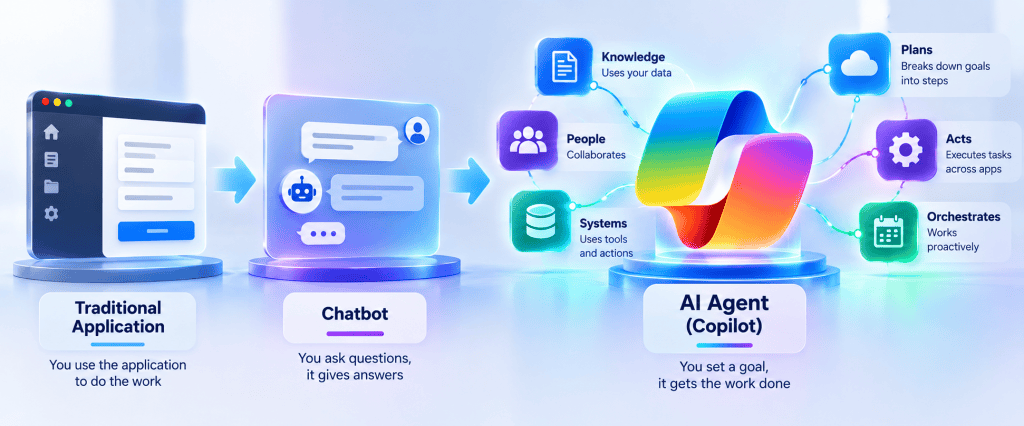
Building Enterprise AI Agents with Microsoft Copilot Studio: The Story Behind This 50-Article Technical Series
Introduction
This series was not created as a collection of isolated Microsoft Copilot Studio tutorials.
It started with a much broader objective:
Understand how enterprise AI Agents actually work, how they connect to the Microsoft ecosystem, and how to design them responsibly for real corporate environments.
The starting point was deliberately practical.
The existing technical background was already strongly connected to the Microsoft ecosystem:
- SharePoint Online
- SPFx
- PnPjs
- PowerShell
- Power Automate
- Microsoft Graph
- REST APIs
- TypeScript
- C#
- Microsoft 365 development
The missing piece was not traditional Microsoft development.
The missing piece was understanding the new architectural layer introduced by Generative AI, Copilot Studio, Agents, Knowledge, Retrieval, Grounding, Tools, Actions, orchestration, and multi-agent systems.
Instead of attempting to learn everything at once, the study process gradually developed into a structured technical journey.
Eventually, that journey became this series:
50 Articles About Microsoft Copilot Studio and Enterprise AI Agent Architecture
The purpose of this article is to explain why the series exists, how the subjects connect, what has already been covered, and where the journey is going.
1. The Starting Question
The original question was not:
How do I create a chatbot?
It was closer to:
How can I understand Microsoft Copilot Studio deeply enough to design real enterprise solutions?
That distinction changed everything.
Creating a demonstration Agent is relatively easy.
Creating an enterprise Agent introduces much larger questions:
What information can the Agent access?How does it find information?Why did it choose a particular document?How does Grounding work?Can it execute operations?Under whose identity?Which permissions are used?Can it call APIs?Can it create SharePoint items?Can it trigger Power Automate?How do multiple Agents collaborate?How do we prevent unauthorized information disclosure?How do we move Agents from DEV to TEST to PROD?How do we monitor them?How do we govern them?And perhaps most importantly:Should this problem use AI at all?
Those questions transformed a simple Copilot Studio study plan into an architectural investigation.
2. SharePoint Became the Main Laboratory
SharePoint Online was selected as the primary enterprise scenario.
This was intentional.
Many organizations already have enormous amounts of corporate Knowledge stored in SharePoint:
PoliciesProceduresTechnical DocumentationTraining MaterialsProject DocumentationCorporate ManualsKnowledge ArticlesFormsListsBusiness Records
This makes SharePoint an excellent environment for understanding enterprise Agents.
The first architecture was therefore very simple:
USER │ ▼AGENT │ ▼SHAREPOINT
But almost immediately, this simple diagram proved insufficient.
What exactly happens between the Agent and SharePoint?
That question led to the first major conceptual breakthrough of the series.
3. The First Important Mental Model
The architecture gradually became:
Knowledge │ ▼Retrieval │ ▼Grounding │ ▼Answer
These four words became foundational to the entire study.
They look simple.
They are not.
Each represents a different responsibility.
| Concept | Responsibility |
|---|---|
| Knowledge | Information available to the Agent |
| Retrieval | Finding information relevant to the request |
| Grounding | Providing relevant evidence to generation |
| Answer | Generating the final response |
This distinction changed how Agents were understood.
An Agent does not simply “read SharePoint.”
There is an information pipeline.
4. Then Came an Even More Important Distinction
The next major realization was:
KNOWLEDGE ≠ ACTION
Consider two requests.
Request A
What is our parental leave policy?
The Agent needs information.
User │ ▼Agent │ ▼Knowledge │ ▼Answer
Now consider:
Request B
Create my parental leave request.
The Agent must perform an operation.
User │ ▼Agent │ ▼Tool / Action │ ▼Business System
These are fundamentally different architectures.
This distinction became one of the central principles of the entire series:
Knowledge provides information. Actions perform operations.
5. The Agent Started Becoming an Orchestrator
Once Knowledge and Actions were separated, another architectural idea emerged.
An enterprise Agent should not necessarily contain all business logic.
Instead, it can orchestrate existing capabilities.
                         USER
                           │
                           ▼
                         AGENT
                           │
                    ORCHESTRATION
                           │
        ┌──────────────────┼──────────────────┐
        │                  │                  │
        ▼                  ▼                  ▼
    KNOWLEDGE            TOPICS             TOOLS
        │                  │                  │
        ▼                  ▼                  ▼
   SHAREPOINT        CONVERSATION        AUTOMATION
                                           │
                                    ┌──────┼──────┐
                                    ▼      ▼      ▼
                                SharePoint API  Dataverse
This became another fundamental principle:
The Agent should orchestrate capabilities rather than absorb every responsibility into Generative AI.
6. This Is Not a “Use AI Everywhere” Series
One of the objectives of this journey is also learning when not to use AI.
Suppose the requirement is:
Update the Status field of SharePoint item 1055 to Approved.
This does not require Generative AI to perform the actual update.
A deterministic operation is preferable.
Item ID +Status │ ▼Power Automate / API │ ▼SharePoint
AI may help interpret:
“Approve the laptop request I submitted yesterday.”
But after the Agent identifies the correct request, the transaction should remain deterministic.
This produces another recurring principle:
Use AI where language, ambiguity, interpretation, retrieval, and reasoning add value. Use deterministic technology where predictability, security, control, and reliability matter more.
7. From Experiments to a Structured Curriculum
As the experiments became more sophisticated, the subjects naturally started connecting.
Knowledge led to Retrieval.
Retrieval led to Grounding.
Grounding led to RAG.
RAG led to Generative Answers.
Then came the question:
When should we not let the model decide?
That leads directly to Topics.
Topics lead to Variables and Conditions.
Those lead to Tools.
Tools lead to Agent Flows and Power Automate.
Then APIs appear.
APIs introduce authentication.
Authentication introduces authorization.
Authorization introduces identity and least privilege.
Then governance becomes unavoidable.
Eventually:
Knowledge │ ▼Retrieval │ ▼Grounding │ ▼Generative AI │ ▼Topics │ ▼Tools │ ▼Automation │ ▼APIs │ ▼Identity │ ▼Security │ ▼Governance │ ▼Enterprise Architecture
The learning path effectively designed itself.
8. The 50-Article Roadmap
The result is the following technical series.
| # | Article | Status |
|---|---|---|
| 1 | From Zero to AI Agent Builder Associate: The Study Roadmap | Completed |
| 2 | What Is an AI Agent? Agent vs Chatbot vs Traditional Application | Completed |
| 3 | Microsoft Copilot Studio Architecture: How an Agent Actually Works | Completed |
| 4 | Instructions: Designing Agent Behavior and Boundaries | Completed |
| 5 | Knowledge Sources: Designing Enterprise Knowledge for Agents | Completed |
| 6 | Retrieval: How an Agent Finds Relevant Information | Completed |
| 7 | Grounding: From Retrieved Information to Reliable Answers | Completed |
| 8 | RAG Architecture with Copilot Studio and SharePoint | Completed |
| 9 | Generative Answers: Controlling AI-Generated Responses | Completed |
| 10 | Topics: When Deterministic Conversation Beats Generative AI | Next |
| 11 | Variables, Conditions and Power Fx in Copilot Studio | Planned |
| 12 | Custom Prompts: Using AI Inside Deterministic Processes | Planned |
| 13 | Knowledge vs Tools vs Actions: Choosing the Right Capability | Planned |
| 14 | Tools Architecture in Copilot Studio | Planned |
| 15 | Agent Flows: Connecting AI Reasoning to Business Automation | Planned |
| 16 | Copilot Studio + Power Automate: Inputs, Outputs and Contracts | Planned |
| 17 | Building a SharePoint Action from a Copilot Studio Agent | Planned |
| 18 | Calling REST APIs from Copilot Studio | Planned |
| 19 | HTTP Request vs REST API Tool vs Custom Connector | Planned |
| 20 | OpenAPI and API-Driven Agent Architecture | Planned |
| 21 | Authentication vs Authorization in Enterprise Agents | Planned |
| 22 | User-Provided vs Maker-Provided Credentials | Planned |
| 23 | Least Privilege and Runtime Identity in Copilot Studio | Planned |
| 24 | DLP and Governance for Enterprise AI Agents | Planned |
| 25 | Event Triggers and Event-Driven Agents | Planned |
| 26 | Autonomous Agents: Architecture, Risks and Guardrails | Planned |
| 27 | Child Agents: Decomposing Complex Agents | Planned |
| 28 | Connected Agents: Reusing Independent Agent Capabilities | Planned |
| 29 | Child Agent vs Connected Agent: Architecture Decision Guide | Planned |
| 30 | Multi-Agent Architecture in Microsoft Copilot Studio | Planned |
| 31 | Generative Orchestration: How Agents Select Capabilities | Planned |
| 32 | Microsoft Foundry Agents and Copilot Studio | Planned |
| 33 | Microsoft Fabric Data Agents and Copilot Studio | Planned |
| 34 | Enterprise Knowledge: Indexed vs Real-Time Retrieval | Planned |
| 35 | Copilot Connectors for Enterprise Knowledge | Planned |
| 36 | Real-Time Power Platform Connector Knowledge | Planned |
| 37 | Azure AI Search as an Enterprise Agent Knowledge Layer | Planned |
| 38 | MCP Fundamentals: Model Context Protocol for Enterprise Agents | Planned |
| 39 | MCP vs REST API vs Connectors | Planned |
| 40 | Designing an Enterprise MCP Architecture | Planned |
| 41 | SharePoint as an Enterprise Knowledge Platform for AI Agents | Planned |
| 42 | SharePoint Permissions and Agent Security | Planned |
| 43 | Designing a Corporate Knowledge Agent with SharePoint | Planned |
| 44 | When NOT to Use an AI Agent | Planned |
| 45 | Testing Copilot Studio Agents Systematically | Planned |
| 46 | Troubleshooting Grounding, Orchestration and Agent Loops | Planned |
| 47 | Monitoring and Analytics for Copilot Studio Agents | Planned |
| 48 | Publishing and Securing Enterprise Agents | Planned |
| 49 | ALM: DEV, TEST and PROD for Copilot Studio | Planned |
| 50 | Reference Architecture: Copilot Studio + SharePoint + Power Platform + Enterprise APIs | Planned |
At this point:
Completed: 9Remaining: 41Total: 50Progress: 18%
But the numbers alone do not explain the structure of the series.
The 50 articles form several architectural chapters.
9. Chapter I — Understanding the Agent
Articles 1–4 establish the conceptual foundation.
01 Study Roadmap │ ▼02 What Is an Agent? │ ▼03 Agent Architecture │ ▼04 Instructions
The goal is to stop thinking about an Agent as simply:
ChatGPT connected to company data.
Instead:
Agent │ ├── Instructions ├── Knowledge ├── Topics ├── Tools ├── Orchestration └── Security Context
This is the architectural foundation.
10. Chapter II — Understanding Enterprise Knowledge
Articles 5–9 form the Knowledge and RAG block.
05 Knowledge Sources │ ▼06 Retrieval │ ▼07 Grounding │ ▼08 RAG │ ▼09 Generative Answers
This block answers a deceptively simple question:
How does an Agent answer questions from enterprise information?
The full answer is:
Enterprise Content │ ▼Knowledge │ ▼Retrieval │ ▼Relevant Evidence │ ▼Grounding │ ▼Generative Model │ ▼Answer
These five articles are now complete.
11. Chapter III — Bringing Determinism Back
The next articles, 10–12, deliberately move away from purely generative behavior.
10 Topics │ ▼11 Variables / Conditions / Power Fx │ ▼12 Custom Prompts
Why?
Because enterprise systems cannot operate exclusively through probabilistic generation.
Suppose we need:
Ask employee number │ ▼Store variable │ ▼Validate value │ ▼Check condition │ ▼Execute process
That is controlled conversation logic.
This is where Topics become essential.
12. Chapter IV — Giving the Agent Hands
Articles 13–17 introduce Actions and automation.
13 Knowledge vs Tools vs Actions │ ▼14 Tools Architecture │ ▼15 Agent Flows │ ▼16 Power Automate Contracts │ ▼17 SharePoint Action
Until this point, the Agent primarily knows things.
Now it begins to do things.
For example:
User:"Create an IT request." │ ▼Agent │ ▼Tool │ ▼Flow │ ▼SharePoint │ ▼New List Item
This is a major transition in the series.
13. Chapter V — Connecting the Agent to APIs
Articles 18–20 move beyond standard Microsoft connectors.
18 REST APIs │ ▼19 HTTP vs REST Tool vs Custom Connector │ ▼20 OpenAPI
Now the architecture can become:
Copilot Studio │ ▼REST API │ ▼External Enterprise System
This opens the Agent to practically any system exposing a suitable API.
But it immediately creates another problem.
Security.
14. Chapter VI — Identity and Security
Articles 21–24 examine one of the most important areas of enterprise Agent architecture.
21 Authentication vs Authorization │ ▼22 User vs Maker Credentials │ ▼23 Runtime Identity / Least Privilege │ ▼24 DLP / Governance
The critical question becomes:
Who is actually executing the operation?
Consider:
User │ ▼Agent │ ▼Tool │ ▼API
Whose identity reaches the API?
The user’s?
The maker’s?
A service identity?
A connection?
An application identity?
This question determines the real security boundary.
15. Chapter VII — Agents That React Without Being Asked
Articles 25–26 introduce event-driven and autonomous behavior.
25 Event Triggers │ ▼26 Autonomous Agents
The architecture changes from:
User │ ▼Agent
to:
Business Event │ ▼Trigger │ ▼Agent │ ▼Reasoning │ ▼Action
For example:
SharePoint Item Created │ ▼Agent Triggered │ ▼Analyze Request │ ▼Select Capability │ ▼Perform Action
This introduces entirely new risks around loops, authorization, unintended actions, and monitoring.
16. Chapter VIII — Multi-Agent Architecture
Articles 27–33 move from one Agent to systems of Agents.
Parent Agent │ ├── Child Agent │ ├── Connected Agent │ ├── Foundry Agent │ └── Fabric Data Agent
This block explores:
- Child Agents;
- Connected Agents;
- delegation;
- independent Agent lifecycle;
- Generative Orchestration;
- Microsoft Foundry Agents;
- Microsoft Fabric Data Agents.
At this point, the architecture begins to resemble a distributed AI system rather than a chatbot.
17. Chapter IX — Enterprise Retrieval Architecture
Articles 34–37 return to Knowledge, but at a much more advanced level.
Enterprise Knowledge │ ├── Indexed │ ├── Real-Time │ ├── Copilot Connectors │ └── Azure AI Search
Now we can ask architectural questions such as:
Should this information be indexed?
or:
Should it be queried in real time?
For example:
Corporate Policy │ ▼Indexed Knowledge
versus:
Current Inventory │ ▼Real-Time Retrieval
That distinction is essential.
18. Chapter X — Model Context Protocol
Articles 38–40 explore MCP.
Agent │ ▼MCP Client │ ▼MCP Server │ ├── Tool A ├── Tool B ├── Resource A └── Resource B
Instead of creating a different custom integration for every Agent, MCP introduces a standardized way of exposing capabilities to AI systems.
We will compare it directly with:
REST APIsConnectorsCustom ConnectorsTools
and examine where MCP belongs in enterprise Microsoft architecture.
19. Chapter XI — Returning to SharePoint
Articles 41–43 bring everything back to our primary laboratory.
41 SharePoint as Enterprise Knowledge Platform │ ▼42 SharePoint Permissions and Agent Security │ ▼43 Corporate SharePoint Knowledge Agent
At this point, we will revisit SharePoint with everything learned during the previous 40 articles.
The architecture will look very different from our original:
Agent → SharePoint
Instead:
                         USER
                           │
                           ▼
                       IDENTITY
                           │
                           ▼
                    COPILOT STUDIO
                           │
                    ORCHESTRATION
                           │
         ┌─────────────────┼─────────────────┐
         │                 │                 │
         ▼                 ▼                 ▼
     KNOWLEDGE           TOPICS            TOOLS
         │                                   │
         ▼                                   ▼
     RETRIEVAL                            FLOWS/APIs
         │                                   │
         ▼                                   ▼
     GROUNDING                           SHAREPOINT
         │
         ▼
 GENERATIVE ANSWERS
Now SharePoint is part of a complete Agent architecture.
20. Chapter XII — Production Engineering
The final articles, 44–50, answer the questions that separate a demonstration from a production system.
44 When NOT to Use AI │ ▼45 Testing │ ▼46 Troubleshooting │ ▼47 Monitoring │ ▼48 Publishing & Security │ ▼49 ALM │ ▼50 Reference Architecture
This is where the journey becomes enterprise engineering.
21. Article 50 Is Not Really the End
The final planned article is:
Reference Architecture: Copilot Studio + SharePoint + Power Platform + Enterprise APIs
Its purpose is to combine the concepts developed throughout the series.
Conceptually:
                              USERS
                                │
                                ▼
                        MICROSOFT ENTRA ID
                                │
                                ▼
                       COPILOT STUDIO AGENT
                                │
                         INSTRUCTIONS
                                │
                         ORCHESTRATION
                                │
        ┌───────────────────────┼────────────────────────┐
        │                       │                        │
        ▼                       ▼                        ▼
    KNOWLEDGE                 TOPICS                   TOOLS
        │                       │                        │
        ▼                       ▼                        ▼
   RETRIEVAL             VARIABLES / POWER FX      AGENT FLOWS
        │                                                │
        ▼                                                ▼
   GROUNDING                                       POWER AUTOMATE
        │                                                │
        ▼                                  ┌─────────────┼─────────────┐
GENERATIVE ANSWERS                          ▼             ▼             ▼
                                      SHAREPOINT      DATAVERSE       APIs
                                                                         │
                                                                         ▼
                                                                EXTERNAL SYSTEMS
Around everything:
┌─────────────────────────────────────────────────────────────┐│ ││ ENTERPRISE GOVERNANCE ││ ││ Identity ││ Authentication ││ Authorization ││ Least Privilege ││ DLP ││ Environment Strategy ││ ALM ││ Monitoring ││ Content Governance ││ Testing ││ Cost / Capacity ││ │└─────────────────────────────────────────────────────────────┘
That is the destination.
22. Where We Are Today
We have completed the first major conceptual block.
01 ──► Agent Fundamentals02 ──► Agent vs Chatbot03 ──► Architecture04 ──► Instructions05 ──► Knowledge06 ──► Retrieval07 ──► Grounding08 ──► RAG09 ──► Generative Answers
Therefore:
9 / 50 articles completed18% of the original roadmap41 articles remaining
More importantly, we now have the conceptual foundation required for the next stage.
23. The Next Transition
Article #10 marks an important transition.
Until now, much of the series has focused on:
Information │ ▼AI │ ▼Answer
We are now moving toward:
Conversation │ ▼Control │ ▼Decision │ ▼Action
The next subjects therefore form a natural sequence:
Topics │ ▼Variables │ ▼Conditions │ ▼Power Fx │ ▼Custom Prompts │ ▼Tools │ ▼Agent Flows │ ▼Power Automate │ ▼SharePoint Actions
This is where the Agent stops being primarily a Knowledge interface and starts becoming a business-process orchestrator.
24. What This Series Is Ultimately Trying to Build
The objective is not to memorize every Copilot Studio button.
Interfaces change.
Product names evolve.
Capabilities are added.
What matters is developing an architectural mental model that survives those changes.
Given a business problem, we should eventually be able to ask:
Does this require an Agent?Does it require Knowledge?Which Knowledge Source?Does it require RAG?Does it require deterministic conversation?Does it require a Tool?Does it require Power Automate?Does it require an API?Does it really require Microsoft Graph?Who authenticates?Who authorizes?Whose credentials execute the operation?What permissions are required?How will the solution be tested?How will it be monitored?How will it move from DEV to TEST to PROD?How much will it cost?And could a traditional application solve this better?
When those questions become natural, we are no longer simply learning Copilot Studio.
We are learning to architect enterprise AI systems.
Conclusion
This 50-article series began with Microsoft Copilot Studio, but its real subject is larger.
It is about the convergence of:
Microsoft 365 +SharePoint +Power Platform +Copilot Studio +Generative AI +Enterprise APIs +Identity +Security +Governance
The first nine articles established the Knowledge and Generative AI foundation.
The next articles will introduce deterministic conversation, business logic, Tools, automation, APIs, identity, autonomous behavior, multi-agent systems, advanced enterprise Knowledge, MCP, security, governance, testing, monitoring, and ALM.
And throughout the entire journey, one principle will remain constant:
An Agent is not a replacement for enterprise architecture. It is a new orchestration and interaction layer inside enterprise architecture.
Our progress today is:
9 completed. 41 remaining. 50 planned.
And Article #10 begins the next chapter:
Topics in Microsoft Copilot Studio: When Deterministic Conversation Beats Generative AI
From this point forward, the Agent will begin moving from knowing to controlling, deciding, and eventually acting.


