Microsoft Copilot Studio Architecture: How an Agent Actually Works
Introduction
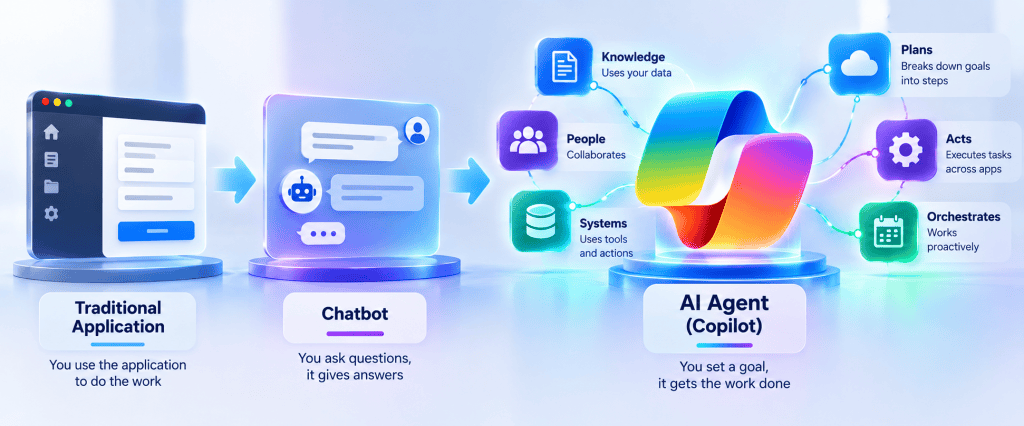
After understanding the difference between an AI Agent, a traditional chatbot, and a traditional application, the next step is to look inside a Microsoft Copilot Studio Agent.
When a user sends a message to an Agent, several architectural components can participate before the final response is produced.
The Agent may need to:
- interpret the user’s intent;
- apply its Instructions;
- retrieve enterprise Knowledge;
- execute a Topic;
- select a Tool;
- invoke an Agent Flow;
- call an external API;
- delegate work to another Agent;
- maintain conversational context;
- generate the final response.
A simplified architecture looks like this:
                         USER
                           │
                           ▼
                 COPILOT STUDIO AGENT
                           │
                    INSTRUCTIONS
                           │
                           ▼
                    ORCHESTRATION
                           │
        ┌──────────────────┼──────────────────┐
        │                  │                  │
        ▼                  ▼                  ▼
    KNOWLEDGE            TOPICS             TOOLS
        │                  │                  │
        ▼                  ▼                  ▼
   SharePoint          Conversation       Agent Flows
   Websites               Logic           Connectors
   Documents            Variables         REST APIs
   Enterprise Data      Conditions        External Systems
        │                  │                  │
        └──────────────────┼──────────────────┘
                           │
                           ▼
                    GENERATED RESPONSE
                           │
                           ▼
                          USER
This diagram is intentionally simplified.
A production Agent can contain considerably more complexity, including authentication, variables, prompts, triggers, child agents, connected agents, monitoring, governance, and external enterprise services.
The important point is that Copilot Studio is not just a conversational UI.
It is an orchestration platform where generative AI, enterprise knowledge, deterministic logic, automation, APIs, and other Agents can participate in the same solution.
1. The Agent as the Central Orchestration Layer
A useful way to understand Copilot Studio is to place the Agent at the center of the architecture.
The Agent receives a request but does not necessarily contain all the information or logic required to satisfy it.
Instead, it can coordinate other capabilities.
                        Agent
                          │
        ┌─────────────────┼─────────────────┐
        │                 │                 │
        ▼                 ▼                 ▼
    Knowledge           Logic             Actions
        │                 │                 │
        ▼                 ▼                 ▼
   Information          Topics            Tools
This separation is important.
An enterprise Agent should not become one giant prompt containing every rule, policy, integration, and business process.
Different responsibilities should be represented by the appropriate architectural component.
2. The User Request
Everything begins with a request.
For example:
“What is our company’s parental leave policy?”
Or:
“Create a parental leave request for me.”
Or:
“I need time away from work after my child is born. What should I do?”
Although these requests are related, they represent different technical requirements.
The first primarily requires Knowledge.
The second requires an Action.
The third may require reasoning, Knowledge retrieval, clarification, and potentially an Action later in the conversation.
This is why natural-language interaction changes application architecture.
The user describes the goal.
The Agent must determine which available capability can help achieve it.
3. Instructions
One of the first components influencing Agent behavior is Instructions.
Instructions establish the role and behavioral expectations of the Agent.
For example:
You are an HR Employee Services Agent.Help employees understand approved HR policies.Use approved enterprise knowledge when answering policy questions.Do not invent company policies.When the available information is insufficient,tell the employee that you cannot determine the answer.Use concise and professional language.
Instructions can influence:
- role;
- tone;
- scope;
- response style;
- behavioral boundaries;
- capability selection guidance;
- restrictions;
- escalation behavior.
Conceptually:
User Request │ ▼ Agent │ ▼Instructions │ ▼Expected Behavior
But Instructions should not be confused with Knowledge.
4. Instructions vs Knowledge
This distinction is fundamental.
Instructions tell the Agent how to behave.
Knowledge provides information the Agent can use.
For example:
INSTRUCTION"Answer HR questions using approved company policies."
versus:
KNOWLEDGEParental Leave Policy.pdfVacation Policy.pdfRemote Work Policy.pdfEmployee Handbook.pdf
The architecture is therefore:
              Instructions
                   │
                   ▼
User ───────────► Agent
                   │
                   ▼
               Knowledge
                   │
                   ▼
               Information
Putting large amounts of enterprise content directly into Instructions is generally not equivalent to designing an appropriate Knowledge architecture.
These components serve different purposes.
5. Knowledge
Knowledge provides information that the Agent can retrieve when answering questions.
In a Microsoft-centered enterprise scenario, SharePoint is an obvious example.
SharePoint Online │ ▼Document Library │ ├── HR Policies ├── Procedures ├── Training Material └── Technical Documentation │ ▼Knowledge │ ▼Copilot Studio Agent
The Agent does not simply dump all documents into every conversation.
The system needs to identify information relevant to the user’s request.
This leads to Retrieval.
6. Retrieval
Suppose the SharePoint Knowledge Source contains 5,000 documents.
The employee asks:
“How many weeks of parental leave are available?”
Sending all 5,000 documents to the model would make no sense.
The system must identify relevant information.
Conceptually:
5,000 Documents │ ▼User Question │ ▼Retrieval │ ▼Relevant Information │ ▼Generation
Retrieval is therefore a critical component of Knowledge-based Agent architecture.
The quality of the answer depends heavily on the quality and relevance of the context retrieved.
7. Grounding
Retrieval alone is not the entire process.
The retrieved information needs to provide context for generation.
This is where Grounding becomes important.
A useful conceptual pipeline is:
Knowledge │ ▼Retrieval │ ▼Relevant Evidence │ ▼Grounding │ ▼Generative Model │ ▼Answer
For example:
Knowledge:"Employees are entitled to 16 weeksof parental leave."
The user asks:
“How much parental leave can I take?”
The retrieved information becomes grounding context for the generated answer.
The Agent can then respond:
Employees are entitled to 16 weeks of parental leave according to the available company policy.
The important architectural objective is that the answer is based on enterprise information rather than merely on the model’s general knowledge.
8. Generative Answers
Once relevant information is available, the Agent can use generative capabilities to construct a natural-language response.
This allows users to ask questions in many different ways.
For example:
"How long can I stay home after my baby is born?""What is our parental leave allowance?""How many weeks does the company provide for new parents?"
All three questions may retrieve the same underlying policy.
Different Natural-Language Questions │ ▼ Retrieval │ ▼ Same Relevant Policy │ ▼ Generative Response
This is fundamentally different from manually authoring an answer for every possible variation of a question.
9. Topics
Not every conversation should be controlled entirely by generative orchestration.
Sometimes we need explicit conversational logic.
This is where Topics become important.
Suppose an employee wants to submit an equipment request.
The conversation might need to follow a specific process:
Ask Equipment Type │ ▼Ask Business Justification │ ▼Ask Required Date │ ▼Validate Information │ ▼Create Request
A Topic provides controlled conversational logic.
It can contain:
- messages;
- questions;
- variables;
- conditions;
- branching;
- Tools;
- Flows;
- HTTP requests;
- generative capabilities.
Topics are therefore particularly useful when predictability matters.
10. Variables
Variables allow information collected or generated during a conversation to be stored and reused.
For example:
User:"I need a new laptop."
The Topic might ask:
“Why do you need the laptop?”
The user responds:
“My current device is no longer supported.”
The Agent can store:
EquipmentType = "Laptop"BusinessJustification ="My current device is no longer supported."
These variables can later be passed to a Tool or Flow.
Conversation │ ▼Variables │ ├── EquipmentType ├── BusinessJustification └── RequiredDate │ ▼Tool / Flow
Variables form an important bridge between conversational interaction and deterministic business operations.
11. Conditions and Power Fx
Once information is stored in variables, the Agent may need to evaluate conditions.
For example:
RequestAmount = 500
A deterministic rule might be:
If RequestAmount <= 1000 → Manager ApprovalIf RequestAmount > 1000 → Manager Approval → Finance Approval
This is an example where traditional logic remains preferable to generative reasoning.
Power Fx and conditions can help implement explicit rules inside appropriate parts of the solution.
The principle remains:
If the business rule is deterministic, consider implementing it deterministically.
12. Tools
Knowledge allows an Agent to know something.
Tools allow an Agent to do something.
For example:
User:"Create an IT support request."
The Agent might collect:
TitleDescriptionPriorityUser
Then invoke a Tool.
User │ ▼Agent │ ▼Tool │ ▼External System │ ▼Operation │ ▼Result
Possible Tools might interact with:
- SharePoint;
- Dataverse;
- Power Automate;
- REST APIs;
- enterprise applications;
- external services.
13. Tool Inputs and Outputs
A Tool should have a clear contract.
Consider a SharePoint request creation Tool.
Inputs
TitleDescriptionCategoryRequestedBy
Outputs
RequestIdStatusRequestUrl
Architecturally:
                  AGENT

Title --------------------------┐
Description --------------------┤
Category -----------------------┤
RequestedBy --------------------┤
                               ▼
                              TOOL
                               │
                               ▼
                           SharePoint
                               │
                               ▼
                             RESULT
                               │
RequestId ◄─────────────────────┤
Status ◄────────────────────────┤
RequestUrl ◄────────────────────┘
This resembles a function or API contract.
That comparison is useful for developers coming from C#, TypeScript, REST, or other traditional development environments.
14. Agent Flows
A Tool may invoke an Agent Flow to perform a deterministic process.
For example:
Agent │ ▼Agent Flow │ ├── Validate Request │ ├── Create SharePoint Item │ ├── Start Approval │ ├── Send Notification │ └── Return Result │ ▼Agent
The responsibilities are clearly separated.
The Agent handles conversation and interpretation.
The Flow handles the deterministic process.
This separation produces a strong enterprise architecture pattern:
Natural Language │ ▼ Agent │ ▼Structured Parameters │ ▼Deterministic Flow │ ▼Business Systems
15. Connectors
Connectors provide standardized integration with external services and enterprise systems.
Instead of manually implementing every HTTP interaction, a connector can expose operations in a reusable form.
Conceptually:
Agent │ ▼Connector │ ▼External Service
Depending on the requirement, organizations might use:
- prebuilt connectors;
- custom connectors;
- other supported integration mechanisms.
A Custom Connector becomes particularly interesting when a proprietary API should be reused across multiple Power Platform solutions.
16. REST APIs
Sometimes direct API integration is more appropriate.
For example:
Agent │ ▼REST API Tool │ ▼OpenAPI-defined API │ ▼Enterprise Backend
Or inside controlled Topic logic:
Topic │ ▼HTTP Request │ ▼REST Endpoint │ ▼JSON Response │ ▼Topic Condition
These approaches solve related but different architectural problems.
The important point is that Copilot Studio does not isolate the Agent from traditional APIs.
APIs remain fundamental integration building blocks.
17. Custom Prompts
Sometimes AI is useful for a small part of a deterministic process.
Consider an IT support request:
“Since yesterday I cannot access the Finance SharePoint site. Other sites work normally.”
A Custom Prompt might transform this into:
Category = AccessSystem = SharePointPriority = NormalSummary ="User cannot access the Finance SharePoint site."
Then deterministic logic can process the structured result.
Free Text │ ▼Custom Prompt │ ▼Structured Data │ ▼Topic / Flow │ ▼Business Process
This is an excellent example of hybrid architecture.
AI performs interpretation.
Traditional logic performs execution.
18. Generative Orchestration
As the number of capabilities grows, the Agent needs to determine which capability is appropriate.
Suppose the Agent has:
HR KnowledgeIT KnowledgeCreate Support Ticket ToolCreate Leave Request ToolEquipment Request TopicFinance Specialist Agent
A user asks:
“My laptop stopped working and I need help.”
The Agent needs to select the relevant capability.
Conceptually:
User Request │ ▼Generative Orchestration │ ├── Knowledge? ├── Topic? ├── Tool? └── Agent? │ ▼ Selected Capability
This capability selection is one of the central architectural characteristics of modern Agent systems.
19. Capability Descriptions Matter
Generative orchestration needs enough information to understand when a capability is appropriate.
Imagine two Tools:
Tool A"Creates a request."
and:
Tool B"Creates an IT support request when an employeereports a technical problem with hardware,software, access, or Microsoft 365 services."
The second description provides much stronger semantic information.
This means that descriptions are not merely documentation.
In generatively orchestrated systems, they can influence capability selection.
Clear capability design therefore becomes part of Agent engineering.
20. Child Agents
As an Agent becomes more complex, responsibilities can be decomposed.
For example:
                 Employee Agent
                       │
        ┌──────────────┼──────────────┐
        ▼              ▼              ▼
    HR Agent        IT Agent      Training Agent
Each specialist can focus on a narrower domain.
The parent Agent can delegate appropriate work.
This prevents one Agent from becoming responsible for every enterprise domain.
21. Connected Agents
Sometimes the specialist Agent already exists independently.
For example:
Finance Agent
It may have its own:
- lifecycle;
- owner;
- Knowledge;
- Tools;
- security;
- release process.
Another Agent can potentially use it as a connected capability.
Employee Services Agent │ ▼ Connected Agent │ ▼ Finance Agent
This introduces reusable Agent architecture.
22. Triggers
So far, most examples begin with a user message.
But an Agent can also participate in event-driven architectures.
Business Event │ ▼Trigger │ ▼Agent │ ▼Reasoning │ ▼Tool / Action
For example:
SharePoint Item Changed │ ▼ Trigger │ ▼ Agent │ ▼Evaluate Situation │ ▼ Action
This moves Agent architecture beyond conversational interfaces and toward autonomous or event-driven scenarios.
23. Authentication
Once an Agent accesses enterprise systems, identity becomes critical.
Authentication answers:
Who is making the request?
Conceptually:
User │ ▼Authentication │ ▼Identity │ ▼Agent / Connector / API
But authentication alone does not determine what the identity is allowed to do.
That is authorization.
24. Authorization
Authorization answers:
What is this identity allowed to access or execute?
Authenticated Identity │ ▼ Authorization │ ▼Allowed Resources / Operations
This distinction becomes especially important when an Agent retrieves SharePoint content or invokes enterprise APIs.
An authenticated user should not automatically gain access to information merely because an Agent can technically connect to the source.
25. Runtime Identity
Another architectural question is:
Which identity actually executes the operation?
Consider:
Employee │ ▼Agent │ ▼Connector │ ▼SharePoint
The SharePoint request might execute using:
- the individual user’s identity;
- a configured connection;
- another supported service identity pattern.
These approaches have different security implications.
Runtime identity must therefore be deliberately designed rather than assumed.
26. DLP and Governance
Even if authentication and authorization succeed, organizational governance can still restrict an integration.
Conceptually:
Authentication │ ▼Authorization │ ▼DLP / Governance │ ▼Operation Allowed?
This is important because enterprise Agent architecture exists inside the broader Power Platform governance model.
Security architecture therefore includes more than credentials.
It includes policy.
27. The Complete Request Lifecycle
We can now combine the major concepts.
Suppose an employee asks:
“Please create an IT ticket because I cannot access the Finance SharePoint site.”
A simplified lifecycle might be:
1. USER MESSAGE"I cannot access the Finance SharePoint site.Please create a ticket." │ ▼2. AGENTReceives conversational input │ ▼3. INSTRUCTIONSDefine expected behavior and boundaries │ ▼4. ORCHESTRATIONDetermines appropriate capability │ ▼5. TOOLCreate IT Support Ticket │ ▼6. INPUT PARAMETERSIssueType = AccessSystem = SharePointDescription = Cannot access Finance site │ ▼7. AGENT FLOWValidateCreate recordReturn ticket number │ ▼8. SHAREPOINT / SERVICE SYSTEMTicket #IT-1042 created │ ▼9. TOOL OUTPUTTicketId = IT-1042Status = Open │ ▼10. AGENT RESPONSE"Your support ticket IT-1042 was created successfully."
This example demonstrates how generative and deterministic components can participate in the same transaction.
28. A Knowledge Request Follows a Different Path
Now compare:
“What should I do if I cannot access a SharePoint site?”
The architecture may be:
User Question │ ▼Agent │ ▼Instructions │ ▼Knowledge Selection │ ▼Retrieval │ ▼Relevant IT Documentation │ ▼Grounding │ ▼Generative Answer │ ▼User
No Tool may be necessary.
The same Agent can therefore support both information retrieval and business operations while keeping the architectural responsibilities separate.
29. A More Complete Enterprise Architecture
We can now expand our original diagram.
                              USER
                                │
                                ▼
                       COPILOT STUDIO AGENT
                                │
                        ┌───────┴───────┐
                        │               │
                  Instructions      Context
                        │               │
                        └───────┬───────┘
                                ▼
                     Generative Orchestration
                                │
       ┌────────────────────────┼────────────────────────┐
       │                        │                        │
       ▼                        ▼                        ▼
   KNOWLEDGE                  TOPICS                   TOOLS
       │                        │                        │
       │                  Variables                  Agent Flow
       │                  Conditions                 Connectors
       │                  Power Fx                   REST APIs
       │                  Prompts                    HTTP
       │                        │                        │
       ▼                        ▼                        ▼
   SharePoint              Deterministic          Enterprise
   Websites                  Logic                 Systems
   Documents                                         │
   Enterprise Data                                  │
       │                                             │
       └──────────────────────┬──────────────────────┘
                              │
                              ▼
                       OTHER AGENTS
                              │
                   Child / Connected Agents
                              │
                              ▼
                       Generated Result
                              │
                              ▼
                             USER
This is much closer to the mental model required for enterprise Copilot Studio architecture.
30. Copilot Studio Does Not Replace the Microsoft Stack
One of the most important architectural conclusions is that Copilot Studio does not replace technologies such as:
- SharePoint;
- Power Automate;
- Dataverse;
- Microsoft Graph;
- REST APIs;
- Azure services;
- SPFx;
- traditional applications.
Instead, it can sit above or alongside these technologies.
For example:
                 Copilot Studio
                       │
                       ▼
                 Agent Layer
                       │
      ┌────────────────┼────────────────┐
      ▼                ▼                ▼
 SharePoint       Power Platform       APIs
      │                │                │
      ▼                ▼                ▼
 Knowledge        Automation        Systems
The Agent introduces natural-language interaction and reasoning.
The existing platforms continue to provide data, transactions, business rules, integrations, identity, and governance.
31. When Not to Add Another Layer
Architecture should remain proportional to the problem.
Suppose a user needs to update one SharePoint column using a button.
Existing architecture:
Button │ ▼PnPjs │ ▼SharePoint
Adding:
Button │ ▼Agent │ ▼Generative AI │ ▼Tool │ ▼Flow │ ▼SharePoint
may provide no meaningful business benefit.
It introduces more moving parts without solving a problem that requires language understanding or reasoning.
This is why Agent architecture begins with the requirement, not with the technology.
32. Architectural Responsibility Matrix
A useful summary is:
| Component | Primary Responsibility |
|---|---|
| Instructions | Define Agent behavior |
| Knowledge | Provide information |
| Retrieval | Find relevant information |
| Grounding | Provide evidence/context for generation |
| Generative Answers | Produce natural-language responses |
| Topic | Control conversational logic |
| Variable | Store conversational/process data |
| Power Fx / Condition | Evaluate deterministic logic |
| Custom Prompt | Perform focused AI transformation |
| Tool | Execute a capability |
| Agent Flow | Execute deterministic multi-step automation |
| Connector | Integrate with external services |
| REST API | Integrate directly with external systems |
| Trigger | Initiate behavior from an event |
| Child Agent | Internal specialized Agent capability |
| Connected Agent | Reuse an independently managed Agent |
| Authentication | Establish identity |
| Authorization | Determine permitted access |
| DLP | Apply organizational integration policy |
| Orchestration | Select and coordinate capabilities |
Understanding these boundaries is more important than memorizing individual screens in Copilot Studio.
33. The Architecture Principle
After working through these components, one principle becomes clear:
An Agent should orchestrate capabilities rather than absorb every responsibility into generative AI.
A strong architecture might therefore look like:
Language Understanding │ ▼ Agent │ ▼Capability Selection │ ┌──────┼──────┐ ▼ ▼ ▼Know Think Act │ │ │ ▼ ▼ ▼Data AI Task Tool │ ▼ Deterministic System
The result is an architecture where generative AI and traditional enterprise technologies complement each other.
Conclusion
Microsoft Copilot Studio should be understood as much more than a chatbot builder.
At the center is the Agent, but the Agent operates as part of a broader architecture containing:
Instructions, Knowledge, Retrieval, Grounding, Generative Answers, Topics, Variables, Conditions, Custom Prompts, Tools, Agent Flows, Connectors, REST APIs, Triggers, other Agents, identity, security, and governance.
The key architectural skill is learning where each responsibility belongs.
For a SharePoint-oriented enterprise solution, this can eventually produce architectures such as:
                           Employee
                              │
                              ▼
                     Copilot Studio Agent
                              │
                       Orchestration
                              │
          ┌───────────────────┼───────────────────┐
          ▼                   ▼                   ▼
      Knowledge             Topics              Tools
          │                   │                   │
          ▼                   ▼                   ▼
     SharePoint         Conversation        Power Automate
     Documents             Logic            REST APIs
          │                                      │
          │                                      ▼
          │                              Enterprise Systems
          │                                      │
          └──────────────────┬───────────────────┘
                             ▼
                    Secure Business Result
The Agent provides the reasoning and conversational layer.
SharePoint provides enterprise information.
Power Platform provides automation and integration.
APIs provide access to external capabilities.
Identity and governance control what is permitted.
That separation of responsibilities is the foundation for designing maintainable enterprise Agents.
Next Article
Instructions in Microsoft Copilot Studio: Designing Agent Behavior, Boundaries, and Responsibilities
The next article will focus exclusively on Instructions.
We will examine how Instructions influence Agent behavior, how they differ from Knowledge and Topics, how to define scope and boundaries, common mistakes when creating large instruction blocks, and how Instructions participate in an enterprise Agent architecture.


