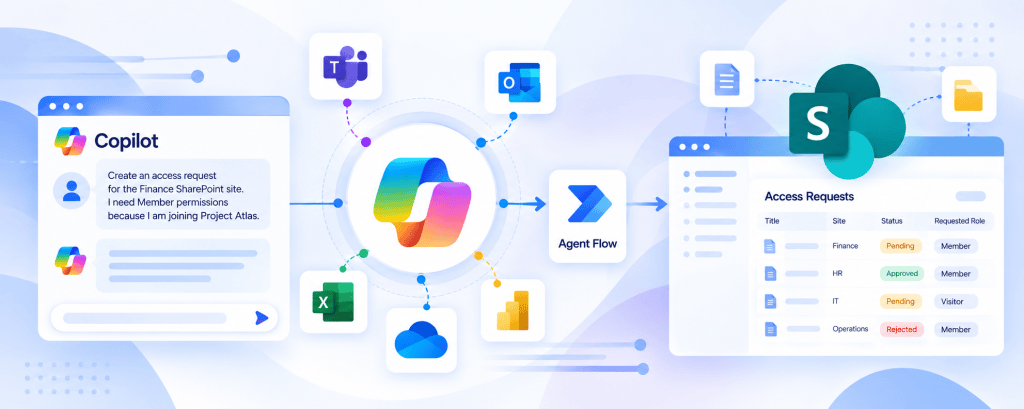
Article #18/50 — Calling REST APIs from Microsoft Copilot Studio
A knowledge-based Agent can explain policies, summarize documents, and answer questions using approved information sources. However, many enterprise scenarios require something different: accessing live information or executing business operations through external services.
Calling REST APIs from Microsoft Copilot Studio
Enterprise AI Agents — Article 18 of 50
REST API Integration, OpenAPI, Authentication, Tool Orchestration, Security, and Enterprise Architecture
1. Introduction
Enterprise AI Agents become significantly more useful when they can interact with business systems beyond their conversational knowledge.
A knowledge-based Agent can explain policies, summarize documents, and answer questions using approved information sources. However, many enterprise scenarios require something different: accessing live information or executing business operations through external services.
Examples include retrieving the current status of a support ticket, querying a financial system, checking product inventory, creating a service request, or accessing structured information from a proprietary application.
These operations commonly rely on REST APIs.
Microsoft Copilot Studio supports integration with REST APIs through several mechanisms, including REST API Tools, Power Platform Connectors, Agent Flows, and other supported integration capabilities.
The central architectural challenge is not simply sending an HTTP request.
It is transforming natural-language intent into a controlled, authenticated, authorized, and predictable interaction with an external system.
Consider a user asking:
“What is the current status of service request 1055?”
The Agent must understand the request, identify the appropriate capability, supply the correct identifier, execute the operation, interpret the response, and communicate the result.
Conceptually:
User → Agent → Tool Selection → REST API → Business System → JSON Response → Agent → User
The API remains responsible for authoritative business information. The Agent provides the conversational interface and orchestration.
This article explores REST fundamentals, Copilot Studio integration patterns, OpenAPI specifications, authentication, authorization, request and response contracts, error handling, security, governance, and enterprise architecture.
2. What Is a REST API?
REST stands for Representational State Transfer.
It is an architectural style for designing network-based applications, commonly implemented using HTTP.
A REST-oriented API exposes resources through identifiable endpoints and uses standard HTTP methods to interact with those resources.
For example, a business system may expose:
This endpoint represents a collection of requests.
A specific request might be addressed through:
The client sends an HTTP request, and the server returns an HTTP response.
The response frequently contains JSON data.
REST APIs provide a standardized integration boundary between independent applications.
The consuming application does not need to know how the server stores its data internally.
It only needs to understand the published API contract.
REST API Characteristics
| Characteristic | Description | Enterprise Importance |
|---|---|---|
| Resource-oriented | Operations target identifiable resources | Clear business boundaries |
| HTTP-based | Uses standard HTTP semantics | Broad interoperability |
| Stateless interaction | Each request contains the necessary request context | Scalable service design |
| Structured representation | Frequently uses JSON | Predictable integration |
| Defined contract | Endpoints, methods, parameters, and responses | Maintainability |
| Authentication | Establishes the caller’s identity | Secure access |
| Authorization | Controls permitted operations | Data protection |
| Versioning | Supports API evolution | Compatibility |
REST is not specific to AI.
It is a conventional software integration architecture that Agents can consume.
3. REST APIs and AI Agents
Traditional applications usually invoke APIs through explicitly programmed logic.
For example, a web application may execute a predefined API call when a user clicks a button.
An AI Agent introduces an additional decision layer.
The user does not necessarily select the endpoint directly.
Instead, the Agent interprets natural language and determines which capability should be invoked.
Consider:
“Show me the latest information about request 1055.”
The Agent might select:
GetRequestDetails
The Tool contract identifies:
requestId = 1055
The integration layer invokes the corresponding API operation.
The response is returned to the Agent.
The Agent generates an understandable answer.
This architecture combines probabilistic language interpretation with deterministic API execution.
The important distinction is:
The Agent decides which operation is relevant. The API determines the authoritative result.
4. REST API Anatomy
An HTTP request typically contains several components.
Endpoint
Identifies the target resource.
Example:
HTTP Method
Defines the requested operation.
Example:
GET
Headers
Provide metadata such as authentication credentials and accepted content types.
Examples:
Authorization: Bearer <access-token>
Accept: application/json
Query Parameters
Supply optional filtering, sorting, or pagination information.
Example:
GET /v1/requests?status=pending
Request Body
Carries structured data for operations such as creating or updating resources.
Response
Contains an HTTP status code, headers, and potentially a structured body.
REST Request Components
| Component | Example | Purpose |
|---|---|---|
| Base URL | https://api.contoso.com | Identifies API host |
| Path | /v1/requests/1055 | Identifies resource |
| Method | GET | Requests operation |
| Query | status=pending | Filters results |
| Authorization | Bearer token | Authenticates caller |
| Content-Type | application/json | Describes request representation |
| Response status | 200 | Indicates HTTP outcome |
| Response body | JSON | Returns structured information |
These components remain relevant regardless of whether the API is called by C#, TypeScript, Power Automate, or Copilot Studio.
5. HTTP Methods
HTTP methods express the intended operation.
| Method | Typical Purpose | Example |
|---|---|---|
| GET | Retrieve a resource | Get request status |
| POST | Create or submit an operation | Create support ticket |
| PUT | Replace a resource representation | Replace configuration |
| PATCH | Partially modify a resource | Update request status |
| DELETE | Remove a resource | Delete eligible record |
The actual behavior depends on the API implementation.
For example, a POST endpoint may start a process rather than create a conventional resource.
Therefore, an Agent should rely on the API’s documented semantics rather than assuming that every endpoint behaves identically.
Read Operations vs State-Changing Operations
GET operations are generally intended for retrieval.
POST, PUT, PATCH, and DELETE frequently modify business state.
State-changing operations require stronger attention to authorization, confirmation, idempotency, retries, and auditing.
An Agent should not treat every API operation as equally safe.
6. HTTP Status Codes
REST APIs communicate important execution information through HTTP status codes.
Common Status Codes
| Code | Meaning | Agent Integration Consideration |
|---|---|---|
| 200 | OK | Process returned result |
| 201 | Created | Resource was created |
| 202 | Accepted | Processing may continue asynchronously |
| 204 | No Content | Operation succeeded without response body |
| 400 | Bad Request | Invalid request |
| 401 | Unauthorized | Authentication missing or invalid |
| 403 | Forbidden | Authenticated caller lacks permission |
| 404 | Not Found | Resource unavailable or inaccessible |
| 409 | Conflict | Conflicting resource state |
| 422 | Unprocessable Content | Semantically invalid request |
| 429 | Too Many Requests | Rate limiting |
| 500 | Internal Server Error | Server failure |
| 502 | Bad Gateway | Upstream integration failure |
| 503 | Service Unavailable | Temporary service problem |
| 504 | Gateway Timeout | Upstream timeout |
An Agent must not infer business success simply because a Tool invocation was attempted.
The actual HTTP result and API response must be evaluated.
7. JSON as the Integration Format
JSON is widely used for REST API requests and responses.
Consider a conceptual API response:
{ "requestId": 1055, "title": "Finance Access", "status": "PendingApproval", "requestedRole": "Member", "createdDate": "2026-10-07T14:30:00Z"}
This response contains structured information.
The Agent can interpret the fields and generate:
“Request 1055 is currently pending approval. The requested permission level is Member.”
The important architectural principle is that the Agent should generate its response from returned facts.
It should not invent the request status or assume that a pending request has already been approved.
8. REST APIs as Tools in Copilot Studio
Microsoft Copilot Studio supports REST API Tools for Agents using the standard harness.
A REST API Tool exposes selected API operations as capabilities that the Agent can invoke.
Microsoft’s documentation identifies three essential elements:
- An OpenAPI specification describing the API.
- Authentication configuration for connecting to the external system.
- Descriptions that help the Agent determine when to invoke the capability.
The API specification defines the technical contract.
The Tool metadata helps the generative orchestrator select the correct operation.
Authentication establishes the connection to the external system.
These are distinct architectural responsibilities.
Important product status: Microsoft’s current documentation labels this REST API Tool capability as preview. Preview functionality can change and should not be assumed to have production support or availability equivalent to generally available capabilities.
Official documentation:
9. Understanding OpenAPI
OpenAPI is a machine-readable specification for describing HTTP APIs.
An OpenAPI document can define:
- API title and description.
- Server or host information.
- Resource paths.
- HTTP methods.
- Operation identifiers.
- Input parameters.
- Request representations.
- Response schemas.
- Authentication schemes.
For Copilot Studio, OpenAPI provides the structural information required to expose REST operations as Tools.
The specification acts as a contract between the Agent integration layer and the API.
OpenAPI Components
| Component | Purpose |
|---|---|
| API information | Identifies and describes the service |
| Paths | Defines resource endpoints |
| Operations | Associates HTTP methods with capabilities |
| Parameters | Defines expected inputs |
| Schemas | Describes structured data |
| Responses | Defines possible outputs |
| Security definitions | Describes supported authentication mechanisms |
| Descriptions | Explains semantic behavior |
A well-designed OpenAPI document is not merely documentation.
It is part of the Agent integration architecture.
10. OpenAPI Versions and Copilot Studio
OpenAPI has multiple major versions, including OpenAPI 2.0, commonly called Swagger 2.0, and OpenAPI 3.x.
Microsoft currently documents that the REST API Tool creation process uses an OpenAPI v2 specification.
When a v3 specification is submitted through the documented experience, the platform attempts to translate it to v2.
This has architectural implications.
Features supported by a modern API specification may not always translate cleanly into an older representation.
Complex schemas, authentication definitions, and certain parameter structures may require additional validation.
Therefore, successful OpenAPI import should not be treated as proof that every API operation behaves correctly.
The resulting Tool contract should be tested independently.
11. OperationId and Tool Selection
An OpenAPI specification can assign an operationId to an API operation.
For example:
getRequestById
createAccessRequest
updateRequestStatus
These identifiers help distinguish API operations.
However, Copilot Studio also uses Tool names and descriptions to guide generative orchestration.
A technically valid operation with an ambiguous description may be difficult for the Agent to select reliably.
Consider two Tools:
Tool A: executeOperation
Tool B: GetAccessRequestStatus
The second communicates business intent more clearly.
A useful description might be:
“Retrieves the current status of an existing access request using its unique request identifier. Use this Tool when the user asks about an already submitted request. Do not use it to create or update requests.”
This description helps separate retrieval from execution.
12. The Role of Generative Orchestration
Generative orchestration allows the Agent to select capabilities based on the user’s request and available Tool metadata.
Suppose the Agent exposes:
GetRequestStatus
CreateRequest
CancelRequest
The user asks:
“Has request 1055 been approved?”
The orchestrator should select the retrieval capability.
If the user says:
“Cancel request 1055.”
The orchestrator may select the cancellation capability, subject to confirmation and execution controls.
The architecture is:
Natural-Language Intent → Capability Selection → Structured Parameters → API Operation
This differs from traditional applications where endpoint selection is usually hardcoded.
However, the backend must remain authoritative.
Tool selection is not authorization.
13. Input Contracts
A REST API Tool should expose well-defined parameters.
Consider:
GetRequestStatus
Input:
requestId
Type:
Integer
The Agent extracts the identifier from the user’s request.
The integration layer then invokes the appropriate API operation.
A more complex operation might require:
| Parameter | Type | Meaning |
|---|---|---|
| siteName | String | Target business site |
| requestedRole | String | Requested permission |
| businessReason | String | Justification |
| expirationDate | String/date representation | Requested expiration |
| correlationId | String | Transaction correlation |
The API contract should clearly distinguish required and optional parameters.
Missing values may need to be collected conversationally.
Critical values should be validated deterministically.
14. Avoid Passing Raw Conversations to APIs
An API should generally receive structured business parameters rather than an entire conversation transcript.
For example, the user says:
“Please create a request for Member access to Finance because I am joining Project Atlas.”
A suitable contract might contain:
{ "siteName": "Finance", "requestedRole": "Member", "businessReason": "Joining Project Atlas"}
This is preferable to sending the original sentence and requiring the backend to interpret it again.
The Agent handles language interpretation.
The API handles business execution.
This separation reduces ambiguity and coupling.
15. REST API Responses as Authoritative Evidence
The API response should be treated as the authoritative result of the operation within the API’s domain.
Suppose the Agent invokes:
CreateAccessRequest
The API returns:
{ "success": true, "requestId": 1055, "status": "Submitted"}
The Agent can state:
“Access request 1055 was submitted successfully.”
It should not state:
“Your access has been granted.”
Submitting a request and granting permissions are different business operations.
This distinction is an example of transactional grounding.
The Agent’s answer is grounded in the actual execution result rather than a plausible narrative.
16. Authentication Fundamentals
Authentication establishes the identity used to access the API.
REST APIs may support different authentication mechanisms.
Examples include:
- API keys.
- OAuth 2.0.
- Microsoft Entra ID access tokens.
- Basic authentication in legacy scenarios.
- Other provider-specific schemes.
The supported options depend on the API and the Copilot Studio integration mechanism.
Authentication Comparison
| Mechanism | Typical Use | Important Consideration |
|---|---|---|
| API key | Service integration | Protect secret and control scope |
| OAuth 2.0 delegated | User-context access | User permissions and consent |
| OAuth 2.0 client credentials | Application-to-application access | Application permissions |
| Microsoft Entra ID | Enterprise identity | Tenant, scopes, roles, consent |
| Basic authentication | Legacy integration | Avoid where stronger alternatives exist |
Authentication should be designed before exposing sensitive API operations to an Agent.
17. API Keys
Some APIs authenticate requests using an API key.
Conceptually:
X-API-Key: <secret>
The key identifies an authorized API consumer according to the provider’s implementation.
However, an API key does not automatically establish the identity of the conversational user.
If a single key is shared by an Agent integration, multiple users may execute operations under the same API identity.
Therefore, the backend may require additional authorization controls.
API keys should never be placed in Agent Instructions or exposed in conversational responses.
Secrets should be managed through supported secure connection or secret-management mechanisms.
18. OAuth 2.0
OAuth 2.0 is an authorization framework widely used by enterprise APIs.
A client obtains an access token and presents it to a protected resource.
Conceptually:
Client → Authorization Server → Access Token → Protected API
The API validates the token and applies authorization rules.
In Microsoft environments, Microsoft Entra ID frequently acts as the identity platform issuing tokens for protected resources.
OAuth configuration depends on the integration mechanism and supported authentication flow.
A token should never be assumed to provide unrestricted access simply because it is valid.
The API must evaluate its audience, issuer, scopes or roles, expiration, and other applicable claims.
19. Delegated vs Application Permissions
Microsoft Entra ID distinguishes between delegated and application permission models for many Microsoft APIs.
Delegated Permissions
An application acts on behalf of a signed-in user.
Effective access depends on the granted delegated permissions and the user’s applicable authorization.
Application Permissions
An application acts using its own identity without a signed-in user context.
Application permissions can provide broad access depending on the resource and consent configuration.
Comparison
| Criterion | Delegated | Application |
|---|---|---|
| Signed-in user context | Yes | Not required |
| Effective identity | User + application | Application |
| Typical use | User-driven operations | Background/service operations |
| Authorization | User access and delegated grants | Application roles and backend policy |
| Security risk | Excessive delegated scopes | Overprivileged service identity |
| Agent consideration | Preserve user context | Enforce caller authorization separately |
This distinction becomes particularly important when an Agent invokes Microsoft Graph or a custom API protected by Microsoft Entra ID.
20. Authentication Is Not Authorization
Authentication answers:
Who is calling the API?
Authorization answers:
What is that caller allowed to do?
Suppose a user tells an Agent:
“I am the Finance Director. Approve this payment.”
The Agent must not treat the conversational statement as authoritative identity evidence.
The API must verify whether the authenticated caller has the necessary business permissions.
A safe architecture is:
Agent → Authenticated API Request → Backend Authorization → Business Operation
The backend should not rely on the Agent’s confidence about the user’s role.
21. User Credentials vs Configured Credentials
An Agent integration may use credentials associated with an end user or credentials configured for the integration, depending on the supported Tool and connection model.
These approaches have different security implications.
User-Context Execution
The API request is associated with the user’s supported authentication context.
The backend can evaluate the user’s permissions.
Configured Connection Execution
The API request uses a configured connection or service identity.
The backend may see a service principal or integration account rather than the conversational user.
In this case, business authorization must be designed explicitly.
A configured connection with broad permissions can otherwise become an unintended privilege-escalation path.
22. REST API Tools vs Agent Flows
Copilot Studio can interact with an API directly through a REST API Tool or indirectly through an Agent Flow.
Both patterns can be valid.
Direct REST API Tool
Agent → REST API Tool → External API
This is appropriate when the API exposes a clear, reusable business capability and the supported REST Tool functionality satisfies the requirements.
Agent Flow
Agent → Agent Flow → HTTP/Connector → External API
This is appropriate when additional deterministic orchestration is required.
Examples include validation, transformation, multiple API calls, conditional branching, and error normalization.
Architecture Comparison
| Criterion | REST API Tool | Agent Flow |
|---|---|---|
| Primary purpose | Expose API operations | Execute business automation |
| Contract | OpenAPI | Flow inputs and outputs |
| Multiple operations | Individual API Tools | Can orchestrate sequences |
| Data transformation | Depends on API/Tool | Stronger workflow flexibility |
| Conditional logic | Primarily backend | Flow conditions |
| Authentication | REST Tool connection | Flow connection/action model |
| Reuse | API-based capability | Reusable automation |
| Current maturity | REST Tool documented as preview | Agent Flow capability available |
| Best fit | Well-defined API operation | Multi-step business process |
The integration mechanism should be selected based on the required behavior and production support expectations.
23. REST API Tool vs Custom Connector
A Custom Connector is another way to expose external API capabilities through the Power Platform ecosystem.
Custom Connectors are useful when an organization wants to reuse an API integration across multiple Power Platform applications and automation processes.
For example:
Power Apps
Power Automate
Copilot Studio
may all need to consume the same proprietary API.
A Custom Connector can provide a shared integration abstraction.
A REST API Tool, by contrast, exposes selected API operations directly to the Agent through the supported Copilot Studio experience.
The decision depends on reuse, governance, authentication requirements, API complexity, and platform support.
This comparison will be explored in greater detail in Article 19.
24. REST API Tool vs Microsoft Graph
Microsoft Graph is itself a REST API platform.
It exposes Microsoft 365 and Microsoft Entra resources through documented HTTP endpoints.
Examples include users, groups, Teams, files, and other supported resources.
However, not every SharePoint requirement needs Microsoft Graph.
If the SharePoint Connector already supports the operation, a native connector may be simpler.
Microsoft Graph becomes appropriate when it provides a required capability that is unavailable or unsuitable through simpler integration mechanisms.
Graph integration also requires careful attention to:
- Endpoint selection.
- HTTP method.
- Request body.
- Response schema.
- Delegated or application permissions.
- Microsoft Entra authentication.
- Consent.
- Least privilege.
The presence of an AI Agent does not remove these requirements.
25. API Contract Design
A well-designed API operation should expose a narrow business responsibility.
Consider two approaches.
Generic Operation
POST /execute
Request:
{ "operation": "update", "resource": "request", "payload": {}}
This interface provides little semantic guidance.
Business-Oriented Operation
POST /access-requests
Request:
{ "siteName": "Finance", "requestedRole": "Member", "businessReason": "Project Atlas"}
The second operation is easier to document, validate, authorize, and expose as an Agent Tool.
A narrow contract also reduces the risk of the Agent invoking unintended operations.
26. API Versioning
Enterprise APIs evolve.
A service may expose:
/v1/requests
and later:
/v2/requests
Version changes may introduce new fields, remove old fields, or modify business semantics.
An Agent Tool depending on an API contract may break when that contract changes.
Potential breaking changes include:
- Renaming parameters.
- Changing data types.
- Removing response fields.
- Changing authentication requirements.
- Changing endpoint paths.
- Changing error semantics.
- Making optional parameters mandatory.
Versioning should therefore be part of Agent integration governance.
The Agent should not depend on undocumented response structures.
27. API Error Contracts
A mature API should return structured errors.
For example:
{ "success": false, "errorCode": "REQUEST_NOT_FOUND", "message": "The specified request does not exist."}
This is preferable to returning only:
“Something went wrong.”
Structured errors allow the Agent to distinguish business failures from infrastructure failures.
Error Categories
| Error | Typical Cause | Agent Behavior |
|---|---|---|
| INVALID_INPUT | Invalid parameter | Ask for correction |
| UNAUTHORIZED | Missing authentication | Report authentication requirement |
| ACCESS_DENIED | Insufficient permissions | Deny safely |
| NOT_FOUND | Unknown resource | Explain unavailable record |
| DUPLICATE_REQUEST | Existing transaction | Report existing state |
| RATE_LIMITED | Too many requests | Avoid immediate repeated calls |
| TIMEOUT | Execution uncertainty | Avoid unsafe blind retry |
| SERVER_ERROR | Backend failure | Report controlled failure |
The API or integration layer should avoid returning sensitive internal exception details to the Agent.
28. Rate Limiting and Throttling
External APIs frequently impose rate limits.
For example, a provider may allow a defined number of requests per minute or per subscription.
When the limit is exceeded, the API may return:
429 Too Many Requests
The response may include retry guidance such as a Retry-After header.
An Agent must not repeatedly invoke the same Tool without respecting the provider’s constraints.
Poor orchestration can produce:
- Excessive API consumption.
- Increased latency.
- Failed requests.
- Additional operational costs.
- Unnecessary load on external systems.
Rate limiting is therefore both a technical and economic architecture concern.
29. Retries and Idempotency
Retries are useful for transient failures.
However, retrying a state-changing operation can create duplicate transactions.
Suppose the Agent invokes:
POST /access-requests
The API creates request 1055.
The response is lost.
The Agent retries.
The API creates request 1056.
The result is an unintended duplicate.
An idempotency strategy can reduce this risk.
For example, the API may accept a unique request identifier and recognize repeated submissions of the same transaction.
The architecture should distinguish:
Retrying the same operation
from:
Creating a new operation
This becomes critical for financial transactions, provisioning, approvals, and other sensitive business processes.
30. Timeouts and Long-Running Operations
Not every API operation completes immediately.
Some operations may start a background process.
For example:
POST /reports
may return:
202 Accepted
with a report identifier.
The report may be generated asynchronously.
A suitable architecture separates submission from status retrieval.
SubmitReportRequest
returns:
reportId
status = Processing
Later:
GetReportStatus
returns:
status = Completed
This is preferable to forcing the Agent to wait indefinitely for a long-running process.
The supported execution limits of the selected Copilot Studio integration mechanism must also be considered.
31. API Security Boundaries
A REST API Tool introduces a boundary between generative reasoning and external execution.
This boundary must be treated as untrusted until the API validates the request.
The Agent may supply:
- Resource identifiers.
- User-entered text.
- Dates.
- Amounts.
- Email addresses.
- Requested operations.
These values can be incorrect, ambiguous, or malicious.
Therefore the backend should enforce:
- Input validation.
- Authentication.
- Authorization.
- Business rules.
- Resource ownership.
- Rate limiting.
- Audit logging.
- Data minimization.
A valid Tool invocation does not guarantee a valid business transaction.
32. Prompt Injection and API Operations
Prompt injection becomes particularly important when an Agent can invoke external Tools.
An attacker may attempt to manipulate the Agent through user messages or retrieved content.
For example, malicious text might instruct the Agent to invoke an administrative operation or supply unexpected parameters.
The correct defense is not simply adding stronger Agent Instructions.
The execution architecture must limit available capabilities and validate all sensitive operations.
A secure API should reject unauthorized requests regardless of how confidently the Agent presents them.
The API must enforce security independently of the Agent’s reasoning.
33. Data Minimization
An API may return far more information than the Agent needs.
For example, a customer API might expose:
- Name.
- Email.
- Address.
- Account status.
- Financial information.
- Internal notes.
- Sensitive identifiers.
If the user only asks for account status, returning every field may be unnecessary and risky.
A better contract returns the minimum information required.
Data minimization reduces:
- Exposure of sensitive information.
- Response complexity.
- Processing overhead.
- Potential hallucination opportunities.
- Unnecessary data movement.
The integration layer should shape API responses intentionally.
34. Observability and Monitoring
Enterprise REST integrations require operational visibility.
Important questions include:
- Which Agent invoked the API?
- Which Tool was selected?
- Which operation was executed?
- What parameters were supplied?
- Which identity authenticated?
- What HTTP status was returned?
- How long did execution take?
- Did the request fail or succeed?
- Was a retry attempted?
- Which transaction identifier was returned?
Correlation identifiers can help connect Agent activity with backend API logs.
However, sensitive tokens, credentials, and confidential request data should not be indiscriminately logged.
Observability must be balanced with privacy and security.
35. API Testing Strategy
A REST API integration should be tested at several layers.
API Contract Testing
Verify that the endpoint accepts the documented parameters and returns the expected response structure.
Authentication Testing
Verify that valid credentials succeed and invalid credentials fail.
Authorization Testing
Verify that callers cannot access resources or operations outside their permissions.
Tool Testing
Verify that Copilot Studio correctly maps inputs and outputs.
Orchestration Testing
Verify that the Agent selects the correct Tool for the user’s intent.
Conversational Testing
Verify that the Agent accurately communicates the API result.
Test Matrix
| Scenario | Expected Result |
|---|---|
| Valid request | Successful API response |
| Missing parameter | Validation failure |
| Invalid identifier | Appropriate client error |
| Expired token | Authentication failure |
| Insufficient permissions | Authorization failure |
| Unknown resource | Not-found response |
| Duplicate transaction | Controlled duplicate handling |
| Rate limit exceeded | Throttling behavior |
| API timeout | Controlled failure or recovery |
| Unexpected response schema | Integration error |
| Successful transaction | Accurate Agent response |
| Failed transaction | No false success claim |
Testing only a successful conversation is insufficient for production readiness.
36. Troubleshooting by Architectural Layer
When a REST API integration fails, the problem should be isolated systematically.
Layer 1 — Orchestration
Did the Agent select the correct Tool?
Layer 2 — Input Mapping
Were the correct parameters supplied?
Layer 3 — Authentication
Was a valid credential or token available?
Layer 4 — Authorization
Was the caller permitted to execute the operation?
Layer 5 — HTTP Execution
Did the request reach the endpoint?
Layer 6 — API Processing
Did the backend accept the request?
Layer 7 — Response Mapping
Was the returned JSON interpreted correctly?
Layer 8 — Agent Presentation
Did the Agent accurately communicate the result?
Troubleshooting Table
| Symptom | Primary Investigation |
|---|---|
| Tool never invoked | Orchestration metadata |
| Wrong endpoint selected | Tool descriptions |
| Incorrect parameter | Input mapping |
| HTTP 400 | Request structure and validation |
| HTTP 401 | Authentication |
| HTTP 403 | Authorization |
| HTTP 404 | Endpoint or resource identifier |
| HTTP 429 | Rate limiting |
| HTTP 500 | Backend failure |
| Valid response but wrong answer | Output interpretation |
| Duplicate records | Retry and idempotency |
| Intermittent failures | Timeouts, throttling, dependencies |
This layered methodology avoids unnecessary changes to unrelated components.
37. Governance and ALM
REST API integrations are enterprise application components.
They require lifecycle management.
A typical environment strategy is:
DEV → TEST → PROD
Relevant artifacts may include:
- Copilot Studio Agent.
- REST API Tool definitions.
- OpenAPI specifications.
- Connections.
- Authentication configuration.
- Environment-specific endpoints.
- Power Platform Solutions.
- DLP policies.
- Backend API deployments.
- API access policies.
Production environments should not depend on hardcoded development endpoints or unmanaged credentials.
API contracts should be versioned.
Changes should be tested against dependent Agents before deployment.
38. REST APIs and DLP Policies
Power Platform governance policies can restrict which connectors and capabilities are available.
The exact enforcement behavior depends on the integration mechanism and configured organizational policies.
A technically correct API integration may still be blocked by governance configuration.
Therefore troubleshooting should distinguish:
API error
from:
Connection error
from:
Authentication error
from:
Authorization error
from:
Governance restriction
DLP is part of the enterprise architecture, not merely an administrative afterthought.
39. When Not to Use Direct REST Integration
Direct REST API integration is not always the best choice.
Consider a SharePoint list operation already supported by a native Connector.
Using Microsoft Graph or a custom REST API may introduce additional authentication, maintenance, and permission complexity.
Similarly, a multi-step process involving approvals, notifications, and conditional business logic may be better implemented through an Agent Flow.
Architecture Decision Table
| Requirement | Recommended Starting Point |
|---|---|
| Simple SharePoint list operation | SharePoint Connector |
| Multi-step business process | Agent Flow |
| Existing proprietary REST API | REST API Tool or Custom Connector |
| Reusable API across Power Platform | Custom Connector |
| Specialized Microsoft 365 capability | Microsoft Graph |
| Complex server-side business logic | Custom API / Azure Function |
| Natural-language policy question | Knowledge |
| Structured real-time status | Tool / API |
| Simple deterministic user interface | Traditional application |
| Long-running approval | Asynchronous workflow |
The best architecture is not necessarily the one using the most advanced technology.
It is the one that satisfies the business requirement with appropriate security, reliability, maintainability, and cost.
40. Enterprise Reference Architecture
A mature API-enabled Agent can be represented as several layers.
Interaction Layer
The user communicates through a supported Agent channel.
Identity Layer
Authentication establishes the user or integration identity.
Agent Layer
Copilot Studio manages Instructions, context, and orchestration.
Capability Layer
Tools expose approved business operations.
Integration Layer
REST API Tools, Connectors, or Agent Flows communicate with external systems.
API Security Layer
The backend validates tokens, permissions, parameters, and business rules.
Business System Layer
The target system owns authoritative data and transactions.
Governance Layer
Monitoring, DLP, ALM, auditing, and lifecycle management provide operational control.
Architecture Diagram
User
↓
Authentication
↓
Copilot Studio Agent
↓
Intent Interpretation
↓
Generative Orchestration
↓
REST API Tool
↓
OpenAPI Contract
↓
Authentication and Authorization
↓
REST API Endpoint
↓
Enterprise Business System
↓
JSON Response
↓
Agent Response
The Agent is the conversational orchestrator.
The API is the controlled execution interface.
The enterprise system remains authoritative.
41. Security and Architecture Matrix
| Layer | Main Responsibility | Principal Risk | Recommended Control |
|---|---|---|---|
| User | Express business intent | Malicious or ambiguous input | Validation and confirmation |
| Agent | Interpret request | Incorrect Tool selection | Clear Tool descriptions |
| Orchestration | Select capability | Excessive Tool access | Least capability |
| Input Contract | Supply parameters | Invalid or manipulated data | Schema validation |
| REST API Tool | Invoke operation | Misconfigured connection | Controlled authentication |
| Authentication | Establish identity | Credential exposure | Secure credential management |
| Authorization | Enforce permissions | Privilege escalation | Backend authorization |
| API | Execute operation | Invalid state changes | Business rules |
| Business System | Maintain authoritative data | Unauthorized access | Resource-level security |
| Output Contract | Return structured results | Sensitive-data exposure | Data minimization |
| Agent Response | Communicate result | Hallucinated completion | Transactional grounding |
| Monitoring | Record execution | Sensitive logs | Controlled retention and access |
| ALM | Manage changes | Contract incompatibility | Versioning and testing |
42. Key Architectural Principles
Principle 1 — REST APIs expose capabilities, not conversational intelligence.
The Agent interprets language. The API executes defined operations.
Principle 2 — OpenAPI is an integration contract.
It defines operations, parameters, responses, and authentication expectations.
Principle 3 — Tool descriptions influence orchestration.
Clear business semantics improve capability selection.
Principle 4 — Authentication and authorization are different responsibilities.
A valid credential does not imply unrestricted permission.
Principle 5 — The backend must enforce business rules.
Agent Instructions cannot replace deterministic validation.
Principle 6 — State-changing operations require stronger controls.
Confirmation, authorization, idempotency, and auditing matter.
Principle 7 — API responses are authoritative for execution results.
The Agent must not invent successful transactions.
Principle 8 — Preview capabilities require additional caution.
Production architecture must consider support status and feature limitations.
Principle 9 — Native integration should be evaluated first.
Custom REST integration should solve a real requirement.
Principle 10 — Agents remain distributed software systems.
Retries, failures, timeouts, versioning, and observability still apply.
43. Conclusion
REST APIs provide one of the most important integration mechanisms for enterprise AI Agents.
They allow Copilot Studio to interact with external business systems through well-defined contracts.
The Agent can understand natural-language requests, select the appropriate capability, supply structured parameters, and present results conversationally.
However, the REST API remains responsible for authoritative execution.
The Agent should not replace authentication, authorization, business rules, transaction processing, or data governance.
A successful enterprise architecture separates these responsibilities clearly.
The essential model is:
Agent understands intent.
Tool exposes capability.
OpenAPI defines the contract.
Authentication establishes identity.
Authorization enforces access.
REST API executes the operation.
Business system owns the result.
Agent communicates the outcome.
The most important principle is:
REST API integration should transform an AI Agent into a controlled consumer of enterprise capabilities—not an unrestricted executor of arbitrary HTTP operations.
This foundation prepares the way for more advanced integration decisions involving HTTP Requests, REST API Tools, Custom Connectors, Microsoft Graph, and Model Context Protocol.
44. Microsoft Learn References
The following official Microsoft Learn resources support the concepts discussed in this article. Full URLs are included for direct access and publication.
1. Extend your agent with tools from a REST API (preview)
Official documentation describing REST API Tools, OpenAPI requirements, authentication, and API operation selection.
2. Add tools to custom agents
Explains available Tool mechanisms, including Connectors, Agent Flows, REST APIs, and MCP.
3. Use agent flows with your agent
Describes Agent Flow integration and deterministic automation capabilities.
4. Create an agent flow as a tool
Explains how Agent Flows expose inputs and outputs to Copilot Studio Agents.
5. Plan and design integration strategies
Architectural guidance for integrating Agents with external systems.
6. Microsoft Graph REST API overview
Introduces Microsoft Graph as a REST API platform for Microsoft 365.
7. Microsoft identity platform and OAuth 2.0 authorization
Explains authentication and authorization concepts used by Microsoft Entra ID.
8. Custom connectors overview
Describes reusable API integration through Power Platform Custom Connectors.
9. Power Platform ALM overview
Provides guidance on managing application components across environments.
Final Technical Summary
| Concept | Purpose | Enterprise Consideration |
|---|---|---|
| REST API | Expose business operations | Contract and lifecycle |
| HTTP Method | Define operation semantics | Side effects and safety |
| Endpoint | Identify resource | Scope and authorization |
| JSON | Exchange structured data | Schema validation |
| OpenAPI | Describe API contract | Version compatibility |
| REST API Tool | Expose API operation to Agent | Preview status and authentication |
| Generative Orchestration | Select appropriate capability | Tool descriptions |
| OAuth 2.0 | Authorize access | Token and permission model |
| Microsoft Entra ID | Enterprise identity | Delegated/application permissions |
| Agent Flow | Execute deterministic automation | Business rules and monitoring |
| Custom Connector | Reuse API integration | Governance and connection management |
| Microsoft Graph | Access Microsoft 365 APIs | Least privilege |
| Error Contract | Communicate failure | Safe error handling |
| Idempotency | Prevent duplicate transactions | Retry safety |
| ALM | Manage deployment lifecycle | DEV/TEST/PROD |
Final Architecture
User → Copilot Studio Agent → Tool → REST API → Enterprise System → Structured Response → Agent → User
The fundamental rule remains:
Generative AI interprets. Deterministic systems execute. Enterprise security authorizes. Authoritative systems determine the result.


