Creating Microsoft Dataverse Tables and Columns Programmatically with C# and the SDK
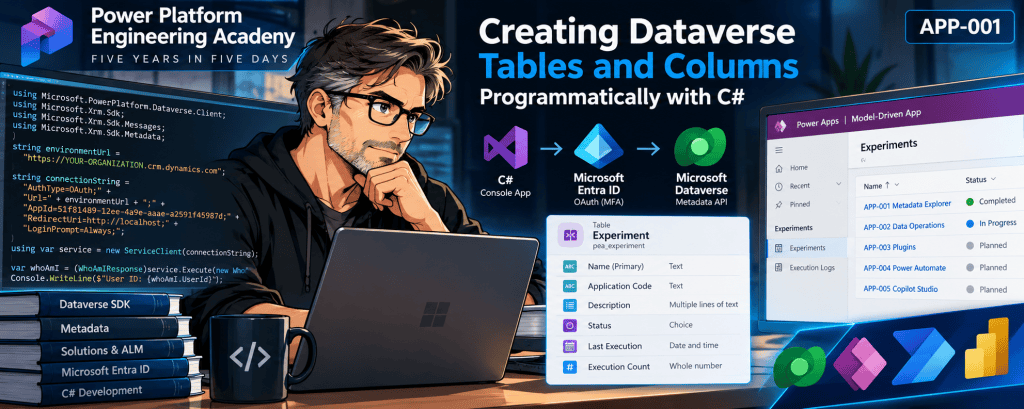
Power Platform Engineering Academy | APP-001 — Dataverse Metadata Explorer
Technical focus: C#, Dataverse SDK, metadata operations, Microsoft Entra ID authentication, solution-aware customization, and schema deployment.
1. Introduction
Microsoft Dataverse is more than a relational data store. It is a metadata-driven application platform where tables, columns, relationships, security definitions, and application components are described through platform metadata.
Although the Power Apps Maker Portal provides a graphical interface for creating these components, Dataverse also exposes programmatic metadata operations through its SDK and Web API.
This article explores how to create a custom Dataverse table and its columns using C#, with all implementation logic contained in a single Program.cs file.
The objective is to understand how Dataverse schema creation works internally, how metadata requests are executed, and how to make a basic provisioning program safe to rerun.
This experiment forms the foundation of APP-001, the Dataverse Metadata Explorer, in the Power Platform Engineering Academy.
2. Experiment objectives
Our C# program will:
- Authenticate to Dataverse using Microsoft Entra ID and interactive OAuth.
- Verify connectivity with
WhoAmIRequest. - Determine whether a custom table already exists.
- Create the table and its primary name column.
- Create five additional columns with different metadata types.
- Associate the customizations with an unmanaged Dataverse solution.
- Publish the customizations.
- Retrieve and inspect the resulting table metadata.
The program uses the Microsoft.PowerPlatform.Dataverse.Client NuGet package.
Development environment
| Component | Configuration |
|---|---|
| IDE | Visual Studio |
| Language | C# |
| Project type | Console App |
| Framework | .NET 10 |
| NuGet package | Microsoft.PowerPlatform.Dataverse.Client |
| Authentication | Microsoft Entra ID / OAuth |
| Dataverse solution | PEADataverse |
| Publisher prefix | pea |
| Table logical name | pea_experiment |
The environment URL is anonymized throughout this article.
3. Understanding Dataverse metadata
A Dataverse table is described by an EntityMetadata object.
Despite the platform’s modern terminology of tables and columns, many SDK types still use the historical terms Entity and Attribute.
For example:
| Modern terminology | SDK terminology |
|---|---|
| Table | Entity |
| Column | Attribute |
| Table definition | EntityMetadata |
| Column definition | AttributeMetadata |
| Create table | CreateEntityRequest |
| Create column | CreateAttributeRequest |
This distinction is important when reading Microsoft documentation, examining SDK classes, or debugging Dataverse customization operations.
A metadata operation modifies the structure of Dataverse. It is different from creating or updating business records using service.Create() or service.Update().
4. Connecting to Dataverse
We begin by importing the required namespaces:
using Microsoft.PowerPlatform.Dataverse.Client;using Microsoft.Xrm.Sdk;using Microsoft.Xrm.Sdk.Messages;using Microsoft.Xrm.Sdk.Metadata;using Microsoft.Crm.Sdk.Messages;
The ServiceClient class provides an authenticated client for interacting with Dataverse.
Our local learning experiment uses an OAuth connection string:
string environmentUrl = "https://YOUR-ORGANIZATION.crm.dynamics.com";string connectionString = $"AuthType=OAuth;" + $"Url={environmentUrl};" + "AppId=51f81489-12ee-4a9e-aaae-a2591f45987d;" + "RedirectUri=http://localhost;" + "LoginPrompt=Always;";
The application ID shown here is a Microsoft-documented development sample. Enterprise applications should use an appropriately configured Microsoft Entra application registration.
We deliberately avoid embedding usernames, passwords, tokens, or client secrets in the source code.
The connection is established as follows:
using var service = new ServiceClient(connectionString);if (!service.IsReady){ throw new InvalidOperationException( service.LastError ?? "Dataverse connection failed.");}
Next, we execute a simple organization request:
var whoAmI = (WhoAmIResponse)service.Execute(new WhoAmIRequest());Console.WriteLine($"User ID: {whoAmI.UserId}");
WhoAmIRequest returns information about the identity under which Dataverse is executing the request.
A successful response demonstrates that the application can authenticate and communicate with Dataverse.
It does not establish that the user has privileges to customize the environment. Metadata creation requires additional authorization.
Experiment evidence: The SDK installation and WhoAmIRequest authentication test were successfully executed during APP-001 development.
5. Creating a Dataverse table
The principal SDK operation is CreateEntityRequest.
This request accepts two important metadata objects:
EntityMetadata, which describes the table.StringAttributeMetadata, which describes its primary name column.
Our implementation is:
var createTable = new CreateEntityRequest{ SolutionUniqueName = "PEADataverse", Entity = new EntityMetadata { SchemaName = "pea_Experiment", DisplayName = new Label("Experiment", 1033), DisplayCollectionName = new Label("Experiments", 1033), OwnershipType = OwnershipTypes.UserOwned, IsActivity = false }, PrimaryAttribute = new StringAttributeMetadata { SchemaName = "pea_Name", DisplayName = new Label("Name", 1033), MaxLength = 200, FormatName = StringFormatName.Text }};service.Execute(createTable);
Understanding the properties
SchemaName
The schema name identifies the component in Dataverse metadata. It incorporates the publisher’s customization prefix.
For example:
pea_Experiment
DisplayName
The human-readable name presented in the application interface.
DisplayCollectionName
The plural display name used when representing collections of records.
OwnershipType
Determines the ownership model for the table.
In this experiment, OwnershipTypes.UserOwned enables user/team ownership, which is relevant to Dataverse record-level security.
PrimaryAttribute
Defines the primary name column.
The primary name column is created as part of the table-creation request, rather than through a separate CreateAttributeRequest.
Why solution association matters
The SolutionUniqueName property instructs Dataverse to associate the newly created customization with a specified unmanaged solution.
This matters for application lifecycle management because customizations must be packaged and transported consistently between environments.
However, solution membership alone does not constitute a complete ALM strategy. Dependencies, deployment order, environment configuration, versioning, and validation must also be addressed.
6. Creating columns using metadata classes
Dataverse exposes specialized metadata classes for different column types.
Our Experiment table uses five additional columns.
| Column | Metadata class |
|---|---|
| Application Code | StringAttributeMetadata |
| Description | MemoAttributeMetadata |
| Status | PicklistAttributeMetadata |
| Last Execution | DateTimeAttributeMetadata |
| Execution Count | IntegerAttributeMetadata |
Example: Text column
var applicationCode = new StringAttributeMetadata{ SchemaName = "pea_ApplicationCode", DisplayName = new Label("Application Code", 1033), MaxLength = 30};
The metadata definition is submitted through CreateAttributeRequest:
service.Execute(new CreateAttributeRequest{ EntityName = "pea_experiment", Attribute = applicationCode, SolutionUniqueName = "PEADataverse"});
The same request pattern is reused for other supported attribute metadata types.
Example: Choice column
Choice columns require an OptionSetMetadata definition.
var status = new PicklistAttributeMetadata{ SchemaName = "pea_Status", DisplayName = new Label("Status", 1033), OptionSet = new OptionSetMetadata { IsGlobal = false, OptionSetType = OptionSetType.Picklist, Options = { new OptionMetadata( new Label("Planned", 1033), 100000000), new OptionMetadata( new Label("In Progress", 1033), 100000001), new OptionMetadata( new Label("Completed", 1033), 100000002), new OptionMetadata( new Label("Failed", 1033), 100000003) } }};
Here, IsGlobal = false indicates that the choice definition is local to the column.
The option values are explicitly assigned by the program rather than generated automatically.
This introduces an important architectural consideration: integer option values become part of the data contract and should be managed consistently across environments.
7. Making schema creation repeatable
A provisioning program should not blindly attempt to create components that already exist.
Our initial implementation uses RetrieveAllEntitiesRequest to retrieve table definitions:
var response = (RetrieveAllEntitiesResponse)service.Execute( new RetrieveAllEntitiesRequest { EntityFilters = EntityFilters.Entity, RetrieveAsIfPublished = true });
We then check for the table:
bool tableExists = response.EntityMetadata.Any( entity => entity.LogicalName == "pea_experiment");
If the table already exists, creation is skipped.
We apply a similar technique to columns, retrieving existing attribute metadata and comparing logical names before calling CreateAttributeRequest.
Idempotency and its limitations
This approach supports basic create-if-missing behavior.
However, it is not a complete declarative schema reconciliation engine.
For example, if pea_applicationcode already exists with a maximum length of 20 rather than 30, the program will skip it instead of modifying the definition.
A more mature provisioning tool should distinguish:
- Component missing: create it.
- Component exists with expected metadata: leave it unchanged.
- Component exists with compatible differences: evaluate an update.
- Component exists with incompatible differences: report a schema conflict.
Some metadata changes have restrictions and cannot be safely treated as ordinary updates.
Performance consideration
RetrieveAllEntitiesRequest can retrieve metadata for every table in the environment.
That is useful for demonstrating metadata discovery, but it can be unnecessarily expensive when the application only needs to inspect one known table.
For targeted operations, RetrieveEntityRequest is generally a more appropriate choice.
This gives us a valuable follow-up experiment: compare metadata retrieval scope, response sizes, and execution times.
8. Publishing customizations
Creating metadata and publishing customizations are distinct operations.
Our implementation publishes the Experiment table through PublishXmlRequest:
service.Execute(new PublishXmlRequest{ ParameterXml = "<importexportxml><entities>" + "<entity>pea_experiment</entity>" + "</entities></importexportxml>"});
This requests publication of the specified table’s customizations.
Targeted publishing is preferable to indiscriminately publishing every unpublished customization when working in shared development environments.
Publishing does not replace functional validation. The resulting table, columns, permissions, and application behavior must still be inspected.
9. Retrieving the final metadata
After publishing, we retrieve the table definition:
var verified = (RetrieveEntityResponse)service.Execute( new RetrieveEntityRequest { LogicalName = "pea_experiment", EntityFilters = EntityFilters.Entity | EntityFilters.Attributes, RetrieveAsIfPublished = false });
We can now inspect important metadata properties:
var entity = verified.EntityMetadata;Console.WriteLine(entity.SchemaName);Console.WriteLine(entity.LogicalName);Console.WriteLine(entity.EntitySetName);Console.WriteLine(entity.PrimaryNameAttribute);
These properties expose different aspects of the table’s identity.
| Property | Purpose |
|---|---|
SchemaName | Schema identifier |
LogicalName | Logical identifier used in SDK operations |
EntitySetName | Collection name used by the Dataverse Web API |
PrimaryNameAttribute | Logical name of the primary name column |
Developers should retrieve the actual EntitySetName rather than assume that it can always be constructed by adding an s to the logical name.
This is especially relevant when building REST integrations.
10. Error handling and failure scenarios
Metadata operations can fail for several reasons.
| Failure scenario | Engineering consideration |
|---|---|
| Authentication rejected | Entra ID configuration, Conditional Access, application registration |
| Missing customization privileges | Dataverse security roles and permissions |
| Incorrect solution name | SolutionUniqueName must match the existing solution |
| Invalid schema name | Publisher prefix and metadata naming rules |
| Existing incompatible column | Schema conflict requires explicit handling |
| Publishing failure | Inspect the organization service fault |
| Network interruption | Determine which operations completed before retrying |
Our initial program uses a top-level exception handler:
catch (Exception ex){ Console.Error.WriteLine(ex); Environment.ExitCode = 1;}
This is useful during development because it preserves the exception details.
For production tooling, structured diagnostics, correlation identifiers, fault-code inspection, and explicit retry policies deserve further consideration.
Importantly, multiple metadata requests do not automatically form one atomic transaction. If a later operation fails, earlier successful schema changes may remain.
This is why existence checks, inspection, and safe reruns are essential.
11. Engineering conclusions
This experiment demonstrates several fundamental principles of Dataverse development.
First, Dataverse schema definitions are accessible through APIs. Tables and columns can be created and inspected programmatically rather than exclusively through the Maker Portal.
Second, metadata is a first-class architectural concern. Understanding metadata classes, naming conventions, ownership, and solution membership is essential for reliable Dataverse engineering.
Third, repeatability requires deliberate design. A script that succeeds once is not necessarily a safe deployment tool. Existing components, partial failures, schema conflicts, and publishing behavior must be considered.
Fourth, authentication and authorization are different. A successful WhoAmIRequest confirms authenticated SDK access, not unrestricted customization privileges.
Finally, SDK-based schema creation provides an excellent foundation for exploring ALM, metadata discovery, and automated Dataverse provisioning.
Experiment status
The following evidence is currently available:
| Verification | Status |
|---|---|
| Console App compilation | Verified |
| Dataverse SDK installation | Verified |
| Interactive OAuth authentication | Verified |
WhoAmIRequest execution | Verified |
| Table and column creation | Awaiting execution evidence |
| Metadata retrieval after creation | Awaiting execution evidence |
| Model-Driven App and dashboard | Not yet implemented |
The implementation is therefore a reproducible engineering experiment, not yet a fully validated deployment.
12. Next engineering milestone
The next milestone is to execute the complete Program.cs, inspect the generated metadata in Dataverse, and confirm that the table and columns belong to the intended solution.
Once validated, APP-001 will continue with its Execution Log table, Model-Driven App, entry dashboard, and end-to-end testing.
That work will support a second article focused on the complete Dataverse Metadata Explorer application.
References
- Microsoft Learn — Create tables using code
- Microsoft Learn — Query table definitions
- Microsoft Learn — CreateEntityRequest
- Microsoft Learn — CreateAttributeRequest
- Microsoft Learn — Authenticate with OAuth
- Microsoft Learn — Work with solutions using APIs
Power Platform Engineering Academy — APP-001 | C# Technical Article 001
Engineering mastery through reproducible experiments.


