Edvaldo Guimrães Filho
-
Artificial Intelligence Is Not Capital Expenditure
This article argues that modern AI systems behave not as amortizable capital assets but as perpetual operating cost systems, where capital investment does not converge toward payoff but instead enforces continuous reinvestment. The misclassification of AI economics is the primary… Continue reading

-
Sorting an Array Variable by a Date Field in Power Automate (Step-by-step)
Sorting an Array Variable by a Date Field in Power Automate (Step-by-step) In Power Automate, an array variable doesn’t have a native “Sort” action. The standard pattern is: Below are the most reliable approaches (with copy/paste expressions). Approach A (Best):… Continue reading

-
Power Automate → “Pretty” HTML Email Table (Header Row + Grid) for Daily SharePoint Comment Capture
Power Automate → “Pretty” HTML Email Table (Header Row + Grid) for Daily SharePoint Comment Capture Right now your flow is producing valid HTML, but it’s unstyled, so Outlook renders it as plain text-like lines with minimal spacing. The fix… Continue reading
-
Build a Generic Copilot Prompt Hub SPFx Web Part for SharePoint
Interaction 1 (Baseline v1.0.0): Build a Generic Copilot Prompt Hub SPFx Web Part for SharePoint Why this exists Most organizations try Copilot in SharePoint and quickly hit the same issue: Before you build agents, connect to business lists, or automate… Continue reading

-
Webhooks, End-to-End
Webhooks, End-to-End: Power Automate, Power Apps, Power BI, Azure Functions, and SharePoint (Microsoft 365) A webhook is a lightweight, event-driven integration pattern where System A notifies System B by sending an HTTP request (usually POST) to a pre-registered URL whenever… Continue reading
-
Counting Document Library Items in Power Automate
Counting Document Library Items in Power Automate (and fixing “Folder Not Found” 404) — the right way When you need to compare the number of items in a document library across two SharePoint sites, you have two common options: In… Continue reading

-
Using a SharePoint Choice Column as the “Workflow Engine” for a Modern List (SharePoint Online + Power Automate + Power Apps + Azure DevOps)
Using a SharePoint Choice Column as the “Workflow Engine” for a Modern List (SharePoint Online + Power Automate + Power Apps + Azure DevOps) In SharePoint Online (Microsoft Lists), a Choice column is one of the simplest—and most powerful—ways to… Continue reading
-
SharePoint + Power Automate + Power BI + Power Apps
SharePoint + Power Automate + Power BI + Power Apps The corporate integration suite for transactional and non-transactional systems Modern organizations don’t win just by running “systems of record” (ERP/CRM/HRIS). They win by connecting them to the day-to-day reality of… Continue reading

-
“Sync Site Pages” (Copy pages from Source site to Target site) — list-driven with Power Automate
Flow Blueprint: “Sync Site Pages” (Copy pages from Source site to Target site) — list-driven with Power Automate Below is a ready-to-build blueprint you can reproduce in Power Automate. The flow is triggered by one specific SharePoint list item (a… Continue reading

-
Copying SharePoint Online Pages Between Sites with Power Automate
Copying SharePoint Online Pages Between Sites with Power Automate (List-Driven “Sync Pages” Pattern) This article shows a repeatable, list-driven way to copy pages from one SharePoint Online site to another using Power Automate. The key idea is simple: To cover… Continue reading

-
Building a “Comments Created Today” Digest for SharePoint Online with Power Automate (REST) — Including Clickable Item Links
Building a “Comments Created Today” Digest for SharePoint Online with Power Automate (REST) — Including Clickable Item Links This article documents a mature, production-ready pattern to collect SharePoint item comments created today, format them into a clean HTML email, and… Continue reading
-
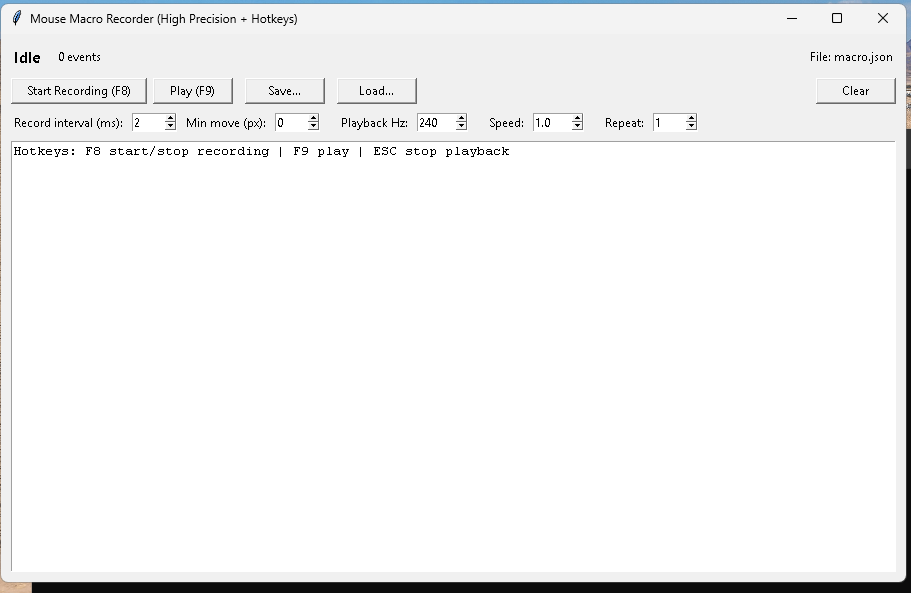
Building a High-Precision Mouse Macro Recorder in Python (GUI + Hotkeys + Repeat + Speed)
Building a High-Precision Mouse Macro Recorder in Python (GUI + Hotkeys + Repeat + Speed) This post documents a practical “desktop macro” tool in Python that can: This is a lab-style implementation intended for personal automation where you have permission… Continue reading
-
Azure DevOps: “I can’t paste my PAT in the command line” — and what to do when PAT creation is restricted
Azure DevOps: “I can’t paste my PAT in the command line” — and what to do when PAT creation is restricted If you’re trying to automate Azure DevOps tasks (like creating a Git repository) via command line, you’ll often end… Continue reading

-
Azure DevOps PATs Restricted by Organization: What It Means, Why It Happens, and How to Fix It (Safely)
Azure DevOps PATs Restricted by Organization: What It Means, Why It Happens, and How to Fix It (Safely) If you’ve tried to create a Personal Access Token (PAT) in Azure DevOps and hit this message: “Your ability to create and… Continue reading

-
Scheduled polling + REST /comments + state list
Below is a copy/paste, click-by-click build recipe for a Power Automate flow that detects new modern SharePoint list item comments and sends notifications without duplicates. This design is based on the fact that modern Comments are not a normal column… Continue reading

-
Scheduled flow that detects new comments and sends notifications
There is no first-class SharePoint connector trigger that reliably fires “when a comment is added” for modern list item comments, so the stable pattern is: run on a schedule, query comments via REST, compare state, notify only for new ones.… Continue reading

-
SharePoint Online (Modern) List Item Comments: How They Work, How They’re Stored, and How to Automate Notifications
Modern SharePoint Online and Microsoft Lists introduced an experience where list items behave more like “collaboration objects” than just rows in a table. One of the clearest examples is Comments in modern list item forms. SharePoint Online (Modern) List Item… Continue reading

-
SharePoint Online Modern List Item Comments: How They Work (and Why They’re Not “Just a Column”)
SharePoint Online Modern List Item Comments: How They Work (and Why They’re Not “Just a Column”) This article explains how Comments behave in SharePoint Online / Microsoft Lists modern forms, how they differ from normal list columns, and what this… Continue reading

-
Embedding a Microsoft Copilot Studio Agent in SharePoint as a Web Part (SPFx)
Modern SharePoint pages are often the “front door” for users who need quick answers, guided navigation, and structured actions (create/update list items, open documents, etc.). Microsoft Copilot Studio lets you build an agent that can be published to the web… Continue reading
-
Embedding a Copilot Studio Agent in SharePoint as a Web Part (SPFx) — Two Production Patterns
Embedding a Copilot Studio Agent in SharePoint as a Web Part (SPFx) — Two Production Patterns This article shows two reliable ways to bring a Microsoft Copilot Studio agent into a SharePoint Online modern page as a “web part experience”:… Continue reading
-
Build a Flow: SharePoint List Item → Azure DevOps User Story + Child Tasks (Power Automate)
.Create a User Story (or Product Backlog Item) in Azure DevOps Create a set of Tasks under that parent item Link each Task to the parent using Hierarchy-Reverse Update the SharePoint list item with the created Azure DevOps ID/URL (optional… Continue reading
-
From SharePoint List Item to Azure DevOps Tasks
From SharePoint List Item to Azure DevOps Tasks Automating backlog creation with Power Automate (Microsoft Learn–aligned, client-neutral) Organizations that use SharePoint as an intake or request system (ideas, demands, PMO requests, incident triage, migration requests, etc.) often want the same… Continue reading
-
Epics, Features, and User Stories in Azure DevOps
Understanding Epics, Features, and User Stories in Azure DevOps (A Practical Blog Article) In Azure DevOps Boards, work items like Epic, Feature, and User Story (or Product Backlog Item / PBI, depending on your process template) are not “random labels.”… Continue reading
-
Scrum vs Kanban vs Mixed in Azure DevOps Boards
Scrum vs Kanban vs Mixed in Azure DevOps Boards (A Deep, Practical Guide) Most teams don’t fit perfectly into only Scrum or only Kanban. Azure DevOps recognizes that reality: it gives you tools that support time-boxed planning (Scrum) and flow-based… Continue reading
-
Azure DevOps Boards
Azure DevOps Boards Menu — What Each Item Means (Blog Article) Azure DevOps “Boards” is the part of the platform where teams plan work, track progress, and measure delivery. Depending on your organization, you’ll see a mix of built-in features… Continue reading
-
SharePoint Engineering in Microsoft 365: SPFx + Azure Functions + PnP + DevOps + AI
Modern SharePoint Engineering in Microsoft 365: SPFx + Azure Functions + PnP + DevOps + AI (Reference Architecture) SharePoint on-premises customization was historically “platform-internal”: farm solutions, timer jobs, event receivers, and deep page/DOM customization. In SharePoint Online inside Microsoft 365,… Continue reading
-
Replacing SharePoint On-Prem Timer Jobs with Azure Functions
In SharePoint Online (Microsoft 365), that execution model is not available. Microsoft explicitly documents alternative patterns: Azure WebJobs / scheduled jobs, and in modern cloud practice the default evolution is Azure Functions (serverless compute) triggered on schedules. (Microsoft Learn) Replacing… Continue reading

-
Replacing SharePoint On-Prem Event Receivers with SharePoint Webhooks + Azure Functions (Enterprise Blueprint)
In SharePoint on-premises, event receivers (and later Remote Event Receivers in the Add-in model) were the default way to react to list and library changes: item added, item updated, item deleted, and so on. That model gave you server-side execution… Continue reading

-
Why Microsoft 365 Is the “New SharePoint”: Replacing On-Prem Customizations with Azure Functions, PnP, DevOps, and AI
Why Microsoft 365 Is the “New SharePoint”: Replacing On-Prem Customizations with Azure Functions, PnP, DevOps, and AI For years, SharePoint on-premises customization was synonymous with full-trust code: farm solutions (WSP), server-side web parts, timer jobs, event receivers running in the… Continue reading
-
Azure DevOps: Why You Can’t Create a Repository Even as Project Admin (Stakeholder vs Basic Explained)
A practical deep-dive into Azure DevOps permission layers: Project Admin vs Organization Access Level, and how ‘Stakeholder’ can block repo creation. tags: [“Azure DevOps”, “Git”, “Permissions”, “Security”, “Repos”, “Troubleshooting”] The Problem You open Azure DevOps, you are listed as a… Continue reading

-
Article 4 — Implementing SharePoint “Upsert” with PnP/CSOM (.NET) (WPF Study & Rating App)
Article 4 — Implementing SharePoint “Upsert” with PnP/CSOM (.NET) (WPF Study & Rating App) This final article in the series shows how to implement the same Upsert behavior (create/update an item by VideoId) using PnP/CSOM in .NET—an approach widely used… Continue reading

-
Article 3 — Implementing SharePoint “Upsert” with SharePoint REST API (WPF Study & Rating App)
Article 3 — Implementing SharePoint “Upsert” with SharePoint REST API (WPF Study & Rating App) This article shows how to implement the same Upsert behavior (create/update by VideoId) using SharePoint’s native REST API (_api/…) instead of Microsoft Graph. This is… Continue reading
-
Article 2 — Implementing SharePoint “Upsert” with Microsoft Graph (WPF Study & Rating App)
Article 2 — Implementing SharePoint “Upsert” with Microsoft Graph (WPF Study & Rating App) This article continues the series by showing a practical, code-forward implementation of saving your YouTube study cards (rating/status/notes) into a SharePoint Online list using Microsoft Graph.… Continue reading
-
Adding Ratings and Saving YouTube Study Cards to SharePoint Online
Adding Ratings and Saving YouTube Study Cards to SharePoint Online Part 2 — Adding Ratings and Saving YouTube Study Cards to SharePoint Online (WPF + MVVM + Microsoft Graph) Goal Extend the WPF YouTube Cards app so you can: This… Continue reading

-
Building a YouTube “Study & Rating” Desktop App in C# (WPF) — From Search Cards to SharePoint Online Notes
Building a YouTube “Study & Rating” Desktop App in C# (WPF) — From Search Cards to SharePoint Online Notes Below is a public, end-to-end technical article describing the WPF app you built: a YouTube search experience that renders results as… Continue reading
-
YouTube remains remarkably relevant besides Large Language Models (LLMs) have reshaped technical learning
YouTube’s Enduring Relevance for Technical Learning in the Age of AI and LLMs Abstract Large Language Models (LLMs) have reshaped technical learning by enabling rapid explanations, code scaffolding, and iterative problem solving. Yet YouTube remains remarkably relevant because it excels… Continue reading

-
YouTube remains essential for technical learning even in the age of AI and LLMs
YouTube remains essential for technical learning even in the age of AI and LLMs because it transfers what text rarely captures: real demonstration under real constraints. LLMs accelerate understanding, summarization, and code iteration, but YouTube shows workflows, sequencing, verification checkpoints,… Continue reading
-
YouTube’s Enduring Relevance for Technical Learning in the Age of AI and LLMs
Large Language Models (LLMs) have transformed technical learning by enabling fast explanations, code scaffolding, and iterative problem solving. However, YouTube remains highly relevant because it excels at transmitting tacit and procedural knowledge—the “how it looks when done” layer of technical… Continue reading
-
Technical Learning in the Age of AI and LLMs
Why YouTube Still Matters for Technical Learning in the Age of AI and LLMs Executive summary Large Language Models (LLMs) changed how developers search, summarize, and prototype. You can ask for explanations, get code scaffolds, and iterate quickly. Yet, YouTube… Continue reading
-
YouTube API
YouTube API (YouTube Data API v3) — An Exhaustive Technical Guide (Endpoints, Search, Authentication) YouTube exposes multiple developer APIs, but when people say “YouTube API” they usually mean YouTube Data API v3: the REST API used to search YouTube, read… Continue reading
 edvaldo b. guimarães filho