Edvaldo Guimrães Filho
-
Using an Inactivity Trigger in Microsoft Copilot Studio to Re-Engage the User
Using an Inactivity Trigger in Microsoft Copilot Studio to Re-Engage the User Introduction Not every useful conversational behavior in Microsoft Copilot Studio needs to involve Knowledge, Retrieval, Grounding, or an external Tool. Sometimes the objective is purely conversational. A good… Continue reading

-
Designing a Microsoft Copilot Studio Agent from a Natural-Language Specification
Designing a Microsoft Copilot Studio Agent from a Natural-Language Specification Introduction One of the most interesting ways to start building an Agent in Microsoft Copilot Studio is to avoid configuring every component manually from the beginning. Instead of immediately editing… Continue reading

-
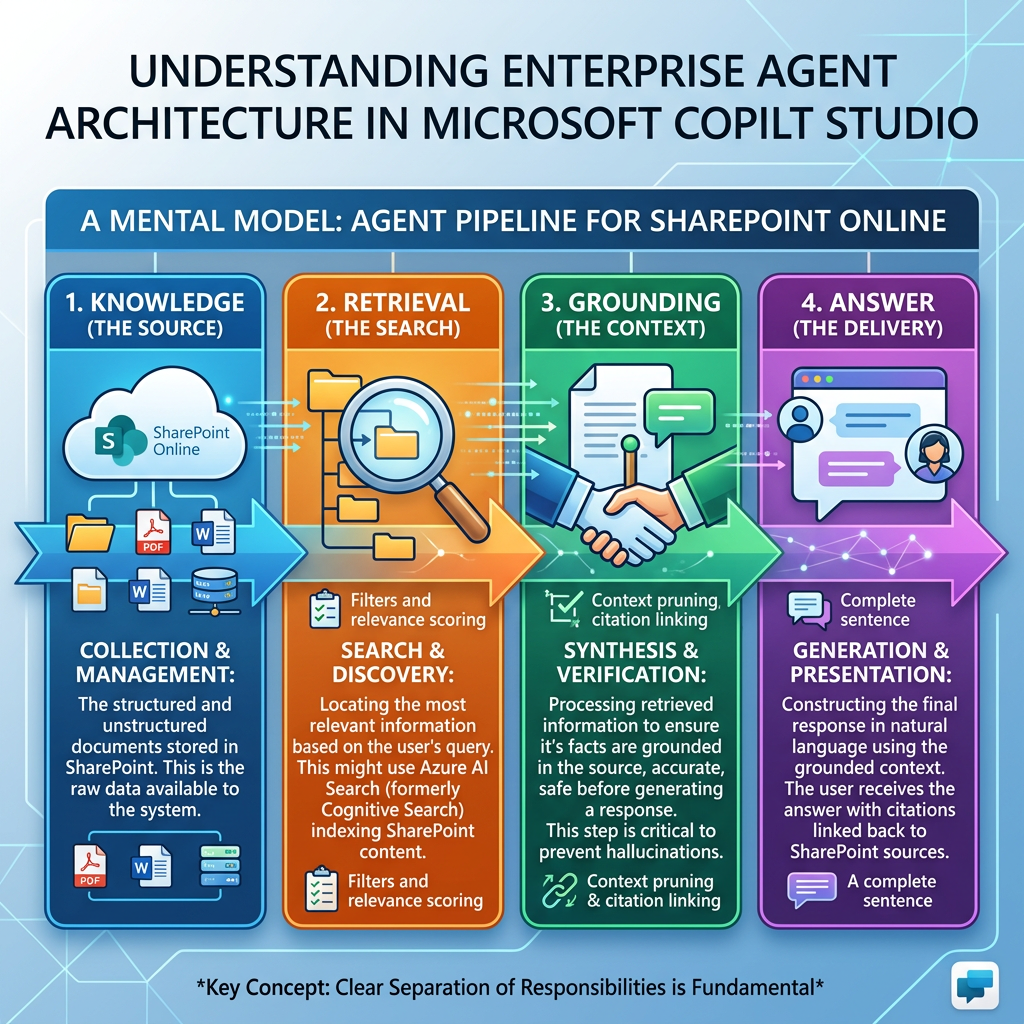
Knowledge → Retrieval → Grounding → Answer
Knowledge → Retrieval → Grounding → Answer A Technical Deep Dive into How Enterprise Agents Turn Corporate Content into Generative Responses 1. Introduction One of the most important concepts to understand when designing enterprise agents is the pipeline: Knowledge →… Continue reading
-
Building Rich Agent Experiences with Adaptive Cards in Microsoft Copilot Studio
Building Rich Agent Experiences with Adaptive Cards in Microsoft Copilot Studio Introduction Microsoft Copilot Studio agents are conversational applications, but conversation does not need to be limited to plain text. An agent can answer a question with a sentence such… Continue reading

-
Understanding Agents in Microsoft Copilot Studio
Understanding Agents in Microsoft Copilot Studio Introduction Agents are one of the fundamental building blocks of Microsoft Copilot Studio. An Agent is more than a traditional chatbot. It can receive a user request, interpret context, follow instructions, use organizational knowledge,… Continue reading

-
Understanding Microsoft Copilot Studio: Agents, Workflows, and Harnesses
Understanding Microsoft Copilot Studio: Agents, Workflows, and Harnesses Introduction Microsoft Copilot Studio is a graphical, low-code platform for building and managing AI-powered agents and workflows. It provides a unified environment where organizations can create agents, automate business processes, connect organizational… Continue reading

-
Microsoft Copilot Studio — Essential Microsoft Learn Resources
Microsoft Copilot Studio — Essential Microsoft Learn Resources Introduction Microsoft Copilot Studio is Microsoft’s platform for creating and managing AI-powered agents that can answer questions, use organizational knowledge, interact with enterprise systems, and perform actions. For developers and solution architects… Continue reading

-
Synchronizing SharePoint Online Site Users with a SharePoint List Using PnP PowerShel
Synchronizing SharePoint Online Site Users with a SharePoint List Using PnP PowerShell Introduction Understanding who has access to a SharePoint Online site is fundamental for governance, auditing, migration planning, security reviews, and workflow automation. While exporting users to a CSV… Continue reading
-
Exporting SharePoint Online Site Users to CSV with PnP PowerShell
Exporting SharePoint Online Site Users to CSV with PnP PowerShell Introduction Understanding who has access to a SharePoint Online site is one of the first steps in any governance, migration, auditing, or reporting project. Whether you are validating permissions before… Continue reading
-
Connecting to SharePoint Online with PnP PowerShell Using Interactive Authentication
Connecting to SharePoint Online with PnP PowerShell Using Interactive Authentication Introduction Before any SharePoint Online administration or automation task can be executed, the first and most important step is establishing a secure connection to the target site. Whether the goal… Continue reading
-
How to Export SharePoint Group Members to CSV Using PnP PowerShell
How to Export SharePoint Group Members to CSV Using PnP PowerShell SharePoint groups are commonly used to manage access to sites, lists, libraries, folders, and documents. During migrations, permission reviews, security audits, or general administration, you may need to generate… Continue reading
-
Using the PnP PropertyFieldPeoplePicker Control in an SPFx Web Part
Using the PnP PropertyFieldPeoplePicker Control in an SPFx Web Part The PropertyFieldPeoplePicker control from the PnP SPFx Property Controls library adds a SharePoint-aware people and group picker to the property pane of a SharePoint Framework web part. It can search… Continue reading

-
How to Use PropertyFieldOrder in an SPFx Web Part and Fix Missing Icons
How to Use PropertyFieldOrder in an SPFx Web Part and Fix Missing Icons The PropertyFieldOrder control is part of the PnP SPFx Property Controls library. It allows users to reorder a collection of items directly from the Web Part Property… Continue reading

-
PropertyFieldMultiSelect – Allow Multiple Selections in the SPFx Property Pane
PropertyFieldMultiSelect – Allow Multiple Selections in the SPFx Property Pane One of the most useful controls available in the PnP SPFx Property Controls library is PropertyFieldMultiSelect. It allows users to select multiple values from a predefined list directly in the… Continue reading
-
PropertyFieldMonacoEditor – Adding a Monaco Code Editor to the SPFx Property Pane
PropertyFieldMonacoEditor – Adding a Monaco Code Editor to the SPFx Property Pane The PropertyFieldMonacoEditor is one of the most powerful controls available in the PnP SPFx Property Controls library. It embeds the Monaco Editor (the same editor used by Visual… Continue reading
-
PropertyFieldMessage – Display Informational Messages in the SPFx Property Pane
PropertyFieldMessage – Display Informational Messages in the SPFx Property Pane The PropertyFieldMessage control from PnP SPFx Property Controls allows you to display informational messages directly inside the Property Pane of a SharePoint Framework (SPFx) Web Part. Unlike most Property Controls,… Continue reading

-
Using PropertyFieldListPicker in an SPFx Web Part
Using PropertyFieldListPicker in an SPFx Web Part The PropertyFieldListPicker control from the PnP SPFx Property Controls library adds a SharePoint list and document library selector to the Web Part Property Pane. Instead of manually entering a list title or GUID,… Continue reading
-
PropertyFieldIconPicker – Let Users Choose Fluent UI Icons in SPFx
PropertyFieldIconPicker – Let Users Choose Fluent UI Icons in SPFx The PropertyFieldIconPicker is one of the most useful controls available in the PnP SPFx Property Controls library. Instead of asking users to manually type the name of a Fluent UI… Continue reading
-
Using the PnP PropertyFieldGrid Control in an SPFx Web Part
Using the PnP PropertyFieldGrid Control in an SPFx Web Part The PropertyFieldGrid control adds a selectable grid to the SPFx Property Pane. Each row can display an icon, title, and description, while supporting single or multiple selection. In this example,… Continue reading

-
Getting Started with PropertyFieldFolderPicker in SPFx
Getting Started with PropertyFieldFolderPicker in SPFx One of the most common requirements when building SharePoint Framework solutions is allowing users to select a document library folder directly from the Property Pane. Instead of asking users to manually type a URL,… Continue reading
-
Using the PnP PropertyFieldFilePicker Control in an SPFx Web Part
Using the PnP PropertyFieldFilePicker Control in an SPFx Web Part The PropertyFieldFilePicker is a PnP SPFx property pane control that allows a Web Part author to browse and select a file directly from the Web Part property pane. The control… Continue reading
-
PropertyFieldEnterpriseTermPicker – Browsing the SharePoint Term Store from the Property Pane
PropertyFieldEnterpriseTermPicker – Browsing the SharePoint Term Store from the Property Pane The PropertyFieldEnterpriseTermPicker is one of the most powerful controls available in the PnP SPFx Property Controls library. Unlike the standard PropertyFieldTermPicker, this control is designed to browse the Enterprise… Continue reading

-
Using PropertyFieldDateTimePicker in an SPFx Web Part
Unlike the native PropertyPaneTextField, this control returns a structured date value instead of a plain string. It can be configured to display only a date or both a date and a time. In this example, we will create a Property… Continue reading
-
Using the PnP PropertyFieldColumnPicker Control in an SPFx Web Part
The PropertyFieldColumnPicker control allows users to select one or more columns from a SharePoint list or document library directly from the Web Part Property Pane. Instead of requiring users to manually enter a SharePoint column name, the control retrieves the… Continue reading
-
Using PropertyFieldColorPicker in an SPFx Web Part
Using PropertyFieldColorPicker in an SPFx Web Part The PropertyFieldColorPicker control from the PnP SPFx Property Controls library adds a visual color selector to the SharePoint Framework property pane. Instead of requiring users to manually enter hexadecimal or RGB color values,… Continue reading
-
Using the PnP PropertyFieldCollectionData Control in an SPFx Web Part
Using the PnP PropertyFieldCollectionData Control in an SPFx Web Part The PropertyFieldCollectionData control allows users to create and manage a collection of structured records directly from the SharePoint Framework property pane. Instead of adding only one text field or one… Continue reading
-
Using the PnP PropertyFieldCodeEditor Control in an SPFx Web Part
Using the PnP PropertyFieldCodeEditor Control in an SPFx Web Part language: PropertyFieldCodeEditorLanguages.HTML, language: PropertyFieldCodeEditorLanguages.HTML, language: PropertyFieldCodeEditorLanguages.HTML, What We Will Build The Web Part will contain two configurable properties: description: a standard SPFx text field. htmlCode: an HTML source-code field using… Continue reading
-
Using the PnP PropertyFieldButton Control in an SPFx Web Part
Using the PnP PropertyFieldButton Control in an SPFx Web Part The PropertyFieldButton control adds an action button directly to the SharePoint Framework Property Pane. Unlike input controls such as text fields, dropdowns, or checkboxes, this control does not necessarily store… Continue reading
-
SPFx Property Controls: Getting Started with PropertyFieldBrandFontPicker
SPFx Property Controls: Getting Started with PropertyFieldBrandFontPicker The PropertyFieldBrandFontPicker control is one of the newest additions to the PnP SPFx Property Controls library. It provides a modern font picker that integrates directly into the SharePoint Framework Property Pane, allowing users… Continue reading

-
SPFx Property Controls: Working with PropertyFieldBrandFontPicker
SPFx Property Controls: Working with PropertyFieldBrandFontPicker One of the newest controls available in the PnP SPFx Property Controls library is PropertyFieldBrandFontPicker. It allows users to select fonts directly from the Property Pane, making it easy to create web parts that… Continue reading

-
Getting Started with PnP SPFx Property Controls
When developing SharePoint Framework (SPFx) solutions, the native Property Pane provides a solid set of controls for configuring Web Parts. Text fields, checkboxes, dropdowns, toggles, sliders, and other built-in controls are suitable for many scenarios. Getting Started with PnP SPFx… Continue reading

-
Building a Complete Native Property Pane Showcase in SharePoint Framework (SPFx)
Building a Complete Native Property Pane Showcase in SharePoint Framework (SPFx) Introduction Throughout this series, we explored the most important native Property Pane controls available in the SharePoint Framework (SPFx). Instead of learning each control in isolation forever, the next… Continue reading

-
SPFx PropertyPaneHorizontalRule: Organizing the Property Pane with Visual Separators
SPFx PropertyPaneHorizontalRule: Organizing the Property Pane with Visual Separators Introduction As Web Parts become more sophisticated, their Property Panes often contain many configuration options. Without proper organization, users can quickly become overwhelmed by long lists of settings. The SharePoint Framework… Continue reading
-
SPFx PropertyPaneLink: Adding Helpful Links to the Property Pane
SPFx PropertyPaneLink: Adding Helpful Links to the Property Pane Introduction As we continue exploring the native SharePoint Framework Property Pane controls, we now arrive at PropertyPaneLink. Unlike controls such as TextField, Dropdown, or Slider, this control does not collect information… Continue reading
-
SPFx PropertyPaneLabel: Displaying Informational Text in the Property Pane
SPFx PropertyPaneLabel: Displaying Informational Text in the Property Pane Introduction As we continue exploring the native SharePoint Framework Property Pane controls, we now arrive at one of the simplest controls available: PropertyPaneLabel. Unlike most controls we’ve studied so far, the… Continue reading
-
SPFx PropertyPaneButton: Executing Actions from the Property Pane
SPFx PropertyPaneButton: Executing Actions from the Property Pane Introduction Until now, every Property Pane control we have explored shared one common characteristic: they stored data inside the Web Part. Examples include: TextField → string Checkbox → boolean Toggle → boolean… Continue reading
-
SPFx PropertyPaneSlider: Working with Numeric Values in the Property Pane
SPFx PropertyPaneSlider: Working with Numeric Values in the Property Pane Introduction The SharePoint Framework provides several native controls for configuring Web Parts. One of the most useful when working with numeric values is the PropertyPaneSlider. protected onInit(): Promise<void> { this.properties.maxItems… Continue reading
-
SPFx PropertyPaneToggle: Enabling and Disabling Features with a Toggle Switch
SPFx PropertyPaneToggle: Enabling and Disabling Features with a Toggle Switch Introduction The SharePoint Framework provides several native controls for building intuitive Property Panes. One of the most common is the PropertyPaneToggle. Although it is similar to the PropertyPaneCheckbox, the Toggle… Continue reading

-
SPFx PropertyPaneChoiceGroup: Using Radio Buttons in the Property Pane
SPFx PropertyPaneChoiceGroup: Using Radio Buttons in the Property Pane Introduction this.properties.selectedTheme = “dark”; this.properties.selectedTheme = “dark”; this.properties.selectedTheme = “dark”; This makes it an excellent choice when the number of options is small. In this article, we’ll build a simple example… Continue reading

-
SPFx PropertyPaneDropdown: Creating Selection Lists in the Property Pane
SPFx PropertyPaneDropdown: Creating Selection Lists in the Property Pane Introduction One of the most frequently used controls in the SharePoint Framework Property Pane is the PropertyPaneDropdown. Unlike a text field, a dropdown allows users to select one option from a… Continue reading


